

WiFi Marketing: The Complete Guide
WiFi marketing transforms guest networks from a pure cost centre into a measurable revenue driver through structured data capture and campaign automation. This guide provides IT leaders and venue operators with the technical architecture and strategic framework needed to deploy secure, compliant, and highly profitable WiFi marketing solutions.
🎧 Listen to this Guide
View Transcript
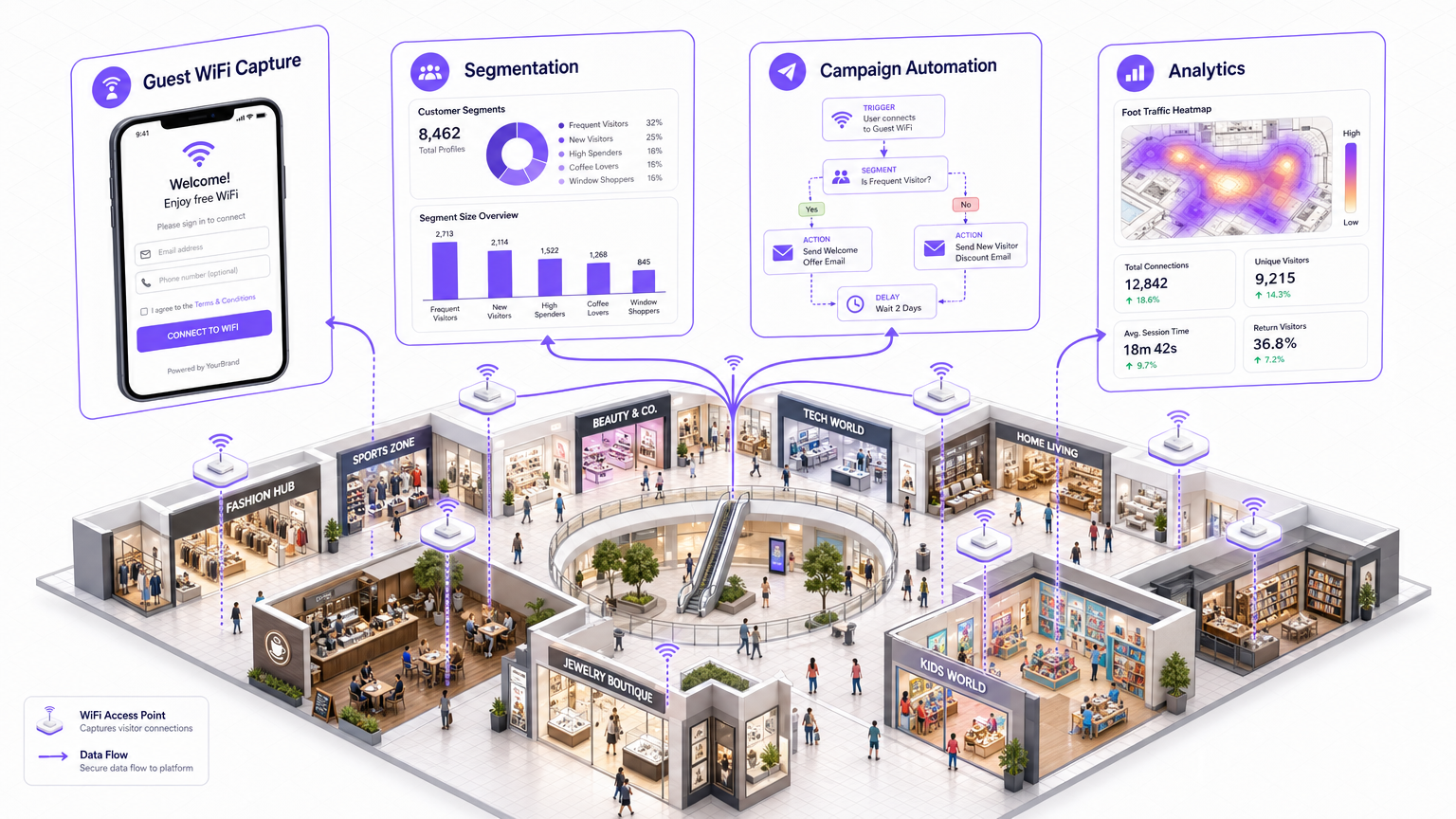
Executive Summary
For IT managers, network architects, and venue operations directors, the enterprise guest WiFi network represents a significant, yet often underutilised, strategic asset. Historically viewed as a mandatory operational expense—a basic amenity demanded by guests—modern WLAN infrastructure is now a critical engine for first-party data acquisition and automated marketing.
WiFi marketing bridges the gap between physical venue presence and digital customer engagement. By leveraging the captive portal as a secure identity capture layer, organisations can build rich, deterministic customer profiles. This guide outlines the technical architecture, deployment strategies, and ROI measurement frameworks required to implement a robust WiFi marketing solution. We will explore how to capture data compliantly (adhering to GDPR and PCI DSS), segment audiences using presence analytics, and trigger automated campaigns that drive measurable business impact. Whether deploying across a single stadium or a multi-site retail estate, the principles detailed here will enable IT to deliver a solution that directly impacts the bottom line.
Technical Deep-Dive: Architecture and Standards
At its core, WiFi marketing relies on intercepting the client association process and enforcing authentication before granting full network access. This is achieved through a combination of network hardware (Access Points and Controllers) and a cloud-based captive portal and analytics platform, such as Purple's Guest WiFi .
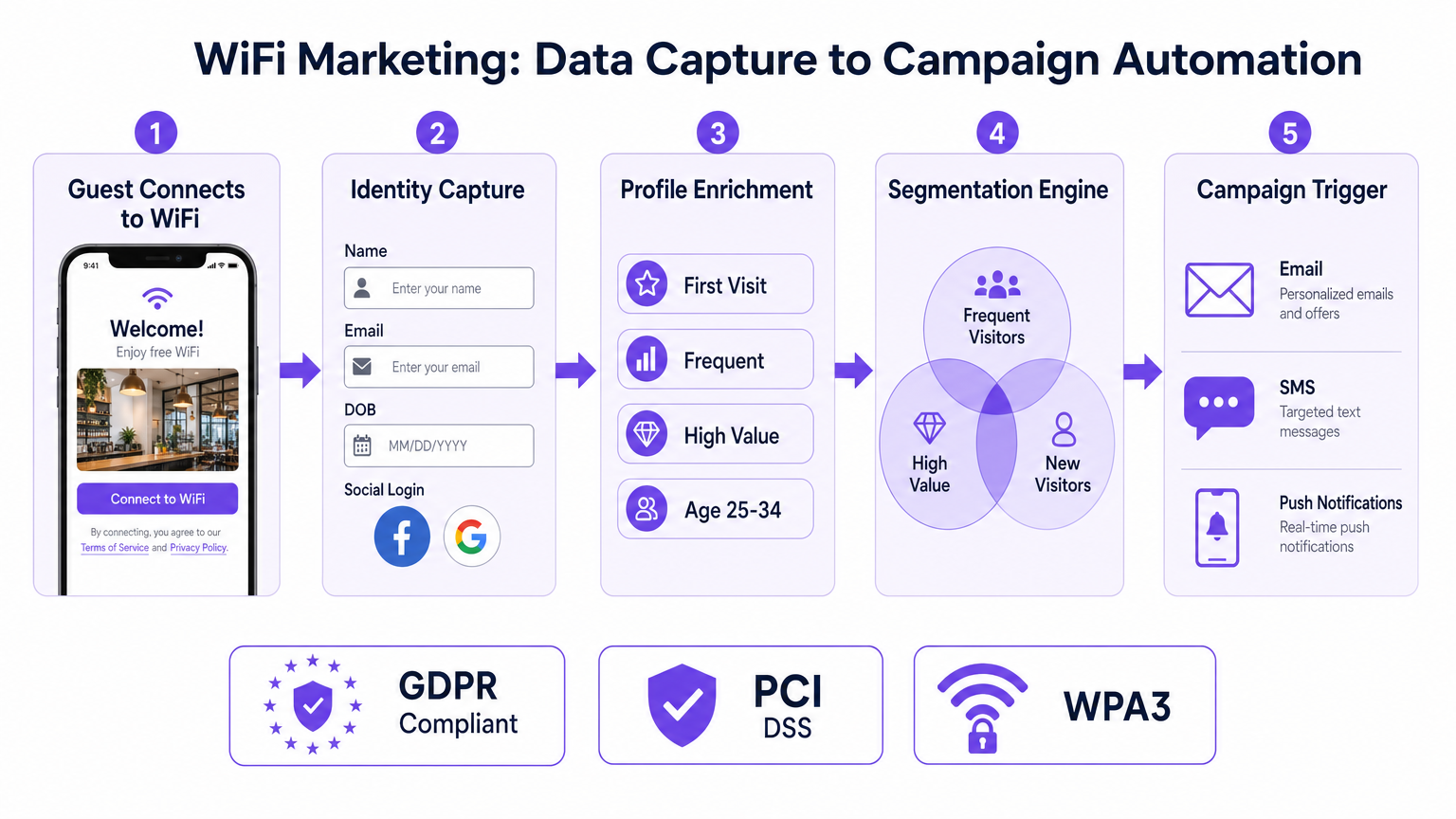
The Identity Capture Pipeline
- Client Association: A guest device (e.g., smartphone) associates with the open guest SSID.
- Traffic Interception: The network controller or AP intercepts the initial HTTP/HTTPS request (often using a walled garden configuration to allow access to specific authentication domains).
- Captive Portal Redirection: The client is redirected to a hosted captive portal splash page.
- Authentication & Data Capture: The user authenticates via form fill (Name, Email, DOB) or OAuth (Social Login). This step is critical for capturing verified first-party data.
- RADIUS Authorization: Upon successful authentication, the platform sends a RADIUS Access-Accept message to the controller, authorising the MAC address and applying appropriate bandwidth policies.
Advanced Authentication: OpenRoaming and Passpoint
While traditional captive portals are effective, the industry is moving towards seamless, secure authentication. Technologies like Passpoint (Hotspot 2.0) and OpenRoaming allow devices to automatically and securely connect to participating networks without manual intervention. Purple acts as a free identity provider for services like OpenRoaming under the Connect license, providing an encrypted, frictionless onboarding experience while still capturing essential presence data.
Data Privacy and Compliance
IT teams must ensure strict adherence to data protection regulations. A compliant WiFi marketing platform will:
- Ensure GDPR/CCPA Compliance: Implement explicit opt-in mechanisms and transparent terms of service on the splash page.
- Avoid Local PII Storage: Never store Personally Identifiable Information (PII) on local access points. Data must be encrypted in transit (TLS 1.2+) and at rest within a secure cloud database.
- Maintain PCI DSS: Segment the guest network (via VLANs) entirely from the corporate and Point-of-Sale (POS) networks.
Implementation Guide: From Deployment to Automation
Deploying a WiFi marketing solution requires careful planning to ensure seamless user experience and accurate data collection. This is particularly relevant for complex environments; refer to our guide on How to Set Up WiFi in a Large Area or Multi-Site Estate for detailed architectural considerations.
Step 1: Network Configuration and Walled Gardens
Configure your network controller (e.g., Cisco, Aruba, Meraki) to point to the external captive portal via RADIUS. Crucially, configure the 'Walled Garden'—a list of IP addresses or domains the user can access before authenticating. This must include the portal URL, social media authentication domains (if using social login), and any required CDN endpoints for loading portal assets.
Step 2: Splash Page Design and Data Strategy
Design the splash page to balance data capture with user friction. Ask for what you need, not everything you want. A typical retail deployment might ask for Email and Date of Birth (for birthday campaigns). Ensure the design aligns with brand guidelines and is fully responsive.
Step 3: Presence Analytics and Segmentation
Once connected, the network continuously monitors the device's RSSI (Received Signal Strength Indicator) to track presence. This data feeds into the WiFi Analytics engine, enabling segmentation based on:
- Dwell Time: How long the guest stayed.
- Frequency: First-time visitor vs. loyal customer.
- Movement: Which zones they visited (requires advanced location services; see Indoor Positioning System: UWB, BLE, & WiFi Guide ).
Step 4: Campaign Automation via API Integrations
Data is only valuable if acted upon. Integrate the WiFi platform with your CRM or marketing automation tool (e.g., Salesforce, HubSpot) via webhooks or REST APIs. Create automated triggers:
- Trigger: Guest logs in for the first time.
- Action: Send a 'Welcome' email with a 10% discount code.
- Trigger: Loyal customer hasn't visited in 60 days.
- Action: Send a 'We miss you' SMS offer.
Best Practices for Specific Verticals
Different industries require tailored approaches to WiFi marketing:
- Retail : Focus on capturing email addresses to build a loyalty database and tracking dwell time to optimise store layouts.
- Hospitality : Integrate with the Property Management System (PMS) to authenticate guests via room number and last name, offering tiered bandwidth (e.g., free basic, paid premium).
- Healthcare : Prioritise patient privacy and secure network segmentation. See WiFi in Hospitals: A Guide to Secure Clinical Networks for compliance specifics.
- Transport : Handle high-density, transient connections. Focus on rapid authentication and monetisation through sponsored splash pages. (Also relevant: Your Guide to Enterprise In Car Wi Fi Solutions ).
Troubleshooting & Risk Mitigation
- MAC Randomisation: Modern mobile OSs randomise MAC addresses to prevent tracking. However, they typically use a consistent randomised MAC per SSID. Ensure your network configuration remains stable so returning devices are recognised.
- Captive Portal Not Popping Up: Often caused by an incorrectly configured walled garden or aggressive DNS interception. Verify that the client device can resolve the portal URL and access the required resources pre-authentication.
- Bandwidth Hogging: Implement strict bandwidth shaping and session limits (e.g., 2 hours per session, 5 Mbps down/1 Mbps up) to ensure fair usage and protect core network performance.
ROI & Business Impact
WiFi marketing shifts the network from a cost centre to a revenue generator. The ROI is measured through closed-loop attribution: tracking the digital campaign to the physical visit.
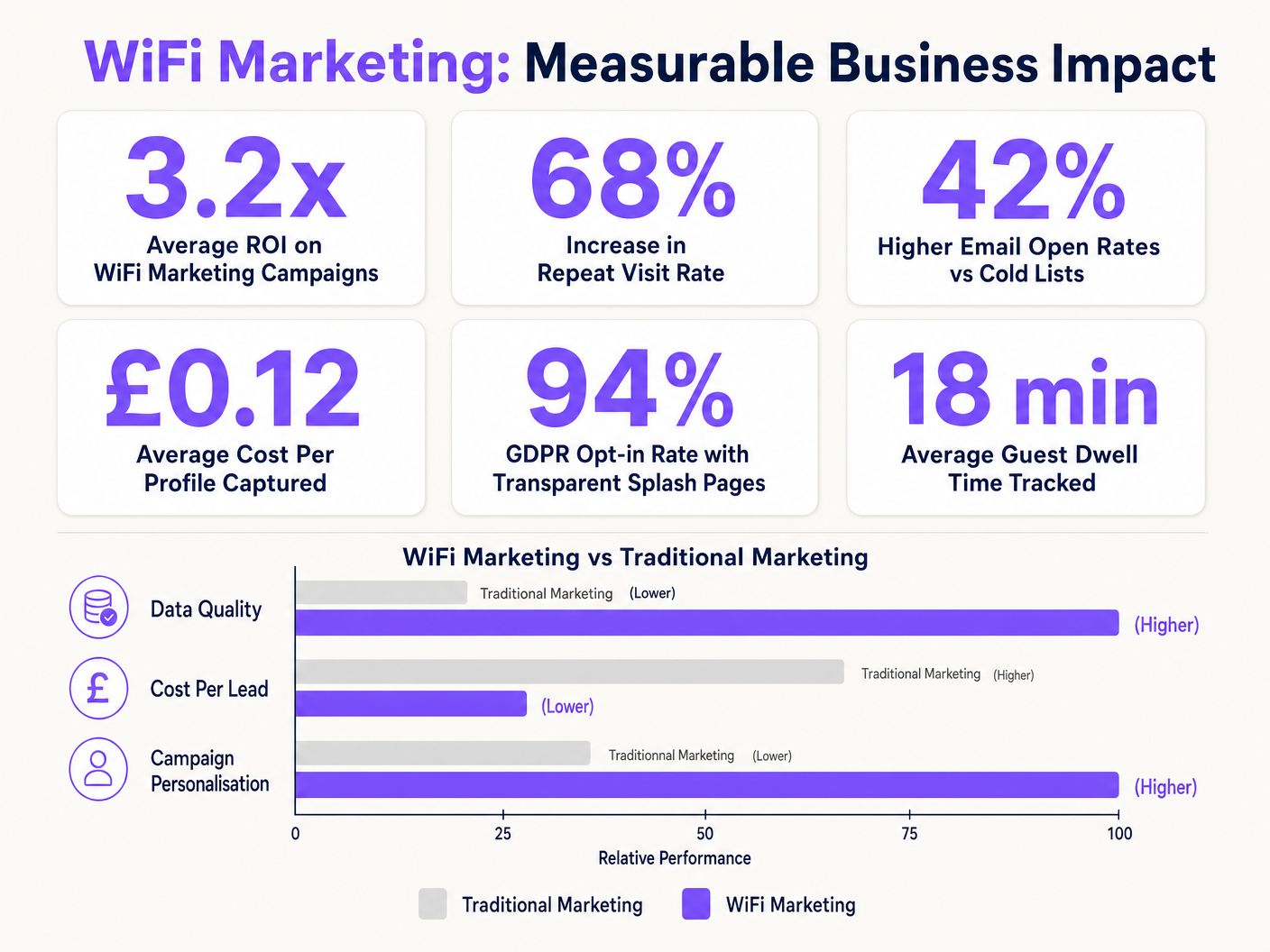
By comparing the cost of the WiFi infrastructure against the revenue generated from automated campaigns (e.g., the value of a returning customer driven by an SMS offer), organisations can clearly demonstrate the business impact of the network.
Key Terms & Definitions
Captive Portal
A web page that the user of a public-access network is obliged to view and interact with before access is granted.
This is the primary interface for identity capture and brand engagement in WiFi marketing.
Walled Garden
A restricted environment that controls the user's access to web content and services pre-authentication.
Essential for allowing devices to load the captive portal assets and access social login providers before full internet access is granted.
RADIUS (Remote Authentication Dial-In User Service)
A networking protocol that provides centralized Authentication, Authorization, and Accounting (AAA) management.
The core protocol used by the network controller to communicate with the cloud platform to authorise a user's MAC address after they complete the captive portal flow.
MAC Address (Media Access Control)
A unique identifier assigned to a network interface controller (NIC) for use as a network address.
The primary identifier used to track device presence and associate a physical device with a digital profile captured via the portal.
RSSI (Received Signal Strength Indicator)
A measurement of the power present in a received radio signal.
Used by access points to estimate the distance of a client device, enabling location analytics and dwell time calculations.
OpenRoaming
A roaming federation service enabling an automatic and secure WiFi experience globally.
Represents the future of seamless onboarding, replacing manual captive portal logins while still allowing venues to capture presence data securely.
Closed-Loop Attribution
The ability to track a marketing interaction (like an email open) directly to a physical business outcome (like a store visit).
The ultimate metric for proving the ROI of WiFi marketing, demonstrating that digital campaigns drive physical footfall.
VLAN (Virtual Local Area Network)
A logical subnetwork that groups a collection of devices from different physical LANs.
Critical for security; guest WiFi traffic must be isolated on a separate VLAN from corporate and Point-of-Sale (POS) systems.
Case Studies
A 200-room hotel needs to implement guest WiFi that captures marketing data but also integrates with their Property Management System (PMS) to provide tiered internet access (free basic, paid premium for conferences).
- Deploy APs with dual SSIDs: one for corporate (802.1X) and one for guests (Open with Captive Portal).
- Configure the guest SSID to redirect to a cloud-hosted portal.
- Implement a PMS integration via API. On the splash page, guests enter their Room Number and Last Name.
- The portal queries the PMS to verify the guest. If verified, they receive standard bandwidth.
- For conference attendees or premium users, offer an 'Upgrade' path via a payment gateway integration (PCI compliant, offloaded from the local network), adjusting the RADIUS attributes to increase bandwidth limits.
A national retail chain with 50 locations wants to build a first-party data list to reduce reliance on expensive third-party advertising. They need to track the effectiveness of their email campaigns in driving physical store visits.
- Standardise the guest WiFi architecture across all 50 locations, pointing to a centralised captive portal.
- Design the splash page to require an Email Address and opt-in for marketing communications.
- Integrate the WiFi platform with the central CRM via API.
- When a marketing email is sent, the CRM tracks the digital open/click.
- When that customer later walks into any of the 50 stores, the APs detect their MAC address (previously linked to their email during initial login).
- The WiFi platform logs the physical visit and sends this data back to the CRM, attributing the visit to the email campaign.
Scenario Analysis
Q1. Your organisation is deploying guest WiFi across 10 retail locations. The marketing team wants to implement a Facebook Social Login option on the captive portal to capture rich demographic data. What critical network configuration step must the IT team perform to ensure this works?
💡 Hint:Consider how the client device communicates before it has been fully authenticated by the RADIUS server.
Show Recommended Approach
The IT team must configure the 'Walled Garden' on the network controller. They need to whitelist the specific IP ranges or domains associated with Facebook's authentication servers. Without this, the client device cannot reach Facebook to complete the OAuth process, and the captive portal will fail to load or authenticate the user.
Q2. A venue operations director reports that the new guest WiFi system is causing performance issues on the corporate network, specifically slowing down the Point-of-Sale (POS) terminals during peak hours. What architectural flaw is the likely cause, and how should it be resolved?
💡 Hint:Think about network segmentation and resource allocation.
Show Recommended Approach
The likely cause is a lack of proper network segmentation and bandwidth management. The guest WiFi traffic is likely sharing the same logical network or bandwidth pool as the corporate/POS traffic. To resolve this, IT must ensure the guest SSID is mapped to a dedicated VLAN, completely isolated from the POS network (crucial for PCI DSS compliance). Additionally, they must implement bandwidth shaping rules on the controller (e.g., capping guest traffic to 10% of total throughput or applying per-user rate limits).
Q3. The marketing department is frustrated because they are seeing a high drop-off rate on the captive portal; many users connect to the SSID but never complete the login process. The portal currently asks for Name, Email, Phone Number, Date of Birth, and Postal Code. What is the recommended strategy to improve conversion?
💡 Hint:Balance the desire for rich data against user friction.
Show Recommended Approach
The recommended strategy is to reduce user friction by simplifying the data capture form. The principle is 'ask for what you need, not what you want.' The IT/Marketing teams should implement a 'progressive profiling' approach. For the initial login, require only a single, high-value identifier (like Email). Once the device MAC is associated with that email, subsequent visits can be tracked seamlessly, or the portal can be configured to ask for one additional piece of information (like DOB) on the next visit.




