
Healthcare WiFi: HIPAA, HIPAA and WiFi Compliance Explained
This guide provides a definitive technical reference for IT managers, network architects, and compliance officers deploying wireless networks in healthcare environments. It maps the specific requirements of HIPAA (US) and HIPAA (UK) to concrete network architecture decisions - covering segmentation, identity-based access, encryption standards, and IoMT device handling. Purple's guest WiFi and analytics platform is positioned throughout as a compliant, enterprise-grade solution for managing patient and visitor connectivity within a governed wireless estate.
Video overview
Listen to this guide
View podcast transcript
Part of our core series: Enterprise WiFi Security Guide →
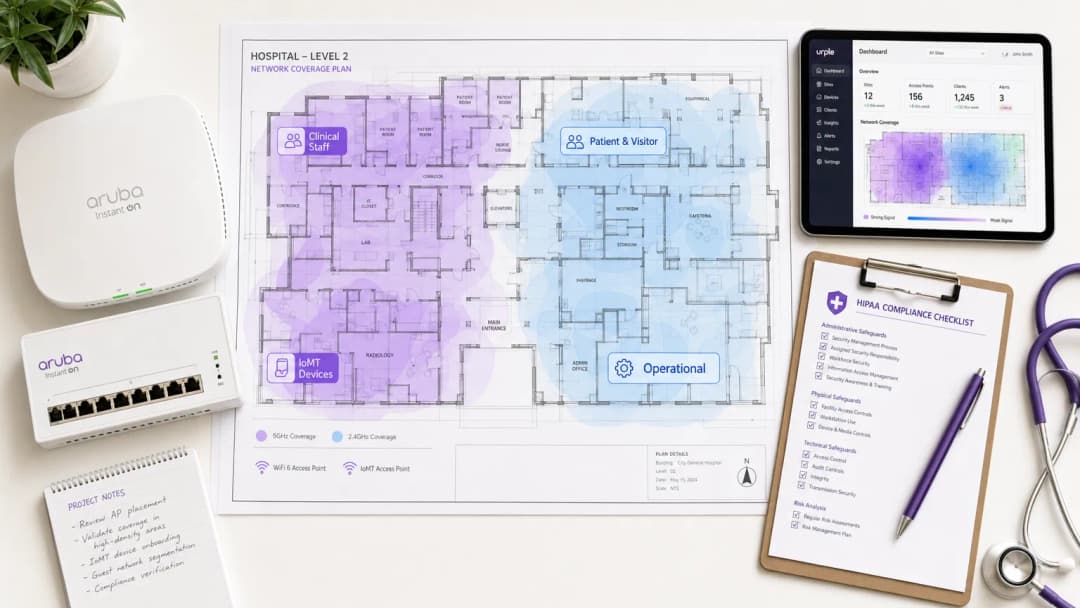
Executive Summary
Healthcare WiFi compliance is not just a configuration setting - it is an architectural discipline. Whether your organization operates under HIPAA in the United States or the HIPAA framework in the United Kingdom, the regulatory expectation is the same: every device, every user, and every data flow on your wireless estate must be accounted for, controlled, and audited.
In the US, the average cost of a healthcare data breach is now over $10.9 million per incident, making it the most expensive sector for breaches for the thirteenth consecutive year. In the UK, NHS Trusts that fail to complete their annual HIPAA submission risk losing access to national systems and face mandatory improvement programs. The wireless network is often the weakest link in both environments - not because the technology is inadequate, but because deployment decisions are made without the compliance framework in mind.
This guide covers the technical architecture, regulatory mapping, and implementation phases required to deploy a healthcare-grade wireless network that meets both frameworks. It also addresses the specific challenge of patient and visitor guest WiFi - a service that must be simultaneously accessible, compliant, and completely isolated from clinical systems.

Technical Deep-Dive
The Regulatory Landscape
The HIPAA Security Rule (45 CFR Part 164) establishes three categories of safeguards for electronic protected health information (ePHI): administrative, physical, and technical. For wireless networks, the technical safeguards under §164.312 apply most directly. These mandate access controls (§164.312(a)(1)), audit controls (§164.312(b)), integrity controls (§164.312(c)(1)), and transmission security (§164.312(e)(1)). Crucially, the Security Rule is technology-neutral - it does not prescribe specific protocols, but organizations must implement mechanisms that meet the standards.
The NHS HIPAA is structured around ten National Data Guardian (NDG) Data Security Standards. For wireless networks, the most relevant are Standard 1 (personal confidential data is accessible only to staff who need it), Standard 6 (all personal data is processed lawfully and appropriately), and Standard 9 (unsupported systems are identified and managed). The HIPAA also incorporates SOC 2 Type II requirements, which mandate specific technical controls including network boundary firewalls, secure configuration, access control, malware protection, and patch management - all of which have direct implications for the wireless network.
The primary difference between the two frameworks is the enforcement mechanism. HIPAA is enforced by the HHS Office for Civil Rights (OCR) through financial penalties ranging from $100 to $50,000 per violation category per year. DSPT compliance is enforced by NHS England, with non-compliant organizations risking the loss of access to NHS national systems and mandatory improvement plans. Both frameworks require annual review and evidence submission.
Network Architecture: Four Trust Zones
The foundational principle of healthcare WiFi compliance is network segmentation into distinct trust zones. A flat network - even one with multiple SSIDs - does not meet the access control requirements of either framework if the underlying policy enforcement is weak.
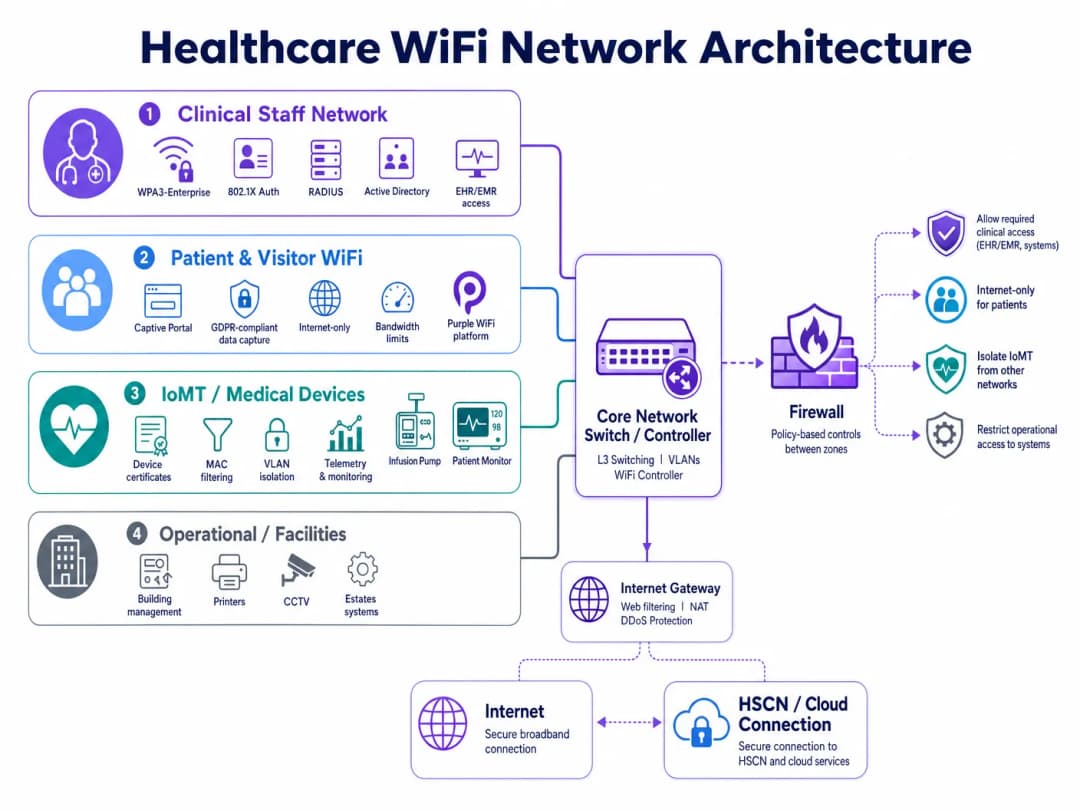
A compliant hospital wireless estate requires four distinct policy domains:
| Zone | User/Device Type | Authentication Method | Access Scope | Compliance Driver |
|---|---|---|---|---|
| Clinical Staff | Clinicians, nurses, admin | WPA3-Enterprise, 802.1X, RADIUS | EHR/EMR, clinical apps, internal services | HIPAA §164.312(a), DSPT Standard 1 |
| Patients and Visitors | Patients, families, visitors | Captive Portal (CCPA/CPRA-compliant) | Internet only, no internal routing | HIPAA §164.312(e), CCPA/CPRA |
| IoMT / Medical Devices | Infusion pumps, monitors, telemetry | Device certificates, MAC filtering | Micro-segmented per device type | HIPAA Minimum Necessary, DSPT Standard 9 |
| Operational / Facilities | Printers, CCTV, BMS, estates | Dedicated VLAN, managed credentials | Operational systems only | DSPT Standard 6, HIPAA §164.312(a) |
Segmentation must be enforced at the network layer - not just on the SSID label. Each zone requires its own VLAN, dedicated firewall policies, and inter-zone Access Control Lists (ACLs) that deny by default. The clinical staff zone must have no routable path to the guest zone, and the IoMT zone must have communication paths restricted only to the specific servers and ports required for each device type.
Identity-Based Access: Moving Beyond Shared PSKs
Shared Pre-Shared Keys (PSKs) remain the most common compliance failure in healthcare wireless deployments. They are operationally convenient but introduce three critical issues: they cannot be attributed to a specific user or device, they are rarely rotated on a schedule that matches staff turnover, and they provide no mechanism for immediate revocation when an employee leaves or a device is decommissioned.
IEEE 802.1X with EAP-TLS (Extensible Authentication Protocol - Transport Layer Security) is the current gold standard for identity-based wireless access in healthcare. Under this model, each user or managed device presents a certificate issued by the organization's PKI (Public Key Infrastructure). The RADIUS server validates the certificate against Active Directory or an LDAP directory, assigns the appropriate VLAN and policy, and logs the authentication event with a timestamp, device identifier, and user identity. When a staff account is disabled in Active Directory, their wireless access is revoked at the next re-authentication cycle - typically within minutes.
WPA3-Enterprise, introduced in the IEEE 802.11ax (WiFi 6) specification, further strengthens this by mandating a 192-bit security suite for sensitive environments and providing forward secrecy through the Simultaneous Authentication of Equals (SAE) handshake. For new deployments, WPA3-Enterprise should be the baseline standard for all clinical and operational zones.
Transmission Security and Encryption Standards
HIPAA §164.312(e)(2)(ii) requires organizations to implement mechanisms to encrypt ePHI in transit when deemed appropriate. In practice, any wireless transmission of ePHI must be encrypted. The minimum acceptable standard for application-layer encryption is TLS 1.2, with TLS 1.3 strongly recommended for new deployments. At the wireless layer, WPA3 provides CCMP-256 (Counter Mode Cipher Block Chaining Message Authentication Code Protocol) encryption, replacing legacy TKIP and AES-CCMP-128 standards.
For healthcare organizations, data in transit to clinical and operational systems must comply with HIPAA security requirements, which mandate at least TLS 1.2 and restrict the use of SSL 3.0, TLS 1.0, and TLS 1.1. Any wireless access point or controller terminating clinical-bound traffic must be configured to enforce these cipher suite restrictions.
IoMT Device Management: The Hardest Problem
The Internet of Medical Things (IoMT) presents the most technically complex compliance challenge in healthcare wireless deployments. Legacy medical devices - infusion pumps, patient monitors, telemetry systems, imaging equipment - frequently run embedded operating systems that cannot support 802.1X authentication or modern TLS versions. They cannot be patched on the same schedule as managed endpoints, and their manufacturers often prohibit modifications that would affect device certification.
The compliant approach is micro-segmentation combined with strict communication path controls. Each device type or device family is assigned to a dedicated sub-VLAN. Firewall ACLs permit only the specific source/destination IP pairs, protocols, and ports that the device requires for its clinical function. All other traffic is blocked and logged. Network Access Control (NAC) solutions can enforce device profiling - ensuring that a device claiming to be an infusion pump actually behaves like one before its assigned policy is approved.
HIPAA standards specifically address unsupported systems: organizations must maintain an inventory of all systems that cannot be updated to current security standards and implement compensating controls. For IoMT devices, the compensating control is network isolation combined with enhanced monitoring.
Patient and Visitor WiFi: Compliance Without Friction
Patient and visitor guest WiFi is a clinical necessity, not an optional amenity. Research consistently shows that access to connectivity reduces patient anxiety, improves family communication during long admissions, and contributes to overall patient satisfaction scores. The compliance challenge is delivering this service without creating a risk vector into the clinical network.
A compliant patient WiFi deployment requires three elements. First, complete network isolation: the guest SSID must route traffic directly to the internet through a dedicated gateway with no path to internal clinical systems, EHR platforms, or administrative networks. Second, CCPA/CPRA-compliant data handling: any data captured on the Captive Portal - email addresses, device identifiers, acceptance of terms - must be handled in accordance with CCPA/CPRA (for healthcare organizations) or HIPAA's Minimum Necessary standard (for US healthcare). Third, bandwidth management: Quality of Service (QoS) policies must ensure that visitor traffic cannot saturate the wireless medium and degrade clinical application performance.
Purple's guest WiFi platform is designed specifically for this use case. It provides a configurable Captive Portal with CCPA/CPRA-compliant consent flows, first-party data capture for patient communications, and WiFi analytics that give operations teams visibility into visitor dwell times, peak usage periods, and access point load - all without creating any data path into the clinical network. For healthcare organizations, Purple's data handling practices are documented to support HIPAA evidence submission.
For a detailed deployment guide covering healthcare-specific requirements, see Staff WiFi: How to Deploy Secure Wireless Networks in Healthcare.
Got questions about your specific setup?
Our team works with venue operators, IT managers, and network engineers across 80,000 venues. Book a 20-minute call and we will show you how others like you solved it.
Implementation Guide
Phase 1: Discovery and Risk Assessment (Weeks 1-3)
Begin with a comprehensive wireless site survey and device inventory. Map every SSID currently active, every device type connecting to the network, and every data flow traversing the wireless layer. Pay special attention to legacy medical devices - catalog their operating system versions, authentication capabilities, and manufacturer support status. This inventory forms the foundation of your HIPAA evidence pack and your HIPAA Risk Analysis documentation.
Perform a gap analysis against your target compliance framework. For HIPAA, map current controls against the technical safeguards checklist. For HIPAA compliance, complete a pre-assessment against the NDG 10 standards. Identify every instance where shared PSKs are in use, where network segmentation is absent or incomplete, and where audit logging does not capture sufficient detail.
Phase 2: Architecture Design (Weeks 4-6)
Design the four-zone segmentation model described above. Define VLAN assignments, firewall policy rules, and inter-zone ACLs. Specify the RADIUS infrastructure - either on-premises (Microsoft NPS, FreeRADIUS) or cloud-hosted (RADIUS-as-a-Service). Design the PKI structure for certificate-based authentication, including certificate lifecycle management and revocation processes.
For the guest WiFi zone, select and configure a Captive Portal platform. Define data capture fields, consent language, and data retention policies. Ensure the portal's privacy notice meets CCPA/CPRA requirements (for US deployments) or HIPAA's Notice of Privacy Practices requirements (for US deployments).
Phase 3: Deployment and Migration (Weeks 7-12)
Deploy the zones sequentially: operational and IoMT zones first (lowest risk to clinical operations), followed by the staff zone, then guest. For each zone, validate segmentation by attempting cross-zone traffic from test devices - confirm that firewall ACLs block unexpected traffic. Validate authentication by testing certificate revocation - disable a test account in Active Directory and confirm that wireless access is denied within the expected re-authentication window.
Migrate staff devices to 802.1X authentication using a phased rollout. Deploy device certificates to managed endpoints via your MDM (Mobile Device Management) platform. For BYOD devices, implement a separate onboarding SSID that guides users through certificate installation before granting access to the staff zone.
Phase 4: Audit Logging and Monitoring (Ongoing)
Configure your RADIUS server and wireless controllers to forward authentication logs to your SIEM (Security Information and Event Management) platform. Ensure logs capture: timestamp, user identity, device MAC address, SSID, VLAN assignment, session duration, and bytes transferred. For HIPAA compliance, retain logs for at least six years. For HIPAA compliance, ensure logs are regularly reviewed and the review process is documented.
Implement automated alerting for anomalous behavior: devices connecting outside of business hours, unusual data volumes, failed authentication attempts exceeding thresholds, and devices appearing on unexpected VLANs.
Best Practices
Adopt WPA3-Enterprise as the baseline standard for all new access point deployments. WPA3 provides significantly stronger encryption and forward secrecy compared to WPA2 and is required for WiFi 6 and WiFi 6E certified devices. Legacy WPA2 deployments should be scheduled for migration within a defined timeframe.
Never use shared PSKs on clinical or operational networks. If legacy devices cannot support 802.1X, implement MAC-based authentication as a compensating control, combined with strict firewall micro-segmentation. Document the compensating control in your risk register.
Implement RADIUS-as-a-Service for smaller healthcare organizations and clinics that lack the infrastructure to run on-premises RADIUS servers. Cloud-hosted RADIUS eliminates single point of failure risks and simplifies certificate lifecycle management.
Conduct quarterly wireless penetration tests targeting segmentation boundaries. Specifically test for VLAN hopping, rogue access point detection, and Captive Portal bypass vulnerabilities. Document findings and remediation steps in your HIPAA Risk Analysis.
Maintain a live device inventory integrated with your NAC platform. Every device on the wireless estate should have a known owner, a defined policy, and a documented review date. Unknown devices should trigger an automated alert and be quarantined pending investigation.
For broader enterprise WiFi security principles applicable across sectors, the guidance in WiFi in Auto: The Complete 2026 Enterprise Guide covers several architectural patterns directly applicable to healthcare environments.
Troubleshooting and Risk Mitigation
Common Failure Mode 1: VLAN Leakage
The most frequent segmentation failure is VLAN misconfiguration at the access layer. A trunk port incorrectly configured to pass all VLANs, or a firewall rule with an over-permissive destination, can silently allow cross-zone traffic. Mitigation: Validate segmentation with active penetration testing after every configuration change. Use automated network scanning tools to detect unexpected inter-VLAN paths.
Common Failure Mode 2: Clinical Disruption Due to Certificate Expiry
When device certificates expire without automated renewal, clinical devices lose wireless access - potentially in the middle of a shift. Mitigation: Implement automated certificate renewal through your MDM platform with a minimum 30-day renewal window. Configure alerting for certificates expiring within 60 days. Maintain a break-glass PSK for emergency clinical device access, coupled with strict access logging.
Common Failure Mode 3: Captive Portal Bypass on iOS/Android
Modern mobile operating systems use Captive Network Assist (CNA) - a lightweight browser that intercepts Captive Portal redirects. Changes in iOS or Android CNA behavior can break the portal flow. Mitigation: Test the Captive Portal flow on current iOS and Android versions after every OS update cycle. Use a platform like Purple that actively maintains portal compatibility across OS versions.
Common Failure Mode 4: IoMT Device Failure After Network Changes
Legacy medical devices are highly sensitive to network changes. VLAN renumbering, firewall policy updates, or DHCP scope changes can break device connectivity. Mitigation: Maintain change freeze windows for IoMT VLANs during clinical hours. Test all changes in a lab environment against representative device types prior to production deployment. Engage device manufacturers' clinical engineering teams prior to any network change affecting IoMT VLANs.
Common Failure Mode 5: Inadequate Audit Log Retention
HIPAA requires six years of log retention. Many wireless controllers default to 30 or 90 day log retention. Mitigation: Configure all wireless infrastructure to forward logs to a centralized SIEM with appropriate retention policies. Validate retention configurations annually as part of your HIPAA Risk Analysis or HIPAA self-assessment.
ROI and Business Impact
The business case for compliant healthcare WiFi is straightforward when measured against the cost of non-compliance. The average total cost of a single HIPAA breach in a healthcare organization is $10.9 million - including regulatory fines, legal fees, remediation, and reputational damage. A HIPAA compliance failure that results in lost access to national systems can halt clinical operations for days or weeks, with direct patient safety implications.
Beyond risk mitigation, a well-architected wireless estate delivers measurable operational returns. Clinical staff spend less time on connectivity workarounds - a 2023 digital survey found that 67% of clinical staff cited poor connectivity as a barrier to productivity. Automated device onboarding via MDM reduces IT service desk tickets for wireless access issues. And a compliant, well-managed guest WiFi service - delivered through a platform like Purple's WiFi Analytics - generates first-party patient data that can support communications, satisfaction surveys, and operational planning.
For healthcare organizations, a successful compliance submission also unlocks access to shared business services frameworks and group purchasing organizations, lowering the cost of future technology acquisition. Investment in a compliant wireless architecture pays dividends across the entire digital estate.
For implementation support and compliant guest WiFi deployment in your healthcare environment, explore Purple's Healthcare WiFi solutions or review the detailed NHS Staff WiFi deployment guide.
Key Definitions
ePHI (Electronic Protected Health Information)
Any individually identifiable health information that is created, received, maintained, or transmitted in electronic form. Under HIPAA, this includes patient names, dates of service, medical record numbers, and any other data that could be used to identify a patient in connection with their health status or care.
IT teams encounter this when designing network segmentation and data handling policies. Any system or network path that could carry ePHI - including wireless networks used by clinical staff - falls under HIPAA's Technical Safeguards requirements.
HIPAA (Health Insurance Portability and Accountability Act)
A US federal law that established national standards for the protection of sensitive patient health information from being disclosed without the patient's consent or knowledge. It requires healthcare organizations to implement secure technical safeguards to protect electronic protected health information (ePHI).
Healthcare providers, payers, and third-party vendors with access to patient systems must maintain continuous HIPAA compliance. For wireless networks, the most relevant requirements are under the Security Rule, including access control, transmission security, and audit controls.
802.1X
An IEEE standard for port-based network access control. It provides an authentication framework that requires devices to present valid credentials (typically a certificate or username/password) to a RADIUS server before being granted network access. In wireless deployments, 802.1X is used with EAP (Extensible Authentication Protocol) to authenticate individual users and devices.
The replacement for shared PSKs in enterprise and healthcare environments. When a staff member's account is disabled in Microsoft Entra ID or Active Directory, their 802.1X-authenticated wireless access is automatically revoked - providing the access control accountability required by HIPAA.
WPA3-Enterprise
The current Wi-Fi Alliance security certification for enterprise wireless networks, introduced with WiFi 6 (802.11ax). It mandates 192-bit security mode using GCMP-256 encryption and HMAC-SHA-384 for authentication, providing significantly stronger protection than WPA2-Enterprise. It also provides forward secrecy, meaning that compromise of a long-term key does not expose past session traffic.
The baseline encryption standard for new healthcare wireless deployments. Required for WiFi 6 and WiFi 6E certified equipment. Legacy WPA2 deployments should be scheduled for migration as part of the organization's technology refresh program.
RADIUS (Remote Authentication Dial-In User Service)
A networking protocol that provides centralized authentication, authorization, and accounting (AAA) for network access. In wireless deployments, the RADIUS server validates 802.1X credentials, assigns VLAN and policy based on user or device identity, and logs every authentication event with a timestamp and device identifier.
The core infrastructure component for identity-based wireless access. Can be deployed on-premises (Microsoft NPS, FreeRADIUS) or as a cloud service (RADIUS-as-a-Service). The RADIUS authentication log is a primary source of evidence for HIPAA audit controls and security monitoring requirements.
IoMT (Internet of Medical Things)
The ecosystem of connected medical devices that communicate over IP networks, including infusion pumps, patient monitors, telemetry systems, imaging equipment, and wearable sensors. IoMT devices typically run embedded operating systems with limited security capabilities and long replacement cycles, creating specific challenges for healthcare network compliance.
The most technically complex compliance challenge in healthcare wireless deployments. IoMT devices frequently cannot support 802.1X authentication or modern TLS versions, requiring compensating controls such as MAC-based authentication, micro-segmentation, and enhanced monitoring. HIPAA requirements specifically require that unsupported systems (which includes many IoMT devices) are inventoried and managed with documented compensating controls.
Network Segmentation / VLAN
The practice of dividing a physical network into multiple logical networks (Virtual Local Area Networks, or VLANs) that are isolated from each other at the network layer. Traffic between VLANs is controlled by firewall policies and access control lists. In healthcare, segmentation is used to isolate clinical, guest, IoMT, and operational traffic into separate policy domains.
The foundational technical control for healthcare WiFi compliance. Both HIPAA and CCPA/CPRA require that access to sensitive data is restricted to authorized users and systems. Network segmentation enforces this at the infrastructure layer, ensuring that a guest device on the visitor WiFi cannot route traffic to clinical systems even if the application-layer controls fail.
Captive Portal
A web page that intercepts a user's initial HTTP/HTTPS request when they connect to a WiFi network, requiring them to complete an action (accept terms of service, enter credentials, or provide contact details) before granting full network access. In healthcare, captive portals are used to manage patient and visitor WiFi onboarding, collect CCPA/CPRA-compliant consent, and enforce acceptable use policies.
The primary user-facing component of a compliant guest WiFi deployment. A captive portal alone does not make a guest network compliant - the underlying network must still be properly segmented and isolated. However, a well-configured portal (such as Purple's platform) handles CCPA/CPRA consent management, data minimization, and audit logging for the guest access layer.
HSCN (Health and Social Care Network)
The managed network service that provides connectivity between health and social care organizations and national health systems. HSCN replaced N3 in 2019 and provides a secure, managed IP network for accessing national services including Spine, mail, and clinical information systems. Organizations connecting to HSCN must meet specific security requirements.
Relevant for healthcare organizations whose wireless estate provides access to HSCN-connected systems. Wireless access points or controllers that terminate traffic destined for HSCN services must be configured to enforce HSCN security requirements, including TLS 1.2 minimum and approved cipher suites.
Worked Examples
A 450-bed hospital network is preparing its annual HIPAA compliance audit and has identified that clinical staff are currently using a shared WPA2 PSK on the staff SSID. The IT director needs to migrate to identity-based access without disrupting clinical operations. The estate includes 280 managed Windows laptops, 120 iOS devices enrolled in Jamf, and approximately 60 legacy medical devices (infusion pumps and bedside monitors) that cannot support 802.1X.
Phase the migration across four workstreams running in parallel. First, deploy a cloud-hosted RADIUS service (or configure Microsoft NPS on existing domain controllers) and integrate it with Active Directory. Second, use Jamf to push EAP-TLS profiles and device certificates to all 120 iOS devices - this can be completed silently without user intervention. Third, deploy certificates to the 280 Windows laptops via Group Policy, configuring the wireless profile to use EAP-TLS with the new RADIUS server. Run both the legacy PSK SSID and the new 802.1X SSID simultaneously during the migration window, using a dedicated onboarding SSID for devices that need manual certificate installation. Fourth, place the 60 legacy medical devices on a dedicated IoMT VLAN using MAC-based authentication as a compensating control, with firewall ACLs restricting each device type to its required communication paths only. Document the MAC-based authentication as a compensating control in the HIPAA risk assessment, with a review date tied to the device replacement program. Once all managed devices are migrated, disable the shared PSK SSID and document the migration in the HIPAA compliance logs.
A US healthcare system operating three community hospitals needs to deploy compliant patient and visitor WiFi across all sites. Each site has between 150 and 300 beds, with high visitor volumes in waiting areas, outpatient clinics, and cafeterias. The CIO wants to use the guest WiFi to capture patient contact data for post-visit satisfaction surveys, but the legal team has flagged HIPAA concerns about data collection on a healthcare network.
Deploy a dedicated guest WiFi SSID on a separate VLAN at each site, with traffic routed directly to the internet via a dedicated gateway - no routing path to internal clinical systems, EHR platforms, or administrative networks. Implement a Captive Portal platform (such as Purple) that handles the user onboarding flow. The portal should present a clear privacy notice explaining what data is collected, how it will be used, and how users can opt out - this satisfies HIPAA's Notice of Privacy Practices requirement for any data collection. Critically, the data collected at the portal (email address, device identifier, connection timestamp) does not constitute ePHI because it is not linked to any health information - it is simply contact data collected from a visitor. Configure the portal to collect only the minimum data required for the satisfaction survey use case: email address and optional name. Ensure the data is stored in the guest WiFi platform's cloud environment, not on any system connected to the clinical network. Implement bandwidth QoS policies to cap guest traffic at 10 Mbps per device and 100 Mbps aggregate per site, preventing visitor usage from impacting clinical application performance. Document the network isolation architecture and data handling practices in the HIPAA risk analysis.
A private hospital group in the US is deploying WiFi 6E across a newly built facility. The network architect needs to design the wireless estate to support both HIPAA compliance and Joint Commission inspection readiness, while also providing a premium patient WiFi experience that supports the hospital's private pay model.
Design a four-zone architecture as described in the Technical Deep-Dive section, leveraging WiFi 6E's 6 GHz band for clinical and IoMT zones (less interference, higher throughput) and the 5 GHz and 2.4 GHz bands for patient/visitor coverage. Deploy WPA3-Enterprise on clinical zones with EAP-TLS authentication integrated with the hospital's Active Directory. For the patient WiFi zone, implement a premium Captive Portal with branded onboarding, room-number-based authentication (allowing the hospital to associate WiFi sessions with patient records for billing and communications purposes, with explicit CCPA/CPRA consent), and tiered bandwidth packages. Deploy Purple's guest WiFi platform to handle the Captive Portal, CCPA/CPRA-compliant consent management, and analytics. The analytics dashboard provides the operations team with real-time visibility into access point load, patient connectivity rates, and peak usage periods - data that supports both operational planning and Joint Commission evidence on patient experience. Ensure the patient WiFi data is handled under a CCPA/CPRA-compliant data processing agreement with the platform provider. Document the network architecture, segmentation controls, and data handling practices in the HIPAA self-assessment evidence pack.
Practice Questions
Q1. Your healthcare system's IT security team has just completed a wireless site survey and discovered that the radiology department is using a shared WPA2 PSK for all wireless devices in the department, including both managed Windows workstations and three legacy DICOM imaging workstations running Windows 7 (out of support). The HIPAA and SOC 2 Type II compliance submissions are due in six weeks. What is your immediate action plan, and how do you document this for HIPAA?
Hint: Consider that HIPAA specifically addresses unsupported systems. You have two separate problems here: the shared PSK (access control) and the unsupported OS (system management). They require different remediation approaches and different HIPAA evidence entries.
View model answer
Immediate actions: (1) Migrate the managed Windows workstations to 802.1X authentication using existing domain certificates - this can be completed within the six-week window via Group Policy. (2) Place the three Windows 7 DICOM workstations on a dedicated IoMT VLAN with MAC-based authentication and strict firewall ACLs permitting only DICOM traffic to the PACS server. (3) Document the Windows 7 systems in the risk register under HIPAA security risk assessments as "unsupported systems with compensating controls", specifying the network isolation as the compensating control and including a planned replacement date. (4) Disable the shared PSK SSID once all managed devices are migrated. For the compliance evidence pack: provide the network architecture diagram showing the new segmentation, the RADIUS authentication logs showing named user authentication for managed devices, the risk register entry for the Windows 7 systems, and the firewall ACL configuration for the IoMT VLAN. The key compliance insight is that HIPAA and SOC 2 Type II do not require immediate replacement of unsupported systems - they require that they are identified, risk-assessed, and managed with documented compensating controls.
Q2. A US healthcare system's CISO has received a request from the marketing team to use the hospital's patient WiFi data to send promotional emails about new services to patients who connected during their visit. The marketing team argues that patients provided their email address when connecting to the guest WiFi, so consent was already given. Is this HIPAA-compliant? What controls need to be in place?
Hint: Consider the distinction between the data collected at the WiFi portal (contact data) and the context in which it was collected (a healthcare facility). Also consider whether the email address, combined with the fact that the person was at a hospital, constitutes ePHI.
View model answer
This is a nuanced HIPAA question. An email address collected on a guest WiFi portal is not, by itself, ePHI. However, combining that email address with the fact that the individual was present at a healthcare facility on a specific date could constitute ePHI - because it reveals that the person received or sought healthcare services. This is the "facility visit" problem in HIPAA: the mere fact of being at a hospital is health information. For the marketing use case to be compliant: (1) The captive portal consent language must explicitly state that the email address will be used for marketing communications about hospital services - generic "terms of service" acceptance is not sufficient. (2) The consent must be separate from the WiFi access grant - patients must be able to access WiFi without consenting to marketing emails (opt-in, not opt-out). (3) The data handling must be documented in the HIPAA Privacy Notice. (4) If the marketing emails will reference the patient's visit or health services, a HIPAA authorization (not just consent) may be required. The safest architecture is to treat any email address collected at a healthcare facility WiFi portal as potentially ePHI and handle it accordingly - with a BAA with the WiFi platform provider and explicit opt-in consent for marketing use.
Q3. You are the network architect for a new 200-bed private hospital being built in the US. The clinical director wants to deploy a 'smart ward' with 45 IoMT devices per ward (infusion pumps, vital signs monitors, nurse call systems, and smart beds), all wireless. The facilities team also wants to connect building management systems (BMS), CCTV, and access control to the same wireless infrastructure to reduce cabling costs. How do you design the wireless estate to meet HIPAA requirements while accommodating all these use cases?
Hint: Think carefully about the number of distinct policy domains you need. Smart beds and nurse call systems have different security profiles from infusion pumps. BMS and CCTV have different risk profiles from clinical devices. Consider whether sharing physical infrastructure (access points) while maintaining logical separation (VLANs) is sufficient, or whether some device types require physical separation.
View model answer
Design a six-zone architecture for this environment: (1) Clinical Staff - WPA3-Enterprise, 802.1X, Okta/Active Directory integration. (2) Patient & Visitor - captive portal, internet-only, CCPA/CPRA-compliant. (3) Critical IoMT (infusion pumps, vital signs monitors) - dedicated VLAN, device certificates where supported, strict ACLs, enhanced monitoring, no shared infrastructure with non-clinical zones. (4) Non-critical IoMT (smart beds, nurse call) - separate VLAN from critical IoMT, less restrictive ACLs but still isolated from clinical staff and guest zones. (5) Building Management Systems - dedicated VLAN, physically separate from clinical zones where possible, no routing to clinical networks. (6) CCTV / Access Control - dedicated VLAN, consider whether this should be on a physically separate network given the security sensitivity of access control data. The key HIPAA consideration is that CCTV and access control data is personal data under the CCPA/CPRA, and BMS data may be sensitive operational data - these must not be accessible from the patient WiFi zone or from clinical systems that handle patient data. For the critical IoMT zone, consider whether the 45-device-per-ward density justifies dedicated access points for that zone rather than shared APs with VLAN separation - this provides stronger physical isolation and eliminates the risk of misconfiguration creating cross-zone paths. Document the zone architecture, the rationale for each design decision, and the compensating controls for any devices that cannot support modern authentication in the HIPAA evidence pack.
Continue reading in this series
CIPA compliance: compliance checklist for venue operators
You will be able to decide whether CIPA binds your WiFi, then segment networks, route DNS through Purple Shield and close bypass routes. You will also know what evidence to keep for Form 486 or Form 479 certification. The checklist assigns every requirement an owner, so your next funding year certification has nothing missing.
WPA3 transition mode connection failures: a deployment checklist for Cisco Meraki, HPE Aruba and Ruckus
Use this checklist to diagnose why devices fail on a WPA3 SAE transition mode SSID and fix it on Cisco Meraki, HPE Aruba or Ruckus. You will match 802.11 status codes to causes, isolate PMF, 802.11r and 6GHz issues, and decide when to move to a WPA3-only SSID.
Best DNS filtering: a comprehensive guide for businesses
This technical reference guide explains how enterprise DNS filtering secures public networks by blocking malicious domains at the resolution layer - before a connection is ever established. It gives IT directors, network architects, and venue operations teams the deployment architecture, firewall configuration, and compliance context they need to protect Guest WiFi across hospitality, retail, and public-sector environments. Purple Shield blocks malware, botnets, and inappropriate content at the DNS level across 80,000+ live venues.
Got questions about your specific setup?
Our team works with venue operators, IT managers, and network engineers across 80,000 venues. Book a 20-minute call and we will show you how others like you solved it.