
NAC for Healthcare: Securing Medical Devices and Patient Data
This guide provides a comprehensive technical reference for deploying Network Access Control (NAC) in healthcare environments, covering architecture design, authentication mechanisms, device profiling, and VLAN segmentation for medical IoT, clinical systems, and guest access. It addresses compliance requirements across HIPAA, ISO 27001, and CCPA/CPRA, with concrete implementation scenarios and vendor-neutral best practices. For IT directors and CTOs in healthcare, this is the operational blueprint for securing medical devices and patient data without disrupting clinical workflows.
Video overview
Listen to this guide
View podcast transcript
Part of our core series: Enterprise WiFi Security Guide →

Executive Summary
Securing a modern healthcare network is no longer just about defending the perimeter - it is about managing the explosive growth of connected devices across the estate. From MRI scanners and smart infusion pumps to patient tablets and visitor smartphones, the sheer volume and diversity of endpoints creates an unprecedented attack surface. Network Access Control (NAC) is the critical infrastructure required to identify, authenticate and authorize every device that connects to the network, keeping medical devices and patient data secure.
For CTOs and IT directors in healthcare organizations, deploying a robust NAC solution is a necessity for complying with HIPAA, HIPAA and CCPA/CPRA, and for meaningful risk reduction. This guide, tailored to healthcare environments, takes a deep look at NAC architecture, implementation strategy and best practices. We will explore how to achieve zero-trust network access, segregate clinical IoT devices from public traffic, and use solutions such as Guest WiFi to manage visitor access securely without compromising the security of the core clinical network.
Technical Deep-Dive
The Healthcare Network Challenge
Healthcare networks are uniquely complex. They must simultaneously support clinical systems with strict uptime and data integrity requirements, large fleets of Internet of Medical Things (IoMT) devices running legacy operating systems, staff bring-your-own-device (BYOD), and thousands of unmanaged patient and visitor devices. Traditional perimeter security or static VLAN assignment is wholly inadequate in this environment. A dynamic, identity-driven approach is required, enforcing least-privilege access throughout the network architecture.
The scale of the problem is enormous. A typical 500-bed hospital may have more than 10,000 connected devices at any given time. Fewer than 30% of those devices are capable of running a traditional endpoint security agent. The remaining 70% (infusion pumps, patient monitors, imaging equipment, smart beds) must be secured through network-level controls rather than host-based controls. This is precisely the problem NAC is designed to solve.
Core NAC Architecture
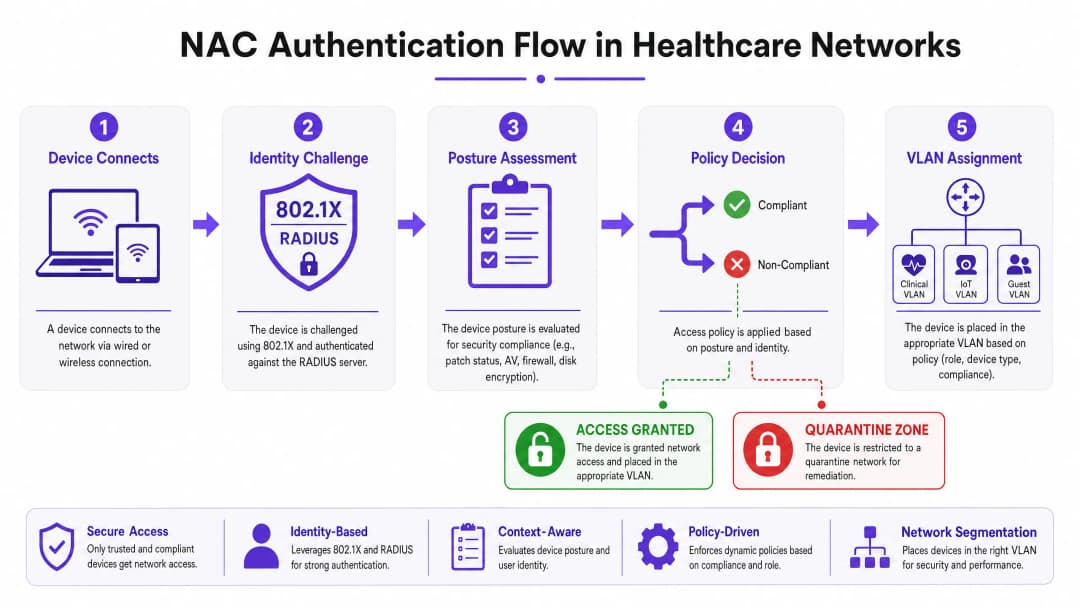
A production-grade NAC deployment in a healthcare environment relies on four core components working in concert. The Supplicant is the client software or native operating system component on the connecting device that initiates the authentication exchange. For headless IoT devices that lack supplicant capability, MAC Authentication Bypass (MAB) is used as the fallback. The Authenticator is the network access device (a switch or wireless access point) that intercepts connection requests and acts as the gatekeeper, forwarding credentials to the authentication server. The Authentication Server (typically a RADIUS-based policy engine such as Cisco ISE, Aruba ClearPass or ForeScout) is the central intelligence of the system; it validates identity, evaluates posture, and returns authorization decisions with dynamic VLAN assignments. Finally, the Directory Store (usually Microsoft Active Directory or LDAP) provides the identity records for users and devices against which the RADIUS server validates requests.
Authentication Mechanisms
IEEE 802.1X is the gold standard for port-based network access control. It provides a framework for encapsulating EAP (Extensible Authentication Protocol) messages between the supplicant and the authentication server. For corporate-owned devices, EAP-TLS (certificate-based mutual authentication) is strongly recommended over PEAP-MSCHAPv2 (password-based). EAP-TLS eliminates the credential theft vector entirely - if authentication requires a valid machine certificate signed by your internal PKI, a leaked password alone can never grant network access.
MAC Authentication Bypass (MAB) is the pragmatic solution for devices that cannot support 802.1X, which covers the majority of medical IoT equipment. The authenticator uses the device's MAC address as its identity credential. Because MAC addresses can be spoofed, MAB on its own is weak protection, but combined with deep device profiling and behavioral analysis it becomes a robust control for managing known medical devices.
Captive Portal authentication is the mechanism for guest and patient access. A well-implemented Guest WiFi solution handles user registration, terms-of-service acceptance and bandwidth management, ensuring public traffic is fully isolated from the clinical network from the moment a device associates with an access point.
Device Profiling and Posture Assessment
Knowing "who" is connecting is only half the battle; knowing "what" device they are connecting with is equally critical. Device Profiling combines passive and active network probing techniques (DHCP fingerprints, HTTP User-Agent strings, SNMP queries, Nmap-based active scanning and traffic pattern analysis) to classify every device on the network. A well-tuned profiling engine can distinguish a Philips IntelliVue patient monitor from a Baxter Sigma Spectrum infusion pump on network behavior alone, even though both connect via MAB.
Posture Assessment applies to managed corporate devices. Before granting access to a clinical VLAN, the NAC system interrogates the endpoint for compliance: Is the operating system patched to the required version? Are the antivirus signature databases up to date? Is full-disk encryption enabled? Devices that fail posture checks are dynamically assigned to a remediation VLAN where they can receive updates but cannot reach clinical systems.
Got questions about your specific setup?
Our team works with venue operators, IT managers, and network engineers across 80,000 venues. Book a 20-minute call and we will show you how others like you solved it.
Implementation Guide
Deploying NAC in a live hospital environment requires careful planning to avoid disrupting critical care services. A phased approach is not merely recommended - it is mandatory.
Phase 1: Discovery and Profiling (Monitor Mode)
Begin by deploying the NAC solution in Monitor Mode. Configure switches and access points to forward authentication requests to the NAC server, but instruct the server to permit all access while logging every connection. Run this phase for a minimum of four weeks to cover all shift patterns and device usage cycles. The output of this phase is a complete, validated inventory of every device on the network, including shadow IT and legacy equipment that may not appear in the CMDB. Use this data to refine device profiling rules and to identify any devices that will need special handling during enforcement.
Phase 2: Policy Definition and VLAN Segmentation
Based on the discovery data, define granular access policies mapped to specific VLANs. Clinical VLANs should be restricted to authorized staff devices authenticated via 802.1X EAP-TLS and known medical IoT devices authenticated via MAB with validated profiling. IoT VLANs should be further subdivided by device class (for example, a dedicated VLAN for infusion pumps, a separate one for imaging equipment) with strict ACLs permitting communication only with the specific management servers each device class requires. Guest VLANs direct all unauthenticated traffic to a Captive Portal, using a platform with integrated WiFi Analytics to provide operational visibility while remaining fully isolated from internal networks.
For vendor-specific configuration guidance, see our detailed tutorial on how to configure VLAN-steering NAC policies in Cisco Meraki.
Phase 3: Gradual Enforcement
Transition from Monitor Mode to enforcement in stages. Start with Low-Impact Enforcement: apply basic ACLs that block known-bad traffic patterns but permit most legitimate traffic. Use this phase to identify and resolve any policy misconfigurations before they can affect clinical operations. Then transition to Closed Mode enforcement, rolling out department by department - administrative areas first, clinical support areas next, and critical care units last. At each stage, maintain a rapid rollback procedure and ensure clinical engineering teams are on standby to verify that medical devices function correctly after enforcement.
Best Practices
Enforce certificate-based authentication. For all corporate-owned devices, EAP-TLS with machine certificates issued by an internal PKI should be the only accepted authentication method. Passwords are a liability; certificates are not.
Micro-segment medical IoT. Do not lump all medical devices into a single IoT VLAN. Segment by device class and apply zero-trust ACLs. An infusion pump should be able to reach its specific management server and the EMR system - nothing else. Lateral movement between device classes should be blocked at the network layer.
Implement continuous behavioral monitoring. NAC is not a set-and-forget control. Integrate your NAC policy engine with a SIEM or Network Detection and Response (NDR) platform. If a profiled IoT device begins exhibiting anomalous behavior - unexpected port scanning, unusual outbound connections - the NAC system should dynamically quarantine it without waiting for human intervention.
Optimize your wireless infrastructure. Ensure your access point deployment provides adequate coverage and capacity for the device density in each clinical area. Understanding the implications of the different wireless bands is essential - our guide WiFi Frequencies: A Guide to WiFi Frequencies in 2026 covers the practical trade-offs between 2.4 GHz, 5 GHz and 6 GHz in mixed IoT and clinical environments.
Integrate guest access as a first-class security control. Guest WiFi is not an optional extra - it is one of the highest-risk traffic types on your network. A dedicated Guest WiFi platform ensures patient and visitor devices are isolated from the clinical network, authenticated and managed independently. The resulting WiFi Analytics data also supports operational improvements in patient flow and facilities management.
Troubleshooting and Risk Mitigation
Common Failure Modes
The Silent IoT Device is the most common operational issue in healthcare NAC deployments. A medical device that enters a low-power sleep state drops its network connection and fails to re-authenticate correctly on waking. The result is a device that appears offline in the NAC system but is physically present and attempting to function. Mitigations include tuning MAC aging timers on switches to match the expected sleep cycles of each device class, and configuring the NAC profiling engine to recognize returning devices without requiring a full re-authentication cycle.
Certificate expiry is a systemic risk that can lock out hundreds of staff devices simultaneously if not proactively managed. Implement automated certificate lifecycle management using the SCEP or EST protocols, and configure alerts for certificates expiring within 60 days. Stagger certificate renewal cycles across device groups to avoid mass simultaneous expiry.
RADIUS server misconfiguration - incorrect IP addresses, mismatched shared secrets or misconfigured EAP methods on network access devices - causes silent authentication failures that are difficult to diagnose without proper logging. Use centralized network management to push standardized RADIUS configuration to all switches and access points, and implement RADIUS accounting to provide an audit trail of all authentication events.
The Fail-Open versus Fail-Closed Decision
This is the single most important architectural decision in a healthcare NAC deployment. A fail-closed policy (deny network access if the NAC server is unreachable) provides the strongest security but risks isolating life-critical medical devices during a server outage. A fail-open policy (grant limited access if the server fails) maintains clinical continuity but creates a window of reduced security control. The recommended approach is a tiered failure policy: fail-open for critical clinical VLANs, backed by strong network-level ACLs, while administrative and guest VLANs fail closed. Deploy NAC policy engines in high-availability clusters across multiple physical locations or availability zones to minimize how often this decision is ever invoked.
ROI and Business Impact
The business case for deploying NAC in healthcare is compelling across several dimensions. The primary driver is risk reduction: the average cost of a single reportable data breach involving Protected Health Information (PHI) exceeds $10 million once regulatory fines, legal costs, remediation expenses and reputational damage are factored in. NAC directly reduces both the probability and the potential blast radius of such an incident by ensuring only authorized, compliant devices can reach systems containing PHI. Operational efficiency is a secondary but significant benefit. Automated device profiling and onboarding eliminates the manual switch-port configuration that consumes substantial IT service desk time in environments without NAC. Clinical engineering teams gain a real-time, accurate device inventory to support lifecycle management, maintenance scheduling and procurement planning.
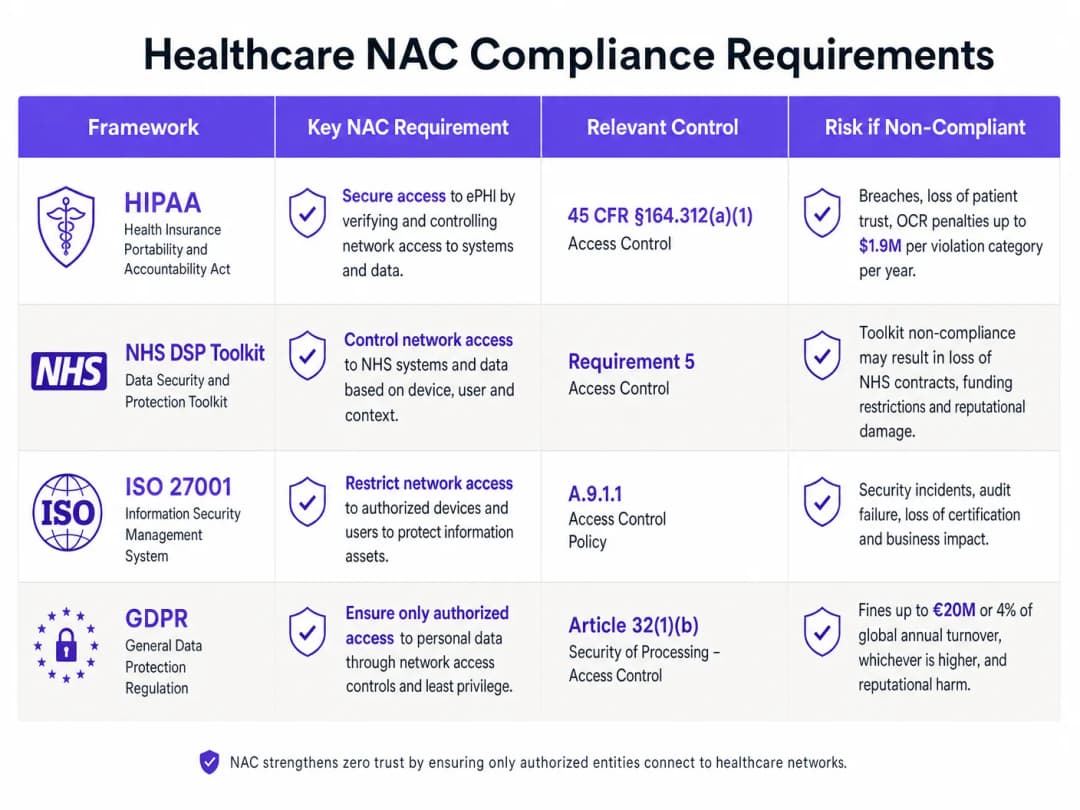
Compliance posture improves directly. HIPAA's access control standard (45 CFR §164.312(a)(1)), HIPAA requirements, and CCPA/CPRA security-of-processing obligations all require demonstrable controls over which people and devices can access systems containing patient data. A well-documented NAC deployment provides the audit evidence needed to satisfy these obligations.
Finally, the patient experience benefits from a well-implemented guest access strategy. Reliable, secure Guest WiFi for patients and visitors improves satisfaction scores, while the underlying WiFi Analytics data supports operational improvements in bed management, visitor flow and facilities utilization.
Key Definitions
Network Access Control (NAC)
A security framework that enforces policy-based control over which devices and users are permitted to connect to a network, and what resources they can access once connected. NAC combines authentication, device profiling, posture assessment, and dynamic policy enforcement.
IT teams encounter NAC as both a product category (Cisco ISE, Aruba ClearPass, ForeScout) and an architectural approach. In healthcare, NAC is the primary mechanism for enforcing network segmentation between clinical systems, medical IoT, and guest access.
IEEE 802.1X
An IEEE standard for port-based network access control that provides an authentication framework for devices wishing to connect to a LAN or WLAN. It defines the roles of the supplicant (client), authenticator (switch/AP), and authentication server (RADIUS), and encapsulates EAP messages between them.
802.1X is the authentication mechanism used for corporate-owned devices in a NAC deployment. IT teams configure it on both the network access devices (switches, APs) and the endpoint devices (via OS-level supplicant settings or Group Policy).
MAC Authentication Bypass (MAB)
A fallback authentication mechanism used for devices that cannot support 802.1X. The network access device uses the connecting device's MAC address as its identity credential, forwarding it to the RADIUS server for authorization.
MAB is the primary authentication method for medical IoT devices in healthcare NAC deployments. It must be combined with device profiling to provide meaningful security, as MAC addresses can be spoofed.
EAP-TLS (Extensible Authentication Protocol - Transport Layer Security)
A certificate-based EAP method that provides mutual authentication between the client and the authentication server using X.509 digital certificates. Both the client and the server present certificates, eliminating the password-based credential theft vector.
EAP-TLS is the recommended authentication method for corporate devices in healthcare NAC deployments. It requires a functioning internal PKI to issue and manage machine certificates.
VLAN Steering
The dynamic assignment of a connecting device to a specific VLAN based on the authentication result and policy decision from the NAC system. The RADIUS server returns a VLAN ID (or VLAN name) as part of the Access-Accept response, and the authenticator places the device's port into that VLAN.
VLAN steering is the mechanism by which NAC enforces network segmentation. IT teams configure RADIUS attributes (Tunnel-Type, Tunnel-Medium-Type, Tunnel-Private-Group-ID) on the authentication server to specify the target VLAN for each device class.
Device Profiling
The process of identifying the type, manufacturer, and operating system of a connecting device using passive network probes (DHCP fingerprints, HTTP User-Agent strings, mDNS/Bonjour advertisements) and active scanning techniques (Nmap, SNMP queries).
Device profiling is essential for accurately classifying medical IoT devices in a healthcare NAC deployment. Without profiling, MAB-authenticated devices are indistinguishable from each other, making it impossible to apply device-class-specific access policies.
Posture Assessment
The evaluation of a connecting device's security compliance state before granting network access. Posture checks typically verify OS patch level, antivirus signature currency, disk encryption status, and the presence of required security software.
Posture assessment applies to managed corporate devices (laptops, workstations) in a healthcare NAC deployment. Devices that fail posture checks are dynamically assigned to a remediation VLAN where they can receive updates but cannot access clinical systems.
Quarantine VLAN
A restricted network segment to which non-compliant or unrecognized devices are assigned when they fail authentication or posture assessment. The quarantine VLAN typically provides access only to remediation resources (patch servers, antivirus update servers) and blocks access to all clinical and corporate systems.
IT teams use quarantine VLANs as the enforcement mechanism for NAC policy violations. A device in the quarantine VLAN is effectively isolated from the rest of the network while still being able to receive the updates needed to achieve compliance.
IoMT (Internet of Medical Things)
The ecosystem of connected medical devices and healthcare applications that communicate over networks to collect and transmit patient data. IoMT includes infusion pumps, patient monitors, imaging equipment, smart beds, and wearable health monitors.
IoMT devices represent the largest and most challenging device category in a healthcare NAC deployment. They typically run legacy operating systems, cannot support endpoint security agents, and require specialized profiling and micro-segmentation strategies.
Zero-Trust Network Access (ZTNA)
A security model that eliminates implicit trust from the network architecture. Under ZTNA, no device or user is trusted by default, regardless of their network location. Every access request must be explicitly authenticated, authorized, and continuously validated.
ZTNA is the architectural philosophy that underpins modern NAC deployments. In healthcare, ZTNA means that even a device on the clinical VLAN must continuously prove its identity and compliance state - network location alone does not grant access to sensitive systems.
Worked Examples
A 350-bed hospital is preparing for its annual HIPAA compliance audit. The IT Director has identified that the network currently has no device authentication - everything connects to a flat network with a single VLAN. There are approximately 2,400 connected devices, of which an estimated 800 are medical IoT devices (infusion pumps, patient monitors, ventilators). The hospital needs to achieve compliance within 6 months without disrupting clinical operations. Where do they start?
The engagement begins with a 4-week Monitor Mode deployment. Configure all core switches and wireless controllers to forward 802.1X and MAB requests to a newly deployed RADIUS policy engine (Cisco ISE or Aruba ClearPass are the leading options for this scale). The server is set to permit-all but log everything. After 4 weeks, analyze the profiling data to categorize all 2,400 devices. Expect to find approximately 800 medical IoT devices (MAB candidates), 600 corporate workstations and laptops (802.1X candidates), 400 staff BYOD devices, and 600 patient/visitor devices. In week 5-8, define the VLAN architecture: Clinical VLAN (10.10.0.0/22) for staff devices and EMR-connected systems, IoT VLAN (10.20.0.0/22) for medical devices with ACLs restricting communication to specific management servers, and Guest VLAN (10.30.0.0/22) routed to a Captive Portal. Deploy a dedicated Guest WiFi platform for the patient-facing network. In weeks 9-16, begin graduated enforcement starting with the administrative block. In weeks 17-24, extend enforcement to clinical areas, validating each medical device class with clinical engineering before enforcement. By month 6, the hospital has a fully segmented network with documented access controls, satisfying HIPAA security requirements and providing the audit evidence required for the submission.
A private hospital group is expanding its network to support a new oncology wing with 150 new connected medical devices, including 40 infusion pumps from two different manufacturers, 60 patient monitors, and 50 mixed devices (smart beds, nurse call systems). The network team has an existing Cisco Meraki infrastructure with no NAC. The CISO wants micro-segmentation in place before the wing opens in 8 weeks. What is the deployment strategy?
With Cisco Meraki as the existing infrastructure, the deployment leverages Meraki's built-in RADIUS integration and Group Policy features. First, deploy a RADIUS server (FreeRADIUS or Cisco ISE) and configure all Meraki switches and MR access points in the new wing to use it for authentication. Configure MAB for all medical devices, using Meraki's client fingerprinting to assist with device classification. Define three Group Policies in the Meraki dashboard: IoT-InfusionPumps (VLAN 210, ACL permitting only traffic to the infusion pump management server at 10.10.5.20 and the EMR at 10.10.1.10), IoT-PatientMonitors (VLAN 220, ACL permitting traffic to the monitoring server at 10.10.5.30 and the EMR), and IoT-General (VLAN 230, more permissive ACL for mixed devices). Pre-populate the RADIUS server with the MAC addresses of all 150 devices, sourced from the procurement documentation. Run in Monitor Mode for the first two weeks of the wing's soft opening, validating that all devices are correctly profiled and assigned. Transition to full enforcement in week 3. For detailed Meraki-specific VLAN steering configuration, refer to the guide on How to Configure NAC Policies for VLAN Steering in Cisco Meraki.
Practice Questions
Q1. A regional hospital has 1,200 connected devices. During a Monitor Mode NAC deployment, the profiling engine identifies 340 devices with unknown profiles - they are not matching any known medical device fingerprint and are not corporate workstations. The CISO wants to move to enforcement in 2 weeks. What is the correct course of action, and what are the risks of proceeding on the CISO's timeline?
Hint: Consider what those 340 unknown devices might be, and what happens to them when enforcement goes live if they remain unclassified.
View model answer
The correct action is to delay enforcement until the 340 unknown devices are investigated and classified. These devices will be placed in the quarantine VLAN when enforcement goes live, which may include clinical equipment that is critical to patient care. The investigation should involve: (1) cross-referencing MAC address OUI prefixes against manufacturer databases to identify likely device types, (2) reviewing switch port locations to physically identify the devices, (3) engaging clinical engineering to identify any medical devices not in the CMDB, and (4) reviewing DHCP logs for hostname patterns. Only after all 340 devices are classified and appropriate policies are defined should enforcement proceed. The risk of proceeding on the CISO's 2-week timeline is a potential patient safety incident if an unclassified medical device is quarantined during a critical care scenario.
Q2. An IT architect is designing the NAC failure mode policy for a new hospital wing. The clinical director insists that medical devices must never lose network connectivity, even if the NAC server goes offline. The CISO insists on fail-closed for all VLANs. How do you resolve this conflict, and what compensating controls are required?
Hint: Think about tiered failure policies and what network-level controls can substitute for NAC policy enforcement during an outage.
View model answer
The resolution is a tiered failure policy that satisfies both requirements. The IoT VLAN and Clinical VLAN are configured to fail-open (permit access if the RADIUS server is unreachable), while the Guest VLAN and administrative VLAN are configured to fail-closed. The compensating controls that make the fail-open policy acceptable for clinical VLANs are: (1) strict ACLs applied at the VLAN gateway that restrict inter-VLAN traffic regardless of NAC state, (2) NAC server high availability deployment (active-active cluster across two data centers) to minimize the probability of the failure mode being triggered, (3) network-level IDS/IPS monitoring on clinical VLANs to detect anomalous traffic during NAC outages, and (4) documented incident response procedures for NAC outage scenarios. This approach satisfies the clinical director's availability requirement while providing the CISO with documented compensating controls that maintain an acceptable security posture.
Q3. A hospital's NAC deployment has been running in full enforcement mode for 3 months. The security team receives an alert that a device on the IoT VLAN (profiled as an infusion pump) is attempting to establish outbound connections to an external IP address on port 443. The device's MAC address matches the expected profile. What is the immediate response, and what does this incident indicate about the NAC architecture?
Hint: Consider both the immediate containment action and the architectural gap that allowed this traffic to be attempted (even if blocked).
View model answer
The immediate response is to dynamically quarantine the device via the NAC policy engine, isolating it from the IoT VLAN pending investigation. The security team should capture a packet trace from the device's switch port to analyze the traffic content, and clinical engineering should be notified to physically inspect the device and take it offline if necessary. The incident indicates two architectural issues: (1) the ACL on the IoT VLAN is not blocking outbound internet traffic from infusion pumps - the ACL should permit only traffic to the specific management server IP and the EMR, with an explicit deny-all rule for all other destinations; and (2) the behavioral monitoring integration is working correctly (the alert was generated), but the ACL should have blocked the traffic before it was even attempted. The remediation action is to tighten the IoT VLAN ACLs to implement a default-deny posture, permitting only explicitly required communication paths for each device class.
Continue reading in this series
Managing Bandwidth for Staff WiFi: Shaping, QoS and Reducing Traffic
This guide details practical methods for managing bandwidth for staff WiFi in enterprise venues. It covers traffic shaping, QoS implementation, and how deploying Purple Shield reduces network load without requiring infrastructure upgrades.
How to Reduce the Number of WiFi SSIDs Using Per-Device PSK (iPSK, DPSK, MPSK)
This authoritative technical reference guide explains how IT teams can eliminate WiFi performance degradation caused by SSID beacon overhead by collapsing multiple purpose-built networks into a single SSID using per-device PSK (xPSK). It covers the vendor landscape across Cisco iPSK, HPE Aruba MPSK, Ruckus DPSK, Juniper Mist PPSK, and Ubiquiti UniFi PPSK, with practical implementation guidance on dynamic VLAN assignment, IoT onboarding, and PCI DSS compliance. Venue operators in hospitality, retail, stadiums, and public-sector organisations will find actionable architecture guidance and real-world worked examples.
The Checklist for Migrating from Legacy NAC to Cloud-Native NAC
This authoritative technical reference guide provides a structured, three-phase checklist for migrating from legacy Network Access Control (NAC) to a cloud-native architecture. It equips IT managers and network architects with actionable strategies to handle identity integration, policy parity, and compliance without disrupting venue operations.
Got questions about your specific setup?
Our team works with venue operators, IT managers, and network engineers across 80,000 venues. Book a 20-minute call and we will show you how others like you solved it.