
Per-Device PSK by Vendor: iPSK, DPSK, MPSK and PPSK Compared (and WPA3 Support)
A comprehensive comparison of per-device PSK implementations across Cisco Meraki, HPE Aruba, Ruckus, Juniper Mist, Extreme, Fortinet, and Ubiquiti UniFi. Learn how WPA3-SAE impacts per-device key strategies and when to deploy transition modes versus moving to 802.1X.
Listen to this guide
View podcast transcript
Executive Summary
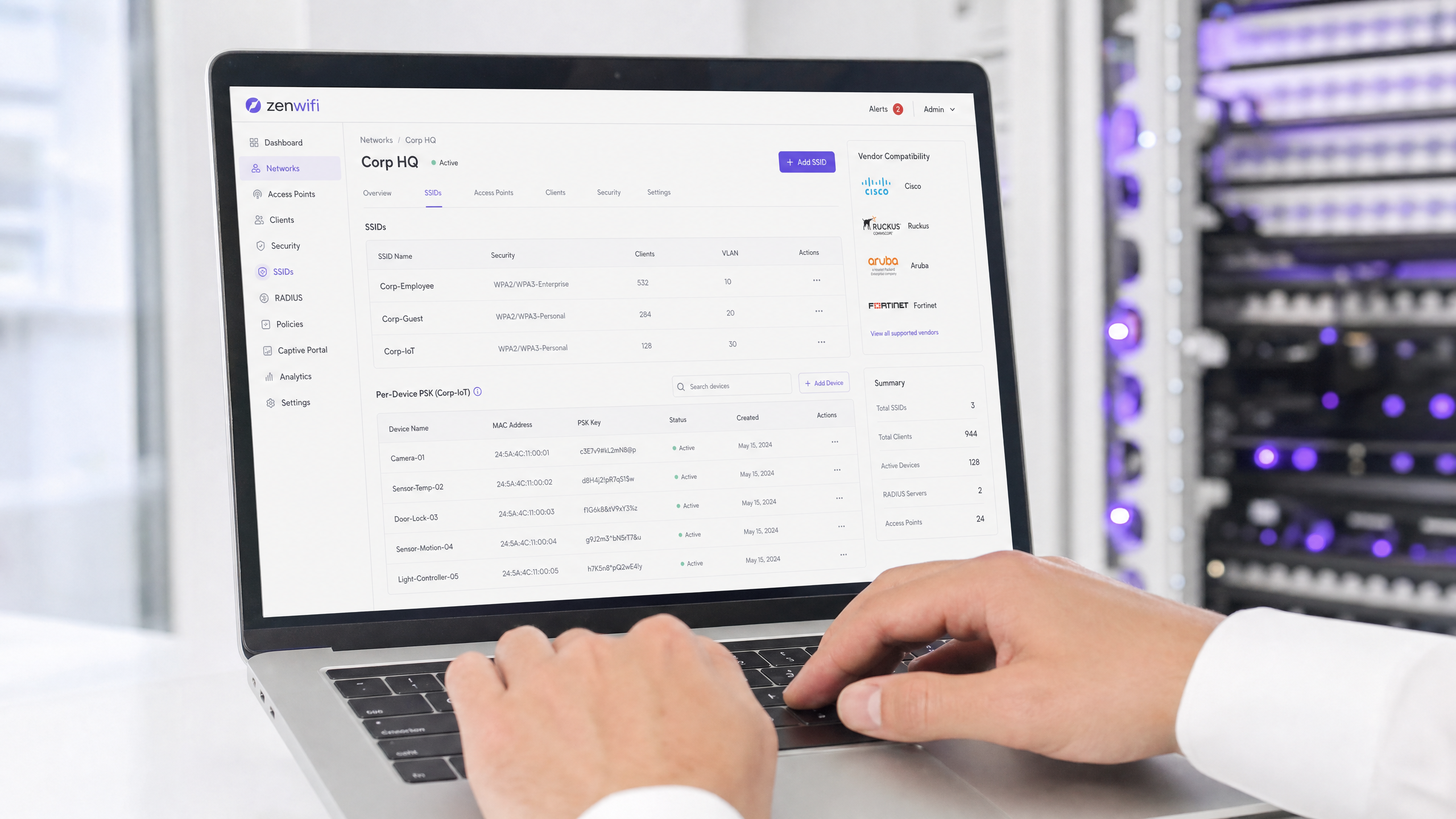
Per-device Pre-Shared Key (PSK) is the essential transition technology for enterprise networks that need per-device visibility without the complexity of full 802.1X authentication. While vendors use different names - Cisco Meraki iPSK, HPE Aruba MPSK, Ruckus DPSK, Juniper Mist PPSK - the fundamental goal is identical: assigning a unique password to every device on a single SSID.
However, the move to WPA3 introduces a significant architectural constraint. WPA3 replaces the traditional WPA2 four-way handshake with Simultaneous Authentication of Equals (SAE). SAE requires the password to be known by both the access point and the client before the exchange begins, which breaks the standard RADIUS-based lookup mechanism used by most per-device PSK implementations. This guide details how each major vendor handles per-device PSK, how they store and look up keys, and how they address the WPA3-SAE challenge - from WPA3 transition modes to proprietary extensions like Ruckus DPSK3.
Technical Deep-Dive
The Architecture of Per-Device PSK
Traditional WPA2-Personal uses a single shared passphrase for an entire SSID. Every device uses the same password, which means you cannot revoke access for one device without changing the password for everyone. Furthermore, you have no per-device visibility or policy enforcement.
Per-device PSK solves this by issuing a unique credential to each device or user. You can revoke one key without touching the others. You can assign different VLANs, bandwidth policies, or access schedules per key.
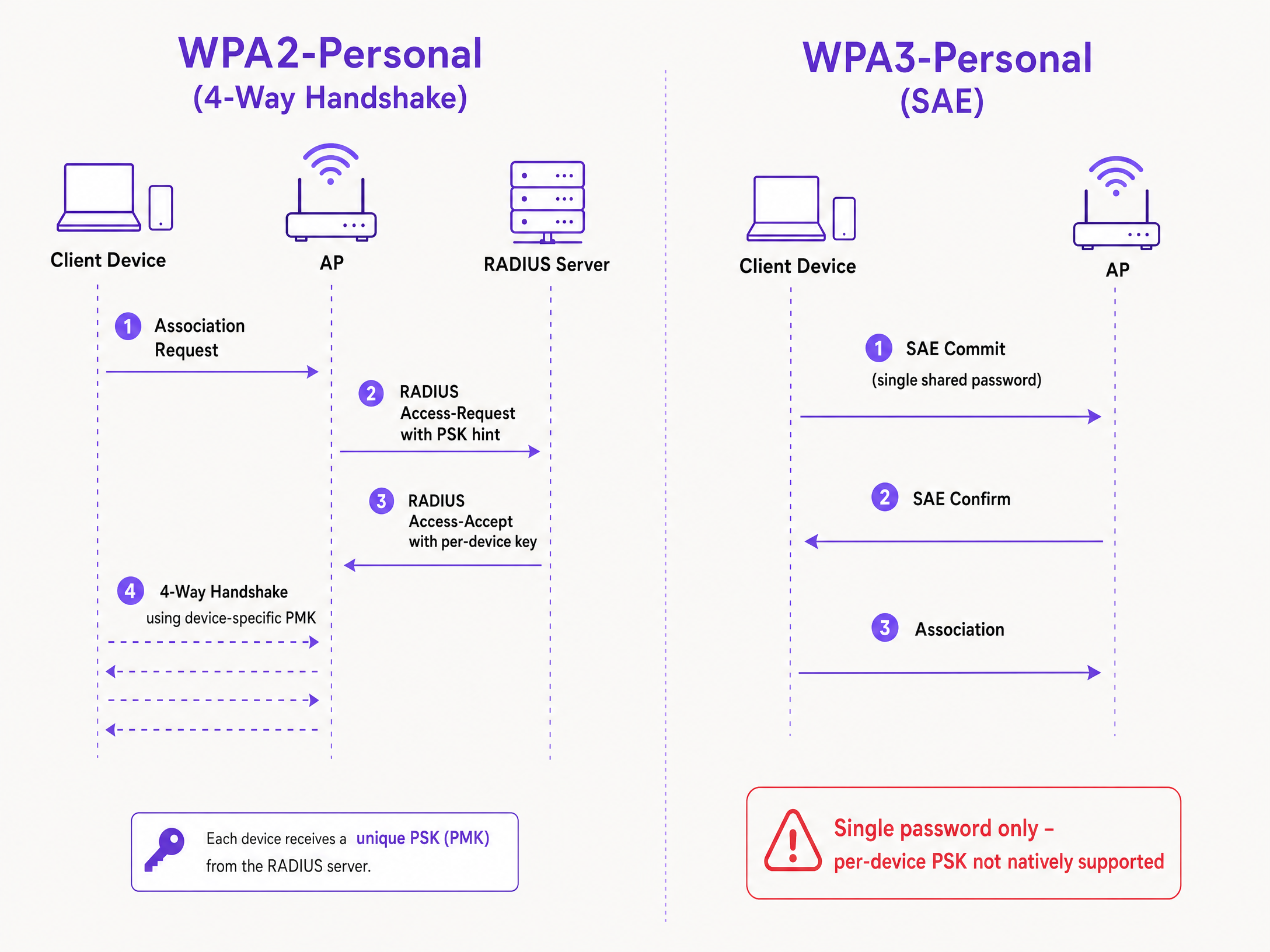
The technical mechanism relies on the WPA2 four-way handshake. When a client associates, the access point sends the client's MAC address to a RADIUS server (or a local database) in an Access-Request message. The RADIUS server returns an Access-Accept message containing the specific key for that device. The access point then completes the four-way handshake using that specific key to derive the Pairwise Master Key (PMK).
The WPA3-SAE Challenge
WPA3-Personal replaces the four-way handshake with SAE. SAE is a Diffie-Hellman-based protocol where both sides commit to a shared password element derived from the passphrase before the association completes.
The critical difference is that the password must be known to both sides before the SAE exchange begins. There is no point in the protocol where a RADIUS server can inject a different key per device. The access point and client are already executing a cryptographic exchange based on a single shared value. This is a protocol constraint defined by the IEEE 802.11 standard, not a vendor limitation.
Vendor Implementations Compared
Every major enterprise vendor supports per-device PSK, but their implementations and WPA3 readiness vary.
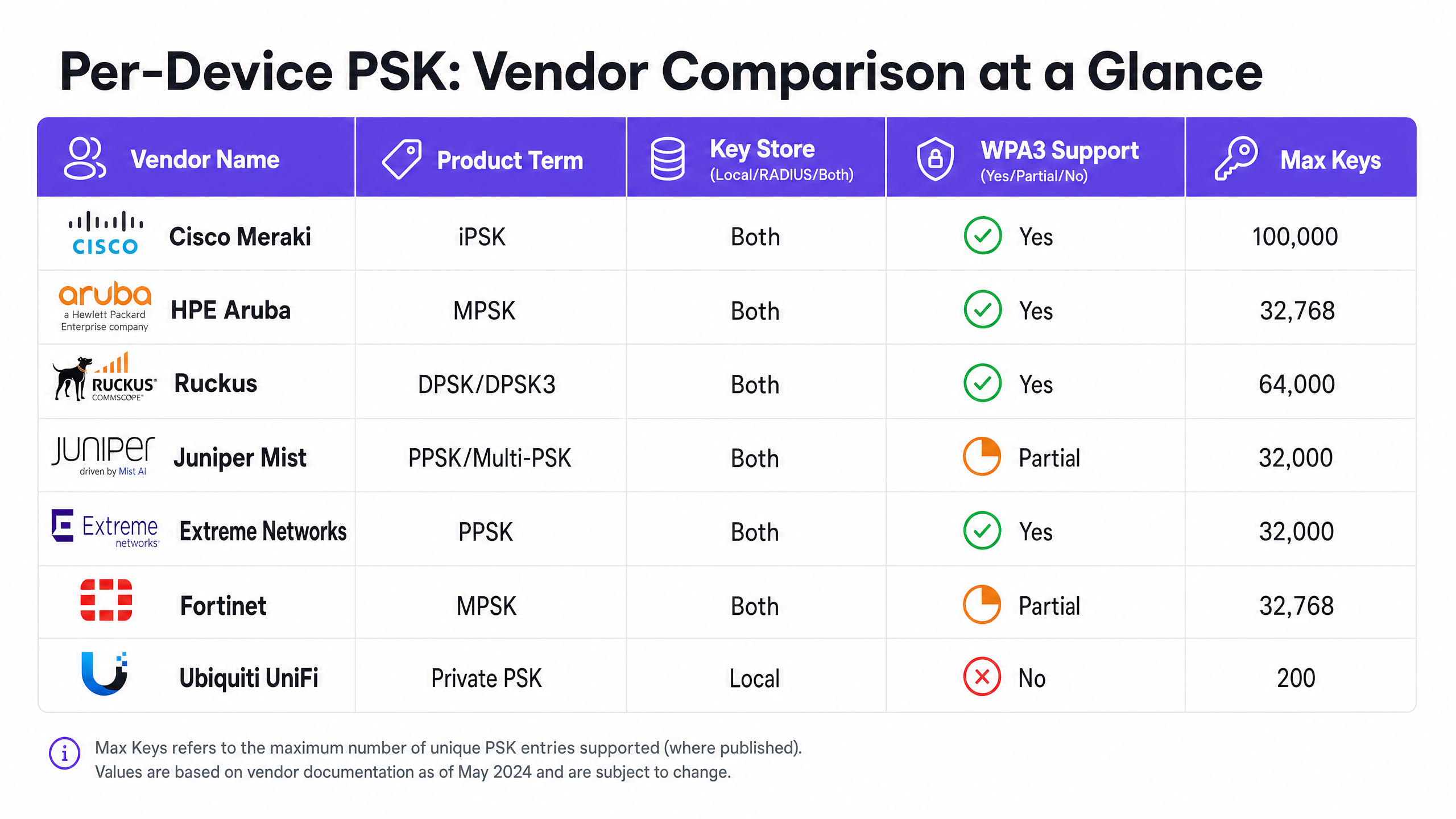
Cisco Meraki (iPSK) Cisco Meraki calls it Identity Pre-Shared Key (iPSK). It supports two modes. Without RADIUS, you can configure up to five unique PSKs directly in the Meraki dashboard. With RADIUS - typically Cisco ISE - you can scale to 100,000 keys. The RADIUS server performs the lookup and returns the per-device key. For WPA3, Meraki relies on WPA3 transition mode (WPA2/WPA3 mixed mode), where WPA2 clients use the four-way handshake and receive per-device keys, while WPA3 clients use SAE with a single shared password.
HPE Aruba (MPSK) HPE Aruba calls it Multiple Pre-Shared Key (MPSK). Aruba supports MPSK Local, where keys are stored on the controller, and MPSK with ClearPass, which acts as the RADIUS and policy engine. ClearPass can hold tens of thousands of keys and assign dynamic VLANs. Like Meraki, WPA3 support is currently handled via transition mode.
Ruckus (DPSK and DPSK3) Ruckus calls it Dynamic Pre-Shared Key (DPSK). It is one of the most mature implementations, available since the early SmartZone days. In RADIUS mode, it integrates with Cloudpath. Ruckus is notable for DPSK3, their WPA3 extension. DPSK3 operates in WPA2/WPA3 mixed mode and requires Cloudpath as the RADIUS backend. It allows WPA3-capable devices to use SAE while the system manages per-device key binding through the Cloudpath integration.
Juniper Mist (PPSK / Multi-PSK) Juniper Mist calls it Private Pre-Shared Key (PPSK) or Multi-PSK. Mist stores keys in the cloud database, with a limit of 5,000 keys per site. Keys can be assigned per user, per device, or per group. Mist integrates with its Access Assurance service, which adds RADIUS-based PSK lookup. Juniper supports WPA3 RADIUS PSK through Access Assurance, allowing a single WPA3-Personal SSID to serve multiple passphrases.
Extreme Networks (PPSK) Extreme Networks calls it Private Pre-Shared Key (PPSK) through ExtremeCloud IQ. It supports local key storage on the access point itself, which is useful for remote sites, as well as RADIUS-based lookup via ExtremeCloud IQ's cloud RADIUS service. Extreme supports MAC binding to tie a PPSK to a specific device.
Fortinet (MPSK) Fortinet calls it Multiple Pre-Shared Key (MPSK), managed through FortiAP and the FortiGate wireless controller. Fortinet explicitly supports WPA3-SAE and WPA3-SAE Transition security modes in its MPSK profiles. You can create an MPSK profile with WPA3-SAE keys, assign them to a VAP, and enable dynamic VLAN assignment.
Ubiquiti UniFi (Private PSK) Ubiquiti UniFi calls it Private Pre-Shared Keys. The implementation is local only; keys are stored in the UniFi Network controller. You can assign different VLANs per key. However, UniFi Private PSK only works on WPA2 networks on 2.4 GHz and 5 GHz. WPA3 and 6 GHz are not supported.
Implementation Guide
When deploying per-device PSK, follow these steps to ensure a secure and scalable architecture.
- Audit Your Device Landscape: Identify which devices support WPA3 and which rely on WPA2. Legacy IoT devices will likely require WPA2 for the foreseeable future.
- Select the Right SSID Strategy: For a mixed environment, deploy a hybrid SSID design. Maintain a WPA2-Personal SSID with per-device PSK for legacy IoT and guest devices. Deploy a WPA3-Enterprise SSID for managed staff devices.
- Implement Transition Mode Carefully: If you use WPA3 transition mode on your primary guest SSID, ensure your access points and RADIUS servers are correctly configured to handle the mixed authentication flows.
- Integrate Identity Management: Do not manage keys manually. Integrate your key provisioning with your device management workflow or an identity provider like Microsoft Entra ID or Okta.
- Configure Dynamic VLANs: Map each per-device PSK to a specific VLAN to enforce network segmentation. This is critical for isolating IoT devices from guest traffic.
Best Practices
- Enforce Lifecycle Management: Per-device PSK requires strict lifecycle management. You must have a process to revoke keys when devices are decommissioned to prevent key sprawl.
- Use 802.1X for Managed Endpoints: For corporate laptops and staff devices, move to WPA3-Enterprise with EAP-TLS. It provides stronger security and native compatibility with zero-trust models.
- Test WPA3 Upgrades: Never enable WPA3 on an existing per-device PSK SSID without testing in a pilot site. Verify firmware versions and RADIUS server compatibility.
- Leverage Purple for Identity: Integrate Purple to handle the identity layer. Purple sits as a cloud overlay, providing authentication, data capture, and consent management, and passes the appropriate VLAN assignment back to your hardware via RADIUS. See Enterprise WiFi Security: A Complete Guide for 2026 for more details.
Troubleshooting & Risk Mitigation
- Clients Failing to Connect on WPA3: If legacy devices fail to connect to a WPA3 transition mode SSID, it is often due to incompatible wireless drivers. Ensure client drivers are updated. If the issue persists, move legacy devices to a dedicated WPA2-only SSID.
- RADIUS Timeouts: If the access point times out waiting for the per-device key from the RADIUS server, check the network path and ensure the RADIUS server is scaled to handle the authentication load.
- VLAN Assignment Failures: If a device connects but receives the wrong IP address, verify the VLAN mapping in the RADIUS Access-Accept message and ensure the VLAN exists on the access point and switch port.
ROI & Business Impact
Implementing per-device PSK delivers measurable business value by reducing support tickets and improving security.
- Reduced Helpdesk Load: Automating key provisioning and revocation eliminates manual password resets.
- Improved Security Posture: Isolating devices onto separate VLANs based on their unique key reduces the blast radius of a compromised device.
- Enhanced Visibility: Per-device keys provide granular visibility into network utilisation, allowing you to identify bandwidth hogs and optimise capacity planning.
Key Definitions
Per-Device PSK
A security mechanism that assigns a unique Pre-Shared Key to each device or user on a single SSID, allowing for individual revocation and dynamic policy assignment.
Used when IT teams need per-device visibility and control without deploying full 802.1X authentication.
WPA3-SAE
Simultaneous Authentication of Equals. The secure key establishment protocol used in WPA3-Personal, replacing the WPA2 four-way handshake.
Relevant when upgrading to WPA3 or deploying 6 GHz networks, as it fundamentally changes how passwords are authenticated.
Transition Mode
A mixed-mode configuration where an SSID advertises support for both WPA2-PSK and WPA3-SAE, allowing legacy and modern clients to connect to the same network name.
The standard approach for migrating existing networks to WPA3 without stranding legacy devices.
MAC Binding
The process of associating a specific per-device PSK with the hardware MAC address of a specific device, preventing the key from being used on another device.
Used to prevent credential sharing and ensure strict access control for IoT devices.
Dynamic VLAN Assignment
The ability to assign a device to a specific Virtual LAN based on its authentication credentials (such as its per-device PSK), rather than the SSID it connects to.
Essential for network segmentation, allowing IT to isolate guest traffic from corporate traffic on the same access point.
iPSK
Identity Pre-Shared Key. Cisco Meraki's implementation of per-device PSK.
Encountered when managing Cisco Meraki wireless networks.
DPSK
Dynamic Pre-Shared Key. Ruckus's implementation of per-device PSK, with DPSK3 being the WPA3-compatible version.
Encountered when managing Ruckus wireless networks.
MPSK
Multiple Pre-Shared Key. The term used by HPE Aruba and Fortinet for their per-device PSK implementations.
Encountered when managing HPE Aruba or Fortinet wireless networks.
Worked Examples
A 200-room hotel needs to provide secure Guest WiFi and isolate smart TVs in each room. They currently use a single WPA2-Personal password for all guests and devices.
Deploy per-device PSK using a RADIUS backend. Integrate Purple to capture guest data and issue a unique PSK to each guest upon registration. For the smart TVs, generate a unique PSK for each TV and map it to a dedicated IoT VLAN. Configure the guest PSKs to map to a separate Guest VLAN with client isolation enabled.
A university campus is upgrading to Wi-Fi 6E and must support WPA3 on the 6 GHz band, but they have thousands of legacy IoT devices that only support WPA2.
Implement a hybrid SSID design. Create a WPA3-Enterprise SSID for student and staff laptops and smartphones, using 802.1X for authentication. Create a separate WPA2-Personal SSID with per-device PSK on the 2.4 GHz and 5 GHz bands specifically for the legacy IoT devices.
Practice Questions
Q1. You are deploying Wi-Fi 6E access points and need to support 6 GHz clients. Your existing 5 GHz network uses iPSK for IoT devices. Can you extend the iPSK configuration to the 6 GHz band?
Hint: Consider the mandatory security protocols for the 6 GHz band.
Q2. A retail chain uses Aruba MPSK to assign unique keys to point-of-sale terminals. They want to upgrade their primary SSID to WPA3 for better security. What is the recommended approach?
Hint: Aruba MPSK requires the WPA2 four-way handshake.
View model answer
Enable WPA3 transition mode (WPA2/WPA3 mixed mode) on the SSID. The point-of-sale terminals will continue to connect using WPA2 and MPSK, while newer devices can connect using WPA3-SAE with a shared password.
Q3. You manage a Ruckus network and want to deploy per-device PSK for WPA3 clients. What specific configuration is required?
Hint: Consider the proprietary extension Ruckus offers and its backend requirements.
View model answer
You must deploy Ruckus DPSK3. This requires Wi-Fi 6 or newer access points running firmware 7.0 or later, configuring the SSID for WPA2/WPA3 mixed mode, and using Ruckus Cloudpath as the RADIUS server.
Continue reading in this series
Captive Portal Authentication Methods Compared
This authoritative technical reference guide evaluates the architectural, operational, and compliance trade-offs of five core captive portal authentication methods. It provides network architects, IT directors, and marketing managers with the quantitative data and decision frameworks required to balance guest onboarding friction with data-collection requirements across enterprise venues.
What Is MAC Address Authentication? When to Use It and When to Avoid It
This authoritative technical reference guide covers MAC address authentication in enterprise WiFi environments — how RADIUS-based MAC authentication works at Layer 2, its inherent security vulnerabilities (including MAC spoofing and the impact of OS-level MAC randomisation), and the precise operational contexts where it remains a valid tool for managing IoT and headless devices. It provides actionable deployment guidance for IT managers and network architects across hospitality, retail, healthcare, and public-sector venues, with real-world worked examples, decision frameworks, and integration context for Purple's guest WiFi and analytics platform.
What Is MAC Address Authentication? When to Use It and When to Avoid It
This authoritative technical reference guide covers MAC address authentication in enterprise WiFi environments — how RADIUS-based MAC authentication works at Layer 2, its inherent security vulnerabilities (including MAC spoofing and the impact of OS-level MAC randomisation), and the precise operational contexts where it remains a valid tool for managing IoT and headless devices. It provides actionable deployment guidance for IT managers and network architects across hospitality, retail, healthcare, and public-sector venues, with real-world worked examples, decision frameworks, and integration context for Purple's guest WiFi and analytics platform.