
Troubleshooting Windows 11 802.1X Authentication Issues
This technical reference guide provides a definitive diagnostic and remediation path for Windows 11 802.1X authentication failures. It details how OS upgrades disrupt certificate trust chains and Credential Guard enforcement, offering actionable GPO configurations and architectural best practices for enterprise IT teams.
Listen to this guide
View podcast transcript
执行摘要
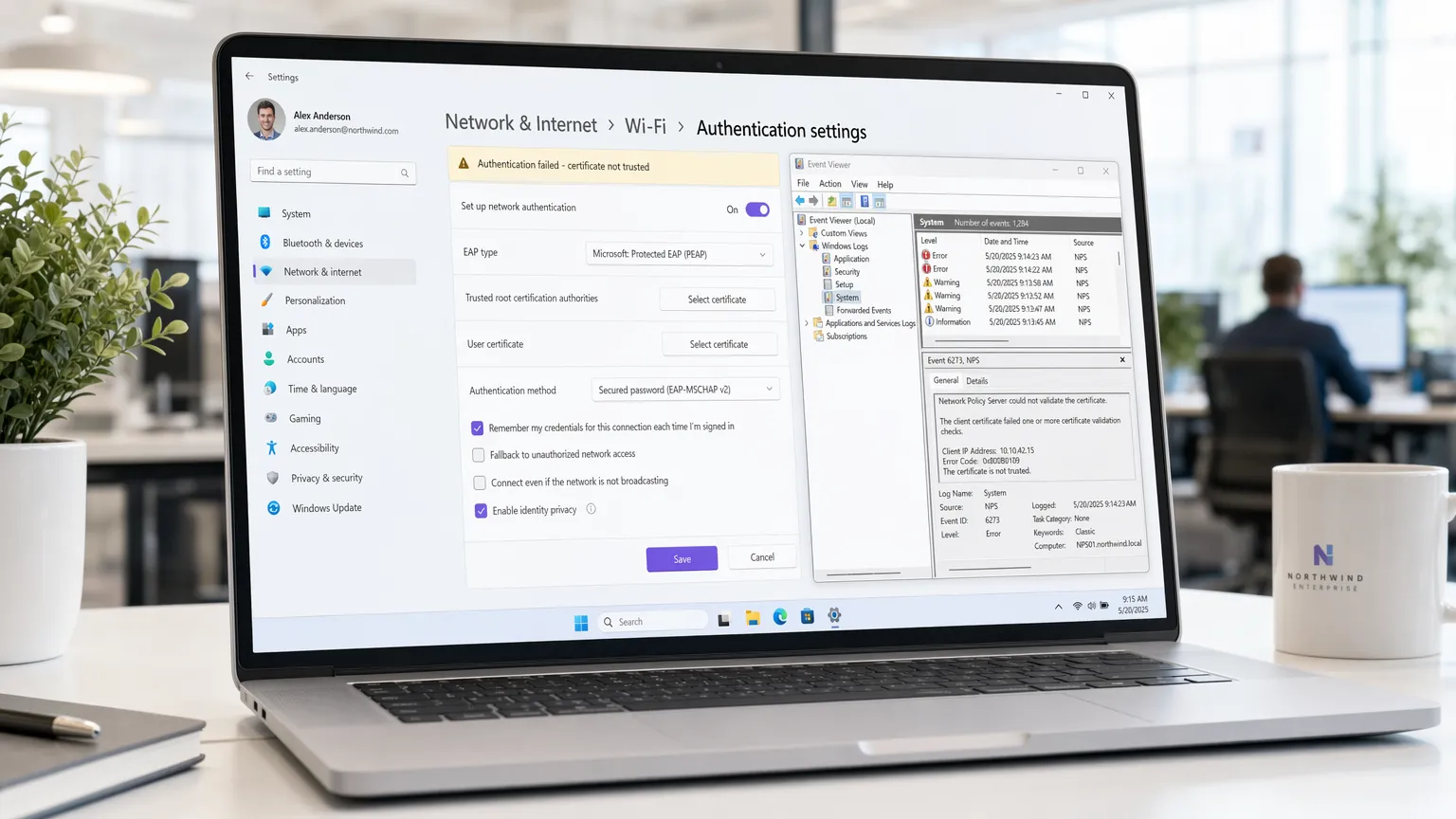
对于在 酒店业 、 零售业 和企业园区管理大规模部署的企业IT团队来说,Windows 11的推出对802.1X无线身份验证造成了重大干扰。核心问题源于Windows 11处理旧版凭据存储(通过Credential Guard)的方式以及无线配置文件中受信任根证书的迁移。设备升级时,预先存在的PEAP-MSCHAPv2或EAP-TLS配置通常无法验证网络策略服务器(NPS)证书,导致TLS隧道立即静默断开。
本指南提供一种供应商中立、基于架构的方法来诊断这些故障。我们详细说明了需要监控的具体事件查看器日志、恢复信任所需的特定组策略对象(GPO)修改,以及为保持PCI DSS和GDPR合规性而需要进行的向EAP-TLS的长期战略转变。对于场馆运营总监和网络架构师而言,解决此问题不仅是帮助台问题,更是维持安全吞吐量和业务连续性的关键要求。
技术深入解析
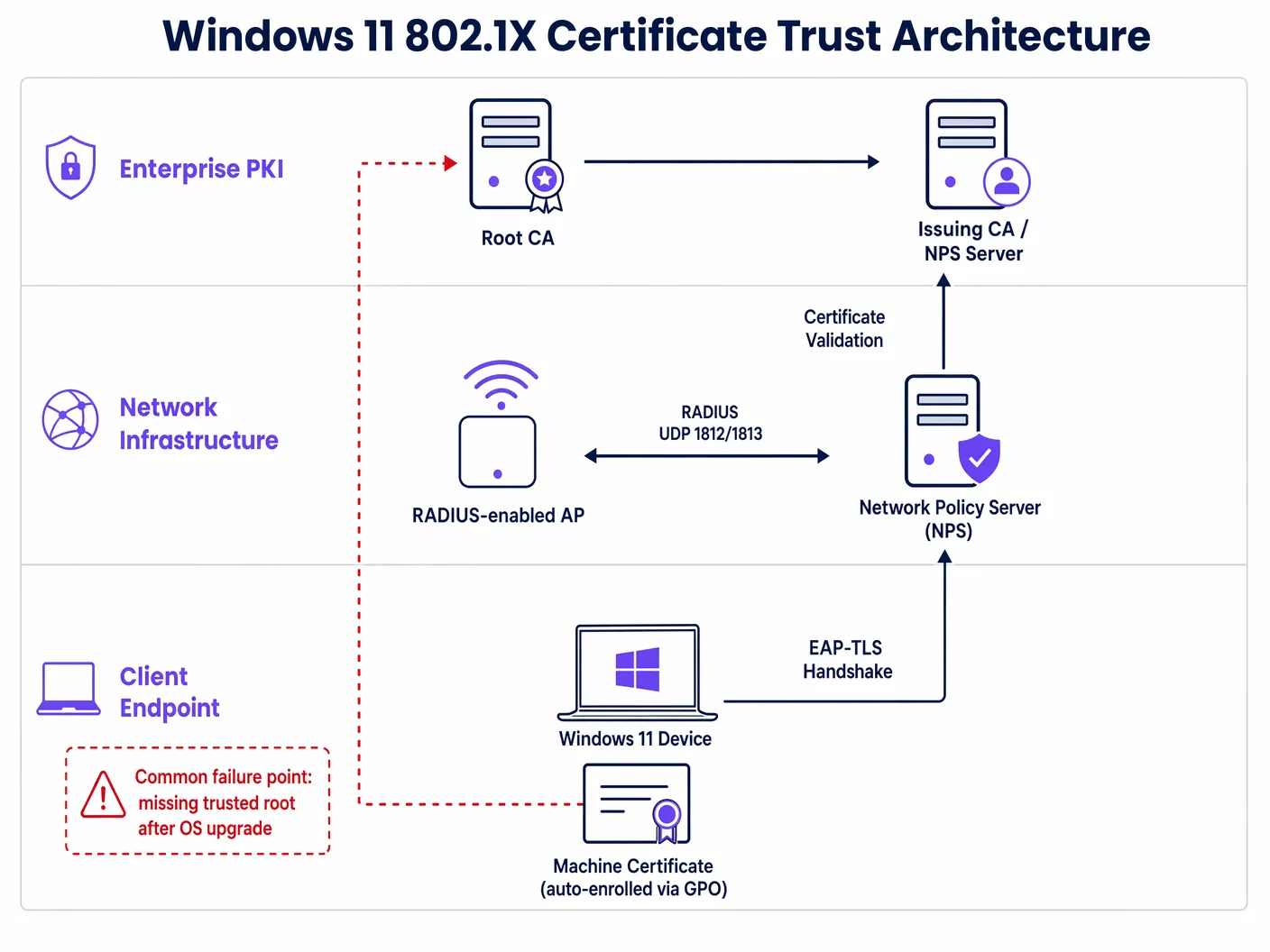
802.1X身份验证框架依赖于申请者(Windows 11终端)、认证者(无线接入点)和身份验证服务器(通常是RADIUS/NPS服务器)之间复杂的信任链。Windows 11中的故障机制主要涉及申请者无法验证认证者的身份。
证书信任崩溃
在标准PEAP(受保护的可扩展身份验证协议)部署中,服务器向客户端出示证书以建立加密的TLS隧道。客户端必须验证此证书是否由受信任的根证书颁发机构(CA)颁发。
在Windows 11升级过程中,经常发生两个关键变化:
- 配置文件迁移失败: 无线配置文件中明确信任RADIUS服务器根CA的特定设置经常被剥离或损坏。
- Credential Guard强制启用: Windows 11在兼容硬件上默认启用Windows Defender Credential Guard。这种基于虚拟化的安全功能隔离了NTLM密码哈希和Kerberos票证授予票证。虽然它在缓解传递哈希攻击方面表现出色,但可能会干扰旧版MS-CHAPv2凭据传递给802.1X申请者的方式,导致即使证书受信任也会出现静默身份验证失败。
日志分析和错误代码
诊断此问题需要检查Windows事件查看器中的WLAN-AutoConfig操作日志。证书信任失败的最常见指示器是:
- 错误11: 网络停止响应。
- 错误15: 证书链由不受信任的颁发机构颁发。
这些错误确认在实际用户或计算机凭据可以被验证之前,TLS握手就已经失败。
实施指南
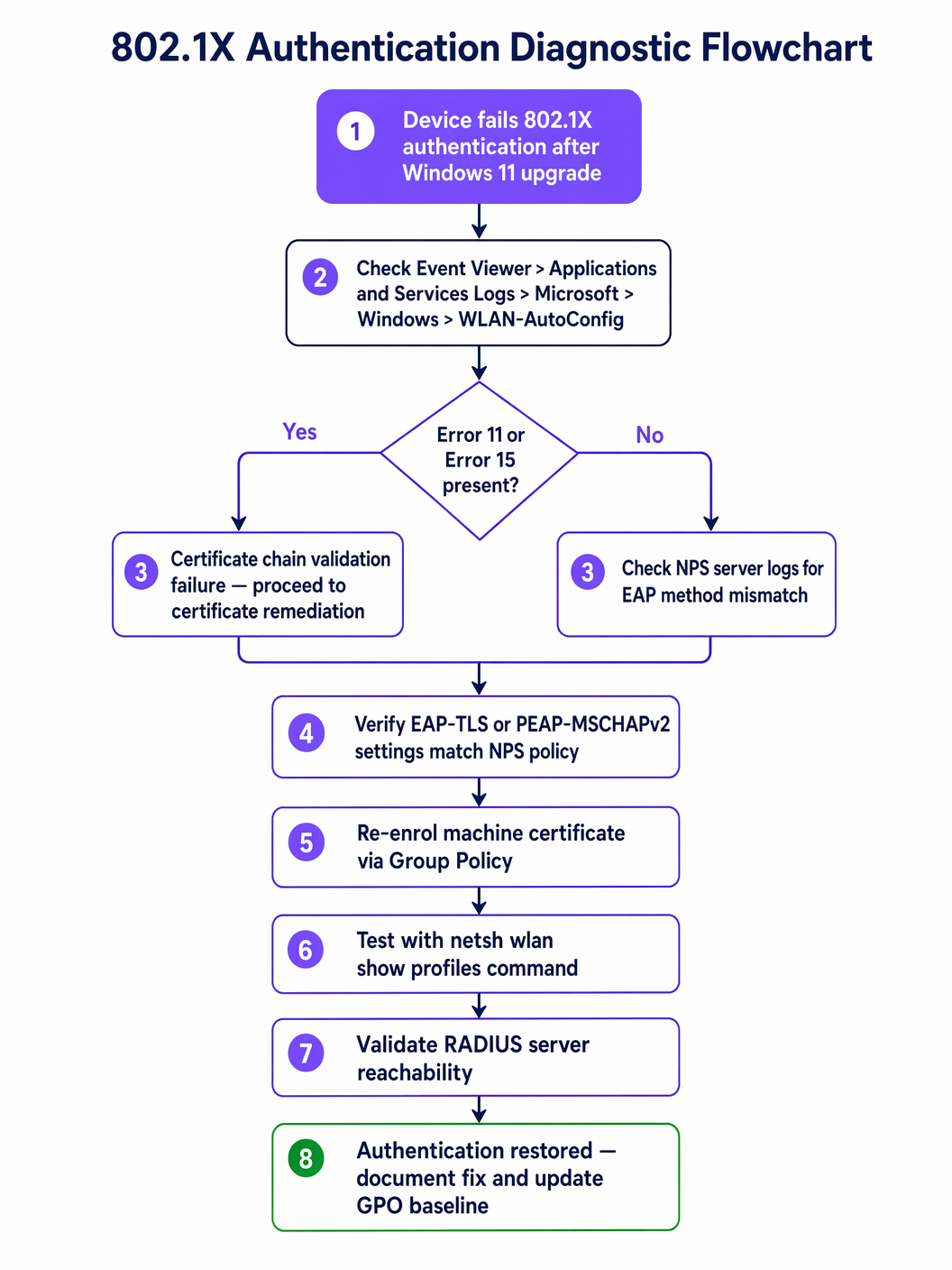
解决Windows 11 802.1X问题需要对终端管理基线进行协调更新。以下步骤概述了通过Active Directory组策略所需的修复措施。
步骤1:验证根CA部署
确保颁发NPS服务器证书的根CA证书已部署到所有客户端计算机上的受信任的根证书颁发机构存储区。这通常通过计算机配置 > 策略 > Windows设置 > 安全设置 > 公钥策略进行处理。
步骤2:重新配置无线网络(IEEE 802.11)策略
关键修复在于在无线配置文件中明确定义信任关系。
- 打开相关的GPO并导航至
计算机配置 > 策略 > Windows设置 > 安全设置 > 无线网络(IEEE 802.11)策略。 - 编辑企业SSID配置文件属性。
- 导航到安全选项卡,并为您选择的网络身份验证方法(例如,Microsoft:受保护的EAP (PEAP))选择属性。
- 在PEAP属性窗口中,选中通过验证证书来验证服务器身份复选框。
- 至关重要的是,在受信任的根证书颁发机构列表中,您必须明确选中颁发NPS证书的CA旁边的复选框。
- 确保选中启用快速重新连接以优化漫游性能。
步骤3:解决Credential Guard冲突
如果证书信任已验证但PEAP-MSCHAPv2认证仍然失败,则Credential Guard可能正在干扰。长期的架构解决方案是完全从基于密码的身份验证迁移。过渡到EAP-TLS(对计算机和用户都使用基于证书的身份验证)可以完全绕过MS-CHAPv2凭据存储问题。有关现代化安全状况的详细指导,请参阅我们的指南: 实施WPA3-Enterprise以增强无线安全 。
最佳实践
在管理企业无线基础设施时,尤其是在 医疗保健 或大规模 交通 枢纽等高密度环境中,遵守供应商中立的规范对于风险缓解至关重要。
- 永远不要禁用证书验证: IT团队采用的最常见且最危险的变通方法是取消选中“验证服务器身份”框。这会使网络暴露于邪恶双胞胎攻击和凭据收集,直接违反PCI DSS合规性。始终修复底层信任链。
- 实施计算机身份验证: 仅依赖用户凭据意味着设备无法在用户登录之前连接到网络,从而破坏了GPO更新和远程管理。实施计算机身份验证(使用EAP-TLS)以确保设备始终连接且可管理。
- 标准化EAP-TLS: 基于密码的802.1X (PEAP) 对操作系统级别的安全更改越来越脆弱。EAP-TLS提供了更强的安全性、无缝的用户体验(无密码提示)以及对Credential Guard冲突的免疫力。
故障排除与风险缓解
除了主要的证书信任问题之外,网络架构师还必须为Windows 11部署期间的次级故障模式做好准备。
RADIUS服务器过载
当大量计算机升级并随后未能通过身份验证时,它们会不断重试连接。这可能导致RADIUS风暴,使NPS服务器不堪重负,并导致整个无线网络出现拒绝服务状况。
缓解措施: 在无线LAN控制器(WLC)上实施积极的RADIUS超时和重试限制。分阶段推出操作系统升级以监控NPS服务器的CPU和内存利用率。
Captive Portal回退
对于绝对无法通过GPO修复的设备(例如,未管理的BYOD或承包商设备),提供安全的回退机制。利用强大的 Guest WiFi 解决方案和captive portal,可以让这些用户获得互联网访问,同时与内部企业网络保持隔离。这确保了在IT团队调查802.1X故障时生产力不会停止。
ROI与业务影响
解决802.1X认证问题不仅是技术上的必要,还具有直接的业务影响。
- 降低帮助台成本: 主动的GPO修复可以防止数百个一线支持工单,显著降低IT运营支出。
- 业务连续性: 在 零售业 等行业,移动销售点(mPOS)设备依赖安全的Wi-Fi,认证失败直接影响收入生成。
- 合规态势: 保持严格的证书验证可确保持续符合监管框架,避免潜在的罚款和与数据泄露相关的声誉损害。
通过解决Windows 11身份验证失败的根本原因并迁移到强大的EAP-TLS架构,IT领导者可以确保他们的无线基础设施保持安全、高性能的资产。
Key Definitions
802.1X
An IEEE standard for port-based network access control, providing an authentication mechanism to devices wishing to attach to a LAN or WLAN.
The foundational security protocol for enterprise wireless networks, ensuring only authorized devices and users can access corporate resources.
PEAP (Protected Extensible Authentication Protocol)
An authentication protocol that encapsulates the EAP within an encrypted and authenticated TLS tunnel.
The most common legacy 802.1X deployment, relying on a server-side certificate and client-side passwords (MS-CHAPv2). It is highly susceptible to Windows 11 upgrade issues.
EAP-TLS (Extensible Authentication Protocol-Transport Layer Security)
An EAP method that relies on client and server certificates to establish a secure connection.
The recommended architectural standard for modern enterprise wireless, providing the highest level of security and immunity to password-related OS conflicts.
RADIUS (Remote Authentication Dial-In User Service)
A networking protocol that provides centralized Authentication, Authorization, and Accounting (AAA) management.
The server component (often Microsoft NPS) that processes the 802.1X authentication requests from the wireless access points.
Supplicant
The client device (e.g., a Windows 11 laptop) attempting to access the network.
The endpoint that must be correctly configured via GPO to trust the RADIUS server's certificate.
Authenticator
The network device (e.g., a wireless access point or switch) that facilitates the authentication process between the supplicant and the RADIUS server.
The infrastructure component that enforces the 802.1X policy, blocking access until authentication is successful.
Credential Guard
A Windows security feature that uses virtualization-based security to isolate secrets so that only privileged system software can access them.
A common cause of PEAP-MSCHAPv2 failures in Windows 11, as it alters how legacy passwords are handled during the authentication process.
Group Policy Object (GPO)
A collection of settings that define what a system will look like and how it will behave for a defined group of users or computers in Active Directory.
The primary mechanism for deploying the required certificate trust and wireless profile configurations to resolve Windows 11 802.1X issues at scale.
Worked Examples
A large retail chain with 500 locations is rolling out Windows 11 to all store manager laptops. After the first 50 upgrades, managers report they cannot connect to the 'Corp-Secure' SSID. The helpdesk confirms the devices are receiving the correct GPO, but the connection drops silently. How should the network architect resolve this?
The architect must first verify the specific error in the WLAN-AutoConfig logs on a failing device. If Error 11 or 15 is present, the issue is certificate trust. The architect must edit the 'Wireless Network (IEEE 802.11) Policies' GPO. Within the PEAP properties for the 'Corp-Secure' profile, they must explicitly check the box next to the specific Root CA that issued the RADIUS server's certificate. Once the GPO is updated and pushed via gpupdate /force, the laptops will successfully validate the server and connect.
A hospital IT team has updated their GPO to explicitly trust the RADIUS server's Root CA, but Windows 11 devices using PEAP-MSCHAPv2 are still failing to authenticate. The NPS logs show 'Authentication failed due to a user credentials mismatch.' What is the likely cause and the recommended long-term solution?
The likely cause is Windows Defender Credential Guard, which is enabled by default in Windows 11 and can interfere with legacy MS-CHAPv2 credential handling. The immediate fix is to disable Credential Guard via GPO for those specific devices, but this weakens the endpoint security posture. The recommended long-term architectural solution is to migrate the wireless network to EAP-TLS using machine and user certificates. This eliminates the reliance on passwords and bypasses the Credential Guard conflict entirely.
Practice Questions
Q1. A CTO asks you to resolve a widespread 802.1X failure immediately by unchecking 'Verify the server's identity' in the GPO to get the sales team back online. How do you respond?
Hint: Consider the compliance and security implications of disabling certificate validation.
View model answer
I would advise against this approach. Disabling certificate validation exposes the network to Evil Twin attacks and credential harvesting, which directly violates PCI DSS and GDPR compliance. The correct approach is to identify the missing Root CA and explicitly trust it within the GPO. If immediate access is required, we can route affected users through a secure Guest WiFi captive portal as a temporary fallback while the GPO propagates.
Q2. You are designing the wireless architecture for a new corporate campus and must choose between PEAP-MSCHAPv2 and EAP-TLS. Given the recent Windows 11 upgrade issues, which do you recommend and why?
Hint: Evaluate the impact of OS-level security features like Credential Guard on legacy authentication methods.
View model answer
I strongly recommend EAP-TLS. While PEAP-MSCHAPv2 is easier to deploy initially (relying on AD passwords), it is highly susceptible to OS-level changes like Credential Guard and profile migration failures. EAP-TLS uses machine and user certificates, eliminating password-related vulnerabilities, providing a seamless user experience, and ensuring long-term architectural stability against future OS updates.
Q3. After deploying the correct GPO to explicitly trust the Root CA, several machines still fail to connect. You notice these machines have not been on the network for several weeks. What is the likely issue and how do you resolve it?
Hint: Consider how Group Policy updates are delivered to endpoints.
View model answer
The likely issue is that these machines have not received the updated GPO because they cannot connect to the network to pull the policy. This is a classic 'chicken-and-egg' problem. To resolve it, the machines must be temporarily connected via a wired Ethernet connection or a secure VPN to authenticate to the domain and run gpupdate /force to receive the new wireless profile configuration.
Continue reading in this series
Troubleshooting Public WiFi: Fixing 'Connected, No Internet' and Splash Page Redirection Failures
This authoritative technical reference guide explains the underlying mechanics of captive portal detection and details the six primary failure modes that prevent guest WiFi from connecting. It provides IT managers and network architects with a practical troubleshooting framework to resolve HTTP redirect issues, DNS conflicts, and MAC randomisation challenges.
Troubleshooting Public WiFi: Fixing 'Connected, No Internet' and Splash Page Redirection Failures
This authoritative technical reference guide explains the underlying mechanics of captive portal detection and details the six primary failure modes that prevent guest WiFi from connecting. It provides IT managers and network architects with a practical troubleshooting framework to resolve HTTP redirect issues, DNS conflicts, and MAC randomisation challenges.
Top 10 Causes of DHCP Timeouts on High-Density Wireless Networks
This authoritative technical reference guide identifies the top ten causes of DHCP timeouts on high-density wireless networks and provides actionable, vendor-neutral remediation strategies. Designed for senior IT leaders, network architects, and venue operations directors, it covers deep-dive engineering principles, step-by-step implementation workflows, and measurable business outcomes. Learn how to eliminate connection bottlenecks and optimise your wireless infrastructure to deliver seamless connectivity in demanding enterprise environments.