

Il WiFi Pubblico è Sicuro? La Guida Definitiva
Questa guida definitiva fornisce ai leader IT aziendali strategie attuabili per l'architettura di reti WiFi pubbliche sicure. Dettaglia la mitigazione tecnica delle minacce primarie come gli attacchi MITM e gli access point non autorizzati, delineando al contempo come sfruttare piattaforme come Purple per garantire la conformità, proteggere l'infrastruttura aziendale e monetizzare in sicurezza la connettività degli ospiti.
🎧 Ascolta questa guida
Visualizza trascrizione

Riepilogo Esecutivo
Per i leader IT aziendali, gli architetti di rete e i direttori delle operazioni delle sedi, la domanda "il WiFi pubblico è sicuro?" non è più una preoccupazione del consumatore, ma un mandato infrastrutturale critico. Poiché la connettività pubblica si trasforma da un vantaggio di ospitalità a un requisito operativo di base in settori come la vendita al dettaglio, la sanità e le grandi sedi, il panorama delle minacce si è evoluto. Le reti non protette espongono sia gli ospiti all'intercettazione dei dati sia l'infrastruttura aziendale al movimento laterale.
Questa guida definitiva fornisce strategie attuabili e neutrali rispetto al fornitore per l'architettura di implementazioni WiFi pubbliche sicure. Esaminiamo i meccanismi delle minacce primarie, inclusi gli attacchi Man-in-the-Middle (MITM) e gli access point Evil Twin, e delineiamo le contromisure tecniche necessarie per mitigarle. Implementando una rigorosa segmentazione VLAN, sfruttando la crittografia WPA3 Enhanced Open e distribuendo robusti captive portal tramite piattaforme come Purple, le organizzazioni possono trasformare le reti aperte vulnerabili in risorse sicure, conformi e monetizzabili. Questa guida funge da progetto pratico per la distribuzione di WiFi per ospiti di livello aziendale che protegge gli utenti, garantisce la conformità normativa (come GDPR e PCI DSS) e salvaguarda i dati aziendali.
Approfondimento Tecnico: Il Panorama delle Minacce e l'Architettura
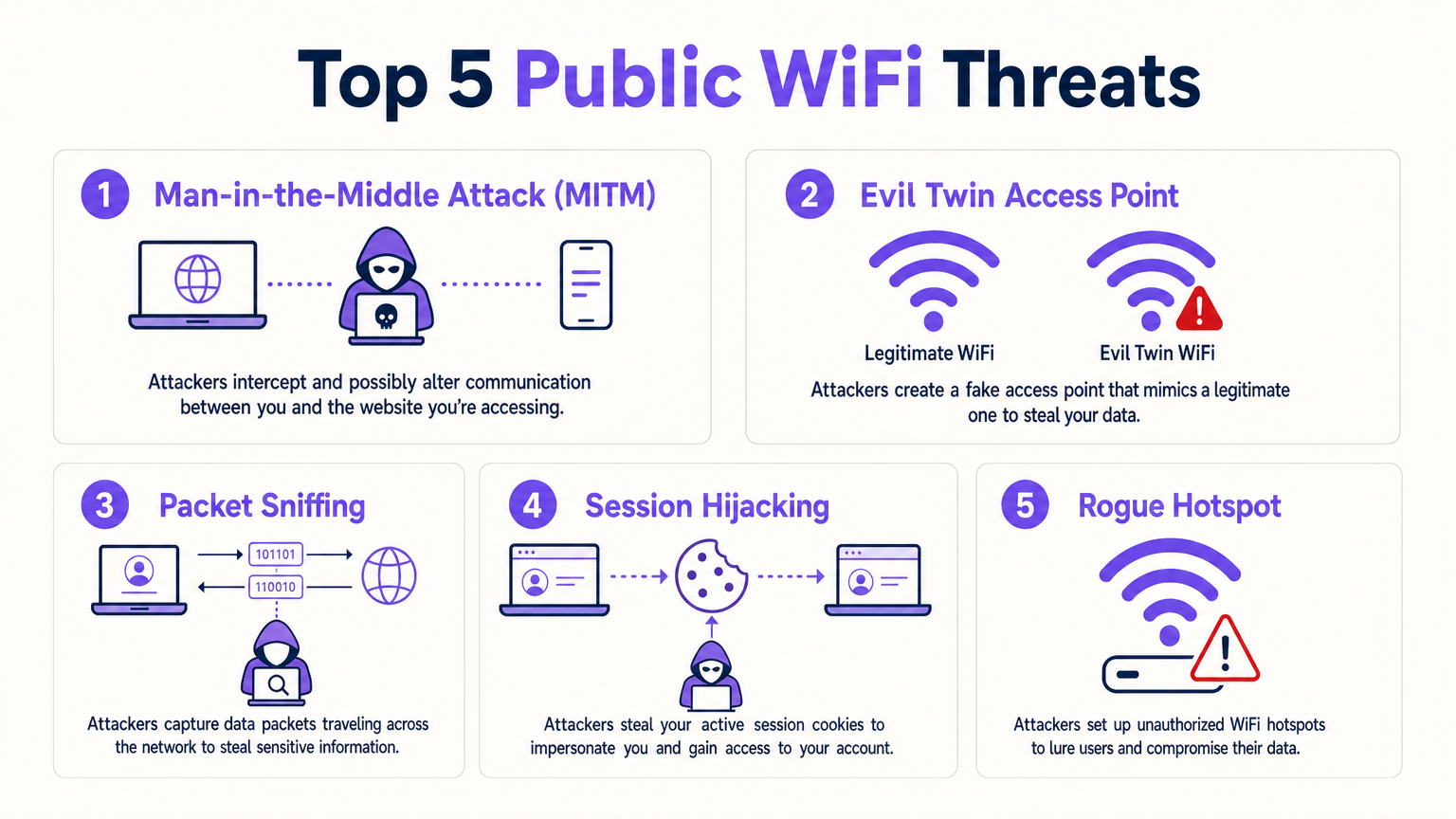
La vulnerabilità intrinseca del WiFi pubblico tradizionale deriva dalla mancanza di crittografia a livello di collegamento su SSID aperti. Quando i dati vengono trasmessi in chiaro, qualsiasi dispositivo nel raggio radio dotato di software di packet-sniffing può intercettare il traffico.
Vulnerabilità Principali
- Attacchi Man-in-the-Middle (MITM): L'attaccante si posiziona tra il dispositivo dell'ospite e l'access point (AP) o il router. Intercettando il flusso di comunicazione, l'attaccante può spiare dati sensibili o alterare il traffico in transito.
- Access Point Evil Twin: Gli attaccanti distribuiscono un AP non autorizzato che trasmette lo stesso Service Set Identifier (SSID) della rete legittima della sede (es. "Free_Stadium_WiFi"). I dispositivi si connettono automaticamente al segnale più forte, instradando tutto il traffico attraverso l'hardware dell'attaccante.
- Packet Sniffing: Intercettazione passiva di pacchetti di dati non crittografati che viaggiano via etere. Sebbene HTTPS mitighi l'ispezione del payload, i metadati e le query DNS rimangono spesso esposti.
- Session Hijacking: Sfruttamento dei cookie di sessione intercettati per impersonare l'utente su piattaforme autenticate, bypassando i requisiti di accesso.
Principi di Architettura Sicura
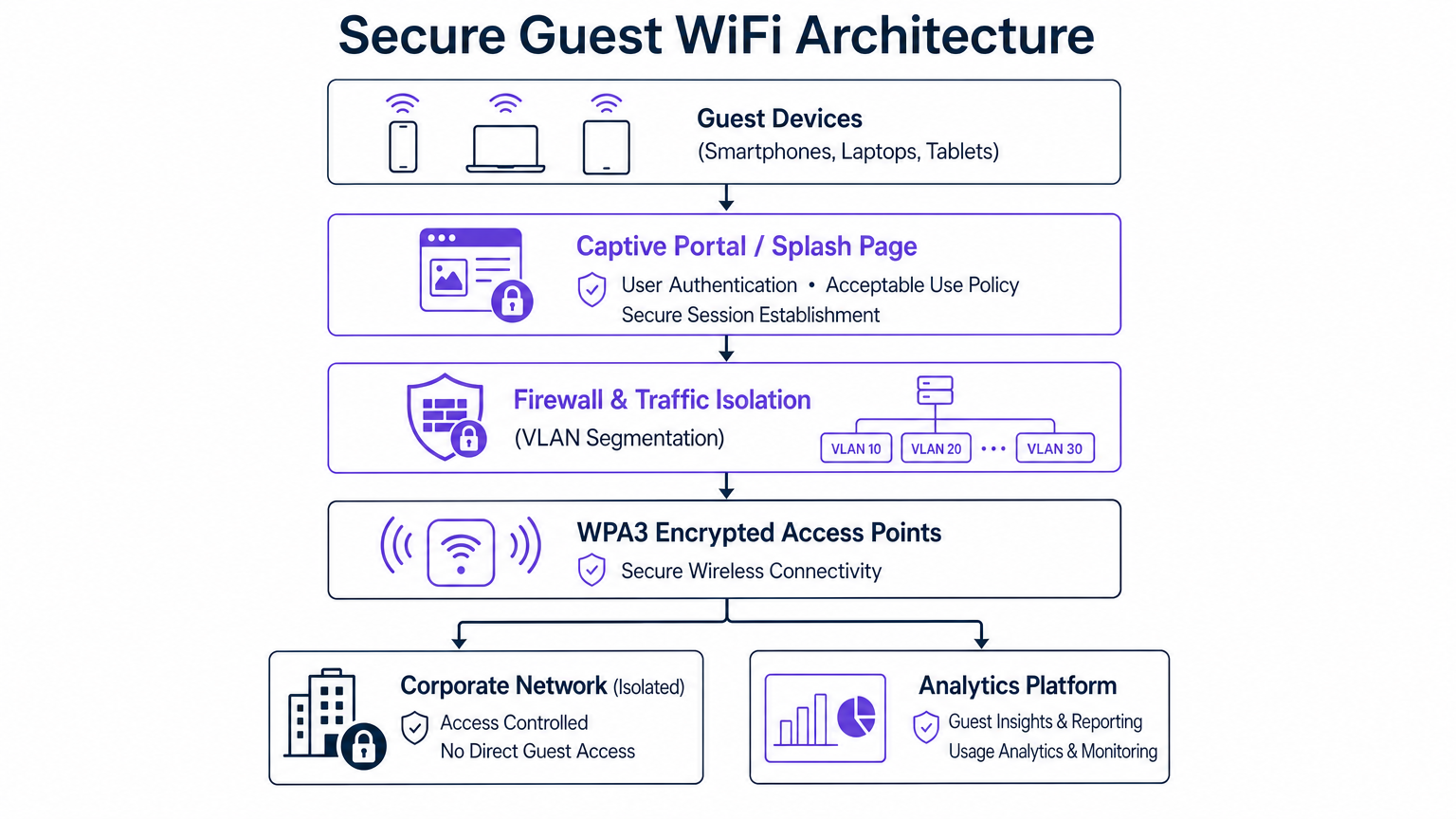
Per contrastare queste minacce, le implementazioni aziendali devono andare oltre le reti piatte di base. Un'architettura sicura si basa su principi di difesa in profondità:
- Segmentazione VLAN: Il traffico degli ospiti deve essere logicamente isolato dalle reti aziendali, Point-of-Sale (POS) e di tecnologia operativa (OT). Una VLAN dedicata garantisce che, anche se un dispositivo ospite viene compromesso, il movimento laterale nell'ambiente aziendale sia bloccato.
- Isolamento del Cliente (Isolamento Layer 2): Gli access point devono essere configurati per impedire la comunicazione peer-to-peer tra i dispositivi connessi allo stesso SSID ospite. Ciò impedisce ai dispositivi ospiti infetti di scansionare o attaccare altri ospiti.
- WPA3 e Opportunistic Wireless Encryption (OWE): WPA3 introduce Enhanced Open, che utilizza OWE per fornire una crittografia individualizzata per ogni connessione client su una rete aperta, eliminando l'intercettazione passiva senza richiedere una password condivisa.
- Passpoint / OpenRoaming: Sfruttando IEEE 802.1X, Passpoint consente ai dispositivi di autenticarsi automaticamente e in modo sicuro utilizzando le credenziali fornite da un provider di identità. Purple funge da provider di identità gratuito per OpenRoaming con licenza Connect, facilitando un accesso senza interruzioni e crittografato.
Guida all'Implementazione: Distribuzione di WiFi Sicuro per Ospiti
La distribuzione di una rete sicura richiede una configurazione meticolosa su controller wireless, switch e firewall.
Fase 1: Segmentazione della Rete e Configurazione del Firewall
Iniziare definendo una sottorete e una VLAN dedicate per il traffico degli ospiti. Configurare il firewall perimetrale con rigorose Access Control Lists (ACL).
- Regola 1: Negare tutto il traffico dalla VLAN Ospiti a qualsiasi spazio IP privato RFC 1918 (reti aziendali).
- Regola 2: Consentire il traffico dalla VLAN Ospiti strettamente alla WAN (Internet) sulle porte richieste (es. 80, 443, 53).
- Regola 3: Implementare il filtro DNS per bloccare i domini dannosi noti, impedendo agli ospiti di accedere a siti di phishing o scaricare malware.
Fase 2: Configurazione dell'Access Point
Durante il provisioning dei vostri AP (fare riferimento a risorse come La Tua Guida a un Access Point Wireless Ruckus per dettagli specifici del fornitore):
- Abilitare l'Isolamento del Cliente.
- Configurare il rilevamento di AP non autorizzati per scansionare l'ambiente RF e sopprimere gli SSID non autorizzati che tentano di falsificare la vostra rete.
- Limitare la larghezza di banda per client per prevenire condizioni di denial-of-service (DoS) causate da un singolo utente che monopolizza la connessione.
Fase 3: Captive Portal e Autenticazione
Il captive portal è il gateway critico per la sicurezza e la conformità. Invece di una semplice chiave pre-condivisa (PSK), instradare gli utenti attraverso un portale robusto.
- Integrare una piattaforma come la soluzione Guest WiFi di Purple.
- Imporre l'accettazione di una Politica di Utilizzo Accettabile (AUP) prima di concedere l'accesso.
- Utilizzare metodi di autenticazione sicuri (es. OAuth tramite accessi social o verifica SMS) per stabilire una sessione verificata.
Best Practice per i Settori Verticali
Requisiti di sicurezzaI requisiti variano significativamente a seconda dell'ambiente di implementazione.
- Ospitalità e Vendita al Dettaglio: In ambienti come Retail e Hospitality , l'attenzione è rivolta a bilanciare un accesso senza attriti con la sicurezza. I Captive Portal devono essere ottimizzati per i dispositivi mobili. La raccolta dei dati deve aderire rigorosamente al GDPR o alle leggi locali sulla privacy.
- Sanità: Gli ambienti Healthcare devono affrontare rigorosi requisiti normativi (ad es. HIPAA). Le reti ospiti devono essere assolutamente isolate dai sistemi clinici. Per approfondimenti, consulta WiFi in Hospitals: A Guide to Secure Clinical Networks .
- Trasporti e Luoghi Pubblici: Negli hub di Transport o negli stadi, gli ambienti ad alta densità richiedono una gestione aggressiva dei client e una robusta mitigazione degli AP non autorizzati a causa dell'enorme volume di utenti transitori. Considera implementazioni avanzate come Your Guide to Enterprise In Car Wi Fi Solutions .
Per una panoramica completa delle considerazioni hardware e software aziendali, consulta la Enterprise WiFi Solutions: A Buyer's Guide .
Risoluzione dei Problemi e Mitigazione del Rischio
Anche le reti ben architettate presentano anomalie. Il monitoraggio continuo è essenziale.
- Modalità di Guasto: Segmentazione Incompleta.
- Sintomo: I dispositivi ospiti possono effettuare ping ai server interni.
- Mitigazione: Controllare regolarmente le regole del firewall ed eseguire test di penetrazione dalla prospettiva della rete ospite.
- Modalità di Guasto: Proliferazione di AP Non Autorizzati.
- Sintomo: Gli utenti segnalano di connettersi alla rete ma di non riuscire a raggiungere il Captive Portal, oppure l'IT rileva SSID duplicati.
- Mitigazione: Assicurarsi che i Wireless Intrusion Prevention Systems (WIPS) siano attivi e configurati per contenere automaticamente gli AP non autorizzati tramite frame di deautenticazione.
- Modalità di Guasto: Traffico in Uscita Malevolo.
- Sintomo: Un dispositivo ospite tenta di contattare server di comando e controllo (C2) o di lanciare campagne di spam in uscita.
- Mitigazione: Utilizzare WiFi Analytics per monitorare i modelli di traffico. Implementare la limitazione automatica o la blacklist per gli indirizzi MAC che mostrano comportamenti anomali.
ROI e Impatto sul Business
Investire in un WiFi pubblico sicuro non è solo un esercizio di mitigazione del rischio; genera un valore aziendale misurabile.
- Evitare il Rischio: Una singola violazione dei dati originata da una rete ospite non protetta può comportare gravi multe normative (ad es. sanzioni GDPR) e danni catastrofici al marchio. Un'architettura sicura mitiga questo rischio non quantificabile.
- Raccolta Dati Migliorata: Un Captive Portal sicuro e conforme crea fiducia negli utenti. Quando gli utenti si sentono sicuri, sono più propensi ad autenticarsi utilizzando credenziali reali, migliorando la qualità dei dati di prima parte raccolti per le iniziative di marketing.
- Efficienza Operativa: L'onboarding automatizzato tramite OpenRoaming riduce i ticket dell'helpdesk relativi a problemi di connettività. Le piattaforme di analisi gestite in cloud forniscono ai team IT una visibilità centralizzata, riducendo il tempo necessario per risolvere le anomalie di rete.
Trattando il WiFi pubblico come un'estensione del perimetro di sicurezza aziendale, le organizzazioni possono offrire un'esperienza ospite senza interruzioni mantenendo il controllo assoluto sulla propria infrastruttura.
Termini chiave e definizioni
VLAN Segmentation
The practice of logically dividing a physical network into multiple isolated broadcast domains.
Essential for keeping guest traffic entirely separate from corporate data and payment systems.
Client Isolation (Layer 2 Isolation)
A wireless network setting that prevents devices connected to the same access point from communicating with each other.
Critical on public networks to stop infected guest devices from spreading malware to other guests.
Man-in-the-Middle (MITM) Attack
A cyberattack where an adversary secretly intercepts and relays communications between two parties who believe they are communicating directly.
The primary threat on unencrypted public WiFi, allowing attackers to steal credentials or inject malicious code.
Evil Twin Access Point
A fraudulent Wi-Fi access point that appears to be legitimate, set up to eavesdrop on wireless communications.
Attackers use this in venues to trick users into connecting, routing all traffic through the attacker's hardware.
WPA3 Enhanced Open (OWE)
A security certification that provides unauthenticated data encryption for users connecting to open Wi-Fi networks.
Replaces the legacy open network model, ensuring that even without a password, over-the-air traffic cannot be passively sniffed.
Passpoint / OpenRoaming
A protocol based on IEEE 802.1X that allows devices to automatically and securely authenticate to Wi-Fi networks using credentials from an identity provider.
Provides cellular-like roaming capabilities on Wi-Fi, improving user experience while mandating strong encryption.
Captive Portal
A web page that users of a public-access network are obliged to view and interact with before access is granted.
The enforcement point for Acceptable Use Policies and the primary mechanism for collecting compliant first-party data.
Wireless Intrusion Prevention System (WIPS)
A network device that monitors the radio spectrum for unauthorized access points (intrusion detection) and can automatically take countermeasures.
Required in enterprise deployments to automatically detect and suppress Evil Twin attacks.
Casi di studio
A 400-room luxury hotel is upgrading its network infrastructure. The IT Director needs to deploy a guest WiFi solution that provides seamless roaming across the property, captures guest data for marketing, but absolutely prevents guests from accessing the hotel's property management system (PMS) and point-of-sale (POS) terminals.
- Define VLAN 10 for Corporate/PMS, VLAN 20 for POS, and VLAN 30 for Guest Access. 2. Configure the edge firewall to drop all packets originating from VLAN 30 destined for VLAN 10 or 20. 3. Enable Layer 2 Client Isolation on all access points broadcasting the Guest SSID. 4. Deploy Purple's Guest WiFi captive portal to handle authentication and enforce the AUP, routing authenticated traffic directly to the WAN.
A large retail shopping centre is experiencing complaints that users are connecting to 'Free_Mall_WiFi' but receiving certificate errors when browsing, indicating a potential MITM attack via a rogue AP.
- Activate the Wireless Intrusion Prevention System (WIPS) on the enterprise wireless controller. 2. Configure the WIPS to classify any unmanaged AP broadcasting the official SSID or matching the venue's BSSID profile as 'Rogue'. 3. Enable automated containment, allowing legitimate APs to send deauthentication frames to clients attempting to connect to the rogue device. 4. Dispatch security personnel to physically locate the rogue hardware using signal strength mapping.
Analisi degli scenari
Q1. You are deploying a guest network in a hospital waiting area. You must provide free access while ensuring absolute compliance with patient data protection regulations. What is the most critical architectural requirement?
💡 Suggerimento:Consider how traffic is routed once it leaves the access point.
Mostra l'approccio consigliato
Strict VLAN segmentation and firewall ACLs to physically or logically isolate the guest network from the clinical and administrative networks. A captive portal must also be used to enforce an Acceptable Use Policy.
Q2. A stadium deployment is seeing high CPU utilisation on the core router during events, and analytics show several devices performing rapid IP scans across the subnet. What configuration was likely missed?
💡 Suggerimento:Think about how devices communicate with each other on the same SSID.
Mostra l'approccio consigliato
Client Isolation (Layer 2 Isolation) is likely disabled on the access points. Enabling this prevents peer-to-peer communication on the guest network, stopping the IP scanning behaviour.
Q3. The marketing team wants to offer 'frictionless' access without a password, but the security team mandates that over-the-air traffic cannot be passively sniffed. How do you resolve this conflict?
💡 Suggerimento:Look at modern wireless encryption standards designed for open networks.
Mostra l'approccio consigliato
Implement WPA3 with Enhanced Open (Opportunistic Wireless Encryption). This provides individualised encryption for each connection without requiring the user to enter a pre-shared key, satisfying both marketing and security requirements.




