
自定义 Captive Portal:HTML 和 CSS 指南
本权威技术参考指南概述了设计和编码自定义 captive portal 落地页所需的开发标准、CSS 架构以及网络级限制。它为前端开发人员和网络架构师提供了可行性策略,以应对 Apple CNA 和 Android webview 环境,从而确保提供像素级完美、合规且高性能的访客 WiFi 体验。
Video overview
收听本指南
查看播客转录
核心系列的一部分:Captive Portal 指南 →
Custom Captive Portal Architecture & CNA Inspector Tool
Model your custom HTML/CSS guest WiFi splash page. Inspect walled garden domain allowlists, evaluate Captive Network Assistant (CNA) mini-browser restrictions across iOS and Android, and export production-ready boilerplate code.
Vendor Controller Profile: Cisco Meraki (MR Series)
Architecture Category: Cloud-Managed WLAN
Redirection Flow: Custom splash URL with URL parameter append ($login_url)
RFC 3576 CoA Support: Supported (Dynamic Session Terminate / Role Push)
RFC 8908 Modern API: Native Controller Support
Onboarding & Conversion: Click-Through / Terms Acceptance
Guests review acceptable use policies (AUP) and click a single button to connect.
Average Onboarding Duration: ~8 seconds
Target Venue Policy: Fast friction-free onboarding, social marketing consent, and return visitor recognition.
Eliminate Captive Portal Support Calls & Walled Garden Errors
Building custom HTML/CSS captive portals by hand across changing iOS, Android, and Windows mini-browsers causes frequent disconnection tickets and broken walled gardens. Purple delivers enterprise cloud captive portals with 99.99% uptime SLA, native RFC 8908 support, and seamless CRM integrations across 40,000+ venues worldwide.
- ✓ Native Cisco Meraki, Aruba & Ruckus API Sync
- ✓ Automated Walled Garden Allowlist Orchestration
- ✓ Guaranteed iOS & Android CNA Compatibility
- ✓ GDPR, CCPA & ISO 27001 Certified Data Security
Request Custom Captive Portal Consultation
Speak with a Purple wireless architect to review your splash page requirements and controller integrations.
核心摘要
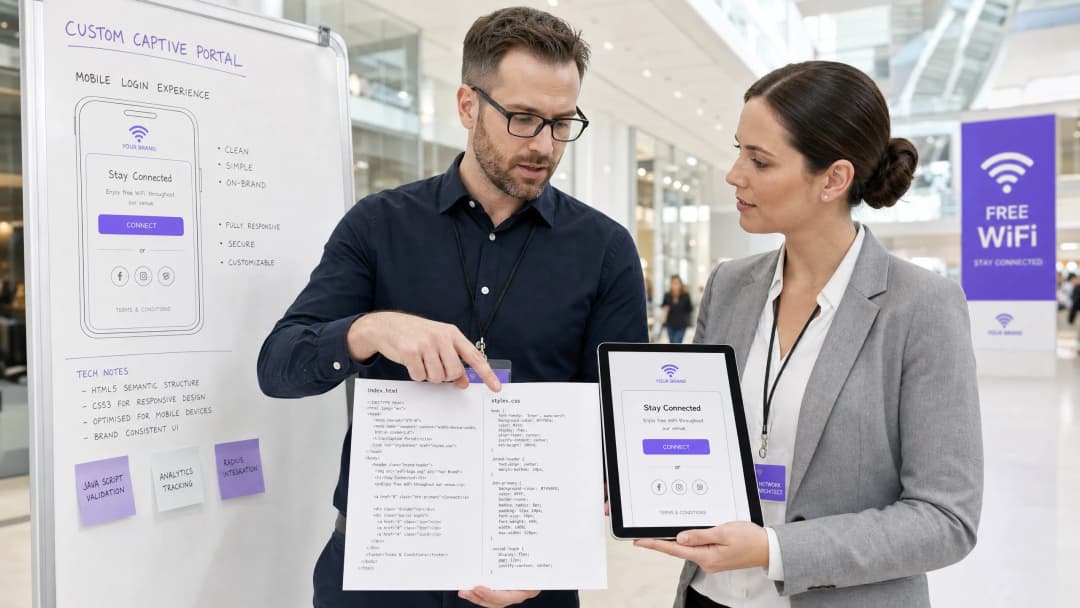
对于企业级场所 - 从豪华酒店 Hospitality 和零售连锁 Retail 到交通枢纽 Transport 以及现代医疗园区 Healthcare - 访客 WiFi 登录页面是数字化体验的第一道门槛。然而,超过 90% 的访客 WiFi 登录都发生在移动设备上,这些设备上的页面渲染并非由 Safari 或 Chrome 等标准浏览器控制,而是受制于高度受限的 Captive Network Assistant (CNA) Webview [1]。这些“微型浏览器”强制执行严格的沙盒限制:它们会阻止外部 CDN、禁用持久化 Cookie、忽略外部网络字体,并严格限制 JavaScript 的执行,以降低安全风险并防止会话劫持 [2]。
当开发人员使用传统的 Web 标准设计登录页面时,这些限制会导致布局破坏、品牌资产缺失以及登录按钮失效,从而直接影响客户满意度和数字化参与度。本指南提供了解决这些挑战的方案,介绍了防御性编码实践 - 例如内联 CSS、Base64 资产编码、系统字体栈以及显式的基于导航的认证握手 - 以确保无缝的跨平台渲染。此外,我们还将探讨如何利用像 Purple 的门户构建器这样的托管解决方案,使开发人员能够在保持对 HTML/CSS 完全创意控制的同时,将 RADIUS 认证、数据库扩展、GDPR/PCI 合规性以及多厂商 AP 集成工作交由平台处理 [3]。
技术深度剖析
要构建一个具有弹性的自定义 Captive Portal,开发人员必须了解当访客关联到开放的服务集标识符 (SSID) 时发生的网络级拦截和浏览器虚拟化。
Captive Portal 生命周期
当客户端设备与受限 SSID 关联时,会触发以下序列:
- IP 关联:设备完成三次握手,并通过 DHCP 请求 IP 地址。
- 主动连接性探测:操作系统的后台网络管理器会立即向专用的厂商中立 Canary URL 发送 HTTP GET 请求(例如,Apple 的
http://captive.apple.com/hotspot-detect.html或 Google 的http://connectivitycheck.gstatic.com/generate_204)[1]。 - DNS/HTTP 拦截:本地无线局域网控制器 (WLC) 或接入点 (AP) 会拦截此 80 端口的 HTTP 请求。网关不会返回预期的 HTTP 200 或 204 状态,而是通过 HTTP 302 重定向将客户端的流量重定向到 Captive Portal 的着陆页 URL [2]。
- Webview 生成:探测到重定向后,操作系统会生成其原生的 Captive Network Assistant (CNA) 微型浏览器来显示重定向的登录页面,从而无需用户手动打开完整的浏览器。5. 身份验证与状态转换:用户填写登录表单,将凭据提交回门户服务器。门户服务器指示网关(通常通过 RADIUS Access-Accept 或外部 API 调用)授权该 MAC 地址。
- CNA 退出握手:CNA 微型浏览器向其 Canary URL 执行另一次 HTTP GET。如果收到预期的 200/204 响应,它会将右上角的按钮从“取消”更改为“完成”,并将 WiFi 连接确立为主要网络接口。
特定平台的微型浏览器限制
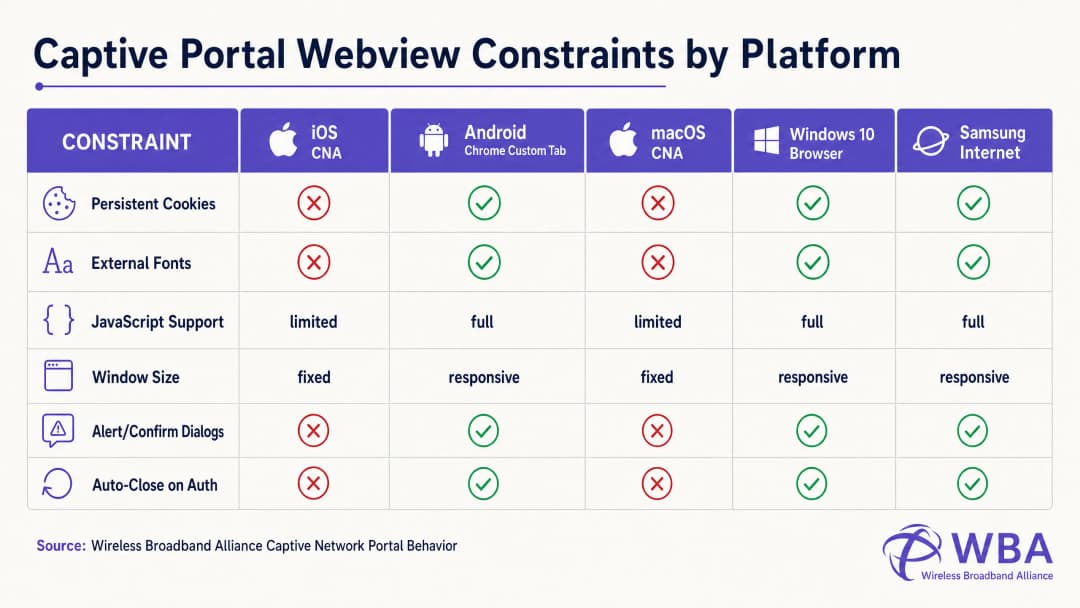
每个操作系统都在不同的 Webview 环境中处理此生命周期,从而导致高度碎片化的行为。下表详细列出了这些关键限制:
| 平台 / Webview | 显示方式 | 持久性 Cookie | 外部网络字体 | JavaScript 执行 | 窗口尺寸 | 退出握手触发器 |
|---|---|---|---|---|---|---|
| Apple iOS CNA (Websheet) | 微型浏览器弹窗 | 已被拦截(关闭时销毁) | 已被拦截(离线) | 受限(无 localStorage/sessionStorage) | 响应式(设备宽度) | 仅限全页面 HTTP 重定向 [1] |
| Apple macOS CNA (Captive Network Assistant) | 微型浏览器弹窗 | 已被拦截 | 已被拦截 | 受限(无 alert/confirm 对话框) | 固定 (900px x 572px) | 仅限全页面 HTTP 重定向 |
| Android (Google) (CaptivePortalLogin) | 推送通知 -> Chrome Custom Tab | 允许(与 Chrome 共享) | 允许(如果在围墙花园白名单中) | 完整 | 响应式 | 自动(Captive Portal API / 204 检测) [2] |
| Samsung Android (Samsung Internet) | 推送通知 -> 微型浏览器 | 允许 | 允许 | 完整 | 响应式 | 自动 |
| Windows 10/11 (默认浏览器) | 自动启动默认浏览器 | 允许(完整浏览器上下文) | 允许 | 完整 | 响应式 | 手动 / 自动 |
规避 Apple CNA “完成”按钮陷阱的编码
自定义门户开发中最常见的故障模式之一是 iOS 设备上的 “完成”按钮陷阱。当用户进行身份验证时,iOS Websheet Webview 必须检测到网络不再受限。它通过监控其后台 Canary 请求的成功状态来实现这一点。
至关重要的是,iOS CNA 仅在整页 HTTP 导航(地址重定向)时才会触发此检查。如果开发人员构建了一个现代单页面应用程序 (SPA),通过异步 AJAX 调用(例如 fetch() 或 Axios)提交表单数据并在不更改 URL 的情况下动态更新 DOM,则 CNA 将永远不会重新运行其连接性检查。用户将在网关层面通过身份验证,但右上角的 CNA 按钮仍将显示为“取消”。如果感到沮丧的用户点击“取消”,iOS 设备将立即断开与 SSID 的连接,从而终止 WiFi 会话 [1]。
为了防止这种情况,身份验证成功处理器必须执行到物理落地页的整页重定向(例如 window.location.href = '/success'),或者通过标准的 HTTP POST 操作原生提交登录表单。
实施指南
为了确保在所有平台上实现一致的渲染,开发人员必须从现代、资产繁重的网页设计转变为高度自包含、防御性的编码风格。
黄金法则:针对零互联网连接进行设计
在受限状态下,客户端设备无法访问更广泛的互联网。它只能解析和访问无线控制器 Walled Garden 中明确白名单化的 IP 地址和域名(例如 Captive Portal 服务器本身的 IP)。因此,HTML 中引用的任何外部资产都将无法加载,从而导致布局损坏。
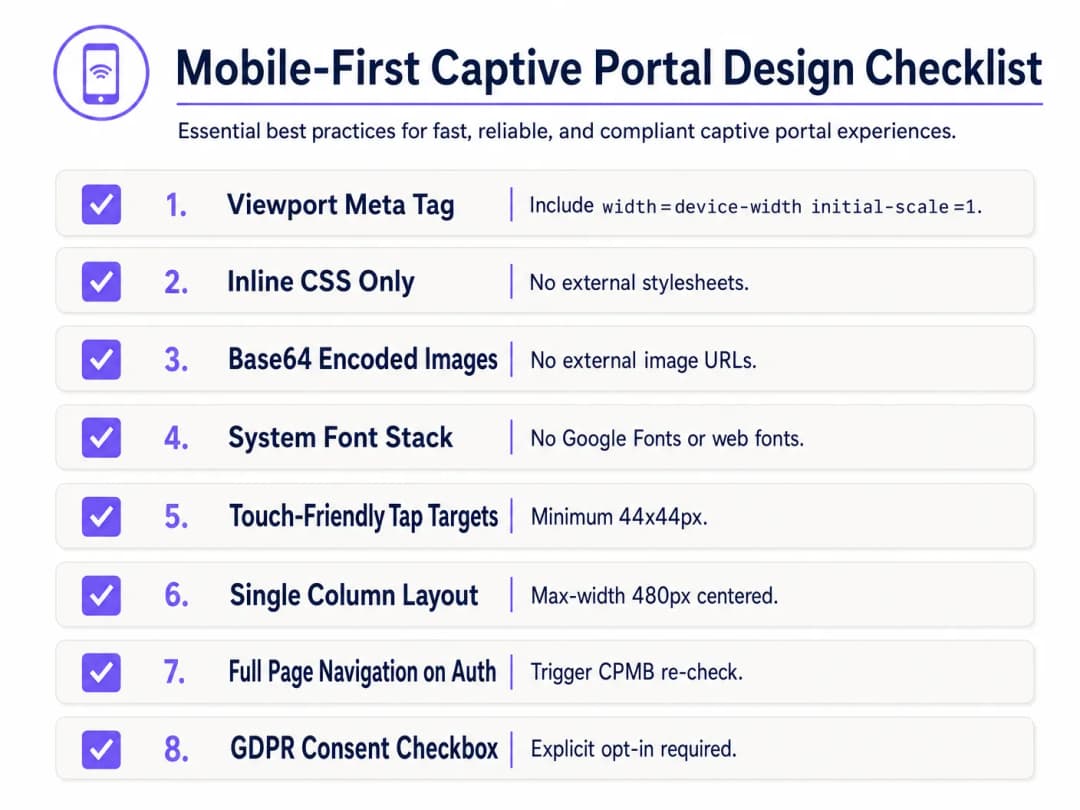
为了进行防御性设计,请实施以下移动优先 Captive Portal 设计清单:
1. 视口配置
为了防止移动设备将视口缩小到桌面宽度(通常为 980px),HTML <head> 必须包含一个响应式视口 meta 标签。如果没有这个,文本和输入字段在移动设备上会显得极其微小:
<meta name="viewport" content="width=device-width, initial-scale=1.0, maximum-scale=1.0, user-scalable=no">
2. 内联 CSS 并移除外部依赖
绝对不要链接到外部 CSS 文件或 CDN(例如 Bootstrap、Tailwind 或 Google Fonts)。所有 CSS 必须嵌入到 HTML <head> 的 <style> 块中。
对于排版,请利用引用了预安装的本地操作系统字体的系统字体栈。这完全避免了 HTTP 请求,并确保页面使用设备原生的、高质量的无衬线字体立即加载:
body {
    font-family: -apple-system, BlinkMacSystemFont, "Segoe UI", Roboto, Helvetica, Arial, sans-serif;
    background-color: #F5F1ED; /* 珍珠白品牌色 */
    color: #011638; /* 深蓝品牌色 */
    margin: 0;
    padding: 0;
    display: flex;
    flex-direction: column;
    align-items: center;
    justify-content: center;
    min-height: 100vh;
}
3. Base64 资源编码
除非托管域名已添加到网关围栏(walled garden)的白名单中,否则不应通过外部 HTTP URL 引用图像、徽标和图标。最可靠的方法是将小型视觉资源(如 PNG 或 SVG 徽标)作为 Base64 数据 URI 直接编码到 HTML 或 CSS 中:
<!-- 内联 Base64 徽标示例 -->
<img src="data:image/svg+xml;base64,PHN2ZyB4bWxucz0iaHR0cDovL3d3dy53My5vcmcvMjAwMC9zdmciIHZpZXdCb3g9IjAgMCAxMDAgMTAwIj48Y2lyY2xlIGN4PSI1MCIgY3k9IjUwIiByPSI0MCIgZmlsbD0iIzc0NThGRCIvPjwvc3ZnPg==" alt="Purple Logo" class="brand-logo">
4. 输入框和点击目标优化
为了符合移动端可用性标准(例如 Apple 的 Human Interface Guidelines),所有交互式元素都必须针对触摸输入进行优化:
- 输入框字体大小:输入文本的字体大小必须至少为 16px。如果字体大小较低(例如 14px),iOS Safari 和 CNA 会在聚焦时自动放大输入框,从而导致页面布局变形 [1]。
- 点击目标:按钮、复选框和链接的最小触摸目标区域必须为 44px x 44px,以防止误触或造成用户困扰。
5. 法律同意与 GDPR 合规性
在收集访客数据(例如电子邮件、电话号码或社交资料)时,HTML 结构必须支持明确的法律同意。在 GDPR 规定下,预先勾选的复选框或隐式同意声明(例如“登录即表示您同意我们的条款”)均属于不合规行为 [3]。
- 提供默认不勾选的复选框,用于同意条款与条件以及隐私政策。
- 将详细的法律文本放置在可滚动、限制高度的容器中(
max-height: 120px; overflow-y: auto;),以确保主要登录表单保持在首屏展示。
<div class="consent-container">
    <input type="checkbox" id="terms_consent" name="terms_consent" required>
    <label for="terms_consent">
        我明确同意 <a href="#" onclick="showTerms()">服务条款</a> 并同意根据 <a href="#" onclick="showPrivacy()">隐私政策</a> 处理我的个人数据。
    </label>
</div>
对您的具体配置有疑问吗?
我们的团队与 80,000 多个场所的运营方、IT 经理和网络工程师保持合作。预约 20 分钟的通话,我们将为您展示同行是如何解决类似问题的。
自定义 Captive Portal HTML/CSS 模板
以下是一个完整的、可直接用于生产环境的单文件 HTML/CSS 模板,其中融入了所有移动优先、符合 CNA 要求的最佳实践。它采用了响应式布局、系统字体栈、支持 Base64 的资源占位符、触控友好的输入框以及符合 GDPR 合规要求的明确同意结构:
<!DOCTYPE html>
<html lang="zh-CN">
<head>
    <meta charset="UTF-8">
    <meta name="viewport" content="width=device-width, initial-scale=1.0, maximum-scale=1.0, user-scalable=no">
    <title>Guest WiFi Login</title>
    <style>
        /* CSS 重置和变量声明 */
        :root {
            --color-primary: #7458FD; /* Purple 品牌颜色 */
            --color-dark: #011638; /* 深蓝色 */
            --color-light: #F5F1ED; /* 珍珠白 */
            --color-white: #FFFFFF;
            --color-border: #D1D5DB;
            --radius-container: 12px;
            --radius-element: 6px;
        }

        * {
            box-sizing: border-box;
            -webkit-tap-highlight-color: transparent;
        }

        body {
            font-family: -apple-system, BlinkMacSystemFont, "Segoe UI", Roboto, Helvetica, Arial, sans-serif;
            background-color: var(--color-light);
            color: var(--color-dark);
            margin: 0;
            padding: 20px;
            display: flex;
            flex-direction: column;
            align-items: center;
            justify-content: center;
            min-height: 100vh;
        }

        /* 响应式卡片布局 */
        .portal-card {
            background-color: var(--color-white);
            width: 100%;
            max-width: 420px;
            padding: 32px 24px;
            border-radius: var(--radius-container);
            box-shadow: 0 4px 20px rgba(1, 22, 56, 0.05);
            text-align: center;
        }

        .logo-container {
            margin-bottom: 24px;
        }

        /* 嵌入式 Base64 Logo 占位符 */
        .logo {
            width: 120px;
            height: auto;
        }

        h1 {
            font-size: 24px;
            font-weight: 700;
            margin: 0 0 8px 0;
            color: var(--color-dark);
        }

        p {
            font-size: 14px;
            color: #4B5563;
            margin: 0 0 24px 0;
            line-height: 1.5;
        }

        /* 表单样式 */
        .form-group {
            text-align: left;
            margin-bottom: 16px;
        }

        label {
            display: block;
            font-size: 14px;
            font-weight: 600;
            margin-bottom: 6px;
            color: var(--color-dark);
        }

        /* 关键:字体大小必须至少为 16px,以防止 iOS 自动缩放 */
        input[type="email"],
        input[type="text"] {
            width: 100%;
            height: 48px;
            padding: 12px 16px;
            font-size: 16px;
            border: 1px solid var(--color-border);
            border-radius: var(--radius-element);
            background-color: var(--color-white);
            color: var(--color-dark);
            outline: none;
            transition: border-color 0.2s;
        }

        input[type="email"]:focus,
        input[type="text"]:focus {
            border-color: var(--color-primary);
            box-shadow: 0 0 0 3px rgba(116, 88, 253, 0.15);
        }

        /* 同意条款样式 */
        .consent-group {
            display: flex;
            align-items: flex-start;
            text-align: left;
            margin: 20px 0;
        }

        /* 易于触摸的目标尺寸 */
        input[type="checkbox"] {
            width: 20px;
            height: 20px;
            margin: 2px 12px 0 0;
            flex-shrink: 0;
            cursor: pointer;
            accent-color: var(--color-primary);
        }

        .consent-label {
            font-size: 13px;
            line-height: 1.4;
            color: #4B5563;
            user-select: none;
        }

        .consent-label a {
            color: var(--color-primary);
            text-decoration: none;
            font-weight: 600;
        }

        .consent-label a:hover {
            text-decoration: underline;
        }

        /* Touch-Friendly CTA Button (Minimum 44px height) */
        .btn-submit {
            width: 100%;
            height: 48px;
            background-color: var(--color-primary);
            color: var(--color-white);
            border: none;
            border-radius: var(--radius-element);
            font-size: 16px;
            font-weight: 600;
            cursor: pointer;
            transition: background-color 0.2s;
            display: flex;
            align-items: center;
            justify-content: center;
        }

        .btn-submit:hover {
            background-color: #5B3EE3;
        }

        .btn-submit:active {
            background-color: #4A2FD4;
        }

        /* Legal Terms Scrollbox */
        .terms-scrollbox {
            display: none; /* Toggled via JS */
            text-align: left;
            font-size: 11px;
            color: #6B7280;
            background-color: var(--color-light);
            padding: 12px;
            border-radius: var(--radius-element);
            max-height: 100px;
            overflow-y: auto;
            margin-bottom: 16px;
            border: 1px solid var(--color-border);
        }

        .footer {
            margin-top: 24px;
            font-size: 11px;
            color: #9CA3AF;
        }
    </style>
</head>
<body>

    <div class="portal-card">
        <div class="logo-container">
            <!-- Replace src with your actual Base64-encoded SVG or PNG -->
            <svg class="logo" xmlns="http://www.w3.org/2000/svg" viewBox="0 0 100 30">
                <rect width="100" height="30" rx="6" fill="#7458FD"/>
                <text x="50" y="20" font-family="sans-serif" font-size="12" fill="#FFFFFF" font-weight="bold" text-anchor="middle">您的品牌</text>
            </svg>
        </div>

        <h1>欢迎使用访客 WiFi</h1>
        <p>请在下方输入您的详细信息,以获得安全、高速的互联网访问权限。</p>

        <!-- Form must submit natively (full page navigation) to clear Apple CNA -->
        <form action="/login/submit" method="POST" onsubmit="return validateForm()">
            <div class="form-group">
                <label for="guest_name">姓名</label>
                <input type="text" id="guest_name" name="name" placeholder="张三" required autocomplete="name">
            </div>

            <div class="form-group">
                <label for="guest_email">电子邮箱地址</label>
                <input type="email" id="guest_email" name="email" placeholder="john@example.com" required autocomplete="email">
            </div>

            <div class="consent-group">
                <input type="checkbox" id="terms_consent" name="terms_accepted" required>
                <label for="terms_consent" class="consent-label">
                    我接受 <a href="#" onclick="toggleTerms(event)">服务条款</a> 并同意在符合 GDPR 规定的情况下进行数据处理。
                </label>
            </div>

            <div id="terms_box" class="terms-scrollbox">
                <strong>WiFi 服务条款:</strong><br>
                1. 本服务按 "原样" 提供,不作任何保证。<br>
                2. 用户不得进行非法的、占用大量带宽 ovip 的活动。<br>
                3. 收集个人数据仅用于身份验证和符合我们隐私政策的营销选择性加入。<n>
            </div>

            <button type="submit" class="btn-submit">连接至 WiFi</button>
        </form>

        <div class="footer">
            由 Purple 提供支持 | 安全访客 WiFi
        </div>
    </div>

    <script>
        function toggleTerms(e) {
            e.preventDefault();
            var box = document.getElementById('terms_box');
            box.style.display = (box.style.display === 'block') ? 'none' : 'block';
        }

        function validateForm() {
            var consent = document.getElementById('terms_consent');
            if (!consent.checked) {
                alert('您必须接受服务条款才能进行连接。');
                return false;
            }
            return true;
        }
    </script>
</body>
</html>
故障排除与风险规避
在部署自定义代码 HTML/CSS Captive Portal 时,IT 运维团队经常会遇到几种严重的运维风险:
1. SSL/TLS 证书警告循环
由于 Captive Portal 通过拦截流量来发挥作用,因此它们与现代 HTTPS 网络安全存在根本性的冲突。当用户尝试访问 HTTPS 网站(例如 https://www.google.com),且网关尝试将该流量重定向到 HTTP Captive Portal 时,浏览器会检测到 SSL 证书不匹配,并显示关键的 "您的连接不是私密连接" 安全警告。
- 规避措施:切勿尝试直接拦截 HTTPS 流量。完全依赖操作系统原生的 CNA 助手(它会发送未加密的 HTTP 请求来触发重定向)。确保您的 Captive Portal 域名拥有有效的、受公众信任的 SSL 证书(例如 Let's Encrypt 或 DigiCert),并且 仅在 初始 HTTP 重定向成功将用户路由到您的门户域名后,才通过 HTTPS 进行提供 [2]。
2. DNS 解析失败(围墙花园陷阱)
如果您的自定义 HTML 页面引用了外部资源 - 例如社交登录 OAuth 端点(如 Facebook、Google)或支付网关 - 除非在无线控制器的 Walled Garden 中明确将其列入白名单,否则对这些域的 DNS 请求将失败。如果白名单中缺少某个域名,登录流程将会中断,并显示空白屏幕。
- 缓解措施:维持一个严格且精简的 Walled Garden 列表。如果使用社交登录,请将身份提供商推荐的特定通配符域名列入白名单(例如
*.google.com、*.gstatic.com)。
3. 会话超时与 MAC 地址欺骗漏洞
标准 Captive Portal 基于设备的 MAC 地址进行身份验证。然而,现代移动操作系统(iOS 14+ 和 Android 10+)默认使用随机 MAC 地址(私有 WiFi 地址),并定期轮换。这可能会导致访客反复被要求重新进行身份验证,从而彻底破坏用户体验 [1]。
- 缓解措施:在 RADIUS 服务器上设置合理的会话超时(例如 24 小时)以防止过期会话,并采用 Passpoint (Hotspot 2.0) 或 WPA3-Enterprise 等现代身份验证标准,实现无缝、安全的接入,从而完全绕过基于 MAC 的 Captive Portal。
Purple 产品关联:自建与购买之争
虽然编写单个 HTML 页面非常简单,但托管、保护和扩展自定义 Captive Portal 基础设施却面临着巨大的技术和合规性障碍。下表对比了自建托管自定义门户与使用 Purple 的托管企业平台在工程和运营方面的实际情况:
| 功能 / 运营需求 | 自建托管自定义门户 | Purple 企业级 WiFi 平台 |
|---|---|---|
| HTML/CSS 定制 | 完全手动编码,将文件上传到单个 AP 或本地 Web 服务器。 | 像素级完美的开发者编辑器,支持自定义 HTML/CSS 注入,并结合拖拽式可视化构建器。 |
| RADIUS 基础设施 | 必须部署、配置和维护高可用性的 FreeRADIUS 或云 RADIUS 服务器 [4]。 | 内置、全球分布且云原生的 RADIUS,具有双活冗余和 99.99% 的可用性 SLA。 |
| 多厂商 AP 支持 | 需要为每个硬件厂商(Cisco、Aruba、Meraki、Ruckus)编写自定义集成脚本 [5]。 | 与 200 多种硬件型号提供原生、开箱即用的集成;在混合硬件资产中统一进行门户部署。 |
| 数据隐私与合规性 | 场所方需承担 GDPR、CCPA 和 PCI-DSS 合规性的 100% 法律责任,包括安全的数据库加密和数据删除工作流。 | 设计上完全合规。内置同意管理、自动化的数据主体删除请求以及安全的 ISO 27001 认证托管。 |
| 身份提供商集成 | 与 Google、Facebook、Apple 和本地短信网关的手动 OAuth2 集成。 | 与主要社交平台、短信网关以及面向企业访客的 Azure AD / Okta 的一键集成。 |
Purple 的平台解决了“自建还是购买”的难题。它为开发人员提供了自定义 HTML/CSS 工作空间的完全创意自由,同时消除了支持大规模安全 RADIUS 认证所需的复杂且高风险的后端基础设施工程。
投资回报率与业务影响
投资于经过专业设计、响应式的自定义 Captive Portal,可在 IT 运营、营销和法律合规性方面带来可量化的回报。
1. 降低运营成本(IT 服务台工单)
在大规模部署(如体育场或多站点零售连锁店)中,损坏的 Captive Portal 是导致 IT 服务台升级的主要原因。当访客遇到“白屏”或无响应的登录按钮时,他们会使现场工作人员不堪重负或提交支持工单。
$$\text{年度支持节省} = (\text{年度访客总数} \times \text{门户失败率} \times \text{服务台联系率}) \times \text{每张支持工单的成本}$$
- 场景:一个年访客量为 1,000,000 人的会议中心。一个编写拙劣的门户在较旧的 iOS 设备上有 5% 的失败率,导致 10% 的服务台联系率。按照行业标准的每张支持工单 $15 计算,运营成本为: $$(1,000,000 \times 0.05 \times 0.10) \times $15 = $75,000 \text{ 每年可避免的支持开销}$$
- 结果:过渡到经过 CNA 优化的移动优先模板可将门户失败率降至 <0.1%,几乎消除了这一运营消耗。
2. 营销数据收集与选择加入优化
对于零售和酒店场所,访客 WiFi 门户是收集干净的第一手客户数据的主要机制。设计糟糕的用户界面(带有微小的文本或笨拙的表单布局)会导致极高的跳出率 - 用户完全放弃登录过程,从而导致营销机会的流失。
- 案例研究(零售):一家全国性零售连锁店实施了利用 Purple 平台优化的移动优先 Captive Portal。通过将多步骤登录表单替换为单字段电子邮件输入(字号:16px)和优化的 48px 触控目标按钮,他们在第一季度内实现了完成注册量增加 42% 以及营销简报选择加入量增加 28% [6]。
3. 法律与监管风险缓解
在 GDPR 和 CCPA 框架下,非合规的数据收集会带来严厉的财务处罚(在 GDPR 下最高可达全球年营业额的 4%)。依靠预先勾选的复选框,或未能在您的展示页面上提供清晰且易于访问的隐私政策,会使企业面临巨大的法律责任。
- 规避风险的投资回报率:实施明确且未勾选的同意复选框,并在优化的滚动框中展示条款,可确保 100% 的法规合规性,从而降低数百万美元监管罚款的风险并保护品牌声誉。
核心要点总结
- CNA 沙箱具有限制性:Apple 的 iOS Websheet 和 macOS CNA 是高度沙箱化的环境,会阻止外部资产、cookie 和网络字体。所有样式和资产必须是自包含的(内联 CSS、Base64 图像、系统字体)[1]。
- AJAX 会破坏 iOS 退出握手:要成功将 iOS 设备从“受限”状态过渡到“已连接”状态(将右上角的按钮从“取消”更改为“完成”),您必须触发全页面 HTTP 重定向。异步 DOM 更新会使设备陷入受限循环。
- 移动端优先是强制要求的:超过 90% 的登录发生在移动端。设计单栏布局(最大宽度:480px),利用易于触控的点击目标(最小 44px x 44px),并在所有文本输入框上强制执行最小 16px 的字体大小,以防止 iOS 浏览器自动缩放。
- 围墙花园控制 DNS:登录期间引用的任何外部域名(例如社交登录 API)都必须明确列入无线控制器的围墙花园白名单中,否则页面将无法加载。
- Purple 消除后端复杂性:利用 Purple 的门户构建器,开发人员可以通过自定义编辑器获得完全的 HTML/CSS 控制权,同时减轻 RADIUS、多厂商 AP 集成以及符合 GDPR 的数据库管理所带来的巨大安全、扩展和合规负担 [3]。
参考文献
- [1] 无线宽带联盟:Captive Portal 行为
- [2] Android 开源项目:Captive Portal 登录 Webview 集成
- [3] 欧洲数据保护委员会:关于 2016/679 法规下同意的指南
- [4] 如何使用 Cloud RADIUS 实施 802.1X 认证
- [5] Cisco 无线 AP:2026 产品与部署指南
- [6] Purple WiFi 营销与分析平台
收听技术简报
收听高级解决方案架构师讨论自定义 Captive Portal 的技术限制和实施策略:
关键定义
Captive Portal
在向 WiFi 网络的新连接用户授予更广泛的网络资源访问权限之前,向其展示的网页,通常用于身份验证、支付或显示服务条款。
IT 团队在网关层部署 Captive Portal,以控制访客访问、捕获用户数据并执行法律合规性。
Captive Network Assistant (CNA)
在检测到强制网络门户重定向时,由操作系统(如 Apple iOS 和 macOS)自动生成的受限沙盒化微型浏览器,专为简化门户认证而设计。
CNA 网页视图实施了严格的限制,包括阻止外部 CDN、持久性 Cookie 和本地存储,这经常会破坏标准的网页设计。
Walled Garden
一个受限的 IP 地址、子网或域名列表,允许未认证的访客用户在完成 Captive Portal 登录流程之前通过网关进行访问。
开发人员必须确保任何外部资源(如社交登录 API 或支付网关)都在 Walled Garden 中列入白名单,以防止登录流程停滞。
Base64 编码
一种二进制到文本的编码方案,将二进制数据(如图像)表示为 ASCII 字符串,允许将资产直接嵌入到 HTML 或 CSS 文档中。
利用 Base64 编码来处理徽标和图标可以消除外部 HTTP 请求,确保资产在离线 CNA 环境中完美渲染。
RADIUS (Remote Authentication Dial-In User Service)
一种网络协议,为连接和使用网络服务的用户提供集中式的认证、授权和计费(AAA)管理。
一旦满足认证条件,Captive Portal 服务器就会与 RADIUS 服务器进行通信,以便在网络网关处对访客的 MAC 地址进行授权。
系统字体栈
一种 CSS font-family 声明,优先使用预安装的操作系统字体(例如 iOS 上的 San Francisco、Windows 上的 Segoe UI 和 Android 上的 Roboto),而不是外部 Web 字体。
实施系统字体栈可确保立即渲染排版,而不会触发针对 Google Fonts 等服务被阻止的外部 HTTP 请求。
Canary URL
由操作系统供应商维护的专用、未加密的 HTTP URL(例如 captive.apple.com),用于测试设备是否具有无限制的互联网连接。
操作系统后台网络管理器会检查此 URL,以检测是否存在 Captive Portal 并触发 CNA 网页视图弹窗。
Passpoint (Hotspot 2.0)
由 WiFi Alliance 开发的行业标准,使移动设备能够自动发现 WiFi 热点并与之进行安全身份验证,从而绕过手动的 Captive Portal 登录。
企业将 Passpoint 与 Purple 等平台结合使用,让访客从繁琐的展示页面过渡到无缝、类似于蜂窝网络的安全漫游体验。
应用实例
一家拥有 250 间客房的豪华连锁酒店 [酒店餐饮业](/industries/hotels) 希望实施一个与其高端品牌指南完美契合的自定义访客 WiFi 登录页面。其创意代理公司设计了一个过渡页,其中使用了自定义品牌字体(托管在 Adobe Fonts 上)、多个高分辨率背景图片(托管在公开的 AWS S3 存储桶上)以及一个多步骤动画 JavaScript 向导。部署后,iOS 访客连接到 SSID,但该 portal 弹出时显示为空白白屏,且用户无法进行身份验证。
要解决白屏和品牌元素缺失的问题,我们必须重构 portal 的前端架构,以符合 Apple CNA 沙盒限制:
- 字体修复:由于 Adobe Fonts 需要外部 HTTP 请求,而该请求会被 CNA 拦截,我们将自定义字体调用替换为原生的优质系统字体栈(
font-family: -apple-system, BlinkMacSystemFont, 'Segoe UI', Roboto, Helvetica, Arial, sans-serif;)。这可确保在没有外部网络调用的情况下实现即时渲染。 - 资源优化:AWS S3 上的背景图片被拦截,因为 S3 不在网关的围墙花园(放行列表)中。我们压缩主要品牌徽标,将其转换为轻量级 SVG,并将其作为 Base64 数据 URI 直接编码到 HTML 中。对于背景,我们使用采用酒店品牌色的整洁、响应式 CSS 渐变替换了笨重的图像,从而显著减轻了页面大小。
- JavaScript 简化:多步骤动画向导依赖于外部 jQuery 和 GSAP 库。我们去除了这些外部依赖项,并将表单重构为单页、单栏的 HTML 结构。表单验证使用轻量级原生 JavaScript 重写。
- 身份验证握手:表单提交从基于 AJAX 的提交修改为原生 HTML
<form action="/submit" method="POST">,以触发全页重定向,从而允许 iOS Websheet 执行其 Canary 测试并显示“完成”按钮。
一家拥有 450 家门店的全国零售连锁店 [零售业](/industries/retail) 希望通过 WiFi 过渡页收集访客电子邮件,以充实其 CRM。他们要求访客选择同意接收营销简报。初始设计包含一个预先勾选的“我同意接收营销电子邮件”复选框。此外,该 portal 托管在其总部的单台本地服务器上。在高峰时段(周六下午),全国各地的访客都遇到了严重的延迟,许多人无法加载登录页面,导致数据收集率大幅下降。
我们必须同时解决合规性违规问题和基础设施瓶颈:
- 合规性整改:在 GDPR 和 CCPA 规定下,预勾选的同意框属于违法行为。我们修改 HTML,将营销同意复选框默认设置为未勾选(
<input type="checkbox" id="marketing_consent">)。我们还为服务条款添加了一个独立的强制性复选框,以便将法律协议与营销订阅进行解耦。 - 基础设施扩容:在单个集中式服务器上托管全国性的 Captive Portal 会导致单点故障并带来巨大的延迟瓶颈。我们将门户前端迁移到具有边缘缓存、高可用性且全球分布的内容分发网络(CDN)中。
- RADIUS 集成:我们配置本地门店接入点,使其指向具有双活冗余的云原生 RADIUS 集群,确保即使在周六的客流高峰期,认证请求也能在边缘进行本地处理,且延迟低于 50 毫秒。
- Purple 迁移:为了消除这部分的全部工程开销,该零售商迁移到了 Purple。Purple 内置的 GDPR 同意工具能够自动管理合规的订阅流程,其全球分布的云基础设施可以处理每日数百万次的认证,并提供 99.99% 的在线率,彻底解决了扩容瓶颈。
练习题
Q1. 一家大型国际机场 [Transport](/industries/trains) 的 IT 团队部署了自定义编码的 Captive Portal。他们发现,虽然 Android 用户可以无缝连接,但很大一部分 iOS 用户遇到了成功进行身份验证却无法浏览网页的问题。仔细观察后,iOS 设备显示已连接到 SSID,但受限弹窗右上角的按钮仍显示“取消”而不是“完成”。该问题的根本原因是什么?开发人员应该如何修复?
提示:分析 Apple CNA 助手如何检测网络已从受限状态转换为已验证状态,以及触发此检查需要哪些浏览器操作。
查看标准答案
根本原因是 Portal 的成功页面通过 JavaScript(AJAX/SPA 路由)动态更新 UI,而不是进行全页面 HTTP 导航。Apple iOS 的 Captive Network Assistant (CNA) 微型浏览器仅在发生全页面 URL 重定向或导航时,才会重新运行其后台连接性检查(对 captive.apple.com 的 canary 请求)。如果开发人员通过 AJAX 提交登录表单并仅在 DOM 中显示“成功”消息,则 CNA 无法得知网络已解锁。因此,右上角的按钮仍保持为“取消”。如果用户点击“取消”退出,操作系统会认为登录失败并断开与 WiFi 网络的连接。
解决方案:开发人员必须修改身份验证成功处理程序以强制进行全页面重定向。这可以通过使用标准 HTML <form action="/submit" method="POST"> 原生提交登录表单来实现,或者在 API 返回成功验证响应后在 JavaScript 中执行 window.location.href = '/success_landing_page'。这会触发所需的页面完整加载,从而强制 CNA 助手重新评估网络状态,验证 canary URL 现在是否可访问,并将右上角的按钮更改为“完成”。
Q2. 一家体育场运营团队 [Events] 想要推出一个可收集营销订阅的访客 WiFi 网络。合规官坚持 Portal 必须 100% 符合 GDPR 规范。开发团队展示了一个模型,其中登录表单有一个预先勾选的复选框,写着“我同意服务条款并同意接收营销新闻通讯”。为什么这种设计不合规?应该如何重构 HTML/CSS 和表单结构,以便在满足 GDPR 的同时保持较高的转化率?
提示:考虑 GDPR 关于明确同意、营销订阅与服务条款解耦以及移动端屏幕上法律文本物理可见性的严格要求。
查看标准答案
建议的设计在两个主要方面违反了 GDPR:首先,预先勾选的复选框不构成有效的同意,同意必须是自由给予的、具体的、知情的且明确的。其次,将营销同意与同意服务条款捆绑在一起是不合规的;不能强制用户接受营销邮件作为使用 WiFi 服务的条件。
重构策略:
- 分离同意:将复选框拆分为两个独立的复选框。复选框 A 是必填的,涵盖服务条款和隐私政策。复选框 B 是可选的,涵盖选择接收营销简报。
- 设置为未勾选:确保 HTML 中的两个复选框在默认情况下均未勾选(省略
checked属性)。 - CSS 可见性:由于超过 90% 的用户使用移动设备,因此将复选框直接放置在“连接”按钮上方,以便无需滚动即可在“首屏”看到它们。使用系统字体栈,并将标签字号设置为 14px,行高设置为 1.4,以提高可读性。
- 条款滚动框:为了防止法律文本将表单元素挤出屏幕,请将详细的服务条款放入具有固定高度的滚动容器中(
max-height: 100px; overflow-y: auto; background-color: #F5F1ED; border: 1px solid #D1D5DB; border-radius: 6px;),该容器可以通过文本链接切换打开或关闭。这样既能保持整洁、高转化率的布局,又能确保绝对的法律合规性。
Q3. 一家零售连锁店 [Retail](/industries/retail) 正在 100 家门店部署自定义代码的展示页面。设计师使用了 Google Fonts (Montserrat),并在 HTML 头部链接到了 CDN 托管的 Bootstrap 样式表。在企业网络测试期间,页面渲染非常精美。然而,当部署在具有 Captive Portal 配置的测试门店 AP 上时,该页面渲染出的文本是无样式的 Times New Roman、对齐错乱且缺少图标。为什么会出现这种情况,以及必须如何重构这些资产?
提示:分析用户通过身份验证之前网络连接的状态,并确定浏览器如何处理对围墙花园之外域名的外部 HTTP 请求。
查看标准答案
发生此故障是因为加载展示页面时,设备处于未通过身份验证的受限状态。在此状态下,无线网关会阻止所有出站互联网流量,仅允许向网关围墙花园中明确加入白名单的域名发送请求。由于 Bootstrap (cdn.jsdelivr.net) 和 Google Fonts (fonts.googleapis.com) 的 CDN 域名未加入白名单,浏览器获取样式表和字体文件的请求会静默失败。因此,浏览器会退回到其默认渲染引擎,导致 HTML 无样式(Times New Roman 文本)和布局错乱。
重构策略:
- 内联 CSS:移除外部 Bootstrap 样式表链接。将所需的 CSS grid/flexbox 规则直接复制到 HTML
<head>中的<style>块中。这可确保所有布局指令都包含在初始的单页面有效负载中传递。 - 实现系统字体栈:移除 Google Fonts
@import或<link>调用。在 CSS 中替换为原生系统字体栈(font-family: -apple-system, BlinkMacSystemFont, 'Segoe UI', Roboto, sans-serif;)。这会强制设备使用操作系统中已预装的高质量字体,从而完全消除对外部网络的依赖。 - Base64 编码图标/Logo:如果布局依赖于外部图像或图标库(如 FontAwesome),请将这些图标转换为 SVG 格式,并将其内联嵌入到 HTML 中,或作为 CSS 中的 Base64 数据 URI。这可以保证页面 100% 自包含,即使在完全没有互联网连接的情况下也能完美渲染。
常见问题
什么是 Captive Network Assistant (CNA)?为什么自定义 Captive Portal HTML 和 CSS 在其中表现不同?
Captive Network Assistant (CNA) 是 iOS、macOS、Android 和 Windows 等操作系统在检测到网络拦截时自动启动的沙盒化、受限的 Web 视图。CNA 缺乏完整的浏览器功能:它们经常阻止弹窗、限制持久性 Cookie 存储、限制 JavaScript 执行速度、禁用文件下载并强制执行严格的视口边界。自定义 Captive Portal HTML 和 CSS 必须保持轻量、自包含,并避免可能导致 CNA 会话提前终止的外部重定向。
Captive Portal 围墙花园中必须包含哪些域名和 IP 地址?
围墙花园(认证前白名单)允许未经认证的无线客户端在登录前访问关键资源。您必须将欢迎页面上使用的任何外部托管 CSS 样式表、JavaScript 包、网络字体或 CDN 资产的主机名纳入其中。如果支持社交媒体登录或短信验证,您还必须将 Apple、Google 或短信网关的认证端点,以及控制器重定向和 RFC 8908 API 端点加入白名单。
与传统的 HTTP 重定向相比,RFC 8908 和 RFC 8910 如何使 Captive Portal 发现机制更加现代化?
传统的 Captive Portal 会拦截明文 HTTP 请求(端口 80)并返回 HTTP 302 重定向,如果客户端尝试 HTTPS 连接,这将导致 SSL/TLS 证书警告。RFC 8908 和 RFC 8910 确立了标准化的 Captive Portal API,无线网络通过 DHCP 选项 114 或 IPv6 路由器通告选项 38 播发 API URL。客户端操作系统直接查询此 JSON 端点,无需数据包篡改或证书报错即可获取明确的 Captive 状态、场所条款和认证 URL。
哪些 CSS 设计模式最适合跨移动设备的 Captive Portal 登录页面?
Captive Portal CSS 的最佳实践包括:使用流式 Flexbox 或 CSS Grid 布局;将交互式点击目标设置为至少 48x48 像素以符合触控人体工程学;依赖系统字体栈(例如 -apple-system, BlinkMacSystemFont, Segoe UI)以避免阻碍渲染的 Web 字体下载;采用内联关键 SVG 图标以减少 HTTP 请求;以及指定严格的移动视口 Meta 标签(width=device-width, initial-scale=1)以防止在微型浏览器中出现不便的水平滚动。
Purple 如何简化自定义 Captive Portal 部署和 Walled Garden 管理?
Purple 用企业级云端 Captive Portal 平台取代了脆弱的自托管 Web 服务器。Purple 提供动态品牌工具,可在 Cisco Meraki, HPE Aruba, Ruckus, Ubiquiti UniFi 和 Fortinet 之间实现自动化的 Walled Garden 编排,支持完整的 RFC 8908 标准,并在 iOS 和 Android CNA Webview 上进行严格的兼容性测试,同时提供 99.99% 的云端正常运行时间和 CRM 营销集成支持。
继续阅读本系列
Ubiquiti UniFi 访客门户未重定向:原因与解决方法
本指南通过依次分析访客状态、重定向、预授权路由和控制器授权,解决 UniFi 访客门户重定向失败的问题。它为场所 IT 团队提供了一种行之有效的方法,用以解决访客网络与 Hotspot 混淆、外部门户交接、当前 UniFi OS 帐户要求以及 DNS 隔离测试等问题。
Cisco Meraki splash page无法正常工作:问题排查流程图
本实用指南着重于排查 Cisco Meraki splash 流程失败的环节:客户端授权、HTTP 重定向触发、walled-garden 可达性或 RADIUS 登录。它为场所 IT 团队提供了一条受控的证据排查路径,以便在不对现有网络进行大范围更改的情况下恢复 Guest WiFi。
企业级 Guest WiFi 设置指南:VLAN 隔离、安全与 Captive Portal
本技术指南向 IT 团队展示如何使用 VLAN 隔离、防火墙策略和 Captive Portal,将 Guest WiFi 设置为受控的互联网访问服务。它还解释了 Purple 的注册表单和准入控制如何在不削弱员工、支付和业务系统边界安全的前提下,提供恰到好处的访客体验。
对您的具体配置有疑问吗?
我们的团队与 80,000 多个场所的运营方、IT 经理和网络工程师保持合作。预约 20 分钟的通话,我们将为您展示同行是如何解决类似问题的。