跳至主要内容

How to Set Up Guest WiFi: A Secure Enterprise Configuration Guide

本权威指南为 IT 领导者和网络架构师提供了部署安全企业级访客 WiFi 的决定性蓝图。它涵盖了基本架构、WPA3 迁移、VLAN 隔离以及 Captive Portal 集成,旨在保护内部系统,同时捕获合规的第一方数据。

📖 5 分钟阅读📝 1,003 🔧 2 应用实例3 练习题📚 8 关键定义

收听本指南

查看播客转录
How to Set Up Guest WiFi: A Secure Enterprise Configuration Guide A Purple Technical Briefing [INTRODUCTION AND CONTEXT - approximately 1 minute] Welcome to Purple's Technical Briefing series. I'm your host, and today we're covering a topic that sits right at the intersection of network security, compliance, and customer experience: how to set up guest WiFi securely in an enterprise environment. If you're an IT manager, a network architect, or a CTO responsible for a hotel group, a retail estate, a stadium, or a conference centre, this briefing is for you. We're going to move fast and stay practical. No theory for theory's sake. Just the decisions you need to make, the standards you need to meet, and the pitfalls you need to avoid. Let me frame the problem first. Guest WiFi is no longer a nice-to-have. It's a baseline expectation. Guests, shoppers, fans, and passengers arrive expecting immediate, reliable connectivity. But the way most organisations have deployed it - a shared password on a second SSID, maybe a splash page on top - is not a secure enterprise design. It's a home fix applied to a commercial problem. And when you're operating at scale, that gap creates real liability: regulatory exposure under GDPR, PCI DSS risk if your guest network touches payment infrastructure, and a network you genuinely cannot control once that password is out in the world. So let's fix that. Here's how. [TECHNICAL DEEP-DIVE - approximately 5 minutes] The foundation of any secure guest WiFi deployment is network segmentation. Before you think about captive portals, authentication methods, or analytics, you need hard separation between your guest traffic and everything else. That means a dedicated SSID mapped to its own VLAN - a Virtual Local Area Network - with firewall rules that deny access to internal subnets by default. Think of it this way: your guest network is a controlled external zone. You're not giving visitors keys to the building and hoping they stay in the right room. You're giving them a separate entrance, a separate corridor, and access only to the internet. Nothing else. The technical baseline looks like this. Create a guest SSID. Apply WPA2 or WPA3 encryption - we'll come back to WPA3 specifically. Enable client isolation so guest devices cannot see each other on the network. Block access to the primary LAN. Use a dedicated DHCP scope. And critically - test it from a real client device before you call it done. If a guest device can discover your printers, reach an admin interface, or cast to a meeting room screen, the network is not finished. Now, WPA3. If you're deploying or refreshing hardware in 2026, WPA3 should be your default. The Wi-Fi Alliance has required WPA3 certification for all new devices since July 2020, and most enterprise access points from Cisco Meraki, HPE Aruba, Ruckus, Juniper Mist, and Ubiquiti UniFi have supported it via firmware since 2019 or 2020. You may not need new hardware - just a firmware audit. What does WPA3 actually give you? Three things that matter operationally. First, Simultaneous Authentication of Equals - SAE - replaces the WPA2 Pre-Shared Key handshake. Under WPA2, if an attacker captures the four-way handshake between a client and your access point, they can run offline dictionary attacks against it indefinitely. SAE eliminates that. Even if someone captures every packet of your authentication exchange, they cannot derive the session key. Second, Forward Secrecy. Under WPA2, if an attacker records encrypted traffic today and later obtains your network password - through a disgruntled employee, a phishing attack, or a data breach - they can retroactively decrypt everything they recorded. With WPA3's SAE, each session generates a unique ephemeral key. Compromise the password tomorrow, and yesterday's traffic stays encrypted. For hospitality environments handling guest payment data, or retail networks processing loyalty transactions, this is a meaningful risk reduction. Third, Opportunistic Wireless Encryption - OWE. This is the game-changer for public WiFi. On a traditional open network, guest traffic is transmitted in plaintext. Anyone with a packet sniffer on the same network can read it. OWE automatically negotiates an encrypted connection between each client and the access point, with no password required and no change to the user experience. The guest clicks connect. Their session is encrypted. This directly addresses GDPR obligations around protecting personal data in transit. Now let's talk about the authentication layer - specifically, how guests actually get onto the network. The captive portal is still the most common mechanism, and it's still useful, but only if you're clear about what it is and what it isn't. A captive portal is an onboarding and policy tool. It is not your primary security control. The security comes from the VLAN segmentation and the WPA3 encryption underneath it. What the captive portal gives you is identity and consent. When a guest enters their email address and ticks a marketing opt-in checkbox, you've captured first-party data with explicit GDPR consent. That's valuable. Purple's platform processes 440 million logins annually across 80,000 venues - that data, captured compliantly through guest WiFi portals, is what turns a cost-centre network into a business intelligence asset. For environments where guests return regularly - hotel chains, transport networks, multi-site retail - you should be looking beyond the captive portal towards identity-based onboarding. Passpoint and OpenRoaming allow devices to authenticate automatically and securely on subsequent visits, with no portal interaction required. The device carries a credential, the network recognises it, and access is granted silently. This is what the industry calls seamless secure onboarding, and it's the direction enterprise guest WiFi is heading. For staff and corporate devices on the same physical infrastructure, IEEE 802.1X is the standard. It requires each device to authenticate individually against a RADIUS server - Remote Authentication Dial-In User Service - before network access is granted. The RADIUS server checks credentials against your directory - Microsoft Entra ID, Okta, or Google Workspace - and returns an accept or reject. If accepted, the access point places the device on the correct VLAN dynamically. Staff on the staff VLAN. Contractors on a restricted VLAN. Guests on the guest VLAN. All from a single physical infrastructure, all enforced automatically. This is what Purple calls Identity-Based Networks. The same hardware serves multiple user types, each with appropriate access, enforced at the authentication layer rather than through separate physical infrastructure. [IMPLEMENTATION RECOMMENDATIONS AND PITFALLS - approximately 2 minutes] Let me give you the implementation sequence, and then the three pitfalls I see most often. The sequence is: architecture first, then authentication, then the portal layer, then analytics. Do not start with the portal. Start with the VLAN. Get the firewall rules right. Confirm isolation is working. Then build the onboarding experience on top of a secure foundation. For hardware, Purple operates as a hardware-agnostic cloud overlay. You can deploy it on top of existing Cisco Meraki, HPE Aruba, Ruckus, Juniper Mist, Ubiquiti UniFi, Cambium, Extreme, or Fortinet infrastructure. You do not need to rip and replace. The cloud overlay handles the captive portal, the consent flow, the analytics, and the identity layer, while your existing hardware handles the radio and the VLAN enforcement. Now the pitfalls. Pitfall one: confusing a separate password with actual network separation. A new SSID with a different password, sitting on the same broadcast domain as your staff network, is not a security boundary. It's cosmetic. VLAN segmentation is the boundary. If you haven't confirmed that guest traffic cannot reach internal subnets, you haven't finished. Pitfall two: leaving client isolation off. This is the setting that prevents guest devices from communicating with each other on the network. It's off by default on some controllers. Turn it on. A guest device that can reach other guest devices can be used to launch attacks against them - particularly relevant in hotel environments where guests are sharing the same SSID. Pitfall three: not testing fail-open behaviour. If your captive portal or authentication service becomes unavailable, what happens? Does the network block all guest access, or does it fail open and let everyone through without authentication? Decide this deliberately. For most venues, fail-open is the right call - guests should not lose connectivity because a portal server is temporarily unreachable. But fail-open without any policy enforcement is a risk. Configure your fallback state explicitly. [RAPID-FIRE Q AND A - approximately 1 minute] Let's do a quick Q and A on the questions I hear most often. "Do I need to replace my access points to get WPA3?" Probably not. Audit your firmware versions first. Most enterprise-grade APs from the major vendors support WPA3 via firmware update. "What's the minimum viable secure guest WiFi setup?" Dedicated SSID, dedicated VLAN, WPA2 or WPA3, client isolation enabled, firewall blocking internal subnets. That's the floor. Everything else - portals, analytics, identity - is built on top of that. "How do I handle IoT devices that don't support WPA3?" Put them on a dedicated SSID running WPA2, isolated on their own VLAN. This is standard segmentation practice. Do not mix IoT devices with guest traffic. "Is a captive portal enough for GDPR compliance?" It's part of the answer. You need explicit, informed consent - a clear opt-in checkbox, a link to your privacy policy, and a record of when consent was given. Purple's platform handles all of this and stores the consent records. But the portal alone is not compliance. The data handling practices behind it matter equally. [SUMMARY AND NEXT STEPS - approximately 1 minute] To summarise. Secure guest WiFi starts with architecture, not aesthetics. Get the VLAN segmentation right. Apply WPA3 where your hardware supports it - and it probably does. Use a captive portal for identity and consent, not as your primary security control. For returning visitors and multi-site estates, move towards identity-based onboarding with Passpoint or OpenRoaming. And layer your analytics platform on top to turn the network from a cost centre into a source of first-party business intelligence. The organisations doing this well - Premier Inn, Harrods, Manchester Airports Group, Pizza Express - are not running exotic infrastructure. They're running standard enterprise hardware with a cloud overlay that handles the identity, consent, and analytics layers. The result is a network that IT can trust, marketing can use, and guests actually want to connect to. If you want to go deeper, Purple has a full technical guide at purple.ai covering RADIUS configuration, WPA3 deployment, and captive portal architecture. The guide covers everything we've discussed today in detail, with worked examples and configuration checklists. Thanks for listening. This has been a Purple Technical Briefing.

header_image.png

执行摘要

对于企业环境而言——无论是庞大的大学校园、高密度的体育场,还是分布式的零售连锁店——依靠预共享密钥 (PSK) 进行访客 WiFi 接入都是一个重大的安全隐患。单一凭据泄露就会使整个网络暴露,而撤销访问权限则需要更改该场所内每台设备的密码。实施具有 WPA3 加密和强大身份管理的安全性分段架构可以完全解决这一问题。每位访客都进行独立身份验证,访问权限可以立即撤销,并且动态执行网络分段。本指南为 IT 经理和网络架构师部署安全的访客 WiFi 提供了明确的路线图。我们涵盖了架构权衡、向 WPA3 的迁移以及与目录服务的集成。我们还将展示强大的身份验证层如何与访客 WiFi 解决方案集成,为访客提供无缝访问,同时捕获 WiFi 分析 ,将您的网络转化为商业智能资产。

技术深度解析

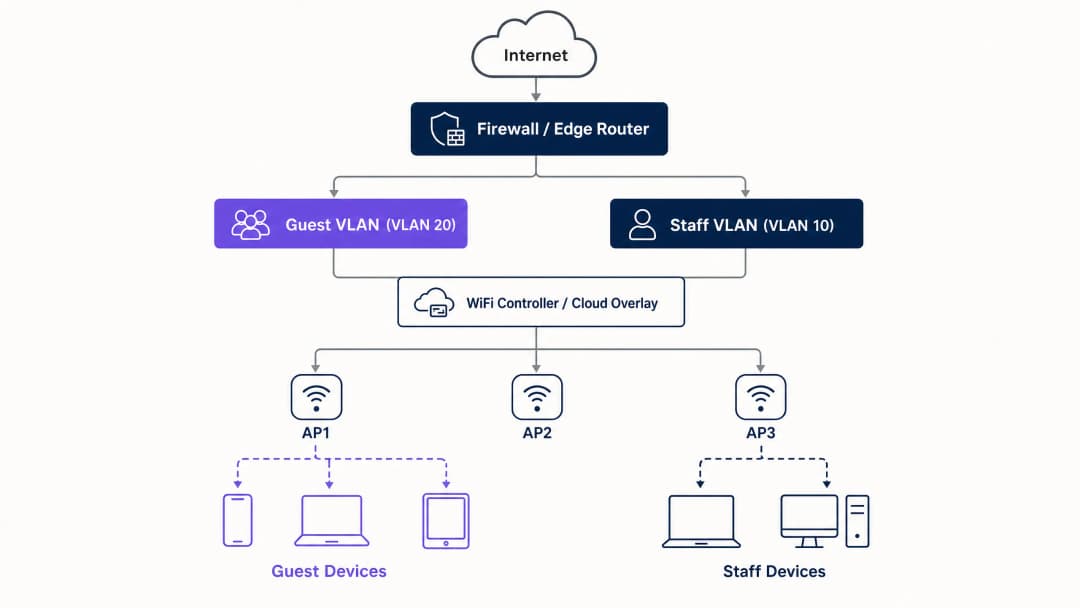
任何安全访客 WiFi 部署的基础都是网络分段。在评估 Captive Portal 或分析之前,您必须在访客流量和内部系统之间建立严格的隔离。这需要一个映射到其自身虚拟局域网 (VLAN) 的专用 SSID,并默认配置拒绝访问内部子网的防火墙规则。可以将访客网络视为一个受控的外部区域;访客拥有独立的入口,且只能访问互联网。

安全架构基线

技术基线需要几项不可妥协的控制措施:

  1. 专用 SSID:创建一个与员工和运营网络分离的访客 SSID。
  2. VLAN 分段:将 SSID 映射到专用 VLAN 以隔离访客流量。
  3. 客户端隔离:启用客户端隔离以防止访客设备之间相互通信,从而减轻横向移动攻击。
  4. 防火墙策略:阻止对主局域网 (LAN) 和管理接口的访问。
  5. 专用 DHCP:使用独立的 DHCP 范围,避免泄露内部 DNS 记录。

architecture_overview.png

WPA3 迁移的必要性

如果您在 2026 年部署或更新硬件,WPA3 必须是默认标准。Wi-Fi 联盟于 2020 年 7 月强制要求所有新设备进行 WPA3 认证。来自 Cisco Meraki、HPE Aruba、Ruckus、Juniper Mist、Ubiquiti UniFi、Cambium、Extreme 和 Fortinet 的大多数企业级接入点都通过固件更新支持 WPA3。WPA3 引入了三项关键的运营改进:

  • 对等实体同时验证 (SAE):取代了脆弱的 WPA2 四次握手,消除了离线字典攻击。即使攻击者捕获了身份验证交换,他们也无法推导出工作组密钥。
  • 前向保密:确保即使今天泄露了网络密码,也不会暴露历史记录的流量。每个会话都会生成一个唯一的临时密钥。
  • 机会性无线加密 (OWE):在开放网络上自动协商加密连接,无需密码。这保护了传输中的数据,并直接支持 GDPR 合规义务。

实施指南

部署安全的访客 WiFi 需要循序渐进的方法:首先是架构,然后是身份验证,接着是门户层,最后是分析。

步骤 1:配置网络基础

在启用任何 SSID 之前配置 VLAN 和防火墙规则。验证访客 VLAN 是否无法将流量路由到内部子网。根据您的身份验证策略应用 WPA3-Personal (SAE) 或 OWE。确保控制器上已激活客户端隔离。

步骤 2:实施身份验证层

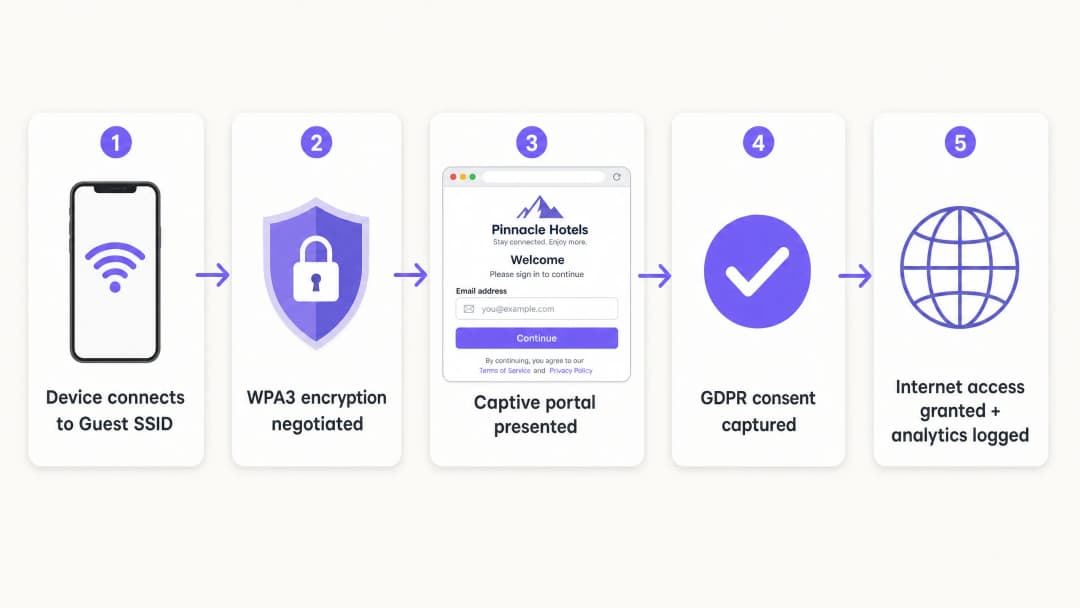
对于员工和公司设备,IEEE 802.1X 是标准。它要求设备在获得访问权限之前向 RADIUS 服务器进行身份验证。对于访客,Captive Portal 仍然是捕获身份和同意的主要机制。

captive_portal_flow.png

步骤 3:部署云端覆盖网络

Purple 作为一个与硬件无关的云端覆盖网络运行。它与您现有的基础设施集成,以处理 Captive Portal、同意流程和分析。该覆盖网络管理身份层,而物理接入点则执行射频和 VLAN 策略。

步骤 4:验证与测试

从物理客户端设备测试部署。尝试访问内部资源、打印机和管理接口。验证故障开启行为:明确决定如果身份验证服务暂时无法访问,访客是失去连接还是绕过门户。

最佳实践

  • 执行严格的证书验证:对于使用 PEAP-MSCHAPv2 的 802.1X 部署,必须配置客户端通过移动设备管理 (MDM) 或组策略对象 (GPO) 验证 RADIUS 服务器的证书。这可以防止流氓接入点攻击。
  • 使用动态 VLAN 分配:配置 RADIUS 服务器根据目录组群成员身份动态分配 VLAN。这允许单个 SSID 安全地为员工、承包商和 IoT 设备提供服务。
  • 隔离老旧设备:不支持 WPA3 的设备必须放置在专用的 WPA2 SSID 上,并在独立的 VLAN 上进行隔离。不要为了老旧设备的兼容性而妥协主要访客网络的安全性性。
  • 符合行业标准:通过在物理或逻辑上将访客流量与支付基础设施隔离,确保部署符合 PCI DSS 要求。通过使用 OWE 进行加密并通过 Captive Portal 获取明确同意,以支持 GDPR 合规性。

故障排除与风险规避

最常见的部署失败源于配置疏忽,而非硬件限制。

  • 表面隔离:与员工网络处于同一广播域的新 SSID 无法提供任何安全性。请验证 VLAN 标记和防火墙规则。
  • 未启用客户端隔离:未能隔离客户端会使访客面临横向攻击。这在 酒店/款待业 环境中尤为危险,因为访客会长时间共享网络。
  • 无计划的故障开放(Fail-Open):如果 Captive Portal 无法访问,网络必须以可预测的方式处理该故障。对于大多数公共场所,为了保持连接性,通常首选故障开放,但这必须是一个有意识的配置选择,而不是意外。

投资回报率(ROI)与业务影响

安全的访客 WiFi 部署可将网络成本中心转变为战略资产。通过将共享密码替换为合规的 Captive Portal,场所可以捕获经过验证的第一方数据。Purple 的平台每年处理 4.4 亿次登录,为营销自动化提供干净的联系人列表。

此外,安全的入网流程可减少 IT 支持开销。实施 PasspointOpenRoaming 允许再次到访的访客无感连接,从而消除密码重置请求。对于 零售 运营商而言,这种无缝连接可推动应用程序参与度和忠诚度计划参与率,从而带来可衡量的投资回报。


听取简报

关键定义

VLAN (Virtual Local Area Network)

A logical subnetwork that groups a collection of devices from different physical LANs.

Used to isolate guest WiFi traffic from corporate data, ensuring visitors cannot access internal servers or payment systems.

WPA3

The latest WiFi security certification, introducing Simultaneous Authentication of Equals (SAE) and Forward Secrecy.

Essential for modern enterprise networks to prevent offline dictionary attacks and protect historical traffic data.

OWE (Opportunistic Wireless Encryption)

A WPA3 feature that automatically encrypts traffic on open networks without requiring a password.

Crucial for public venues wanting to offer frictionless access while protecting guest data in transit from passive eavesdropping.

Client Isolation

A wireless controller setting that prevents devices connected to the same SSID from communicating directly with each other.

Mandatory for guest networks to stop compromised visitor devices from attacking other guests laterally.

Captive Portal

A web page that users must view and interact with before access to the network is granted.

Used by marketing teams to capture first-party data and by IT to enforce terms of service, rather than as a primary security boundary.

IEEE 802.1X

An IEEE standard for port-based Network Access Control (PNAC), providing an authentication mechanism to devices wishing to attach to a LAN or WLAN.

The enterprise standard for authenticating staff devices securely against a central directory.

RADIUS

Remote Authentication Dial-In User Service; a networking protocol that provides centralized Authentication, Authorization, and Accounting (AAA) management.

The server component that checks user credentials against a directory (like Entra ID) and tells the access point which VLAN to assign.

Passpoint

A protocol developed by the Wi-Fi Alliance that enables mobile devices to automatically discover and connect to secure WiFi networks.

Allows returning guests to connect silently and securely without interacting with a captive portal again.

应用实例

A 200-room hotel currently uses a single WPA2 SSID with a shared password changed monthly. They need to secure the network, isolate guest traffic from the property management system, and capture guest emails compliantly.

  1. Create VLAN 20 for guests and VLAN 10 for staff.
  2. Configure firewall rules to block traffic from VLAN 20 to VLAN 10 and the management subnet.
  3. Deploy a new Guest SSID mapped to VLAN 20, using WPA3 OWE (Opportunistic Wireless Encryption).
  4. Enable client isolation on the Guest SSID.
  5. Integrate the Purple cloud overlay to present a branded captive portal capturing email and GDPR consent before granting internet access.
考官评语: This approach secures the radio layer with OWE, enforces network separation via VLANs, and meets the business requirement for compliant data capture without introducing password management overhead.

A university campus needs to support staff laptops, student BYOD devices, and headless IoT sensors (smart thermostats) across a sprawling estate without broadcasting 15 different SSIDs.

  1. Deploy a single 802.1X-enabled SSID for all staff and students.
  2. Configure the RADIUS server to authenticate users against Microsoft Entra ID.
  3. Implement Dynamic VLAN Assignment: staff authenticate and drop onto VLAN 10; students authenticate and drop onto VLAN 30.
  4. Create a separate, hidden WPA2 SSID mapped to VLAN 40 specifically for the headless IoT devices, using MAC Authentication Bypass (MAB) with strict firewall rules limiting their outbound access.
考官评语: Consolidating SSIDs reduces channel interference. Dynamic VLAN assignment ensures users get the correct access privileges based on identity, while isolating vulnerable IoT devices completely.

练习题

Q1. A retail director wants to launch a new 'Free Customer WiFi' network tomorrow by simply adding a second SSID with no password to the existing Meraki access points. As the IT Manager, how do you respond?

提示:Consider the PCI DSS implications of open access on shared infrastructure.

查看标准答案

Reject the request. Adding an open SSID to the existing broadcast domain without VLAN segmentation exposes the retail Point of Sale (POS) systems to public traffic, violating PCI DSS. The network must first be segmented with a dedicated VLAN and firewall rules before the SSID is broadcast.

Q2. During a network audit, you discover that the Guest WiFi captive portal is functioning correctly, but users can ping the IP address of the venue's main file server. What is the most likely configuration failure?

提示:The captive portal handles authentication, not routing.

查看标准答案

The firewall policy or Access Control List (ACL) separating the guest VLAN from the corporate LAN is either missing or misconfigured. The captive portal only controls internet access; the underlying network infrastructure must enforce the routing boundaries.

Q3. A venue is replacing its hardware and wants to use WPA3, but operations is concerned that older guest smartphones will not be able to connect. What is the recommended deployment strategy?

提示:Consider how to support both standards temporarily.

查看标准答案

Deploy WPA3 Transition Mode. This allows the SSID to simultaneously support WPA3-capable devices (using SAE) and legacy devices (using WPA2 PSK). Use Purple's WiFi Analytics to monitor the ratio of legacy devices over 6-12 months, and enforce WPA3-only once the legacy count drops below an acceptable threshold.