How accurate is your visitor count, and what does it cost?
Compare door staff, WiFi analytics and 3D sensors on daily counting error and annual cost, then test an occupancy limit.
Medium footfall where conversion rate (sales divided by visitors) depends on an accurate door count.
Results
Method: missed visitors = visitors a day x (1 - typical accuracy). Manual cost = entrances x open hours x days open x staff cost, assuming one counter per door whenever the venue is open. Sensor cost is hardware spread over five years plus licence; £600 a door a year is a mid-range assumption, so enter your own quote. Accuracy figures are typical validated ranges; confirm yours with a manual audit at your busiest hour.
Occupancy limit simulator
How a live count drives an entrance sign. Thresholds: 75% warns staff, 90% pauses entry.
| Method | Headcount accuracy | In and out | Groups | Any lighting | Dwell time | Staff |
|---|---|---|---|---|---|---|
| Door staff with tally clickers | About 90%, lower at peaks | Usually in only | Misses at busy times | Not applicable | No | One person per door |
| WiFi probe analytics | About 75% until calibrated | No | Only phones with WiFi on | Yes | Yes | None |
| Overhead 3D stereo or ToF sensors | 98% or better | Yes, in and out | Yes, side by side | Yes (ToF works in the dark) | Only at the line | None |
| 3D sensors plus WiFi analytics | 98% or better (from 3D) | Yes, in and out | Yes, side by side | Yes | Yes, from WiFi | None |
手動統計進出人數是收集訪客人數的一種低效率方式,除此之外,許多場域還不得不雇用額外的員工來協助進行這項工作。
全球許多場所(如超級市場和商業街零售商)已選擇實施 一進一出策略, 由一名員工站在入口處,以控制訪客進出商店的人流。
自從採用人工統計訪客以來,企業發現營運效率降低了,進而對其最終盈餘產生了負面影響。
這是因為人工統計人數可能會發生許多潛在的人為錯誤,例如員工可能分心、算錯,或者在短時間內離開了崗位。
在確保企業場域內任一特定時間的人數絕不超過規定限制比以往都更重要的時期,企業無法承受在人數統計方面出現低準確度的後果。
精確統計人數以提升場館安全性
如上所述,人工統計人數有可能導致微小的錯誤和漏計,在國際公共衛生危機期間,這不是任何企業能承受得起的錯誤。
企業可以透過多種方式利用技術來提高其訪客、員工和場域的安全性。
透過將攝影機與我們的企業級分析平台相連結,場域在使用 3D 相容攝影機時,可以高達 98% 的準確度追蹤訪客數量。
透過準確統計進出的人數,企業還可以確保訪客與員工能夠保持安全的社交距離,進而遵守政府的指導方針。
由於收集到的容納人數與數據都是匿名的,企業在訪客進入其場域時,也可以讓他們感到安心,
自動化管理進入場域的訪客流量
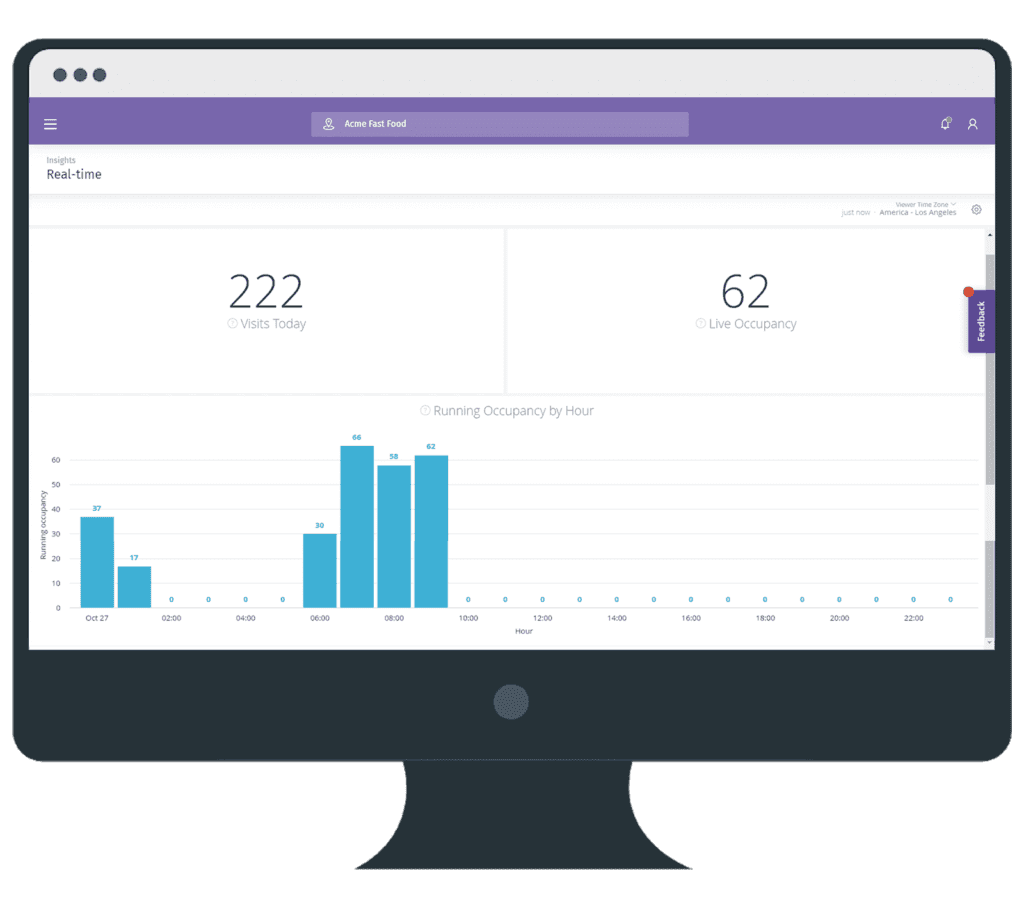
使用 Purple 的自動化人數統計與分析 等軟體的場館,其功能不僅限於統計進出場館的訪客數量。
企業可以使用顯示在場館入口或場館內特定區域螢幕上的信號系統,指示訪客進入是否安全(綠色),或者他們是否必須等待(紅色),直到場館或區域內的訪客數量減少到安全水準。
這可以透過 API 直接從 Purple Portal 提取即時數據來完成,讓您的訪客感到安心。
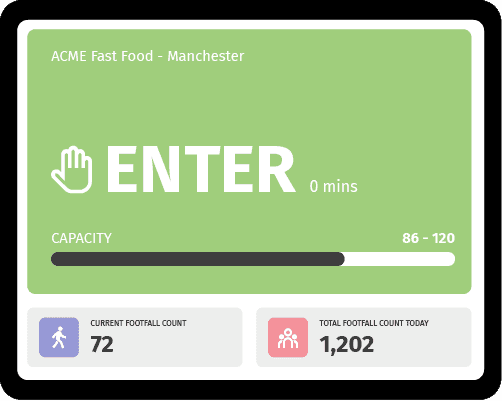
利用這項技術自動控制場域的訪客進出流量,意味著排隊管理會變得極其高效。
場域不再需要依賴員工手動統計訪客人數並估計可以進入的人數。
除此以外,還可以使用這些即時數據來更新您的網站,顯示容納人數和繁忙時段,或使用 Kiosk 自助服務機與顯示器來反應該場域在任一特定時間的訪客數量。
正如那些已經適應自動化的企業所樂於證實的那樣,營運效率與安全性都得到了提升,而訪客和客戶數量也因此在不斷增加。
這使得那些仍在使用手動方式處理容留人數和人數統計的企業顯得有些落後。
進一步瞭解我們的 容留人數控制與人數統計解決方案