
Wie man den WiFi-Zugriff entzieht, wenn ein Mitarbeiter das Unternehmen verlässt
Dieser Leitfaden zeigt IT- und Standort-Betriebsteams, wie sie den Staff WiFi-Zugriff beim Ausscheiden eines Mitarbeiters entziehen können, ohne den restlichen Betrieb zu stören. Er vergleicht zertifikatsbasiertes 802.1X, identitätsspezifisches iPSK und SCIM-gesteuertes Deprovisionieren und bietet anschließend ein Runbook für denselben Tag, Testmethoden sowie ein Audit-Nachweismodell.
Video overview
Diesen Leitfaden anhören
Podcast-Transkript ansehen
Teil unserer Kernserie: Enterprise WiFi Security Guide →
Management-Zusammenfassung
Wenn ein Mitarbeiter ein Unternehmen verlässt, ist der Entzug des physischen Zugangs unkompliziert. Der Entzug des WiFi-Zugangs ist jedoch oft nicht so einfach. Wenn Ihr Netzwerk auf einem gemeinsam genutzten WPA2-Passwort basiert, verlässt der scheidende Mitarbeiter das Unternehmen im Besitz dieser Zugangsdaten. Die einzige Möglichkeit, seinen Zugriff zu blockieren, besteht darin, das Passwort für das gesamte Netzwerk zu ändern. Dies stört den Betrieb und erfordert manuelle Updates auf allen Geräten. Dies stellt eine schwerwiegende Sicherheitslücke dar und führt zu Compliance-Verstößen gegen Standards wie PCI-DSS und ISO 27001.
Dieser Leitfaden zeigt, wie Sie gemeinsam genutzte Passwörter vermeiden und den WiFi-Entzug pro Benutzer implementieren können. Wir untersuchen drei bewährte Modelle: 802.1X EAP-TLS mit Zertifikatswiderruf, Identity Pre-Shared Key (iPSK) mit identitätsspezifischer Schlüssellöschung und SCIM-gesteuerte Deprovisionierung. Durch die direkte Verknüpfung des Netzwerkzugriffs mit Ihrem Identitätsanbieter - wie Microsoft Entra ID, Okta oder Google Workspace - können Sie den Entzug automatisieren, sobald ein Konto deaktiviert wird. Dadurch wird genau der Audit-Trail erstellt, den Auditoren erwarten.
Hören Sie sich unseren Podcast zum technischen Briefing zu diesem Thema an:
Technischer Deep Dive
Das Problem mit gemeinsam genutzten Passwörtern
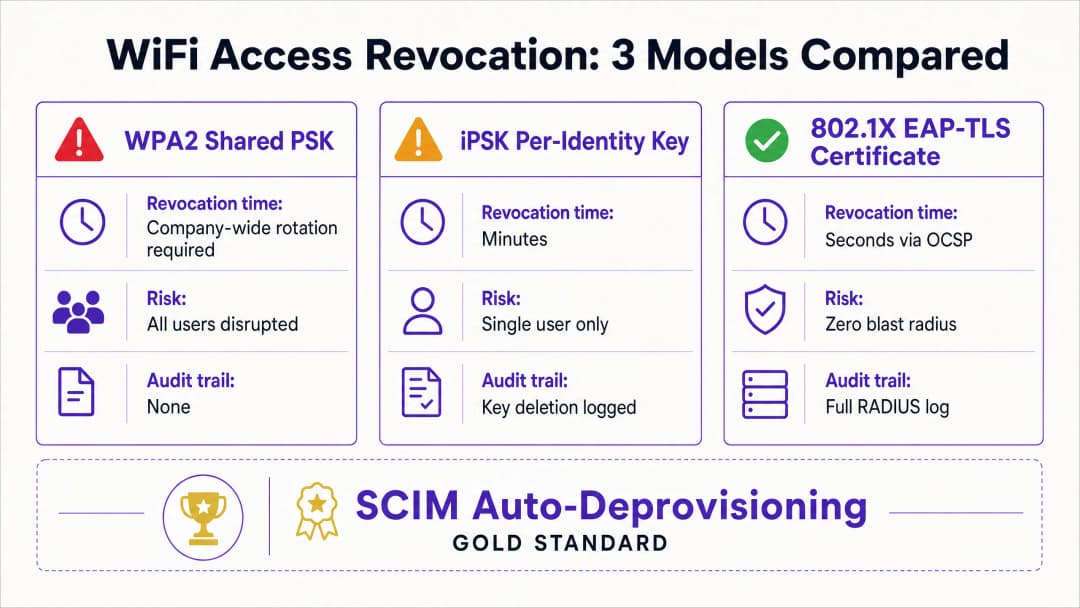
Ein gemeinsam genutztes WPA2-Personal-Passwort bietet keinen Identitätskontext. Das Netzwerk kann nicht zwischen einem aktuellen und einem ehemaligen Mitarbeiter unterscheiden. Folglich erfordert der Entzug des Zugangs eine unternehmensweite Passwortänderung. Dies stellt ein Sicherheitsrisiko im Zeitraum zwischen dem Ausscheiden des Mitarbeiters und der Durchführung der Passwortänderung dar.
Modell 1: 802.1X EAP-TLS Zertifikatswiderruf
Der Enterprise-Standard für WiFi-Sicherheit ist 802.1X mit EAP-TLS. Bei diesem Modell erhält jedes Gerät ein eindeutiges digitales Zertifikat von einer Zertifizierungsstelle (CA). Wenn sich ein Gerät verbindet, überprüft der RADIUS-Server das Zertifikat kryptografisch.
Um den Zugriff zu entziehen, widerrufen Sie das Zertifikat innerhalb der CA. Der RADIUS-Server überprüft den Widerrufsstatus in Echtzeit über das Online Certificate Status Protocol (OCSP). Wenn der OCSP-Responder den Status "Revoked" zurückgibt, sendet der RADIUS-Server eine Access-Reject-Nachricht. Für aktive Sitzungen gibt der Server eine Change of Authorisation (CoA) aus, um die Verbindung des Geräts sofort zu trennen. Dieser Prozess beschränkt den Widerruf auf einen einzelnen Benutzer, ohne das restliche Netzwerk zu beeinträchtigen.
Modell 2: iPSK Identitätsspezifische Extralöschung von Schlüsseln
Für Umgebungen mit gemischten Gerätetypen, einschließlich hardwarebasierten Systemen ohne Benutzeroberfläche, die keine 802.1X-Zertifikate unterstützen, ist Identity Pre-Shared Key (iPSK) die am besten geeignete Lösung. iPSK weist jedem einzelnen Benutzer oder Gerät auf derselben SSID ein eindeutiges Passwort zu.
Der RADIUS-Server ordnet jeden eindeutigen Schlüssel einer bestimmten Identität zu. Wenn ein Mitarbeiter das Unternehmen verlässt, löscht die IT-Abteilung einfach seinen spezifischen Schlüssel aus der RADIUS-Datenbank. Die Auswirkung ist somit ausschließlich auf diesen einen Benutzer beschränkt. Dieser Ansatz bietet die individuelle Sicherheit eines Enterprise-Netzwerks kombiniert mit der Einfachheit eines Pre-Shared Keys.
Modell 3: Automatisches SCIM-De-Provisioning
Das System for Cross-domain Identity Management (SCIM) ist ein offener Standard, der den Austausch von Benutzeridentitätsdaten automatisiert. SCIM fungiert als Brücke zwischen Ihrem Identitätsanbieter und nachgelagerten Systemen, wie Ihrer WiFi-Verwaltungsplattform.
Wenn die Personalabteilung einen ausscheidenden Mitarbeiter in Microsoft Entra ID, Okta oder Google Workspace deaktiviert, sendet SCIM ein De-Provisioning-Ereignis an Purple. Purple widerruft die WiFi-Anmeldedaten des Benutzers bei der nächsten Authentifizierung sofort - unabhängig davon, ob es sich um ein Zertifikat oder ein iPSK handelt. Dadurch entsteht ein geschlossener Kreislauf, in dem Änderungen des Identitätslebenszyklus automatisch die Netzwerkzugriffsrichtlinien durchsetzen.
Haben Sie Fragen zu Ihrem spezifischen Setup?
Unser Team arbeitet mit Standortbetreibern, IT-Managern und Netzwerktechnikern an über 80.000 Standorten zusammen. Buchen Sie ein 20-minütiges Gespräch und wir zeigen Ihnen, wie andere diese Herausforderungen gelöst haben.
Implementierungshandbuch
Die Implementierung des benutzerdefinierten Widerrufs erfordert eine Abstimmung zwischen Ihrem Identitätsanbieter, dem RADIUS-Server und der WiFi-Hardware. Purple lässt sich in Hardware von Cisco Meraki, HPE Aruba, Ruckus, Juniper Mist, Ubiquiti UniFi, Cambium, Extreme und Fortinet integrieren.
Schritt 1: Identität als Single Source of Truth etablieren
Stellen Sie sicher, dass Ihr Identity Provider die einzige Quelle der Wahrheit (Single Source of Truth) für den Benutzerstatus ist. Alle Onboarding- und Offboarding-Prozesse müssen innerhalb von Microsoft Entra ID, Okta oder Google Workspace beginnen und enden.
Schritt 2: Das richtige Authentifizierungsprotokoll wählen
Wenn Sie über eine ausgereifte Mobile-Device-Management-Lösung (MDM) verfügen, die Zertifikate an alle Unternehmensgeräte verteilen kann, wählen Sie 802.1X EAP-TLS. Wenn Sie eine Vielzahl von unmanaged Geräten, POS-Terminals oder IoT-Hardware unterstützen müssen, wählen Sie iPSK.
Schritt 3: SCIM-Integration konfigurieren
Konfigurieren Sie eine SCIM-Verbindung zwischen Ihrem Identity Provider und Purple. Ordnen Sie das Benutzerstatus-Attribut so zu, dass ein "deaktiviert"-Status im Verzeichnis ein Widerrufsereignis in Purple auslöst.
Schritt 4: RADIUS-Timer anpassen
Wenn Sie EAP-TLS verwenden, konfigurieren Sie die Time-To-Live (TTL) des OCSP-Caches Ihres RADIUS-Servers entsprechend. Eine kurze TTL (z. B. 15 Minuten) erhöht die Sicherheit, indem sie das Zeitfenster verkürzt, in dem ein widerrufenes Zertifikat gültig bleibt, erhöht jedoch die Last auf der CA.
Best Practices
In Übereinstimmung mit Industriestandards sollten Organisationen den Netzwerkzugriff streng kontrollieren. Implementieren Sie diese Maßnahmen, um ein hohes Sicherheitsniveau zu gewährleisten:
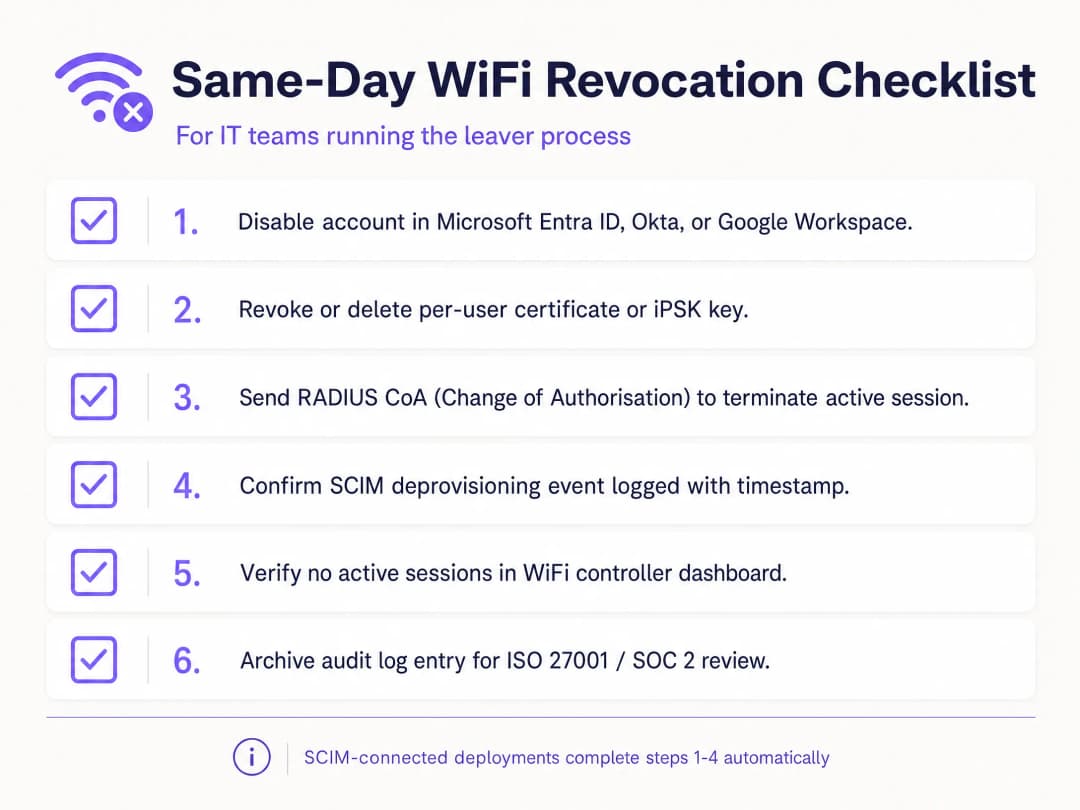
- Mit SCIM automatisieren: Der manuelle Widerruf ist anfällig für menschliche Fehler. Automatisieren Sie diesen Prozess, indem Sie Ihre WiFi-Plattform direkt mit Ihrem Identity Provider verknüpfen.
- RADIUS CoA implementieren: Das Widerrufen von Anmeldedaten verhindert zwar neue Verbindungen, beendet jedoch keine aktiven Sitzungen. Stellen Sie sicher, dass Ihr System einen Change of Authorisation-Befehl sendet, um die Verbindung zum Gerät sofort zu trennen.
- Gast- und Mitarbeiter-Traffic trennen: Verbinden Sie Mitarbeitergeräte niemals mit einem guest WiFi Netzwerk. Verwenden Sie separate VLANs und SSIDs, um die Trennung aufrechterzuerhalten.
- Audit-Protokolle: Führen Sie unveränderliche Protokolle aller De-Provisionierungsereignisse. ISO 27001-Auditoren fordern den Nachweis, dass der Zugriff sofort nach Beendigung des Arbeitsverhältnisses entzogen wurde.
Fehlerbehebung und Risikominderung
Die häufigste Fehlerquelle beim WiFi-Widerruf ist ein fragmentierter Prozess. Wenn die IT-Abteilung das Konto im Verzeichnis deaktiviert, es aber versäumt, die eigenständige RADIUS-Datenbank zu aktualisieren, behält der ausscheidende Mitarbeiter den Zugriff. Eine SCIM-Integration eliminiert dieses Risiko vollständig.
Ein weiteres Risiko ist das Caching von Zertifikaten. Wenn ein RADIUS-Server eine positive OCSP-Antwort für 24 Stunden im Cache speichert, kann sich ein gesperrtes Gerät weiterhin authentifizieren, bis der Cache abläuft. Passen Sie Ihre OCSP-Cache-Einstellungen an, um ein optimales Gleichgewicht zwischen Performance und Sicherheitsanforderungen zu finden. Verknüpfen Sie bei gemeinsam genutzten Geräten, wie z. B. Tablets im Einzelhandel, die von mehreren Schichtarbeitern verwendet werden, die Geräteauthentifizierung nicht mit der Identität eines einzelnen Mitarbeiters. Verwenden Sie Dienstkonten oder gerätespezifische Zertifikate, um zu verhindern, dass kritische Hardware offline geht, wenn eine Person das Unternehmen verlässt.
ROI und geschäftliche Vorteile
Der Übergang zum benutzerbasierten WiFi-Entzug liefert einen messbaren geschäftlichen Mehrwert. Er eliminiert die IT-Supportstunden, die für die Koordination unternehmensweiter Passwortänderungen aufgewendet werden. Darüber hinaus minimiert er das Risiko von Datenpannen durch ehemalige Mitarbeiter und schützt das Unternehmen vor regulatorischen Geldstrafen und Reputationsschäden.
Zudem bietet er den klaren Audit-Trail, der für das problemlose Bestehen von ISO 27001- und SOC 2-Audits erforderlich ist. Durch die Automatisierung des Joiner-Mover-Leaver-Prozesses können sich IT-Teams auf strategische Initiativen konzentrieren, anstatt Zeit mit der manuellen Verwaltung von Zugangsdaten zu verschwenden. Weitere Informationen zur Sicherung Ihres Netzwerks finden Sie in unserem Leitfaden Enterprise WiFi Security: Ein vollständiger Leitfaden für 2026.
Schlüsseldefinitionen
IEEE 802.1X
Ein Framework zur Netzwerkzugriffskontrolle, das ein Gerät, einen Netzwerk-Authentifikator und einen Back-End-Authentifizierungsdienst nutzt, um zu entscheiden, ob der Netzwerkzugriff erlaubt wird.
Verwenden Sie dies, wenn beim Staff WiFi einzelne Personen oder verwaltete Geräte authentifiziert werden müssen, anstatt sich auf eine gemeinsam genutzte Passphrase zu verlassen.
EAP-TLS
Eine Methode des Extensible Authentication Protocol, die TLS-Zertifikate für die gegenseitige Authentifizierung verwendet und während des Authentifizierungsaustauschs Schlüsselmaterial ableitet.
Verwenden Sie dies für verwaltete Geräte, wenn der Zertifikatslebenszyklus und die RADIUS-Validierung einen individuellen Entzug unterstützen können.
RADIUS
Ein Protokoll und Dienstmodell, das häufig verwendet wird, um Entscheidungen über Authentifizierung, Autorisierung und Accounting zwischen Netzwerkgeräten und einem Authentifizierungsdienst zu übertragen.
Dies ist der Back-End-Entscheidungspunkt, den Sie beim Testen von 802.1X und bestimmten iPSK-Bereitstellungen verstehen müssen.
Zertifikatswiderruf
Der vorzeitige Entzug der Authentifizierungsberechtigung eines Zertifikats vor dessen planmäßigem Ablaufdatum.
Dies ist wichtig, wenn das Zertifikat eines ausscheidenden Mitarbeiters bei der nächsten WiFi-Authentifizierung fehlschlagen muss, anstatt bis zum Ablaufdatum gültig zu bleiben.
iPSK
Identity Pre-Shared Key. Ein eindeutiger WiFi-Schlüssel, der einer einzelnen Person, einem Gerät oder einer verantwortlichen Gruppe auf einer gemeinsam genutzten SSID zugewiesen ist.
Bietet ein praktisches Modell für den gezielten Entzug, wenn EAP-TLS für ein Gerät nicht geeignet ist.
SCIM
System for Cross-domain Identity Management. Ein HTTP-basierter Standard für das Provisioning und die Verwaltung von Identitätsdaten zwischen Systemen.
Verbindet ein Ereignis zur Kontodeaktivierung im Identity-Provider mit einer Statusänderung des WiFi-Zugriffs.
Identity Provider
Das System, das Konten verwaltet und die Identität von Mitarbeitern, externen Auftragnehmern und anderen Belegschaftsmitgliedern authentifiziert oder bestätigt.
Er sollte die maßgebliche Quelle für das Deaktivierungsereignis in Ihrem Eintritts-, Wechsel- und Austrittsprozess sein.
Aktive Sitzung
Ein Gerät, das bereits authentifiziert wurde und derzeit über Netzwerkzugriff verfügt.
Entscheiden Sie, ob Ihre Risikorichtlinie eine separate Trennungsaktion erfordert, nachdem die Anmeldedaten widerrufen wurden.
WPA3 Enterprise
Die Enterprise-Variante der WPA3 Sicherheit, die moderne Sicherheitsprotokolle verwendet und Protected Management Frames für WiFi CERTIFIED WPA3 Netzwerke erfordert.
Es verbessert die WiFi Sicherheit, aber das individuelle Offboarding erfordert weiterhin ein identitätsgebundenes Anmeldedatenmodell.
VLAN
Ein logisches Netzwerksegment, das den Datenverkehr auf Layer 2 oder Layer 3 entsprechend dem Netzwerkdesign trennt.
Dies ist von Bedeutung, wenn die WiFi Identität eines Mitarbeiters einer Belegschafts-, Auftragnehmer- oder einer anderen Netzwerkrolle zugeordnet ist.
Ausgearbeitete Beispiele
Ein Hotel mit 200 Zimmern nutzt eine einzige Staff WiFi SSID, die sich Rezeption, Housekeeping und Haustechnik teilen. Ein ausscheidender Mitarbeiter kennt die gemeinsam genutzte WPA2-Passphrase, und das Hotel kann den Betrieb der belegten Zimmer nicht durch eine ungeplante Rotation stören.
Erstellen Sie einen Ausnahme-Eintrag für die gemeinsam genutzte Passphrase, migrieren Sie verwaltete Rezeptionsgeräte auf 802.1X mit EAP-TLS und vergeben Sie eindeutig zugewiesene iPSKs für Geräte, die keine Zertifikate verwenden können. Für den akut ausscheidenden Mitarbeiter rotieren Sie die gemeinsam genutzte Passphrase, da sie ein gemeinsames Geheimnis bleibt. Für jeden nachfolgenden Ausscheider deaktivieren Sie die Identität, entfernen das Zertifikat oder das iPSK, testen eine neue Verbindung und dokumentieren die Ereigniskette. Das messbare Betriebsergebnis ist ein gezielter Entzug von Anmeldedaten, ein verweigerter Testzugriff und ein nachvollziehbarer Audit-Eintrag pro Offboarding-Ereignis.
Ein nationaler Einzelhändler betreibt Staff WiFi in Filialen, Logistikzentren und einem temporären Stadion-Verkauf. Die HR-Abteilung deaktiviert Konten in Microsoft Entra ID, aber die Filialteams erstellen derzeit separate Netzwerk-Tickets für ausscheidende Mitarbeiter.
Verknüpfen Sie die dauerhafte Entra ID-Identität mit dem WiFi-Zugriffsdatensatz und nutzen Sie SCIM, um den Deaktivierungsstatus an den Access-Service zu senden. Behalten Sie die Deaktivierung im Identity-Provider als autorisierten Trigger bei. Definieren Sie einen Ausnahmepfad für fehlgeschlagene Synchronisierungen, benennen Sie einen Verantwortlichen und führen Sie vor dem Rollout einen kontrollierten Deaktivierungs- und Authentifizierungstest in einer Filialgruppe durch. Das messbare Ergebnis ist ein einzelnes Identitätsereignis, das eine Änderung des WiFi-Status und eine protokollierte, verweigerte Authentifizierung erzeugt, was ein lokales Ticket als Standardpfad ersetzt.
Ein Konferenzzentrum muss den Staff WiFi-Zugriff eines externen Dienstleisters nach einer Wochenendveranstaltung entziehen, während festangestellte Mitarbeiter und Geräte des Standorts für die Eröffnung am Montag verbunden bleiben müssen.
Weisen Sie dem Dienstleister ein iPSK zu, das an einen Dienstleister-Identitätsdatensatz gebunden ist, und kein generisches Passwort für das Event-Team. Löschen Sie am Ende des Einsatzes nur dieses iPSK, entscheiden Sie, ob die aktive Sitzung beendet werden soll, und testen Sie eine neue Verbindung mit dem entfernten Schlüssel. Bewahren Sie die autorisierte Offboarding-Anfrage, die Schlüssellöschung und den fehlgeschlagenen Test gemeinsam auf. Das Ergebnis ist keine Änderung der Anmeldedaten für das Stammpersonal und keine Neukonfiguration ihrer Geräte.
Weiterlesen in dieser Reihe
Sicheres BYOD WiFi: Passpoint-Zertifikats-Onboarding vs. xPSK (iPSK)
Ein umfassender technischer Leitfaden für IT-Teams zur Absicherung unmanaged Mitarbeiter- und Studentengeräte (BYOD) mittels Zero-Touch Passpoint EAP-TLS-Zertifikaten im Vergleich zu herstellerspezifischen xPSK-Lösungen (iPSK/easyPSK, DPSK, PPSK, MPSK).
WPA2 Personal vs Enterprise: Was ist der Unterschied und welche Variante sollten Sie nutzen?
Dieser technische Leitfaden bietet einen umfassenden Vergleich der Sicherheitsrotokolle WPA2 Personal und WPA2 Enterprise in WiFi-Umgebungen von Unternehmen. Er beschreibt die architektonischen Unterschiede, Bereitstellungsmethoden und Sicherheitsaspekte jedes Standards, um Netzwerkarchitekten und IT-Leitern eine fundierte Entscheidungsfindung zu ermöglichen.
Drei SSIDs für alle Fälle: Einrichtungsleitfaden für Guest, Passpoint und IoT WiFi
Dieser technische Leitfaden bietet eine definitive Blaupause für die Implementierung des Drei-SSID-WiFi-Designs in Unternehmensumgebungen. Er beschreibt die Konfiguration eines offenen Guest WiFi-Portals, das automatisierte Onboarding via Passpoint sowie die gerätespezifische xPSK-Authentifizierung, um eine vollständige VLAN-Segmentierung und Zero-Trust-Netzwerkzugriff zu erreichen.
Haben Sie Fragen zu Ihrem spezifischen Setup?
Unser Team arbeitet mit Standortbetreibern, IT-Managern und Netzwerktechnikern an über 80.000 Standorten zusammen. Buchen Sie ein 20-minütiges Gespräch und wir zeigen Ihnen, wie andere diese Herausforderungen gelöst haben.