
Comment révoquer l'accès WiFi lorsqu'un employé s'en va
Ce guide montre aux équipes informatiques et opérationnelles des sites comment supprimer l'accès WiFi du personnel lorsqu'un employé s'en va, sans perturber le reste des équipes. Il compare l'authentification 802.1X basée sur des certificats, l'iPSK spécifique à l'identité et le déprovisionnement via SCIM, puis fournit un plan d'action pour le jour même, une méthode de test et un modèle de preuve d'audit.
Video overview
Écouter ce guide
Voir la transcription du podcast
Fait partie de notre série principale : Enterprise WiFi Security Guide →
Résumé exécutif
Lorsqu'un employé quitte une organisation, révoquer son accès physique est simple. En revanche, révoquer son accès WiFi l'est souvent moins. Si votre réseau repose sur un mot de passe partagé WPA2, l'employé sortant quitte l'organisation en possession de ces identifiants. Le seul moyen de bloquer son accès est de changer le mot de passe pour l'ensemble du réseau. Cela perturbe les opérations et nécessite des mises à jour manuelles sur tous les appareils. Cela représente une vulnérabilité de sécurité majeure et entraîne des non-conformités avec des normes telles que PCI-DSS et ISO 27001.
Ce guide montre comment éviter les mots de passe partagés et implémenter la révocation WiFi par utilisateur. Nous explorons trois modèles éprouvés : 802.1X EAP-TLS avec révocation de certificat, la clé pré-partagée d'identité (iPSK) avec suppression de clé propre à chaque identité, et le déprovisionnement basé sur SCIM. En reliant l'accès réseau directement à votre fournisseur d'identité - comme Microsoft Entra ID, Okta ou Google Workspace - vous pouvez automatiser la révocation dès qu'un compte est désactivé. Cela crée la piste d'audit exacte attendue par les auditeurs.
Écoutez notre podcast de briefing technique sur ce sujet :
Analyse technique approfondie
Le problème des mots de passe partagés
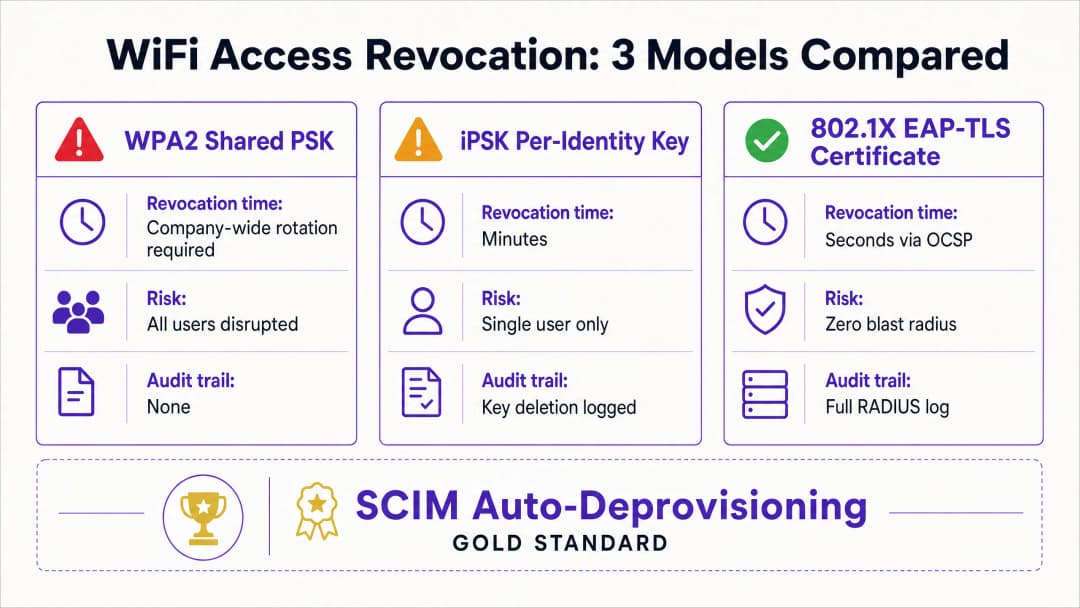
Un mot de passe WPA2-Personal partagé manque de contexte d'identité. Le réseau ne peut pas faire la différence entre un employé actuel et un ancien employé. Par conséquent, révoquer l'accès nécessite de modifier le mot de passe à l'échelle de l'entreprise. Cela crée un risque de sécurité durant la période comprise entre le départ de l'employé et l'application du changement de mot de passe.
Modèle 1 : Révocation de certificat 802.1X EAP-TLS
La norme d'entreprise pour la sécurité WiFi est le 802.1X avec EAP-TLS. Dans ce modèle, chaque appareil reçoit un certificat numérique unique de la part d'une autorité de certification (CA). Lorsqu'un appareil se connecte, le serveur RADIUS vérifie le certificat par cryptographie.
Pour révoquer l'accès, vous révoquez le certificat au sein de la CA. Le serveur RADIUS vérifie le statut de révocation en temps réel via le protocole OCSP (Online Certificate Status Protocol). Si le répondeur OCSP renvoie un statut "Révoqué", le serveur RADIUS envoie un message Access-Reject. Pour les sessions actives, le serveur émet un changement d'autorisation (CoA) afin de déconnecter l'appareil immédiatement. Ce processus limite la révocation à un seul utilisateur, sans impact pour le reste du réseau.
Modèle 2 : Suppression de clé spécifique à l'identité iPSK
Pour les environnements avec des types d'appareils mixtes, y compris les équipements sans écran qui ne prennent pas en charge les certificats 802.1X, la clé pré-partagée d'identité (iPSK) est la solution la plus adaptée. L'iPSK attribue un mot de passe unique à chaque utilisateur individuel ou appareil sur le même SSID.
Le serveur RADIUS associe chaque clé unique à une identité spécifique. Lorsqu'un employé quitte l'entreprise, l'équipe informatique supprime simplement sa clé spécifique de la base de données RADIUS. L'impact est donc strictement limité à ce seul utilisateur. Cette approche offre la sécurité individuelle d'un réseau d'entreprise combinée à la simplicité d'une clé pré-partagée.
Modèle 3 : Dé-provisionnement SCIM automatisé
Le système de gestion des identités inter-domaines (SCIM) est une norme ouverte qui automatise l'échange de données d'identité utilisateur. SCIM sert de passerelle entre votre fournisseur d'identité et les systèmes en aval, tels que votre plateforme de gestion WiFi.
Lorsque les RH désactivent un employé sur le départ dans Microsoft Entra ID, Okta ou Google Workspace, SCIM envoie un événement de dé-provisionnement à Purple. Purple révoque immédiatement les identifiants WiFi de l'utilisateur lors de la prochaine authentification - qu'il s'agisse d'un certificat ou d'une clé iPSK. Cela crée un système en boucle fermée où les changements de cycle de vie des identités appliquent automatiquement les politiques d'accès au réseau.
Vous avez des questions sur votre configuration spécifique ?
Notre équipe collabore avec des exploitants de sites, des responsables informatiques et des ingénieurs réseau au sein de 80 000 sites. Réservez un appel de 20 minutes et nous vous montrerons comment d'autres professionnels comme vous ont résolu ce problème.
Guide de mise en œuvre
La mise en œuvre de la révocation par utilisateur nécessite un alignement entre votre fournisseur d'identité, le serveur RADIUS et le matériel WiFi. Purple s'intègre avec le matériel de Cisco Meraki, HPE Aruba, Ruckus, Juniper Mist, Ubiquiti UniFi, Cambium, Extreme Networks et Fortinet.
Étape 1 : Établir l'identité comme source unique de vérité
Assurez-vous que votre fournisseur d'identité est la source unique de vérité pour le statut de l'utilisateur. Tous les processus d'intégration et de départ doivent commencer et se terminer au sein de Microsoft Entra ID, Okta ou Google Workspace.
Étape 2 : Choisir le bon protocole d'authentification
Si vous disposez d'une solution de gestion des appareils mobiles (MDM) mature capable de distribuer des certificats à tous les appareils de l'entreprise, choisissez 802.1X EAP-TLS. Si vous devez prendre en charge une variété d'appareils non gérés, de terminaux de point de vente ou de matériel IoT, choisissez iPSK.
Étape 3 : Configurer l'intégration SCIM
Configurez une connexion SCIM entre votre fournisseur d'identité et Purple. Cartographiez l'attribut de statut de l'utilisateur afin qu'un statut "désactivé" dans l'annuaire déclenche un événement de révocation dans Purple.
Étape 4 : Ajuster les temporisateurs RADIUS
Si vous utilisez EAP-TLS, configurez la durée de vie (TTL) du cache OCSP de votre serveur RADIUS en conséquence. Un TTL court (par exemple, 15 minutes) augmente la sécurité en réduisant la fenêtre pendant laquelle un certificat révoqué reste valide, mais augmente la charge sur l'autorité de certification.
Bonnes pratiques
Conformément aux normes du secteur, les organisations doivent contrôler strictement l'accès au réseau. Mettez en œuvre ces mesures pour garantir un niveau de sécurité élevé :
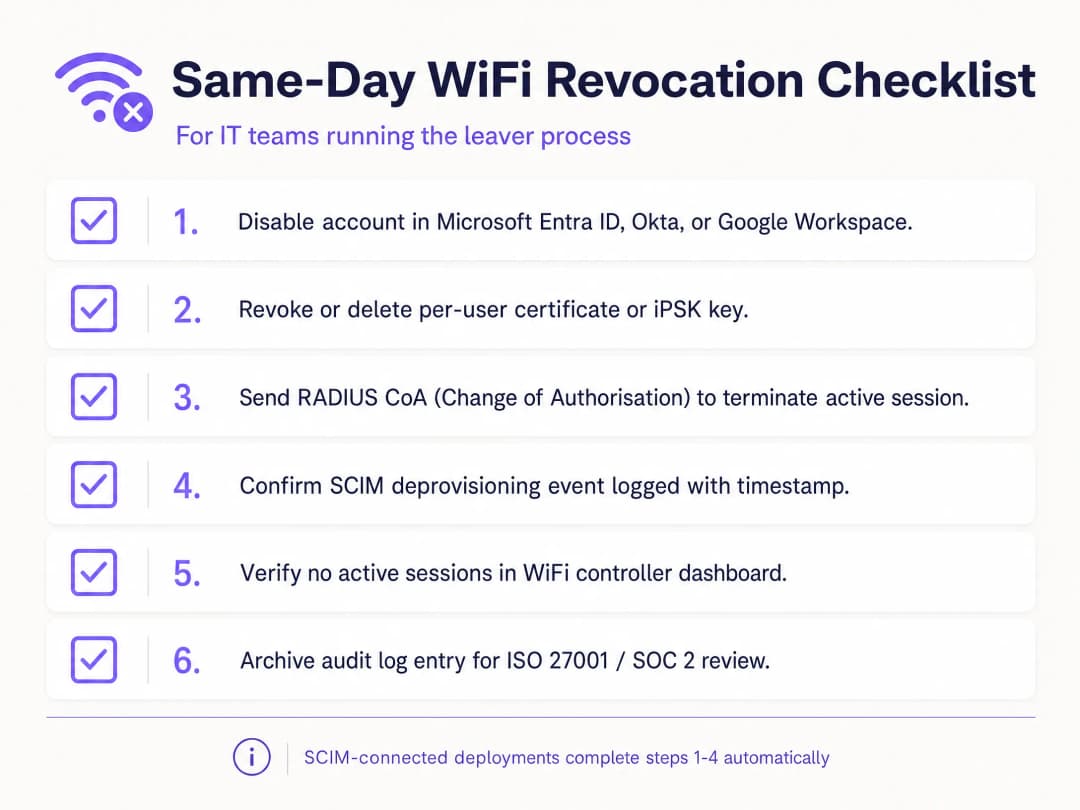
- Automatiser avec SCIM : La révocation manuelle est sujette aux erreurs humaines. Automatisez ce processus en reliant directement votre plateforme WiFi à votre fournisseur d'identité.
- Mettre en œuvre RADIUS CoA : Bien que la révocation des identifiants empêche les nouvelles connexions, elle ne met pas fin aux sessions actives. Assurez-vous que votre système envoie une commande de changement d'autorisation (CoA) pour déconnecter immédiatement l'appareil.
- Séparer le trafic des invités et des employés : Ne connectez jamais les appareils des employés à un réseau guest WiFi. Utilisez des VLAN et des SSIDs distincts pour maintenir la ségrégation.
- Journaux d'audit : Conservez des journaux immuables de tous les événements de déprovisionnement. Les auditeurs ISO 27001 exigent la preuve que l'accès a été révoqué immédiatement après la fin du contrat de travail.
Dépannage et atténuation des risques
Le point de défaillance le plus courant dans la révocation du WiFi est un processus fragmenté. Si le service informatique désactive le compte dans l'annuaire mais ne met pas à jour la base de données RADIUS autonome, l'employé sortant conserve son accès. Une intégration SCIM élimine complètement ce risque.
Un autre risque est la mise en cache des certificats. Si un serveur RADIUS met en cache une réponse OCSP positive pendant 24 heures, un appareil révoqué peut continuer à s'authentifier jusqu'à l'expiration du cache. Ajustez les paramètres de cache de votre OCSP pour équilibrer de manière optimale les exigences de performance et de sécurité. Pour les appareils partagés, tels que les tablettes de vente utilisées par plusieurs employés en rotation, ne liez pas l'authentification de l'appareil à l'identité d'un seul employé. Utilisez des comptes de service ou des certificats propres à l'appareil pour éviter que du matériel critique ne se déconnecte lorsqu'un collaborateur quitte l'entreprise.
ROI et bénéfices commerciaux
La transition vers la révocation WiFi par utilisateur apporte une valeur commerciale mesurable. Elle élimine les heures de support informatique consacrées à la coordination des changements de mots de passe à l'échelle de l'entreprise. De plus, elle minimise le risque de failles de données causées par d'anciens employés, protégeant ainsi l'organisation contre les amendes réglementaires et les dommages réputationnels.
De plus, elle fournit la piste d'audit claire requise pour passer les audits ISO 27001 et SOC 2 en toute fluidité. En automatisant le processus de gestion des mouvements de personnel (arrivées, mutations, départs), les équipes informatiques peuvent se concentrer sur des initiatives stratégiques plutôt que de perdre du temps sur la gestion manuelle des identifiants. Pour plus de détails sur la sécurisation de votre réseau, consultez notre guide Enterprise WiFi Security: A Complete Guide for 2026.
Définitions clés
IEEE 802.1X
Un cadre de contrôle d'accès réseau qui utilise un appareil, un authentificateur réseau et un service d'authentification centralisé pour décider si l'accès au réseau est autorisé.
Utilisez-le lorsque le WiFi du personnel doit authentifier des individus ou des appareils gérés plutôt que de faire confiance à une clé de sécurité partagée.
EAP-TLS
Une méthode de protocole d'authentification extensible (Extensible Authentication Protocol) qui utilise des certificats TLS pour l'authentification mutuelle et génère des clés de chiffrement pendant l'échange d'authentification.
Utilisez-le pour les appareils gérés lorsque le cycle de vie des certificats et la validation RADIUS peuvent prendre en charge une révocation individuelle.
RADIUS
Un protocole et un modèle de service couramment utilisés pour transmettre les décisions d'authentification, d'autorisation et de comptabilité entre les équipements réseau et un service d'authentification.
Il s'agit du point de décision centralisé que vous devez comprendre lors du test de déploiements 802.1X et de certains déploiements iPSK.
Révocation de certificat
L'annulation anticipée de l'autorité d'un certificat à s'authentifier avant sa date d'expiration prévue.
Elle est essentielle lorsque le certificat d'un employé sortant doit être rejeté lors de la prochaine authentification WiFi plutôt que de rester valide jusqu'à sa date d'expiration.
iPSK
Clé pré-partagée d'identité (Identity pre-shared key). Une clé WiFi distincte attribuée à une personne, un appareil ou un groupe responsable sur un SSID partagé.
Elle fournit un modèle de suppression ciblée pratique lorsque l'EAP-TLS ne convient pas à un appareil.
SCIM
System for Cross-domain Identity Management. Un standard basé sur HTTP pour le provisionnement et la gestion des données d'identité entre les systèmes.
Il connecte un événement de désactivation de compte chez le fournisseur d'identité à un changement de statut d'accès WiFi.
Fournisseur d'identité
Le système qui gère les comptes et authentifie ou atteste l'identité du personnel, des sous-traitants et des autres identités de l'effectif.
Il doit être la source faisant autorité pour l'événement de désactivation dans votre processus d'arrivée, de mutation et de départ.
Session active
Un appareil qui s'est déjà authentifié et dispose actuellement d'un accès au réseau.
Déterminez si votre politique de risque exige une action de déconnexion distincte après la révocation de l'identifiant.
WPA3 Enterprise
La branche d'entreprise de la sécurité WPA3, qui utilise des protocoles de sécurité modernes et requiert des cadres de gestion protégés (Protected Management Frames) pour les réseaux WiFi certifiés WPA3.
Il améliore la sécurité WiFi, mais le départ individuel d'un collaborateur nécessite toujours un modèle d'identifiant lié à l'identité.
VLAN
Un segment de réseau logique qui sépare le trafic au niveau de la couche 2 ou de la couche 3 selon la conception du réseau.
Cela est important lorsque l'identité WiFi d'un employé est associée à un rôle de réseau pour le personnel, les sous-traitants ou un autre rôle.
Exemples concrets
Un hôtel de 200 chambres dispose d'un seul SSID WiFi pour le personnel, partagé par la réception, le ménage et la maintenance. Un employé qui s'en va connaît la clé de sécurité WPA2 partagée, et l'hôtel ne peut pas perturber les opérations dans les chambres occupées par un changement de clé imprévu.
Créez un registre d'exceptions pour la clé de sécurité partagée, puis migrez les appareils gérés de la réception vers l'authentification 802.1X avec EAP-TLS et attribuez des iPSKs uniques aux appareils qui ne peuvent pas utiliser de certificats. Pour le départ immédiat, modifiez la clé de sécurité partagée car elle reste un secret commun. Pour chaque départ ultérieur, désactivez l'identité, supprimez le certificat ou l'iPSK, testez une nouvelle connexion et conservez l'historique des événements. Le résultat opérationnel mesuré est la suppression d'un seul identifiant ciblé, un test de connexion refusé et un enregistrement d'audit attribuable par événement de départ.
Un détaillant national gère le WiFi du personnel dans ses magasins, ses centres de distribution et un point de vente éphémère dans un stade. Les ressources humaines désactivent les comptes dans Microsoft Entra ID, mais les équipes des magasins ouvrent actuellement des tickets réseau distincts pour chaque départ.
Associez l'identité durable de Microsoft Entra ID à l'enregistrement d'accès WiFi et utilisez SCIM pour transmettre le statut de désactivation au service d'accès. Conservez la désactivation du fournisseur d'identité comme déclencheur autorisé. Définissez une procédure d'exception en cas d'échec de la synchronisation, désignez un responsable opérationnel et lancez un test contrôlé de désactivation et d'authentification dans un groupe de magasins avant le déploiement général. Le résultat mesurable est un événement d'identité unique qui produit un changement de statut WiFi et l'enregistrement d'un échec de nouvelle authentification, remplaçant le ticket local comme procédure normale.
Un centre de conférence doit supprimer l'accès WiFi du personnel d'un prestataire externe après un événement de week-end, tout en laissant le personnel permanent et les appareils du site connectés pour l'ouverture du lundi.
Attribuez au prestataire une iPSK associée à une fiche d'identité de prestataire externe, et non un mot de passe générique d'équipe d'événement. À la fin de la mission, supprimez uniquement cette iPSK, décidez s'il faut interrompre la session active, puis testez une nouvelle connexion avec la clé supprimée. Conservez ensemble la demande de départ autorisée, la suppression de la clé et l'échec du test de connexion. Le résultat est l'absence de modification des identifiants du personnel permanent et aucune reconfiguration de leurs appareils.
Continuer la lecture de cette série
Les arguments de conformité pour le WiFi sans mot de passe : HIPAA, PCI, ISO 27001
Vous serez en mesure de décider si le passage des réseaux du personnel d'un mot de passe partagé à 802.1X avec EAP-TLS comble vos lacunes d'audit dans le cadre de PCI DSS 4.0, HIPAA et ISO 27001:2022. Vous saurez quels contrôles cela satisfait, lesquels ne le sont pas, et quelles preuves rassembler avant le travail sur le terrain.
WiFi BYOD sécurisé : intégration de certificats Passpoint vs xPSK (iPSK)
Un guide technique complet pour les équipes informatiques sur la sécurisation des appareils non gérés des employés et des étudiants (BYOD) à l'aide de certificats Passpoint EAP-TLS sans intervention vs les solutions xPSK spécifiques aux constructeurs (iPSK/easyPSK, DPSK, PPSK, MPSK).
WPA2 Personal vs Enterprise : quelle est la différence et lequel devriez-vous utiliser ?
Ce guide de référence technique propose une comparaison complète des protocoles de sécurité WPA2 Personal et WPA2 Enterprise au sein des environnements WiFi d'entreprise. Il détaille les différences architecturales, les méthodologies de déploiement et les implications en matière de sécurité de chaque norme pour aider les architectes réseau et les responsables IT à prendre des décisions de déploiement éclairées.
Vous avez des questions sur votre configuration spécifique ?
Notre équipe collabore avec des exploitants de sites, des responsables informatiques et des ingénieurs réseau au sein de 80 000 sites. Réservez un appel de 20 minutes et nous vous montrerons comment d'autres professionnels comme vous ont résolu ce problème.