
Captive Portal WiFi pour le personnel : intégration et authentification des employés
Une référence technique complète pour les responsables informatiques sur la conception et le déploiement de Captive Portals WiFi pour le personnel. Ce guide couvre l'authentification EAP-TLS, l'intégration BYOD, la segmentation VLAN et la gestion de la bande passante pour améliorer l'efficacité opérationnelle et atténuer les risques de sécurité.
Écouter ce guide
Voir la transcription du podcast
Résumé exécutif
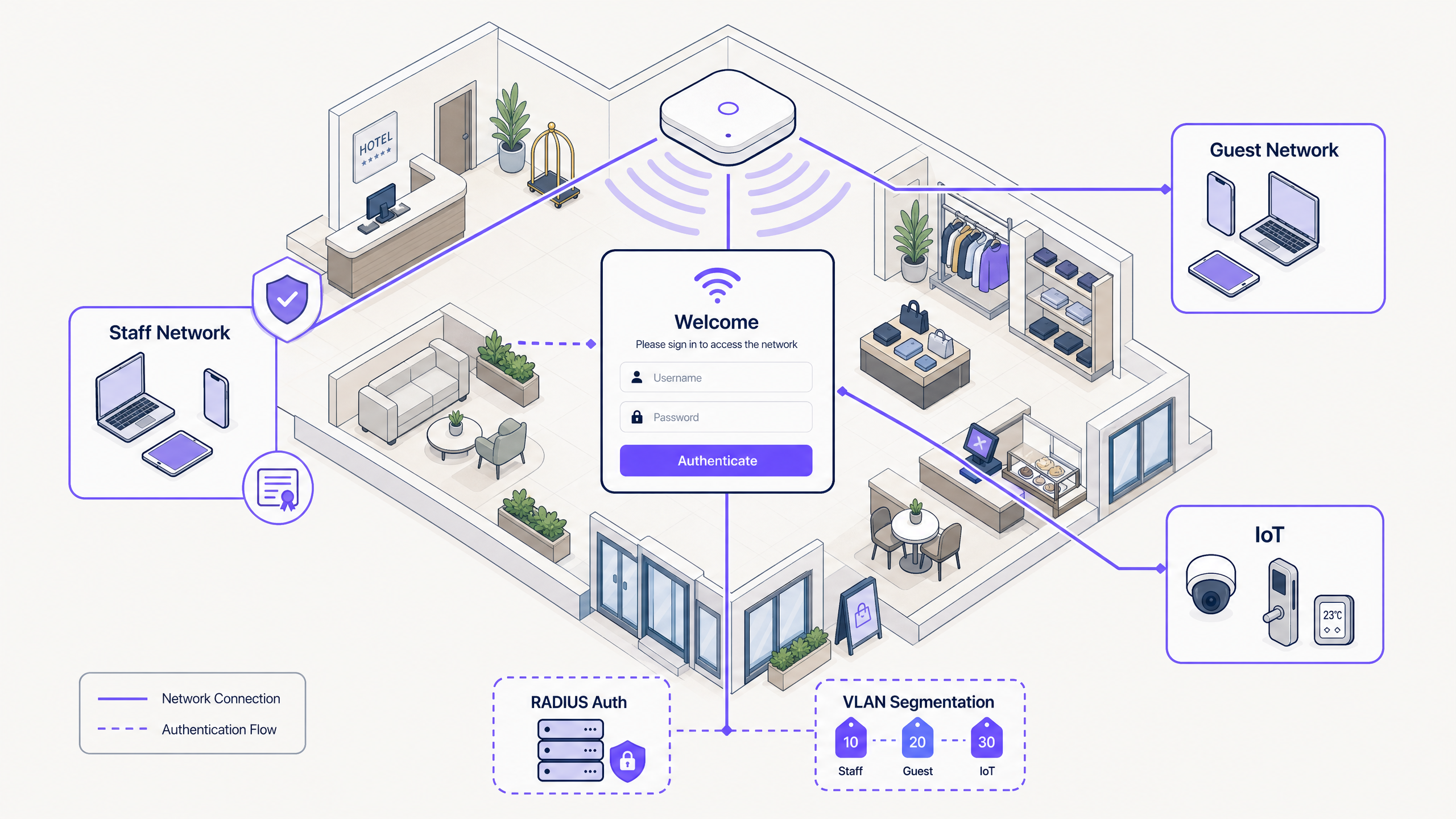
Pour les responsables informatiques et les architectes réseau dans l'hôtellerie, le commerce de détail et les grands espaces publics, la gestion de l'accès au réseau pour les appareils des employés représente un défi de sécurité et opérationnel majeur. S'appuyer sur des clés pré-partagées (PSK) partagées est fondamentalement non sécurisé et lourd sur le plan opérationnel, créant un scénario dans lequel les anciens employés et les appareils non gérés conservent un accès indéfini au réseau. Ce guide présente une approche pratique et sécurisée de l'intégration du WiFi pour le personnel à l'aide d'un flux de Captive Portal intégré à votre fournisseur d'identité. En tirant parti de cette architecture, vous pouvez intégrer en toute sécurité des appareils BYOD non gérés sur un réseau 802.1X, appliquer des politiques d'utilisation acceptable et maintenir la conformité sans la friction d'un enregistrement complet dans une gestion des appareils mobiles (MDM). Pour les établissements qui utilisent déjà le Guest WiFi et le WiFi Analytics , étendre l'intégration sécurisée aux appareils du personnel offre une stratégie de gestion de réseau unifiée et robuste.
Écouter ce guide
Analyse technique approfondie
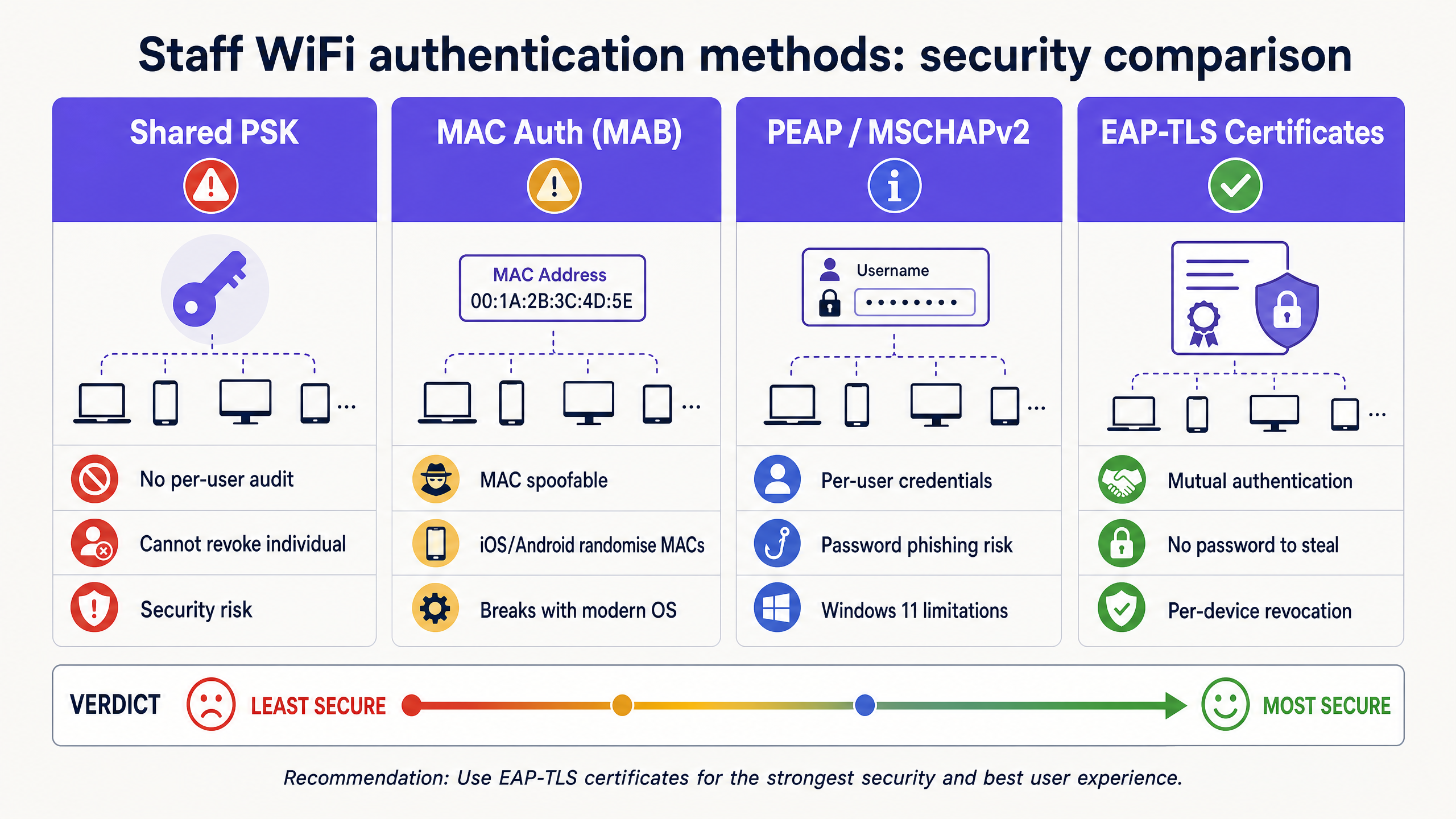
La base d'une intégration sécurisée du personnel est la transition des méthodes d'authentification héritées vers EAP-TLS (Extensible Authentication Protocol-Transport Layer Security). EAP-TLS est la norme de l'industrie pour l'authentification WiFi sécurisée, s'appuyant sur des certificats numériques plutôt que sur des mots de passe. Le défi avec les réseaux du personnel, en particulier dans les environnements BYOD, est de distribuer ces certificats aux appareils non gérés.
Le flux d'intégration en libre-service
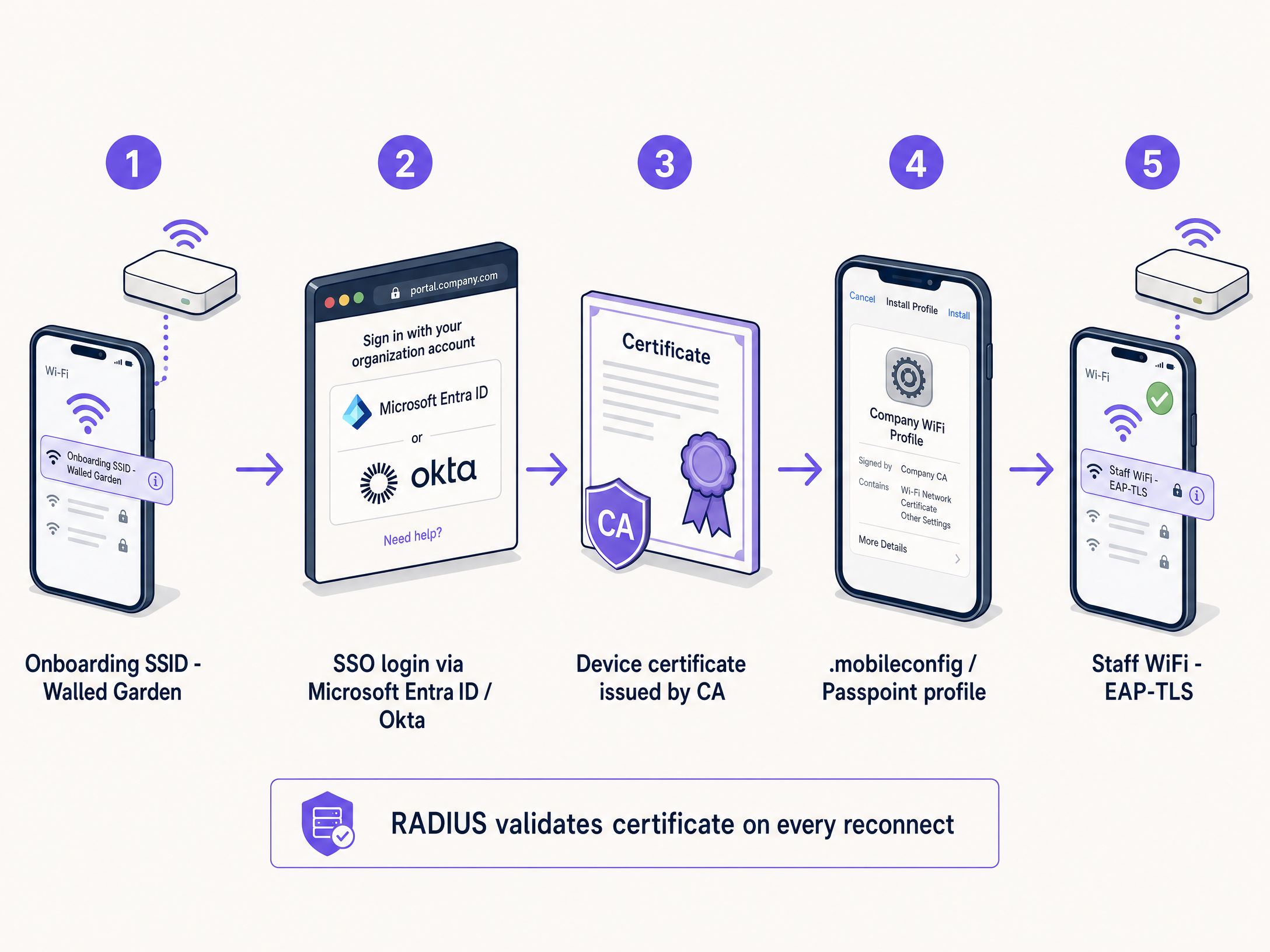
Pour y parvenir, les établissements mettent en œuvre un portail d'intégration en libre-service. Le processus suit un parcours structuré pour garantir la livraison sécurisée des certificats :
- Connexion initiale : L'utilisateur connecte son appareil personnel à un SSID de provisionnement dédié et ouvert. Ce réseau agit comme un environnement fermé (walled garden), limitant l'accès à tout sauf au portail d'intégration et au fournisseur d'identité (IdP).
- Authentification : L'utilisateur est redirigé vers un Captive Portal où il s'authentifie à l'aide de ses identifiants d'entreprise. Cela implique une intégration SAML ou SCIM avec un IdP comme Microsoft Entra ID, Okta ou Google Workspace.
- Génération de certificat : Une fois l'authentification réussie, le système génère un certificat client unique et spécifique à l'appareil.
- Installation du profil : Un profil de configuration est envoyé à l'appareil. Ce profil contient le certificat client, le certificat de l'autorité de certification (CA) racine et les paramètres de configuration réseau pour le SSID 802.1X sécurisé.
- Connexion sécurisée : L'appareil se déconnecte automatiquement du SSID de provisionnement et se connecte au SSID d'entreprise sécurisé en utilisant le certificat nouvellement installé pour l'authentification EAP-TLS.
Pourquoi les clés PSK partagées échouent pour les réseaux du personnel
Historiquement, les établissements s'appuyaient sur des clés pré-partagées (PSK) pour l'accès du personnel. Cette méthode est fondamentalement défaillante dans les environnements d'entreprise modernes. Les PSK, une fois partagées, sont compromises. Elles n'offrent aucune responsabilité individuelle et nécessitent un changement de mot de passe à l'échelle du réseau si un appareil est perdu ou si un employé s'en va. Dans un hôtel de 200 chambres comptant 80 membres du personnel, un mot de passe partagé a probablement été partagé avec environ 80 personnes, leurs partenaires et au moins trois anciens employés. Ce n'est pas un réseau sécurisé ; c'est une porte ouverte.
Guide de mise en œuvre
Le déploiement d'un Captive Portal WiFi sécurisé pour le personnel nécessite une planification et une exécution minutieuses. Suivez ces étapes pour un déploiement réussi dans un hôtel, un commerce de détail ou un stade.
Étape 1 : Définir les politiques d'accès et la segmentation
Avant de configurer l'infrastructure technique, définissez clairement ce à quoi les appareils du personnel doivent être autorisés à accéder. Les appareils BYOD ne sont pas gérés ; vous ne contrôlez pas leurs mises à jour de système d'exploitation, leur statut antivirus ou leurs applications installées. Par conséquent, ils doivent être traités comme des appareils non approuvés.
Placez les appareils du personnel sur un VLAN dédié. Ce VLAN doit fournir un accès Internet et un accès restreint uniquement aux applications internes spécifiques requises pour le rôle de l'employé, telles que l'interface web du point de vente pour le commerce de détail ou l'application de service d'étage pour l'hôtellerie. Ne placez jamais d'appareils BYOD sur le même VLAN que les serveurs d'entreprise ou les appareils gérés. Pour en savoir plus sur la sécurisation des réseaux d'arrière-boutique, consultez notre guide sur les Politiques WiFi pour le personnel du commerce de détail : Sécuriser les réseaux Back-of-House ou la version portugaise Políticas de WiFi para Colaboradores no Retalho: Proteger as Redes Back-of-House .
Étape 2 : Configurer le serveur RADIUS et l'intégration IdP
Votre serveur RADIUS est le cœur du processus d'authentification 802.1X. Il doit être configuré pour prendre en charge EAP-TLS et être intégré à votre fournisseur d'identité.
Connectez votre serveur RADIUS à votre IdP via SAML ou LDAP. Cela garantit que seuls les employés actifs peuvent s'authentifier et recevoir un certificat. Lorsqu'un employé est désactivé dans Microsoft Entra ID ou Okta, le serveur RADIUS cesse d'accepter ses identifiants ou son certificat lors de la tentative de connexion suivante. Établissez une autorité de certification (CA) interne ou utilisez une PKI gérée dans le cloud pour émettre les certificats clients. Le serveur RADIUS doit faire confiance à cette CA.
Étape 3 : Concevoir le portail d'intégration et appliquer l'AUP
Le portail d'intégration est la première interaction de l'utilisateur avec le système. Il doit être intuitif et clairement personnalisé aux couleurs de la marque. Fournissez des instructions étape par étape sur l'écran du portail. Les utilisateurs doivent savoir exactement sur quoi cliquer et à quoi s'attendre.
Le Captive Portal est le point d'application naturel pour l'acceptation de la politique d'utilisation acceptable (AUP). Avant qu'un employé n'accède au réseau du personnel, le portail présente la politique et exige une acceptation explicite. Cela crée un enregistrement horodaté et vérifiable de l'acceptation de la politique, ce qui est essentiel pour la conformité GDPR et PCI DSS.
Bonnes pratiques
Pour garantir un déploiement sécurisé et facile à gérer, respectez ces meilleures pratiques du secteur.
Implémenter des certificats à courte durée de vie
Les appareils BYOD n'étant pas gérés, le risque qu'un appareil compromis reste sur le réseau est plus élevé. Atténuez ce risque en émettant des certificats à courte durée de vie. Au lieu d'un certificat valide pendant trois ans, émettez des certificats valides pendant 90 jours. À l'expiration du certificat, l'utilisateur doit se réauthentifier via le portail d'intégration. Cela permet d'éliminer naturellement les appareils inactifs du réseau et de garantir que seuls les employés actifs conservent leur accès.
Utiliser Passpoint (Hotspot 2.0)
Pour une expérience d'intégration fluide, en particulier sur les appareils Android, exploitez Passpoint. Passpoint permet aux appareils de détecter automatiquement le réseau sécurisé et de s'y authentifier sans que l'utilisateur n'ait à sélectionner manuellement le SSID ou à interagir avec un Captive Portal après la configuration initiale. Cela réduit considérablement les frictions et améliore l'expérience utilisateur.
Gestion de la bande passante avec Purple Shield
Dans les environnements de personnel à haute densité, la saturation de la bande passante sur le réseau du personnel est un véritable problème opérationnel. Purple Shield fonctionne au niveau DNS, bloquant les charges utiles publicitaires, les scripts de suivi et les domaines malveillants avant qu'ils n'atteignent l'appareil. L'effet pratique est une réduction allant jusqu'à 40 % du volume total de données téléchargées sur le réseau. Pour les appareils du personnel, cela se traduit par des chargements de pages plus rapides, une consommation de batterie réduite et plus de bande passante disponible pour le trafic opérationnel.
Résolution des problèmes et atténuation des risques
Même avec un système bien conçu, des problèmes peuvent survenir. Comprendre les modes de défaillance courants est essentiel pour une résolution rapide.
La configuration du Walled Garden
Le SSID de provisionnement doit être strictement contrôlé. Si le walled garden est trop ouvert, les utilisateurs risquent de simplement rester connectés au réseau de provisionnement pour accéder à Internet, contournant ainsi complètement le processus d'intégration sécurisé. Assurez-vous que le SSID de provisionnement autorise uniquement l'accès au portail d'intégration, aux points de terminaison d'authentification IdP et aux serveurs de téléchargement de certificats nécessaires. Tout autre trafic doit être bloqué.
Fragmentation Android
Les appareils Apple iOS gèrent les profils de configuration de manière cohérente. Android, en revanche, est très fragmenté. Les différents fabricants et versions de système d'exploitation gèrent les profils WiFi et l'installation des certificats de manière différente. Pour atténuer ce problème, assurez-vous que votre solution d'intégration fournit des instructions claires et spécifiques à chaque système d'exploitation et exploitez Passpoint dans la mesure du possible.
ROI et impact commercial
La mise en œuvre d'un Captive Portal WiFi sécurisé pour le personnel offre un retour sur investissement significatif grâce à une sécurité renforcée, une réduction des coûts informatiques et une productivité accrue des employés.
En permettant aux utilisateurs de s'intégrer eux-mêmes, les centres de support informatique constatent une réduction spectaculaire des tickets liés aux mots de passe WiFi et aux problèmes de connexion. Passer des clés PSK à l'EAP-TLS réduit considérablement le risque d'accès non autorisé au réseau et de violation de données. Cela est essentiel pour maintenir la conformité avec des normes telles que PCI DSS et le GDPR. Les employés peuvent connecter rapidement et en toute sécurité leurs appareils personnels pour accéder aux outils dont ils ont besoin, améliorant ainsi l'efficacité globale et la satisfaction dans les secteurs du Commerce de détail , de la Santé , de l' Hôtellerie et des Transports .
Définitions clés
Captive Portal
A web page that a user of a public-access or corporate network is obliged to view and interact with before access is granted.
Used in staff networks as the gateway for identity verification, AUP acceptance, and certificate provisioning.
EAP-TLS
Extensible Authentication Protocol-Transport Layer Security. An 802.1X authentication method that uses digital certificates on both the client and server.
The most secure WiFi authentication method, eliminating the need for passwords and preventing credential theft.
RADIUS
Remote Authentication Dial-In User Service. A networking protocol that provides centralised authentication, authorisation, and accounting management.
The core server that validates device certificates against the identity provider before granting network access.
VLAN Segmentation
The practice of dividing a physical network into multiple logical networks to isolate traffic.
Essential for keeping untrusted BYOD staff devices separated from sensitive corporate servers and POS systems.
Passpoint (Hotspot 2.0)
An industry standard that enables seamless and secure WiFi onboarding and roaming without requiring manual SSID selection or captive portal interaction after initial setup.
Improves the user experience for staff onboarding, particularly on Android devices.
Walled Garden
A restricted network environment that controls user access to specific web content and services.
Used on the provisioning SSID to ensure staff can only access the onboarding portal and IdP, preventing them from bypassing the security setup.
SCIM
System for Cross-domain Identity Management. An open standard for automating the exchange of user identity information between identity domains.
Enables automatic deprovisioning of network access when an employee leaves the company and is disabled in the IdP.
iPSK
Identity Pre-Shared Key. A security feature that assigns a unique WiFi password to every individual user or device.
Used as an alternative to 802.1X for headless devices or contractors who cannot install a certificate.
Exemples concrets
A 200-room hotel needs to provide WiFi access to 80 housekeeping and maintenance staff who use their personal smartphones to access the cloud-based property management system (PMS). The hotel currently uses a single WPA2 password that hasn't been changed in three years. How should the IT manager secure this network without purchasing MDM software for personal devices?
- Create a new open provisioning SSID (e.g., 'Hotel-Staff-Onboard') with a strict walled garden allowing access only to the captive portal and Microsoft Entra ID.
- Configure a captive portal to require SSO login via Entra ID and display the staff Acceptable Use Policy.
- Upon successful login and AUP acceptance, generate a 90-day device-specific EAP-TLS certificate.
- Push the configuration profile to the staff member's phone to automatically connect to the secure 802.1X SSID (e.g., 'Hotel-Staff-Secure').
- Configure the RADIUS server to assign connected devices to a dedicated BYOD VLAN that only routes to the internet and the cloud PMS, blocking access to the corporate server VLAN.
A large retail chain experiences severe point-of-sale (POS) connectivity issues during Black Friday sales because staff members are streaming video on their personal phones connected to the staff network during breaks. How can the network architect resolve this without banning personal devices?
- Implement Purple Shield on the staff network to block ad payloads and tracking scripts at the DNS level, instantly reclaiming up to 40% of wasted bandwidth.
- Implement Quality of Service (QoS) policies on the wireless controller to prioritise POS and inventory application traffic over general web browsing and video streaming.
- Apply rate limiting to the BYOD VLAN to cap the maximum bandwidth available to any single personal device.
Questions d'entraînement
Q1. A stadium operations director wants to issue a single WiFi password to all 500 match-day event staff to make it 'easier for them to get online quickly'. What is the primary security risk of this approach, and what is the recommended alternative?
Conseil : Consider what happens when a match-day staff member does not return for the next event.
Voir la réponse type
The primary risk is the inability to revoke access for individuals. When a staff member leaves, they retain the password, granting them indefinite access to the operational network. The recommended alternative is a captive portal onboarding flow that issues device-specific EAP-TLS certificates tied to their identity, allowing IT to revoke access per device or automatically upon termination.
Q2. Your RADIUS server logs show that several Android devices are failing to complete the certificate installation process after authenticating on the captive portal. What is the most likely cause, and how can it be mitigated?
Conseil : Consider the differences in how mobile operating systems handle configuration profiles.
Voir la réponse type
The most likely cause is Android OS fragmentation, as different manufacturers handle certificate installation differently. This can be mitigated by providing clear, OS-specific instructions on the captive portal, utilising a dedicated onboarding app, or leveraging Passpoint (Hotspot 2.0) for a more seamless and standardised onboarding experience.
Q3. A hospital IT team is designing a staff BYOD network. They plan to place the BYOD devices on the same VLAN as the hospital's electronic health record (EHR) servers to ensure staff can access patient data quickly. Is this a secure design? Why or why not?
Conseil : Consider the trust level of unmanaged BYOD devices.
Voir la réponse type
No, this is not a secure design. BYOD devices are unmanaged, meaning the IT team does not control their security posture, OS updates, or installed applications. They must be treated as untrusted. Placing them on the same VLAN as sensitive EHR servers creates a significant lateral movement risk. The BYOD devices should be placed on a dedicated, segmented VLAN with strict firewall rules limiting access only to the necessary web interfaces, never direct server access.
Continuer la lecture de cette série
Captive Portal vs Splash Page
Ce guide de référence détaille la distinction cruciale entre les captive portals et les splash pages au sein des réseaux WiFi invités. Il explique comment le mécanisme d'interception réseau sous-jacent fonctionne en synergie avec l'interface visuelle destinée aux invités, aidant ainsi les responsables informatiques et les exploitants de sites à prendre des décisions d'architecture et d'achat éclairées.
Comment configurer un hotspot WiFi pour votre entreprise
Ce guide faisant autorité fournit aux responsables informatiques, aux architectes réseau et aux directeurs des opérations de sites un plan pratique et neutre vis-à-vis des fournisseurs pour le déploiement de hotspots WiFi invités sécurisés, conformes et améliorant l'activité. Il couvre les décisions architecturales critiques – de la segmentation VLAN et la configuration du Captive Portal à la conformité GDPR et la gestion du trafic – et démontre comment transformer l'infrastructure réseau d'un centre de coûts en une plateforme d'analyse génératrice de revenus en utilisant les capacités de Guest WiFi et d'analyse de Purple.
Purple vs Cisco Spaces (DNA Spaces) : Quand choisir l'un ou l'autre
Ce guide de référence technique offre une comparaison complète de Purple et Cisco Spaces (anciennement DNA Spaces) pour les déploiements de portails captifs d'entreprise et de WiFi invité. Il évalue les différences architecturales, la profondeur de l'automatisation marketing et la question cruciale du verrouillage par le fournisseur de matériel afin d'aider les responsables informatiques à prendre des décisions éclairées en matière d'infrastructure.