跳至主要內容

員工 WiFi Captive Portal:員工入網與驗證

針對 IT 主管設計與部署員工 WiFi Captive Portal 的全面技術參考指南。本指南涵蓋 EAP-TLS 驗證、BYOD 入網、VLAN 區隔及頻寬管理,旨在提升營運效率並降低安全風險。

📖 6 分鐘閱讀📝 1,263 字數🔧 2 範例3 練習題📚 8 關鍵定義

收聽此指南

查看播客逐字稿
Staff WiFi Captive Portal: Onboarding and Authenticating Employees A Purple Enterprise WiFi Intelligence Briefing [INTRODUCTION - approximately 1 minute] Welcome to the Purple Enterprise WiFi Intelligence series. Today we're covering a topic that sits at the intersection of security, HR operations, and network architecture: the staff WiFi captive portal. Now, I know what some of you might be thinking. A captive portal for staff? Isn't that what you use for guests? And that's exactly the misconception we need to address upfront. A staff WiFi captive portal is not a guest splash page with a different logo. It is a structured onboarding gateway that authenticates individual employees, enforces policy acceptance, and registers devices before granting access to your operational network. Get it right, and you eliminate the single biggest vulnerability in most enterprise WiFi deployments: the shared pre-shared key. Get it wrong, and you have former employees, contractors, and personal devices sitting on your staff network indefinitely. Let's get into the architecture. [TECHNICAL DEEP-DIVE - approximately 5 minutes] The foundational problem with most staff WiFi deployments is the shared password. A single WPA2 pre-shared key, written on a sticky note in the back office, shared in a WhatsApp group, and never changed when someone leaves. In a 200-room hotel with 80 staff members, that password has been shared with roughly 80 people, their partners who borrowed their phone, and at least three former employees. That is not a network. That is an open door. The staff WiFi captive portal solves this by replacing the shared credential with an identity-verified onboarding flow. Here is how it works in practice. When a new employee connects their device to the staff network for the first time, they hit a provisioning SSID. This is an open network, but it is a walled garden - it routes only to the onboarding portal and your identity provider. Nothing else. The employee is redirected to the captive portal, where they authenticate using their corporate identity. In most enterprise environments today, that means Single Sign-On via Microsoft Entra ID, Okta, or Google Workspace. Once the identity provider confirms the employee is active and in the correct group, the portal does one of two things depending on your authentication architecture. In a credential-based deployment using PEAP and MSCHAPv2, the portal validates the credentials and issues a network access token. In a certificate-based deployment using EAP-TLS, the portal triggers certificate generation. A device-specific X.509 certificate is issued by your Certificate Authority, packaged into a configuration profile - a dot-mobileconfig file on iOS, or a Passpoint profile on Android - and pushed to the device. The device installs the profile, disconnects from the provisioning SSID, and connects automatically to the secure staff SSID using the certificate for EAP-TLS authentication. From that point forward, every time the device connects to the staff network, the RADIUS server validates the certificate. No password prompt. No manual login. The device just connects, silently and securely. Now let us talk about why EAP-TLS is the target state for most enterprise deployments. The IEEE 802.1X standard defines the framework, but EAP-TLS is the method that eliminates credential theft from the authentication path entirely. There is no password to phish. There is no hash to brute-force. The certificate is bound to the device. If the device is lost or stolen, you revoke the certificate in your Certificate Authority and the RADIUS server denies access on the next connection attempt. If the employee leaves the company, you disable their account in the identity provider, and because the certificate was issued against that identity, the SCIM integration propagates the deprovisioning automatically. Access ends when the person does. This is the architecture that organisations like Premier Inn and Whitbread need when managing hundreds of properties with thousands of staff devices across a distributed estate. You cannot manage that at scale with shared passwords and manual revocation. Let us also address the BYOD dimension, because this is where the captive portal becomes particularly valuable. In most hospitality, retail, and events environments, a significant proportion of staff use personal devices for operational tasks. Housekeeping staff check room assignments on their own smartphones. Retail associates use personal tablets for inventory lookups. Stadium operations teams use personal phones for communications. These are unmanaged devices. You do not control their OS version, their antivirus status, or what other applications are installed. They must be treated as semi-trusted at best. The staff WiFi captive portal handles BYOD by placing these devices on a dedicated VLAN after authentication. The VLAN gives them access to the specific internal applications they need - the property management system, the point-of-sale interface, the scheduling app - and nothing else. They cannot reach your corporate servers, your financial systems, or your managed device network. This is VLAN segmentation enforced at the RADIUS level, and it is the practical implementation of the zero-trust principle: verify identity, then grant the minimum access required. One more architectural element worth covering: the Acceptable Use Policy, or AUP. The captive portal is the natural enforcement point for AUP acceptance. Before an employee gains access to the staff network, the portal presents the policy - covering acceptable use, monitoring, data handling, and consequences of misuse - and requires an explicit acknowledgement. This creates a timestamped, auditable record of policy acceptance. Under GDPR, this matters. Under PCI DSS, for any network that touches cardholder data, this matters. And in the event of a disciplinary investigation involving network misuse, this matters considerably. Now, bandwidth. This is where Purple Shield becomes directly relevant. In high-density staff environments - a hotel during a full-house weekend, a retail estate on Black Friday, a stadium on match day - bandwidth contention on the staff network is a real operational problem. Purple Shield operates at the DNS level, blocking ad payloads, tracking scripts, and malware domains before they reach the device. The practical effect is up to a 40% reduction in total downloaded data across the network, according to Purple's own data. For staff devices, that means faster page loads, lower device battery consumption, and more available bandwidth for operational traffic. Pages load up to 3.5 times faster when the 120-plus DNS queries typical of an ad-heavy page are stripped out before they hit the network. You get that improvement without touching the hardware, without reconfiguring the access points, and without any per-device setup. [IMPLEMENTATION RECOMMENDATIONS AND PITFALLS - approximately 2 minutes] Let me give you the implementation sequence and the failure modes to watch for. Start with your VLAN architecture before you configure a single access point. Define three VLANs minimum: staff, guest, and IoT. Map your firewall policies. Get sign-off from your security team. The most expensive mistakes in WiFi deployments happen when the network is built first and the security architecture is added afterwards. Second, deploy your RADIUS infrastructure with redundancy. A single RADIUS server failure locks every staff member off the network simultaneously. In a hotel, that means front desk cannot process check-ins. In a retail store, that means point-of-sale systems cannot authenticate. Deploy at least two RADIUS servers in an active-passive configuration, and test the failover before you go live. Third, integrate your RADIUS server with your identity provider via LDAP or SAML. This is what enables automatic deprovisioning. When an employee is disabled in Microsoft Entra ID or Okta, the RADIUS server stops accepting their credentials or their certificate on the next connection attempt. No manual step, no ticket queue, no gap between departure and access removal. Fourth, design your captive portal onboarding flow for the least technical user on your team. Not the IT manager. The seasonal warehouse operative who has never installed a configuration profile. Clear instructions, branded interface, and a helpdesk contact number visible on every screen. Now the pitfalls. The most common failure mode is the walled garden being too permissive. If your provisioning SSID allows general internet access, staff will simply stay on it rather than completing the onboarding flow. Lock it down to the portal, the identity provider endpoints, and the certificate download server. Nothing else. The second pitfall is Android fragmentation. iOS handles dot-mobileconfig profiles consistently. Android does not. Different manufacturers and OS versions handle certificate installation differently. Test your onboarding flow on the specific Android devices your staff actually use before you roll out. Passpoint, also known as Hotspot 2.0, significantly improves the Android experience by enabling automatic network discovery and authentication after the initial setup. The third pitfall is certificate expiry. Issue short-lived certificates - 90 days is a reasonable default for BYOD devices. When the certificate expires, the device must re-onboard through the portal. This naturally removes stale devices from the network and forces re-authentication against the current identity provider state. A device belonging to a former employee whose account was disabled six months ago will fail re-onboarding automatically. [RAPID-FIRE Q&A - approximately 1 minute] A few questions we hear frequently. "Can we use iPSK instead of full 802.1X?" Yes, for environments where certificate deployment is not feasible. iPSK, or Identity Pre-Shared Key, assigns a unique WiFi password to each user or device. It is more secure than a shared PSK because each credential is individual and revocable. It is less secure than EAP-TLS because it is still password-based. Use it as a stepping stone, not a destination. "Do we need WPA3 if we are already on WPA2-Enterprise?" If your hardware supports it, yes. WPA3-Enterprise introduces Simultaneous Authentication of Equals, which eliminates offline dictionary attacks against the handshake. The migration cost on supported hardware is a configuration change. The security uplift is material. "How do we handle contractors who do not have a corporate identity?" Use iPSK or a time-limited guest credential issued through the portal. Set an expiry date matching the contract end date. Purple's platform supports time-bounded access credentials natively. [SUMMARY AND NEXT STEPS - approximately 1 minute] Let me bring this together. A staff WiFi captive portal is not a convenience feature. It is the enforcement point for identity verification, policy acceptance, device registration, and access control on your operational network. The shared pre-shared key is a compliance liability and a security vulnerability. Replace it with an identity-verified onboarding flow, VLAN segmentation, and RADIUS-based authentication. Your immediate next steps: audit your current staff network authentication method. If you are running a shared PSK, that is your highest priority remediation. If you are on credential-based 802.1X, evaluate the path to certificate-based EAP-TLS. And if you do not have Purple Shield deployed on your staff network, the bandwidth reduction alone justifies the conversation. For implementation guidance, architecture templates, and case studies from Purple's deployments across 80,000 live venues, visit purple.ai. Thank you for listening.

header_image.png

執行摘要

對於旅宿業、零售業和大型公共場所的 IT 經理與網路架構師而言,管理員工裝置的網路存取是一項重大的安全與營運挑戰。依賴共享的預共用金鑰 (PSK) 從根本上來說是不安全的,且會帶來營運負擔,導致離職員工和未受管理的裝置能無限期保留網路存取權限。本指南概述了一種實用且安全的方法,透過與您的身分識別提供者 (IdP) 整合的 Captive Portal 流程來進行員工 WiFi 入網。藉由利用此架構,您可以安全地將未受管理的 BYOD 裝置引導至 802.1X 網路、執行可接受使用政策,並在沒有完整行動裝置管理 (MDM) 註冊摩擦的情況下維持合規性。對於已採用 Guest WiFiWiFi Analytics 的場所,將安全入網擴展至員工裝置可提供統一且強健的網路管理策略。

收聽本指南

技術深度解析

安全員工入網的基礎是從傳統驗證方法過渡到 EAP-TLS (可延伸驗證協定-傳輸層安全)。EAP-TLS 是安全 WiFi 驗證的產業標準,依賴數位憑證而非密碼。員工網路(特別是 BYOD 環境)面臨的挑戰在於如何將這些憑證分發到未受管理的裝置。

自助式入網流程

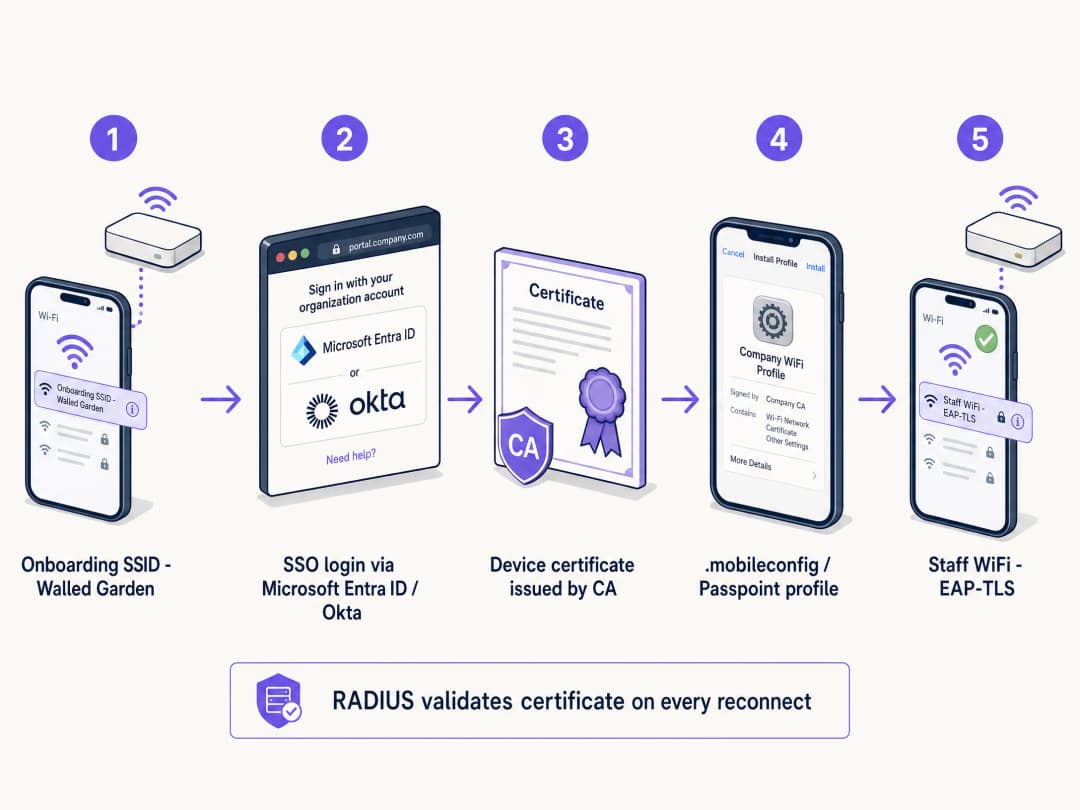
為了實現這一點,場所會部署自助式入網入口網站。該流程遵循結構化的路徑以確保安全的憑證傳遞:

  1. 初始連線: 使用者將其個人裝置連線到專用的開放式佈署 SSID。此網路充當圍牆花園 (walled garden),限制存取除入網入口網站和身分識別提供者 (IdP) 以外的所有內容。
  2. 驗證: 使用者被重導向至 Captive Portal,並在此使用其企業認證資訊進行驗證。這涉及與 Microsoft Entra ID、Okta 或 Google Workspace 等 IdP 的 SAML 或 SCIM 整合。
  3. 憑證產生: 驗證成功後,系統會產生一個唯一的、裝置專屬的用戶端憑證。
  4. 設定檔安裝: 系統會將設定檔推送到裝置。此設定檔包含用戶端憑證、根 CA 憑證以及安全 802.1X SSID 的網路設定。
  5. 安全連線: 裝置會自動中斷與佈署 SSID 的連線,並使用新安裝的憑證進行 EAP-TLS 驗證,連線至安全的企業 SSID。

byod_onboarding_flow.png

為什麼共享 PSK 不適用於員工網路

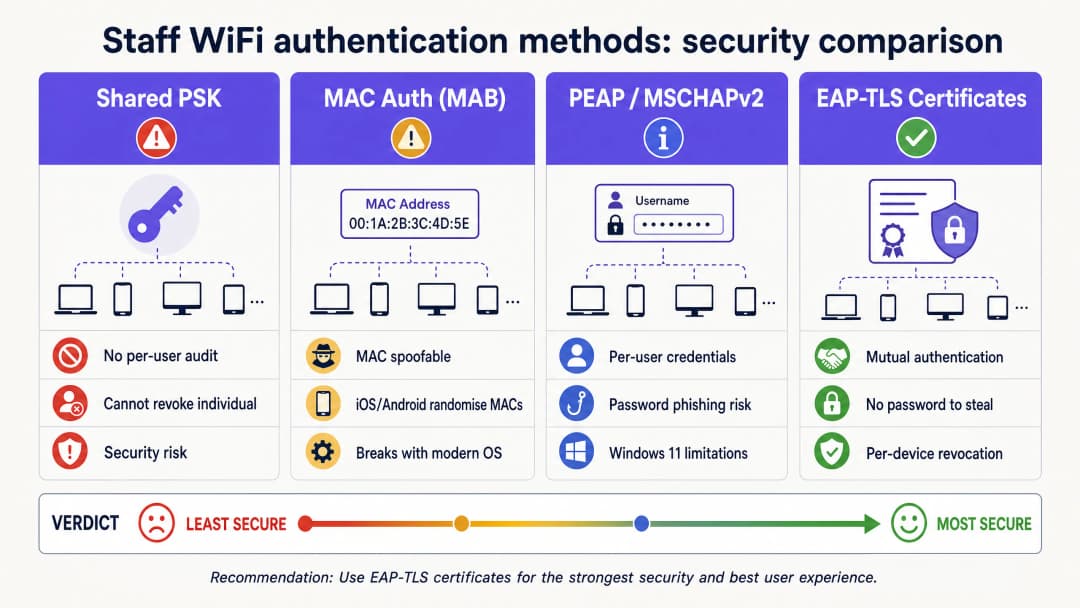
過去,場所依賴預共用金鑰 (PSK) 供員工存取。這種方法在現代企業環境中存在根本性的缺陷。PSK 一旦共享就會面臨安全風險。它們無法提供個人歸責性,且如果裝置遺失或員工離職,就需要變更整個網路的密碼。在一間擁有 200 間客房和 80 名員工的飯店中,共享密碼可能已被分享給大約 80 個人、他們的伴侶以及至少三名離職員工。這不是一個安全的網路,而是一扇敞開的大門。

authentication_methods_comparison.png

實作指南

部署安全的員工 WiFi Captive Portal 需要仔細的規劃與執行。請按照以下步驟在飯店、零售或體育場環境中成功推廣。

步驟 1:定義存取政策與區隔

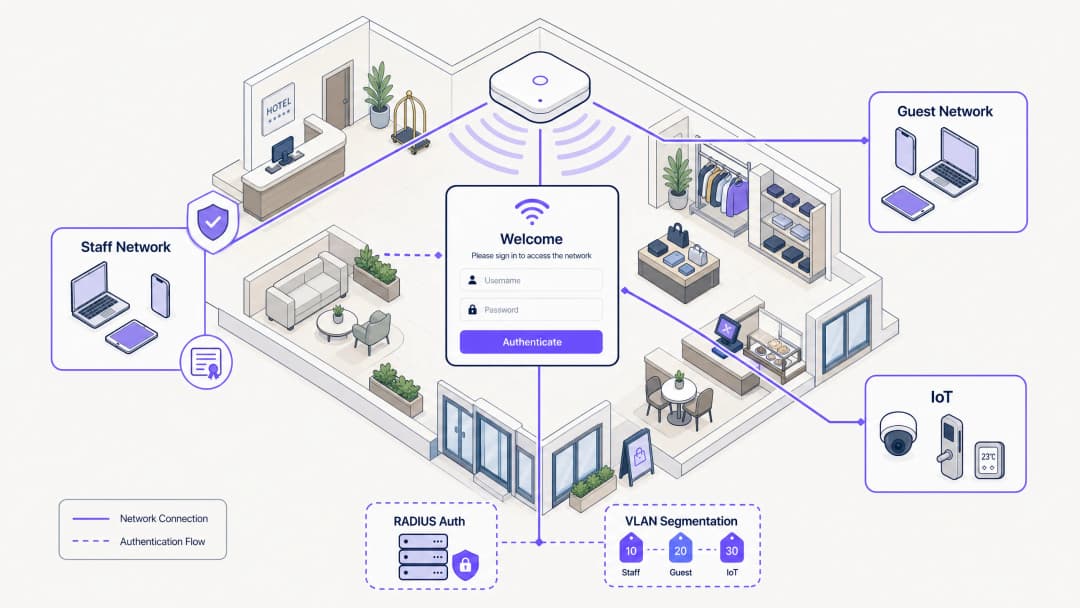
在設定技術基礎架構之前,請明確定義應允許員工裝置存取哪些內容。BYOD 裝置是未受管理的;您無法控制其作業系統更新、防毒狀態或已安裝的應用程式。因此,必須將它們視為不受信任的裝置。

將員工裝置放置在專用的 VLAN 上。此 VLAN 應提供網際網路存取,且僅限存取員工角色所需的特定內部應用程式,例如零售銷售點 (POS) 網頁介面或旅宿業的房務管理應用程式。切勿將 BYOD 裝置與企業伺服器或受管理裝置放置在同一個 VLAN 上。如需進一步瞭解如何保障後勤網路的安全,請參閱我們的指南 零售業員工 WiFi 政策:保障後勤網路安全 或葡萄牙語版本 Políticas de WiFi para Colaboradores no Retalho: Proteger as Redes Back-of-House

步驟 2:設定 RADIUS 伺服器與 IdP 整合

您的 RADIUS 伺服器是 802.1X 驗證流程的核心。它必須設定為支援 EAP-TLS 並與您的身分識別提供者整合。

透過 SAML 或 LDAP 將您的 RADIUS 伺服器連線至您的 IdP。這可確保只有在職的員工才能進行驗證並取得憑證。當員工在 Microsoft Entra ID 或 Okta 中被停用時,RADIUS 伺服器將在下一次連線嘗試時停止接受其認證資訊或憑證。建立內部 CA 或利用雲端託管 PKI 來核發用戶端憑證。RADIUS 伺服器必須信任此 CA。

步驟 3:設計入網入口網站並執行 AUP

入網入口網站是使用者的首次互動 與系統互動。它必須直覺且品牌形象鮮明。在入口網站畫面上提供逐步說明。使用者需要確切知道要點擊什麼以及預期會發生什麼事。

Captive Portal 是強制執行接受《可接受使用政策》(AUP)的自然切入點。在員工存取員工網路之前,入口網站會呈現該政策並要求明確確認。這會建立帶有時間戳記、可稽核的政策接受記錄,這對於 GDPR 和 PCI DSS 合規性至關重要。

最佳實踐

為確保安全且易於管理的部署,請遵循以下產業最佳實踐。

實作短期憑證

由於 BYOD 裝置未受管理,受侵害裝置留在網路上的風險較高。透過核發短期憑證來降低此風險。不要核發有效期為三年的憑證,而是核發有效期為 90 天的憑證。當憑證過期時,使用者必須透過引導入口網站重新進行驗證。這會自然地從網路中清除過期的裝置,並確保只有在職的員工才能維持存取權限。

利用 Passpoint (Hotspot 2.0)

為了獲得無縫的引導體驗,特別是在 Android 裝置上,請利用 Passpoint。Passpoint 允許裝置自動偵測安全網路並進行驗證,而無需使用者在初始設定後手動選擇 SSID 或與 Captive Portal 進行互動。這顯著減少了阻礙並提升了使用者體驗。

使用 Purple Shield 進行頻寬管理

在高密度的員工環境中,員工網路上的頻寬爭奪是一個實際的營運問題。Purple Shield 在 DNS 層級運作,在廣告負載、追蹤指令碼和惡意軟體網域到達裝置之前將其封鎖。實際效果是整個網路的總下載數據量最多可減少 40%。對於員工裝置而言,這意味著更快的網頁載入速度、更低的裝置電池消耗,以及為營運流量提供更多可用頻寬。

疑難排解與風險緩釋

即使系統設計良好,也可能會出現問題。瞭解常見的故障模式對於快速解決問題至關重要。

Walled Garden 設定

必須嚴格控制佈署用的 SSID。如果 Walled Garden 開放範圍過大,使用者可能會直接保持連線到佈署網路以存取網際網路,從而完全繞過安全的引導流程。請確保佈署 SSID 僅允許存取引導入口網站、IdP 驗證端點以及必要的憑證下載伺服器。必須封鎖所有其他流量。

Android 碎片化

Apple iOS 裝置處理設定描述檔的方式非常一致。然而,Android 則高度碎片化。不同的製造商和作業系統版本處理 WiFi 設定檔和憑證安裝的方式各不相同。為了緩解此問題,請確保您的引導解決方案提供清晰且針對特定作業系統的說明,並盡可能利用 Passpoint。

投資報酬率與企業影響

實作安全的員工 WiFi Captive Portal,能透過提升安全性、減少 IT 開銷以及提高員工生產力,帶來顯著的投資報酬率。

透過讓使用者能夠自行引導上線,IT 服務台處理與 WiFi 密碼和連線問題相關的工單數量將大幅減少。從 PSK 轉向 EAP-TLS 可顯著降低未經授權的網路存取和資料外洩風險。這對於維持 PCI DSS 和 GDPR 等標準的合規性至關重要。員工可以快速且安全地連接其個人裝置以存取所需的工具,從而提高 零售醫療保健餐旅交通運輸 產業的整體效率和滿意度。

關鍵定義

Captive Portal

A web page that a user of a public-access or corporate network is obliged to view and interact with before access is granted.

Used in staff networks as the gateway for identity verification, AUP acceptance, and certificate provisioning.

EAP-TLS

Extensible Authentication Protocol-Transport Layer Security. An 802.1X authentication method that uses digital certificates on both the client and server.

The most secure WiFi authentication method, eliminating the need for passwords and preventing credential theft.

RADIUS

Remote Authentication Dial-In User Service. A networking protocol that provides centralised authentication, authorisation, and accounting management.

The core server that validates device certificates against the identity provider before granting network access.

VLAN Segmentation

The practice of dividing a physical network into multiple logical networks to isolate traffic.

Essential for keeping untrusted BYOD staff devices separated from sensitive corporate servers and POS systems.

Passpoint (Hotspot 2.0)

An industry standard that enables seamless and secure WiFi onboarding and roaming without requiring manual SSID selection or captive portal interaction after initial setup.

Improves the user experience for staff onboarding, particularly on Android devices.

Walled Garden

A restricted network environment that controls user access to specific web content and services.

Used on the provisioning SSID to ensure staff can only access the onboarding portal and IdP, preventing them from bypassing the security setup.

SCIM

System for Cross-domain Identity Management. An open standard for automating the exchange of user identity information between identity domains.

Enables automatic deprovisioning of network access when an employee leaves the company and is disabled in the IdP.

iPSK

Identity Pre-Shared Key. A security feature that assigns a unique WiFi password to every individual user or device.

Used as an alternative to 802.1X for headless devices or contractors who cannot install a certificate.

範例

A 200-room hotel needs to provide WiFi access to 80 housekeeping and maintenance staff who use their personal smartphones to access the cloud-based property management system (PMS). The hotel currently uses a single WPA2 password that hasn't been changed in three years. How should the IT manager secure this network without purchasing MDM software for personal devices?

  1. Create a new open provisioning SSID (e.g., 'Hotel-Staff-Onboard') with a strict walled garden allowing access only to the captive portal and Microsoft Entra ID.
  2. Configure a captive portal to require SSO login via Entra ID and display the staff Acceptable Use Policy.
  3. Upon successful login and AUP acceptance, generate a 90-day device-specific EAP-TLS certificate.
  4. Push the configuration profile to the staff member's phone to automatically connect to the secure 802.1X SSID (e.g., 'Hotel-Staff-Secure').
  5. Configure the RADIUS server to assign connected devices to a dedicated BYOD VLAN that only routes to the internet and the cloud PMS, blocking access to the corporate server VLAN.
考官評語: This approach eliminates the shared password vulnerability while avoiding the privacy concerns of full MDM enrolment. The 90-day certificate ensures stale devices are automatically pruned, and the VLAN segmentation protects the corporate network from potentially compromised personal devices.

A large retail chain experiences severe point-of-sale (POS) connectivity issues during Black Friday sales because staff members are streaming video on their personal phones connected to the staff network during breaks. How can the network architect resolve this without banning personal devices?

  1. Implement Purple Shield on the staff network to block ad payloads and tracking scripts at the DNS level, instantly reclaiming up to 40% of wasted bandwidth.
  2. Implement Quality of Service (QoS) policies on the wireless controller to prioritise POS and inventory application traffic over general web browsing and video streaming.
  3. Apply rate limiting to the BYOD VLAN to cap the maximum bandwidth available to any single personal device.
考官評語: This solution addresses the bandwidth contention technically rather than through unenforceable HR policies. Purple Shield reduces the baseline data load, while QoS and rate limiting ensure critical operational traffic always has priority during peak periods.

練習題

Q1. A stadium operations director wants to issue a single WiFi password to all 500 match-day event staff to make it 'easier for them to get online quickly'. What is the primary security risk of this approach, and what is the recommended alternative?

提示:Consider what happens when a match-day staff member does not return for the next event.

查看標準答案

The primary risk is the inability to revoke access for individuals. When a staff member leaves, they retain the password, granting them indefinite access to the operational network. The recommended alternative is a captive portal onboarding flow that issues device-specific EAP-TLS certificates tied to their identity, allowing IT to revoke access per device or automatically upon termination.

Q2. Your RADIUS server logs show that several Android devices are failing to complete the certificate installation process after authenticating on the captive portal. What is the most likely cause, and how can it be mitigated?

提示:Consider the differences in how mobile operating systems handle configuration profiles.

查看標準答案

The most likely cause is Android OS fragmentation, as different manufacturers handle certificate installation differently. This can be mitigated by providing clear, OS-specific instructions on the captive portal, utilising a dedicated onboarding app, or leveraging Passpoint (Hotspot 2.0) for a more seamless and standardised onboarding experience.

Q3. A hospital IT team is designing a staff BYOD network. They plan to place the BYOD devices on the same VLAN as the hospital's electronic health record (EHR) servers to ensure staff can access patient data quickly. Is this a secure design? Why or why not?

提示:Consider the trust level of unmanaged BYOD devices.

查看標準答案

No, this is not a secure design. BYOD devices are unmanaged, meaning the IT team does not control their security posture, OS updates, or installed applications. They must be treated as untrusted. Placing them on the same VLAN as sensitive EHR servers creates a significant lateral movement risk. The BYOD devices should be placed on a dedicated, segmented VLAN with strict firewall rules limiting access only to the necessary web interfaces, never direct server access.