
Como revogar o acesso WiFi quando um funcionário sai
Este guia mostra às equipas de TI e de operações de locais como remover o acesso WiFi da equipa quando um funcionário sai, sem perturbar o resto da força de trabalho. Compara 802.1X baseado em certificados, iPSK específico de identidade e desprovisionamento gerido por SCIM, fornecendo de seguida um manual para o próprio dia, um método de teste e um modelo de evidência de auditoria.
Video overview
Ouça este guia
Ver transcrição do podcast
Parte da nossa série principal: Enterprise WiFi Security Guide →
Resumo Executivo
Quando um colaborador sai de uma organização, revogar o seu acesso físico é simples. No entanto, revogar o acesso WiFi muitas vezes não é tão fácil. Se a sua rede depende de uma palavra-passe WPA2 partilhada, o colaborador cessante sai da organização em posse destas credenciais. A única forma de bloquear o seu acesso é alterar a palavra-passe de toda a rede. Isto interrompe as operações e exige atualizações manuais em todos os dispositivos. Esta situação representa uma vulnerabilidade de segurança grave e leva a falhas de conformidade com normas como a PCI-DSS e a ISO 27001.
Este guia demonstra como evitar palavras-passe partilhadas e implementar a revogação de WiFi por utilizador. Exploramos três modelos comprovados: 802.1X EAP-TLS com revogação de certificados, Identity Pre-Shared Key (iPSK) com eliminação de chave específica da identidade, e desprovisionamento gerido por SCIM. Ao associar o acesso à rede diretamente ao seu provedor de identidade - como o Microsoft Entra ID, Okta ou Google Workspace - pode automatizar a revogação assim que uma conta é desativada. Isto cria o registo de auditoria exato que os auditores esperam.
Ouça o nosso podcast de briefing técnico sobre este tema:
Análise Técnica Detalhada
O Problema com as Palavras-passe Partilhadas
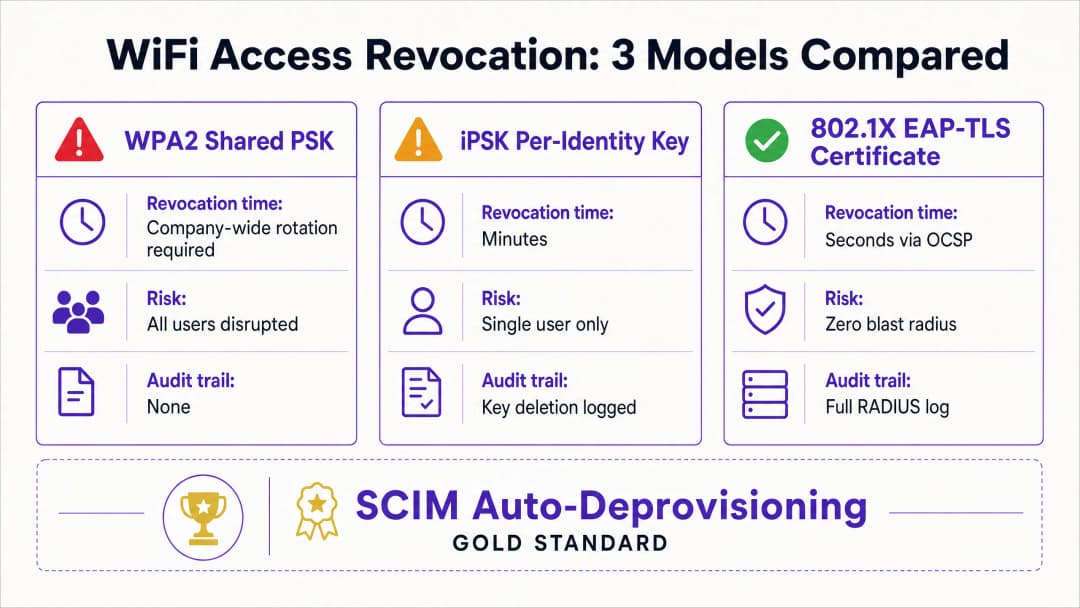
Uma palavra-passe WPA2-Personal partilhada carece de contexto de identidade. A rede não consegue distinguir entre um colaborador atual e um antigo colaborador. Consequentemente, a revogação do acesso exige uma alteração da palavra-passe a nível de toda a empresa. Isto cria um risco de segurança durante o período entre a saída do colaborador e a execução da alteração da palavra-passe.
Modelo 1: Revogação de Certificados 802.1X EAP-TLS
O padrão empresarial para a segurança de WiFi é o 802.1X com EAP-TLS. Neste modelo, cada dispositivo recebe um certificado digital único de uma Autoridade de Certificação (CA). Quando um dispositivo se liga, o servidor RADIUS verifica criptograficamente o certificado.
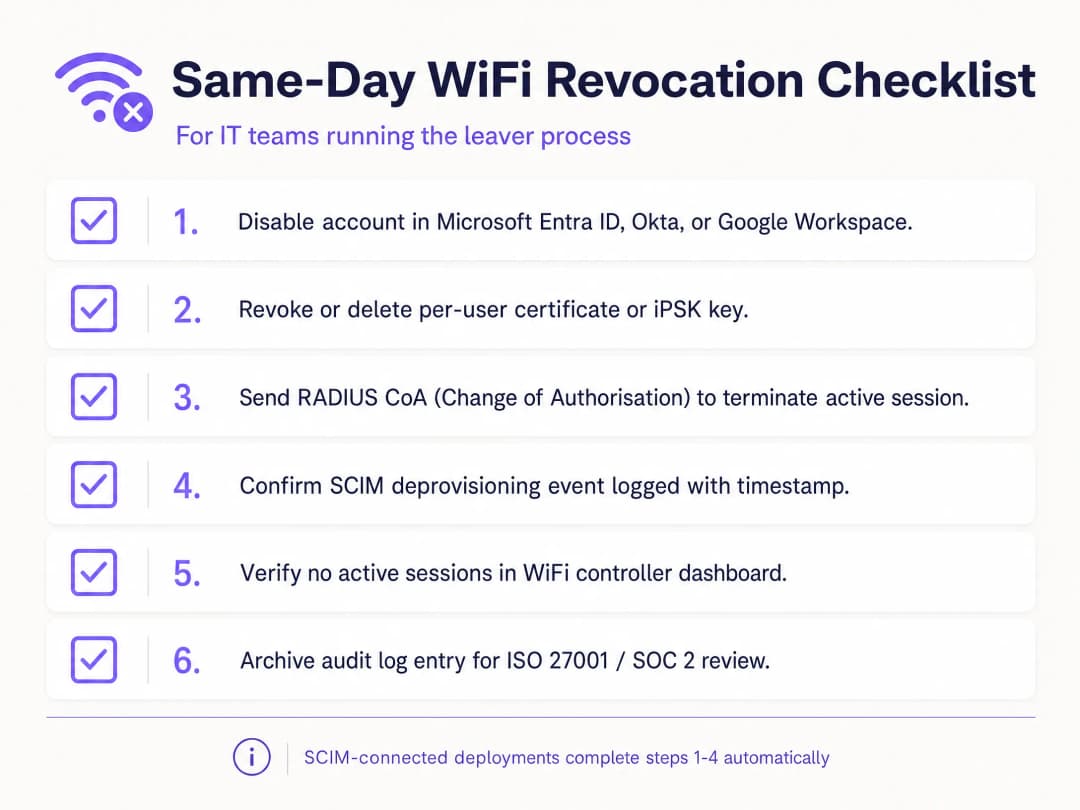
Para revogar o acesso, revoga-se o certificado dentro da CA. O servidor RADIUS verifica o estado de revogação em tempo real através do Online Certificate Status Protocol (OCSP). Se o respondedor OCSP devolver um estado "Revoked", o servidor RADIUS envia uma mensagem de Access-Reject. Para sessões ativas, o servidor emite uma Change of Authorisation (CoA) para desligar o dispositivo imediatamente. Este processo limita a revogação a um único utilizador, sem afetar o resto da rede.
Modelo 2: Eliminação de Chaves Específicas de Identidade iPSK
Para ambientes com tipos de dispositivos mistos, incluindo hardware sem ecrã (headless) que não suporta certificados 802.1X, a Identity Pre-Shared Key (iPSK) é a solução mais adequada. A iPSK atribui uma palavra-passe única a cada utilizador ou dispositivo individual no mesmo SSID.
O servidor RADIUS mapeia cada chave única para uma identidade específica. Quando um colaborador deixa a empresa, a equipa de TI simplesmente elimina a sua chave específica da base de dados RADIUS. O impacto é, portanto, restrito apenas a esse utilizador único. Esta abordagem oferece a segurança individual de uma rede empresarial combinada com a simplicidade de uma chave pré-partilhada.
Modelo 3: Desaprovisionamento Automatizado via SCIM
O System for Cross-domain Identity Management (SCIM) é um padrão aberto que automatiza a troca de dados de identidade de utilizadores. O SCIM atua como uma ponte entre o seu fornecedor de identidade e os sistemas a jusante, tais como a sua plataforma de gestão de WiFi.
Quando os Recursos Humanos desativam um colaborador cessante no Microsoft Entra ID, Okta ou Google Workspace, o SCIM envia um evento de desaprovisionamento para a Purple. A Purple revoga imediatamente as credenciais de WiFi do utilizador na autenticação seguinte - independentemente de ser um certificado ou uma iPSK. Isto cria um sistema de circuito fechado onde as alterações no ciclo de vida da identidade aplicam automaticamente as políticas de acesso à rede.
Tem dúvidas sobre a sua configuração específica?
A nossa equipa trabalha com operadores de espaços, gestores de TI e engenheiros de rede em 80.000 espaços. Agende uma chamada de 20 minutos e mostraremos como outros profissionais na sua área o resolveram.
Guia de Implementação
A implementação da revogação por utilizador requer o alinhamento entre o seu fornecedor de identidade, o servidor RADIUS e o hardware de WiFi. A Purple integra-se com hardware da Cisco Meraki, HPE Aruba, Ruckus, Juniper Mist, Ubiquiti UniFi, Cambium, Extreme Networks e Fortinet.
Passo 1: Estabelecer a Identidade como a Fonte Única de Verdade
Garanta que o seu fornecedor de identidade é a fonte única de verdade para o estado do utilizador. Todos os processos de integração e exclusão devem começar e terminar no Microsoft Entra ID, Okta ou Google Workspace.
Passo 2: Escolher o Protocolo de Autenticação Correto
Se possui uma solução madura de Gestão de Dispositivos Móveis (MDM) capaz de distribuir certificados a todos os dispositivos corporativos, escolha 802.1X EAP-TLS. Se necessita de suportar uma variedade de dispositivos não geridos, terminais de ponto de venda ou hardware IoT, escolha iPSK.
Passo 3: Configurar a Integração SCIM
Configure uma ligação SCIM entre o seu fornecedor de identidade e a Purple. Mapeie o atributo de estado do utilizador para que um estado "desativado" no diretório desencadeie um evento de revogação na Purple.
Passo 4: Ajustar os Temporizadores RADIUS
Se estiver a utilizar EAP-TLS, configure o Time-To-Live (TTL) da cache OCSP do seu servidor RADIUS em conformidade. Um TTL curto (por exemplo, 15 minutos) aumenta a segurança ao estreitar a janela durante a qual um certificado revogado permanece válido, mas aumenta a carga na CA.
Boas Práticas
De acordo com as normas do setor, as organizações devem controlar rigorosamente o acesso à rede. Implemente estas medidas para garantir um elevado nível de segurança:
- Automatizar com SCIM: A revogação manual é propensa a erros humanos. Automatize este processo ligando a sua plataforma WiFi diretamente ao seu fornecedor de identidade.
- Implementar RADIUS CoA: Embora a revogação de credenciais impeça novas ligações, não termina as sessões ativas. Garanta que o seu sistema envia um comando de Alteração de Autorização para desligar o dispositivo imediatamente.
- Separar o tráfego de convidados e de colaboradores: Nunca ligue dispositivos de colaboradores a uma rede de guest WiFi. Utilize VLANs e SSIDs separados para manter a segregação.
- Registos de auditoria: Mantenha registos imutáveis de todos os eventos de desaprovisionamento. Os auditores da ISO 27001 exigem provas de que o acesso foi revogado imediatamente após a cessação do contrato de trabalho.
Resolução de Problemas e Mitigação de Riscos
O ponto de falha mais comum na revogação de WiFi é um processo fragmentado. Se o departamento de TI desativar a conta no diretório, mas não atualizar a base de dados RADIUS autónoma, o colaborador que está de saída mantém o acesso. Uma integração SCIM elimina completamente este risco.
Outro risco é a colocação de certificados em cache. Se um servidor RADIUS colocar em cache uma resposta OCSP positiva por 24 horas, um dispositivo revogado pode continuar a autenticar-se até que a cache expire. Ajuste as definições de cache do seu OCSP para equilibrar de forma ideal o desempenho e os requisitos de segurança.Para dispositivos partilhados, como tablets de retalho utilizados por múltiplos trabalhadores por turnos, não associe a autenticação do dispositivo à identidade de um único colaborador. Utilize contas de serviço ou certificados específicos do dispositivo para evitar que o hardware crítico fique offline quando um indivíduo sai da empresa.
Retorno do Investimento (ROI) e Benefícios de Negócio
A transição para a revogação de WiFi por utilizador proporciona um valor comercial mensurável. Elimina as horas de suporte de TI gastas a coordenar alterações de palavras-passe em toda a empresa. Além disso, minimiza o risco de violações de dados causadas por ex-colaboradores, protegendo a organização de multas regulatórias e danos na reputação.
Adicionalmente, fornece o registo de auditoria claro necessário para passar com sucesso nas auditorias ISO 27001 e SOC 2. Ao automatizar o processo de entrada, mudança e saída de colaboradores, as equipas de TI podem focar-se em iniciativas estratégicas em vez de perderem tempo com a gestão manual de credenciais. Para mais detalhes sobre como proteger a sua rede, consulte o nosso guia Segurança WiFi Empresarial: Um Guia Completo para 2026.
Definições Principais
IEEE 802.1X
Uma estrutura de controlo de acesso à rede que utiliza um dispositivo, um autenticador de rede e um serviço de autenticação back-end para decidir se o acesso à rede é permitido.
Utilize-o quando o WiFi da equipa precisar de autenticar indivíduos ou dispositivos geridos, em vez de confiar numa frase de passe partilhada.
EAP-TLS
Um método de Extensible Authentication Protocol que utiliza certificados TLS para autenticação mútua e deriva material de chaveamento durante a troca de autenticação.
Utilize-o para dispositivos geridos quando o ciclo de vida do certificado e a validação RADIUS puderem suportar a revogação individual.
RADIUS
Um protocolo e modelo de serviço comummente utilizado para transportar decisões de autenticação, autorização e contabilidade entre o equipamento de rede e um serviço de autenticação.
É o ponto de decisão de back-end que deve compreender ao testar implementações de 802.1X e de algumas iPSK.
Revogação de certificado
A remoção antecipada da autoridade de um certificado para autenticação antes da sua data de expiração programada.
É importante quando o certificado de um funcionário que está de saída deve falhar na próxima autenticação WiFi, em vez de permanecer válido até à expiração.
iPSK
Chave pré-partilhada de identidade. Uma chave WiFi distinta atribuída a uma pessoa, dispositivo ou grupo responsável num SSID partilhado.
Fornece um modelo prático de remoção direcionada quando o EAP-TLS não é adequado para um dispositivo.
SCIM
System for Cross-domain Identity Management. Um padrão baseado em HTTP para aprovisionamento e gestão de dados de identidade entre sistemas.
Liga um evento de desativação de conta no fornecedor de identidade a uma alteração de estado de acesso WiFi.
Fornecedor de identidade
O sistema que mantém as contas e autentica ou afirma a identidade dos funcionários, prestadores de serviços e outras identidades da força de trabalho.
Deve ser a fonte fidedigna do evento de desativação no seu processo de entrada, mobilidade e saída de colaboradores.
Sessão ativa
Um dispositivo que já se autenticou e que possui atualmente acesso à rede.
Decida se a sua política de risco exige uma ação de desconexão separada após a credencial ser revogada.
WPA3 Enterprise
O ramo empresarial da segurança WPA3, que utiliza protocolos de segurança modernos e exige Protected Management Frames para redes WiFi CERTIFIED WPA3.
Melhora a segurança do WiFi, mas a saída individual de colaboradores ainda exige um modelo de credenciais associado à identidade.
VLAN
Um segmento de rede lógico que separa o tráfego na Camada 2 ou Camada 3 de acordo com a arquitetura de rede.
É relevante quando a identidade de WiFi de um funcionário é associada a uma função de funcionário, prestador de serviços ou outra função de rede.
Exemplos Práticos
Um hotel de 200 quartos tem um único SSID de WiFi para a equipa, partilhado pela receção, limpeza e manutenção. Um funcionário que está de saída conhece a frase de passe WPA2 partilhada, e o hotel não pode perturbar as operações dos quartos ocupados com uma rotação não planeada.
Crie um registo de exceção para a frase de passe partilhada, depois migre os dispositivos geridos da receção para 802.1X com EAP-TLS e emita iPSKs exclusivos para os dispositivos que não conseguem utilizar certificados. Para o funcionário em saída imediata, rode a frase de passe partilhada porque esta continua a ser um segredo comum. Para cada funcionário seguinte que saia, desative a identidade, remova o certificado ou iPSK, teste uma nova ligação e retenha a cadeia de eventos. O resultado operacional mensurável é uma remoção direcionada de credenciais, um teste recusado e um registo de auditoria atribuível por cada evento de desvinculação.
Um retalhista nacional opera WiFi para a equipa em lojas, locais de distribuição e numa operação temporária num estádio. Os Recursos Humanos desativam as contas no Microsoft Entra ID, mas atualmente as equipas das lojas abrem pedidos de suporte de rede separados para os funcionários que saem.
Mapeie a identidade duradoura do Entra ID com o registo de acesso WiFi e utilize o SCIM para enviar o estado desativado para o serviço de acesso. Mantenha a desativação no fornecedor de identidade como o acionador autorizado. Defina um caminho de exceção para falhas de sincronização, nomeie um proprietário operacional e execute um teste controlado de desativação e autenticação num grupo de lojas antes do lançamento. O resultado mensurável é um único evento de identidade que produz uma alteração de estado do WiFi e uma tentativa de nova autenticação recusada registada, substituindo o pedido de suporte local como o caminho normal.
Um centro de conferências precisa de remover o acesso WiFi de equipa de um prestador de serviços após um evento de fim de semana, mantendo a equipa permanente e os dispositivos do local ligados para a abertura de segunda-feira.
Emita um iPSK ao prestador de serviços associado a um registo de identidade do próprio, e não a uma palavra-passe genérica de equipa de eventos. No final do contrato, elimine apenas esse iPSK, decida se deve terminar a sessão ativa e, em seguida, teste uma nova ligação com a chave removida. Mantenha o pedido autorizado de desvinculação, a eliminação da chave e o teste falhado registados em conjunto. O resultado é a ausência de alteração de credenciais para a equipa permanente e nenhuma reconfiguração nos seus dispositivos.
Continue a ler esta série
A conformidade para WiFi sem palavra-passe: HIPAA, PCI, ISO 27001
Poderá decidir se a migração das redes de colaboradores de uma palavra-passe partilhada para 802.1X com EAP-TLS elimina as lacunas de auditoria ao abrigo da PCI DSS 4.0, HIPAA e ISO 27001:2022. Saberá quais os controlos que satisfaz, quais os que não satisfaz e que provas reunir antes do trabalho de campo.
Secure BYOD WiFi: Integração de certificados Passpoint vs xPSK (iPSK)
Um guia técnico abrangente para equipas de TI sobre como proteger dispositivos não geridos de funcionários e estudantes (BYOD) utilizando certificados Passpoint EAP-TLS com configuração automática (zero-touch) vs xPSK específicos do fabricante (iPSK/easyPSK, DPSK, PPSK, MPSK).
WPA2 Personal vs Enterprise: qual é a diferença e qual deve utilizar?
Este guia de referência técnica fornece uma comparação abrangente dos protocolos de segurança WPA2 Personal e WPA2 Enterprise em ambientes de WiFi corporativo. Aborda as diferenças arquitetónicas, metodologias de implementação e implicações de segurança de cada norma para ajudar os arquitetos de rede e responsáveis de TI a tomarem decisões de implementação informadas.
Tem dúvidas sobre a sua configuração específica?
A nossa equipa trabalha com operadores de espaços, gestores de TI e engenheiros de rede em 80.000 espaços. Agende uma chamada de 20 minutos e mostraremos como outros profissionais na sua área o resolveram.