跳至主要内容

如何实施 SCEP 以实现自动化 WiFi 证书注册

本指南介绍了如何在企业场所实施 SCEP(简单证书注册协议)以实现自动化 WiFi 证书注册。它涵盖了完整的架构蓝图——从 PKI 设计和 MDM 集成到必不可少的三个步骤部署顺序——并向 IT 经理和网络架构师展示了如何在大规模场景下消除共享凭据、自动化证书生命周期管理,并满足 PCI DSS 和 GDPR 要求。

📖 10 分钟阅读📝 2,383 🔧 2 应用实例4 练习题📚 10 关键定义

收听本指南

查看播客转录
INTRODUCTION AND CONTEXT - 0:00 to 1:00 Hello, and welcome to this technical briefing from Purple. Today we are unpacking SCEP, the Simple Certificate Enrollment Protocol, and how to implement it for automated WiFi certificate enrollment. If you are a network architect, an IT director, or managing infrastructure for large venues like retail chains, hospitals, or stadiums, this briefing is for you. We are cutting through the noise to discuss how to deploy EAP-TLS at scale, why SCEP is the right choice for device identity, and how you can practically deploy it in your environment. Let us get straight into it. TECHNICAL DEEP-DIVE - 1:00 to 6:00 So, what exactly is the challenge we are solving here? In the world of enterprise WiFi security, EAP-TLS represents the gold standard. Unlike legacy methods such as PEAP or EAP-TTLS, which rely on user passwords, EAP-TLS mandates mutual certificate-based authentication. This means the client device must verify the network identity via a server certificate, and the network must verify the client identity via a unique client certificate. Think about the vulnerability of passwords. They can be shared, phished, or stolen. In a sprawling enterprise environment, a compromised password can grant a bad actor access to your entire internal network. EAP-TLS eliminates this vector entirely. The authentication relies on X.509 certificates issued by a Public Key Infrastructure, or PKI. But the core challenge with EAP-TLS is not the protocol itself. It is the logistics of getting unique client certificates onto thousands of devices, whether they are Windows laptops, iPads, or point-of-sale tablets. You cannot manually install certificates on thousands of devices. This is where Mobile Device Management platforms like Microsoft Intune or Jamf come into play. But how do you deliver those certificates securely? You generally have two choices: PKCS or SCEP. Let me be absolutely clear on this. For WiFi authentication, you want SCEP. Here is why it matters. With SCEP, the MDM instructs the endpoint device to generate its own private key locally. That key stays locked in the device secure hardware. It never travels across the network. The device just sends a Certificate Signing Request to your Certificate Authority via a gateway, usually an NDES server. Contrast that with PKCS, where the Certificate Authority generates the private key centrally and pushes it down over the network to the device. While PKCS has its place, say, for email encryption where you need key escrow, transmitting private keys over the network is a risk you do not need to take for network authentication. Keep the keys on the device. Use SCEP. Now, let us talk implementation. If you take away one thing from this briefing, it is this rule of thumb: Trust before Authentication. You cannot just push a WiFi profile and expect it to work. There is a strict, three-step deployment sequence you must follow. Step one: Deploy the Trusted Root Certificate. Before a device can ask for a client certificate, or trust your RADIUS server, it has to trust the issuing Certificate Authority. Push this profile first. Step two: Configure and push the SCEP Certificate Profile. This tells the device how to talk to the SCEP gateway, what format to use for its subject name, and what the certificate is actually for. In this case, Client Authentication. You must link this profile to the Trusted Root you deployed in step one. Step three: Deploy the 802.1X WiFi Profile. This is where you tie it all together. You specify the SSID, select WPA3-Enterprise, set the EAP type to EAP-TLS, and point it to the SCEP certificate for client authentication. IMPLEMENTATION RECOMMENDATIONS AND PITFALLS - 6:00 to 8:00 Here is a major pitfall we see all the time. A client calls us and says, the certificates are on the device, but the WiFi profile shows an error in Intune. Almost every single time, this is a group targeting mismatch. If you assign the SCEP profile to a Users group, but assign the WiFi profile to a Devices group, the MDM cannot resolve the dependency. Match your targets exactly across all three profiles. Let us look at a real-world scenario. Imagine a 200-room hotel. They have 150 managed iOS devices for housekeeping staff. Currently, they use a standard password network, and staff keep sharing the password with guests. It is a genuine operational headache. By migrating to WPA2-Enterprise with EAP-TLS via SCEP, the IT Director eliminates the password entirely. The iOS devices authenticate silently in the background using their certificates. But what happens if a housekeeper loses a device, or leaves the company? Disabling their Active Directory account is not enough, because the certificate on that device is still cryptographically valid. This brings us to a critical security control: strict CRL checking. You must configure your RADIUS server to check the Certificate Revocation List. If a device goes missing, you revoke the certificate at the CA. The RADIUS server sees the revocation on the CRL and immediately blocks network access. Without strict CRL checking, your security posture is incomplete. RAPID-FIRE Q&A - 8:00 to 9:00 Let us tackle a few rapid-fire questions we often hear from CTOs. Question one: Is EAP-TLS required for WPA3 Enterprise? While WPA3 Enterprise supports other methods, EAP-TLS is strongly recommended and is required if you are implementing the WPA3 Enterprise 192-bit security suite, often called Suite B. Question two: Can we use public certificates for clients? No. You must use a private internal CA for client certificates. Public CAs are for public-facing web servers. Your internal RADIUS server needs to trust your specific internal Root CA to validate your corporate devices. Question three: How does this fit with OpenRoaming? OpenRoaming relies on Passpoint and 802.1X. Purple acts as a free identity provider for services like OpenRoaming under the Connect licence, facilitating seamless, secure roaming across venues using underlying certificate and identity frameworks. SUMMARY AND NEXT STEPS - 9:00 to 10:00 To wrap up, transitioning to automated SCEP certificate deployment delivers real, measurable returns. You will see a 70 to 80 percent reduction in WiFi-related helpdesk tickets, because users are not getting locked out or typing passwords incorrectly. More importantly, you eliminate the risk of credential harvesting, ensuring you meet compliance frameworks like PCI DSS and GDPR. Automating enterprise WiFi security is not just about locking things down. It is about making the secure path the easiest path for your users. Your next steps: audit your current 802.1X deployment. If you are still relying on passwords, design your PKI and plan the migration to EAP-TLS with SCEP. Check whether your RADIUS server is enforcing strict CRL or OCSP checking. And verify that your three deployment profiles all target the same group. Thank you for listening to this technical briefing from Purple. For more detailed deployment guides and to understand how our analytics and identity platforms can integrate with your secure networks, visit purple dot ai.

header_image.png

执行摘要

对于在酒店、零售物业、体育场馆和会议中心运营 Guest WiFi 的场所运营商而言,依赖预共享密钥或基础 Captive Portal 进行员工网络访问存在安全隐患。现代网络架构要求使用 EAP-TLS(可扩展身份验证协议 - 传输层安全)进行 802.1X 身份验证,以确保每个设备在接入网络之前都经过加密验证。挑战在于分发:如何向成千上万台 Windows、iOS 和 Android 设备部署唯一的客户端证书,而又不让您的服务台不堪重负?

答案就是 SCEP——简单证书注册协议。SCEP 于 2020 年被 IETF 正式确立为 RFC 8894,它实现了托管设备群的证书注册自动化。当与 Microsoft Intune 或 Jamf 等 MDM 平台集成时,SCEP 可提供零接触证书配置:设备无需任何 IT 干预即可自行请求、接收和更新证书。私钥在设备本地生成,绝不会在网络上传输——与基于 PKCS 的分发相比,这具有根本性的安全优势。

本指南将逐步介绍完整的 SCEP 实施工作流:PKI 架构、NDES 网关配置、必不可少的三个步骤 MDM 部署顺序,以及决定部署成功还是停滞的运营控制(特别是 CRL 检查和组定位)。两个真实场景展示了该方法在酒店和零售环境中的应用。Purple 在全球 80,000 多个活跃场所运营,拥有 3.5 亿独立用户;此处描述的模式反映了在该规模下行之有效的方案。


技术深挖

SCEP 的实际作用

SCEP 介于您的 MDM 平台和证书颁发机构 (CA) 之间。它提供了一种基于 HTTP 的标准化机制,使设备能够请求、接收和更新 X.509 证书,而无需加入域的凭据或管理员的手动干预。该协议最初开发于 2000 年代初期,在 IETF 正式发布为 RFC 8894 之前,已在企业 MDM 环境中获得广泛采用。

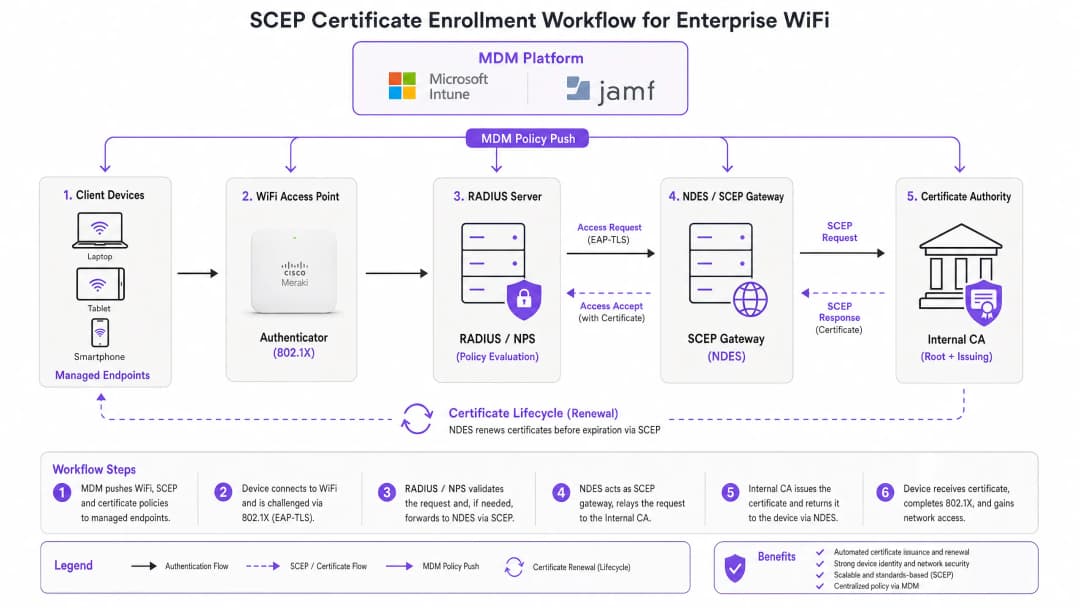
六步注册流程如下。第一步,托管设备连接到其 MDM 配置文件中预先配置的 SCEP 网关 URL。第二步,设备在本地生成私钥/公钥对,并创建证书签名请求 (CSR)。第三步,SCEP 网关使用嵌入在 MDM 策略中的质询密码或 OTP 验证设备的授权。第四步,网关将验证后的 CSR 转发给 CA。第五步,CA 对证书进行签名并将其返回给网关。第六步,网关将签名后的证书分发给设备。未来的更新也遵循相同的自动化路径——设备在过期前重新注册,无需任何用户或管理员操作。

scep_architecture_overview.png

SCEP 与 PKCS:至关重要的抉择

Microsoft Intune 和大多数 MDM 平台支持两种证书分发机制:SCEP 和 PKCS。两者的区别在于架构,而非表面。

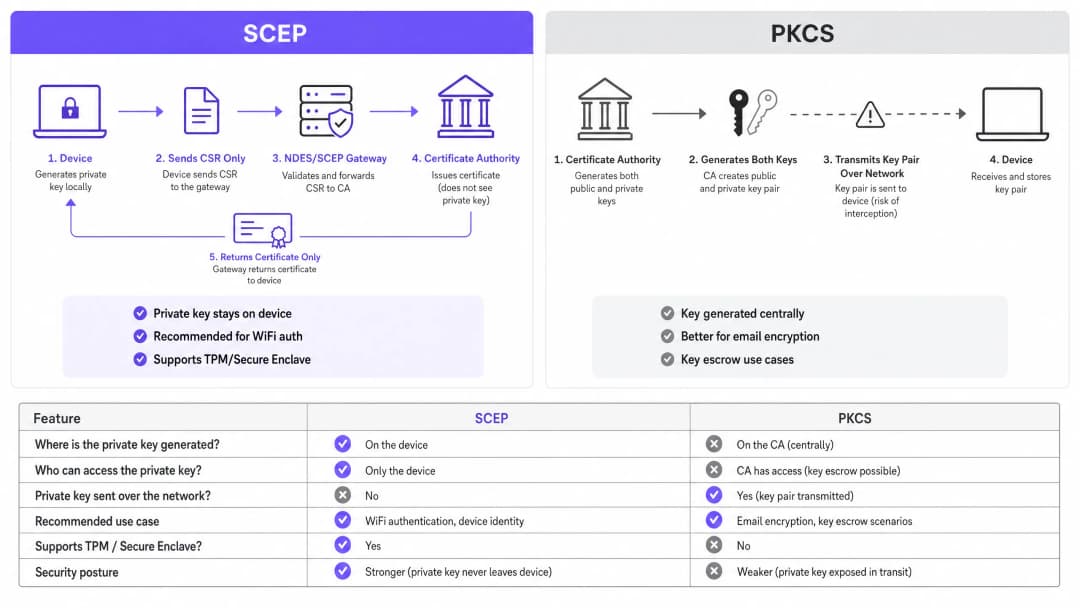
使用 SCEP 时,私钥在设备上生成并保留在设备上。CA 永远看不到它。设备的 TPM(在 Windows 上)或 Secure Enclave(在 iOS/macOS 上)在硬件级别保护该密钥。使用 PKCS 时,CA 集中生成密钥对,并通过网络将其传输到设备。CA 保留一份副本以启用密钥托管——这对于 S/MIME 电子邮件加密很有用,但会为网络身份验证引入不必要的风险。

对于 802.1X WiFi 身份验证,请使用 SCEP。私钥绝不离开设备。这是基本原则。

scep_vs_pkcs_comparison.png

评估标准 SCEP PKCS
私钥生成位置 设备 CA(集中式)
私钥是否通过网络传输 绝不
是否支持 TPM / Secure Enclave
是否推荐用于 WiFi 身份验证
是否推荐用于电子邮件加密 (S/MIME)
是否可以进行密钥托管

802.1X 和 EAP-TLS:身份验证框架

IEEE 802.1X 是基于端口的网络访问控制标准,是企业 WiFi 安全的基石。它定义了三个角色:申请者(客户端设备)、认证者(接入点 - Cisco Meraki、HPE Aruba、Ruckus、Juniper Mist、Ubiquiti UniFi、Cambium、Extreme 或 Fortinet)以及认证服务器(RADIUS 服务器,例如 Microsoft NPS、FreeRADIUS 或 Cisco ISE)。

EAP-TLS 是 802.1X 中最安全的 EAP 方法。双方都需要出示证书:RADIUS 服务器向客户端出示其证书,客户端向 RADIUS 服务器出示其通过 SCEP 配置的证书。如果没有来自受信任 CA 层级的有效且未被吊销的证书,任何一方都无法冒充另一方。这种双向身份验证模型通过单一的架构决策,消除了凭据窃取、双面恶魔(Evil Twin)攻击和流氓接入点风险。

EAP-TLS 满足 PCI DSS 4.0 要求 8.6 中关于网络层多因素身份验证的规定。它是 WPA3 Enterprise 192 位 (Suite B) 部署的必需项。对于任何涉及持卡人数据处理的无线网络——零售 销售点(POS)、酒店前台、体育场票务——EAP-TLS 是正确的选择。

如需深入了解 安全 WiFi 架构以及基于证书的身份验证如何融入更广泛的安全态势,请参阅我们的核心指南。


实施指南

部署顺序是不可更改的。Intune 和 Jamf 按顺序解析配置文件依赖关系:WiFi 配置文件依赖于 SCEP 配置文件,而后者又依赖于受信任的根(Trusted Root)配置文件。如果不按顺序部署,WiFi 配置文件将无法应用。

步骤 1:设计您的 PKI

在操作 MDM 控制台之前,请先设计您的证书层级。标准的双层 PKI 包括:离线根 CA 和在线发证 CA。根 CA 的私钥是整个证书基础设施的主信任锚——请保持其物理隔离(air-gapped)。发证 CA 负责日常的证书颁发,并发布证书吊销列表(CRL)和 OCSP 响应程序。

对于大多数企业级场所部署,运行在 Windows Server 上的 Microsoft Active Directory 证书服务(AD CS)可提供发证 CA。来自 SCEPman 或 SecureW2 等提供商的云托管 PKI 服务完全免去了本地基础设施的需求,非常适合跨酒店集团、零售连锁店或多站点公共部门组织的分布式资产部署,值得进行评估。

步骤 2:部署 NDES 服务器(或云 SCEP 网关)

NDES(网络设备注册服务)是 Microsoft Windows Server 的一个角色,充当 MDM 与 CA 之间的 SCEP 网关。关键配置要求如下:

  • 通过 Azure AD 应用程序代理(或等效的反向代理)向外部发布 NDES URL。这允许远程设备在到达现场之前进行注册,而无需打开入站防火墙端口。
  • NDES 服务帐户需要对 CA 证书模板具有“读取”和“注册”权限。
  • 配置证书模板,将“密钥用法”设置为“数字签名”和“密钥加密”,将“增强型密钥用法”设置为“客户端身份验证”(OID: 1.3.6.1.5.5.7.3.2)。
  • 设置适当的证书有效期。客户端证书的标准有效期为一年;对于稳定设备群中的设备证书,两年是可接受的。

如果您希望避免使用本地 NDES 基础设施,云 SCEP 网关可以通过 API 直接与 Intune 和您的 CA 集成,从而完全免去对 IIS 的依赖。

步骤 3:部署受信任的根证书(Trusted Root Certificate)配置文件

在您的 MDM 平台中,创建一个“受信任的证书”配置文件,并将您的根 CA 证书(以及任何中间 CA 证书)作为 .cer 文件上传。在部署任何其他证书或 WiFi 配置文件之前,先将此配置文件部署到您的目标设备组。如果没有这一步,设备在 EAP-TLS 握手期间将无法验证 RADIUS 服务器的证书,并且在请求自己的 SCEP 证书时也无法信任发证 CA。

经验法则: 务必在所有三个相关配置文件中针对相同的 Azure AD 组(用户或设备)。此处的配置不匹配是导致 WiFi 配置文件部署失败最常见的原因。

步骤 4:配置 SCEP 证书配置文件

在您的 MDM 中创建一个 SCEP 证书配置配置文件:

  • 使用者名称格式: 对于用户驱动的身份验证,使用 CN={{UserPrincipalName}}。对于设备身份验证(推荐用于共享设备和物联网 IoT),使用 CN={{AAD_Device_ID}}
  • 密钥用法: 数字签名(Digital Signature)、密钥加密(Key Encipherment)。
  • 增强型密钥用法: 客户端身份验证(Client Authentication,OID: 1.3.6.1.5.5.7.3.2)。
  • SCEP 服务器 URL: 外部发布的 NDES URL。
  • 根证书: 链接到步骤 3 中的受信任的根(Trusted Root)配置文件。
  • 证书有效期: 与 CA 上配置的模板相匹配。

步骤 5:部署 802.1X WiFi 配置文件

创建一个 WiFi 配置配置文件:

  • SSID: 输入与您的接入点广播完全一致的网络名称。
  • 安全类型: WPA2-EnterpriseWPA3-Enterprise
  • EAP 类型: EAP-TLS。
  • 客户端身份验证证书: 选择步骤 4 中的 SCEP 证书配置文件。
  • 服务器验证: 指定步骤 3 中的受信任的根(Trusted Root)证书,并输入预期的 RADIUS 服务器名称。这可以防止设备连接到呈现欺诈性证书的恶意接入点。

最佳实践

在您的 RADIUS 服务器上强制执行严格的 CRL 检查

证书吊销是一项操作控制,用于消除禁用帐户与阻止网络访问之间的差距。当设备丢失、被盗或员工离职时,请禁用 AD 帐户并在 CA 处吊销证书。您的 RADIUS 服务器必须配置为在每次身份验证尝试时检查 CRL。如果 CRL 不可用(因为 CDP(CRL 分发点)无法访问),大多数 RADIUS 服务器默认会选择“故障开放”(fail open),这存在安全风险。请确保您的 CDP 具有高可用性,并且您的 RADIUS 服务器配置为在无法获取 CRL 时选择“故障关闭”(fail closed)。

对于实时吊销,除 CRL 外,还应配置 OCSP(在线证书状态协议)。OCSP 提供针对单个证书的状态响应,而无需 RADIUS 服务器下载并解析整个 CRL。

对共享设备和物联网(IoT)设备使用设备证书

对于共享设备——酒店客房服务平板电脑、零售 POS 终端、体育场门禁读卡器——请使用设备证书而不是用户证书。设备证书与机器身份绑定,而不是与用户帐户绑定。这意味着无论哪个用户登录,设备都会进行身份验证,并且吊销操作与设备记录绑定,而不是与员工的离职绑定。

对于 零售 部署,POS 硬件上的设备证书还满足了 PCI DSS 对网络层设备身份的要求,而无需在销售点引入复杂的用户凭据。

自动证书续期

SCEP 支持自动续期:MDM 会指示设备在证书到期前重新注册证书过期。配置您的 SCEP 配置文件,在证书剩余有效期的 20% 时触发更新。对于为期一年的证书,更新大约在过期前 73 天开始。这个时间窗口提供了足够的时间,以便在证书过期且设备失去网络访问权限之前解决任何更新失败的问题。

证书过期导致的大规模身份验证失败是 802.1X 部署中最常见的运维事件。通过 SCEP 进行自动更新可完全消除这一风险。

按证书属性细分网络

RADIUS 服务器可以读取证书属性(使用者、SAN 或自定义 OID),并使用它们动态地将设备分配到 VLAN。使用从 HousekeepingDevices 模板颁发的证书的客房服务平板电脑会进入客房服务 VLAN。使用来自 RetailPOS 模板的证书的 POS 终端会进入 PCI 范围内的 VLAN。这是通过密码学强制执行的网络细分,比基于 SSID 或基于 MAC 的方法可靠得多。

对于在同一物理基础设施上同时运行访客 WiFi 和员工 WiFi 的 酒店业 运营商而言,通过证书属性进行 VLAN 分配可确保访客和员工始终处于不同的网络细分中,无论设备连接到哪个 SSID。


故障排除与风险缓解

WiFi 配置文件在 Intune 中显示“错误”或“不适用”

根本原因: 组定位不匹配。SCEP 配置文件分配给与 WiFi 配置文件不同的组。Intune 无法解析证书依赖关系。

解决方法: 审核所有三个配置文件(受信任的根、SCEP、WiFi)。确保它们都分配给完全相同的 Azure AD 组。如果要部署到“用户”,则所有三个配置文件都必须针对“用户”组。如果部署到“设备”,则所有三个都必须针对“设备”组。

NDES 返回 HTTP 403 错误

根本原因: Intune Certificate Connector 服务帐户对 CA 证书模板缺乏“读取”或“注册”权限,或者防火墙 URL 过滤正在阻止 SCEP 查询字符串。

解决方法: 在 CA 控制台中验证连接器帐户对模板是否具有“读取”和“注册”权限。检查防火墙日志中是否包含 ?operation=GetCACaps?operation=PKIOperation 的被阻止请求。这些查询字符串必须在不进行修改的情况下通过。

设备未能能在过期前更新证书

根本原因: SCEP 更新窗口太短,或者在更新时无法访问 NDES 服务器。

解决方法: 将更新阈值设置为证书有效期的 20%。确保通过高可用反向代理发布 NDES URL。监控 NDES IIS 日志中的更新请求失败,并主动进行告警。

RADIUS 拒绝有效的证书

根本原因: RADIUS 服务器的受信任 CA 存储中不包含颁发 CA 证书,或者 CRL 已过期。

解决方法: 将完整的 CA 链(根 CA + 颁发 CA)导入到 RADIUS 服务器的受信任存储中。验证是否成功获取了 CRL,以及从 RADIUS 服务器是否可以访问 CDP URL。检查 CRL 的下一次更新时间戳——如果已过期,则 CA 需要发布新的 CRL。

有关安全之外更广泛的网络性能注意事项,请参阅我们的 带宽管理指南


投资回报率 (ROI) 与业务影响

基于 SCEP 的证书注册的商业案例非常简单。基于密码的 WiFi 会产生可预测的服务台工单量:密码过期、锁定、员工与访客共享凭据以及新员工入职摩擦。基于证书的身份验证对最终用户是无感的。设备会自动连接。没有需要过期、共享或遗忘的密码。

从基于密码的 WiFi 迁移到带有 SCEP 的 EAP-TLS 的组织通常报告 WiFi 相关服务台工单减少了 70-80%(Purple 内部数据,2024 年,基于在酒店业和零售物业的部署)。仅服务台节省的费用通常就能在第一年内收回实施成本。

合规性影响同样具体。EAP-TLS 满足 PCI DSS 4.0 要求 8.6 中关于网络层多因素身份验证的要求。对于 医疗保健 环境,它符合 HIPAA 对无线网络访问的技术保护要求。对于公共部门组织,它支持 NCSC Cyber Essentials Plus 认证要求对网络访问控制的要求。

对于 交通运输 运营商(铁路特许经营、机场运营商、公交网络),在员工设备上进行基于证书的身份验证可确保承载安全关键数据的运营网络与乘客 WiFi 隔离,并免受基于凭据的攻击。

Purple 的 WiFi 分析 平台与受 802.1X 保护的网络集成,可在不损害底层基础设施安全状况的情况下提供第一方数据洞察。在 Purple 的网络中收集的 290 亿个数据点表明,安全和分析是互补的,而不是竞争的目标。

有关安全网络部署以及反馈和体验管理的信息,请参阅我们的 场所反馈手册

关键定义

SCEP (Simple Certificate Enrollment Protocol)

An IETF-standardised protocol (RFC 8894) that automates X.509 certificate enrollment for managed devices. The device generates its own private key locally and sends only a Certificate Signing Request to the CA via a gateway. The private key never leaves the device.

IT teams encounter SCEP when configuring MDM platforms (Intune, Jamf) to deploy WiFi authentication certificates at scale. It is the recommended mechanism for 802.1X EAP-TLS deployments because the private key is hardware-protected on the endpoint.

EAP-TLS (Extensible Authentication Protocol - Transport Layer Security)

The most secure 802.1X authentication method. Both the client device and the RADIUS server present X.509 certificates. Neither side can authenticate without a valid, non-revoked certificate from the trusted CA hierarchy.

EAP-TLS is the target authentication protocol that SCEP certificate deployment enables. It satisfies PCI DSS 4.0 Requirement 8.6 and is required for WPA3 Enterprise 192-bit (Suite B) deployments.

PKCS (Public Key Cryptography Standards)

A certificate delivery mechanism where the CA generates both the public and private key pair centrally and transmits them to the endpoint. The CA retains a copy of the private key, enabling key escrow.

IT teams choose between SCEP and PKCS when configuring certificate profiles in Intune. PKCS is appropriate for S/MIME email encryption where key escrow is required. It is not recommended for WiFi authentication because the private key is transmitted over the network.

NDES (Network Device Enrollment Service)

A Microsoft Windows Server role that acts as the SCEP gateway between an MDM platform and a Certificate Authority. It validates device enrollment requests and forwards CSRs to the CA.

NDES is a required infrastructure component for on-premises SCEP deployments with Microsoft Intune. It must be published externally via an application proxy to allow remote devices to enroll. Cloud SCEP gateways are an alternative that eliminates the on-premises NDES dependency.

CRL (Certificate Revocation List)

A list published by the CA containing the serial numbers of certificates that have been revoked before their expiry date. RADIUS servers check the CRL to ensure devices with revoked certificates cannot authenticate.

CRL checking is the operational control that enforces certificate revocation. IT teams must configure their RADIUS server to check the CRL on every authentication attempt and ensure the CRL Distribution Point (CDP) is highly available.

802.1X

An IEEE standard for port-based network access control. It defines the three-party authentication framework (supplicant, authenticator, authentication server) used in enterprise WiFi and wired networks.

802.1X is the framework within which EAP-TLS and SCEP operate. IT teams encounter it when configuring WPA2-Enterprise or WPA3-Enterprise SSIDs and when setting up RADIUS server policies.

RADIUS (Remote Authentication Dial-In User Service)

A networking protocol that provides centralised authentication, authorisation, and accounting (AAA) for network access. In 802.1X deployments, the RADIUS server validates client certificates and enforces VLAN assignment policies.

The RADIUS server is the authentication decision point in every 802.1X deployment. Common implementations include Microsoft NPS, FreeRADIUS, and Cisco ISE. It must be configured with the trusted CA chain and strict CRL or OCSP checking.

CSR (Certificate Signing Request)

A block of encoded text generated by a device that contains the device's public key and identity information. The device sends the CSR to the CA (via the SCEP gateway) to request a signed certificate. The corresponding private key is generated and retained on the device.

The CSR is the core artifact in the SCEP enrollment flow. IT teams configure the CSR format (subject name, key usage, EKU) in the SCEP certificate profile within their MDM platform.

PKI (Public Key Infrastructure)

The combination of hardware, software, policies, and procedures required to create, manage, distribute, and revoke digital certificates. A standard enterprise PKI consists of an offline root CA and an online issuing CA.

PKI is the prerequisite for any EAP-TLS deployment. IT teams must design and deploy a two-tier CA hierarchy before configuring SCEP. Cloud-hosted PKI services reduce the infrastructure burden for distributed estate deployments.

VLAN (Virtual Local Area Network)

A logical network segment that isolates traffic at Layer 2. In 802.1X deployments, RADIUS servers assign devices to VLANs dynamically based on certificate attributes, user identity, or policy.

VLAN assignment via RADIUS is the mechanism that enforces network segmentation in enterprise WiFi. IT teams use it to separate POS devices onto PCI-scoped VLANs, guest devices onto internet-only VLANs, and staff devices onto corporate VLANs - all from a single physical infrastructure.

应用实例

A 200-room Premier Inn property needs to deploy secure WiFi for 150 iOS housekeeping devices. Staff are currently sharing a WPA2-Personal password with guests, creating a compliance and operational risk. The IT Director needs to eliminate the shared password without disrupting daily operations.

The IT Director implements a Jamf-driven SCEP deployment in three phases. Phase one: the Root CA certificate is pushed to all 150 iOS devices via a Jamf Trusted Certificate profile, targeting the 'Housekeeping Devices' smart group. Phase two: a SCEP certificate profile is deployed, directing devices to an Azure AD App Proxy-published NDES server. The subject name uses CN={{SERIALNUMBER}} to tie the certificate to the device hardware. Phase three: a WPA2-Enterprise WiFi profile is pushed, specifying EAP-TLS and linking to the SCEP certificate. Devices authenticate silently. The shared password SSID is decommissioned. The RADIUS server is configured with strict CRL checking and VLAN assignment: housekeeping devices land on VLAN 20 (operations), guest devices on VLAN 10 (internet-only).

考官评语: The key design decisions here are device certificates (not user certificates) for shared hardware, and VLAN assignment via certificate attributes rather than SSID. This means a device that somehow connects to the guest SSID still lands on the correct VLAN. The CRL checking configuration is non-negotiable: when a housekeeper leaves, the device certificate is revoked at the CA, and the RADIUS server blocks access within the CRL refresh interval - typically 15 minutes with OCSP, or up to one hour with CRL.

A retail chain with 500 locations needs to secure corporate WiFi for Windows POS tablets running payment processing software. PCI DSS 4.0 compliance requires multi-factor authentication at the network layer. The current WPA2-Personal setup fails the PCI DSS Requirement 8.6 assessment.

The network architect deploys EAP-TLS via Microsoft Intune and SCEP across all 500 locations. The deployment uses device certificates with CN={{AAD_Device_ID}} as the subject name, tying each certificate to the Intune device record. The three-profile sequence (Trusted Root, SCEP, WiFi) is deployed to the 'POS Devices' Azure AD group - the same group across all three profiles. The RADIUS server assigns POS devices to a dedicated PCI-scoped VLAN (VLAN 100) based on the certificate's issuing template. The CRL is published to a highly available CDN-hosted endpoint with a four-hour validity window. OCSP is enabled for real-time revocation checking. The deployment is validated against PCI DSS 4.0 Requirement 8.6 by the QSA.

考官评语: The PCI DSS alignment is achieved by the combination of EAP-TLS (something you have - the certificate) and the device identity bound to the Intune record (something you are - the enrolled managed device). The VLAN assignment via certificate template ensures POS devices are always on the PCI-scoped network segment, regardless of physical location across the 500-site estate. The CDN-hosted CRL endpoint is a critical reliability decision: if the CRL is unreachable, authentication fails, causing a site-wide outage. High availability for the CRL is as important as high availability for the RADIUS server itself.

练习题

Q1. You have deployed Trusted Root and SCEP certificate profiles to the 'All Staff' user group in Intune. You then deploy the WiFi profile to the 'Corporate Devices' device group. Devices receive the certificates but the WiFi profile shows 'Error' in the Intune console. What is the most likely cause, and how do you fix it?

提示:Consider how Intune resolves dependencies between profiles and what happens when profiles target different group types.

查看标准答案

The root cause is a group targeting mismatch. The WiFi profile depends on the SCEP profile, which depends on the Trusted Root profile. Intune cannot resolve these dependencies when the profiles target different group types (Users vs Devices). Fix: redeploy all three profiles to the same group. If the WiFi profile targets 'Corporate Devices' (a device group), the SCEP and Trusted Root profiles must also target 'Corporate Devices'. Alternatively, move all three to a user group if user-based authentication is required.

Q2. A hotel housekeeper's iPad is reported stolen. You immediately disable the housekeeper's Active Directory account. The next morning, the stolen iPad is still connecting to the hotel's WPA2-Enterprise network. Why, and what two actions do you take to prevent this?

提示:Think about what the RADIUS server actually validates during EAP-TLS authentication, and what controls govern certificate validity.

查看标准答案

Disabling the AD account does not revoke the client certificate stored on the iPad. The RADIUS server validates the certificate, not the AD account status, during EAP-TLS authentication. The two required actions are: (1) revoke the device certificate at the CA - this adds the certificate serial number to the CRL; (2) ensure the RADIUS server is configured with strict CRL checking so it fetches the updated CRL and rejects the revoked certificate on the next authentication attempt. For faster revocation, configure OCSP on the RADIUS server for real-time certificate status checks.

Q3. A retail chain is deploying 802.1X WiFi to 500 POS locations. The security architect proposes using PKCS certificate delivery instead of SCEP to avoid deploying an NDES server. The QSA reviewing the PCI DSS 4.0 assessment raises a concern. What is the concern, and what is the correct recommendation?

提示:Consider what PCI DSS says about private key handling and what PKCS does with the private key during delivery.

查看标准答案

The QSA's concern is that PKCS transmits the private key over the network from the CA to the device. PCI DSS 4.0 Requirement 3.5 requires that private keys used for authentication are protected against disclosure. Transmitting the private key over the network - even encrypted - introduces a risk that SCEP eliminates entirely. The correct recommendation is to use SCEP, where the private key is generated on the POS device and never leaves it. To avoid on-premises NDES infrastructure, the architect should evaluate a cloud SCEP gateway service that integrates directly with Intune and the CA via API.

Q4. You are designing a WiFi network for a large conference centre that hosts 50+ events per year. Staff devices need to be on a secure 802.1X network. You want to ensure that if a contractor's device is compromised, it can be isolated from the network within 15 minutes. What certificate revocation mechanism do you configure, and why?

提示:Compare CRL and OCSP in terms of revocation latency and what determines how quickly a RADIUS server acts on a revocation.

查看标准答案

Configure OCSP (Online Certificate Status Protocol) on the RADIUS server. CRL-based revocation has a latency determined by the CRL's validity period - typically one to 24 hours - meaning a revoked certificate may still authenticate until the RADIUS server fetches the next CRL. OCSP provides real-time per-certificate status responses: when a certificate is revoked at the CA, the OCSP responder immediately returns a 'revoked' status on the next query. With OCSP configured on the RADIUS server, a revoked contractor certificate is blocked on the next authentication attempt, typically within seconds. Ensure the OCSP responder is highly available - if it is unreachable and the RADIUS server is configured to fail closed, all authentications will fail.