跳至主要内容

为什么我的访客 WiFi 无法连接?Captive Portal 问题排查

本权威技术参考指南解释了 Captive Portal 检测的底层机制,并详细介绍了导致访客 WiFi 无法连接的六种主要故障模式。它为 IT 经理和网络架构师提供了一个实用的排查框架,以解决 HTTP 重定向问题、DNS 冲突和 MAC 随机化带来的挑战。

📖 6 分钟阅读📝 1,384 🔧 2 应用实例3 练习题📚 8 关键定义

收听本指南

查看播客转录
TITLE: Why Is My Guest WiFi Not Connecting? Troubleshooting Captive Portal Issues FORMAT: Purple Technical Briefing Podcast VOICE: UK English - Senior Solutions Architect tone DURATION: Approximately 10 minutes --- SECTION 1: Introduction and Context - approximately 1 minute Hello, and welcome to this technical briefing from Purple. I am your host, and today we are tackling one of the most persistent, most misunderstood problems in enterprise wireless networking: the guest WiFi captive portal that simply refuses to load. You have been there. A guest arrives at your hotel, your retail store, your stadium, or your conference centre. They join the WiFi network. Nothing happens. No login page. No internet. Just a spinning icon and a growing sense of frustration. For venue operations directors and IT managers, that moment is not just a minor inconvenience. It represents a direct failure of your guest experience, a spike in front-of-house support calls, and a missed opportunity to capture the first-party data that justifies your wireless infrastructure investment. In this briefing, we are going to go under the hood. We will explain exactly how captive portal detection works at the operating system level, identify the six root causes responsible for the vast majority of connection failures, and give you a practical, actionable troubleshooting framework you can hand to your IT team today. Let us get into it. --- SECTION 2: Technical Deep-Dive - approximately 5 minutes To fix a captive portal problem, you first need to understand what a captive portal actually does at the network level. Most people think of it as simply a login page. It is actually a network-level traffic interception mechanism, and that distinction matters enormously when things go wrong. Here is the sequence. A guest's device joins your guest SSID and receives an IP address via DHCP. At that point, the operating system does not wait for the user to open a browser. In the background, a system service immediately fires off an unencrypted HTTP GET request to a vendor-controlled probe URL. Apple devices query captive.apple.com. Android devices query connectivitycheck.gstatic.com. Windows devices query msftconnecttest.com. Firefox has its own probe at detectportal.firefox.com. If the network has open internet access, these probes return their expected responses, and the operating system concludes everything is fine. But on a guest network, your wireless gateway or controller intercepts that HTTP probe before it reaches the internet. Instead of the expected response, the gateway returns an HTTP 302 redirect pointing to your captive portal splash page. The operating system detects the unexpected redirect, realises it is behind a captive portal, and opens a sandboxed browser window - often called the Captive Portal Assistant - to display the login page. That is the happy path. Now let us talk about the six ways it breaks. Root cause number one: DHCP pool exhaustion. This is the silent killer at high-density events. If you are running a conference with two thousand attendees on a standard slash-24 subnet, you have 254 usable IP addresses. If your DHCP lease time is set to the default 24 hours, you will exhaust that pool within minutes of doors opening. Every subsequent connection attempt fails before the captive portal sequence even begins. The fix is straightforward: set guest DHCP lease times to between 15 and 30 minutes for high-turnover environments, and size your subnets appropriately for peak concurrent users, not just total headcount. Root cause number two: DNS interception failure. The captive portal redirect depends on the gateway intercepting the HTTP probe. But the probe requires a DNS lookup first. If your DNS configuration does not permit pre-authenticated clients to resolve external domain names, the probe never fires. Ensure your firewall policy explicitly allows DNS queries from unauthenticated clients, and verify that your DNS interception is working by running a packet capture against a test device. Root cause number three: incomplete walled garden. The walled garden - also called the pre-authentication access control list - defines which external domains unauthenticated guests can reach. If your portal splash page loads assets from a CDN that is not in the walled garden, the page renders as a blank screen. If you offer social login via Google, Apple, or Facebook, every OAuth domain those providers use must be whitelisted. And here is the critical point: social identity providers update their CDN IP ranges and authentication domains regularly. A walled garden that worked perfectly six months ago may be silently broken today. Schedule quarterly walled garden audits and use wildcard domain snooping where your hardware supports it. On Cisco Meraki, HPE Aruba, Ruckus, and Juniper Mist, this is available natively. Root cause number four: HSTS blocking the redirect. HTTP Strict Transport Security, or HSTS, is a browser security policy that forces connections to specific domains over HTTPS only. If a guest's device attempts to contact an HSTS-preloaded domain - and that includes virtually every major website - and your gateway tries to intercept that HTTPS request to redirect to the portal, the browser detects a certificate mismatch. It presents a non-bypassable security warning and blocks the redirect entirely. The correct solution is never to attempt HTTPS interception. Your gateway should only redirect the unencrypted HTTP canary probes. The long-term standards-based fix is RFC 8910, which defines DHCP Option 114. This option allows your DHCP server to directly advertise the captive portal URL to the client device, bypassing the need for HTTP redirection entirely. iOS 14 and Android 11 and above support this natively. Root cause number five: active VPN on the guest device. A VPN encrypts all traffic from the device and routes it through an external tunnel before it reaches your gateway. Your gateway never sees the HTTP probe. The captive portal detection sequence never triggers. The guest sees no login page and no internet. The fix for the guest is simple: disable the VPN, connect to the portal, then re-enable the VPN. For your front-of-house staff, this should be the first question they ask when a guest reports a connection problem. Root cause number six: MAC address randomisation breaking session persistence. Modern iOS and Android devices use randomised MAC addresses by default as a privacy feature. Each time a device connects to a network, it may present a different MAC address. Since captive portal session state is tracked by MAC address, a guest who authenticated an hour ago may be presented with the login page again after their device's MAC rotates. The guest-facing fix is to disable Private Address for your specific SSID in the network settings. The operator-side fix is to implement profile-based authentication - such as OpenRoaming via Passpoint and 802.1X - which authenticates at Layer 2 using credentials rather than MAC addresses, making randomisation irrelevant. --- SECTION 3: Implementation Recommendations and Pitfalls - approximately 2 minutes Now that we understand the root causes, let us talk about what a well-configured captive portal deployment actually looks like. Start with your DHCP architecture. For any venue expecting more than 200 concurrent devices, move away from a single slash-24 subnet. Use slash-22 or larger, and set lease times to match your venue's dwell profile. A hotel sets leases to 8 hours. A stadium sets leases to 3 hours. A shopping centre sets leases to 90 minutes. A conference centre sets leases to 30 minutes. Next, validate your walled garden before every major event. The minimum required entries are: your portal's FQDN and all associated CDN domains, the captive portal detection URLs for Apple, Google, Windows, and Firefox, and the OAuth domains for every social login provider you support. On Purple's platform, we maintain and update these walled garden entries automatically as part of our cloud-managed service, which removes the manual maintenance burden from your team. For your portal certificate, use a publicly trusted TLS certificate from a recognised certificate authority. Self-signed certificates will trigger browser warnings on every device. Renew certificates before expiry - a lapsed certificate is one of the most common causes of sudden, venue-wide portal failures. One pitfall that catches many IT teams: testing the portal from a device that has previously authenticated. Your device's session is still active, so you bypass the portal entirely and conclude everything is working. Always test from a device in a fresh, unauthenticated state - either a new device, or one where you have forgotten the network and cleared the WiFi profile. Finally, consider the strategic direction of travel. Captive portals are a mature technology, but they carry inherent friction. OpenRoaming, built on Passpoint and 802.1X, allows returning guests to connect automatically and securely without ever seeing a login page. Purple acts as a free identity provider for OpenRoaming under our Connect plan. Venues like Premier Inn and Manchester Airports Group are already deploying this to eliminate re-authentication friction for repeat visitors while maintaining full GDPR compliance and first-party data capture. --- SECTION 4: Rapid-Fire Q and A - approximately 1 minute Let us run through the most common questions we hear from venue IT teams. Question: Why does the portal work on iPhones but not on Android devices? Answer: Android uses connectivitycheck.gstatic.com as its probe URL. If that domain is blocked by your firewall or not in your walled garden, Android devices never trigger the portal. Add it explicitly. Question: A guest says the portal loaded but they cannot get online after logging in. Answer: This is almost always a RADIUS authorisation failure. Check that your RADIUS server is reachable from the wireless controller, verify the shared secret matches on both sides, and review the RADIUS logs for Access-Reject messages. Question: How do we handle guests who keep getting logged out after a few minutes? Answer: Check your idle timeout setting. Many controllers default to a 5-minute idle timeout, which is far too aggressive for mobile devices that sleep between interactions. Set idle timeout to at least 30 minutes for hospitality and retail environments. --- SECTION 5: Summary and Next Steps - approximately 1 minute To summarise: guest WiFi captive portal failures fall into six categories - DHCP exhaustion, DNS interception failure, incomplete walled garden, HSTS redirect blocking, active VPN on the client device, and MAC address randomisation. Each has a specific, testable fix. For your IT team, the immediate actions are: audit your DHCP lease times and subnet sizing, validate your walled garden against the current OAuth domains of your social login providers, and test your portal from a fresh unauthenticated device after every configuration change. For your longer-term roadmap, evaluate OpenRoaming as the successor to captive portal re-authentication for returning visitors. The technology is mature, the standards are established under IEEE 802.1X and WPA3-Enterprise, and Purple makes it available at no additional software cost under the Connect plan. For more technical guides, case studies, and implementation resources, visit purple.ai. Thank you for listening to this Purple technical briefing. Keep your networks reliable and your guests connected.

header_image.png

执行摘要

对于现代企业场所而言,访客无线网络不再仅仅是一项便利设施,它们代表了客户互动、运营情报和品牌定位的关键触点。然而,这些网络的商业价值完全取决于初始连接体验的可靠性。当访客连接到网络而 Captive Portal 登录页面未能出现时,场所会立即面临前台摩擦增加、支持工单激增以及失去数据捕获机会的困境。

这些故障的核心在于安全 Web 标准与 Captive Portal 历史上使用的网络级拦截技术之间的根本冲突。现代 Web 浏览器和操作系统旨在检测并阻止未经授权的流量重定向,以保护用户免受中间人攻击。通过了解精确的 HTTP 和 DNS 重定向顺序、HSTS 等安全协议的影响以及现代移动设备的隐私功能,IT 团队可以构建强大的无线接入解决方案。本指南为诊断和解决 "guest wifi not connecting captive portal" 故障状态背后的根本原因提供了决定性的框架。

听取完整的技术简报:

技术深潜:Captive Portal 检测的实际工作原理

要排查 Captive Portal 问题,您首先必须了解 Captive Portal 在网络层面上实际执行的操作。大多数人认为它只是一个登录页面。实际上,它是一种网络级的流量拦截机制。

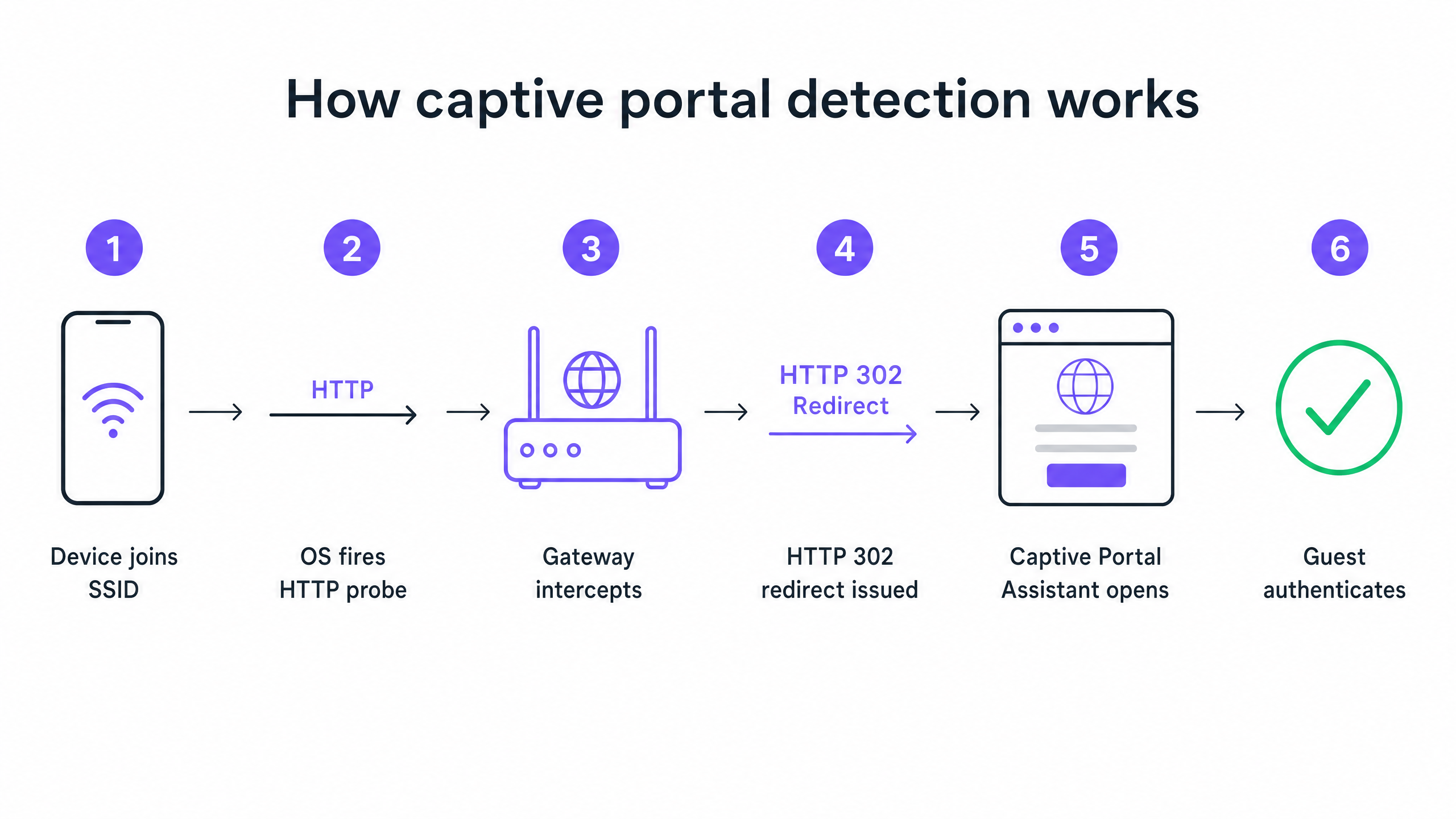
当设备加入您的访客 SSID 并通过 DHCP 获取 IP 地址时,操作系统不会等待用户打开浏览器。在后台,系统服务会立即向供应商控制的探测 URL 发起未加密的 HTTP GET 请求。Apple 设备查询 captive.apple.com。Android 设备查询 connectivitycheck.gstatic.com。Windows 设备查询 msftconnecttest.com

如果网络具有开放的互联网访问权限,这些探测将返回其预期响应,操作系统会判定一切正常。但在访客网络上,您的无线网关或控制器会在该 HTTP 探测到达互联网之前对其进行拦截。网关不会返回预期的响应,而是返回一个指向您的 Captive Portal 认证页面的 HTTP 302 重定向。操作系统检测到意外的重定向,意识到其处于 Captive Portal 之后,并打开一个沙盒浏览器窗口以显示登录页面。
captive_portal_flow_diagram.png

六种主要故障模式

当访客报告 WiFi 无法连接时,故障几乎总是源于中断此顺序的六个根本原因之一。

1. DHCP 地址池耗尽 这是高密度活动中的无形杀手。如果您在标准的 /24 子网上举办一场有 2,000 名参会者的会议,您将拥有 254 个可用 IP 地址。如果您的 DHCP 租期设置为默认的 24 小时,您将在开门后的几分钟内耗尽该地址池。在 Captive Portal 顺序开始之前,随后的每一次连接尝试都会失败。

2. DNS 拦截失败 Captive Portal 重定向依赖于网关拦截 HTTP 探测。但探测首先需要进行 DNS 查询。如果您的 DNS 配置不允许未认证的客户端解析外部域名,则探测永远不会触发。

3. Walled Garden(围墙花园)不完整 Walled Garden 定义了未认证访客可以访问哪些外部域名。如果您的 Portal 认证页面从不在 Walled Garden 中的 CDN 加载资源,该页面将渲染为空白屏幕。如果您提供通过 Google、Apple 或 Facebook 的社交登录,这些提供商使用的每个 OAuth 域名都必须列入白名单。社交身份提供商会定期更新其 CDN IP 范围。六个月前完美运行的 Walled Garden 今天可能会在无形中失效。

4. HSTS 阻止重定向 HTTP 严格传输安全(HSTS)是一种浏览器安全策略,它强制仅通过 HTTPS 连接到特定域名。如果访客尝试访问预载了 HSTS 的域名,而您的网关试图拦截该 HTTPS 请求以重定向到 Portal,浏览器将检测到证书不匹配。它会呈现一个无法绕过的安全警告,并完全阻止重定向。正确的解决方案是绝不尝试 HTTPS 拦截。您的网关应该只重定向未加密的 HTTP Canary 探测。

5. 访客设备上启用了 VPN VPN 会加密来自设备的所有流量,并在其到达您的网关之前通过外部隧道进行路由。您的网关永远看不到 HTTP 探测。Captive Portal 检测顺序永远不会触发。

6. MAC 地址随机化 作为一项隐私功能,现代 iOS 和 Android 设备默认使用随机 MAC 地址。由于 Captive Portal 会话状态是通过 MAC 地址进行跟踪的,因此一小时前已通过认证的访客在设备 MAC 轮换后可能会再次看到登录页面。

实施指南:构建高可靠性架构

配置良好的 Captive Portal 部署需要跨 Guest WiFi 基础设施进行仔细协调。

步骤 1:优化 DHCP 架构

对于任何预期人数超过 200 个并发设备,请摆脱单一的 /24 子网。使用 /22 或更大子网,并设置租期以匹配您的场所停留特征。酒店将租期设置为 8 小时。体育场将租期设置为 3 小时。购物中心将租期设置为 90 分钟。会议中心将租期设置为 30 分钟。

步骤 2:自动化 Walled Garden 管理

在每次重大活动之前验证您的 walled garden。在 Purple 的平台上,我们作为云管理服务的一部分自动维护和更新这些 walled garden 条目,从而减轻了您团队的手动维护负担。我们支持与 Cisco Meraki、HPE Aruba、Ruckus、Juniper Mist、Ubiquiti UniFi、Cambium、Extreme 和 Fortinet 的集成。

步骤 3:实施 RFC 8910 (DHCP Option 114)

解决 HSTS 冲突的长期标准方案是 RFC 8910,它定义了 DHCP Option 114。该选项允许您的 DHCP 服务器直接向客户端设备播发 Captive Portal URL,从而完全绕过 HTTP 重定向。iOS 14 和 Android 11 及以上版本原生支持此功能。

最佳实践

为再次到访的访客部署基于配置文件的身份验证 Captive Portal 是一项成熟的技术,但它们带有固有的摩擦。基于 Passpoint802.1X 构建的 OpenRoaming 允许再次到访的宾客自动、安全地连接,而无需看到登录页面。在我们的 Connect 计划下,Purple 充当 OpenRoaming 的免费身份提供商。像 Premier Inn 和曼彻斯特机场集团 (Manchester Airports Group) 这样的场所已经部署了该方案,以消除重复访客的重新验证摩擦,同时保持完全符合 GDPR 并进行第一方数据采集。

切勿使用已通过身份验证的设备进行测试 许多 IT 团队都会踩到的一个坑:使用之前已通过身份验证的设备测试门户。您的设备会话仍处于活动状态,因此您会完全绕过门户并得出一切正常的结论。请务必在全新的、未经验证的状态下使用设备进行测试。

阅读相关指南 有关保护网络安全的进一步阅读,请参阅我们的 什么是安全 WiFi:2026 年企业基本指南 和我们的 带宽管理:2026 年实用指南

故障排除与风险缓解

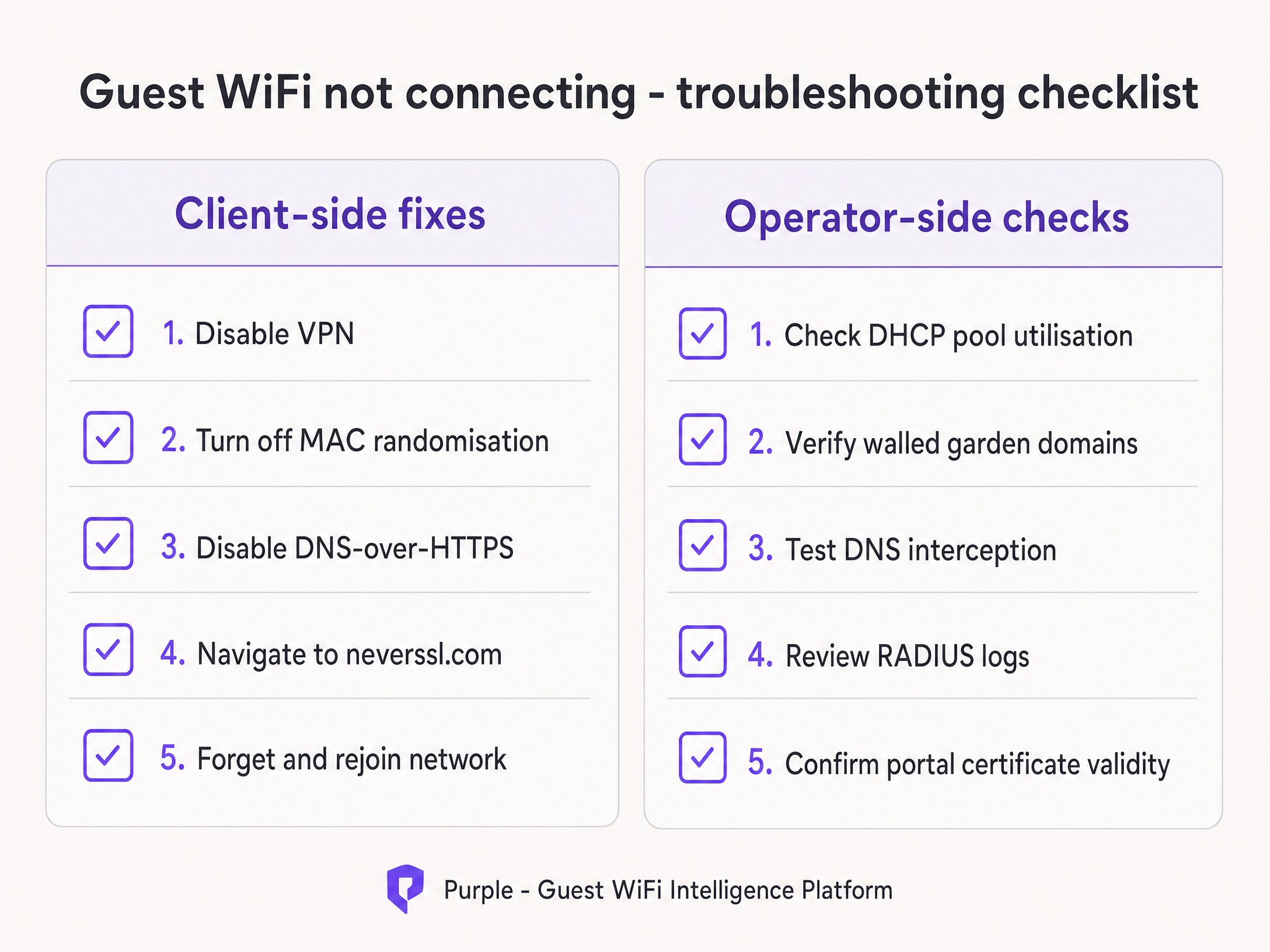
当宾客报告连接问题时,您的前台员工需要一个快速诊断框架。
troubleshooting_checklist.png

指导您的员工首先进行客户端修复:

  1. 请宾客禁用任何处于活动状态的 VPN。
  2. 指导宾客针对您的特定 SSID 关闭 MAC 随机化(私有地址)。
  3. 让宾客打开标准浏览器并访问 http://neverssl.com。由于该网站旨在从不使用 SSL,网关可以轻松拦截请求并触发重定向。
  4. 如果其他方法都失败了,请让宾客忽略该网络并重新加入。

如果多个宾客都存在该问题,请升级到运营商端检查。立即检查 DHCP 地址池利用率,验证 RADIUS 日志中的 Access-Reject 消息,并测试 DNS 拦截。

投资回报率 (ROI) 与业务影响

可靠的 Captive Portal 对业务的影响远超 IT 指标。通过消除连接失败,场所可以直接提高其营销数据库的增长率。

以哈罗德百货 (Harrods) 为例,他们通过优化其 WiFi 分析 和 Captive Portal 流程,实现了 57 倍的营销投资回报率。或者 AGS 机场,他们通过无缝的分层带宽管理实现了 842% 的投资回报率。可靠的连接体验是收集现代反馈数据的基础要求,详见我们的 现代反馈收集:2026 年场所指南 指南。

每次 Captive Portal 加载失败都意味着流失一个客户画像。通过实施本指南中概述的架构标准,IT 领导者可以将他们的无线基础设施从成本中心转变为可靠、合规的创收工具。

关键定义

Captive Portal

A network-level interception mechanism that forces an unauthenticated user to view and interact with a specific web page before being granted access to the public internet.

When IT teams deploy guest networks, the captive portal is the primary tool for enforcing terms of service and capturing first-party marketing data.

Walled Garden

A pre-authentication access control list (ACL) that defines which external IP addresses or domain names an unauthenticated device is permitted to access.

Crucial for allowing devices to load the captive portal splash page assets and communicate with social identity providers before the user has fully authenticated.

HSTS (HTTP Strict Transport Security)

A web security policy mechanism that helps to protect websites against man-in-the-middle attacks such as protocol downgrade attacks and cookie hijacking.

HSTS is the primary reason why intercepting HTTPS traffic to display a captive portal results in severe browser security warnings rather than a successful redirect.

RFC 8910 (DHCP Option 114)

An IETF standard that allows a DHCP server to directly advertise the URL of the captive portal to the client device during the initial IP address assignment.

This standard eliminates the need for HTTP redirection entirely, solving the HSTS conflict and providing a cleaner connection experience.

MAC Address Randomisation

A privacy feature in modern mobile operating systems that generates a new, random MAC address for each wireless network the device joins, or periodically rotates the address.

This feature breaks traditional captive portal session persistence, forcing returning guests to log in repeatedly unless the venue upgrades to profile-based authentication like OpenRoaming.

OpenRoaming

A global roaming federation built on Passpoint and 802.1X that allows users to connect to public WiFi networks automatically and securely without interacting with a captive portal.

Purple acts as a free identity provider for OpenRoaming under the Connect plan, allowing venues to eliminate re-authentication friction.

HTTP 302 Redirect

An HTTP response status code indicating that the requested resource resides temporarily under a different URI.

This is the specific mechanism the wireless gateway uses to redirect the device's HTTP canary probe to the captive portal splash page.

Canary Probe

An automated, unencrypted HTTP request sent by an operating system immediately after connecting to a network to test for internet connectivity.

Apple uses captive.apple.com; Android uses connectivitycheck.gstatic.com. Intercepting these probes is the foundation of captive portal detection.

应用实例

A 2,500-capacity conference centre in London is hosting a major technology summit. Within 45 minutes of the keynote beginning, attendees report that the 'guest wifi not connecting captive portal' issue is widespread. The SSID is visible, but devices either fail to obtain an IP address or receive an IP but see no login screen. The network is configured with a single /23 subnet and 12-hour DHCP leases.

  1. Identify DHCP Exhaustion: A /23 subnet provides 1,022 usable IP addresses. With 2,500 attendees, the pool is undersized. The 12-hour lease means addresses are not returned to the pool when attendees leave the building for lunch.
  2. Expand the Subnet: Reconfigure the guest VLAN to use a /21 subnet, providing 4,094 usable IP addresses, comfortably exceeding the venue capacity.
  3. Reduce Lease Time: Change the DHCP lease time from 12 hours to 30 minutes. This ensures that IP addresses from devices that disconnect (e.g., when an attendee leaves) are quickly reclaimed.
  4. Clear Leases: Clear the existing DHCP bindings to force active devices to renew under the new parameters.
考官评语: This scenario demonstrates the classic failure mode of undersized subnets and overly long lease times in high-density environments. The solution addresses both the immediate capacity constraint and the ongoing lifecycle management of the IP addresses. By reducing the lease time to 30 minutes, the network operator ensures efficient utilisation of the address space without requiring manual intervention.

A retail chain rolls out a new captive portal featuring social login via Google and Facebook. During testing, the IT team finds that the portal splash page loads correctly, but when a user taps 'Log in with Google', the page times out and fails to connect. Standard email registration works perfectly.

  1. Diagnose Walled Garden Failure: The timeout indicates that the unauthenticated client device cannot reach the Google OAuth servers to complete the authentication handshake.
  2. Audit Walled Garden Entries: Review the pre-authentication access control list on the wireless controller (e.g., Cisco Meraki or HPE Aruba).
  3. Add Required Domains: Add the specific Google and Facebook authentication domains (e.g., accounts.google.com) to the walled garden. Crucially, add wildcard entries for the CDNs that serve the login page assets (e.g., *.gstatic.com).
  4. Implement Automated Updates: Because these providers change their IP ranges frequently, configure the controller to use wildcard domain snooping rather than static IP whitelisting.
考官评语: The failure of social login while standard email login succeeds is the definitive symptom of an incomplete walled garden. The expert approach here is not just fixing the immediate missing domain, but implementing wildcard domain snooping to prevent the issue from recurring when the identity provider updates their infrastructure.

练习题

Q1. A retail venue reports that their captive portal works perfectly for guests using standard email registration, but guests attempting to use the 'Log in with Facebook' option experience a blank white screen after tapping the button. What is the most likely architectural cause?

提示:Consider what network resources the unauthenticated device needs to reach to render the Facebook login prompt.

查看标准答案

The venue has an incomplete walled garden. The wireless gateway is blocking the unauthenticated device from reaching Facebook's OAuth domains or CDN infrastructure. The IT team must update the pre-authentication access control list to include all required wildcard domains for Facebook authentication.

Q2. You are designing the guest WiFi architecture for a major football stadium. The venue holds 60,000 fans, and matches last approximately 3 hours. The current configuration uses a /16 subnet and 24-hour DHCP lease times. During the first match, thousands of fans report they cannot connect. What changes should you implement?

提示:Calculate the total available IP addresses in the subnet versus the venue capacity, and evaluate the lifecycle of those addresses.

查看标准答案

The network is experiencing DHCP pool exhaustion. A /16 subnet provides 65,534 usable IP addresses, which is theoretically enough for 60,000 fans. However, with a 24-hour lease time, any device that connects briefly (e.g., staff, vendors, or fans walking past) consumes an IP address that will not be released until the next day. The solution is to reduce the DHCP lease time to 3 hours to match the venue's dwell profile, ensuring IP addresses are recycled efficiently during the event.

Q3. A hotel guest complains that the captive portal login page does not appear automatically on their laptop. When the front desk staff checks the guest's device, they notice a corporate VPN client is running. Why does the VPN prevent the portal from loading?

提示:Consider how a VPN routes traffic and how the gateway intercepts the captive portal probe.

查看标准答案

The VPN encrypts all traffic from the laptop and attempts to route it through a secure tunnel to the corporate server. Because the traffic is encrypted, the local wireless gateway cannot inspect it, cannot identify the unencrypted HTTP canary probe, and therefore cannot issue the HTTP 302 redirect required to trigger the captive portal. The guest must disable the VPN, authenticate via the portal, and then re-enable the VPN.