
学生 WiFi:大学需要做对的关键事项
本权威指南详细介绍了大规模提供高性能学生 WiFi 所需的关键架构、安全协议和分析。它为 IT 领导者提供了管理 BYOD 密度、实施强大身份验证以及利用网络智能进行资产管理的实用策略。
核心系列的一部分:Multi-Tenant WiFi Guide →
执行摘要

提供强大的学生 WiFi 不再是外围的 IT 功能;它是现代大学和大型教育场所的核心运营依赖。自带设备 (BYOD) 密度的爆炸式增长 - 现在每个学生平均拥有 3 到 5 台设备 - 要求从传统的扁平网络根本性地转变到智能、高度细分的架构。本技术参考指南为首席技术官 (CTO)、网络架构师和 IT 总监提供可操作的、独立于厂商的策略,以设计、部署和管理高性能校园连接。我们将探讨在高密度区域向 802.11ax (Wi-Fi 6) 过渡的必要性、通过 eduroam 实施 802.1X 等严格的认证协议,以及网络分析在容量规划和安全合规中的关键作用。此外,我们将研究集成 Guest WiFi 和 WiFi Analytics 等解决方案如何将网络从成本中心转变为用于资产管理和用户互动的战略资产。
技术深度剖析:架构与标准
高密度网络拓扑
可靠校园 WiFi 的基石是弹性的三层分层网络设计。扁平网络无法扩展以满足数千个并发用户和设备的需求。
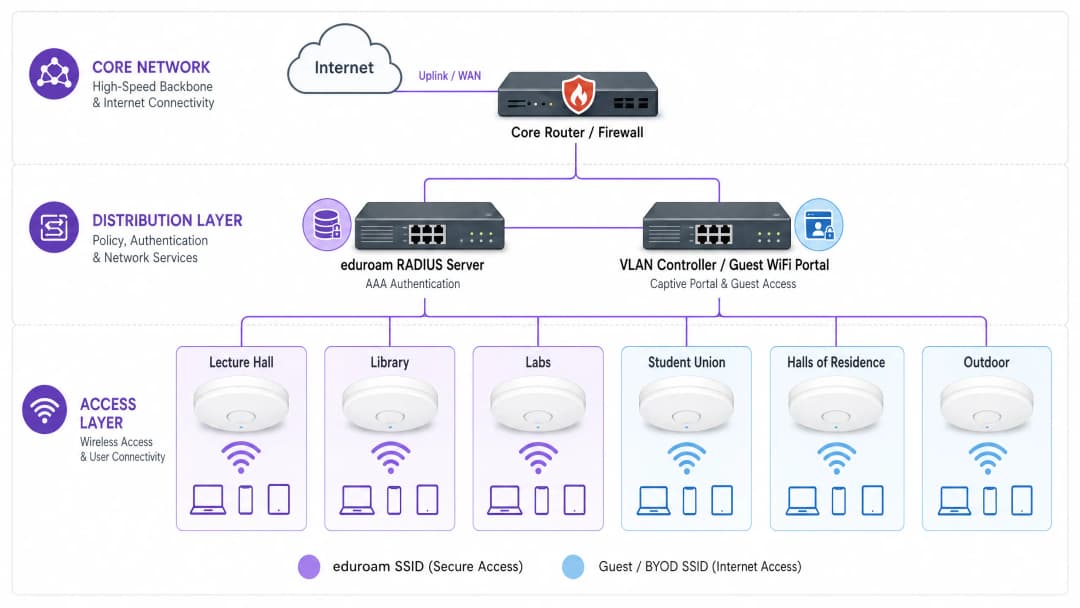
- 核心层: 高速骨干网,需要冗余路由器和防火墙,并具备巨大的吞吐量以处理来自汇聚层的聚合流量。它必须支持到广域网 (WAN) 或互联网服务提供商的高容量上行链路(例如 40Gbps 或 100Gbps)。考虑使用专用的连接解决方案(如 专线),以保证带宽并最大限度地减少关键机构应用的网络延迟。
- 汇聚层: 此层聚合接入交换机、实施路由策略并提供关键网络服务。在此处部署智能 VLAN 管理和访问控制列表 (ACL) 以隔离流量。例如,将学生 BYOD 流量与行政系统和物联网 (IoT) 基础设施隔离开来,这对于安全性和性能至关重要。
- 接入层: 用户连接的网络边缘。在大学环境中,这涉及无线接入点(AP)的高密度部署。在阶梯教室、图书馆和学生会等高密度区域,升级到 802.11ax (WiFi 6) 至关重要。WiFi 6 引入了正交频分多址(OFDMA)和多用户多输入多输出(MU-MIMO)等技术,显著提高了拥挤环境中的频谱效率和性能。
认证与安全框架
保护校园网络的安全需要采用多层认证方法,在严格的安全性和用户易用性之间取得平衡。
- 802.1X 和 eduroam: 对于学生和教职员工,IEEE 802.1X 是黄金标准,提供基于端口的网络准入控制(NAC)。在高等教育中,这几乎普遍通过 eduroam 提供,允许用户在参与该计划的全球机构中使用其学校凭据进行安全认证。这利用了 EAP(可扩展身份验证协议)来提供加密的安全访问。
- 访客和 BYOD 引导: eduroam 无法涵盖所有使用场景。访客、承包商和无屏幕的物联网设备(如学生宿舍中的游戏机或智能音箱)需要其他引导方式。在这种情况下,强大的 Captive Portal 和 MAC 认证绕过(MAB)至关重要。部署专用的 Guest WiFi 解决方案使 IT 团队能够安全地引导这些设备,执行可接受的使用策略并保持可见性,同时又不损害安全的 802.1X 网络。在此,Protect Your Network with Strong DNS and Security 对于防止来自未管理访客设备的高危流量至关重要。
- OpenRoaming: 展望未来,OpenRoaming 代表了无缝连接的下一次演进。Purple 在 Connect 许可下作为 OpenRoaming 的免费身份提供商,允许用户在蜂窝网络和 WiFi 之间安全、自动地过渡,无需手动的 Captive Portal 交互。
实施指南:管理设备生态
BYOD 的挑战
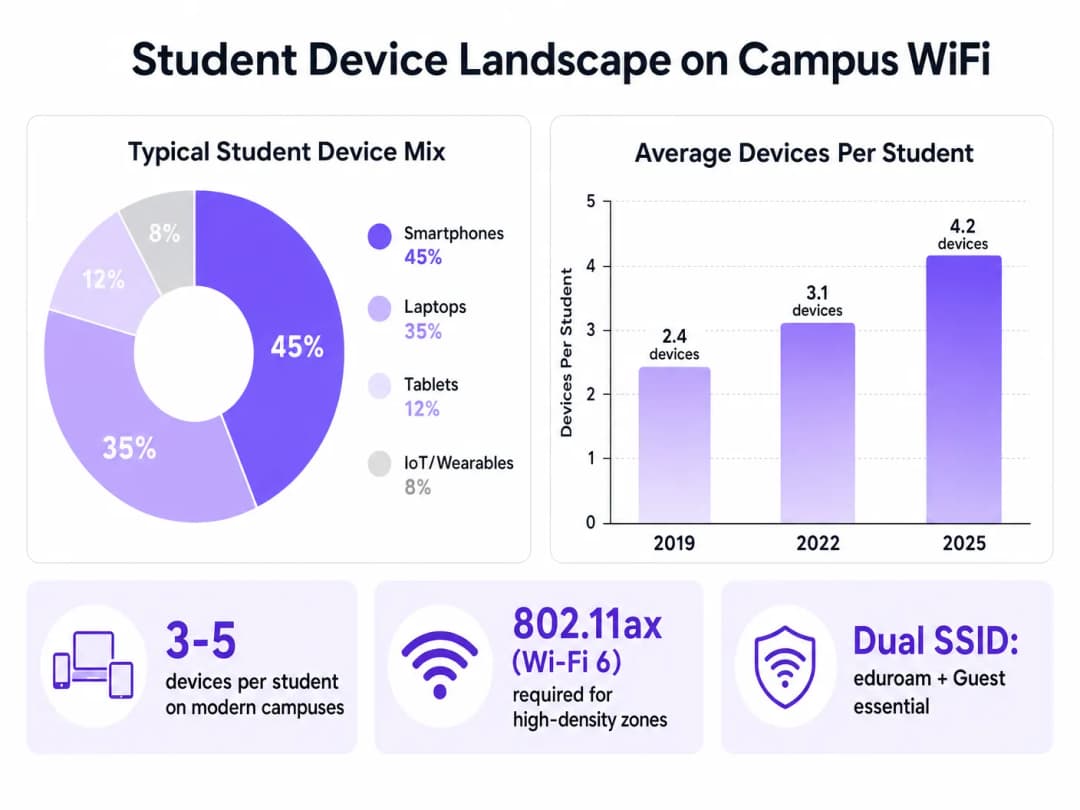
设备的庞大数量和多样性带来了重大挑战。IT 团队必须规划容量,而不仅仅是覆盖范围。
- 射频规划与现场勘测: 部署必须从全面的预测性和主动性现场勘测开始。这包括绘制不同建筑材料(例如历史建筑中厚重的石墙与现代玻璃结构)的衰减图,并规划 AP 布局,以最大程度地减少同信道干扰,同时最大化信噪比(SNR)。
- 细分 IoT 和无界面的设备: 由于消费级 IoT 设备的激增,学生宿舍带来了独特的挑战。这些设备通常不支持 802.1X。IT 团队必须实施自助服务门户,学生可以在其中注册设备 MAC 地址,然后通过 MAB 将这些地址分配给特定且隔离的 VLAN。这可以防止广播风暴并隔离潜在的安全漏洞。
- 双 SSID 策略: 标准最佳实践是广播尽可能少数量的 SSID,以减少管理开销。通常,这包括一个安全 SSID (eduroam/802.1X) 和一个带有 Captive Portal 的开放 SSID,用于访客和旧版设备引导。
最佳实践与网络智能
部署基础设施只是第一步;还需要进行持续的监控和优化。
利用 WiFi 分析
网络遥测提供了超出基本正常运行时间指标的宝贵洞察。通过利用 WiFi 分析,IT 和资产管理团队可以了解空间利用率和用户行为。
- 容量规划: 热力图和位置分析可揭示哪些区域持续超出容量,从而指导有针对性的基础设施升级,而不是盲目部署。
- 资产管理: 停留时间和客流量的数据可以为整个校园的建筑利用、清洁计划和资源分配决策提供信息。
行业背景
虽然本指南侧重于高等教育,但高密度 WiFi 设计和安全引导的原则同样适用于其他行业。例如,零售 环境中的大规模部署依赖于类似的分析来了解购物者行为,而 酒店/餐饮 场所则需要强大的访客引导系统来安全地管理会议与会者和酒店宾客。在交通枢纽中也可以看到类似的复杂多区域环境;有关这些部署的见解,请参阅我们的指南 机场 WiFi:运营商如何跨航站楼提供连接(或意大利语版本:WiFi Aeroportuale: Come gli Operatori Forniscono Connettività tra i Terminal)。
故障排除与风险缓解
- 同信道干扰 (CCI): 在密集部署中,在同一信道上发送信号的 AP 可能会相互干扰,从而降低性能。缓解措施: 实施动态无线电资源管理 (RRM),自动调整信道分配和发射功率电平。
- 非法接入点: 学生在宿舍中插入个人路由器可能会干扰托管的射频环境并引入安全漏洞。缓解措施: 部署无线入侵防御系统 (WIPS) 以检测并自动抑制未经授权的 AP。
- Captive Portal问题: 配置不当的 Captive Portal 可能会导致高流失率和大量的服务台工单。缓解措施: 确保门户支持移动端自适应,使用有效的 SSL 证书以避免浏览器警告,并与后端 RADIUS/Active Directory 系统无缝集成。
投资回报率(ROI)与业务影响
投资企业级学生 WiFi 可以带来可衡量的回报:
- 降低支持成本: 针对 BYOD 和 IoT 设备提供强大、自助式的入网流程,可显著减少一线的服务台工单。
- 优化空间利用率: 网络分析可提供优化空间利用所需的数据,从而有可能推迟或避免昂贵的新建项目。
- 提升学生体验: 可靠的连接是学生满意度调查中的一项关键指标,直接影响招生和留存率。近期行业专家的任命突显了该领域的战略重要性;欲了解更多背景信息,请参阅 Purple 任命教育副总裁 Tim Peers 展现其对高等教育领域的雄心。
通过将网络视为一项战略资产,并利用智能分析和安全入网平台,大学可以提供现代教育所要求的高性能连接。
关键定义
802.11ax (WiFi 6)
无线网络的最新标准,专为通过 OFDMA 等技术提高高密度环境下的效率和性能而设计。
对于在阶梯教室和图书馆等拥挤区域进行部署至关重要,以处理高并发的学生设备。
802.1X
用于基于端口的网络准入控制(NAC)的 IEEE 标准,为希望连接到 LAN 或 WLAN 的设备提供身份验证机制。
eduroam 使用的基础安全协议,用于确保只有经过身份验证的学生和员工才能访问安全的校园网络。
eduroam
一项针对科研、高等教育和继续教育用户的国际漫游服务,使用其所在机构的凭据提供安全的网络访问。
在全球大多数大学校园中广播的主要安全 SSID。
MAC 身份验证旁路 (MAB)
一种用于对不支持 802.1X 的设备(如游戏机或打印机)进行身份验证的技术,通过使用其 MAC 地址作为凭据。
对于在宿舍内接入无界面的学生 IoT 设备至关重要,且不会损害主要的 802.1X 网络。
VLAN (虚拟局域网)
一个逻辑子网,它将来自不同物理局域网的设备集合分组,允许它们像在同一个物理网络上一样进行通信。
广泛用于细分网络流量,将学生 BYOD 设备与关键的行政或财务系统隔离开来。
Captive Portal
公共访问网络的用户在获得访问权限之前必须查看并与之交互的网页。
用于访客 SSID,以展示可接受的使用政策并对访客或非 802.1X 设备进行身份验证。
同信道干扰 (CCI)
当两个或多个无线接入点在彼此覆盖范围内的相同频率信道上进行传输时发生的干扰。
密集部署中网络性能不佳的主要原因,通过仔细的射频规划和动态信道分配可以缓解这一问题。
OpenRoaming
一个 WiFi 网络联盟,允许用户自动、安全地连接到参与网络,而无需手动登录或使用 Captive Portal。
无缝校园连接的未来,减少了用户在蜂窝网络和 WiFi 网络之间移动时的摩擦。
应用实例
某大学正在将一个拥有 500 个座位的历史悠久的阶梯教室从 WiFi 4 升级到 WiFi 6。墙体为厚石墙,之前的部署在听课高峰期曾出现严重的信号盲区和断开连接问题。IT 团队应该如何着手这一部署?
- 进行部署前的主动现场勘测,以测量石墙的具体衰减。2. 不要将 AP 放置在走廊以穿透墙体,而是在教室内部分布高密度、定向的 WiFi 6 AP,安装在天花板或墙壁上,指向座位区。3. 配置窄信道宽度(例如 20MHz),以最大化可用非重叠信道的数量,并减少高密度环境中的同信道干扰。4. 在控制器上启用 OFDMA 和 MU-MIMO 功能,以高效处理高并发客户端连接。
在开学初期,IT 服务台收到大量来自宿舍学生的工单,他们无法将游戏机和智能电视连接到 802.1X eduroam 网络。
- 与 eduroam 并行部署专用的访客/BYOD SSID。2. 实施与网络准入控制(NAC)系统集成的自助服务设备注册门户。3. 学生使用其学校凭据登录门户并注册其无界面设备的 MAC 地址。4. NAC 系统使用 MAC 身份验证旁路(MAB)将这些特定设备分配到隔离的 “学生 IoT” VLAN 中,在授予其互联网访问权限的同时将它们与安全的学术网络隔离开来。
练习题
Q1. 一所大学正计划在新建的高密度学生会大楼中部署 WiFi。IT 主管建议使用 80MHz 宽信道,以最大化每个用户的广告带宽。这是正确的方法吗?
提示:考虑在密集的射频环境中,宽信道对可用非重叠信道数量的影响。
查看标准答案
不,在高密度环境中不推荐这样做。虽然 80MHz 信道为单个客户端提供了更高的理论峰值吞吐量,但它们会急剧减少可用的非重叠信道数量。在学生会这样密集的环境中,这将导致严重的同信道干扰 (CCI),从而降低所有人的性能。最佳实践是使用 20MHz 窄信道,以最大化信道重用和整体网络容量。
Q2. 安全团队要求将宿舍中的所有学生设备相互隔离,以防止在发生恶意软件感染时发生横向移动。然而,学生们抱怨他们无法从手机投屏到智能电视。网络架构如何解决这个问题?
提示:研究跨细分网络管理广播/组播流量的技术。
查看标准答案
网络应配置为在学生 VLAN 上启用客户端隔离(或 AP 隔离),以阻止直接的设备到设备通信。为了解决投屏问题,IT 团队必须在网络控制器上实施组播 DNS (mDNS) 网关或 Bonjour 网关服务。该服务选择性地在隔离的网络段之间代理发现协议(如 AirPlay 或 Chromecast),从而允许学生发现并投屏到自己的设备,而不会将其暴露给整个子网。
Q3. 一所大学希望在校园体育场举行的大型体育赛事期间利用其访客 WiFi 网络进行变现,同时确保学术网络保持安全且不受影响。应该部署什么架构?
提示:考虑分析平台与严格网络分段的整合。
查看标准答案
该大学应为体育场部署专用的访客 SSID,通过 VLAN 和防火墙规则与学术网络完全隔离。该 SSID 应通过与 Purple 的 Guest WiFi 等平台集成的 Captive Portal 来路由流量。该门户可以要求捕获数据(例如:电子邮件或短信验证)或在授予访问权限之前显示赞助广告。至关重要的是,流量必须直接路由到互联网,绕过内部路由,以确保学术核心网络免受访客流量潜在飙升的影响。
继续阅读本系列
如何在 Cisco Meraki、HPE Aruba 和 Ruckus 上部署 iPSK
本实用参考指南演示了如何在 Cisco Meraki 上部署 iPSK、在 HPE Aruba Central 上部署 MPSK 以及在 Ruckus SmartZone 上部署 DPSK,并附带简短的 UniFi PPSK 附录。重点介绍密钥分发、VLAN 或策略分配、RADIUS 决策流以及证明部署在实际场所中正常工作的撤销测试。
大宗互联网协议与托管 WiFi:哪种模式适合您的建筑
一份面向物业、IT 和运营负责人的实用采购参考,对比了住户自付的零售宽带、大宗互联网协议和托管 WiFi。它明确了所有权、住户入住、安全、成本范围和合同退出的界限,并参考了美国大宗互联网框架及英国的对应概念。
公寓 WiFi 解决方案:面向企业的全面指南
本指南涵盖了 BTR(建设出租)和多户住宅物业中公寓 WiFi 解决方案的架构、部署和商业案例。它解释了 Identity Pre-Shared Key (iPSK) 技术如何为每位住户创建安全、隔离的网络气泡,同时支持智能设备和物联网。物业开发商、房东和 BTR 运营商将在此找到具有可行性的部署指导、投资回报率 (ROI) 数据以及实际实施场景。
对您的具体配置有疑问吗?
我们的团队与 80,000 多个场所的运营方、IT 经理和网络工程师保持合作。预约 20 分钟的通话,我们将为您展示同行是如何解决类似问题的。