
學生 WiFi:大學必須做對哪些事
這份具權威性的指南詳細介紹了大規模提供高效能學生 WiFi 所需的關鍵架構、安全協定與分析。它為 IT 領導者提供了可行的策略,以管理 BYOD 密度、實施強大的身份驗證,並利用網路智慧進行校產管理。
核心系列的一部分:Multi-Tenant WiFi Guide →
執行摘要

提供強健的學生 WiFi 已不再是次要的 IT 功能;它是現代大學和大型教育場所至關重要的營運依賴。自攜設備 (BYOD) 密度的爆發性增長 - 現在每位學生平均擁有 3 到 5 台設備 - 要求網路架構必須進行根本性的轉變,從傳統的扁平化網路轉向智慧型、高度細分的架構。本技術參考指南為技術長 (CTO)、網路架構師和 IT 總監提供可操作、與廠商無關的策略,以設計、部署和管理高效能的校園連線。我們將探討在高密度區域向 802.11ax (Wi-Fi 6) 過渡的必要性、透過 eduroam 實施 802.1X 等嚴格認證協定,以及網路分析在容量規劃和安全合規性中的關鍵作用。此外,我們還將探討整合 Guest WiFi 和 WiFi Analytics 等解決方案如何將網路從成本中心轉變為用於資產管理和使用者互動的策略性資產。
技術深度剖析:架構與標準
高密度網路拓撲
可靠校園 WiFi 的基礎是具備彈性的三層式階層化網路設計。扁平化網路無法擴充以滿足數千個同時在線的使用者和設備的需求。
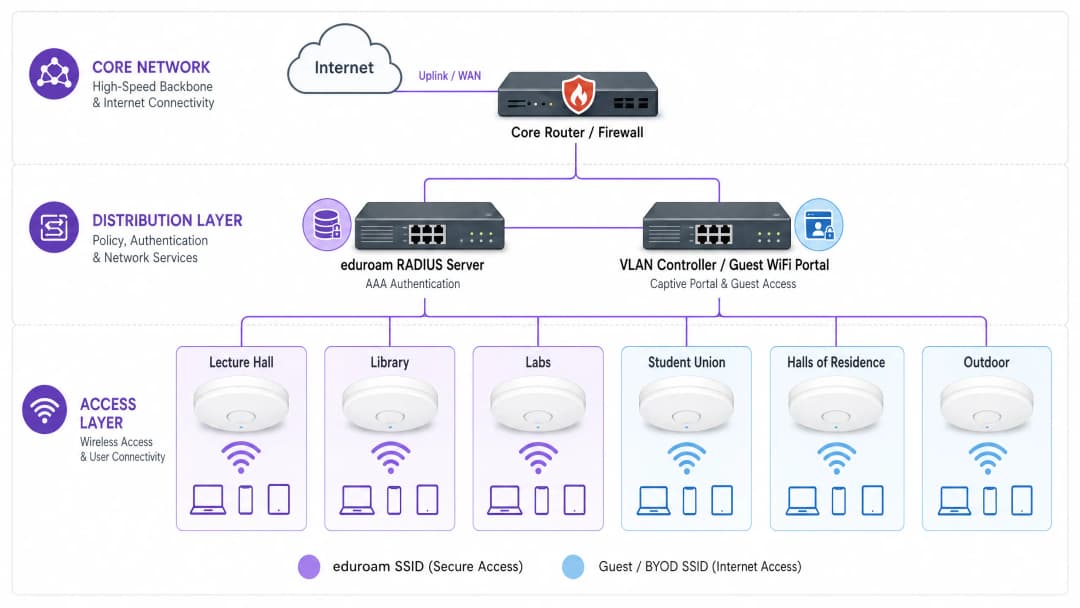
- 核心層 (Core Layer): 高速骨幹網路,需要備援路由器和防火牆,具備極高的吞吐量以處理來自通訊層的匯總流量。它必須支援至廣域網路 (WAN) 或網際網路服務供應商的高容量上行鏈路 (例如 40Gbps 或 100Gbps)。請考慮採用專屬連線解決方案 (例如 專線),以保證頻寬並降低關鍵機構應用程式的延遲。
- 分發層 (Distribution Layer): 此層匯總存取交換器、執行路由策略並提供關鍵網路服務。在此會部署智慧型 VLAN 管理和存取控制清單 (ACL) 來細分流量。例如,將學生的 BYOD 流量與行政系統和物聯網 (IoT) 基礎設施進行細分,對於安全性和效能至關重要。
- 接入層: 使用者連接的網路邊緣。在大學環境中,這涉及無線存取點 (APs) 的密集部署。在演講廳、圖書館和學生會等高密度區域,升級到 802.11ax (WiFi 6) 至關重要。WiFi 6 引入了正交頻分多址 (OFDMA) 和多使用者多輸入多輸出 (MU-MIMO) 等技術,顯著提高了擁擠環境中的頻譜效率和效能。
驗證與安全性架構
保護校園網路安全需要多層次的驗證方法,在嚴格的安全性與使用者便利性之間取得平衡。
- 802.1X 與 eduroam: 對於學生和教職員,IEEE 802.1X 是黃金標準,提供基於連接埠的網路存取控制 (NAC)。在高等教育中,這幾乎普遍透過 eduroam 交付,允許使用者在參與的全球機構中使用其機構憑證安全地進行驗證。這利用 EAP (可延伸驗證協定) 來提供加密、經驗證的存取。
- 訪客與 BYOD 註冊: eduroam 並未涵蓋所有使用案例。訪客、承包商和無螢幕的 IoT 裝置 (例如宿舍中的遊戲主機或智慧喇叭) 需要替代的註冊方式。這正是強大的 Captive Portal 和 MAC 驗證旁路 (MAB) 至關重要的地方。部署專用的 Guest WiFi 解決方案可讓 IT 團隊安全地註冊這些裝置、執行可接受的使用政策,並在不影響安全 802.1X 網路的情況下保持可見度。在此,透過強大的 DNS 和安全性保護您的網路 對於防止源自未託管訪客裝置的惡意流量至關重要。
- OpenRoaming: 展望未來,OpenRoaming 代表了無縫連接的下一次演進。Purple 在 Connect 授權下擔任 OpenRoaming 的免費身分識別提供者,允許使用者在行動網路與 WiFi 之間安全、自動地轉換,無需手動進行 Captive Portal 互動。
實作指南:管理裝置領域
BYOD 的挑戰
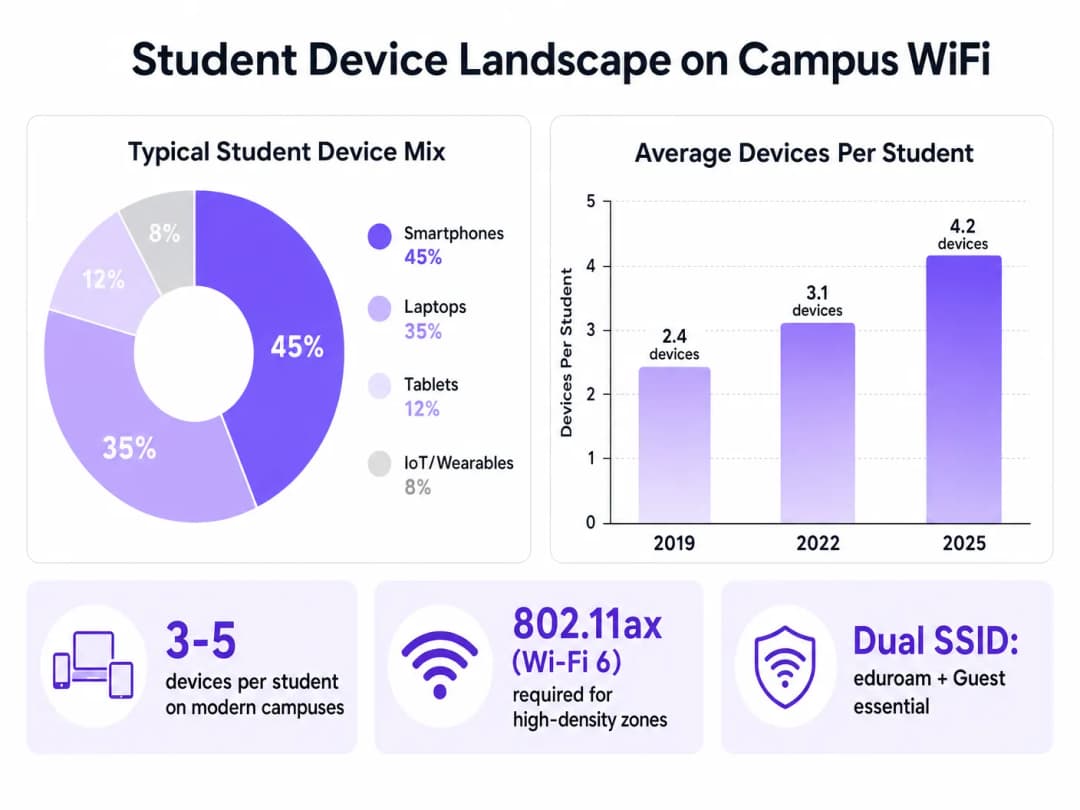
龐大的裝置數量和種類帶來了巨大的挑戰。IT 團隊必須規劃容量,而不僅僅是覆蓋範圍。
- RF 規劃與場地勘測: 部署必須從全面的預測性和主動性場地勘測開始。這涉及繪製不同建築材料 (例如歷史建築中的厚石牆與現代玻璃結構) 的衰減圖,並規劃 AP 放置,以將同通道干擾降至最低,同時將訊噪比 (SNR) 升至最高。
- 細分 IoT 和無螢幕 (Headless) 設備: 由於消費型 IoT 設備的激增,學生宿舍面臨著獨特的挑戰。這些設備通常不支援 802.1X。IT 團隊必須實作自助服務入口網站,讓學生可以註冊設備的 MAC 位址,然後透過 MAB 將這些位址分配給特定、隔離的 VLAN。這可以防止廣播風暴並隔離潛在的安全漏洞。
- 雙 SSID 策略: 標準的最佳實踐是廣播最少數量的 SSID,以減少管理開銷。通常,這包括一個安全的 SSID (eduroam/802.1X) 和一個帶有 Captive Portal 的開放式 SSID,用於訪客和舊型設備的上網引導。
最佳實踐與網路智慧
部署基礎架構只是第一步,還需要進行持續的監控和優化。
利用 WiFi 分析
網路遙測提供了超越基本運作時間指標的寶貴見解。透過利用 WiFi Analytics,IT 和資產管理團隊可以瞭解空間利用率和使用者行為。
- 容量規劃: 熱圖和位置分析可以顯示哪些區域持續超出容量,從而進行有針對性的基礎架構升級,而不是盲目部署。
- 資產管理: 停留時間和人流量的數據可以為校園內的建築利用率、清潔時程表和資源分配等決策提供資訊。
行業背景
雖然本指南側重於高等教育,但高密度 WiFi 設計和安全上網引導的原則同樣適用於其他行業。例如,Retail 環境中的大規模部署依賴類似的分析來瞭解購物者行為,而 Hospitality 場所則需要強大的訪客上網引導系統來安全地管理會議參與者和飯店下榻旅客。在交通樞紐中也可以看到類似複雜的多區域環境;有關這些部署的見解,請參閱我們的 Airport WiFi: How Operators Deliver Connectivity Across Terminals 指南(或義大利文版本:WiFi Aeroportuale: Come gli Operatori Forniscono Connettività tra i Terminal)。
疑難排解與風險緩釋
- 同通道干擾 (CCI): 在密集部署中,在相同通道上傳輸的 AP 可能會互相干擾,從而降低效能。緩釋措施: 實作動態無線電資源管理 (RRM),以自動調整通道分配和傳輸功率電平。
- 私接無線基地台 (Rogue AP): 學生在宿舍內插入個人路由器可能會破壞受管理的射頻環境並引入安全漏洞。緩釋措施: 部署無線入侵防禦系統 (WIPS),以偵測並自動抑制未經授權的 AP。
- Captive Portal 問題: 設定不當的 Captive Portal 可能會導致高流失率與大量的技術支援工單。緩解措施: 確保該入口網頁支援行動端自適應、使用有效的 SSL 憑證以避免瀏覽器警告,並與後端 RADIUS/Active Directory 系統無縫整合。
投資報酬率與業務影響
投資企業級的學生 WiFi 可帶來可衡量的回報:
- 降低支援成本: 適用於 BYOD 和 IoT 裝置的健全、自助式上網引導流程,能顯著減少第一線的技術支援工單。
- 優化空間利用率: 網路分析能提供優化空間使用率所需的數據,進而可能延遲或避免昂貴的新建案。
- 提升學生體驗: 可靠的連線能力是學生滿意度調查中的關鍵指標,直接影響到招生和留存率。近期產業專家的任命突顯了該領域的戰略重要性;請參閱 Purple 藉由任命教育部門副總裁 Tim Peers 展現深耕高等教育的雄心 以了解更多背景資訊。
透過將網路視為策略性資產,並利用智慧分析和安全的上網引導平台,大學可以提供現代教育所需的高效能連線能力。
關鍵定義
802.11ax (WiFi 6)
無線網路的最新標準,專為透過 OFDMA 等技術提高高密度環境中的效率與效能而設計。
對於部署在階梯教室和圖書館等擁擠區域至關重要,以處理大量並行的學生裝置。
802.1X
用於基於連接埠的網路存取控制(NAC)之 IEEE 標準,為希望連線到 LAN 或 WLAN 的裝置提供驗證機制。
eduroam 所使用的底層安全協定,用以確保只有經過驗證的學生和教職員才能存取安全的校園網路。
eduroam
一項針對研究、高等教育和進一步教育用戶的國際漫遊服務,使用其母機構的憑證提供安全的網路存取。
全球大多數大學校園廣播的主要安全 SSID。
MAC Authentication Bypass (MAB)
一種技術,用於透過將不支援 802.1X 的裝置(如遊戲主機或印表機)之 MAC 位址作為憑證來進行驗證。
這對於在不損害主要 802.1X 網路的情況下,在宿舍中引導無螢幕的學生 IoT 裝置上線至關重要。
VLAN (Virtual Local Area Network)
一種邏輯子網路,可將來自不同實體局域網路的裝置組合在一起,使它們能夠像在同一個實體網路上一樣進行通訊。
廣泛用於分割網路流量,將學生的 BYOD 裝置與關鍵的行政或財務系統隔離。
Captive Portal
公共存取網路的使用者在獲得存取權限之前,必須檢視並與之互動的網頁。
用於訪客 SSID,以呈現可接受的使用政策並驗證訪客或非 802.1X 裝置。
同頻干擾 (CCI)
當兩個或多個無線基地台在彼此範圍內相同的頻率通道上進行傳輸時發生的干擾。
密集部署中網路效能不佳的主要原因,可透過仔細的射頻規劃和動態通道分配來緩解。
OpenRoaming
一個 WiFi 網路聯盟,允許使用者自動且安全地連線至參與的網路,而無需手動登入或使用 Captive Portal。
無縫校園連線的未來,可減少使用者在行動網路與 WiFi 網路之間切換時的阻力。
範例
一所大學正在將一個擁有 500 個座位的歷史悠久階梯教室從 WiFi 4 升級到 WiFi 6。牆壁是厚實的磚石結構,以往的部署在尖峰授課時間經常遇到嚴重的收訊死角與斷線問題。IT 團隊應該如何應對這次部署?
- 進行部署前的活動站點調查,以測量磚石牆的具體衰減。2. 不要將 AP 放置在走廊以穿透牆壁,而是在教室內部署高密度、定向的 WiFi 6 AP,安裝在天花板或牆壁上,指向座位區。3. 設定較窄的通道寬度(例如:20MHz),以最大化可用且不重疊的通道數量,並減少高密度環境中的同通道干擾。4. 在控制器上啟用 OFDMA 和 MU-MIMO 功能,以高效處理大量的並行用戶端連接。
開學之初,IT 服務台收到大量來自宿舍學生的工單,因為他們無法將遊戲主機和智慧電視連接到 802.1X eduroam 網路。
- 在 eduroam 之外部署一個專用的 Guest/BYOD SSID。2. 實施與網路存取控制(NAC)系統整合的自助服務設備註冊入口網站。3. 學生使用其大學憑證登入該入口網站,並註冊其無螢幕裝置的 MAC 位址。4. NAC 系統使用 MAC 驗證旁路(MAB)將這些特定裝置分配到隔離的「學生 IoT」 VLAN,授予它們網際網路存取權限,同時與安全的校園學術網路保持隔離。
練習題
Q1. 一所大學計劃在新建的高密度學生會大樓中部署 WiFi。IT 主管建議使用寬 80MHz 通道,以最大化每位使用者宣傳的頻寬。這是正確的方法嗎?
提示:考慮在密集的射頻環境中,寬通道對可用非重疊通道數量的影響。
查看標準答案
不,在高密度環境中不建議這樣做。雖然 80MHz 通道可為單一用戶端提供更高的理論峰值吞吐量,但它們會大幅減少可用的非重疊通道數量。在學生會等密集環境中,這將導致嚴重的同頻干擾 (CCI),從而降低所有人的效能。最佳實踐是使用窄 20MHz 通道,以最大化通道重複使用率和整體網路容量。
Q2. 安全小組要求將宿舍中的所有學生裝置彼此隔離,以防止在發生惡意軟體感染時進行橫向移動。然而,學生抱怨他們無法將手機投射到智慧電視上。網路架構如何解決這個問題?
提示:研究跨分割網路管理廣播/多播流量的技術。
查看標準答案
網路應設定為在學生 VLAN 上啟用用戶端隔離 (或 AP 隔離),以防止裝置之間的直接通訊。為了解決投射問題,IT 小組必須在網路控制器上實作多播 DNS (mDNS) 閘道或 Bonjour 閘道服務。此服務會選擇性地跨隔離的網路區段代理探索協定 (例如 AirPlay 或 Chromecast),允許學生探索並投射到他們自己的裝置,而不會將其暴露給整個子網路。
Q3. 一所大學希望在校園體育場舉行的大型體育賽事期間,將其訪客 WiFi 網路貨幣化,同時確保學術網路保持安全且不受影響。應該部署什麼架構?
提示:考慮分析平台與嚴格網路分割的整合。
查看標準答案
該大學應為體育場部署專用的訪客 SSID,透過 VLAN 和防火牆規則與學術網路完全隔離。此 SSID 應透過與 Purple 的 Guest WiFi 等平台整合的 Captive Portal 來路由流量。該 Portal 可以在授予存取權限之前要求收集資料 (例如:電子郵件或簡訊驗證) 或顯示贊助廣告。至關重要的是,流量必須直接路由到網際網路,繞過內部路由,以確保學術核心網路免受訪客流量潛在高峰的影響。
繼續閱讀本系列
如何在 Cisco Meraki、HPE Aruba 與 Ruckus 上部署 iPSK
本實用參考指南展示了如何在 Cisco Meraki 上部署 iPSK、在 HPE Aruba Central 上部署 MPSK 以及在 Ruckus SmartZone 上部署 DPSK,並附帶簡短的 UniFi PPSK 附錄。內容重點在於金鑰核發、VLAN 或策略配置、RADIUS 決策流程,以及證明部署能在實際場域正常運作的撤銷測試。
整建網際網路協議與託管 WiFi:哪種模式適合您的建築
這是一份針對物業、IT 和營運負責人的實用採購參考,比較了住戶自付的零售寬頻、整建網際網路協議以及託管 WiFi。其中釐清了所有權、住戶入住、安全、成本範圍和合約退場機制,並採用了美國整建網際網路框架和英國的對等概念。
Apartment WiFi 解決方案:企業完整指南
本指南涵蓋了 Build to Rent(BTR)和多住戶住宅(MDU)物業中 Apartment WiFi 解決方案的架構、部署和商業案例。它解釋了 Identity Pre-Shared Key (iPSK) 技術如何為每位住戶建立安全、隔離的網路泡泡,同時支援智慧裝置和物聯網。物業開發商、房東和 BTR 營運商將能在此獲得具體的部署指引、ROI 數據和實際執行情境。
對於您的特定設置有任何疑問嗎?
我們的團隊與超過 80,000 個場域的場域營運商、IT 經理和網路工程師合作。立即預約 20 分鐘的通話,我們將向您展示其他與您相似的用戶是如何解決此問題的。