
How to Set Up Enterprise WiFi on Android Devices with EAP-TLS
This technical reference guide provides senior IT leaders with a comprehensive blueprint for deploying 802.1X EAP-TLS authentication on Android devices. It covers the architectural mechanics, manual and MDM-driven implementation strategies, and troubleshooting methodologies necessary to secure enterprise wireless networks.
Video overview
Listen to this guide
View podcast transcript
Part of our core series: Enterprise WiFi Security Guide →
Android enterprise WiFi & EAP-TLS profile architect
Configure certificate-based 802.1X EAP-TLS for Android 11 to 15 fleets. Resolve CA validation requirements, domain SAN mismatches, Work Profile keystore boundaries, and export multi-platform MDM profiles.
Corporate-owned Android smartphones enforce centralized SCEP certificate issuance and zero-touch WiFi profile enrollment with strict Root CA validation.
Fleet & management scope
Authentication & PKI architecture
Android enterprise supplicant parameters
| Parameter | Configured value | Android requirement & guidance |
|---|---|---|
| EAP method | TLS (Type 13) | Mutual cryptographic certificate exchange without user passwords. |
| Phase 2 authentication | None (not applicable) | Inner tunnels (MSCHAPv2 / GTC) are not used in native EAP-TLS. |
| CA certificate | Mandatory system or enterprise trust | Must select the installed enterprise Root CA; unvalidated certificates blocked. |
| Domain suffix (SAN) | radius.purple.ai | BoringSSL validates that the server certificate dNSName contains this suffix. |
| Client certificate store | Device-wide Android Keystore (KeyChain system) | Hardware-backed StrongBox / TEE private key escrow. |
| Outer anonymous identity | anonymous | Protects user identity against over-the-air RF sniffing in 802.1X Start frame. |

Executive Summary
Securing enterprise wireless networks from credential theft and unauthorised access requires moving beyond shared passwords. For fleets of Android devices in corporate environments, 802.1X EAP-TLS (Extensible Authentication Protocol with Transport Layer Security) is the ultimate security standard. By leveraging mutual certificate-based authentication, EAP-TLS eliminates the risks associated with password fatigue, phishing, and weak credentials.
This technical reference guide provides network architects, IT managers, and CTOs with actionable strategies for deploying EAP-TLS on Android devices. Whether managing point-of-sale terminals in Retail, clinical devices in Healthcare, or back-of-house operations in Hospitality, mastering this deployment ensures robust security compliance (PCI DSS, GDPR, ISO 27001) while delivering a seamless connection experience for end-users. We cover both manual configuration for BYOD environments and zero-touch MDM provisioning for corporate-owned fleets.
Listen to the Briefing
Technical Deep-Dive
802.1X Architecture and EAP-TLS Mechanics
At its core, 802.1X is an IEEE standard for port-based network access control. In a wireless context, the access point acts as the authenticator, facilitating communication between the Android device (supplicant) and the RADIUS server (authentication server).
Unlike PEAP or TTLS, which tunnel legacy password authentication within TLS, EAP-TLS relies entirely on X.509 certificates. This creates a mutual authentication paradigm:
- The RADIUS server presents its certificate to the Android device to prove the network is legitimate.
- The Android device presents its unique client certificate to the RADIUS server to prove it is an authorised endpoint.

Android-Specific Certificate Requirements
Deploying on Android introduces specific constraints, particularly since Android 11. To mitigate Man-in-the-Middle (MitM) attacks, Google deprecated the "Do not validate" option for server certificates. Consequently, Android devices must possess the Root CA certificate that signed the RADIUS server's certificate.
Furthermore, the RADIUS server certificate must contain the correct Extended Key Usage (EKU) attribute - specifically Server Authentication (OID 1.3.6.1.5.5.7.3.1). Without this, the Android supplicant will silently drop the TLS handshake.
For the client side, Android requires the private key and certificate to be bundled together, typically in PKCS#12 format (.p12 or .pfx).
Integration with Purple's Ecosystem
While EAP-TLS secures your corporate devices and operational infrastructure, venue operators must also manage visitor access. This is where a dual-SSID strategy becomes critical. Your corporate SSID uses 802.1X EAP-TLS, while your public SSID leverages Purple's Guest WiFi platform. This segregation ensures operational security while allowing marketing teams to utilise WiFi Analytics on the guest network. For more details on securing physical infrastructure, see Access Point Security: Your 2026 Enterprise Guide.
Got questions about your specific setup?
Our team works with venue operators, IT managers, and network engineers across 80,000 venues. Book a 20-minute call and we will show you how others like you solved it.
Implementation Guide
EAP-TLS deployment on Android can be performed manually for small BYOD setups or via Mobile Device Management (MDM) for enterprise scale.
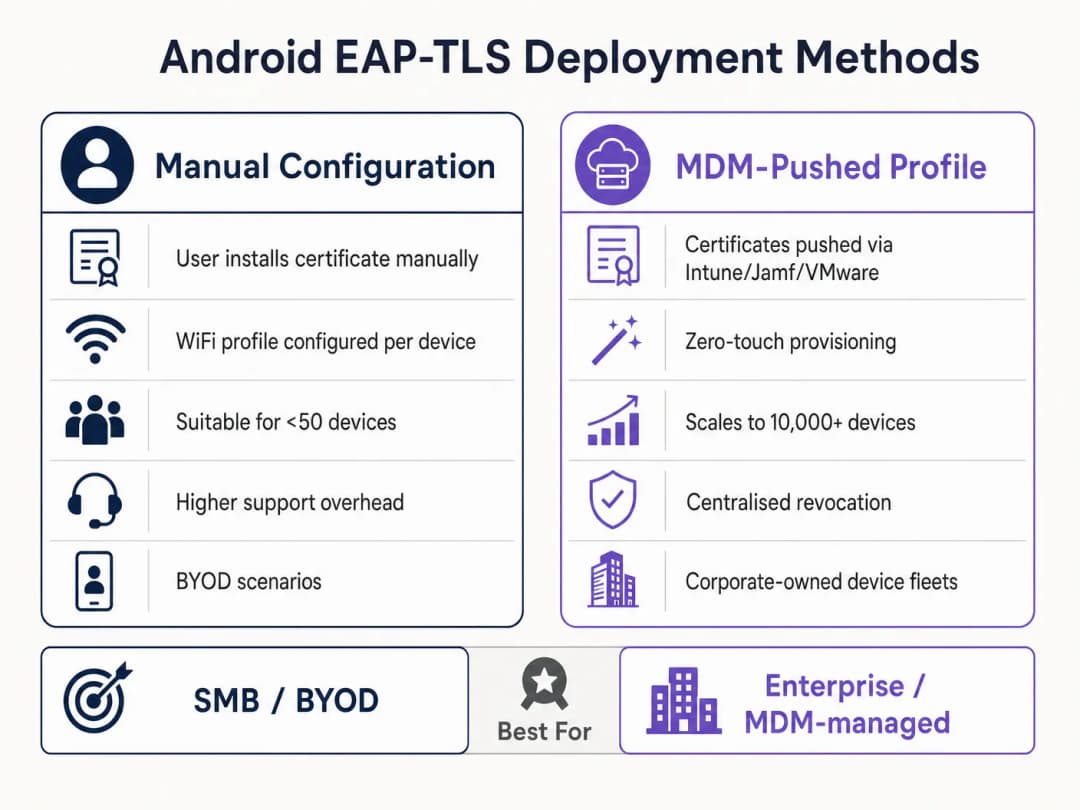
Method 1: Manual Configuration (BYOD / Small Scale)
This method is support-intensive and is recommended only for limited rollouts or testing.
- Certificate Delivery: Securely deliver the
.p12client certificate and Root CA.cerfile to the Android device (e.g., via a secure portal or encrypted email). - Installation:
- Navigate to Settings > Security > Encryption & credentials > Install a certificate.
- Install the Root CA as a "WiFi certificate".
- Install the
.p12file, providing the extraction password when prompted.
- Network Configuration:
- Go to Settings > Network & internet > WiFi and select "Add network".
- Enter the SSID.
- Set Security to WPA/WPA2/WPA3-Enterprise.
- Set EAP method to TLS.
- Set CA certificate to the installed Root CA.
- Set Online Certificate Status to Request certificate status.
- Set Domain to match the Subject Alternative Name (SAN) of the RADIUS server's certificate.
- Select the installed client certificate.
- Enter the Identity (typically the user's UPN or device's MAC).
Method 2: MDM-Pushed Profiles (Enterprise Scale)
For large estates, such as a university campus or a logistics hub in Transport, MDM is mandatory. It provides zero-touch provisioning and lifecycle management.
- PKI Integration: Connect your MDM (Intune, Workspace ONE, Jamf) to your Certificate Authority using SCEP or NDES.
- Certificate Profiles: Create a configuration profile to push the Root CA to the device's trust store. Create a second profile (SCEP) to automatically request and install the unique client certificate.
- WiFi Profile: Create a WiFi configuration profile linking the deployed certificates.
- Security Type: WPA2/WPA3 Enterprise
- EAP Type: EAP-TLS
- Authentication Method: Certificate
- Server Trust: Specify the Root CA and the correct server domain name.
For Microsoft-specific detailed instructions, see our guide: How to Use Microsoft Intune to Push WiFi Certificates to Devices.
Best Practices
- Enforce WPA3-Enterprise: Where hardware supports it, mandate WPA3-Enterprise. The 192-bit security suite explicitly requires EAP-TLS, ensuring the highest cryptographic standards.
- Automate Certificate Lifecycle: Client certificates expire. If you rely on manual renewal, you will face widespread outages. Implement SCEP/NDES to automatically renew certificates 30 days before expiry.
- Implement Robust DNS: Certificate Revocation List (CRL) checks and OCSP require reliable DNS resolution from the edge. Read more in Protect Your Network with Strong DNS and Security.
- VLAN Segmentation: Map EAP-TLS authenticated sessions to specific VLANs based on certificate attributes (e.g., separating manager tablets from POS terminals) using RADIUS attributes like
Tunnel-Private-Group-Id.
Troubleshooting and Risk Mitigation
When Android devices fail to connect via EAP-TLS, the issue is almost always within the certificate chain or RADIUS configuration.
- Symptom: Android 11+ devices disconnect immediately or show "Authentication error" without prompting the user.
- Root Cause: The device does not trust the RADIUS server certificate. The "Domain" field in the WiFi profile must match the server certificate's SAN exactly, and the Root CA must be installed.
- Symptom: The connection times out during the TLS handshake.
- Root Cause: The RADIUS server cannot reach the CRL distribution point to verify the client certificate's revocation status. Ensure your RADIUS server has outbound HTTP access to your PKI's CRL endpoints.
- Symptom: Windows devices connect, but Android devices fail.
- Root Cause: The
Server AuthenticationEKU is missing from the RADIUS certificate, or the Android supplicant is attempting to use an unsupported cipher suite. Check RADIUS logs for TLS negotiation failures.
- Root Cause: The
ROI and Business Impact
Transitioning to EAP-TLS requires an upfront investment in PKI and MDM infrastructure, but the return on investment (ROI) for senior IT leaders is substantial.
- Reduced Helpdesk Costs: 20-30% of IT helpdesk tickets are password resets. Certificate-based authentication eliminates password rotation policies for network access, dramatically reducing support overhead.
- Risk Mitigation: EAP-TLS provides immunity against credential harvesting and offline dictionary attacks. In regulated industries like Healthcare, the cost of a single breach far exceeds the deployment cost of a PKI.
- Operational Continuity: Automated certificate provisioning ensures that critical operational devices, from warehouse scanners to retail POS systems, never drop off the network due to expired credentials. As Purple continues to expand its footprint, highlighted by recent strategic moves such as Purple Signals Higher Education Ambitions with Appointment of VP Education Tim Peers, robust foundational connectivity becomes instrumental for advanced analytics and engagement.
Key Definitions
802.1X
An IEEE standard for port-based Network Access Control (PNAC) that provides an authentication mechanism to devices wishing to attach to a LAN or WLAN.
The foundational framework that prevents unauthorised devices from accessing the corporate network at the edge.
EAP-TLS
Extensible Authentication Protocol with Transport Layer Security. An authentication framework that uses X.509 certificates for mutual authentication between the client and the server.
Considered the most secure EAP type, it eliminates password reliance, making it essential for high-security environments.
RADIUS
Remote Authentication Dial-In User Service. A networking protocol that provides centralised Authentication, Authorisation, and Accounting (AAA) management.
The server component (e.g., Cisco ISE, Microsoft NPS) that validates the Android device's certificate against the PKI.
Supplicant
The client device (in this case, the Android smartphone or tablet) that is requesting access to the network.
Understanding the supplicant's specific OS constraints (like Android 11's strict validation) is key to a successful deployment.
Authenticator
The network device (the WiFi Access Point) that facilitates the authentication process between the Supplicant and the RADIUS server.
The AP does not make the decision; it merely enforces the port control based on the RADIUS server's response.
PKI
Public Key Infrastructure. A set of roles, policies, hardware, software, and procedures needed to create, manage, distribute, use, store, and revoke digital certificates.
The backbone of EAP-TLS. Without a robust PKI, certificate-based authentication is impossible.
SCEP
Simple Certificate Enrolment Protocol. A protocol designed to make the issuing and revocation of digital certificates as scalable as possible.
Used by MDM platforms to automatically provision client certificates to Android devices without user intervention.
SAN
Subject Alternative Name. An extension to X.509 that allows various values to be associated with a security certificate.
Android 11+ requires the 'Domain' field in the WiFi profile to match the SAN of the RADIUS server's certificate.
Worked Examples
A national retail chain needs to deploy 5,000 Android-based point-of-sale (POS) tablets. The security team mandates that these devices must not use shared passwords and must be immune to credential phishing. How should the infrastructure team approach this deployment?
The team must deploy a Mobile Device Management (MDM) solution integrated with its internal Public Key Infrastructure (PKI) via SCEP. The MDM will push a configuration profile containing the Root CA certificate, automatically request a unique client certificate for each POS tablet, and configure the WPA3-Enterprise WiFi profile to use EAP-TLS. The RADIUS server will be configured to assign these devices to an isolated POS VLAN based on successful certificate validation.
A hospital IT manager is upgrading the wireless network. Following the upgrade, older Android 9 devices connect successfully to the EAP-TLS network, but newly procured Android 12 devices fail to authenticate, citing a trust error.
The IT manager must update the WiFi configuration profile pushed to the devices. Android 11+ enforces strict server certificate validation. The profile must be updated to explicitly define the Root CA certificate to trust and specify the exact 'Domain' (matching the RADIUS server's SAN) to prevent MitM attacks.
Practice Questions
Q1. Your organisation is migrating from PEAP-MSCHAPv2 to EAP-TLS. During the pilot phase, several Android 13 devices fail to connect. The RADIUS logs show that the TLS handshake is initiated but dropped by the client before the client certificate is sent. What is the most likely configuration error?
Hint: Consider the strict validation requirements introduced in recent Android versions regarding the server's identity.
View model answer
The most likely error is that the WiFi profile pushed to the Android 13 devices does not correctly specify the 'Domain' suffix match, or the Root CA is not properly linked in the profile. Android drops the connection to prevent a Man-in-the-Middle attack because it cannot validate the RADIUS server's certificate.
Q2. You are designing the architecture for a large stadium deployment. The client wants to use EAP-TLS for all staff devices. What specific infrastructure component must be scaled up compared to a standard WPA2-PSK network, and why?
Hint: EAP-TLS involves complex cryptographic operations during the connection phase.
View model answer
The RADIUS server infrastructure must be significantly scaled up. EAP-TLS requires full mutual certificate validation (asymmetric cryptography), which is computationally expensive. In a stadium environment with thousands of devices potentially roaming or authenticating simultaneously, an undersized RADIUS deployment will cause authentication timeouts and connection failures.
Q3. A client certificate is compromised on a lost Android tablet. What is the exact mechanism by which the network prevents this device from connecting via EAP-TLS?
Hint: How does the RADIUS server know the certificate is no longer valid before its expiry date?
View model answer
The IT administrator revokes the client certificate in the PKI. The PKI updates its Certificate Revocation List (CRL) or OCSP responder. When the lost tablet attempts to connect, the RADIUS server checks the client certificate against the CRL/OCSP. Seeing it is revoked, the RADIUS server rejects the authentication request.
Frequently asked questions
Why does Android 11 and newer require a domain and CA certificate for enterprise WiFi?
Starting with Android 11, Google deprecated and removed the 'Do not validate' option for CA certificates to protect mobile endpoints against man-in-the-middle and evil twin attacks. Devices must validate the RADIUS server certificate against a trusted Root CA and verify that the server certificate Subject Alternative Name (SAN) matches the configured domain suffix.
What domain should administrators specify in the Android EAP-TLS WiFi profile?
The domain configured in the Android WiFi profile (or MDM Wi-Fi configuration) must match the fully qualified domain name (FQDN) present in the dNSName attribute of the RADIUS server certificate Subject Alternative Name (SAN) extension, such as radius.purple.ai. If the domain does not match, Android's BoringSSL stack terminates the TLS handshake with Alert 48.
How do enterprise organizations automate EAP-TLS client certificates on Android fleets?
Enterprise organizations automate certificate distribution using Mobile Device Management (MDM) platforms such as Microsoft Intune, VMware Workspace ONE, or Google Android Management API integrated with SCEP or EST. The MDM pushes a Trusted Root certificate profile and a SCEP profile that requests a unique client certificate from the enterprise PKI, storing the private key inside the hardware-backed Android Keystore.
Why do Android Work Profile devices fail to find client certificates for enterprise WiFi?
Android enforces cryptographic isolation between the Personal and Work Profile KeyChains. If an employee imports a certificate via personal settings or browser download, the enterprise WiFi supplicant running in the Work Profile cannot access the private key. Administrators must deliver both the Root CA and the SCEP client certificate through the Android Enterprise Work Profile management payload.
How does Android MAC address randomization affect 802.1X enterprise networks?
Android enables per-SSID MAC randomization by default, rotating the hardware MAC address. While EAP-TLS authenticates client identity cryptographically regardless of MAC address, rotated MACs can create duplicate DHCP leases and complicate switch port auditing. For corporate-owned (COBO) devices, administrators can push an MDM policy setting MAC randomization to 'Use device MAC'. On BYOD networks, identity tracking should rely on the 802.1X User-Name attribute rather than the hardware MAC address.
How does Purple Cloud RADIUS simplify Android enterprise WiFi authentication?
Purple Cloud RADIUS provides high-availability 802.1X authentication that integrates natively with leading MDMs and cloud identity providers. Purple automates SCEP certificate issuance, validates Android client certificate chains in milliseconds, returns dynamic VLAN steering attributes (RFC 2868), and eliminates on-premises RADIUS hardware maintenance.
Continue reading in this series
iOS and macOS 802.1X troubleshooting: a deployment checklist for Intune, Jamf and Entra ID
Use this checklist to diagnose why iPhones, iPads and Macs fail 802.1X on Intune or Jamf Pro. Each failure maps to one of four causes: server trust, identity certificate, macOS mode or Entra ID group scoping. You will confirm the cause from eapolclient and RADIUS logs, apply the fix and stage future certificate rotations.
Intune WiFi profile server trust: certificate server names and root CA checklist for Entra ID
You will be able to configure the server validation half of an Intune WiFi profile so EAP-TLS and PEAP connect on Windows, Apple and Android. You will match certificate server names to the RADIUS certificate, deploy the correct root CA, align Entra ID group assignments, and stage certificate renewals before they silently break connections.
Android 802.1X and EAP-TLS troubleshooting: a deployment checklist for Intune and Entra ID
You will be able to pinpoint why managed Android phones fail EAP-TLS on your staff SSID and fix it in Intune. Match each symptom to the four usual causes - missing CA or domain, client certificate in the wrong profile, a mismatched RADIUS server names value, or an undelivered trusted root. Then apply a rollout checklist that stops repeat outages.
Got questions about your specific setup?
Our team works with venue operators, IT managers, and network engineers across 80,000 venues. Book a 20-minute call and we will show you how others like you solved it.