
Implementing WPA3-Enterprise for Enhanced Wireless Security
This technical reference guide provides a comprehensive, actionable roadmap for IT leaders transitioning from WPA2 to WPA3-Enterprise. It covers the architectural shifts, mandatory security enhancements like EAP-TLS and PMF, and practical deployment strategies to secure corporate networks across complex enterprise environments.
Listen to this guide
View podcast transcript
执行摘要
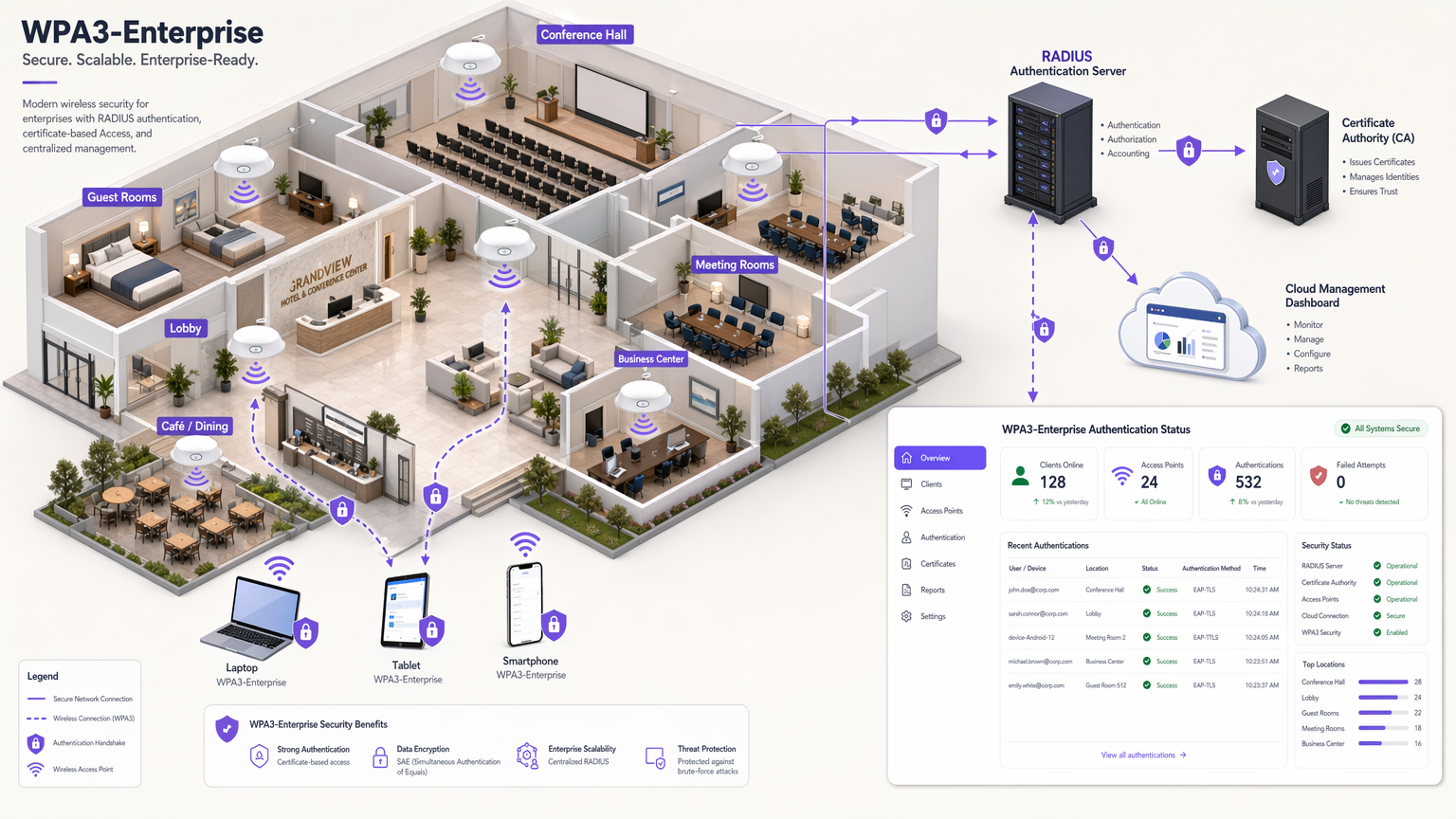
对于企业 IT 领导者来说,向 WPA3-Enterprise 的过渡不再是未来的路线图项目;它是当前的运营要求。自 2020 年起,WPA3 已成为所有 Wi-Fi 认证设备的强制性要求,然而许多企业网络——涵盖酒店、零售和公共部门场所——仍停留在 WPA2。这一差距代表着显著的风险暴露,特别是因为合规框架如 PCI DSS 4.0 和 GDPR 日益要求强大、先进的网络安全控制。
本指南提供了 WPA3-Enterprise 的全面技术剖析,重点关注其相对于 WPA2 的根本架构改进。我们详细说明了向更强加密(GCMP-256)的强制性转变、受保护管理帧 (PMF) 的必要性,以及通过 EAP-TLS 实现基于证书的相互身份验证的关键实施。本文档面向网络架构师和 CTO,避开学术理论,提供可操作的部署策略、故障排除方法和真实案例研究,以确保安全、可扩展和合规的无线基础设施。
收听配套的技术简报播客,了解执行概述:
技术深潜:WPA3-Enterprise 架构
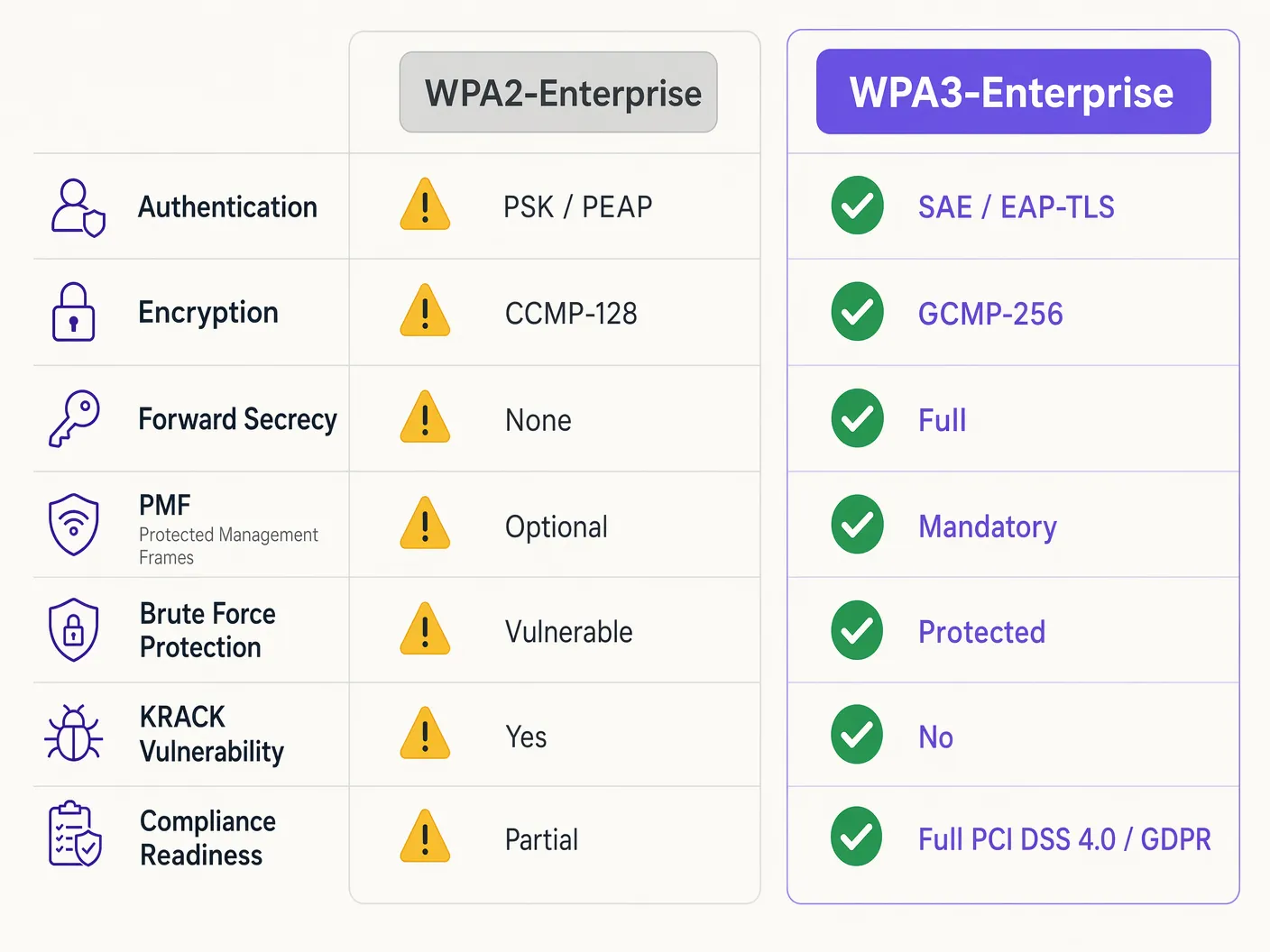
WPA2 和 WPA3-Enterprise 的根本区别不在于底层的 802.1X 框架,该框架仍然是基于端口的网络访问控制的标准,而在于围绕它构建的加密协议和管理帧保护。WPA3 解决了其前身的系统性漏洞,特别针对离线字典攻击和管理帧操纵。
身份验证和密钥交换
WPA2-Enterprise 依赖 4 次握手来派生会话密钥,这一过程已被证明容易受到密钥重装攻击 (KRACK) 和离线字典暴力破解(如果使用弱凭据)的攻击。WPA3 通过实施同时等值身份验证 (SAE) 来缓解这一问题,这是一种基于 Diffie-Hellman 的密钥交换协议。SAE 确保了前向保密性;即使攻击者获取了长期密钥,也无法追溯解密捕获的流量,因为每个会话都使用临时的、唯一的密钥。
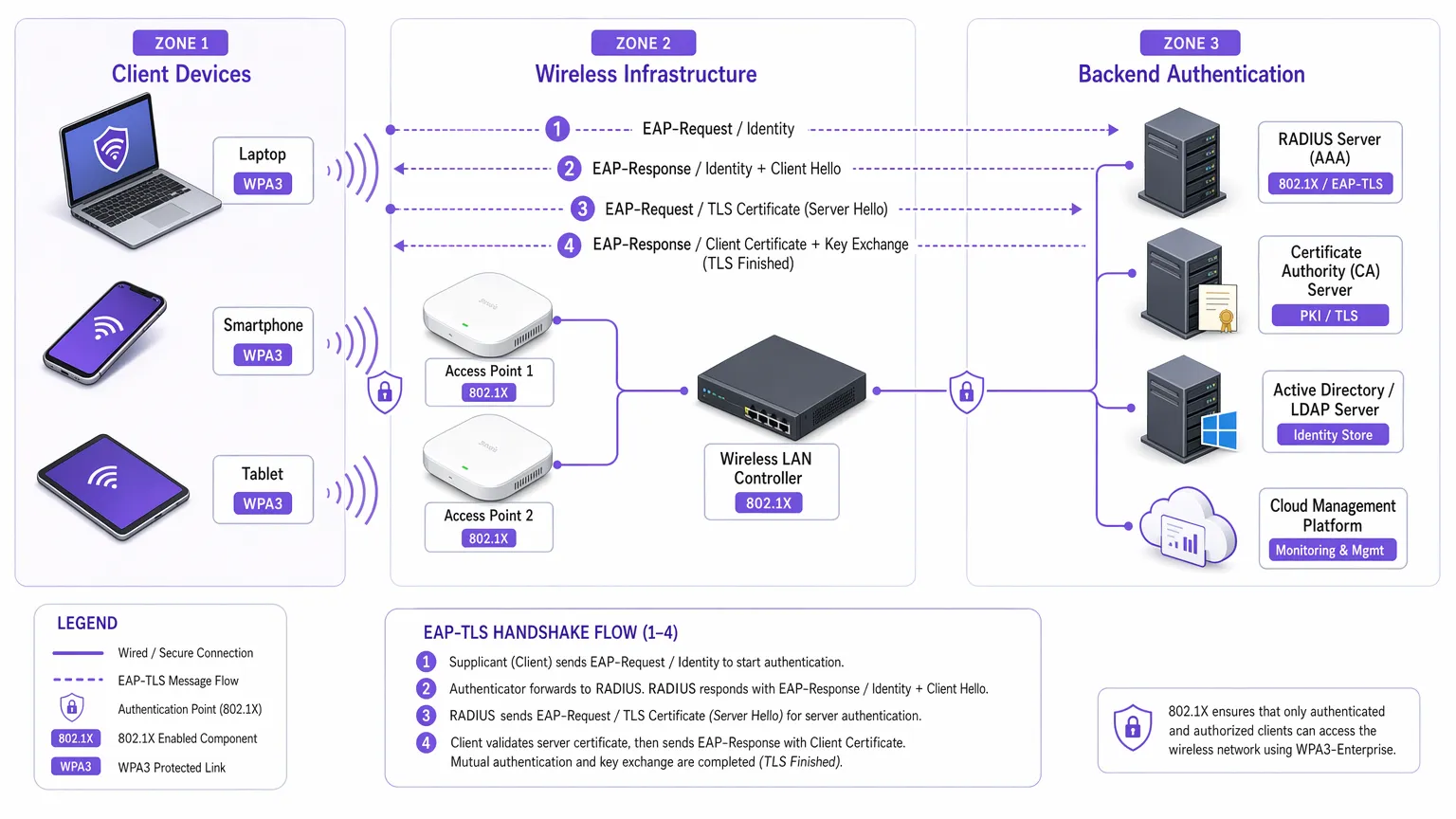
对于企业环境,核心身份验证机制果断转向 EAP-TLS(可扩展身份验证协议-传输层安全)。虽然 WPA2 允许使用较弱的基于凭据的方法,如 PEAP 或 EAP-TTLS,但 WPA3-Enterprise 强烈建议,并在高安全性 192 位模式中强制要求 EAP-TLS。这需要基于证书的相互身份验证,完全消除密码并中和凭据窃取途径。
加密增强
WPA2 使用基于 AES-128 的 CCMP-128(计数器模式及密码块链接消息身份验证码协议)。WPA3-Enterprise 引入了一个可选但强烈推荐的 192 位安全套件,与商业国家安全算法 (CNSA) 套件保持一致。此模式强制使用 GCMP-256(256 位密钥的 Galois/计数器模式协议)进行强健加密,同时使用 384 位椭圆曲线密码学进行密钥建立和管理。
受保护管理帧 (PMF)
根据 IEEE 802.11w,受保护管理帧保护管理客户端关联、取消关联和身份验证的控制信号。在 WPA2 中,PMF 是可选的,使网络容易受到伪造的取消身份验证帧的攻击——这是拒绝服务或中间人攻击的常见前兆。WPA3 强制要求所有连接使用 PMF,从根本上关闭了这一攻击途径。
实施指南:部署 WPA3-Enterprise
在数百个零售地点或庞大的酒店综合体上过渡企业网络需要分阶段、有条不紊的方法。以下步骤概述了一种与供应商无关的部署策略。
第 1 阶段:基础设施审计和 PKI 准备
实施 WPA3-Enterprise(特别是使用 EAP-TLS)的先决条件是强大的公钥基础设施 (PKI)。
- 评估 RADIUS 能力: 确保您的 RADIUS 服务器(例如,Cisco ISE、Aruba ClearPass、FreeRADIUS)支持 WPA3 参数并已配置 EAP-TLS。
- 建立证书颁发机构 (CA): 部署内部 CA(如 Microsoft AD CS)或利用基于云的 PKI 服务。
- MDM 集成: 利用移动设备管理 (MDM) 平台(Intune、Jamf)自动向受管设备部署客户端证书。这对可扩展性至关重要。
有关证书部署的进一步阅读,请参阅 WiFi 证书身份验证:数字证书如何保护无线网络 。
第 2 阶段:启用 WPA3 过渡模式
在多样化的企业环境中,硬切换很少可行。大多数企业无线局域网控制器支持 WPA3 过渡模式,允许单个 SSID 同时接受 WPA2 和 WPA3 客户端。
- 配置过渡 SSID: 在公司 SSID 上启用 WPA3 过渡模式。
- 监控客户端关联: 使用无线管理仪表板监控客户端连接。确保现代设备成功协商 WPA3,而旧设备回退到 WPA2。
- 解决兼容性问题: 识别无法关联的设备。通常,旧无线驱动程序难以满足 WPA3 的强制性 PMF 要求,即使在过渡模式下也是如此。尽可能更新驱动程序。
第 3 阶段:网络分段和遗留设备隔离
并非所有设备都支持 WPA3。遗留物联网设备、较旧的销售点系统或 医疗保健 环境中的专业医疗设备通常缺乏必要的硬件或固件更新。
- 隔离遗留设备: 为这些设备创建一个专用的、隔离的 VLAN 和一个单独的仅 WPA2 的 SSID。
- 实施严格的访问控制: 对此遗留 VLAN 应用严格的防火墙规则,防止横向移动到安全的 WPA3 公司网络。
第 4 阶段:全面强制 WPA3
一旦绝大多数公司设备成功使用 WPA3,并且遗留设备已分段,将主要公司 SSID 转换为仅 WPA3-Enterprise。
企业环境最佳实践
实施技术只是成功的一半;维护其完整性需要持续的运营纪律。
- 自动化证书生命周期管理: EAP-TLS 失败的最常见原因是证书过期。实施自动续订流程和警报机制,在 RADIUS 服务器证书到期前 90 天、60 天和 30 天提醒。
- 确保 RADIUS 冗余: 单个 RADIUS 服务器是单点故障。在地理位置不同的位置部署主 RADIUS 服务器和辅助 RADIUS 服务器,在无线控制器上配置无缝故障切换。
- 分离访客和公司网络: 绝不要将公司安全策略与访客访问混淆。公司网络需要具有 EAP-TLS 的 WPA3-Enterprise。访客网络应使用隔离的 VLAN,通常通过 Captive Portal 管理。Purple 的 Guest WiFi 解决方案提供安全、合规的访客访问,同时捕获有价值的 WiFi Analytics 。
- 利用 OpenRoaming: 为了在不同场所实现无缝、安全的连接,考虑实施 Passpoint/Hotspot 2.0。Purple 在 Connect 许可证下作为 OpenRoaming 等服务的免费身份提供商,促进无摩擦、安全的访问,而不会损害企业安全标准。
故障排除与风险缓解
即使经过精心规划,部署也会遇到摩擦。以下是常见故障模式和缓解策略。
症状:启用过渡模式时客户端无法连接。
根本原因: 旧客户端驱动程序在遇到接入点在过渡模式中广播的强制性 PMF(受保护管理帧)时经常失败,即使它们尝试进行 WPA2 连接。 缓解措施: 更新客户端无线网络接口 (NIC) 驱动程序。如果更新不可用,必须将设备移至隔离的仅 WPA2 的 SSID。
症状:所有设备普遍身份验证失败。
根本原因: RADIUS 服务器证书已过期,或者根 CA 证书已被吊销或从客户端信任存储中删除。 缓解措施: 立即续订并部署 RADIUS 服务器证书。查看自动化生命周期管理警报以防止再次发生。
症状:在接入点之间漫游时延迟高。
根本原因: 802.11r(快速 BSS 过渡)配置错误或与正在使用的特定 EAP 方法不兼容。 缓解措施: 确保 802.11r 已明确启用,并受 WLAN 控制器和客户端设备为 WPA3 SSID 支持。在维护窗口期间测试漫游性能。
投资回报率和业务影响
向 WPA3-Enterprise 的过渡需要对专业服务、潜在的硬件更新和 PKI 基础设施进行投资。然而,投资回报是通过风险缓解和合规性遵守来衡量的。
对于大型 零售 连锁店,涉及支付卡信息的数据泄露成本远远超过 WPA3 的部署成本。PCI DSS 4.0 合规要求强健的加密和身份验证;WPA3-Enterprise 直接满足这些要求,简化合规审计并避免潜在罚款。
此外,现代化无线基础设施为未来的数字计划提供了稳定、高性能的基础,无论是在 酒店业 部署先进的物联网传感器,还是启用安全的移动销售点系统。业务影响是一个弹性、合规且面向未来的网络架构。
Key Definitions
WPA3-Enterprise
The current standard for enterprise wireless security, mandating stronger encryption, protected management frames, and forward secrecy, typically deployed with 802.1X and RADIUS.
Required for compliance (PCI DSS, GDPR) and securing corporate data against modern cryptographic attacks.
EAP-TLS (Extensible Authentication Protocol-Transport Layer Security)
An authentication framework requiring both the client and the RADIUS server to present digital certificates to verify each other's identity.
The gold standard for WPA3-Enterprise authentication, eliminating the reliance on vulnerable user passwords.
PMF (Protected Management Frames)
A security standard (802.11w) that encrypts the control frames used for client association and disassociation.
Mandatory in WPA3, PMF prevents attackers from forging deauthentication packets to knock users off the network or execute man-in-the-middle attacks.
SAE (Simultaneous Authentication of Equals)
A secure key establishment protocol used in WPA3 that replaces the vulnerable 4-way handshake of WPA2.
SAE provides forward secrecy and protects against offline dictionary attacks, ensuring that even if a password is weak, the handshake cannot be brute-forced.
GCMP-256 (Galois/Counter Mode Protocol)
A highly secure, efficient encryption protocol utilizing 256-bit keys.
Mandated for the WPA3-Enterprise 192-bit security suite, required for environments handling highly sensitive data like government or financial records.
RADIUS (Remote Authentication Dial-In User Service)
A centralized networking protocol that provides Authentication, Authorization, and Accounting (AAA) management for users connecting to a network service.
The core backend server in a WPA3-Enterprise deployment that validates client certificates or credentials before granting network access.
Forward Secrecy
A cryptographic feature ensuring that session keys are ephemeral; compromising a long-term key in the future will not allow an attacker to decrypt past recorded sessions.
A critical enhancement in WPA3 provided by the SAE handshake, protecting historical data.
PKI (Public Key Infrastructure)
The framework of roles, policies, hardware, software, and procedures needed to create, manage, distribute, use, store, and revoke digital certificates.
The necessary prerequisite infrastructure for deploying EAP-TLS authentication in a WPA3-Enterprise environment.
Worked Examples
A 200-room luxury hotel is upgrading its corporate network to WPA3-Enterprise. They have a mix of modern corporate laptops, iPads used by concierge staff, and legacy Wi-Fi-enabled door locks that only support WPA2. How should the network architect design the SSIDs and VLANs to ensure maximum security without breaking operational functionality?
The architect must employ network segmentation.
- Create a primary corporate SSID ('HotelCorp_Secure') configured for WPA3-Enterprise only, utilizing EAP-TLS. Deploy certificates to all corporate laptops and iPads via the hotel's MDM solution. Assign this SSID to the primary corporate VLAN.
- Create a secondary, hidden SSID ('Hotel_IoT_Legacy') configured for WPA2-Personal (PSK) or WPA2-Enterprise (if supported by the locks), utilizing a complex, rotated passphrase or MAC authentication bypass (MAB).
- Assign the legacy SSID to a heavily restricted, isolated VLAN. Configure firewall rules to allow the door locks to communicate ONLY with the specific on-premise or cloud-based door management server, blocking all lateral movement to the corporate VLAN or the internet.
A public sector organization has deployed WPA3-Enterprise with EAP-TLS. On a Monday morning, no staff can connect to the wireless network. The wireless controller shows clients associating, but failing RADIUS authentication. What is the most likely cause, and what is the immediate remediation step?
The most likely cause is an expired RADIUS server certificate. Because EAP-TLS relies on mutual authentication, if the server presents an expired certificate, the clients will immediately reject the connection and terminate the handshake.
Immediate remediation: The IT team must generate a new Certificate Signing Request (CSR) from the RADIUS server, have it signed by the internal CA, and bind the new certificate to the EAP-TLS authentication policy on the RADIUS server. Services must then be restarted.
Practice Questions
Q1. You are the network architect for a large retail chain rolling out WPA3-Enterprise. During the pilot phase at three stores using WPA3 Transition Mode, several older barcode scanners frequently drop off the network and require manual reboots to reconnect. Modern tablets connect without issue. What is the most appropriate architectural response?
Hint: Consider how legacy wireless drivers handle unfamiliar management frames broadcast in Transition Mode.
View model answer
The barcode scanners are likely crashing due to the mandatory Protected Management Frames (PMF) broadcast by the APs in Transition Mode. The appropriate response is to abandon Transition Mode for these devices. Create a dedicated, hidden WPA2-only SSID mapped to an isolated VLAN specifically for the scanners, and configure the primary corporate SSID to WPA3-Enterprise only for the modern tablets.
Q2. A CTO mandates the deployment of WPA3-Enterprise across all corporate offices within 60 days to meet new compliance requirements. The current environment uses WPA2-Enterprise with PEAP-MSCHAPv2 (username/password). The organization does not currently have an internal Certificate Authority (CA) or a Mobile Device Management (MDM) solution. Is this timeline realistic, and what is the critical path?
Hint: Evaluate the prerequisites for the recommended WPA3 authentication method (EAP-TLS).
View model answer
The 60-day timeline is highly unrealistic. To properly implement WPA3-Enterprise, the organization should migrate to EAP-TLS to eliminate credential vulnerabilities. The critical path requires designing and deploying a PKI (Certificate Authority) and implementing an MDM solution to distribute client certificates. Building this infrastructure from scratch, testing it, and enrolling all corporate devices will almost certainly exceed 60 days. The architect must communicate this dependency to the CTO.
Q3. During a security audit, an examiner notes that your RADIUS servers are configured for EAP-TLS, but the 'Certificate Revocation List (CRL) checking' feature is disabled on the wireless controllers and RADIUS servers. Why is this a significant security finding in a WPA3 environment?
Hint: What happens if a corporate laptop is stolen, but its certificate has not yet expired?
View model answer
Without CRL or OCSP checking enabled, the RADIUS server has no way of knowing if a presented certificate has been revoked by the CA prior to its natural expiration date. If a device is lost or an employee is terminated, their certificate must be revoked. If revocation checking is disabled, that compromised certificate can still be used to successfully authenticate and access the WPA3-Enterprise network, entirely defeating the purpose of mutual authentication.
Continue reading in this series
Mitigating RADIUS Vulnerabilities: A Security Hardening Guide
This guide provides a comprehensive, actionable reference for IT managers, network architects, and CTOs responsible for enterprise WiFi infrastructure across hospitality, retail, events, and public-sector environments. It covers the full attack surface of RADIUS server deployments — from MD5 collision vulnerabilities and weak shared secrets to unencrypted UDP transport and misconfigured EAP methods — and delivers a prioritised hardening roadmap aligned with IEEE 802.1X, PCI DSS, and GDPR requirements. Organisations that implement these recommendations will materially reduce their exposure to credential-based network attacks, meet compliance obligations, and build a defensible security posture for their guest and corporate WiFi infrastructure.
Mitigating RADIUS Vulnerabilities: A Security Hardening Guide
This guide provides a comprehensive, actionable reference for IT managers, network architects, and CTOs responsible for enterprise WiFi infrastructure across hospitality, retail, events, and public-sector environments. It covers the full attack surface of RADIUS server deployments — from MD5 collision vulnerabilities and weak shared secrets to unencrypted UDP transport and misconfigured EAP methods — and delivers a prioritised hardening roadmap aligned with IEEE 802.1X, PCI DSS, and GDPR requirements. Organisations that implement these recommendations will materially reduce their exposure to credential-based network attacks, meet compliance obligations, and build a defensible security posture for their guest and corporate WiFi infrastructure.
Zero Trust Network Access: Implementation Strategies and Best Practices
This technical reference guide provides IT leaders and network architects with a pragmatic blueprint for Zero Trust Network Access (ZTNA) implementation in enterprise venues. It covers core architecture, microsegmentation strategies, and step-by-step deployment methodologies to secure complex environments without disrupting operations.