
Optimizing Hotel WiFi for Business Travelers
This guide provides actionable, vendor-neutral strategies for hospitality IT leaders to optimize hotel WiFi for business travelers by combining DNS-level ad blocking with end-to-end Quality of Service (QoS) policies. It covers the technical architecture, VLAN segmentation, security compliance, and real-world case studies demonstrating how eliminating background noise can reclaim up to 35% of wasted bandwidth. Venue operations directors and network architects will find concrete implementation steps, decision frameworks, and measurable ROI benchmarks to justify and execute the deployment this quarter.
Video overview
Listen to this guide
View podcast transcript
Part of our core series: Guest WiFi Guide →

Executive Summary
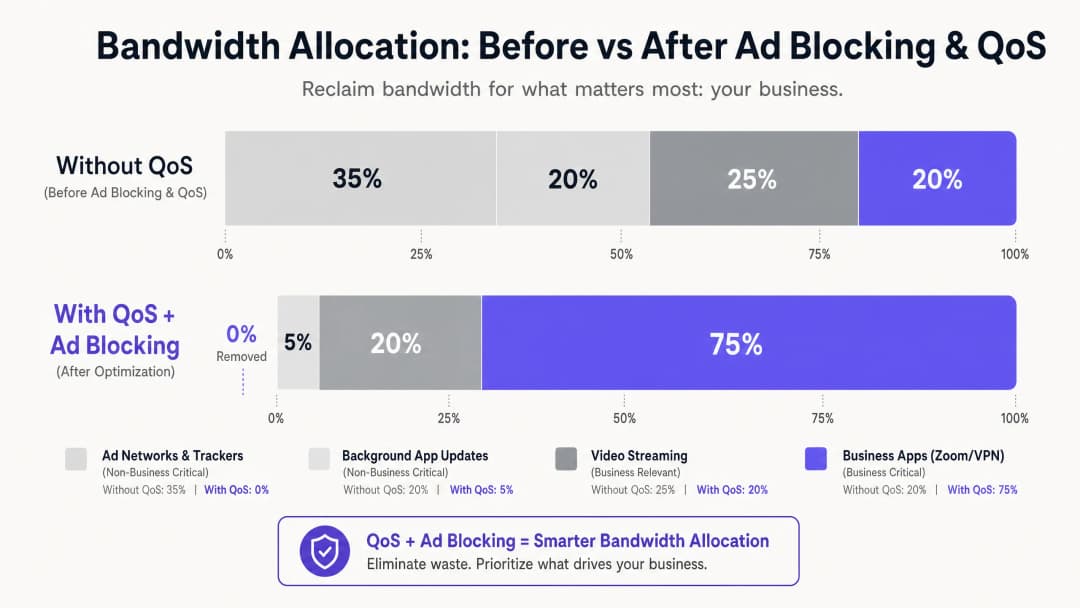
For IT managers and venue operations directors in the hospitality sector, delivering reliable WiFi is no longer a differentiator - it is a baseline operational requirement. Business travelers demand high-performance connectivity for corporate VPNs, video conferencing, and cloud-hosted applications. Yet most hotel networks are silently leaking bandwidth to invisible background traffic: ad trackers, telemetry beacons, and automatic app updates that can consume up to 35% of total available bandwidth before a single business application has initialized.
This guide details a proven, vendor-neutral architecture for reclaiming that wasted bandwidth. By deploying DNS-level ad blocking at the network gateway and implementing end-to-end Quality of Service (QoS) policies mapped through Deep Packet Inspection (DPI), network architects can ensure that latency-sensitive applications - Zoom, Microsoft Teams, IPsec VPNs, and SSL tunnels - receive guaranteed priority throughput. In most cases, this approach can be implemented on existing infrastructure, delivering measurable ROI through deferred ISP link upgrades and improved corporate guest satisfaction scores.
Technical Deep Dive
The core challenge facing the modern hotel WiFi environment is the proliferation of unsolicited background traffic. When any modern device - a business laptop, smartphone, or tablet - connects to a network, it immediately initiates dozens of background connections. These include ad SDK polling from installed applications, operating system telemetry, cloud sync services, and automatic update checks. On an unmanaged, flat network with 200 concurrently connected guests, this background chatter is not merely an inconvenience - it is a structural bandwidth problem.
Research into the traffic profiles of corporate guest networks consistently shows that ad networks and third-party trackers account for 25% to 40% of DNS query volume on unmanaged hotel networks. Every successfully resolved query can initiate a data transfer, and while each individual payload is small, the cumulative effect across hundreds of concurrent connections is substantial. That is bandwidth which should be serving the CFO's Zoom board meeting, or the consultant's VPN session back to their corporate data center.
Layer 1: DNS-Based Ad and Tracker Blocking
The most effective point of intervention is DNS resolution. By directing all guest DNS queries through a filtering resolver - whether an on-premises appliance or a cloud DNS security service - the network can silently drop requests to known ad servers, tracker domains, and telemetry endpoints before any payload data ever traverses the WAN link. The efficiency gain here is structural: a blocked DNS query consumes negligible resources compared to the full HTTP/S connection it would otherwise have initiated.
For practical hotel deployments, managed DNS filtering services offer regularly updated blocklists backed by enterprise-grade SLAs, which makes them preferable to self-managed open-source solutions in environments where availability is critical. The key configuration requirement is ensuring that the Walled Garden - the set of domains accessible before Captive Portal authentication - is explicitly whitelisted and exempt from the general filtering policy. Failure to do this is the most common cause of post-deployment guest complaints.
Layer 2: Deep Packet Inspection and QoS Marking
Once background noise has been reduced at the DNS layer, the remaining traffic must be actively managed by priority. Deep Packet Inspection (DPI) on the edge firewall or Unified Threat Management (UTM) appliance identifies specific application protocols. Modern DPI engines can reliably classify Zoom, Microsoft Teams, Cisco Webex, RTP/SIP voice traffic, and IPsec and SSL VPN sessions based on packet signatures and port patterns, even when non-standard ports are in use.
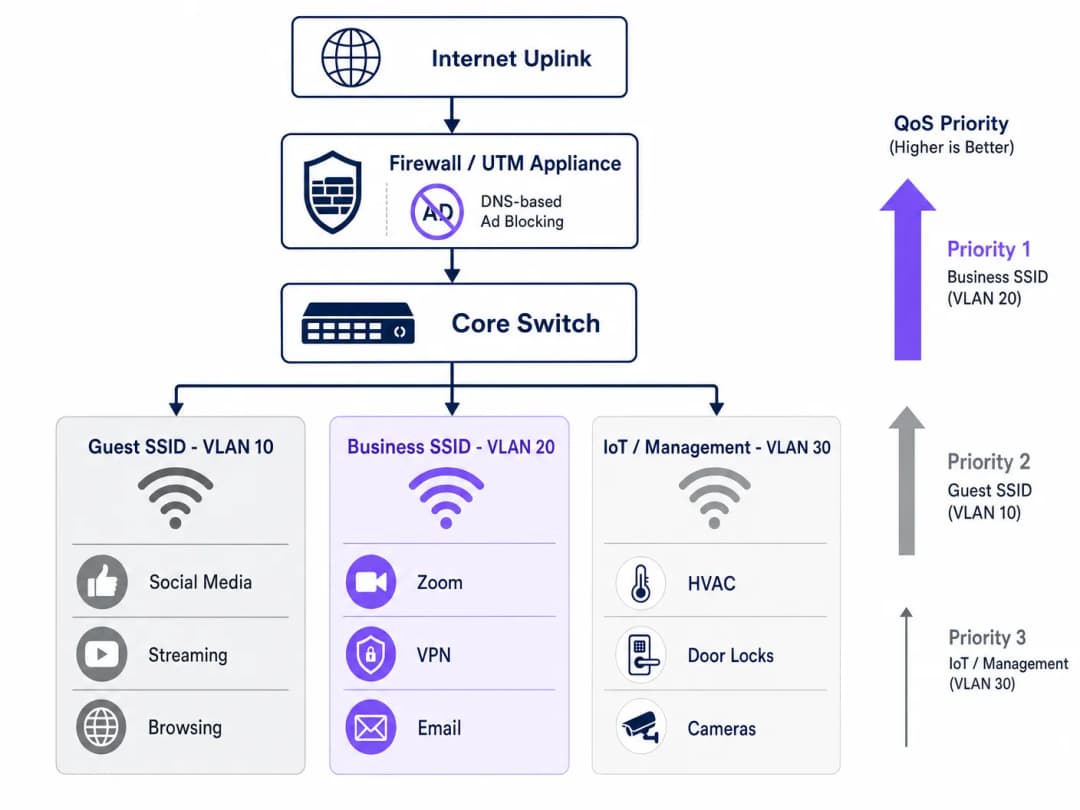
Traffic identified as business-critical is marked with a Differentiated Services Code Point (DSCP) value in the IP header. The DSCP field offers 64 possible per-hop behaviors, but in practice most hotel deployments use a simplified three-tier model: Expedited Forwarding (EF, DSCP 46) for voice and video conferencing; Assured Forwarding class 4 (AF41, DSCP 34) for VPN and corporate application data; and Best Effort (BE, DSCP 0) for general web browsing and media streaming.
Layer 3: Wireless QoS via WMM
Wired QoS configuration is only effective if the wireless access points correctly map DSCP markings to the appropriate WiFi Multimedia (WMM) access categories. WMM defines four access categories: Voice (AC_VO), Video (AC_VI), Best Effort (AC_BE), and Background (AC_BK). The DSCP-to-WMM mapping must be explicitly configured on the APs, as default behavior varies by vendor. Verify this setting in your AP management console; it is a common gap that causes otherwise well-designed QoS policies to fail at the last mile.
VLAN Segmentation and Security Architecture
A properly optimized hotel network should operate across at least three logical segments. The Guest SSID (VLAN 10) serves leisure travelers and conference attendees with standard internet access, subject to DNS filtering and rate limiting. The Business SSID (VLAN 20) carries the highest QoS priority and authenticates via WPA3-Enterprise with IEEE 802.1X, integrating with a RADIUS server to provide per-user credentials. The IoT and Management VLAN (VLAN 30) isolates smart room devices, HVAC sensors, electronic door locks, and IP cameras from all guest traffic.
This segmentation is not just a performance optimization - it is a compliance requirement. Under PCI-DSS, any network segment touching payment card data must be isolated from general networks through documented firewall rules and access controls. Under CCPA/CPRA, personal data collected through Guest WiFi authentication must be handled with appropriate technical safeguards, and network segmentation is a foundational control for demonstrating due diligence. Maintaining complete records for the 01/01/2026 IT security audit trail across all VLANs is essential for proving compliance during assessments.
Got questions about your specific setup?
Our team works with venue operators, IT managers, and network engineers across 80,000 venues. Book a 20-minute call and we will show you how others like you solved it.
Implementation Guide
Deploying this architecture requires a systematic approach to avoid disrupting live guest services. A phased rollout following the steps below is recommended.
Phase 1 - Traffic profiling (Week 1). Before making any changes, deploy a traffic analysis tool on a SPAN port of the core switch to capture 72 hours of baseline data. Identify the top 20 bandwidth-consuming domains and application categories. This data justifies the investment and provides the baseline against which post-deployment improvements are measured. Many operators use WiFi Analytics capabilities to understand device types, dwell patterns, and application usage across their venues.
Phase 2 - Pilot DNS filtering (Week 2). Implement DNS filtering on a single isolated VLAN - ideally a staff or back-office segment - using a conservative blocklist. Monitor for 48 hours to confirm there are no false positives before extending to guest segments. Document every domain added to the Walled Garden whitelist.
Phase 3 - QoS policy deployment (Week 3). Configure DPI rules and DSCP marking on the edge firewall. Verify that DSCP markings survive every switch hop by capturing packets at the distribution layer. Enable WMM on all access points and confirm that the DSCP-to-WMM mapping is correctly applied. For guidance on frequency planning and channel management at this stage, see WiFi Frequencies: A Guide to WiFi Frequencies in 2026. Phase 4 — VLAN restructuring (Week 4). Migrate IoT devices to the dedicated management VLAN. Roll out the Business SSID with WPA3-Enterprise authentication. Notify corporate clients and conference organizers of the new SSID.
Phase 5 — Monitoring and optimization (ongoing). Establish KPIs: average Zoom call quality score, VPN connection success rate, peak-hour throughput utilization, and guest WiFi satisfaction scores. Review and update DNS blocklists monthly.
Best Practices
The following vendor-neutral recommendations reflect current industry standards and apply across the major hardware platforms, including Cisco Meraki, Ubiquiti UniFi, Aruba Networks, and Ruckus.
| Practice | Standard / Reference | Priority |
|---|---|---|
| Enable WPA3-Enterprise on the Business SSID | IEEE 802.11i / WPA3 | Critical |
| 802.1X RADIUS authentication | IEEE 802.1X | Critical |
| End-to-end DSCP preservation | RFC 2474 | High |
| Enable WMM on all APs | Wi-Fi Alliance WMM | High |
| Enable airtime fairness | Vendor-specific | Medium |
| DNS filtering with managed blocklists | NIST SP 800-81 | High |
| VLAN segmentation (Guest/Business/IoT) | IEEE 802.1Q | Critical |
| PCI DSS network isolation | PCI DSS v4.0 Req. 1 | Critical (where applicable) |
For venues operating a retail environment alongside their hospitality space - such as hotel lobby shops or mixed conference-retail areas - the same VLAN and QoS principles apply, with an additional dedicated high-priority queue for POS traffic. The principles discussed in Office Wi-Fi: Optimising Your Modern Office Wi-Fi Network transfer directly to hotel business center and meeting room deployments.
Troubleshooting and Risk Mitigation
The most common failure modes in hotel WiFi optimization deployments fall into three categories.
Captive Portal breakage. Symptom: guests cannot reach the login page after DNS filtering is enabled. Root cause: the filtering policy is blocking domains required for the Captive Portal redirect or the Walled Garden. Mitigation: audit every domain required by the authentication flow and add them to the pre-authentication whitelist before enabling general filters. If you are diagnosing broader congestion issues, the guide Why Is Our Guest WiFi So Slow? Diagnosing Network Congestion provides a structured diagnostic framework.
DSCP marking stripped. Symptom: QoS is configured on the firewall and APs, but corporate application performance does not improve under load. Root cause: an intermediate switch is stripping or re-marking DSCP tags. Mitigation: capture packets at multiple points along the network path using Wireshark or an equivalent tool. Verify that each switch's QoS trust policy is set to trust DSCP from upstream devices.
IoT device instability after enabling airtime fairness. Symptom: smart room devices (thermostats, door locks) drop offline intermittently after airtime fairness is enabled. Root cause: legacy 802.11b/g IoT devices transmit slowly and are starved of airtime under fairness policies. Mitigation: migrate IoT devices to a dedicated 2.4GHz SSID on VLAN 30 with airtime fairness disabled. Apply airtime fairness only to the 5GHz guest and business SSIDs.
ROI and Business Impact
The financial case for this investment is straightforward. By reclaiming 20-35% of wasted bandwidth through DNS filtering alone, most hotel operators can defer an ISP circuit upgrade by 12 to 18 months. At typical business broadband pricing for a 1Gbps dedicated fiber circuit, that represents a deferred capital expenditure of $20,000 to $50,000, depending on market and contract terms.
Beyond infrastructure savings, the impact on corporate guest satisfaction is measurable. Hotels that can credibly market reliable, business-grade WiFi command a premium in the corporate travel market. Sustained improvements in WiFi satisfaction scores - typically measured through post-stay surveys - correlate directly with repeat booking rates among corporate clients, the highest-margin segment for most full-service hotels.
For healthcare and transportation venues operating visitor or patient WiFi, the compliance benefits are equally significant. Demonstrating a documented, auditable approach to network security and data handling reduces regulatory risk and simplifies compliance assessments.
Key Definitions
DNS Filtering
The process of blocking access to specified domains at the DNS resolution stage, preventing devices from establishing connections to those destinations.
Deployed at the gateway to prevent guest devices from reaching ad networks and tracker domains, reclaiming bandwidth before any payload data is transmitted.
Quality of Service (QoS)
A set of network mechanisms that prioritize certain types of traffic over others to guarantee performance for latency-sensitive applications.
Essential for ensuring that Zoom, VoIP, and VPN traffic receive guaranteed throughput and low latency on a congested hotel network shared by hundreds of users.
Deep Packet Inspection (DPI)
An advanced form of packet filtering that examines the data content of a packet beyond its header to identify the specific application or protocol.
Used by edge firewalls to accurately classify application traffic (e.g., distinguishing a Zoom call from generic HTTPS traffic) so it can be tagged for QoS prioritization.
DSCP (Differentiated Services Code Point)
A 6-bit field in the IP packet header used to classify and mark packets for per-hop QoS treatment across network devices.
The industry-standard mechanism for tagging packets so that switches, routers, and access points know which traffic is business-critical and should be processed first.
WMM (WiFi Multimedia)
A WiFi Alliance certification that implements QoS on wireless networks by defining four access categories: Voice, Video, Best Effort, and Background.
The wireless equivalent of wired QoS. Must be enabled on all access points and correctly mapped to DSCP values to ensure that wired QoS policies are honored at the last hop.
Airtime Fairness
A wireless scheduling feature that allocates equal transmission time to all connected clients, rather than equal packet counts, preventing slow legacy devices from monopolizing channel capacity.
Critical in hotel environments where a mix of modern business laptops and older devices share the same AP. Prevents a single slow device from degrading the experience for all others.
VLAN (Virtual Local Area Network)
A logical network segment created on a physical switch infrastructure using IEEE 802.1Q tagging to isolate traffic between groups of devices.
Used to separate guest, business, and IoT traffic on the same physical infrastructure. A mandatory control for PCI-DSS compliance and a best practice for network security and performance management.
Captive Portal
A web-based authentication gateway that intercepts a new device's HTTP traffic and redirects it to a login or registration page before granting full network access.
The primary touchpoint for guest WiFi authentication and first-party data collection. Must be carefully managed to ensure DNS filtering policies do not block the authentication flow.
Walled Garden
A set of domains and IP addresses that a device can access before completing Captive Portal authentication, typically including the portal itself and any required third-party authentication services.
Must be explicitly configured when deploying DNS filtering to ensure the authentication flow is not disrupted by the general blocking policy.
IEEE 802.1X
An IEEE standard for port-based Network Access Control that provides an authentication mechanism for devices wishing to connect to a network.
The authentication framework underpinning WPA3-Enterprise deployments. Integrates with a RADIUS server to provide per-user credentials and is the recommended standard for business-grade hotel SSIDs.
Worked Examples
A 400-room city-center hotel is hosting a major technology conference with 600 registered delegates. The venue has a 1Gbps symmetric fiber uplink. During the first morning of the conference, the network operations team receives a flood of complaints: Zoom calls are dropping, VPN connections are timing out, and the conference app is failing to load. A traffic capture shows the 1Gbps link is at 94% utilization. How should the IT team respond, both immediately and structurally?
Immediate response (within 30 minutes): Deploy an emergency DNS sinkhole for the top 50 ad network and telemetry domains identified in the traffic capture. This alone should shed 25 - 35% of current load. Simultaneously, configure emergency QoS rules on the edge firewall to hard-prioritise traffic on UDP ports 8801-8802 (Zoom) and TCP 443 with Zoom's IP ranges, and to rate-limit traffic to known streaming CDN IP ranges to 10Mbps aggregate.
Structural response (post-event): Segment the network into dedicated conference delegate and speaker VLANs. Deploy a managed DNS filtering service with a maintained blocklist. Implement DPI-based QoS with DSCP tagging for all future events. Negotiate a burst capacity agreement with the ISP for high-density event periods. Consider a dedicated 10Gbps event uplink for conferences exceeding 300 delegates.
A 120-room boutique hotel group with properties across three cities wants to standardize their WiFi infrastructure. Each property has a mix of leisure and business guests. The IT director wants to ensure that business guests get a premium experience without investing in new hardware at each site. The existing infrastructure is a mix of Ubiquiti UniFi APs and Cisco Meraki firewalls. What architecture should be recommended?
Recommend a centralized cloud-managed architecture leveraging the existing Meraki firewalls for DNS filtering (via Meraki's built-in content filtering and Umbrella integration) and DPI-based QoS. Configure two SSIDs per property: a standard Guest SSID (WPA3-Personal with Captive Portal) and a Business SSID (WPA3-Enterprise with 802.1X). Map the Business SSID to a dedicated VLAN with the highest QoS priority tier. On the UniFi APs, enable WMM and configure the DSCP-to-WMM mapping to match the Meraki firewall's tagging policy. Deploy a centralized RADIUS server (or use a cloud RADIUS service) for 802.1X authentication across all three properties. Provide corporate account guests with Business SSID credentials at check-in.
Practice Questions
Q1. You have just enabled DNS filtering on your hotel's guest VLAN. Within 10 minutes, the front desk receives calls from guests saying they cannot connect to WiFi - they are not seeing the login page and are getting a 'No Internet Connection' error. What is the most likely cause and how do you resolve it?
Hint: Consider the sequence of events when a new device joins an open network and attempts to reach the captive portal.
View model answer
The DNS filtering policy is blocking one or more domains required for the captive portal redirect or the walled garden. When a device joins the network, it sends an HTTP probe request to detect the captive portal. If the DNS resolver cannot resolve the redirect domain (because it is on the blocklist or the filter is too aggressive), the device never sees the login page. Resolution: immediately identify the captive portal's redirect domain, authentication server domain, and any social login provider domains (e.g., accounts.google.com for Google login), and add them to the walled garden whitelist. The walled garden must bypass the DNS filter entirely for unauthenticated devices.
Q2. A network architect has configured DPI on the edge firewall to tag Zoom traffic with DSCP EF (46) and has verified the configuration is correct. However, during peak conference hours, business guests still report jitter and dropped calls. A packet capture at the AP shows Zoom traffic arriving with DSCP 0 (Best Effort). What is the most likely cause?
Hint: Remember that QoS is an end-to-end requirement and that each device in the path must be configured to trust and forward priority markings.
View model answer
A switch between the firewall and the access point is stripping or remarking the DSCP tags to 0 (Best Effort). This is a common issue when switches are configured with a default 'untrusted' QoS policy that resets all incoming DSCP values. Resolution: identify the switch(es) in the path between the firewall and the APs, and configure their QoS trust policy to 'trust DSCP' on the uplink ports. Additionally, verify that the access points are configured to map DSCP EF to WMM AC_VO (Voice) and not defaulting to AC_BE.
Q3. You are advising a 250-room hotel that wants to implement Airtime Fairness to improve WiFi performance for business guests. The hotel also has 80 smart room devices (thermostats, motorized blinds) that use 802.11b/g and are currently on the same SSID as guests. What is the risk of enabling Airtime Fairness in this configuration, and what is the recommended approach?
Hint: Consider how Airtime Fairness allocates resources and how the transmission rate of legacy 802.11b devices compares to modern 802.11ac/WiFi 6 devices.
View model answer
Airtime Fairness allocates equal transmission time to all clients, regardless of their data rate. A legacy 802.11b device transmitting at 1-11 Mbps receives the same time slice as a modern WiFi 6 device transmitting at 600+ Mbps. In practice, the legacy device transmits far less data in its time slice, which is acceptable for the device itself, but the problem is that the access point must wait for the slow device to finish its transmission before serving the next client. This can cause the smart room devices to miss their polling windows, leading to intermittent disconnections. The recommended approach is to migrate all IoT devices to a dedicated 2.4GHz SSID on VLAN 30 (IoT/Management) with Airtime Fairness disabled, and enable Airtime Fairness only on the 5GHz guest and business SSIDs where all clients are modern devices.
Q4. A hotel group's CTO asks you to justify the cost of deploying a managed DNS filtering service ($8,000/year) versus continuing with the current unmanaged network. The hotel has a 1Gbps fiber uplink costing $24,000/year. How would you structure the ROI argument?
Hint: Consider both direct infrastructure savings and indirect revenue impact.
View model answer
Structure the ROI argument in two parts. Direct savings: if DNS filtering reclaims 30% of wasted bandwidth, the effective throughput of the existing 1Gbps link increases to the equivalent of approximately 1.3Gbps. This defers the need for a 10Gbps upgrade (typically $55,000 - $100,000 capital cost plus increased annual line leasing costs) by at least 18 - 24 months. The $10,000/year filtering service cost is recovered within the first year through deferred capital expenditure alone. Indirect revenue impact: improved WiFi satisfaction scores in the corporate segment - typically a 15 - 25% improvement based on comparable deployments - directly influence repeat booking rates from corporate accounts. For a 250-room hotel with 40% corporate occupancy at an average rate of $220/night, even a 2% improvement in corporate repeat bookings represents approximately $80,000 in additional annual revenue. The combined ROI case is compelling and quantifiable within a single financial year.
Continue reading in this series
How to Scan for WiFi Interference and Find the Best Channel
This comprehensive technical guide provides enterprise IT leaders with actionable methodologies for identifying RF interference and selecting the optimal 5GHz channels. It covers spectrum analysis, DFS considerations, and practical deployment strategies to optimize throughput and reduce latency without requiring new hardware investments.
How to Improve WiFi Speed Without Buying New Access Points
This guide details how enterprise venues can reclaim 30%+ of their WiFi bandwidth without purchasing new access points. By implementing DNS filtering, band steering, and QoS policies, IT teams can extend hardware lifespans, reduce CapEx, and improve network performance and security.
Reducing Latency on High-Density WiFi Networks
This guide details how eliminating unnecessary DNS lookups for tracking domains drastically lowers latency on high-density WiFi networks. It provides actionable architecture, implementation, and ROI guidance for IT leaders managing congested venue environments.
Got questions about your specific setup?
Our team works with venue operators, IT managers, and network engineers across 80,000 venues. Book a 20-minute call and we will show you how others like you solved it.