
解决访客 WiFi 上“已连接但无互联网连接”的错误
本权威技术参考指南解释了网络拥堵导致的 DNS 超时如何触发访客 WiFi 上的“已连接,无互联网”错误。它为网络架构师和 IT 经理提供了部署企业级 DNS 过滤器以解决这些瓶颈并改善访客接入的切实可行的实施步骤。
收听本指南
查看播客转录
核心系列的一部分:Guest WiFi Guide →
Guest WiFi “Connected, No Internet” Root-Cause Diagnostic Tool
Select your venue deployment profile, active connection failure symptom, and wireless infrastructure vendor to calculate probe timeout risks, diagnose DNS/DHCP bottlenecks, and generate multi-vendor remediation steps.
Root-Cause Diagnostic Analysis: Captive portal login popup never appears on mobile devices
Severity: CriticalOS captive portal detection probe DNS queries exceed the 2-5 second timeout window due to upstream resolver latency or dropped UDP packets.
Devices display "Connected, No Internet" and automatically drop the connection or fail back to mobile cellular data.
Deploy a local enterprise DNS caching filter, allowlist probe domains, and ensure UDP port 53 is allowed pre-authentication.
Vendor Implementation Guide: Cisco Meraki (Meraki Dashboard)
- DNS Configuration & Resolver Tuning:Under Wireless > Configure > Access control > Addressing and traffic, set Client IP assignment to "External DHCP server" or "Bridge mode" with reliable public Anycast DNS (1.1.1.1, 8.8.8.8).
- DHCP Scope & Lease Duration:In Security & SD-WAN > Configure > Addressing & VLANs, decrease DHCP lease time on the Guest VLAN to 30 minutes to prevent scope starvation.
- Walled Garden Pre-Authentication Rules:Under Wireless > Access control > Walled garden, enable Walled garden and add: *.purple.ai and the portal hosts only. Leave the OS probe hosts (captive.apple.com, connectivitycheck.gstatic.com, msftconnecttest.com) out, or devices will think they are online.
# Meraki Dashboard Configuration:
# 1. Wireless > Configure > Access Control > Splash Page: "Sign-on splash page"
# 2. Walled Garden ranges: *.purple.ai, fonts.googleapis.com (not the OS probe hosts)
# 3. Client IP assignment: Bridge Mode (NAT mode restricts Layer 2 client isolation)
Experiencing guest WiFi onboarding failures across your venue?
Purple works with Cisco Meraki, HPE Aruba, Ruckus, Juniper Mist, Ubiquiti UniFi, Cambium, Extreme and Fortinet, and manages the pre-auth walled garden and DNS allowances that most of these failures trace back to.
执行摘要
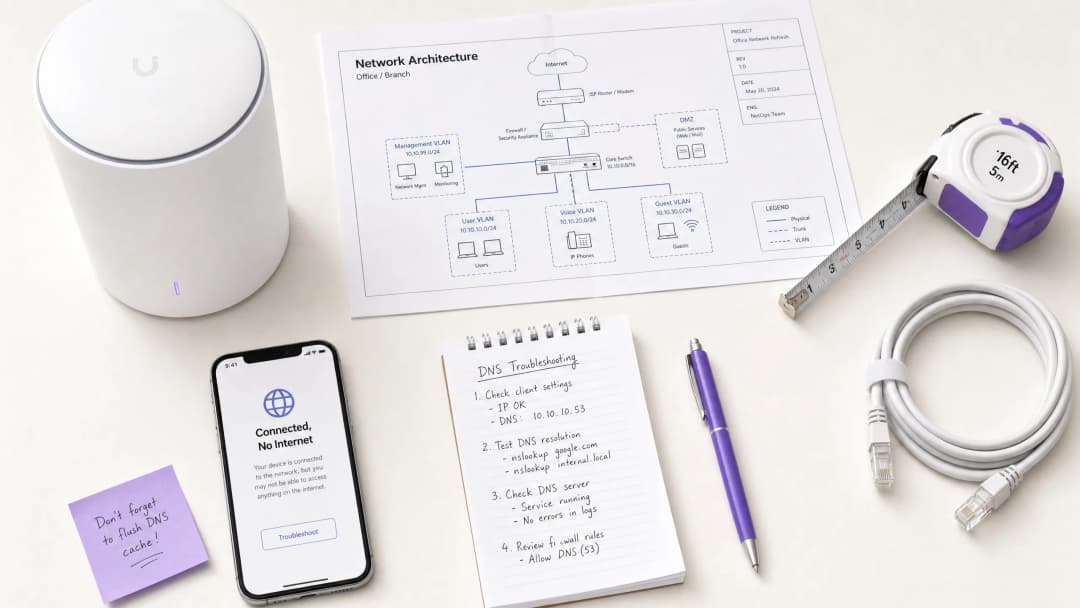
对于监管高密度场所 - 如 零售、酒店/旅游业、医疗保健 和 交通运输 - 的首席技术官 (CTO) 和网络架构师而言,Guest WiFi 网络上“已连接,无互联网”的错误是一个持续存在的运营令人头疼的问题。虽然该问题经常被误诊为 AP 硬件故障或上行带宽不足,但在企业环境中,其根本原因通常是网络拥塞导致的 DNS 超时。
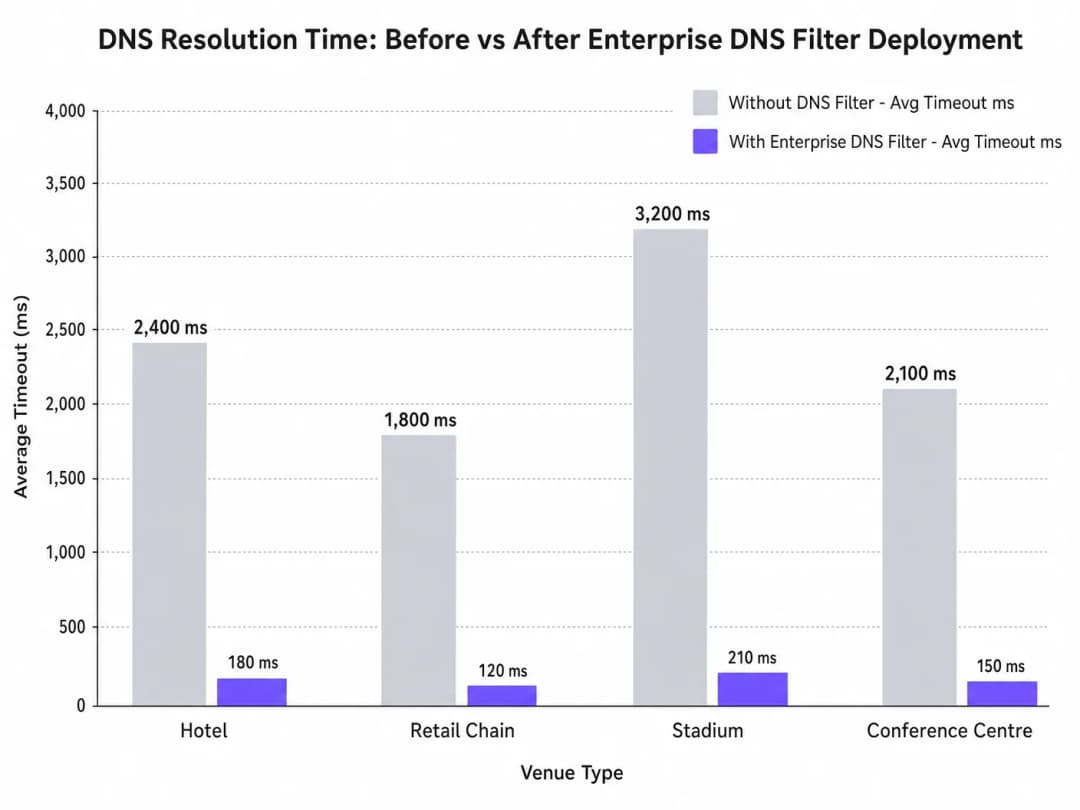
当数百台设备同时探测 Captive Portal 检测(例如 captive.apple.com)时,默认的 UDP 端口 53 查询会使标准的上行解析器不堪重负。如果 DNS 响应超过了操作系统级的超时窗口(通常为 1 - 5 秒),设备就会假定不存在互联网连接,从而无法触发 Captive Portal。本指南详细介绍了这种故障模式的技术架构,并展示了部署企业级 DNS 过滤器如何解决这一瓶颈,将查询延迟从数千毫秒降低到 200 毫秒以下,确保符合 IEEE 802.1X 和 GDPR 等标准,并显著改善宾客的接入体验。
技术深度剖析
Captive Portal 检测机制
当客户端设备与接入点关联并获得 DHCP 租约时,它必须在完全过渡到已连接状态之前验证互联网的可达性。这是通过 Captive Portal 检测探测实现的:
- iOS/macOS:向
captive.apple.com发送 HTTP GET 请求 - Android:向
connectivitycheck.gstatic.com发送 HTTP GET 请求 - Windows:向
msftconnecttest.com发送 HTTP GET 请求
在发出 HTTP GET 之前,设备必须通过 DNS 解析主机名。这一初始 DNS 查询是高密度环境中的关键故障点。
为什么拥塞会触发 DNS 超时
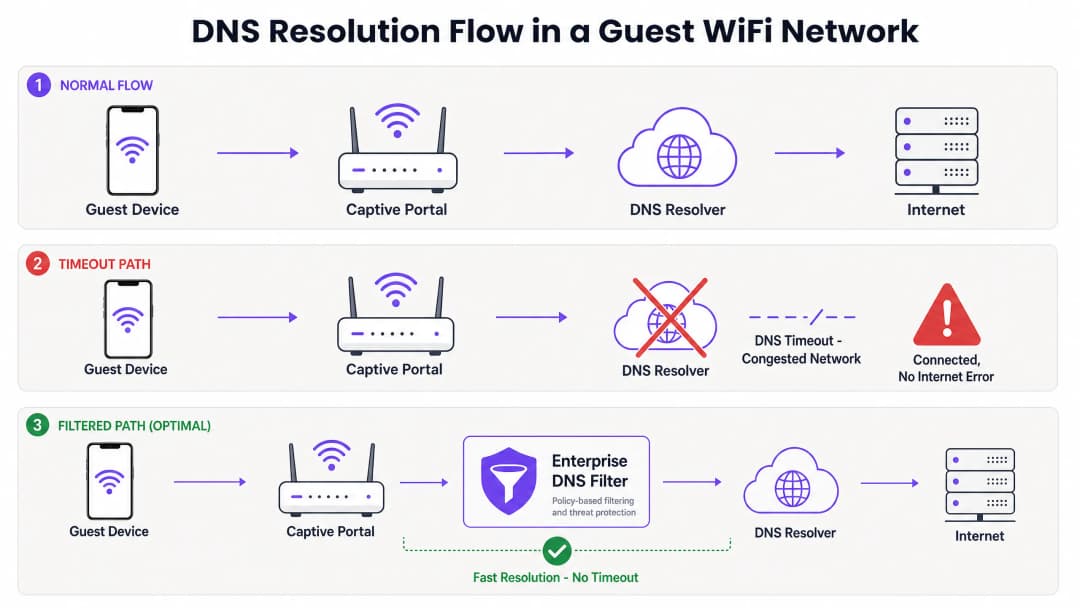
DNS 查询通常使用 UDP,这是一种没有传输层重传机制的无连接协议。在拥塞的网络中 - 例如半场休息期间的体育场或早晨高峰时段的酒店 - UDP 数据包极易丢失或延迟。
如果场所依赖标准的 ISP 解析器或公共 DNS 服务(如 8.8.8.8),则往返时间 (RTT) 加上解析器的处理时间可能会超过操作系统硬编码的超时限制。当超时过期时,设备会将连接标记为“已连接,无互联网”并停止 Captive Portal 重定向过程。此外,这些探测域名的短生存时间 (TTL) 值使问题进一步恶化。随着设备不断关联和断开关联,缓存的条目会迅速过期,恰好在网络承受最大负载时触发洪水般的并发 DNS 查询。
企业级 DNS 过滤器的角色
企业级 DNS 过滤器(例如集成在 Purple 的 WiFi Analytics 平台中的过滤器)可作为高性能、本地或靠近边缘的解析器。通过在 DNS 查询穿过拥塞的 WAN 链路之前进行拦截,该过滤器:
- 缓存高频域名:在本地提供探测域名解析,将 RTT 降低至亚毫秒级。
- 策略执行:立即丢弃对恶意或被阻止域名的查询,从而节省 WAN 带宽。
- 审计日志:为 IT 安全提供审计跟踪,协助满足 GDPR 合规性和事件响应。
实施指南
部署企业级 DNS 过滤器需要仔细的架构规划,以避免引入新的单点故障。
1. 解析器部署位置与延迟优化
将 DNS 过滤器部署在尽可能靠近网络边缘的位置。对于分布式零售连锁店,采用云端交付的边缘节点是合适的;对于体育场等大型单场地场所,首选核心交换机上的本地化设备或虚拟机。其目标是最大程度地减少访客 VLAN 与解析器之间的路由跳数。
2. Captive Portal 白名单(直通)
最关键的配置步骤是确保您的 Captive Portal 域名已被明确列入白名单。如果 DNS 过滤器延迟或阻止了认证门户本身的解析,您将引发原本试图解决的相同错误。
3. TTL 调优与缓存管理
配置本地解析器以积极缓存 Captive Portal 探测域名。虽然遵循上游 TTL 是标准做法,但将本地的 captive.apple.com 及类似域名的 TTL 强制修改为至少 60 秒,可以大幅减少高峰期关联事件中的上游查询量。
4. 与现有基础设施集成
确保 DNS 过滤器的部署与您现有的网络隔离保持一致。访客 DNS 流量必须与企业 DNS 基础设施保持隔离,以保持 PCI-DSS 合规性。无论您是在 为商务旅客优化酒店 WiFi 还是在确保公共部门部署的安全,这种隔离都至关重要。
听一听我们的技术简报播客,了解有关这些实施步骤的更多背景信息:
最佳实践
- 避免在访客网络中使用公共解析器:在高密度访客网络中,依赖 8.8.8.8 或 1.1.1.1 作为 DHCP 分配的首选 DNS 会引入无法接受的延迟波动。
- 谨慎部署 DNS over HTTPS (DoH):虽然 DoH 提高了隐私性,但它绕过了传统的 53 端口过滤。确保您的企业 DNS 解决方案能够根据场所策略的要求检查或管理 DoH 流量。
- 监控 UDP 53 端口丢包:配置您的防火墙或核心交换机,在 UDP 53 端口数据包丢包率过高时发出警报,这是 DNS 即将超时的主导指标。
- 定期审查阻止列表:过度激进的过滤可能会破坏合法应用。每周审查 DNS 查询日志以识别误报。
对于公共部门的部署,确保强大的连接性是更广泛的数字包容计划的一部分,正如最近在 Purple 任命 Iain Fox 为公共部门增长副总裁 中所强调的那样。
故障排除与风险缓解
当出现“已连接,无互联网”错误时,IT 团队应该遵循结构化的诊断路径,而不是立即假定带宽耗尽。
- 数据包捕获 (PCAP):在访客 VLAN 上运行数据包捕获,过滤
udp port 53。寻找在 2 秒窗口内没有相应响应的查询。 - 模拟探测:在访客 VLAN 上的测试设备上使用
curl或wget手动访问http://captive.apple.com/hotspot-detect.html。测量 DNS 解析时间与 HTTP 响应时间。 - 检查防火墙规则:验证没有速率限制或 QoS 策略在无意中限制了来自访客子网的 UDP 53 端口流量。
- 验证离线功能:在 WAN 连接断断续续的环境中,可以考虑使用类似 Purple 的离线地图模式 的功能,即使在上行互联网降级时也能保持一定程度的用户互动。
投资回报率与业务影响
解决 DNS 超时问题直接影响场所运营商的底线。
- 减少支持开销:“已连接,无互联网”错误是酒店和零售业 1 级支持工单的主要起因。消除该错误可降低 IT 运营支出。
- 提高数据捕获率:Captive Portal 加载失败意味着失去了数据捕获和用户认证的机会。通过确保门户的快速呈现,场所可以最大化其 WiFi Analytics 平台的投资回报率。
- 提升访客满意度:无缝连接是基本期望。最大限度地减少接入摩擦与净推荐值 (NPS) 的提升和场所的正面评价直接相关。 通过将视角从 "我们需要更多带宽" 转变为 "我们需要优化的 DNS 解析",网络架构师可以提供在压力下平稳扩展的企业级宾客 WiFi。
关键定义
Captive Portal 检测探测
移动操作系统在网络关联后立即发送的自动 HTTP 请求(例如发送给 captive.apple.com),以确定是否需要登录页面。
如果此探测因 DNS 超时而失败,操作系统将假定没有互联网访问权限并显示错误。
DNS 超时
客户端设备由于解析器响应时间过长(通常大于 2 - 5 秒)而放弃 DNS 查询的事件。
高密度环境下“已连接,无互联网”错误的主要技术原因。
企业级 DNS 过滤器
一种专用 DNS 解析器,可在本地缓存查询并应用基于策略的拦截,以防止访问恶意或不需要的域名。
用于分担拥堵的上游解析器的查询量,并降低延迟。
UDP 端口 53
用于 DNS 查询的标准无连接传输协议和端口。
由于 UDP 无法保证可靠传输,在网络拥堵期间,DNS 数据包很容易被丢弃。
生存时间 (TTL)
DNS 记录中的一个值,规定解析器或客户端在再次查询之前应缓存 IP 地址多长时间。
探测域名上的短 TTL 会导致频繁的重新查询,从而加剧拥堵。
IEEE 802.1X
基于端口的网络访问控制 (PNAC) 标准,为希望连接到 LAN 或 WLAN 的设备提供身份验证机制。
尽管 802.1X 环境很安全,但其仍依赖强大的 DNS 基础设施进行身份验证后的路由。
本地互联网分流
直接从分支机构将绑定互联网 excursion 的流量路由到互联网,而不是将其回传到中央数据中心。
对于降低分布式零售或酒店网络中的 DNS 延迟至关重要。
WPA3
最新的 WiFi 安全标准,为开放式和受密码保护的网络提供增强的加密。
WPA3 提高了安全性,但不会改变基本的 DNS 解析路径,也不会减轻超时问题。
应用实例
一家拥有 400 间客房的酒店每天早上 7:30 到 8:30 之间,当客人们起床并连接到 WiFi 时,会遇到大量“已连接,无互联网”的投诉。在此期间,1Gbps 的 WAN 链路利用率仅为 40%。
- 在早高峰期间对过滤 UDP 端口 53 的访客 VLAN 进行数据包捕获。
- 确定指向 Captive Portal 探测域名(例如 captive.apple.com)的 DNS 查询通过运营商的默认 DNS 解析需要超过 3000ms。
- 在访客子网中部署本地企业级 DNS 过滤器。
- 配置 DHCP 服务器将本地 DNS 过滤器的 IP 分配给访客设备。
- 在过滤器中将酒店的 Captive Portal 域名列入白名单。
- 监控解析时间,其应降至 50ms 以下。
一家大型连锁零售企业在 50 家门店推出了新的访客 WiFi 网络,但客流量高的旗舰店的用户无法加载 Captive Portal,而较小门店的用户则没有任何问题。
- 分析架构:所有 50 家门店都将访客流量通过隧道传输回中央数据中心防火墙,然后防火墙将 DNS 查询转发给公共解析器。
- 在高客流量的门店中,庞大的并发关联事件数量耗尽了中央防火墙上的 NAT/PAT 状态表,导致 UDP 端口 53 数据包被丢弃。
- 实施云端交付的企业级 DNS 过滤器。
- 重新配置本地分支机构路由器,将访客 DNS 查询通过本地互联网分流直接转发到云过滤器,而不是将其回传到数据中心。
练习题
Q1. 一位体育场 IT 总监注意到,在半场休息期间,数以千计的用户连接到 WiFi,但未能访问 Captive Portal。核心交换机显示严重的 UDP 丢包。他们是否应该将 WAN 带宽从 2Gbps 增加到 5Gbps?
提示:考虑正在丢弃什么协议,以及这是否与有效载荷带宽或连接状态限制有关。
查看标准答案
否。增加 WAN 带宽无法解决该问题。UDP 丢包表明防火墙或解析器无法处理庞大的并发 DNS 查询量(状态表耗尽或 CPU 限制)。正确的做法是在边缘部署高性能的本地 DNS 过滤器,以便在本地缓存并响应这些查询,从而完全绕过 WAN 瓶颈。
Q2. 您刚刚在酒店访客网络上部署了企业 DNS 过滤器。访客现在可以快速解析公共网站,但当他们首次连接时,并未被重定向到酒店的登录页面。最可能的配置错误是什么?
提示:思考登录页面本身的域名。
查看标准答案
最可能的错误是 Captive Portal 自身的域名未在 DNS 过滤器中显式加入白名单(放行)。过滤器要么阻止了门户 URL 的解析,要么延迟了其解析,从而导致重定向无法完成。
Q3. 某公共部门组织要求将所有访客 WiFi 流量记录 90 天,以符合安全策略。部署企业 DNS 过滤器如何协助满足这一要求?
提示:考虑 DNS 过滤器与标准防火墙处理的数据有什么区别。
查看标准答案
企业 DNS 过滤器原生记录客户端设备发起的所有 DNS 查询。这提供了一条清晰、可搜索的审计轨迹,记录了何时请求了哪些域名,从而满足了 90 天的日志记录要求,而无需对所有加密的 HTTPS 有效载荷流量进行深度包检测。
常见问题
Why does guest WiFi say connected but no internet?
The 'Connected, No Internet' status occurs when a client device associates with an access point and receives an IP address, but its operating system detection probe fails to reach the internet. On guest WiFi networks, this is most commonly caused by DNS query timeouts on captive portal detection domains (such as captive.apple.com or connectivitycheck.gstatic.com), DHCP lease scope exhaustion, or firewalls blocking pre-authentication DNS traffic.
How do captive portal detection probes work on guest WiFi across iOS, Android, and Windows?
When connecting to an open or guest WiFi SSID, modern operating systems immediately transmit plaintext HTTP probe requests to vendor test URLs (iOS uses captive.apple.com/hotspot-detect.html, Android queries connectivitycheck.gstatic.com/generate_204, and Windows tests msftconnecttest.com/connecttest.txt). If the network returns an HTTP 200/204, the OS marks the connection as having internet. If it receives an HTTP 302 redirect, it launches the captive portal browser. If the initial DNS query for the probe domain times out, the OS reports 'Connected, No Internet' and drops the link.
How do DNS timeouts trigger guest WiFi connection drops?
In high-density environments, hundreds of devices query upstream DNS resolvers simultaneously over UDP port 53. If the local guest WiFi network forwards raw queries directly to rate-limited ISP resolvers without caching, response latency spikes above 2,000ms. Mobile devices enforce strict 2- to 5-second probe timeouts. Once that threshold is exceeded, the device assumes the network is broken and abandons the connection before the splash page can load.
What walled garden domains must be allowed before guest WiFi captive portal login?
Pre-authentication access control lists (walled gardens) on guest WiFi networks must permit outbound UDP and TCP port 53 to your designated DNS resolvers, DHCP transactions (UDP 67/68), and OS detection probes (captive.apple.com, connectivitycheck.gstatic.com, msftconnecttest.com). If using external captive portal hosting, CDN styling, or social login, you must also allow your portal domain (*.purple.ai), Google Fonts (fonts.googleapis.com), and OAuth endpoints.
How does DHCP pool exhaustion cause connected without internet errors on guest WiFi?
When venues configure long DHCP lease durations (such as 24 hours) on guest WiFi in environments with rapid visitor turnover, the pool of available IP addresses quickly runs out. New arrivals may associate with the access point via 802.11 beacons, but fail to receive a valid DHCPOFFER or default gateway, receiving a self-assigned 169.254.x.x APIPA address instead. Shortening lease times to 30 to 60 minutes and configuring dynamic VLAN pooling prevents scope starvation.
How does Purple prevent captive portal and DNS timeout failures on guest WiFi?
Purple acts as a resilient, hardware-agnostic guest WiFi management platform across Cisco Meraki, HPE Aruba, Ruckus, Ubiquiti UniFi, and Fortinet architectures. By optimizing captive portal redirection flows, automating walled garden rules, and integrating with high-speed Anycast DNS, Purple ensures detection probes succeed instantly, onboarding visitors in under 3 seconds without connection drops.
继续阅读本系列
使用数据包捕获 (PCAP) 诊断缓慢的 WiFi 性能
本技术参考指南为 IT 经理、网络架构师和场所运营总监提供了一种结构化的、数据包级别的诊断方法,以使用数据包捕获 (PCAP) 分析来诊断和解决缓慢的企业 WiFi 性能问题。通过剖析原始 802.11 帧 - 包括重传率、空口占用率和物理层元数据 - 团队可以精准地将 RF 层瓶颈与有线或应用程序问题隔离开来。本指南适用于包括酒店、零售连锁、体育场馆和会议中心在内的超高密度场所,提供可操作的诊断工作流、真实案例研究和配置修复步骤,以收回网络容量并保护宾客体验。
为什么体育场 WiFi 会陷入瘫痪(以及如何解决)
本权威技术指南深入分析了体育场 WiFi 拥堵的根本原因:5万台设备同时加载程序化广告和遥测数据而产生的背景杂音,并为部署边缘 DNS 过滤作为主要缓解策略提供了详细的架构蓝图。本指南专为 IT 总监、CTO 和网络架构师设计,提供可操作的实施指导、真实案例研究和可衡量的 ROI 框架,帮助场馆运营商夺回带宽并在大规模场景下提供高性能连接。
为什么我们的宾客 WiFi 如此缓慢?诊断网络拥塞
本指南诊断了宾客 WiFi 拥塞的隐性诱因 - 后台遥测、程序化广告网络和自动操作系统更新 - 在宾客打开浏览器之前,这些因素共同消耗了多达 40% 的公共 WiFi 带宽。它提供了一个分阶段、不依赖特定厂商的 DNS 过滤和 QoS 策略实施框架,以回收这部分带宽,改善宾客体验并实现可衡量的投资回报。本指南面向酒店、零售、活动和公共部门环境中的 IT 总监和运营经理。
对您的具体配置有疑问吗?
我们的团队与 80,000 多个场所的运营方、IT 经理和网络工程师保持合作。预约 20 分钟的通话,我们将为您展示同行是如何解决类似问题的。