跳至主要内容

为什么我们的访客 WiFi 如此缓慢?诊断网络拥塞

本指南诊断了访客 WiFi 拥塞的隐藏驱动因素——后台遥测、程序化广告网络和自动操作系统更新——它们在客人甚至还没有打开浏览器之前就共同消耗了高达 40% 的公共 WiFi 带宽。它提供了一个分阶段、供应商中立的实施框架,用于 DNS 过滤和 QoS 策略,以回收带宽、改善访客体验并提供可衡量的投资回报率。目标读者为酒店业、零售业、活动场所和公共部门环境中的 IT 总监和运营经理。

📖 8 分钟阅读📝 1,894 🔧 2 应用实例3 练习题📚 9 关键定义

收听本指南

查看播客转录
大家好,欢迎收听本期技术简报。我是主持人,今天我们要解决一个困扰高密度场所 IT 总监和运营经理的普遍问题:“为什么我们的访客 WiFi 如此缓慢?”具体来说,我们关注的是诊断网络拥塞。如果您管理着一家酒店、一个零售连锁店、一个体育场或一个大型公共部门场所,您就知道这种痛苦。您升级了线路,增加了更多接入点,但在高峰时段,网络仍然会陷入停顿。今天,我们将探讨为什么会发生这种情况,更重要的是,如何在不只是投入更多资金于带宽的情况下解决它。我们将讨论后台遥测、程序化广告网络的隐藏负载,以及战略性 DNS 过滤如何回收高达 40% 的带宽。让我们深入探讨。 让我们从定义问题开始。当访客连接到您的公共 WiFi 时,实际发生了什么?您可能认为他们打开浏览器、查看电子邮件,也许还观看流媒体视频。但在任何有意识的活动发生之前,他们的设备已经在猛击您的网络。我们称之为“幻影负载”。它主要由三部分组成:设备遥测、程序化广告网络和自动操作系统更新。 首先是遥测。现代操作系统——iOS、Android、Windows——非常健谈。它们不断用使用指标、位置数据和诊断报告向家里汇报。在密集环境中,例如交通枢纽或繁忙的会议中心,您可能有数千台设备同时传输这些小而频繁的负载。这会耗尽可用的无线通话时间,并可能压垮您路由器的 NAT 表。 第二,程序化广告网络。访客手机上的许多免费应用依赖于广告。设备检测到不计流量的 WiFi 连接的那一刻,那些应用便开始预取高分辨率横幅、视频广告和跟踪脚本。这种流量具有侵略性。它是高带宽且对延迟敏感的,并且会愉快地优先于您的访客想要进行的合法浏览。 第三,自动更新。我们都见过这种情况。一个新的 iOS 版本发布,突然您的 1 Gigabit WAN 链路就饱和了,因为大楼里的每部 iPhone 都在尝试下载一个 3 GB 的文件。虽然更新对安全至关重要,但它们不必在高峰时段通过您的公共 WiFi 立即发生。 所以,这就是问题所在。在访客甚至还没有打开网页之前,高达 40% 的带宽就消失了。我们如何解决?传统的答案是深度包检测,即 DPI。但 DPI 资源密集,且随着 TLS 1.3 和端到端加密的广泛采用,它变得越来越不有效。您无法检查您无法解密的内容。 现代、高效的解决方案是在网络边缘进行 DNS 过滤。我们不是试图检查流量,而是阻止连接的建立。当设备尝试解析已知的广告网络或遥测域时,DNS 解析器会根据响应策略区域(RPZ)检查请求。如果该域被标记,解析器返回 NXDOMAIN 响应——基本上告诉设备该域不存在——或者将流量 sinkhole 到本地空 IP。 这种方法的美妙之处在于其效率。连接在 TCP 握手发生之前就被终止。您节省了无线通话时间,节省了 NAT 表条目,并保留了 WAN 带宽。这是一种回收网络容量的高度可扩展的方式。 现在,让我们谈谈实施。您不能只是拨动一个开关就阻止一半的互联网。这会导致服务支持台被淹没。部署必须分阶段进行。 阶段 1 是基线评估与可见性。您需要知道网络上实际传输的是什么。使用您的 WiFi Analytics 平台来识别消耗带宽最多的域。您需要了解您场所的特定流量概况。 阶段 2 是分阶段 RPZ 部署。从仅记录模式开始。这使您能够在不实际丢弃任何数据包的情况下验证阻止列表。一旦您有信心,就开始对高可信度类别强制执行阻止。从已知的恶意软件和命令与控制域开始——这是一个即时的安全胜利,误报风险近乎为零。然后,再处理高带宽广告网络和激进的遥测域。 阶段 3 是流量整形与 QoS。并非所有内容都可以阻止。例如,操作系统更新是合法流量,但需要进行管理。实施服务质量策略,将更新服务器的速率限制在总带宽的一小部分。确保交互式流量,如网页浏览和 VoIP,获得优先排队。 让我们讨论一些最佳实践和潜在陷阱。最大的风险是过度阻止。如果您不小心阻止了一个同时托管合法资产和广告的内容分发网络,您将破坏网页并毁掉访客体验。为了缓解这种情况,您必须拥有细粒度的阻止列表,并为您的支持团队提供快速的添加允许列表机制。 您还需要维护关键服务的显式允许列表。确保用于 Captive Portal 认证、支付网关 PCI 合规性和核心场所运营的域永远不会被阻止。 另一个挑战是 DNS 规避。高级用户或某些应用可能试图通过硬编码外部服务器(如 Google 的 8.8.8.8)来绕过您的本地解析器。您需要配置防火墙规则,拦截所有出站端口 53 流量并将其重定向回本地解析器。同时要关注 DNS over HTTPS,即 DoH。您可能需要阻止已知的 DoH 提供商以强制执行您的本地策略。 让我们基于常见的客户关切进行快速问答。 问题 1:DNS 过滤会增加网络延迟吗?回答:如果配置不当,会的。但一个适当扩展、高可用的本地 DNS 基础设施实际上会通过比外部服务器更快解析查询并释放拥塞带宽来降低感知延迟。 问题 2:我们应该多久更新一次阻止列表?回答:持续更新。广告网络和恶意软件域的格局每天都在变化。您的威胁情报源和 RPZ 列表必须动态更新,理想情况下是通过您的安全供应商自动化更新。 问题 3:这一切的业务影响是什么?回答:影响显著。场所通常回收其 WAN 总带宽的 20% 到 40%。这意味着您可以推迟昂贵的线路升级,带来切实的投资回报率。此外,通过消除后台拥塞,访客 WiFi 的感知速度显著提升。这会导致更高的净推荐值,并减少向运营团队的投诉。最后,在 DNS 层阻止恶意软件显著增强了您的安全态势。 总结:您的访客 WiFi 很可能不是被您的访客拥塞,而是被他们设备在后台的通信所拥塞。通过实施战略性 DNS 过滤和 QoS 策略,您可以阻止请求、节省连接并回收您的网络。记住这条规则:可见性先于速度。建立流量基线,分阶段部署,您将提供卓越、安全且具有成本效益的连接体验。 感谢您收听本期技术简报。下次再见,保持您的网络清洁和低延迟。

header_image.png

Executive Summary

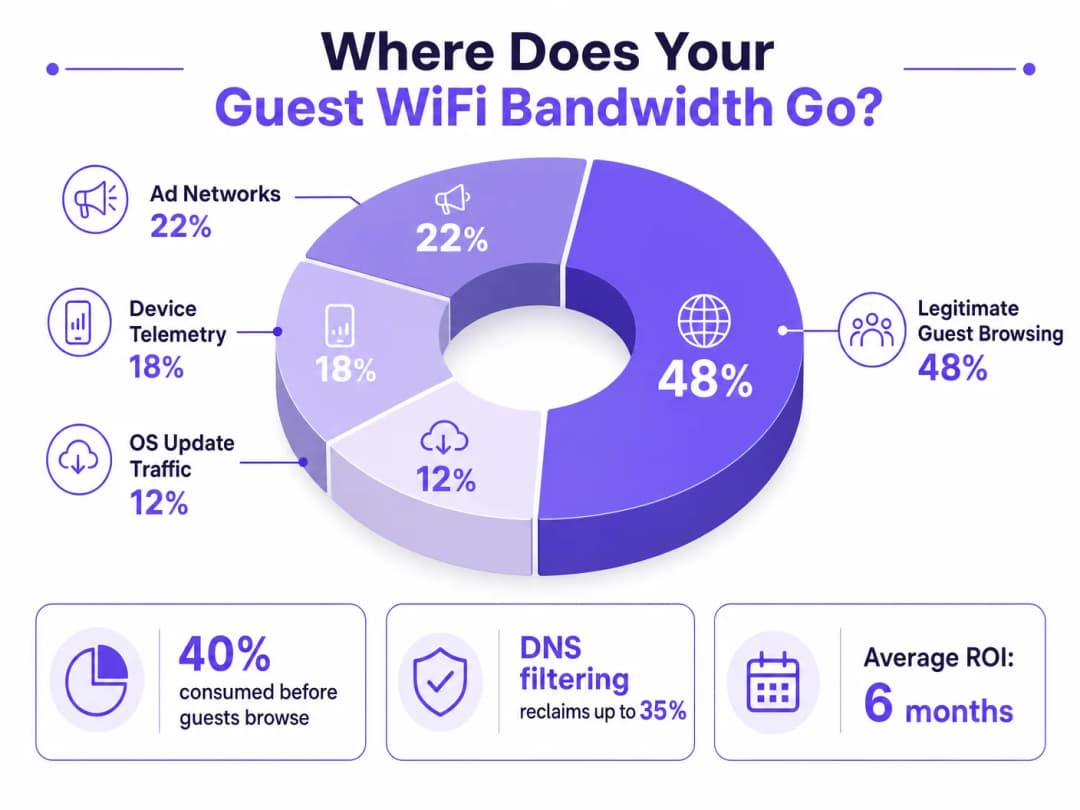
For IT Directors and Operations Managers overseeing high-density venues, ensuring a reliable Guest WiFi experience is a constant battle against network congestion. While legacy approaches focus on increasing overall bandwidth or deploying additional access points, the root cause of slow throughput often lies not in legitimate user traffic, but in the hidden layer of background data. In modern environments — from sprawling Hospitality complexes to high-footfall Retail spaces — up to 40% of public WiFi bandwidth is consumed by device telemetry, programmatic ad networks, and automated OS updates before a guest even opens a browser.

This technical reference guide provides a definitive methodology for diagnosing this congestion and implementing strategic mitigation. By deploying network-level DNS filtering and Response Policy Zones (RPZ), enterprise network architects can reclaim significant bandwidth, reduce latency, and dramatically improve the end-user experience without incurring the capital expenditure of infrastructure upgrades. We will explore the technical architecture of these solutions, real-world implementation case studies, and the measurable ROI of reclaiming your network.


Technical Deep-Dive

The Anatomy of Background Congestion

When a guest device authenticates to a public network, it immediately initiates a barrage of background connections. These connections are primarily driven by three categories of traffic that, in aggregate, constitute what network engineers call the phantom load — bandwidth consumed by the network before any deliberate guest activity occurs.

1. Device Telemetry and Analytics

Modern operating systems (iOS, Android, Windows) and installed applications constantly transmit usage data, location metrics, crash reports, and behavioural analytics to remote servers. In a dense environment such as a Transport hub or conference centre, thousands of devices simultaneously transmitting small but frequent telemetry payloads can exhaust available wireless airtime and overwhelm NAT tables. A single iOS device can generate upwards of 200 distinct background DNS queries within the first 60 seconds of connecting to an unmetered network.

2. Programmatic Ad Networks

Many free applications rely on programmatic advertising ecosystems. The moment a device detects an unmetered WiFi connection, these apps begin pre-fetching video ads, high-resolution display banners, and tracking scripts from ad exchange platforms. This traffic is both high-bandwidth and latency-sensitive, and it will aggressively compete for airtime with legitimate guest browsing. Analysis of public venue networks consistently shows that programmatic ad traffic accounts for 15–22% of total WAN utilisation during peak hours.

3. Automated OS and Application Updates

Without proper traffic shaping, devices will attempt to download large OS patches and application updates as soon as they detect an unmetered WiFi connection. A single iOS major update can be 3–5 GB. In a 500-device environment, a simultaneous update trigger — common when a new OS version is released — can saturate even a 1 Gbps WAN link within minutes.

bandwidth_breakdown_infographic.png

Why Traditional Approaches Fall Short

The conventional response to guest WiFi congestion is to increase WAN bandwidth or deploy additional access points. While both measures have their place, neither addresses the phantom load. Adding more bandwidth simply provides more capacity for background traffic to consume. Deep Packet Inspection (DPI), the other traditional tool, is increasingly ineffective: the widespread adoption of TLS 1.3 and end-to-end encryption means that the majority of traffic payloads are opaque to inspection engines. You cannot throttle what you cannot classify.

For a broader discussion of how wireless frequencies interact with high-density deployments, see our guide on Wi-Fi Frequencies: A Guide to Wi-Fi Frequencies in 2026 .

DNS Filtering: The Efficient Countermeasure

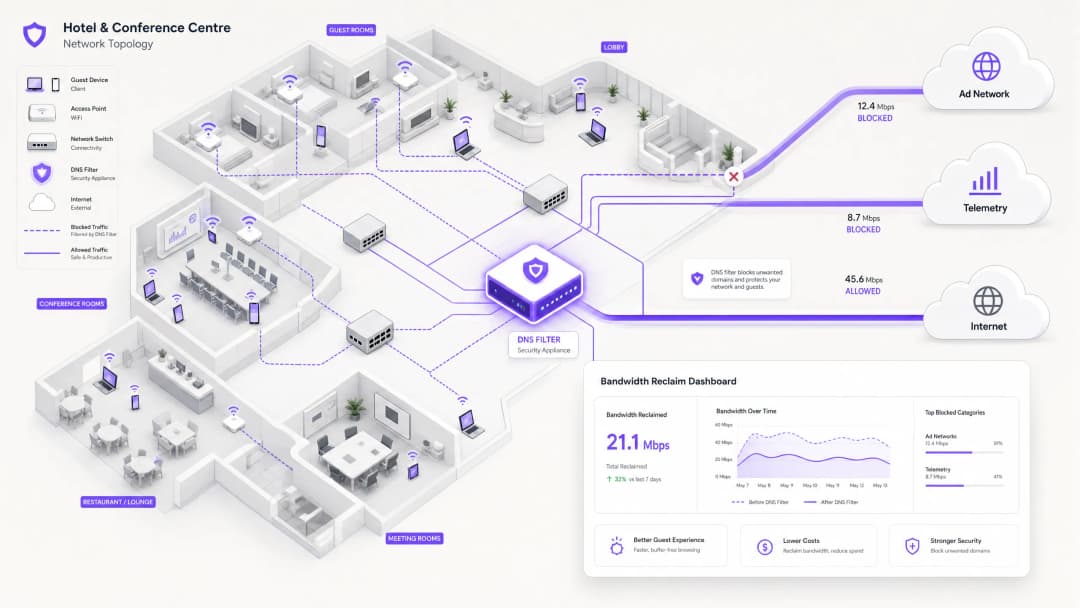
The modern, scalable solution is DNS filtering at the network edge. Rather than inspecting traffic payloads, DNS filtering operates at the resolution layer — preventing connections from being established in the first place.

When a device requests access to a known ad network or telemetry domain, the DNS resolver checks the request against a Response Policy Zone (RPZ). If the domain appears in the blocklist, the resolver returns an NXDOMAIN (Non-Existent Domain) response, or sinkholes the traffic to a local null IP address. The connection is terminated before the TCP handshake occurs, preserving both wireless airtime and WAN bandwidth. This approach is computationally inexpensive, scales linearly with resolver capacity, and is unaffected by payload encryption.

dns_filtering_architecture.png

The Security Dimension

DNS filtering delivers a significant secondary benefit: security. By blocking known malware Command and Control (C2) domains, phishing infrastructure, and exploit kit delivery networks at the DNS layer, the guest network becomes substantially more defensible. This is directly relevant to compliance obligations under frameworks such as PCI DSS (which requires network segmentation and monitoring for cardholder data environments) and GDPR (which mandates appropriate technical measures to protect personal data). For a detailed treatment of audit trail requirements in this context, see Explain what is audit trail for IT Security in 2026 .

For organisations managing educational environments where ad blocking also serves a safeguarding function, the principles covered in Minimising Student Distractions with Network-Level Ad Blocking are directly applicable.


Implementation Guide

Deploying a robust DNS filtering architecture requires careful planning to avoid disrupting legitimate guest services. The implementation should follow a phased approach.

Phase 1: Baseline Assessment and Visibility

Before implementing any blocks, establish a baseline of current traffic patterns. Utilise WiFi Analytics to identify the top bandwidth-consuming domains and categories over a representative 7–14 day period. This audit phase is critical for understanding the specific traffic profile of your venue and for building the business case for the investment. Key metrics to capture include:

Metric Target Baseline Notes
Top 20 DNS domains by query volume Full list Identify telemetry and ad domains
WAN utilisation by category % split Quantify the phantom load
Peak concurrent device count Number Size resolver infrastructure
DNS query failure rate < 0.1% Establish pre-deployment benchmark

Phase 2: Staged RPZ Deployment

Begin by deploying the RPZ in log-only mode. This allows you to verify the accuracy of your blocklists without impacting the user experience. Focus on high-confidence categories first:

  • Known Malware and C2 Domains: Immediate security benefit with near-zero risk of false positives. Use threat intelligence feeds from reputable providers.
  • High-Bandwidth Programmatic Ad Networks: Target the major video ad exchange platforms. These are well-documented and unlikely to host legitimate content.
  • Aggressive Telemetry Endpoints: Block non-essential tracking domains. Maintain a careful allow-list for domains required for captive portal authentication flows.

Once log-only mode confirms acceptable false positive rates (target < 0.5% of queries), move to enforcement mode.

Phase 3: Traffic Shaping and QoS Integration

For traffic that cannot be outright blocked (e.g., OS updates from Apple, Microsoft, and Google), implement Quality of Service (QoS) policies. Rate-limit update servers to a defined ceiling — typically 10–15% of total WAN capacity — ensuring that interactive guest traffic (web browsing, VoIP, video conferencing) receives priority queuing. This is particularly important for Healthcare environments where clinical staff may share a network segment with guests.

For guidance on optimising broader network environments, including office and mixed-use deployments, see Office Wi-Fi: Optimize Your Modern Office Wi-Fi Network .


Best Practices

Maintain Explicit Allow-lists for Critical Services. Ensure that domains essential for captive portal authentication, payment gateways (PCI DSS compliance), and core venue operations are explicitly permitted. A misconfigured blocklist that breaks the login flow will generate immediate and significant support load.

Communicate the Policy Transparently. Your Terms of Service should state that network traffic is managed to ensure a high-quality experience for all users. This is both a legal best practice under GDPR and a reasonable expectation-setting measure for guests.

Automate Blocklist Updates. The landscape of ad networks and telemetry domains shifts constantly. Threat intelligence feeds and RPZ lists must be updated dynamically — ideally on a sub-24-hour cycle — to remain effective.

Address DNS Evasion Proactively. Implement firewall rules to intercept and redirect all outbound port 53 (UDP and TCP) traffic to the local resolver. This prevents clients from bypassing filtering by hardcoding external DNS servers.

Plan for DNS over HTTPS (DoH). As DoH adoption increases, clients may route DNS queries over HTTPS to bypass local resolvers entirely. Evaluate whether to block known DoH providers (e.g., dns.google, cloudflare-dns.com) or to deploy a transparent DoH proxy that enforces local policy.

Align with IEEE 802.1X and WPA3. Ensure that your DNS filtering architecture is compatible with your authentication framework. In environments using IEEE 802.1X with RADIUS-based authentication, DNS filtering policies can be applied per VLAN or per user group, enabling granular control.


Troubleshooting & Risk Mitigation

Common Failure Modes

Failure Mode Symptom Mitigation
Over-blocking (CDN collision) Broken webpages, missing images Granular blocklists; rapid allow-listing process
DNS evasion (hardcoded resolvers) Filtering bypassed by specific apps Firewall redirect rules for port 53
DoH bypass Filtering bypassed by modern browsers Block known DoH providers or deploy DoH proxy
Resolver performance bottleneck Increased DNS latency across all clients Scale resolver infrastructure; implement anycast
Captive portal breakage Guests cannot authenticate Explicit allow-list for portal domains and OS detection endpoints
Stale blocklists New ad domains not blocked Automate feed updates; monitor query logs for new high-volume domains

Security Incident Response

If a guest device is identified as communicating with a known malware C2 domain (visible in DNS query logs), the RPZ will automatically block further communication. Ensure your incident response process includes a workflow for reviewing these events, as they may indicate a compromised device that requires isolation from the guest VLAN.


ROI & Business Impact

Implementing network-level DNS filtering delivers measurable, quantifiable business outcomes across multiple dimensions.

Bandwidth Reclamation and CapEx Deferral. Venues typically reclaim 20–40% of their total WAN bandwidth. This directly translates to cost savings by deferring the need for expensive circuit upgrades. For a venue currently paying for a 500 Mbps leased line, reclaiming 30% of capacity is equivalent to gaining 150 Mbps of effective throughput at zero additional cost.

Improved Guest Satisfaction and NPS. By eliminating background congestion, the perceived speed and reliability of the Guest WiFi improves dramatically. Reduced latency and consistent throughput lead to higher Net Promoter Scores and fewer operational support escalations.

Enhanced Security and Compliance Posture. Blocking malware and phishing domains at the DNS layer significantly reduces the risk of a security breach originating from the guest network. This directly supports compliance with PCI DSS network segmentation requirements and GDPR's obligation to implement appropriate technical security measures.

Operational Efficiency. Automated DNS filtering reduces the manual workload on network operations teams. Rather than reactively responding to congestion events, the network proactively manages its own traffic profile.

Outcome Typical Range Measurement Method
Bandwidth reclaimed 20–40% of WAN capacity Before/after WAN utilisation monitoring
DNS query block rate 15–35% of all queries Resolver query logs
Guest satisfaction improvement +8–15 NPS points Post-stay/post-visit surveys
CapEx deferral 1–3 years on circuit upgrade Cost modelling
Security incident reduction 40–60% fewer C2 detections SIEM correlation

By treating the network not just as a pipe, but as an intelligent, filtered gateway, IT leaders can deliver a superior, secure, and cost-effective connectivity experience — one that scales with venue growth without proportional infrastructure investment.

关键定义

响应策略区域 (RPZ)

DNS 服务器中的一种机制,允许根据定义的策略修改 DNS 响应。当查询的域与 RPZ 中的条目匹配时,解析器可以返回合成响应(例如 NXDOMAIN 或沉洞 IP),而不是真实答案。

实现网络范围 DNS 过滤的主要技术机制。IT 团队在其内部解析器上配置 RPZ,以阻止广告网络、恶意软件域和遥测端点,无需客户端软件。

深度包检测 (DPI)

一种网络数据包过滤形式,它在数据包经过检测点时检查其数据负载,搜索协议不合规性、特定内容或定义的标准。

传统上用于流量分类和整形。由于 TLS 1.3 端到端加密的广泛采用,使其日益受限,加密使负载变得不透明。DNS 过滤是加密流量环境中的首选替代方案。

NXDOMAIN

DNS 响应代码 (RCODE 3),指示所查询的域名在 DNS 命名空间中不存在。

由过滤 DNS 解析器返回,用于故意阻止到不需要域的连接。客户端应用接收此响应并放弃连接尝试,从而防止任何带宽被消耗。

DNS over HTTPS (DoH)

一种通过 HTTPS 协议 (RFC 8484) 执行 DNS 解析的协议,对客户端和支持 DoH 的解析器之间的 DNS 查询和响应进行加密。

如果客户端配置为使用外部 DoH 提供商,则可能绕过本地网络 DNS 过滤。网络管理员必须实施防火墙规则或代理 DoH 流量以强制执行本地 RPZ 策略。

服务质量 (QoS)

一组网络机制,用于控制流量优先级、速率限制和排队,以确保关键应用程序的性能。

与 DNS 过滤一起使用,以管理无法阻止的合法但高带宽流量(例如操作系统更新)。QoS 确保交互式访客流量优先于后台批量传输。

遥测

从设备到远程服务器的自动化收集和传输操作数据,用于监控、分析和诊断。

在访客 WiFi 的背景下,来自移动操作系统和应用程序的设备遥测可能默默消耗 15-20% 的可用带宽。它是公共网络部署中 DNS 过滤的主要目标。

DNS 沉洞

一种技术,其中 DNS 服务器被配置为针对特定域返回虚假 IP 地址(通常是本地空地址),将流量重定向到远离其预定目标的地方。

用于消除恶意软件 C2 流量并积极阻止高带宽广告网络。比 NXDOMAIN 响应更具确定性,因为它允许沉洞服务器记录连接尝试以供安全分析。

通话时间公平性

一种无线网络特性,为所有连接的客户端分配对无线介质的平等访问权,无论其各自的数据速率如何。

在高密度环境中至关重要。如果没有通话时间公平性,一个慢速设备(例如旧的 802.11g 客户端)会不成比例地消耗通话时间,降低所有其他客户端的吞吐量。来自多个设备的背景遥测流量会加剧这种影响。

幻影负载

在任何有意的用户活动发生之前,由连接设备上的自动化后台进程消耗的带宽。

遥测、广告网络预取和操作系统更新流量的统称。理解并量化幻影负载是任何访客 WiFi 拥塞诊断的第一步。

应用实例

一家拥有 400 间客房的度假酒店每晚 7 点至 10 点之间遭遇严重的网络拥塞。1 Gbps WAN 链路饱和,客人抱怨流媒体播放缓慢和 VoIP 通话中断。IT 总监需要找出根本原因,并在不升级线路的情况下实施解决方案。

步骤 1 — 流量分析:在核心路由器上部署网络流量分析器 (NetFlow/IPFIX),并在高峰和非高峰时段运行 5 天。与现有解析器的 DNS 查询日志相关联。分析显示,晚间 35% 的流量流向了已知的程序化视频广告网络(DoubleClick、AppNexus)和自动应用更新服务器(Apple Software Update、Google Play)。合法的访客浏览仅占总流量的 52%。

步骤 2 — DNS 过滤部署:配置核心防火墙,将所有访客 VLAN DNS 查询(UDP/TCP 端口 53)重定向到本地托管的支持 RPZ 的解析器。导入包含已识别广告网络和遥测域的精选阻止列表。在仅记录模式下运行 48 小时以验证误报率。

步骤 3 — 策略执行:验证误报率低于 0.3% 后,切换到强制模式。同时,实施 QoS 策略,在下午 6 点至晚上 11 点的时间段内将 Apple 和 Google 更新服务器的速率限制在总共 80 Mbps 的上限内。

步骤 4 — 验证:在接下来的 7 天内监控 WAN 利用率。峰值利用率从 98% 降至 61%,解决了访客投诉。酒店将计划中的线路升级推迟了约 18 个月。

考官评语: 本场景强调了在行动前获取流量可见性的重要性。通过确定拥塞是由后台流量而非合法的访客使用引起的,IT 总监避免了一次昂贵且不必要的带宽升级。针对广告网络的 DNS 阻止与基于时间的更新 QoS 相结合是一种最佳实践方法。48 小时的仅记录验证期至关重要——跳过这一步骤是生产部署中过度阻止事件最常见的原因。

一个大型会议中心正在举办一场有 5,000 名与会者的技术峰会。在主题演讲期间,WiFi 网络变得完全不可用。事后分析表明,数千台设备同时尝试下载当天早上发布的 iOS 大版本更新。

即时缓解(活动当天):网络运营团队通过实时 DNS 查询监控识别出流量激增。他们立即在 DNS 层将特定的 Apple 软件更新域(mesu.apple.comappldnld.apple.comupdates.cdn-apple.com)进行 sinkhole 处理。在 4 分钟内,WAN 利用率从 99% 降至 68%,网络恢复稳定。

短期修复(同一活动):应用 QoS 策略,在活动期间将所有剩余的更新流量速率限制在 50 Mbps。

长期策略(活动后):网络团队实施动态 QoS 策略,当 WAN 总利用率超过 75% 时自动激活,将已知更新服务器的速率限制在总容量的 10%。创建了一份活动前检查清单,其中包括在重要会议前后 2 小时内临时对主要更新域进行 sinkhole 处理。团队还订阅了 Apple 和 Microsoft 的更新发布通知源,以预判未来的激增事件。

考官评语: 这展示了高密度活动环境中所需的敏捷性。立即进行 DNS sinkhole 是挽救活动的必要战术干预——4 分钟的恢复时间说明了 DNS 层控制相对于基础设施级别响应的速度优势。长期的动态 QoS 策略提供了一种战略性的自动化防御。活动前检查清单是许多场所忽视的流程改进:应用 sinkhole 的最佳时机是在问题发生之前,而不是期间。

练习题

Q1. 您是一家全国零售连锁店的 IT 经理。在 50 家门店部署 DNS 过滤解决方案后,几位门店经理报告说,访客的 Captive Portal 登录页面无法加载。支持团队接到了大量电话。最可能的原因是什么,以及即时的修复步骤是什么?

提示:考虑现代 Captive Portal 认证流程的完整依赖链,包括操作系统级别的 Captive Portal 检测机制。

查看标准答案

最可能的原因是过度阻止。DNS 过滤器阻止了 Captive Portal 运行所需的域。现代移动操作系统使用特定的域来检测 Captive Portal(例如 iOS 的 captive.apple.com,Android 的 connectivitycheck.gstatic.com)。如果这些被阻止,操作系统将不会触发 Captive Portal 浏览器,访客将看不到登录提示。此外,门户本身可能依赖 CDN 或第三方认证提供商(例如通过 Facebook 或 Google 的社交登录),其域被无意中阻止。

即时修复:查看 DNS 查询日志,查找在认证阶段从访客子网发出的 NXDOMAIN 响应。识别在成功登录之前查询的所有被阻止的域。将这些域添加到全局允许列表。为 Captive Portal 部署实施标准的允许列表模板,其中包括所有主要的操作系统检测端点和常见的认证提供商域。

Q2. 一位体育场网络架构师注意到,尽管实施了积极的 DNS 过滤,比赛期间 WAN 利用率仍然极高。进一步调查发现,持续的 UDP 端口 443 高流量与 DNS 日志中的任何被阻止域都不相关。发生了什么,应该如何解决?

提示:考虑现代传输协议及其与 DNS 层控制的交互方式。

查看标准答案

UDP 443 端口的高流量表明使用了 QUIC (HTTP/3)。QUIC 是一种基于 UDP 的传输协议,被主要平台(Google、Meta、YouTube)使用,可绕过传统的基于 TCP 的代理和 DPI 引擎。更关键的是,使用 QUIC 的客户端可能也在使用 DNS over HTTPS (DoH) 解析域,完全绕过本地 RPZ 解析器,使得 DNS 过滤对这些客户端无效。

解决此问题:首先,实施防火墙规则,通过目标 IP 阻止到已知公共 DoH 提供商(Google、Cloudflare、NextDNS)的出站 DoH 流量(TCP/UDP 端口 443),迫使客户端回退到本地解析器。其次,评估是否完全阻止出站 UDP 443(或积极进行速率限制),迫使 QUIC 客户端回退到基于 TCP 的 HTTP/2,后者受现有流量管理策略约束。第三,审查是否可以部署透明 DoH 代理来拦截和检查 DoH 查询,同时执行本地 RPZ 策略。

Q3. 您正在为一家大型公立医院的访客 WiFi 网络设计 QoS 策略。该网络在患者娱乐设备、访客个人设备以及少数使用个人手机上的 VoIP 软电话的临床工作人员之间共享。对以下流量类型进行优先级排序:VoIP (SIP/RTP)、访客网页浏览 (HTTP/HTTPS)、Windows/iOS 更新和流媒体视频 (Netflix/YouTube)。

提示:考虑每种流量类型的延迟敏感性以及业务/临床影响。同时考虑医疗保健环境的监管背景。

查看标准答案

优先级 1 — VoIP (SIP/RTP):严格优先级排队(加速转发,DSCP EF)。VoIP 对延迟(目标 < 150ms 单向)和抖动(目标 < 30ms)高度敏感。超过 1% 的丢包率会导致可察觉的通话质量下降。在临床环境中,掉话可能对患者安全产生影响。

优先级 2 — 访客网页浏览 (HTTP/HTTPS):保证转发 (AF31)。这是患者和访客的主要预期用例。它需要合理的响应速度,但能容忍中等延迟。

优先级 3 — 流媒体视频 (Netflix/YouTube):每客户端速率限制(例如 3–5 Mbps 上限),使用保证转发 (AF21)。虽然对长期住院患者的体验很重要,但无限制的流媒体会饱和链路。每客户端上限确保公平访问。考虑非高峰时段放宽限制的时间策略。

优先级 4 — OS/应用更新(清道夫类,DSCP CS1):最低优先级,尽力而为排队,并设置总速率限制(例如所有更新流量的总速率为 50 Mbps)。这些是没有延迟敏感性的后台任务。它们只应消耗闲置容量。在医疗保健环境中,还需考虑访客网络是否与临床系统完全隔离——如果没有,更新流量管理不仅是带宽问题,也成为一个安全问题。

继续阅读本系列

故障排除 Captive Portal 重定向:解决访客 WiFi 连接失败问题

当访客连接到您的 WiFi 但无法访问互联网时,原因几乎总是配置错误的 Captive Portal 重定向,而不是硬件故障。本指南为 IT 经理、网络架构师和 CTO 提供深入的技术参考,以诊断和解决完整的故障链:从系统级连接性探测和 HSTS 证书冲突,到 RADIUS 授权间隙和 DHCP 耗尽。它将每种故障模式映射到具体的修复方案,并展示了 Purple 的硬件无关云端覆盖层如何消除 Cisco Meraki, HPE Aruba, Ruckus, Juniper Mist, Ubiquiti, UniFi, Cambium, Extreme Networks 和 Fortinet 部署中的这些问题。

阅读指南 →

故障排除公共 WiFi:解决“已连接但无法访问互联网”和登录页面重定向失败的问题

本权威技术参考指南解释了 Captive Portal 检测的底层机制,并详细介绍了导致访客 WiFi 无法连接的六种主要失效模式。它为 IT 经理和网络架构师提供了一个实用的故障排除框架,用于解决 HTTP 重定向问题、DNS 冲突和 MAC 随机化带来的挑战。

阅读指南 →

高密度无线网络上发生 DHCP 超时的十大原因

本权威技术参考指南确定了高密度无线网络上发生 DHCP 超时的十大原因,并提供了可操作的、与厂商无关的解决策略。本指南专为高级 IT 领导者、网络架构师和场馆运营总监设计,涵盖了深入的工程原理、逐步实施工作流以及可衡量的业务成果。了解如何消除连接瓶颈并优化您的无线基础设施,从而在苛刻的企业环境中提供无缝的 WiFi 连接。

阅读指南 →