
為什麼我們的顧客 WiFi 這麼慢?診斷網路擁塞問題
本指南診斷了顧客 WiFi 擁塞的隱形原因 - 背景遙測、程式化廣告網路以及 OS 自動更新 - 這些在顧客開啟瀏覽器前就合共消耗了高達 40% 的公共 WiFi 頻寬。指南為 DNS 過濾與 QoS 策略提供了一個分階段且不限廠商的實作框架,可收回這些頻寬、提升顧客體驗並帶來可衡量的 ROI。本指南專為飯店、零售、活動和公共部門環境的 IT 總監與營運經理而設計。
收聽此指南
查看播客逐字稿
核心系列的一部分:Guest WiFi Guide →
執行摘要
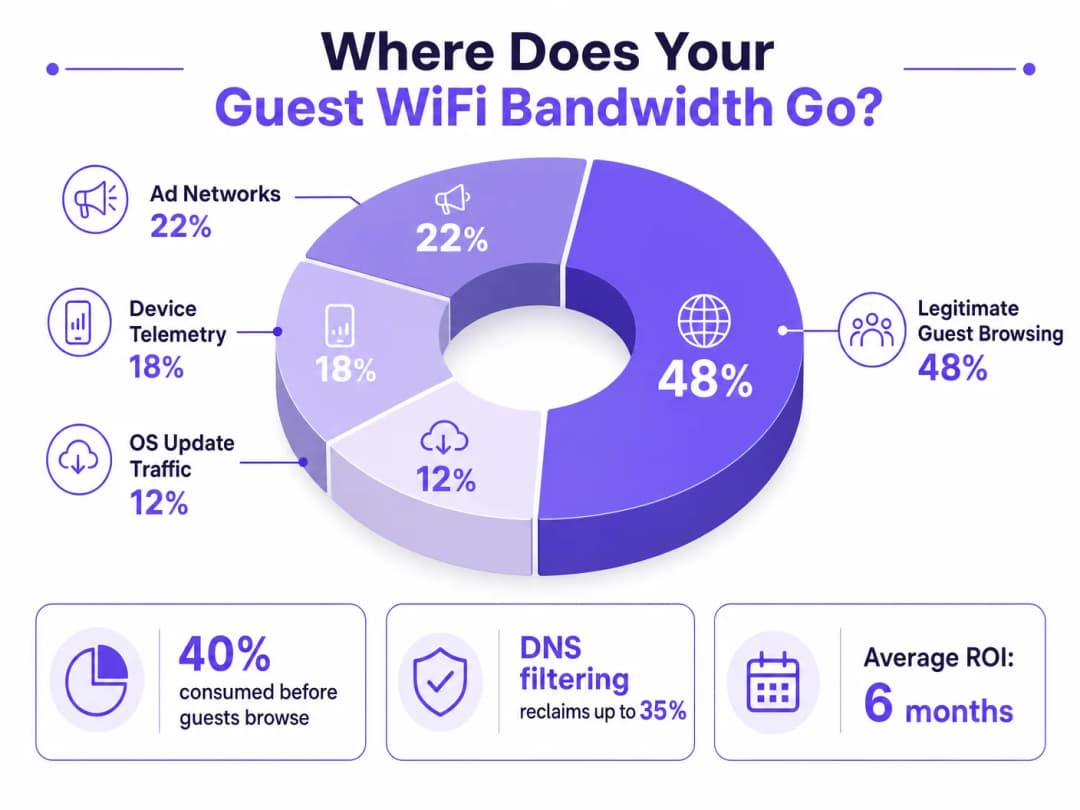
對於負責監管高密度場域的 IT 總監和營運經理而言,確保可靠的 Guest WiFi 體驗是一場對抗網路擁塞的持久戰。傳統的做法專注於增加整體頻寬或部署額外的存取點,但傳輸速率慢的根本原因通常不在於合法的用戶流量,而是在於隱藏的背景資料傳輸。在現代環境中 - 從廣闊的 Hospitality 園區到高人流量的 Retail 空間 - 高達 40% 的公共 WiFi 頻寬在訪客打開瀏覽器之前,就已經被裝置遙測、程式化廣告網路和自動作業系統更新所消耗。
本技術參考指南提供了解決此擁塞並實施策略性緩解的決定性方法。藉由部署網路層級的 DNS 過濾和回應政策區域 (RPZ),企業網路架構師可以回收大量頻寬、降低延遲,並在不產生基礎設施升級資本支出的情況下,顯著改善終端用戶體驗。我們將探討這些解決方案的技術架構、實際部署案例研究,以及回收網路頻寬帶來的量化投資報酬率 (ROI)。
技術深度剖析
背景擁塞的結構分析
當訪客裝置驗證連線到公共網路時,它會立即發起大量的背景連線。這些連線主要由三類流量驅動,總體而言,這構成了網路工程師所稱的幻象負載 - 也就是在發生任何刻意的訪客活動之前,網路就已被消耗的頻寬。
1. 裝置遙測與分析
現代作業系統 (iOS、Android、Windows) 和已安裝的應用程式會不斷向遠端伺服器傳送使用數據、位置指標、崩潰報告和行為分析。在 Transport 樞紐或會議中心等密集環境中,數千台裝置同時傳輸微小但頻繁的遙測資料負載,可能會耗盡可用的無線空中時間並使 NAT 表過載。單一 iOS 裝置在連接到未計流量的網路後的前 60 秒內,即可產生高達 200 個以上的獨立背景 DNS 查詢。
2. 程式化廣告網路
許多免費應用程式都依賴程式化廣告生態系統。當裝置偵測到未計量的 WiFi 連線時,這些應用程式就會開始從廣告交易平台預先擷取影片廣告、高解析度橫幅廣告和追蹤指令碼。這種流量不僅佔用高頻寬且對延遲敏感,還會激烈爭奪正常訪客瀏覽的無線傳輸時間。對公共場所網路的分析一致顯示,在尖峰時段,程式化廣告流量佔總 WAN 使用率的 15 - 22%。
3. 自動化作業系統與應用程式更新
若沒有適當的流量整形,裝置在偵測到未計量的 WiFi 連線時,就會立即嘗試下載大型作業系統修補程式和應用程式更新。單次 iOS 重大更新可能達 3 - 5 GB。在擁有 500 台裝置的環境中,同時觸發更新(這在新作業系統版本發布時很常見)可能會在幾分鐘內使甚至是 1 Gbps 的 WAN 連線達到飽和。
為什麼傳統方法力有未逮
面對訪客 WiFi 擁塞,傳統的因應措施是增加 WAN 頻寬或部署額外的無線基地台。雖然這兩項措施各有其用,但都無法解決虛擬負載的問題。增加更多頻寬只不過是為背景流量提供更多消耗空間。另一項傳統工具深層封包檢測 (DPI) 則越來越不具成效:TLS 1.3 和端到端加密的廣泛採用,意味著大多數流量酬載對檢測引擎而言是不透明的。你無法限制你無法分類的流量。
如欲進一步了解無線頻率如何與高密度部署產生互動,請參閱我們的指南:WiFi 頻率:2026 年 WiFi 頻率指南。
DNS 篩選:高效的對策
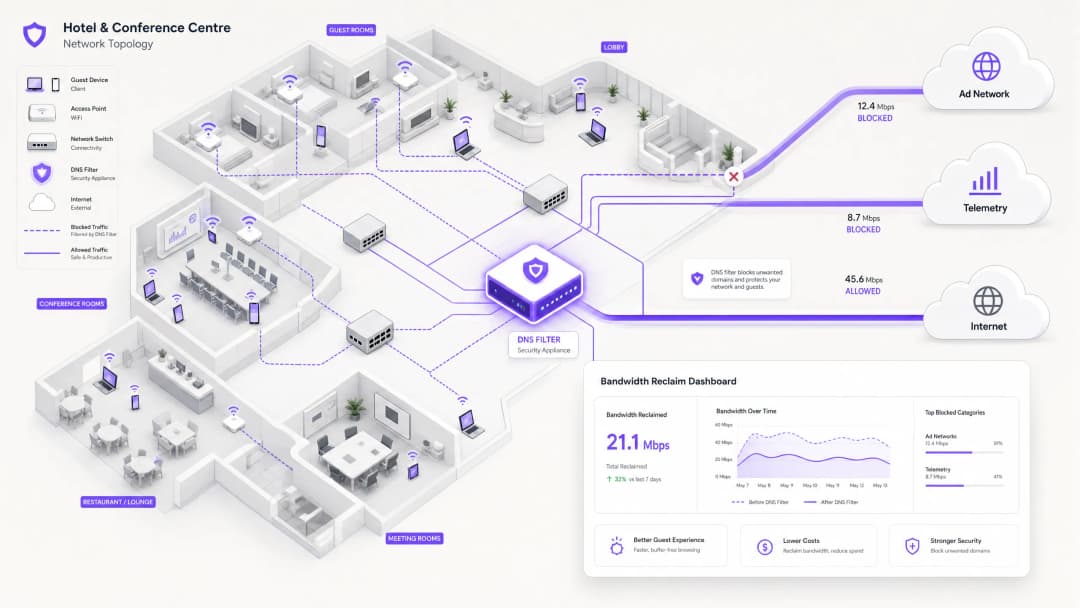
現代且具擴充性的解決方案是在網路邊緣進行 DNS 篩選。DNS 篩選並非檢測流量酬載,而是在解析層運作 - 從一開始就阻止連線建立。
當裝置要求存取已知的廣告網路或遙測網域時,DNS 解析器會根據回應原則區域 (RPZ) 檢查該要求。如果該網域出現在封鎖清單中,解析器就會傳回 NXDOMAIN (不存在的網域) 回應,或將流量導向本地空 IP 位址。連線在進行 TCP 握手之前即被終止,從而保留了無線傳輸時間與 WAN 頻寬。這種方法運算成本低、可隨解析器容量線性擴充,且不受酬載加密影響。

安全性維度
DNS 過濾帶來了顯著的次要效益:安全性。透過在 DNS 層級阻擋已知的惡意軟體命令與控制 (C2) 網域、網路釣魚基礎架構和漏洞利用套件分發網路,訪客網路的防禦能力將大幅提升。這與 PCI DSS(要求對持卡人資料環境進行網路分段與監控)和 GDPR(授權採取適當的技術措施以保護個人資料)等框架下的合規義務直接相關。如需此情境下審計追蹤要求的詳細說明,請參閱 Explain what is audit trail for IT Security in 2026。
對於管理教育環境且廣告阻擋同時具備安全防護功能之組織,在 Minimising Student Distractions with Network-Level Ad Blocking 中所涵蓋的原則可直接套用。
對於您的特定設置有任何疑問嗎?
我們的團隊與超過 80,000 個場域的場域營運商、IT 經理和網路工程師合作。立即預約 20 分鐘的通話,我們將向您展示其他與您相似的用戶是如何解決此問題的。
實作指南
部署強大健全的 DNS 過濾架構需要仔細規劃,以避免中斷合法的訪客服務。實作應採取分階段的方法。
階段 1:基準評估與能見度
在實施任何阻擋之前,先建立目前流量模式的基準。利用 WiFi Analytics 來識別在具代表性的 7 至 14 天期間內,消耗最多頻寬的前幾大網域與類別。此審計階段對於了解您場所的特定流量輪廓,以及為該投資建立商業案例至關重要。要擷取的關鍵指標包括:
| 指標 | 目標基準 | 備註 |
|---|---|---|
| 依查詢量排序的前 20 個 DNS 網域 | 完整列表 | 識別遙測與廣告網域 |
| 依類別區分的 WAN 使用率 | 百分比拆分 | 量化虛擬負載 |
| 尖峰同時連線裝置數量 | 數字 | 估算解析器基礎架構規模 |
| DNS 查詢失敗率 | < 0.1% | 建立部署前基準 |
階段 2:階段式 RPZ 部署
首先在僅記錄模式下部署 RPZ。這使您能夠在不影響使用者體驗的情況下,驗證阻擋清單的準確性。先專注於高信賴度的類別:
- 已知惡意軟體與 C2 網域: 立即獲得安全性效益,且幾乎沒有誤判風險。使用來自信譽良好提供商的威脅情報來源。
- 高頻寬程式化廣告網路: 鎖定主要的影音廣告交易平台。這些平台有完善的記錄,且極不可能託管合法內容。
- 主動型遙測端點: 阻擋非必要的追蹤網域。針對 Captive Portal 驗證流程所需的網域,維持仔細調整的允許清單。
一旦僅記錄模式確認誤判率在可接受範圍內(目標 < 0.5% 的查詢),即可轉入強制執行模式。
階段 3:流量整形與 QoS 整合
對於無法直接封鎖的流量(例如來自 Apple、Microsoft 和 Google 的 OS 更新),請實施服務品質 (QoS) 策略。將更新伺服器的速率限制在定義的上限內(通常為總 WAN 容量的 10–15%),以確保互動式訪客流量(網頁瀏覽、VoIP、視訊會議)獲得優先排隊。這對於 醫療保健 環境尤為重要,因為臨床工作人員可能會與訪客共用網路區段。
如需最佳化更廣泛網路環境(包括辦公室和混合用途部署)的指南,請參閱 辦公室 WiFi:最佳化您的現代辦公室 WiFi 網路(註:連結網址保持不變)。
最佳實踐
針對關鍵服務維持明確的允許清單。 確保明確允許 Captive Portal 驗證、金流閘道(符合 PCI-DSS 規範)和核心營收營運不可或缺的網域。配置錯誤的封鎖清單若破壞了登入流程,將會立即產生大量的支援工作量。
透明地溝通策略。 您的服務條款應聲明網路流量經過管理,以確保為所有使用者提供高品質的體驗。這既是 GDPR 下的法律最佳實踐,也是對訪客建立合理期望的措施。
自動化封鎖清單更新。 廣告網路和遙測網域的版圖不斷變化。威脅情資摘要和 RPZ 清單必須動態更新 - 最好是以小於 24 小時的週期進行 - 以保持有效性。
主動應對 DNS 規避。 實施防火牆規則以攔截所有輸出通訊埠 53(UDP 和 TCP)流量並將其重定向到本機解析程式。這可以防止用戶端透過硬編碼外部 DNS 伺服器來繞過過濾。
為 DNS over HTTPS (DoH) 做好準備。 隨著 DoH 採用率的增加,用戶端可能會透過 HTTPS 路由 DNS 查詢,從而完全繞過本機解析程式。評估是封鎖已知的 DoH 供應商(例如 dns.google、cloudflare-dns.com),還是部署執行本機策略的透明 DoH 代理伺服器。
與 IEEE 802.1X 和 WPA3 保持一致。 確保您的 DNS 過濾架構與您的驗證框架相容。在搭配使用 IEEE 802.1X 與 RADIUS-as-a-Service 驗證的環境中,可以針對每個 VLAN 或每個使用者群組套用 DNS 過濾策略,從而實現細粒度控制。
疑難排解與風險緩釋
常見故障模式
| 故障模式 | 症狀 | 緩釋措施 |
|---|---|---|
| 過度封鎖(CDN 衝突) | 網頁損壞、缺少圖片 | 細粒度封鎖清單;快速允許清單流程 |
| DNS 規避(硬編碼解析程式) | 特定應用程式繞過過濾 | 針對通訊埠 53 的防火牆重定向規則 |
| DoH 繞過 | 現代瀏覽器繞過過濾 | 封鎖已知的 DoH 供應商或部署 DoH 代理伺服器 |
| 解析程式效能瓶頸 | 所有用戶端的 DNS 延遲增加 | 擴充解析程式基礎設施;實施 Anycast |
| Captive portal 中斷 | 訪客無法驗證 | 為 portal 網域和 OS 偵測端點設定明確的允許清單 |
| 過期的封鎖清單 | 新的廣告網域未被封鎖 | 自動化資料餵送更新;監控查詢記錄以找出新的高流量網域 |
安全事件回應
如果偵測到訪客裝置正在與已知的惡意軟體 C2 網域進行通訊(可在 DNS 查詢記錄中查看),RPZ 將會自動封鎖後續的通訊。請確保您的事件回應流程中包含審查這些事件的工作流程,因為這可能表示該裝置已受駭,需要從訪客 VLAN 中進行隔離。
投資報酬率與商業影響
實作網路層級的 DNS 過濾,可在多個維度上帶來可衡量且可量化的商業成果。
頻寬收回與資本支出延後。 場域通常可以收回 20–40% 的總 WAN 頻寬。這透過延後對昂貴線路升級的需求,直接轉化為成本節省。對於目前支付 500 Mbps 專線費用的場域,收回 30% 的容量相當於在零額外成本的情況下,獲得 150 Mbps 的有效吞吐量。
提升訪客滿意度與 NPS。 透過消除背景擁塞,訪客對 Guest WiFi 的感知速度和可靠性會大幅提升。降低的延遲和穩定的吞吐量可帶來更高的淨推薦值(Net Promoter Scores),並減少維運支援的呈報案件。
強化安全與合規態勢。 在 DNS 層級封鎖惡意軟體和網路釣魚網域,可顯著降低源自訪客網路的安全漏洞風險。這直接支援了與 PCI-DSS 網路分割要求的合規性,以及 GDPR 實施適當技術安全措施的義務。
維運效率。 自動化的 DNS 過濾減少了網路運作團隊的手動工作量。網路會主動管理其自身的流量設定,而不是被動地對擁塞事件做出回應。
| 成果 | 典型範圍 | 測量方法 |
|---|---|---|
| 收回的頻寬 | WAN 容量的 20–40% | 實施前後的 WAN 使用率監控 |
| DNS 查詢封鎖率 | 所有查詢的 15–35% | 解析器查詢記錄 |
| 訪客滿意度提升 | +8–15 NPS 分數 | 住宿後/造訪後問卷調查 |
| 資本支出延後 | 線路升級延後 1–3 年 | 成本模型分析 |
| 安全事件減少 | C2 偵測減少 40–60% | SIEM 關聯分析 |
透過將網路視為一個智慧過濾的閘道,而非單純的管道,IT 主管可以提供卓越、安全且具成本效益的連線體驗 - 這種體驗能隨著場域的增長而擴展,而無需等比例的基礎設施投資。
關鍵定義
回應政策區域 (RPZ)
DNS 伺服器中的一種機制,允許根據定義的策略修改 DNS 回應。當查詢的網域與 RPZ 中的條目比對成功時,解析器可以傳回合成回應(例如 NXDOMAIN 或污水池 IP)以代替真實答案。
實施全網路 DNS 過濾的主要技術機制。IT 團隊在內部解析器上設定 RPZ,以阻止廣告網路、惡意軟體網域和遙測端點,而無需用戶端軟體。
深層封包檢測 (DPI)
一種網路封包過濾形式,在封包通過檢測點時檢查其資料負載,以尋找不符合通訊協定、特定內容或定義標準的情況。
傳統上用於流量分類和整形。由於 TLS 1.3 端到端加密的廣泛採用,其作用日益受限,因為加密使負載變得不透明。在加密流量環境中,DNS 過濾是首選的替代方案。
NXDOMAIN
一個 DNS 回應代碼 (RCODE 3),表示查詢的網域名稱在 DNS 命名空間中不存在。
由過濾 DNS 解析器傳回,用於刻意阻止與不必要網域的連線。用戶端應用程式收到此回應並放棄連線嘗試,從而防止消耗任何頻寬。
DNS over HTTPS (DoH)
一種透過 HTTPS 協定 (RFC 8484) 進行 DNS 解析的協定,可加密用戶端與支援 DoH 的解析器之間的 DNS 查詢和回應。
如果用戶端被設定為使用外部 DoH 供應商,則可以繞過本機網路 DNS 過濾。網路管理員必須實施防火牆規則或代理 DoH 流量以強制執行本機 RPZ 策略。
服務品質 (QoS)
一組控制流量優先順序、速率限制和佇列的網路機制,以確保關鍵應用程式的效能。
與 DNS 過濾配合使用,以管理合法但高頻寬的流量(例如作業系統更新),這些流量是無法被封鎖的。QoS 可確保互動式訪客流量比背景大宗傳輸獲得更高的優先順序。
遙測 (Telemetry)
從裝置自動收集操作數據並傳輸到遠端伺服器,以進行監控、分析和診斷。
在訪客 WiFi 的情境中,來自行動作業系統和應用程式的裝置遙測可能會在無形中消耗 15 - 20% 的可用頻寬。這是公共網路部署中 DNS 過濾的主要目標。
DNS Sinkholing
一種技術,其中 DNS 伺服器被設定為針對特定網域傳回錯誤的 IP 位址(通常是本機空位址),從而將流量重新導向遠離其預期目的地。
用於中和惡意軟體 C2 流量並主動封鎖高頻寬廣告網路。這比 NXDOMAIN 回應更具確定性,因為它允許污水池伺服器記錄連線嘗試以進行安全性分析。
通訊時間公平性 (Airtime Fairness)
一種無線網路功能,可在所有連線的用戶端之間分配對無線介質的均等存取權,不論其各自的資料速率為何。
在高密度環境中至關重要。如果沒有通訊時間公平性,單一慢速裝置(例如較舊的 802.11g 用戶端)可能會不合比例地消耗通訊時間,從而降低所有其他用戶端的吞吐量。來自多個裝置的背景遙測流量會加劇這種影響。
幻象負載 (Phantom Load)
在發生任何刻意的使用者活動之前,連線裝置上的自動背景程序所消耗的頻寬。
遙測、廣告網路預先擷取和作業系統更新流量的統稱。了解並量化幻象負載是診斷任何訪客 WiFi 壅塞的第一步。
範例
一間擁有 400 間客房的度假酒店在每天晚上 7:00 至 10:00 期間都會遇到嚴重的網路擁塞。1 Gbps 的 WAN 連線已達飽和,顧客抱怨序列串流緩慢以及 VoIP 通話中斷。IT 總監需要找出根本原因,並在不升級線路的情況下實作解決方案。
步驟 1 - 流量分析:在核心路由器上部署網路流量分析器(NetFlow/IPFIX),並在尖峰和離峰時段運行 5 天。與現有解析器的 DNS 查詢記錄進行關聯分析。分析顯示,晚上 35% 的流量去往已知的程式化影片廣告網路(DoubleClick、AppNexus)以及自動化應用程式更新伺服器(Apple Software Update、Google Play)。合法的顧客瀏覽僅佔總流量的 52%。
步驟 2 - DNS 過濾部署:設定核心防火牆,將所有顧客 VLAN 的 DNS 查詢(UDP/TCP 連接埠 53)重導向至本地代管、啟用 RPZ 的解析器。匯入針對已識別廣告網路和遙測網域的精選封鎖清單。在唯記錄模式下運行 48 小時,以驗證誤判率。
步驟 3 - 策略執行:在驗證誤判率低於 0.3% 後,切換至執行模式。同時實作 QoS 策略,在下午 6 點至晚上 11 點的時段內,將 Apple 和 Google 更新伺服器的合併頻寬上限限制為 80 Mbps。
步驟 4 - 驗證:監控接下來 7 天的 WAN 使用率。尖峰使用率從 98% 降至 61%,解決了顧客的投訴。該酒店估計將計劃中的線路升級推遲了 18 個月。
一個大型會議中心正在舉辦一場有 5,000 人參加的科技峰會。在主題演講期間,WiFi 網路變得完全無法使用。事件後分析顯示,數千部裝置同時嘗試下載當天早上發布的重大 iOS 更新。
立即緩解(活動當天):網路營運團隊透過即時 DNS 查詢監控識別出流量激增。他們立即在 DNS 層對特定的 Apple 軟體更新網域(mesu.apple.com、appldnld.apple.com、updates.cdn-apple.com)進行垃圾洞(sinkhole)處理。在 4 分鐘內,WAN 使用率從 99% 降至 68%,網路恢復穩定。
短期修正(同一活動):套用 QoS 策略,在活動期間將所有剩餘的更新流量限制在 50 Mbps。
長期策略(活動後):網路團隊實作了動態 QoS 策略,當總 WAN 使用率超過 75% 時會自動啟用,將已知更新伺服器的流量限制在總容量的 10%。建立活動前檢查清單,其中包括在矚目會議前後的 2 小時內,暫時對主要更新網域進行垃圾洞處理。該團隊還訂閱了 Apple 和 Microsoft 的更新發布通知,以預測未來的激增事件。
練習題
Q1. 您是一家全國零售連鎖店的 IT 經理。在 50 家分店部署 DNS 過濾解決方案後,數名分店經理回報訪客無法載入 Captive Portal 登入頁面。支援團隊正收到大量的客服電話。最可能的原因是什麼,緊急補救步驟又是什麼?
提示:請考量現代 Captive Portal 驗證流程的完整相依性鏈,包括作業系統層級的 Captive Portal 偵測機制。
查看標準答案
最可能的原因是過度阻擋。DNS 過濾器阻擋了 Captive Portal 運作所需的網域。現代行動作業系統使用特定網域來偵測 Captive Portal(例如 iOS 的 captive.apple.com,Android 的 connectivitycheck.gstatic.com)。如果這些網域被阻擋,作業系統將不會觸發 Captive Portal 瀏覽器,訪客也看不到登入提示。此外,入口網站本身可能依賴 CDN 或第三方驗證提供商(例如透過 Facebook 或 Google 的社群登入),而這些網域不小心被阻擋了。
緊急補救措施:檢查驗證階段期間,源自訪客子網路的 NXDOMAIN 回應之 DNS 查詢記錄。識別在成功登入前被查詢的所有被阻擋網域。將這些網域加入全域允許清單。為 Captive Portal 部署實施標準的允許清單範本,其中包含所有主要的作業系統偵測端點和常見的驗證提供商網域。
Q2. 體育場網路架構師注意到,儘管實施了嚴格的 DNS 過濾,但在比賽期間 WAN 使用率仍居高不下。進一步調查發現,持續存在大量的 UDP 443 埠流量,這與 DNS 記錄中任何被阻擋的網域均無關。目前發生了什麼情況,應該如何解決?
提示:請考量現代傳輸協定及其與 DNS 層級控制的互動方式。
查看標準答案
大量的 UDP 443 流量表示使用了 QUIC (HTTP/3)。QUIC 是主要平台(Google、Meta、YouTube)使用的基於 UDP 的傳輸協定,它會繞過傳統的基於 TCP 的代理和 DPI 引擎。更關鍵的是,使用 QUIC 的用戶端也可能使用 DNS over HTTPS (DoH) 來解析網域,從而完全繞過本地 RPZ 解析器,使 DNS 過濾對這些用戶端失效。
為了解決這個問題:首先,實施防火牆規則,依目的地 IP 阻擋至已知公共 DoH 提供商(Google、Cloudflare、NextDNS)的 TCP/UDP 443 埠的傳出 DoH 流量,強制用戶端回復使用本地解析器。其次,評估是否完全阻擋傳出的 UDP 443 流量(或對其進行嚴格的限速),以強制 QUIC 用戶端回復使用基於 TCP 的 HTTP/2,這將受限於現有的流量管理原則。第三,評估是否可以部署透明 DoH 代理來攔截和檢查 DoH 查詢,同時執行本地 RPZ 原則。
Q3. 您正在為一家大型公立醫院的訪客 WiFi 網路設計 QoS 原則。該網路由病患娛樂裝置、訪客個人裝置,以及少數在個人手機上使用 VoIP 軟體電話的臨床人員共用。請為以下流量類型排出優先順序:VoIP (SIP/RTP)、訪客網頁瀏覽 (HTTP/HTTPS)、Windows/iOS 更新,以及序列串流影音 (Netflix/YouTube)。
提示:請同時考量每種流量類型的延遲敏感度以及商業/臨床影響。此外,也要考量醫療保健環境的法規背景。
查看標準答案
優先順序 1 - VoIP (SIP/RTP):嚴格優先級佇列 (Expedited Forwarding, DSCP EF)。VoIP 對延遲 (目標單向 < 150ms) 和抖動 (目標 < 30ms) 高度敏感。封包遺失率超過 1% 會導致通話品質明顯下降。在臨床情境中,通話中斷可能會影響患者安全。
優先順序 2 - 訪客網頁瀏覽 (HTTP/HTTPS):保證轉發 (AF31)。這是患者和訪客最主要的預期使用場景。它需要合理的響應速度,但對中度延遲有容忍度。
優先順序 3 - 串流影音 (Netflix/YouTube):限制每位用戶頻寬 (例如上限 3-5 Mbps),並採用保證轉發 (AF21)。雖然在長期住院期間這對患者體驗很重要,但未設限的串流會使線路飽和。限制個人頻寬上限可確保公平存取。可考慮採用離峰時段放寬限制的時間段策略。
優先順序 4 - 作業系統/應用程式更新 (清除類別, DSCP CS1):最低優先順序,盡力而為佇列,並設有總體速率限制 (例如所有更新流量總計上限為 50 Mbps)。這些是無延遲敏感性的背景工作,應該只消耗閒置容量。在醫療保健環境中,還需要考慮訪客網路是否與臨床系統完全隔離 - 如果沒有,更新流量管理將成為安全問題,而不僅僅是頻寬問題。
繼續閱讀本系列
診斷 WiFi 漫遊問題的逐步指南
本綜合指南為企業 IT 主管和網路架構師提供診斷與解決 WiFi 漫遊問題的權威且逐步的方法。結合對 IEEE 802.11k/v/r 標準的技術深入探討、實際案例研究以及封包級分析,此參考指南能裝備團隊消除「黏性用戶端」問題並提供無縫的行動連線。它涵蓋了從射頻場地勘測(RF Site Survey)與控制器設定稽核,到空中封包擷取(OTA Packet Capture)分析與修復後驗證的完整診斷工作流程。
為什麼您的體育場 WiFi 會陷入停頓(以及如何解決)
本權威技術指南探討了體育場 WiFi 壅塞的根本原因 - 50,000 台設備同時載入程序化廣告和遙測數據的背景雜訊 - 並為部署邊緣 DNS 過濾作為主要緩解策略提供了詳細的架構藍圖。本指南專為 IT 總監、CTO 和網絡架構師設計,提供可行的實施指南、真實案例研究和可衡量的 ROI 框架,幫助場館營運商回收頻寬並大規模提供高效能的連線。
解決訪客 WiFi 顯示已連線但無網際網路的錯誤
本權威技術參考指南解釋了因網路擁塞導致的 DNS 逾時,如何觸發訪客 WiFi 上的「已連線,無網際網路」錯誤。本指南為網路架構師和 IT 經理提供了部署企業級 DNS 過濾器的具體實作步驟,以解決這些瓶頸並改善訪客登入流程。
對於您的特定設置有任何疑問嗎?
我們的團隊與超過 80,000 個場域的場域營運商、IT 經理和網路工程師合作。立即預約 20 分鐘的通話,我們將向您展示其他與您相似的用戶是如何解決此問題的。