
WiFi 如何改善医院的患者体验
本权威技术指南阐述了医院如何利用企业级访客 WiFi 基础设施和分析技术,显著改善住院患者体验。内容涵盖网络架构、合规性要求(HIPAA、DSPT、GDPR)、Captive Portal 设计、寻路集成以及 ROI 框架,为 IT 决策者提供构建极具说服力的内部商业案例并成功实施部署所需的工具。
收听本指南
查看播客转录
核心系列的一部分:WiFi Analytics Guide →
核心摘要
对于现代医疗机构而言,医院中的免费 WiFi 已从一项基本便利设施演变为患者体验和运营基础设施的关键层面。随着医院将病历数字化、引入远程医疗并依赖互联医疗设备,底层的网络架构必须同时支持临床需求和不断提高的患者期望。本指南适用于需要架构、部署和优化 Guest WiFi 解决方案的 IT 总监、网络架构师和运营主管,该解决方案可在娱乐、路标导引以及实时反馈收集等方面为住院患者体验带来可衡量的提升。
其核心论点非常明确:一个部署良好且与 WiFi Analytics 平台集成的患者 WiFi 网络,可以将网络从被动工具转化为主动智能层。它通过室内导航减少错过的预约,通过自动化反馈提高 HCAHPS 满意度评分,并为运营团队提供优化人员配备和资源分配所需的客流量数据。本指南涵盖了架构、合规性要求、实施步骤和 ROI 框架,以帮助在内部进行方案论证并成功执行。
技术深度分析
医疗环境的网络架构
在医院中部署企业级 Guest WiFi 需要一种与标准商业部署根本不同的方法。其主要限制是临床流量和访客流量在同一物理基础设施上共存,这要求进行严格的逻辑隔离。标准架构使用 802.1Q VLANs 将流量至少划分为三个层级:临床系统(EHR、PACS、遥测)、员工管理网络以及患者/访客的 Guest SSID。
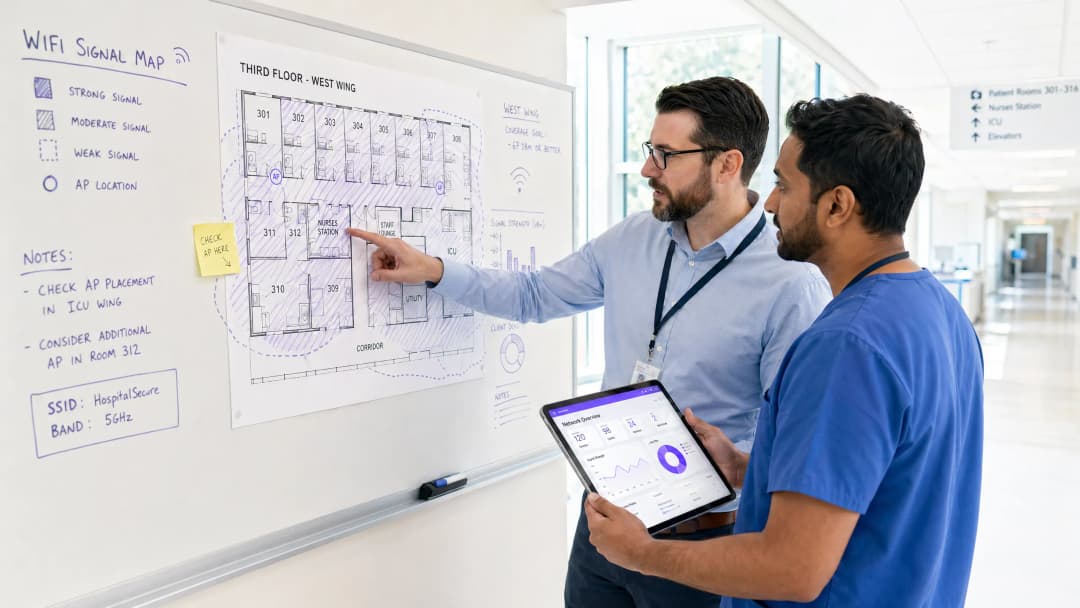
访客 VLAN 必须直接路由到专用的互联网上行链路 - 理想情况下是单独的 专线 - 且没有通往临床 VLAN 的路由路径。防火墙 ACL 应当在分布层而非仅在边界处强制执行此规则。在 HIPAA 和 NHS DSPT 框架下,这是一项不容妥协的架构要求。有关合规性义务的详细解析,请参阅 Healthcare WiFi: HIPAA, DSPT and WiFi Compliance Explained。 Access Point placement in hospitals presents unique RF challenges. Lead-lined radiology suites, reinforced concrete floors between wards, and high-density patient room clusters all create attenuation profiles that differ significantly from office environments. The design target for patient areas should be a minimum RSSI of -67 dBm with at least 20 dB signal-to-noise ratio. Critically, design for capacity, not just coverage. A ward with 30 beds may have 60-90 active devices at peak visiting hours — each potentially streaming video. AP selection should target devices supporting Wi-Fi 6 (802.11ax) or Wi-Fi 6E to handle that density efficiently.
Spectrum management is equally important. The 2.4 GHz band is heavily contested in hospital environments by legacy telemetry equipment, nurse call systems, and Bluetooth devices. Band steering should be configured to push capable devices to 5 GHz or 6 GHz bands. Automatic channel selection algorithms should be reviewed manually after deployment — they rarely produce optimal results in high-interference healthcare environments.
Captive Portal Architecture and Identity Management
The captive portal is the patient's first interaction with the hospital's digital services layer. It must be fast, reliable, and accessible across a wide range of devices — from the latest iPhone to a five-year-old Android tablet running a legacy browser. A poorly designed portal that fails to redirect correctly on certain devices will generate immediate complaints and support tickets.
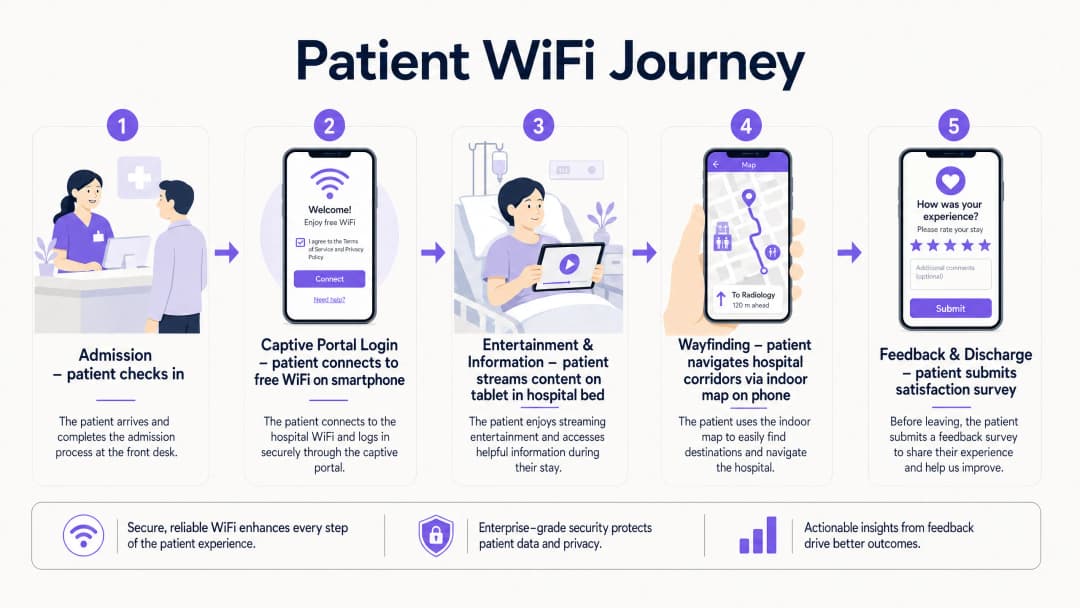
Modern deployments move away from pre-shared keys entirely. The recommended approach is a social login or email-based captive portal that presents the hospital's terms of service and privacy notice, collects explicit consent for marketing communications (separately from network access consent, per GDPR Article 7), and authenticates the session. This flow, when integrated with a platform like Purple's Guest WiFi solution, simultaneously onboards the patient into a CRM-compatible data layer, enabling post-discharge communications and feedback surveys.
DNS-level security filtering should be applied to all guest traffic at the resolver level. This prevents access to known malicious domains, blocks inappropriate content categories, and provides an audit trail for compliance purposes. See Protect Your Network with Strong DNS and Security for implementation guidance on DNS filtering in guest network contexts.
WPA3-SAE (Simultaneous Authentication of Equals) should be the target encryption standard for any new SSID deployment. For legacy device compatibility, a WPA2/WPA3 transition mode is acceptable in the short term, but a migration timeline to WPA3-only should be planned. Client Isolation must be enabled on the guest SSID — this prevents device-to-device communication on the same network segment, which is critical for both security and GDPR compliance.
WiFi 分析和位置智能
分析层是将患者 WiFi 从成本中心转变为战略资产的关键。一个配置合理的网络将数据输入到类似 Purple 的 WiFi Analytics 平台中,可以提供三类极具操作价值的智能信息。
网络性能监控可实时掌握 AP 健康状况、信道利用率、客户端关联率以及每个 SSID 的吞吐量。这使得在患者体验到服务降级之前,能够主动解决故障。基于 RSSI 下降或 AP 断开关联事件的阈值告警是标准做法。
客流量和停留时间分析通过分析探测请求(probe request)数据和关联模式来工作,以生成展示患者和访客在设施内移动轨迹的客流量热力图。这些数据直接适用于人员配置决策 - 如果分析显示门诊候诊区在 10:00 至 11:30 之间持续出现 45 分钟的排队积压,这就是一个可以直接通过人员配置解决的运营洞察。
反馈与满意度闭环通过在 Captive Portal 登录时捕获的电子邮件地址,自动触发发送出院后调查来实现,提供实时的 HCAHPS 相关数据。通过 WiFi 触发的调查回复率始终优于纸质调查,因为联系非常及时,且沟通渠道已经建立。

对您的具体配置有疑问吗?
我们的团队与 80,000 多个场所的运营方、IT 经理和网络工程师保持合作。预约 20 分钟的通话,我们将为您展示同行是如何解决类似问题的。
实施指南
分阶段部署的方法可以降低风险并允许进行迭代优化。
第 1 阶段 - 探索与设计(第 1 - 4 周)
利用医院的建筑图纸委托进行专业的预测性 RF 设计,然后对现有基础设施进行主动站点勘测。记录所有 RF 干扰源。定义 VLAN 架构、防火墙策略和互联网上行链路策略。尽早让信息治理团队参与进来,使 Captive Portal 的数据收集符合 GDPR 和 DSPT 要求。
第 2 阶段 - 基础设施部署(第 5 - 10 周)
部署和配置交换基础设施,确保 PoE++ 预算足以满足高密度 AP 的需求。按照验证过的 RF 设计安装 AP。配置 SSID、VLAN 标记和 QoS 策略。实施 QoS 标记以将语音 (DSCP EF) 和视频 (DSCP AF41) 流量优先于尽力而为(best-effort)的大块数据传输。这确保了即使在网络负载下,远程医疗会议和视频通话也能保持稳定。
第 3 阶段 - Captive Portal 和分析整合(第 9 - 12 周)
部署和定制 Captive Portal 品牌。与医院的 CRM 或患者参与平台集成。使用自定义场馆地图配置分析平台。建立基线指标:每日活跃用户数、平均会话时长、峰值并发连接数和门户完成率。为 IT 和运营团队设置自动化报告仪表板。
第 4 阶段 - 寻路集成(第 12 - 16 周)
将室内定位与 WiFi 基础设施集成。将医院的室内地图发布到访客门户或专用的患者应用中。配置兴趣点(病房、科室、自助餐厅、停车场)。衡量寻路采用率并与未赴约数据进行关联。
最佳实践
| 实践 | 理由 | 标准参考 |
|---|---|---|
| 严格的 VLAN 隔离(临床与访客) | 防止来自受损访客设备的横向移动 | HIPAA 安全规则、NHS DSPT |
| WPA3-SAE 加密 | 防止针对访客凭据的离线字典攻击 | IEEE 802.11-2020 |
| 访客 SSID 上的客户端隔离 | 防止设备间通信和数据泄露 | GDPR 第 25 条(隐私源自设计) |
| 频段导航至 5/6 GHz | 减少传统 2.4 GHz 设备的拥堵和干扰 | Wi-Fi Alliance 最佳实践 |
| 语音和视频的 QoS | 在网络负载下保持通话质量 | IEEE 802.11e / WMM |
| 访客流量的 DNS 过滤 | 阻止恶意域名和不当内容 | NCSC 网络安全指南 |
| 访客流量专用互联网上行链路 | 确保临床网络性能不受影响 | NHS DSPT、HIPAA |
| 出院后自动反馈调查 | 提供及时、可操作的 HCAHPS 相关数据 | NHS 亲友测试指南 |
故障排除与风险缓解
来自医疗设备的射频干扰: 使用专用频谱分析仪工具定期进行频谱分析。运行在 2.4 GHz 上的传统呼叫铃系统和患者监护设备是常见的干扰源。解决方案通常是结合信道重新分配、降低受影响 AP 的功率,以及制定干扰设备的迁移计划。
Captive Portal 重定向失败: 现代操作系统使用 Captive Network Assistant (CNA) 探测来检测 captive portal。确保门户服务器正确响应对已知探测 URL(例如 connectivitycheck.gstatic.com、captive.apple.com)的 HTTP 请求。仅限 HTTPS 的门户配置经常会破坏 CNA 检测 - 即使门户本身是通过 HTTPS 提供的,也要保持 HTTP 重定向路径。
屏蔽区域的信号覆盖盲区: 放射科套房、MRI 室和某些手术室使用射频屏蔽,这会导致信号完全中断。唯一的解决方案是在屏蔽空间内配置 AP,并通过穿透性电缆入口进行连接。在这些区域进行任何布线工作之前,请先与医学物理团队进行协调。
**GDPR 合规风险:**最常见的合规失败是在接受服务条款时一并收集营销同意,而不是作为单独、明确的勾选。这显然违反了 GDPR。请审计您的 Captive Portal 流程,以确保网络接入同意与营销传播同意作为单独、独立的选项呈现。
**带宽争用:**如果没有针对每用户的带宽策略,少数重度用户可能会降低所有人的体验。在访客 SSID 上实施每设备 5 - 10 Mbps 的速率限制。这足以满足高清流媒体播放,同时防止任何单一设备独占容量。
投资回报率与业务影响
投资患者 WiFi 基础设施的业务案例基于四个可衡量的支柱。
**HCAHPS 评分提升:**在基于价值的医疗服务模式下,患者满意度评分直接影响医院的报销比例。已实施自动 WiFi 触发的反馈调查的医院报告说,与纸质调查方法相比,答复率提高了 3 - 5 倍,这为质量改进计划提供了具有统计学意义的数据集。
**减少预约未到场情况:**室内寻路可减少患者因导航困难而迟到或错过预约的比例。一家拥有 500 张床位的典型医院,如果有 10% 的门诊预约受到导航问题的影响,按每次预约平均成本 150 英镑计算,这代表了一个重大的可挽回收入机会。
**运营效率:**来自 WiFi 网络的客流分析支持数据驱动的排班决策。将候诊区停留时间与人员配备水平相关联,使运营经理能够在不增加员工人数的情况下减少平均等待时间 - 只需根据实际需求数据优化排班模式即可。
**第一方数据资产:**每位连接到访客 WiFi 并完成 Captive Portal 流程的患者都代表一份获得同意的第一方数据记录。对于一家平均住院时间为 4 天、拥有 500 张床位的医院来说,这每月会产生数千条全新且合规的数据记录 - 这是患者互动、健康促进传播和医疗服务改进研究的宝贵资产。
医疗保健 行业正日益认识到,网络不仅是 IT 基础设施,更是一个患者体验平台。将网络视作这一平台的机构在满意度指标和运营效率方面一直优于同行。
关键定义
Captive Portal
在用户获准访问公共 WiFi 网络之前向其展示的网页,用于显示服务条款、收集身份验证凭据或同意信息,并重定向至互联网。
医院访客 WiFi 网络上的主要患者触点。设计质量直接影响门户完成率和数据采集质量。必须在所有主要移动操作系统上进行测试。
VLAN (虚拟局域网)
在物理交换基础设施中使用 802.1Q 标记创建的逻辑网络段,允许在第 2 层隔离来自不同用户组的流量,而无需单独的物理布线。
对于将患者访客流量与临床 EHR 和行政网络隔离开来至关重要。缺乏适当的 VLAN 细分是医疗 IT 审计中最常见的网络安全发现。
频段导航 (Band Steering)
一种无线网络管理技术,旨在引导具有双频能力的客户端设备关联到拥塞较少的 5 GHz 或 6 GHz 无线频段,而不是 2.4 GHz 频段。
在传统医疗设备会产生大量 2.4 GHz 干扰的医院环境中尤为重要。可减少拥塞并提高流媒体应用的吞吐量。
客户端隔离 (Client Isolation)
一种无线网络安全功能,可防止与同一 SSID 关联的设备在第 2 层直接进行通信,从而强制所有流量通过网关。
医疗访客 SSID 上的强制要求。防止一名患者设备上的恶意软件扫描或攻击同一网段上的其他设备。这也会对 GDPR 产生数据暴露方面的影响。
WPA3-SAE (Simultaneous Authentication of Equals)
在 WPA3 认证的无线网络中使用的身份验证协议,通过能够抵御离线字典攻击的 Dragonfly 密钥交换代替了 WPA2 的预共享密钥握手。
目前推荐用于新 SSID 部署的加密标准。即使在开放或安全级别较低的网络上,也能保护患者凭据和会话数据免遭拦截。
RSSI (接收信号强度指示)
对接收到的无线电信号功率水平的测量,以 dBm(分贝毫瓦)表示。负值越大表示信号越弱。
在现场调查期间用于验证 AP 放置。患者区域的目标为 -67 dBm 或更好。低于 -75 dBm 的值通常会导致连接不稳定和流媒体性能不佳。
QoS (服务质量)
对不同类型的数据包进行分类和优先排序的网络流量管理策略,以确保对延迟敏感的应用(语音、视频)获得比尽力而为流量更优先的处理。
在网络利用率高期间,对于维持远程医疗通话质量和患者视频通话稳定性至关重要。使用 DSCP 标记实施:语音使用 EF,视频使用 AF41。
位置分析 (Location Analytics)
通过移动设备在场所内移动时产生的 WiFi 探测请求和关联事件,来获取移动、停留时间和人流量数据的过程。
使医院运营团队能够生成人流量热力图,识别患者流中的瓶颈,并根据实际需求数据而非排班假设来优化人员配置水平。
HCAHPS (Hospital Consumer Assessment of Healthcare Providers and Systems)
一项针对患者对医院护理看法的标准化、公开报告的调查,用于衡量和比较不同医疗服务提供者的患者体验。
WiFi 质量和数字服务可用性与 HCAHPS 沟通和响应能力评分的相关性越来越高。自动触发 WiFi 调查可提高响应率和数据及时性。
DNS 过滤 (DNS Filtering)
一种安全控制措施,可拦截 DNS 解析请求,并在建立连接之前阻止对归类为恶意、不当或违反策略的域的查询。
在解析器级别应用于所有访客 WiFi 流量。在患者网络上针对恶意软件传播、网络钓鱼和不当内容访问提供轻量但有效的保护层。
应用实例
一家拥有 500 张床位的区域性 NHS 医院在晚上探视时间(18:00 - 20:00)内遇到了严重的患者 WiFi 网络拥堵,导致患者抱怨视频流缓冲以及与家人的视频通话中断。
- 在高峰时段进行频谱分析,以确认问题是射频(RF)拥堵还是回程饱和。2. 如果是 RF 拥堵:启用频谱导航(Band Steering)以强制支持 5 GHz 的设备脱离 2.4 GHz 频段;检查 AP 信道分配并降低发射功率,以收紧蜂窝边界并减少同信道干扰。3. 如果是回程饱和:检查高峰时段的互联网上行链路利用率 - 如果共享连接已饱和,则实施流量整形,将实时流量(语音使用 DSCP EF,视频使用 DSCP AF41)的优先级置于批量下载之上。4. 在访客 SSID 上实施每台设备 8 Mbps 的带宽上限,以确保公平接入。5. 如果高峰时段每 AP 客户端数量超过 30 个,则在密度最高的病房中部署额外的 AP。6. 查看产生最多投诉的特定病房的分析仪表板 - 问题在整个设施中很少是均匀分布的。
一家私立医院集团正在部署一个新的门诊诊所,并希望使用访客 WiFi Captive Portal 收集患者数据,用于就诊后的反馈调查和营销沟通,同时确保与包含 EHR 数据的临床网络严格隔离。
- 为访客 SSID 创建专用 VLAN(例如 VLAN 100),具有独立的 DHCP 作用域,且与临床 VLAN 没有路由相邻关系。2. 通过独立的防火墙区域将所有访客流量路由到专用的互联网上行链路 - 请勿使用保护临床系统的同一个边界防火墙。3. 在访客 SSID 上启用客户端隔离。4. 设计具有两个独立同意复选框的 Captive Portal:一个用于接受网络服务条款(访问所必需),另一个用于选择加入营销沟通(可选,且有明确标记)。这是 GDPR 第 7 条的要求 - 营销同意必须自由给出,并与服务条件分开。5. 将门户与 Purple 的访客 WiFi 平台集成,以将获得同意的数据捕获为兼容 CRM 的格式。6. 配置自动就诊后调查触发器,在患者会话结束 24 小时后触发。7. 在访客 VLAN 上实施 DNS 过滤以阻止恶意域名。
练习题
Q1. 一位医院管理员建议使用访客 WiFi 网络来跟踪昂贵移动医疗设备(输液泵、便携式心电监护仪)的实时位置。作为 IT 总监,您如何回应,以及您推荐什么替代方案?
提示:考虑访客与临床基础设施之间的架构隔离,以及临床环境中资产跟踪的可靠性要求。
查看标准答案
我建议不要使用访客 WiFi 网络进行临床资产跟踪,原因有两点。首先,访客 SSID 在架构上与临床系统隔离 - 任何资产跟踪数据都需要跨越防火墙边界才能到达临床管理系统,这会引入不必要的复杂性和潜在的安全风险。其次,访客 WiFi 定位精度(使用 RSSI 三角测量通常为 5 - 15 米)不足以在临床环境中进行可靠的病房级资产跟踪。推荐的替代方案是使用专用的 RTLS,在设备上使用主动式 BLE 标签,并在每个房间安装专用的 BLE 读取器。这提供了亚米级精度,独立于访客网络运行,并直接与临床资产管理系统集成。BLE 基础设施通常可以与 WiFi AP 共享相同的物理布线,从而降低部署成本。
Q2. 在部署后审计期间,您发现医院的 Captive Portal 显示一个复选框,内容为:“我接受服务条款并同意接收来自医院的通讯。”合规风险是什么,整改措施又是什么?
提示:考虑 GDPR 第 7 条关于有效同意的要求,特别是认为同意是自由给予的条件。
查看标准答案
这显然违反了 GDPR 第 7 条。营销通讯的同意必须是自由给予的,这意味着它不能作为服务条件与网络访问同意捆绑在一起。整改措施是将 Captive Portal 拆分为两个独立的同意机制:(1)强制接受网络服务条款(访问所必需),以及(2)用于营销通讯的独立、可选选择加入复选框,该复选框带有明确标签且默认不勾选。在捆绑同意下捕获的任何现有记录都应与 DPO 一起审查 - 在重新获得同意之前,出于营销目的,这些记录可能需要被视为未同意。
Q3. 现有医院正在扩建一个拥有 200 张床位的新肿瘤科病区。项目经理询问是否可以简单地延伸现有的访客 WiFi 基础设施来覆盖新病区。在做出建议之前,您会提出哪些问题?
提示:在假设现有基础设施可以扩展之前,考虑容量规划、回传以及新建筑结构的特定射频挑战。
查看标准答案
在做出任何建议之前,我会问:(1)在高峰时段,现有回传上行链路的当前利用率是多少?如果已经超过 70%,增加 200 张床位将导致竞争。(2)新病区的建筑规范是什么 - 具体来说,是否有任何铅衬里房间或钢筋混凝土楼板需要在屏蔽空间内安装 AP?(3)在高峰时段,现有基础设施上每个 AP 的客户端数量是多少?如果现有的 AP 已经处理 40 多个客户端,那么即使增加设备,现有的 AP 硬件也可能不够用。(4)现有的交换机基础设施是否支持 PoE++,还是需要新的交换机?(5)是否针对新病区的建筑图纸运行了预测性射频设计?在没有进行正式容量评估和预测性设计之前,我不建议简单地延伸现有基础设施。
继续阅读本系列
衡量宾客 WiFi 与位置分析的业务 ROI
本技术参考指南为 IT 和场所运营团队展示了如何通过从网络健康状况、经授权的数据到经证实的运营或商业成果的可靠链条,来衡量宾客 WiFi 的 ROI。它将可衡量的证据与假设分离开来,将 Purple Connect、Capture 和 Engage 映射到正确的测量层,并为酒店、零售物业和活动场所提供了规划方案。
设计隐私:为符合 GDPR 规范对 WiFi 数据进行匿名化处理
本权威指南详细介绍了用于匿名化 WiFi 数据以确保符合 GDPR 规范的技术架构和实施策略。它为 IT 领导者和网络架构师提供了切实可行的框架,以便在强大的场所分析与严格的数据隐私要求之间取得平衡。
热力图 vs 客流分析:技术差异
本权威技术指南详细阐述了企业场馆运营商在 WiFi 热力图和客流分析之间的关键架构和运营差异。它为 IT 领导者、网络架构师和运营总监提供了可操作的部署框架、实际实施场景以及供应商中立的最佳实践,以从现有无线基础设施中获取最大投资回报。
对您的具体配置有疑问吗?
我们的团队与 80,000 多个场所的运营方、IT 经理和网络工程师保持合作。预约 20 分钟的通话,我们将为您展示同行是如何解决类似问题的。