跳至主要內容

WiFi 如何提升醫院病患體驗

這份權威的技術指南說明醫院如何利用企業級訪客 WiFi 基礎架構與分析來可衡量地改善住院病患體驗。內容涵蓋網路架構、合規要求(HIPAA、DSPT、GDPR)、Captive Portal 設計、室內導航整合,以及 ROI 架構——為 IT 決策者提供建立具說服力的內部商業案例並成功執行的工具。

📖 8 分鐘閱讀📝 1,853 字數🔧 2 範例3 練習題📚 10 關鍵定義

收聽此指南

查看播客逐字稿
[專業、溫暖的開場語調] 您好,歡迎收聽來自 Purple 的高階主管簡報。今天我們要深入探討一個正迅速從「有也不錯」轉變為醫療保健領域絕對關鍵基礎架構的主題:WiFi 如何從根本上改善醫院的病患體驗。我們將從企業架構、分析和可衡量的投資回報角度來看待這個主題。如果您是醫療保健領域的 IT 總監、CTO 或場域營運經理,本講座就是為您設計的。 [第一段:簡介與背景] 讓我們先設定場景。現代醫院是一個高度連線的環境。但我們談論的不再僅僅是臨床系統。病患及其家屬的期望已經發生了巨大變化。當某人住院時,他們期望能獲得與在家中或高級飯店相同水準的連線能力。他們想要串流娛樂內容、與親人溝通,甚至在康復期間遠距工作。 但這不僅僅是娛樂。一個健全的訪客 WiFi 網路是數位導航的基礎,能幫助焦慮的訪客導航複雜的醫院走廊。它是傳遞目標資訊和收集即時回饋的平台。簡而言之,網路架構直接影響病患滿意度分數,進而影響醫院的資金和聲譽。 [第二段:技術深入探討] 那麼,我們該如何架構這一切呢?在醫療保健環境中部署企業級訪客 WiFi 是一種平衡的藝術。您需要提供無摩擦的存取,同時維持堅不可摧的安全性和對 HIPAA 及 NHS DSPT 框架等法規的嚴格合規。 首先,讓我們談談基礎:網路架構。您不能混合臨床和訪客流量。就是這樣。一個具韌性的醫院網路依賴於分層設計。我們談論的是使用 802.1Q VLAN 和強大的防火牆政策進行嚴格的分段。您需要高密度的存取點部署,特別是在病房、候診區和自助餐廳。 病患區域的設計目標應至少達到 -67 dBm 的接收訊號強度,且訊號雜訊比不低於 20 dB。關鍵是設計時要考量容量,而不僅僅是覆蓋範圍。一間 30 床的病房在尖峰探視時段可能有多達 60 到 90 個活躍裝置,每個都可能正在串流影片。Wi-Fi 6 存取點正是應對這種密度的正確選擇。 頻譜管理同樣重要。2.4 GHz 頻段在醫院環境中受到舊式遙測設備、護士呼叫系統和藍牙裝置的嚴重爭奪。應設定頻段引導 (Band Steering),將支援的裝置推向 5 GHz 或 6 GHz 頻段。 現在,讓我們談談入門流程。在入院櫃檯分發複雜且定期更換的密碼的時代已經結束。現代部署使用與身分提供者整合的精密 Captive Portal。這使得病患可以透過社群登入或簡單的電子郵件表單輕鬆進行驗證。這不僅是為了便利,更是一個策略性的資料擷取點。透過將 Captive Portal 與您的 CRM 整合,您可以收集有價值的第一方資料,為個人化的病患互動奠定基礎。 應對所有訪客流量的 DNS 查詢層級套用安全過濾。這可防止對已知惡意網域的存取,封鎖不當內容,並為合規目的提供稽核軌跡。 WPA3 加密應作為任何新 SSID 部署的目標標準。且必須在 Guest SSID 上啟用用戶端隔離 (Client Isolation)。這可防止裝置間的通訊,對安全性和 GDPR 合規性至關重要。 現在讓我們進入分析。這就是網路從公用設施轉變為智慧平台的關鍵所在。一個妥善配置的網路,將資料饋送至 WiFi 分析平台,能提供三類可據以行動的智慧資訊。 第一:網路效能監控。即時掌握存取點健康狀態、頻道利用率以及每個 SSID 的吞吐量。這使得能在病患感受到服務降級之前主動解決問題。 第二:人流與停留分析。透過分析連線模式,分析平台產生顯示病患與訪客在院區內移動的人流熱圖。如果分析顯示門診候診區在上午 10 點至 11 點半之間持續出現 45 分鐘的排隊累積,那就是一個可以直接用人力配置解決的營運洞察。 第三:回饋與滿意度迴圈。自動化的出院後問卷觸發機制,透過 Captive Portal 登入時擷取的電子郵件地址發送,提供與病患滿意度分數相關的即時資料。經由 WiFi 觸發的問卷回收率持續優於紙本替代方案,因為聯絡時機恰當且溝通管道已經建立。 [第三段:實作建議與陷阱] 讓我們討論實作。成功的部署需要分階段的方法。 第一階段:探索與設計。根據醫院的建築圖委託專業的預測性 RF 設計,接著進行主動現場勘測。記錄所有 RF 干擾來源。定義您的 VLAN 架構、防火牆政策和網際網路上行鏈路策略。及早讓資訊治理團隊參與,使 Captive Portal 的資料收集符合 GDPR 和 DSPT 要求。 第二階段:基礎架構部署。確保您的有線骨幹能夠處理無線負載。您可能需要升級邊際交換器,以支援多千兆乙太網路和針對現代存取點的 PoE++。考慮為訪客流量設置專用的專線,以保證它不會與臨床系統競爭資源。 第三階段:Captive Portal 與分析整合。保持入口乾淨、具有品牌識別且簡單。驗證流程中每增加一個步驟,都會降低完成率。使用自訂場域地圖設定分析平台,並建立基準指標。 第四階段:導航整合。將室內定位與 WiFi 基礎架構整合。將醫院的室內地圖發布到訪客入口。衡量導航採用率,並與錯過約診的資料進行關聯分析。 現在,談談陷阱。最大的錯誤是未能在 Guest SSID 上實作用戶端隔離。另一個常見問題是忽略非 WiFi 干擾。醫院是充滿雜訊的無線電頻率環境,持續監控至關重要。而在合規方面:最常見的 GDPR 失敗是將行銷同意作為服務條款接受的一部分,而不是作為獨立的明確選擇加入。仔細稽核您的 Captive Portal 流程。 [第四段:快速問答] 讓我們快速解答幾個常見問題。 問題一:我們可以使用訪客 WiFi 來追蹤醫療資產嗎? 技術上可行,但不建議。訪客 WiFi 是給訪客使用的。對於關鍵的資產追蹤,您需要一個使用低功耗藍牙或主動式 RFID 的專用即時定位系統 (RTLS)。不要在用於公共存取的網路上混用使用案例。 問題二:行銷部門希望在 Captive Portal 上播放 30 秒的強制性影片。您的建議是什麼? 強烈建議不要這麼做。一位急著想傳訊息給家人的病患不會想觀看廣告。使用乾淨的登入頁面,並將行銷訊息以靜態橫幅或登入後重新導向的方式呈現。保護使用者體驗。 問題三:我們該如何處理尖峰探視時段的頻寬爭奪問題? 在 Guest SSID 上實作每個裝置 5 至 10 Mbps 的速率限制。這足以應付 HD 串流,同時防止任何單一裝置獨佔容量。 [第五段:總結與下一步] 總結來說,將訪客 WiFi 視為策略資產而非成本中心,對醫院來說是真正的變革。它提升了病患體驗,提供了關鍵的導航能力,並透過分析提供可據以行動的營運洞察。 您的下一步?檢視您目前的網路分段情況。確保在您的 Guest SSID 上啟用用戶端隔離。如果近期沒有做過,請委託進行適當的現場勘測。並開始將您的 WiFi 不僅視為一個連線點,而是視為一個感測器網路,能告訴您醫院實際的使用情況。 資料就在那裡。技術已經成熟。問題在於您的組織是否準備好將網路視為它應有的策略資產。 感謝您參與本次高階主管簡報。如需更多詳細的技術指南和個案研究,請探索 Purple 平台上的資源,網址為 purple dot ai。

header_image.png

Executive Summary

For modern healthcare facilities, free WiFi in hospitals has evolved from a basic amenity into a critical layer of patient experience and operational infrastructure. As hospitals digitise patient records, introduce telemedicine, and rely on connected medical devices, the underlying network architecture must simultaneously support clinical demands and rising patient expectations. This guide is for IT directors, network architects, and operations leaders who need to architect, deploy, and optimise a Guest WiFi solution that delivers measurable improvements to the inpatient experience — from entertainment and wayfinding to real-time feedback collection.

The core argument is straightforward: a well-deployed patient WiFi network, integrated with a WiFi Analytics platform, transforms the network from a passive utility into an active intelligence layer. It reduces missed appointments through indoor navigation, improves HCAHPS satisfaction scores through automated feedback, and gives operations teams the footfall data they need to optimise staffing and resource allocation. This guide covers the architecture, compliance requirements, implementation steps, and ROI framework to make that case internally and execute it successfully.


Technical Deep-Dive

Network Architecture for Healthcare Environments

Deploying enterprise-grade Guest WiFi in a hospital requires a fundamentally different approach to a standard commercial deployment. The primary constraint is the co-existence of clinical and guest traffic on the same physical infrastructure, which demands strict logical separation. The standard architecture uses 802.1Q VLANs to segment traffic into at minimum three tiers: clinical systems (EHR, PACS, telemetry), staff administrative networks, and the patient/visitor guest SSID.

The guest VLAN must be routed directly to a dedicated internet uplink — ideally a separate leased line — with no routing path to clinical VLANs. Firewall ACLs should enforce this at the distribution layer, not just at the perimeter. This is a non-negotiable architectural requirement under both HIPAA and the NHS DSPT framework. For a detailed breakdown of compliance obligations, refer to Healthcare WiFi: HIPAA, DSPT and WiFi Compliance Explained .

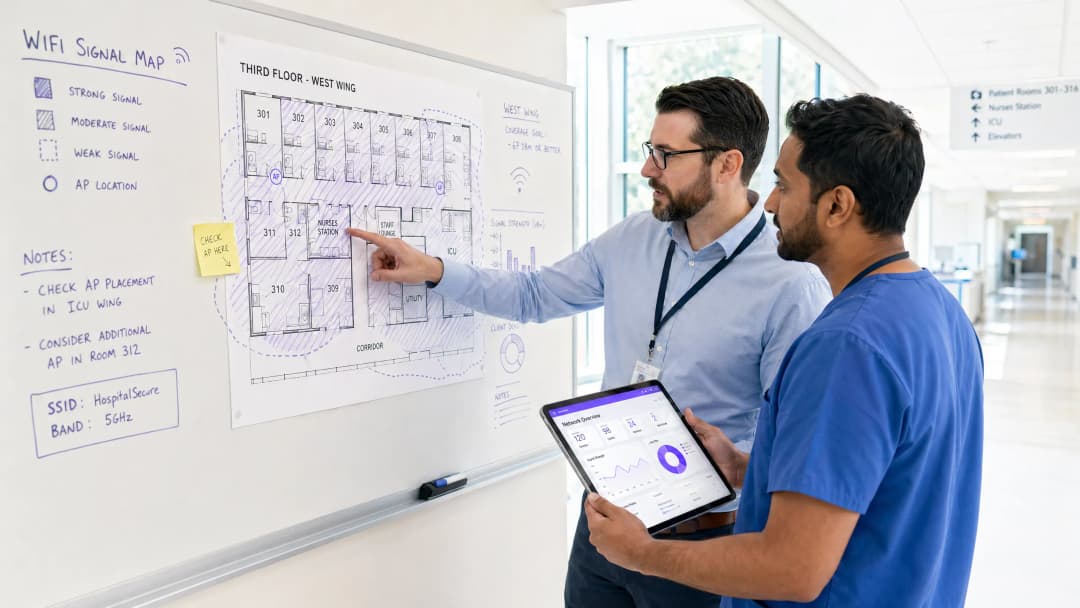
Access Point placement in hospitals presents unique RF challenges. Lead-lined radiology suites, reinforced concrete floors between wards, and high-density patient room clusters all create attenuation profiles that differ significantly from office environments. The design target for patient areas should be a minimum RSSI of -67 dBm with at least 20 dB signal-to-noise ratio. Critically, design for capacity, not just coverage. A ward with 30 beds may have 60-90 active devices at peak visiting hours — each potentially streaming video. AP selection should target devices supporting Wi-Fi 6 (802.11ax) or Wi-Fi 6E to handle that density efficiently.

Spectrum management is equally important. The 2.4 GHz band is heavily contested in hospital environments by legacy telemetry equipment, nurse call systems, and Bluetooth devices. Band steering should be configured to push capable devices to 5 GHz or 6 GHz bands. Automatic channel selection algorithms should be reviewed manually after deployment — they rarely produce optimal results in high-interference healthcare environments.

Captive Portal Architecture and Identity Management

The captive portal is the patient's first interaction with the hospital's digital services layer. It must be fast, reliable, and accessible across a wide range of devices — from the latest iPhone to a five-year-old Android tablet running a legacy browser. A poorly designed portal that fails to redirect correctly on certain devices will generate immediate complaints and support tickets.

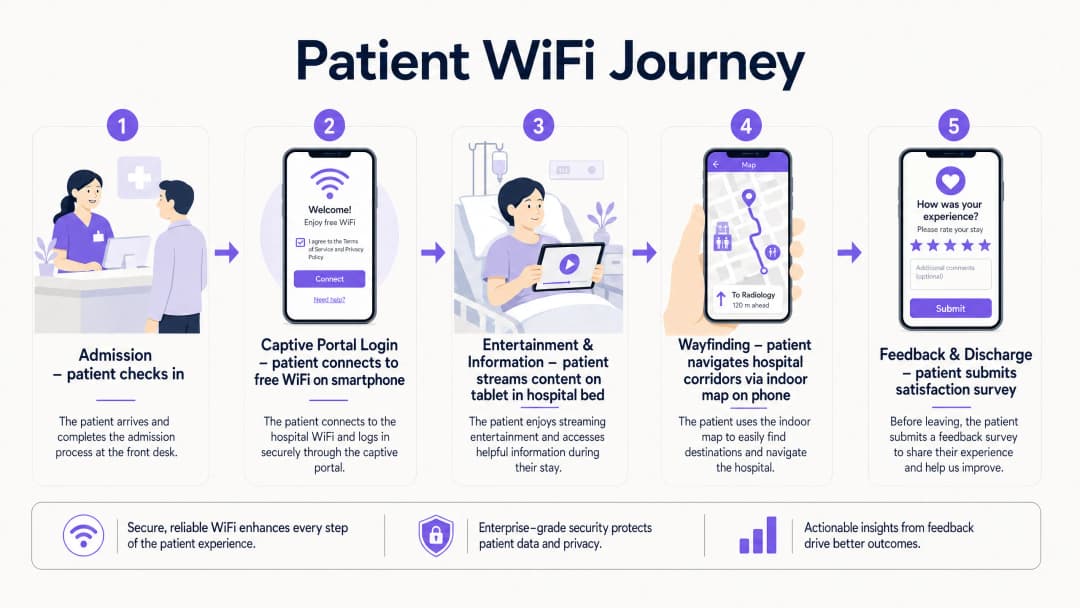
Modern deployments move away from pre-shared keys entirely. The recommended approach is a social login or email-based captive portal that presents the hospital's terms of service and privacy notice, collects explicit consent for marketing communications (separately from network access consent, per GDPR Article 7), and authenticates the session. This flow, when integrated with a platform like Purple's Guest WiFi solution, simultaneously onboards the patient into a CRM-compatible data layer, enabling post-discharge communications and feedback surveys.

DNS-level security filtering should be applied to all guest traffic at the resolver level. This prevents access to known malicious domains, blocks inappropriate content categories, and provides an audit trail for compliance purposes. See Protect Your Network with Strong DNS and Security for implementation guidance on DNS filtering in guest network contexts.

WPA3-SAE (Simultaneous Authentication of Equals) should be the target encryption standard for any new SSID deployment. For legacy device compatibility, a WPA2/WPA3 transition mode is acceptable in the short term, but a migration timeline to WPA3-only should be planned. Client Isolation must be enabled on the guest SSID — this prevents device-to-device communication on the same network segment, which is critical for both security and GDPR compliance. patient_wifi_journey.png

WiFi Analytics and Location Intelligence

The analytics layer is where patient WiFi transitions from a cost centre to a strategic asset. A properly instrumented network, feeding data into a platform like Purple's WiFi Analytics , provides three categories of actionable intelligence.

Network Performance Monitoring delivers real-time visibility into AP health, channel utilisation, client association rates, and throughput per SSID. This enables proactive fault resolution before patients experience degraded service. Threshold-based alerting on RSSI drops or AP disassociation events is standard practice.

Footfall and Dwell Analytics work by analysing probe request data and association patterns to generate footfall heatmaps showing patient and visitor movement through the facility. This data is directly applicable to staffing decisions — if analytics show a consistent 45-minute queue build-up in the outpatient waiting area between 10:00 and 11:30, that is an operational insight with a direct staffing solution.

Feedback and Satisfaction Loops are enabled through automated post-discharge survey triggers, delivered via the email address captured at captive portal login, providing real-time HCAHPS-relevant data. Response rates for WiFi-triggered surveys consistently outperform paper-based alternatives because the contact is timely and the channel is already established.

wifi_analytics_dashboard.png


Implementation Guide

A phased deployment approach reduces risk and allows for iterative optimisation.

Phase 1 — Discovery and Design (Weeks 1-4)

Commission a professional predictive RF design using the hospital's architectural drawings, followed by an active site survey of any existing infrastructure. Document all sources of RF interference. Define VLAN architecture, firewall policy, and internet uplink strategy. Engage the Information Governance team early to align the captive portal data collection with GDPR and DSPT requirements.

Phase 2 — Infrastructure Deployment (Weeks 5-10)

Deploy and configure switching infrastructure, ensuring PoE++ budget is sufficient for high-density APs. Install APs per the validated RF design. Configure SSIDs, VLAN tagging, and QoS policies. Implement QoS markings to prioritise voice (DSCP EF) and video (DSCP AF41) traffic over best-effort bulk data. This ensures telemedicine sessions and video calls remain stable even under network load.

Phase 3 — Captive Portal and Analytics Integration (Weeks 9-12)

Deploy and brand the captive portal. Integrate with the hospital's CRM or patient engagement platform. Configure the analytics platform with custom venue maps. Establish baseline metrics: daily active users, average session duration, peak concurrent connections, and portal completion rate. Set up automated reporting dashboards for the IT and operations teams.

Phase 4 — Wayfinding Integration (Weeks 12-16)

Integrate indoor positioning with the WiFi infrastructure. Publish the hospital's indoor map to the guest portal or a dedicated patient app. Configure points of interest (wards, departments, cafeteria, car parks). Measure wayfinding adoption rates and correlate with missed appointment data.


Best Practices

Practice Rationale Standard Reference
Strict VLAN segmentation (clinical vs. guest) Prevents lateral movement from compromised guest devices HIPAA Security Rule, NHS DSPT
WPA3-SAE encryption Protects against offline dictionary attacks on guest credentials IEEE 802.11-2020
Client Isolation on guest SSID Prevents inter-device communication and data exposure GDPR Article 25 (Privacy by Design)
Band Steering to 5/6 GHz Reduces congestion and interference from legacy 2.4 GHz devices Wi-Fi Alliance best practices
QoS for voice and video Maintains call quality under network load IEEE 802.11e / WMM
DNS filtering on guest traffic Blocks malicious domains and inappropriate content NCSC network security guidance
Dedicated internet uplink for guest traffic Guarantees clinical network performance is unaffected NHS DSPT, HIPAA
Automated post-discharge feedback surveys Provides timely, actionable HCAHPS-relevant data NHS Friends and Family Test guidance

Troubleshooting & Risk Mitigation

RF Interference from Medical Equipment: Conduct regular spectrum analysis using a dedicated spectrum analyser tool. Legacy nurse call systems and patient monitoring equipment operating on 2.4 GHz are common culprits. The solution is typically a combination of channel reassignment and power reduction on affected APs, combined with a migration plan for the interfering equipment.

Captive Portal Redirect Failures: Modern operating systems use Captive Network Assistant (CNA) probes to detect captive portals. Ensure the portal server responds correctly to HTTP requests to known probe URLs (e.g., connectivitycheck.gstatic.com, captive.apple.com). HTTPS-only portal configurations frequently break CNA detection — maintain an HTTP redirect path even if the portal itself is served over HTTPS.

Coverage Gaps in Shielded Areas: Radiology suites, MRI rooms, and some operating theatres use RF shielding that creates complete signal blackouts. The only solution is to deploy APs inside the shielded space, connected via a penetrating cable entry point. Coordinate with the medical physics team before any cabling work in these areas.

GDPR Compliance Risk: The most common compliance failure is collecting marketing consent as part of the terms of service acceptance, rather than as a separate, explicit opt-in. This is a clear GDPR violation. Audit your captive portal flow to ensure consent for network access and consent for marketing communications are presented as separate, independent choices.

Bandwidth Contention: Without per-user bandwidth policies, a small number of heavy users can degrade the experience for everyone. Implement a per-device rate limit of 5-10 Mbps on the guest SSID. This is sufficient for HD streaming while preventing any single device from monopolising capacity.


ROI & Business Impact

The business case for investing in patient WiFi infrastructure rests on four measurable pillars.

HCAHPS Score Improvement: Patient satisfaction scores directly influence hospital reimbursement rates under value-based care models. Hospitals that have implemented automated WiFi-triggered feedback surveys report response rate improvements of 3-5x over paper-based methods, providing a statistically significant data set for quality improvement programmes.

Reduced Missed Appointments: Indoor wayfinding reduces the rate of patients arriving late or missing appointments due to navigation difficulties. A typical 500-bed hospital with 10% of outpatient appointments affected by navigation issues, at an average appointment cost of £150, represents a significant recoverable revenue opportunity.

Operational Efficiency: Footfall analytics from the WiFi network enable data-driven staffing decisions. Correlating waiting area dwell times with staffing levels allows operations managers to reduce average wait times without increasing headcount — simply by optimising shift patterns against actual demand data.

First-Party Data Asset: Every patient who connects to the guest WiFi and completes the captive portal flow represents a consented first-party data record. For a 500-bed hospital with an average length of stay of 4 days, this generates thousands of new, compliant data records per month — a valuable asset for patient engagement, health promotion communications, and service improvement research.

The Healthcare sector is increasingly recognising that the network is not just IT infrastructure — it is a patient experience platform. Organisations that treat it as such are consistently outperforming peers on satisfaction metrics and operational efficiency.

關鍵定義

Captive Portal

在允許使用者存取公共 WiFi 網路之前,向使用者顯示的網頁,用於展示服務條款、收集身分驗證憑證或同意,並重新導向至網際網路。

醫院訪客 WiFi 網路上的主要病患接觸點。設計品質直接影響入口完成率和資料擷取品質。必須在所有主要行動作業系統上進行測試。

VLAN(虛擬區域網路)

使用 802.1Q 標記在實體交換器基礎架構內建立的邏輯網路區段,允許不同使用者群組的流量在第二層隔離,而無需獨立的實體佈線。

對於將病患訪客流量與臨床 EHR 及行政網路隔離至關重要。缺少適當的 VLAN 劃分是醫療 IT 稽核中最常見的網路安全發現。

頻段引導

一種無線網路管理技術,鼓勵支援雙頻的用戶端裝置與較不壅塞的 5 GHz 或 6 GHz 無線頻段關聯,而非 2.4 GHz 頻段。

在醫院環境中特別有價值,因為舊式醫療設備會產生大量 2.4 GHz 干擾。可減少壅塞並提升串流應用的吞吐量。

用戶端隔離

一種無線網路安全功能,可防止與相同 SSID 關聯的裝置在第二層直接相互通訊,強制所有流量透過閘道器傳輸。

醫療保健 Guest SSID 上的強制性要求。防止病患裝置上的惡意軟體掃描或攻擊同一網段上的其他裝置。也涉及關於資料外洩的 GDPR 影響。

WPA3-SAE(等化同時驗證)

WPA3 認證無線網路中使用的驗證協定,以 Dragonfly 金鑰交換取代 WPA2 的預先共用金鑰交握,可抵抗離線字典攻擊。

目前新 SSID 部署的推薦加密標準。即使在開放或輕度安全的網路上,也能保護病患憑證和工作階段資料不受攔截。

RSSI(接收訊號強度指標)

接收到的無線電訊號功率水平的量測,以 dBm(相對於一毫瓦的分貝)表示。數值越負,表示訊號越弱。

在現場勘測中使用,以驗證 AP 放置位置。病患區域的目標為 -67 dBm 或更佳。低於 -75 dBm 的值通常會導致連線不穩定和串流效能不佳。

QoS(服務品質)

網路流量管理政策,將不同類型的資料封包進行分類和優先順序排序,以確保延遲敏感的應用(語音、視訊)能獲得優於盡力而為流量的處理。

對於在高網路利用率期間維持遠距醫療通話品質和病患視訊通話穩定性至關重要。使用 DSCP 標記實作:語音採用 EF,視訊採用 AF41。

位置分析

從行動裝置在場域內移動時所產生的 WiFi 探查請求和關聯事件中,推導出移動、停留時間和人流資料的過程。

讓醫院營運團隊能夠產生人流熱圖、識別病患流動的瓶頸,並根據實際需求資料而非排定的假設來最佳化人力水準。

HCAHPS(醫療保健提供者與系統的醫院消費者評量)

一項標準化、公開報告的病患對醫院照護觀點的調查,用於衡量和比較不同醫療保健提供者之間的病患體驗。

WiFi 品質和數位服務可用性與 HCAHPS 的溝通和回應能力分數越來越相關。自動化的 WiFi 觸發問卷能提升回覆率和資料即時性。

DNS 過濾

一種安全控制措施,在建立連線之前攔截 DNS 解析請求,並封鎖對歸類為惡意、不當或違反政策的網域的查詢。

在解析器層級套用至所有訪客 WiFi 流量。為病患網路上的惡意軟體散佈、網路釣魚和不當內容存取提供輕量但有效的保護層。

範例

一間 500 床的區域性 NHS 醫院,其病患 WiFi 在傍晚探視時段(18:00-20:00)出現嚴重的網路壅塞,導致使用者抱怨影片串流緩衝和與家人的視訊通話失敗。

  1. 在尖峰時段進行頻譜分析,確認問題是 RF 壅塞還是回程飽和。2. 若為 RF:啟用頻段引導,將支援 5 GHz 的裝置強制離開 2.4 GHz 頻段;檢視 AP 頻道分配,並降低傳輸功率以緊縮蜂巢邊界並減少同頻干擾。3. 若為回程:檢視尖峰時段的網際網路上行鏈路使用率——若共享連線已飽和,實作流量塑形,將即時流量(語音採用 DSCP EF,視訊採用 DSCP AF41)的優先順序排在大批量下載之前。4. 在 Guest SSID 上實作每個裝置 8 Mbps 的頻寬上限,以確保公平存取。5. 若在尖峰時段每個 AP 的用戶端數量超過 30,則在最高密度的病房部署額外的 AP。6. 查看產生最多抱怨的特定病房的分析儀表板——問題很少在整個院區內都是均勻發生的。
考官評語: 此情境代表了 NHS 信託中最常見的病患 WiFi 投訴。關鍵的診斷步驟是區分 RF 壅塞(過多裝置爭奪通話時間)和回程飽和(網際網路管線已滿)。兩者都表現為速度緩慢,但解決方案完全不同。頻段引導和每個裝置的速率限制是兩個影響最大、投入最少的介入措施,應始終作為在投資額外硬體前的第一線對策。

一個私立醫院集團正在部署一間新的門診診所,並希望使用訪客 WiFi Captive Portal 來收集病患資料,用於就診後的回饋問卷和行銷通訊,同時確保與包含 EHR 資料的臨床網路嚴格隔離。

  1. 為 Guest SSID 建立專用的 VLAN(例如 VLAN 100),使用獨立的 DHCP 範圍,且無通往臨床 VLAN 的路由相鄰關係。2. 將所有訪客流量透過獨立的防火牆區域路由至專用的網際網路上行鏈路——不要使用保護臨床系統的同一個邊界防火牆。3. 在 Guest SSID 上啟用用戶端隔離。4. 設計 Captive Portal 時提供兩個獨立的同意核取方塊:一個用於接受網路服務條款(存取所需),另一個用於選擇加入行銷通訊(選擇性,清楚標示)。這是 GDPR 第 7 條的要求——行銷同意必須基於自由意志,且與服務條件分開。5. 將入口與 Purple 的 Guest WiFi 平台整合,將已取得同意的資料擷取為 CRM 相容格式。6. 設定自動化的就診後問卷觸發機制,在病患工作階段結束後 24 小時發送。7. 在訪客 VLAN 上實作 DNS 過濾,以封鎖惡意網域。
考官評語: GDPR 合規要素是此情境中最常被忽略的面向。許多醫療機構將行銷同意與服務條款接受捆綁在一起,這明顯違反了自由意志、具體同意的要求。區分這兩個同意機制不僅是法律要求——也能產生更高品質的行銷資料,因為主動選擇加入的病患更可能參與後續的通訊。網路分段要求無可妥協,並應在正式上線前透過滲透測試進行驗證。

練習題

Q1. 一位醫院行政主管提議使用訪客 WiFi 網路來追蹤昂貴的行動醫療設備(如輸液泵、攜帶式心電圖監視器)的即時位置。作為 IT 總監,您如何回應,以及您有何建議的替代方案?

提示:考慮訪客與臨床基礎架構之間的架構隔離,以及在臨床環境中資產追蹤的可靠性要求。

查看標準答案

我會基於兩個原因反對使用訪客 WiFi 網路進行臨床資產追蹤。首先,Guest SSID 在架構上與臨床系統隔離——任何資產追蹤資料都需要穿越防火牆邊界才能到達臨床管理系統,這會引入不必要的複雜性和潛在的安全風險。其次,訪客 WiFi 的位置精確度(使用 RSSI 三角定位通常為 5-15 公尺)不足以在臨床環境中實現可靠的房間級資產追蹤。推薦的替代方案是使用專用的 RTLS,在設備上部署主動式 BLE 標籤,並在每個房間安裝專用的 BLE 讀取器。這可提供次公尺級的精確度,獨立於訪客網路運作,並直接與臨床資產管理系統整合。BLE 基礎架構通常可與 WiFi AP 共用相同的實體佈線,從而降低部署成本。

Q2. 在部署後的稽核中,您發現醫院的 Captive Portal 顯示一個單一的核取方塊,內容為:「我接受服務條款並同意接收醫院通訊。」這有什麼合規風險,以及補救措施是什麼?

提示:考慮 GDPR 第 7 條對於有效同意的要求,特別是在何種條件下同意被視為自由給予。

查看標準答案

這是明顯的 GDPR 第 7 條違規。行銷通訊的同意必須基於自由意志,這意味著它不能作為服務條件與網路存取同意捆綁在一起。補救措施是將 Captive Portal 拆分為兩個不同的同意機制:(1) 必須接受網路服務條款(存取所需),以及 (2) 一個獨立、選擇性的行銷通訊加入核取方塊,清楚標示且預設為未勾選。在捆綁同意下擷取的任何現有記錄,應與 DPO 一起檢視——它們可能需要被視為未取得行銷目的之同意,直到重新取得同意為止。

Q3. 一間現有醫院正在新增一棟 200 床的腫瘤科大樓。專案經理詢問是否可以簡單地將現有的訪客 WiFi 基礎架構延伸至新大樓。在提出建議之前,您會提出哪些問題?

提示:在假設現有基礎架構可以擴展之前,請思考容量規劃、回程以及新建築結構的特定 RF 挑戰。

查看標準答案

在提出任何建議之前,我會詢問:(1) 現有回程上行鏈路在尖峰時段的目前使用率為何?若已超過 70%,增加 200 床將會導致競爭。(2) 新大樓的建築規格為何?具體來說,是否有任何含鉛房間或鋼筋混凝土地板,需要在屏蔽空間內部署 AP?(3) 現有基礎架構在尖峰時段每個 AP 的用戶端數量為何?若現有 AP 已處理 40 個以上的用戶端,即使增加額外的單元,現有的 AP 硬體可能也不足夠。(4) 現有的交換器基礎架構是否支援 PoE++,還是需要新的交換器?(5) 是否已針對新大樓的建築圖進行預測性 RF 設計?我不建議在沒有正式容量評估和預測性設計的情況下,簡單地擴展現有基礎架構。