
如何使用 Microsoft Intune 向设备推送 WiFi 证书
针对 IT 领导者的全面技术参考,介绍如何通过 Microsoft Intune 部署 802.1X WiFi 证书。内容涵盖 SCEP 与 PKCS 架构、实施步骤、合规性映射以及企业环境中的实际部署场景。
收听本指南
查看播客转录
核心系列的一部分:Enterprise WiFi Security Guide →
Microsoft Intune WiFi certificate profile and architecture advisor
Model your enterprise 802.1X certificate deployment. Compare SCEP vs PKCS vs Microsoft Cloud PKI, validate OS-specific key storage parameters, eliminate group targeting conflicts (error 0x87D1FDE8), and generate deployment profiles.
Certificate Enrollment Specifications
- Protocol: Simple Certificate Enrollment Protocol (RFC 8894)
- Key Security: Generated on client device (TPM / Secure Enclave) - never leaves endpoint
- Key Length: RSA 2048-bit (SHA-256 Signature Hash)
- Hardware Provider: TPM KSP (Microsoft Platform Crypto Provider) if present, fallback to Software KSP
- Subject Name Format:
CN={{UserName}},OU=WiFi Users,DC=corp,DC=internal - Subject Alternative Name (SAN):
User Principal Name (UPN) = {{UserPrincipalName}} - Renewal Threshold: 20% (Trigger certificate renewal at 80% of validity period)
AAA & RADIUS Integration Details
- RADIUS Engine: Purple Cloud RADIUS (Recommended)
- Architecture Mode: 100% Cloud Native AAA
- RadSec (RFC 6614): Supported (Encrypted TLS Tunnel)
- Directory Lookup: Direct REST API integration with Microsoft Entra ID for dynamic role mapping & group sync
- CRL & OCSP Validation: Real-time OCSP & Automated CRL distribution point polling
- Operating System Best Practice: Configure Identity Certificate reference in WiFi profile to avoid manual user certificate prompts.
Remove on-premises NPS and NDES with Purple Cloud RADIUS
Authenticate Microsoft Entra ID and Intune-enrolled devices natively with zero on-premises servers. Get dynamic role-based VLAN steering, RadSec encryption, and automated certificate revocation.
核心摘要
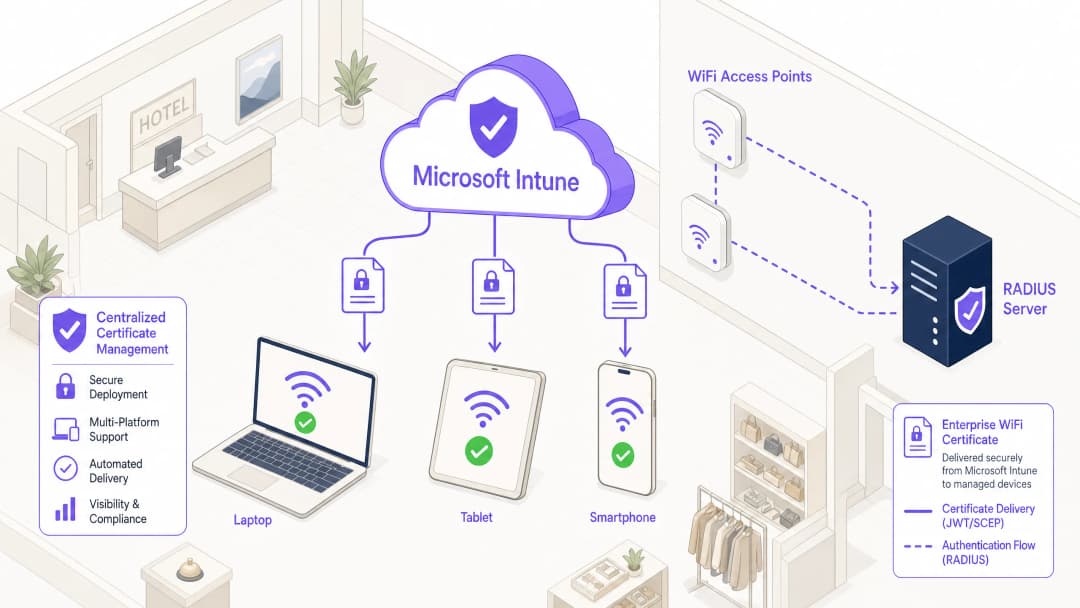
对于在 酒店业、零售业 或公共场所管理大规模环境的企业 IT 领导者而言,安全的无线接入是一项基本的运营要求。依赖共享的 PSK(预共享密钥)或用户名/密码身份验证 (PEAP-MSCHAPv2) 会使网络面临凭据窃取、钓鱼攻击和合规性失效的风险。强大的企业 WiFi 安全行业标准是采用 EAP-TLS(基于传输层安全协议的可扩展身份验证协议)的 802.1X,该标准强制要求设备与网络之间进行双向基于证书的身份验证。
然而,采用 EAP-TLS 的主要障碍历来是证书生命周期管理的运营开销。Microsoft Intune 通过自动向大规模托管设备分发、更新和吊销数字证书解决了这一难题。
本技术参考详细介绍了通过 Microsoft Intune 推送 WiFi 证书所需的架构、部署方法(SCEP 与 PKCS)和实施步骤。它为网络架构师和系统工程师提供了可操作的指导,其任务是在确保企业通信安全的同时,保持与访客网络(例如由 Guest WiFi 平台管理的网络)的严格隔离。
技术深潜:架构与协议
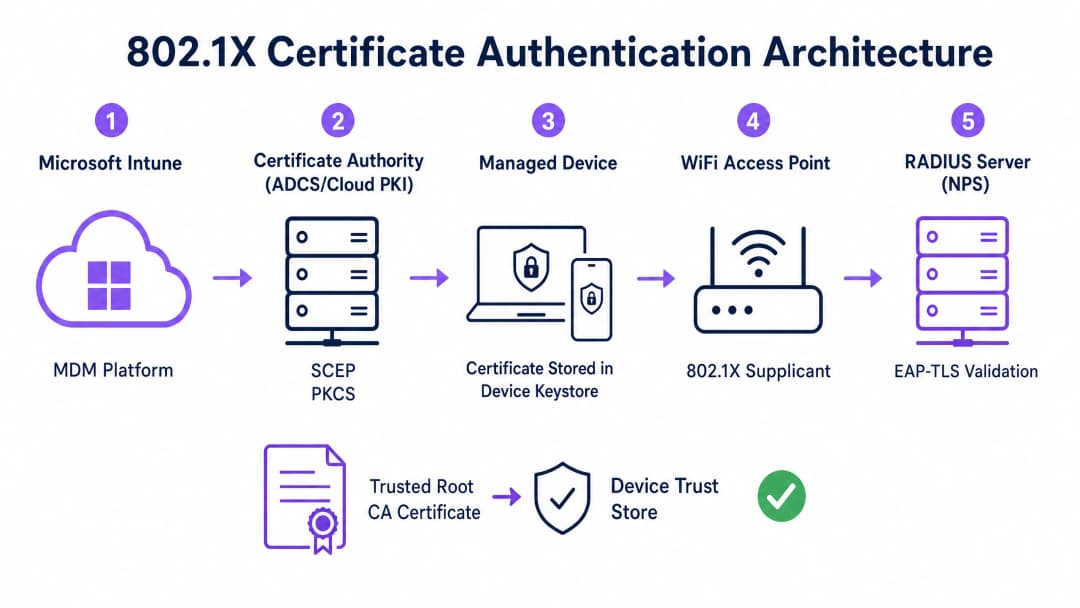
为了有效地实施基于证书的身份验证,IT 团队必须了解移动设备管理 (MDM) 平台、公钥基础设施 (PKI) 以及网络准入控制层之间的交互作用。
802.1X 身份验证框架
IEEE 802.1X 标准定义了基于端口的网络准入控制。在无线环境中,它会阻止设备传输任何流量(EAP 身份验证帧除外),直到其身份得到验证。该架构由三个组件组成:
- 客户端 (Supplicant):请求网络接入的客户端设备(笔记本电脑、智能手机、平板电脑)。
- 认证器 (Authenticator):在身份验证成功前阻止流量的无线接入点或无线局域网控制器。
- 认证服务器 (Authentication Server):RADIUS(远程用户拨号认证服务)服务器,例如 Microsoft 網絡策略服务器 (NPS) 或 Cisco ISE,用于验证凭据并授权访问。
EAP-TLS 与双向身份验证
EAP-TLS 是最安全的 EAP 方法,因为它需要双向身份验证。RADIUS 服务器向请求者(客户端)出示其证书以证明它是合法的企业网络(防止双子星冒名攻击),而请求者向 RADIUS 服务器出示其客户端证书以证明它是经授权的设备或用户。
Intune 证书部署机制:SCEP 与 PKCS
Microsoft Intune 支持两种用于向设备部署客户端证书的主要协议。选择合适的机制是一项关键的架构决策。
简单证书注册协议 (SCEP)
使用 SCEP 时,私钥直接在客户端设备上生成。设备创建证书签名请求 (CSR) 并通过 Intune 将其提交给网络设备注册服务 (NDES) 服务器,该服务器充当 Active Directory 证书服务 (ADCS) 基础架构的代理。证书颁发机构 (CA) 颁发证书,并将其返回给设备。
由于私钥永远不会离开设备,因此 SCEP 被认为具有极高的安全性,是 BYOD(自带设备)部署和零信任架构的推荐方法。
公钥加密标准 (PKCS)
使用 PKCS 时,Intune Certificate Connector 会代表设备向 CA 请求证书。CA 生成公钥证书和私钥,然后连接器通过 Intune 将其安全地交付给设备。
虽然 PKCS 简化了基础架构要求(不需要 NDES 服务器),但私钥会在网络上进行传输。这种模式通常适用于企业所有、完全托管的设备群,在这些设备群中,MDM 平台已经是一个高度受信任的组件。

对您的具体配置有疑问吗?
我们的团队与 80,000 多个场所的运营方、IT 经理和网络工程师保持合作。预约 20 分钟的通话,我们将为您展示同行是如何解决类似问题的。
实施指南:逐步部署
通过 Intune 部署 WiFi 证书需要精确的步骤顺序。未按顺序部署配置文件是导致实施失败最常见的原因。
第 1 步:准备公钥基础架构 (PKI)
无论是使用本地 ADCS 还是 Microsoft Cloud PKI 等云原生解决方案,证书颁发机构都必须配置相应的模板。
- 密钥用途:模板必须包含
Client AuthenticationOID (1.3.6.1.5.5.7.3.2)。 - 密钥大小:配置最小 2048 位 (RSA) 的密钥大小,以符合现代加密标准。
- 使用者名称:对于用户证书,使用者可选名称 (SAN) 应配置为使用用户主体名称 (UPN)。对于设备证书,请使用 Azure AD 设备 ID。
第 2 步:部署受信任的根证书
在设备可以进行身份验证之前,它必须信任颁发 RADIUS 服务器证书的 CA。
- 导出
.cer格式的根 CA 证书(以及任何中间 CA 证书)。 - 在 Intune 管理中心,导航至 设备 > 配置文件 > 创建配置文件。
- 选择平台并选择 受信任的证书 配置文件类型。
- 上传
.cer文件并将配置文件分配给目标设备或用户组。
注意:在继续执行后续步骤之前,此配置文件必须成功应用于设备。
第 3 步:部署客户端证书配置文件
创建 SCEP 或 PKCS 证书配置文件,以将身份证书交付给申请者。
- 导航至 设备 > 配置文件 > 创建配置文件。
- 选择平台并选择 SCEP 证书 或 PKCS 证书。
- 根据您的身份要求(用户与设备)配置使用者名称格式和 SAN。
- 指定密钥存储提供程序 (KSP) - 通常是用于硬件支持安全的受信任平台模块 (TPM)。
- 将配置文件分配给第 2 步中指定的相同组。
第 4 步:配置 WiFi 配置文件
最后一个组件将证书绑定到无线网络设置。
- 导航至 设备 > 配置文件 > 创建配置文件。
- 选择平台并选择 WiFi 配置文件类型。
- 将 WiFi 类型设置为 企业 并输入准确的 SSID。
- 将 EAP 类型设置为 EAP-TLS。
- 在 服务器信任 下,指定 RADIUS 服务器证书的准确名称,并选择在第 2 步中部署的受信任的根证书配置文件。
- 在 客户端身份验证 下,选择在第 3 步中部署的 SCEP 或 PKCS 证书配置文件。
- 将配置文件分配给目标组。
最佳实践与战略建议
设备证书与用户证书
网络架构师必须决定是将证书颁发给设备(机器身份验证)还是用户(用户身份验证)。
- 设备证书:允许机器在用户登录之前连接到 WiFi 网络。这对于初始设备配置、组策略处理以及登录屏幕上的密码重置至关重要。推荐用于公司拥有的设备。
- 用户证书:将网络访问与个人身份绑定。这提供了细粒度的审计和基于角色的访问控制。推荐用于 BYOD 场景。
网络分段与访客访问
一个基本的安全原则是将公司 802.1X 网络与访客或公共访问网络进行严格的逻辑隔离。Intune 管理的基础设施应当专用于公司设备和经过身份验证的员工。 对于访客访问,组织应部署一个由 captive portal 支持的专用 Guest WiFi SSID。这可确保隔离未托管设备,同时仍允许企业通过 WiFi Analytics 平台捕获访客分析数据。要了解有关在两个细分网络中保护 DNS 基础设施的更多信息,请参阅我们的指南:Protect Your Network with Strong DNS and Security。
解决 NPS 证书映射要求
对于将 Microsoft 网络策略服务器(NPS)与 Azure AD 加入设备结合使用的组织,Microsoft 引入了一项关键的配置更改。NPS 现在需要强证书映射。
在使用设备证书时,本地 Active Directory 中的计算机对象必须将其 altSecurityIdentities 属性填充为证书的详细信息(通常为 X509IssuerSerialNumber)。IT 团队必须实施计划脚本或事件驱动的工作流,以便在 Intune 颁发新证书时更新此属性,否则身份验证将失败。
故障排除与风险缓解
当 802.1X 部署失败时,问题几乎总是存在于证书链或 Intune 配置文件的顺序中。
常见失败模式
- 静默 WiFi 配置文件失败:如果在成功配置客户端证书之前将 Intune WiFi 配置文件应用于设备,则 WiFi 配置文件通常会安装失败或静默失败。在对 WiFi 配置进行故障排除之前,请务必先验证设备的个人存储(Windows 上的
certmgr.msc)中是否存在证书。 - 服务器信任验证错误:如果设备拒绝 RADIUS 服务器,请验证 Intune WiFi 配置文件中指定的服务器名称是否与 RADIUS 服务器证书上的主体名称或 SAN 完全匹配。此外,确保整个证书链(根证书和中间证书)都存在于设备的受信任的根证书颁发机构存储中。
- 证书吊销列表(CRL)不可用:如果 RADIUS 服务器无法访问 CA 的 CRL 分发点来验证客户端证书的状态,则身份验证将被拒绝。确保 CRL URL 高度可用且可从 RADIUS 服务器访问。
ROI 与业务影响
通过 Intune 过渡到基于证书的 WiFi 身份验证可带来显著的运营和安全回报。
- 风险缓解:消除了凭据收集、哈希传递攻击以及通过共享 PSK 进行未经授权的网络访问的风险。
- 运营效率:减少了与密码过期和 WiFi 连接问题相关的 IT 服务台工单。自动化的生命周期管理意味着证书可在无需用户干预的情况下透明地进行更新。
- 合规性赋能:满足严格的监管要求。对于零售环境,它直接满足了针对强大无线加密和身份验证的 PCI-DSS 要求。对于公共部门和医疗保健行业,它符合零信任网络访问 (ZTNA) 原则。
通过利用 Microsoft Intune 进行证书部署,IT 团队可以实现无摩擦、高度安全的无线体验,该体验在后台静默运行,使企业能够专注于核心业务。
关键定义
802.1X
一种用于基于端口的网络访问控制的 IEEE 标准,用于阻止未经授权的设备访问 LAN 或 WLAN,直到它们成功通过身份验证。
在企业环境中,用企业级身份验证取代共享 WiFi 密码的基础安全协议。
EAP-TLS
使用传输层安全协议的扩展身份验证协议。一种身份验证框架,要求客户端和服务器使用数字证书来证明其身份。
在 Intune WiFi 配置文件中配置的特定协议,用于强制执行双向证书身份验证,从而消除凭据被盗的风险。
SCEP
简单证书注册协议。一种机制,客户端设备通过该机制生成自己的私钥,并通过中介服务器向 CA 请求证书。
BYOD 环境的首选部署方法,因为私钥绝不会通过网络传输。
PKCS
公钥加密标准。在 Intune 环境中,这是一种部署方法,由 CA 生成私钥,然后由 Intune Connector 安全地将其传送到设备上。
一种更简单的部署架构,通常用于公司拥有的设备群,因为它不需要 NDES 服务器。
NDES
网络设备注册服务。一种 Microsoft 服务器角色,充当代理,允许没有域凭据的运行设备从 Active Directory 证书颁发机构获取证书。
在本地 ADCS 环境中通过 SCEP 部署证书时必不可少的网络基础架构组件。
RADIUS
远程用户拨号认证服务。一种提供集中化身份验证、授权和计费(AAA)管理的网络协议。
从 WiFi 接入点接收身份验证请求并验证设备证书的服务器(如 Microsoft NPS 或 Cisco ISE)。
Supplicant
终端用户设备(笔记本电脑、智能手机)上启动 802.1X 身份验证过程的软件客户端。
Intune WiFi 配置文件会配置原生操作系统客户端(例如 Windows WLAN AutoConfig)以使用正确的证书和 EAP 方法。
证书吊销列表(CRL)
由证书颁发机构发布的经过数字签名的列表,其中包含已被吊销且不应再受信任的证书序列号。
这对于安全合规性至关重要;RADIUS 服务器必须检查 CRL,以确保连接的设备未被报告丢失或被盗。
应用实例
一家拥有 400 家门店的零售连锁店正在部署公司所有的平板电脑用于库存管理。这些设备通过 Intune 进行完全管理,并已加入 Azure AD。在任何特定用户登录之前,设备在启动时需要立即进行网络访问以同步库存数据库。网络基础设施使用 Cisco ISE 作为 RADIUS 服务器。最佳的证书部署策略是什么?
IT 团队应实施 PKCS 设备证书。
- 在 CA 上配置设备证书模板。
- 通过 Intune 将根 CA 证书部署到平板电脑。
- 在 Intune 中创建 PKCS 证书配置文件,将主题名称格式设置为 Azure AD 设备 ID ({{AAD_Device_ID}})。
- 创建一个企业 WiFi 配置文件,指定 EAP-TLS,并引用 ISE 服务器的证书名称和已部署的 PKCS 配置文件。
- 将所有配置文件分配给包含平板电脑的设备组。
一家大型教学医院允许医务人员使用个人智能手机 (BYOD) 访问临床排班应用程序。这些设备通过工作配置文件注册在 Intune 中。安全策略规定个人设备上不得存储任何企业凭据,并且如果设备遭到入侵,必须立即撤销网络访问权限。应该如何设计 WiFi 身份验证?
医院必须实施 SCEP 用户证书,并结合 Intune 合规性策略。
- 部署 NDES 服务器以向 CA 代理请求。
- 在 Intune 中创建 SCEP 用户证书配置文件,其中 SAN 配置为用户主体名称 ({{UserPrincipalName}})。
- 创建 Intune 合规性策略,要求最低操作系统版本、处于活动状态的屏幕锁以及无越狱/root 访问权限。
- 配置 CA 以发布高可用性的证书撤销列表 (CRL)。
- 配置 RADIUS 服务器,在每次身份验证尝试时严格执行 CRL 检查。
练习题
Q1. 您的组织正在将公司 WiFi 从 PEAP-MSCHAPv2(用户名/密码)迁移到 EAP-TLS。在试点阶段,几台 Windows 11 笔记本电脑成功接收了 Intune 配置配置文件,但无法连接到网络。查看 Windows 事件日志显示事件 ID 20271,表明 RADIUS 服务器证书被拒绝。最可能的原因是什么?
提示:考虑双向身份验证所需的信任链。
查看标准答案
设备缺少签发 RADIUS 服务器证书的受信任根 CA 证书。在 EAP-TLS 中,设备必须验证 RADIUS 服务器的身份。IT 团队必须确保在 WiFi 配置文件尝试连接之前,已通过 Intune 将包含根 CA(以及任何中间 CA)的“受信任证书”配置文件部署到设备并成功安装。
Q2. 某公共部门场所正在使用 Intune 和 PKCS 证书为员工设备部署 802.1X。他们还运营着一个由 Guest WiFi 平台管理的独立访客网络。审计员指出,如果员工的笔记本电脑被盗,该证书在 12 个月内仍然有效。网络架构师应该如何应对这种风险?
提示:身份验证服务器如何在证书过期前知道其已不再有效?
查看标准答案
架构师必须实施完善的证书吊销工作流程。首先,确保 CA 将证书吊销列表(CRL)发布到高可用的分发点。其次,配置 RADIUS 服务器(例如 NPS),要求在每次身份验证尝试期间强制进行 CRL 检查。最后,制定 Intune 操作流程,明确吊销任何标记为丢失或被盗设备的证书,从而更新 CRL 并阻止网络访问。
Q3. 您正在为零售环境中的一批共享自助终端设备设计 Intune 部署方案。这些设备每天都会重启,并且必须在任何用户操作之前立即连接到公司网络以下载更新。您应该部署用户证书还是设备证书?应该使用什么使用者备用名称(SAN)格式?
提示:考虑设备重启后的即时状态。
查看标准答案
您必须部署设备证书。由于自助终端(kiosks)在用户登录之前需要网络访问,因此在引导时无法使用用户证书。Intune 证书配置文件中的使用者替代名称(SAN)应配置为使用 Azure AD 设备 ID({{AAD_Device_ID}})或设备的完全限定域名,从而允许 RADIUS 服务器对特定的硬件资产进行身份验证。
常见问题
What is the difference between SCEP and PKCS for Intune WiFi certificates?
SCEP (Simple Certificate Enrollment Protocol, RFC 8894) generates the private key directly on the endpoint hardware (TPM or Secure Enclave) through a one-time challenge password; the private key never leaves the client device. PKCS #12 generates the private key on the certificate authority (AD CS) and transfers the encrypted PFX file over TLS to the device. SCEP is strongly recommended for Zero-Trust enterprise 802.1X WiFi.
What on-premises infrastructure is required for SCEP deployment with Intune?
A standard SCEP deployment requires an Active Directory Certificate Services (AD CS) Enterprise Certificate Authority, the Network Device Enrollment Service (NDES) server role, the Microsoft Intune Certificate Connector, and an external publishing mechanism such as Microsoft Entra Application Proxy or a reverse proxy with valid public SSL certificates.
How does Microsoft Cloud PKI simplify 802.1X WiFi certificate management?
Microsoft Cloud PKI (included in Intune Suite) eliminates all on-premises Windows Servers, NDES roles, and connector agents by hosting the issuing and root certificate authorities entirely in the Microsoft cloud. Intune handles SCEP certificate requests natively, slashing maintenance overhead while supporting multi-platform 802.1X authentication.
In what order must Intune configuration profiles be assigned to endpoints?
Profiles must be assigned in a strict three-tier dependency sequence: first, the Trusted Root Certificate Profile containing the CA chain; second, the SCEP or PKCS Client Certificate Profile targeting user or device authentication; and third, the 802.1X WiFi Configuration Profile configured with WPA3-Enterprise and referencing the client certificate.
How does Purple integrate with Microsoft Intune and Entra ID for enterprise WiFi?
Purple provides a hardware-agnostic Cloud RADIUS AAA service with native Microsoft Entra ID and Intune integration. Purple validates SCEP and Cloud PKI X.509 certificates with automated revocation checking (CRL/OCSP), applies real-time directory-driven dynamic VLAN assignments, and isolates corporate and visitor traffic across all major enterprise access point vendors.
继续阅读本系列
网络管理员配置访客 WiFi RADIUS 认证指南
面向网络管理员的全面技术参考,介绍如何为访客 WiFi 部署 RADIUS 认证。内容涵盖架构、不限厂商的配置步骤、安全最佳实践以及常见部署故障排查。
在高等教育机构中为安全的 BYOD 和 802.1X WiFi 部署 SCEP
本技术指南详细介绍了高等教育 IT 团队如何使用 SCEP 为数万台 BYOD 设备自动进行 802.1X 证书注册。内容涵盖架构设计、安全优势以及将手动入网替换为安全、零接触网络准入模型的实际部署步骤。
为访客和员工 WiFi 网络配置 RADIUS 认证
本技术参考指南概述了企业访客和员工 WiFi 网络的 RADIUS 认证架构、配置和部署。它为网络架构师和 IT 经理提供了构建安全、可扩展的无线访问控制系统所需的准确协议、安全标准和故障排除方法。
对您的具体配置有疑问吗?
我们的团队与 80,000 多个场所的运营方、IT 经理和网络工程师保持合作。预约 20 分钟的通话,我们将为您展示同行是如何解决类似问题的。