
訪客 WiFi 的 Walled Garden 設定
本指南為企業訪客 WiFi 部署中設定 Walled Garden 提供了全面且不限廠商的技術參考。內容涵蓋驗證前存取的架構、動態 DNS 解析的關鍵角色、社群登入網域白名單、OS Captive Portal 探測需求,以及 PCI DSS 和 GDPR 規範下的合規性考量。本指南旨在協助 IT 經理、網路架構師和場地營運總監,並結合餐旅、零售和活動環境的實際案例研究,提供具體可行的實作指引。
收聽此指南
查看播客逐字稿
執行摘要
Walled Garden 是任何安全且使用者友善的訪客 WiFi 部署中不可或缺的基礎元件。它定義了訪客裝置在透過 Captive Portal 完成驗證之前可以存取的有限網路資源集。不正確或不完整的 Walled Garden 設定是企業部署中導致訪客登入失敗的首要原因,這會導致使用者體驗下降、客服工單增加,並在餐旅和零售環境中造成可衡量的商譽受損。對於 IT 經理和網路架構師而言,掌握 Walled Garden WiFi 設定不僅僅是一項技術任務,更是降低安全風險、確保符合 PCI DSS v4.0 和 GDPR 等標準,以及最大化訪客 WiFi 資產投資報酬率的關鍵步驟。本指南提供了一個不限廠商、具體可行的框架,用於設計、實作和維護強大的 Walled Garden,以支援現代驗證方法(包括透過 OAuth 2.0 的社群登入、金流閘道和作業系統級的 Captive Portal 偵測),適用於餐旅、零售、活動和公共部門機構等企業環境。
技術深度剖析
驗證前存取的剖析
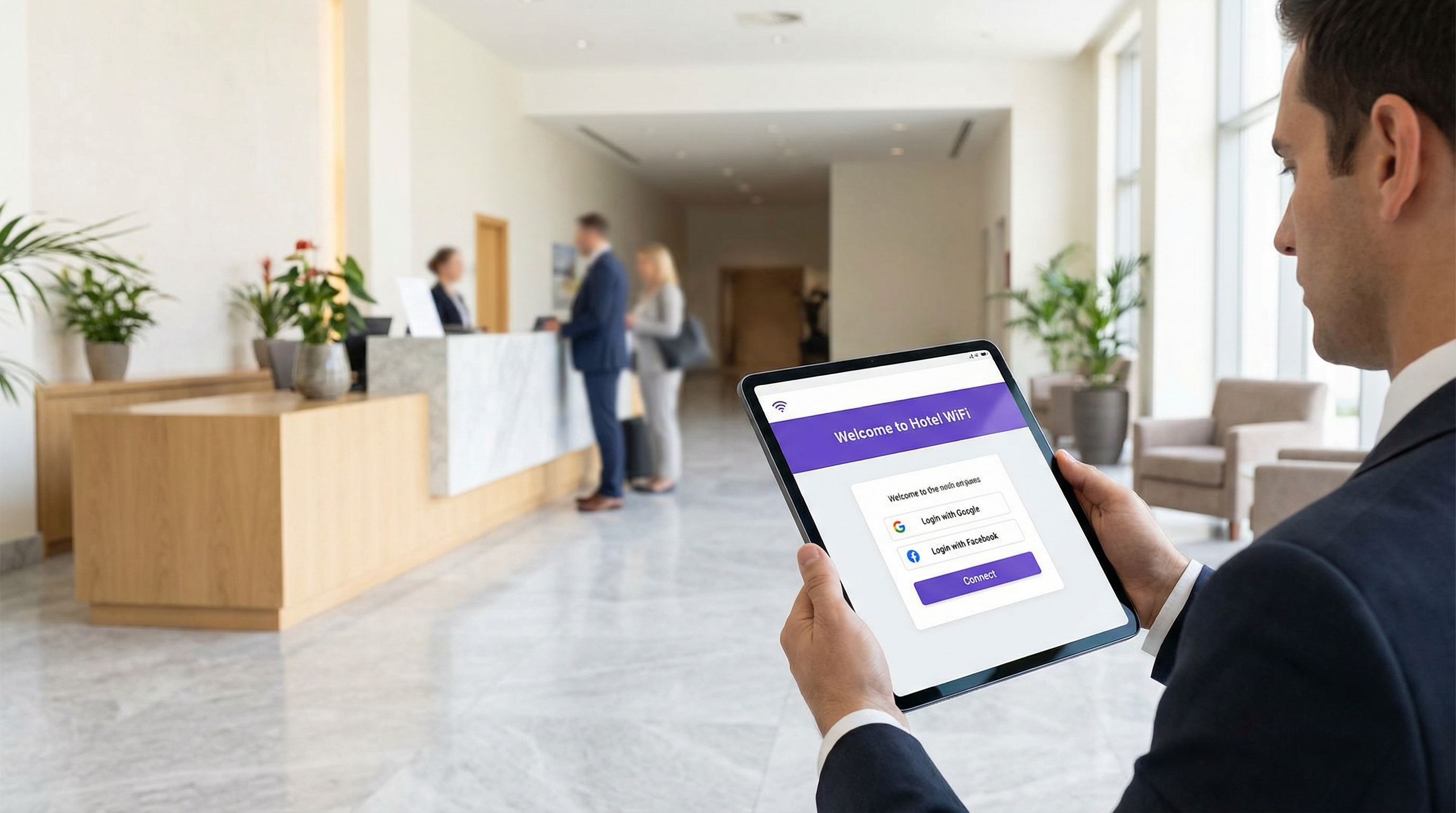
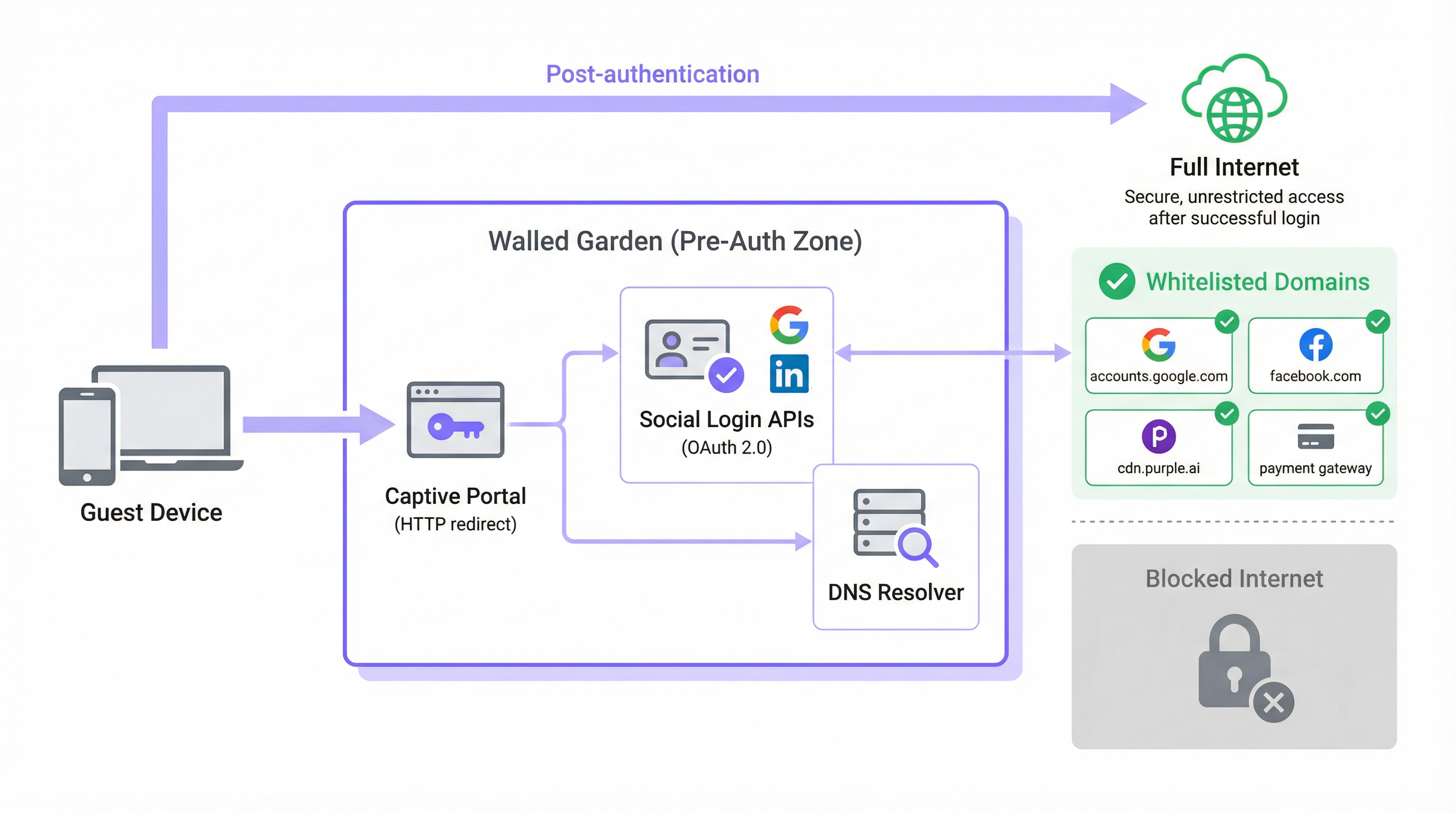
在典型的訪客 WiFi 架構中,當使用者的裝置與開放的 SSID 建立關聯時,系統會透過 DHCP 為其分配一個 IP 地址,並由網路控制器將其置於驗證前角色或隔離的 VLAN 中。在此狀態下,控制器會攔截所有連外的 HTTP 和 HTTPS 流量,並將其重導向至 Captive Portal 歡迎頁面。這就是強制訪客瀏覽器進入登入畫面的機制。Walled Garden 是此攔截規則的明確例外:它是一個精心規劃的外部網域和 IP 地址範圍白名單,允許裝置在驗證前階段與其自由通訊。
如果沒有正確設定 Walled Garden,完成驗證所需的服務本身就會被阻擋。現代的 Captive Portal 並非單一且獨立的應用程式。它們是由微服務和第三方 API 組合而成。Portal 本身的資產(HTML、CSS、JavaScript 和圖片)可能會從內容傳遞網路 (CDN) 提供,而該網路與控制器的本地基礎架構完全獨立。社群登入功能取決於是否能連線到 Google、Facebook、Apple 或 Microsoft 的 OAuth 2.0 端點。如果提供付費 WiFi 方案,Portal 必須與 Stripe 或 PayPal 等付款處理商進行通訊。分析和行銷平台可能會從其自身的 CDN 來源載入追蹤指令碼。這些相依性中的每一個都代表一個必須在 Walled Garden 中明確允許的網域,否則驗證流程將會無聲無息地失敗,或顯示令人困惑的錯誤。
DNS 解析問題
Walled Garden 設定在技術上最微妙的方面,在於基於網域的管理與基於 IP 的執行之間的落差。雖然網路管理員使用易於閱讀的網域名稱(例如 accounts.google.com)來設定 Walled Garden,但大多數網路控制器都是在 IP 層執行這些規則。當網域被新增到白名單時,控制器會執行 DNS 查詢以將其解析為一個或多個 IP 地址,並將這些 IP 新增到臨時存取控制清單 (ACL) 中。
這對主要雲端供應商帶來了重大的營運風險。Google、Meta、Apple 和領先的 CDN 使用任播路由 (anycast routing)和動態 IP 地址分配。在設定時 accounts.google.com 解析出的 IP 地址,可能與六個月後解析出的地址完全不同,甚至在不同的網路區段上也會有所不同。因此,靜態 IP 白名單並非永續的設定方式;隨著 CDN IP 範圍的輪替,它會隨著時間而失效。
正確的解決方案是動態 DNS 解析,即網路控制器定期重新解析每個白名單網域,並相應地更新其 ACL。大多數來自 Cisco、Aruba、Ruckus 和 Fortinet 的企業級控制器都原生支援此功能。如果您的控制器不支援,您所使用的設定將會產生難以診斷且會隨著時間推移而惡化的間歇性故障。
HTTPS 攔截與 TLS 合規性
HTTPS 的普及帶來了更深一層的複雜性。當處於驗證前狀態的訪客裝置嘗試載入非白名單的 HTTPS 資源時,控制器必須決定如何處理該請求。有兩種常見的方法,如果管理不當,這兩種方法都有顯著的缺點。
第一種方法是無聲丟棄 (silent drop),即控制器直接阻擋連線。訪客的瀏覽器會顯示通用的「無法連線至此網站」錯誤,這無法提供任何有用的指引,且通常會被解讀為網路故障,而非 Portal 提示。第二種方法是HTTPS 攔截,即控制器嘗試向 Captive Portal 呈現重導向。這需要控制器充當中間人 (MITM) 代理,並呈現其自身的 TLS 憑證。如果此憑證不被訪客的裝置信任(在公共訪客網路上幾乎不可能被信任),瀏覽器將顯示安全性警告,這會引起使用者的恐慌,且在受監管的環境中,可能會構成合規性問題。
T正確的架構方法是確保驗證流程所需的所有網域都已列入白名單,允許其 HTTPS 流量不受影響地通過。Captive Portal 重新導向應由作業系統層級的探測機制觸發,而非透過 HTTPS 攔截。這能完全消除憑證信任問題。現代瀏覽器還實作了 HTTP 嚴格傳輸安全 (HSTS),且在某些情況下會實作憑證綁定。這兩種機制都會導致主要網域的 HTTPS 攔截直接失敗,從而產生中斷的連線而非重新導向——這也是支持使用正確設定的圍牆花園(walled garden)而非廣泛 HTTPS 攔截策略的另一個強烈論據。
Captive Network Assistant (CNA) 與作業系統探測網域
圍牆花園設定中最常被忽視的方面之一,就是現代作業系統偵測 Captive Portal 存在與否的機制。所有主流作業系統(iOS、iPadOS、macOS、Android 和 Windows)都實作了 Captive Network Assistant (CNA),在連線到新的 WiFi 網路後,會立即探測已知的 HTTP 端點。如果回應與預期值不符,作業系統就會推斷其位於 Captive Portal 後方,並自動開啟瀏覽器視窗以處理登入。
各平台使用的探測端點如下:
| 作業系統 | 探測網域 | 預期回應 |
|---|---|---|
| Apple (iOS, macOS) | captive.apple.com |
HTTP 200 且包含特定主體 |
| Android (Google) | connectivitycheck.gstatic.com |
HTTP 204 No Content |
| Windows | www.msftconnecttest.com |
HTTP 200 且包含特定主體 |
| Firefox / Mozilla | detectportal.firefox.com |
HTTP 200 且包含特定主體 |
如果這些探測網域中的任何一個被圍牆花園阻擋,作業系統將永遠無法偵測到 Captive Portal。從訪客的角度來看,該 WiFi 網路就只是無法存取網際網路。這是實際部署中觀察到最常見的設定錯誤失敗案例之一,只要將這些網域納入基準白名單中,就完全可以避免。
實作指南
步驟 1:基準網域探索
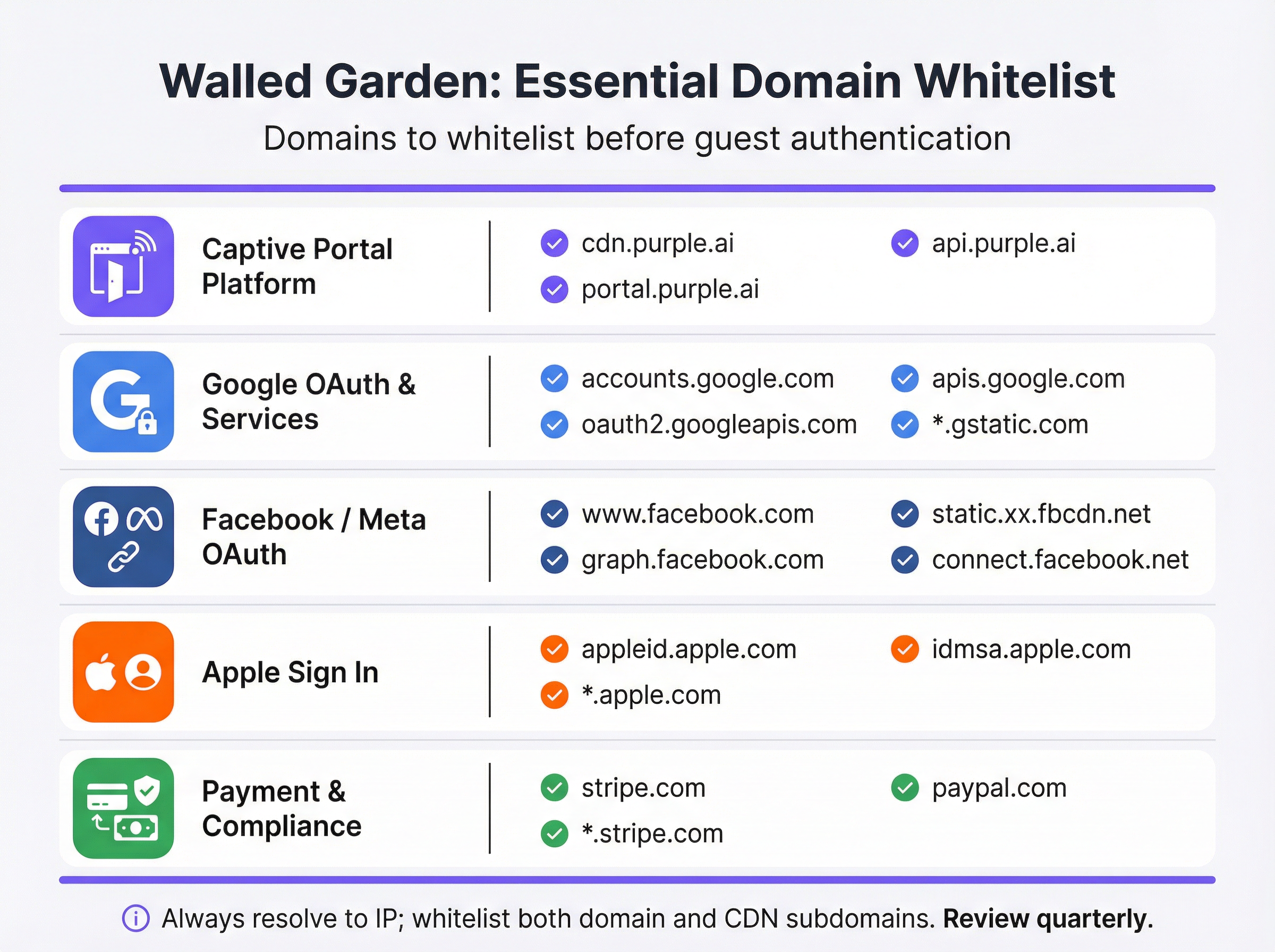
在修改控制器設定之前,請對 Captive Portal 所依賴的每個外部服務進行徹底稽核。最好的做法是在開啟開發者工具的瀏覽器中載入入口網站,並檢查網路(Network)分頁以識別所有外部資源請求。產生的清單應分類如下:
| 類別 | 用途 | 必要網域 |
|---|---|---|
| Captive Portal 平台 | 提供歡迎頁面(Splash Page)資產並處理驗證邏輯。 | *.purple.ai, cdn.your-vendor.com |
| Google OAuth | 啟用 Google 登入。 | accounts.google.com, oauth2.googleapis.com, apis.google.com, *.gstatic.com |
| Facebook / Meta OAuth | 啟用 Facebook 登入。 | www.facebook.com, graph.facebook.com, connect.facebook.net, *.fbcdn.net |
| Apple Sign In | 啟用 Apple 登入。 | appleid.apple.com, idmsa.apple.com, *.apple.com |
| 作業系統 Captive Portal 探測 | 啟用自動入口網站偵測。 | captive.apple.com, connectivitycheck.gstatic.com, www.msftconnecttest.com |
| 金流閘道 | 處理進階方案的付款。 | *.stripe.com, *.paypal.com |
| 分析 / 行銷 | 載入追蹤與分析指令碼。 | 廠商專用(例如 *.segment.com、*.mixpanel.com) |
步驟 2:控制器設定
實作方式因廠商而異,但基本原理是通用的。導覽至網路控制器管理介面中的 Captive Portal 或歡迎頁面設定——在 Cisco Meraki 中,這位於 Wireless > Configure > Splash Page;在 Aruba Central 中,它是 Captive Portal Profile;在 Fortinet 中,它位於 Security Policies > Captive Portal。找到預先驗證存取或圍牆花園白名單區段,並按照以下步驟操作:
- 按類別輸入網域:系統化地新增稽核中的每個網域,逐一處理每個類別。在控制器支援且風險設定檔可接受的情況下,使用萬用字元(
*.gstatic.com)。對於高安全性環境,建議使用明確的子網域,而非廣泛的萬用字元。 - 啟用動態 DNS 解析:確認您的控制器已設定為定期重新解析白名單網域,而非快取靜態 IP 清單。請參閱廠商的文件以確認此功能已啟用。將圍牆花園項目的 DNS TTL 設定為 60 秒或更低。
- 設定雙疊合(Dual-Stack)規則:如果您的網路支援 IPv6(鑑於 IPv4 位址空間枯竭,理應支援),請確保您的圍牆花園 ACL 同時套用於 IPv4 和 IPv6 流量。擁有 IPv6 位址的訪客裝置將會繞過僅限 IPv4 的 ACL。
- 套用至訪客 SSID:僅將 Captive Portal 設定檔及其圍牆花園與訪客 SSID 關聯。切勿將訪客層級的圍牆花園原則套用至企業 SSID。

步驟 3:上線前測試協定
測試是不可或缺的,且必須在真實的預先驗證狀態下使用實際裝置進行——不能使用可能具有更高權限的管理員帳戶,也不能使用先前已連線至網路且可能已快取憑證的裝置。
針對每個裝置平台(iOS、Android、Windows、macOS),執行以下操作:
- 清除網路紀錄在測試裝置上,以確保沒有快取狀態。
- 連線至訪客 SSID並觀察 Captive Portal 是否透過 CNA 機制自動啟動。
- A嘗試 Portal 提供的每一種登入方式**——電子郵件註冊、Google Sign-In、Facebook Login、Apple Sign In——並確認每種方式皆能成功完成。
- 測試付款流程(若有提供付費方案),使用來自您付款閘道沙盒環境的測試卡號。
- 檢查瀏覽器主控台(針對任何失敗的測試)。網路(Network)分頁將識別出被阻擋的確切網域,讓您能精準地將其加入白名單。
將此測試協定的結果記錄在保留用於合規目的之設定紀錄中。
最佳做法
最小權限原則是圍牆花園(walled garden)設定的基本規則。僅將經證實為驗證流程運作所必需的網域加入白名單。除非您的控制器實作需要,否則請避免使用廣泛的萬用字元(例如 *.google.com 或 *.facebook.com);建議優先選擇特定的子網域。在預先驗證區域中,每個額外加入白名單的網域都代表一個潛在的受攻擊面。
每季審查頻率對於長期維持圍牆花園的正常運作至關重要。社群登入提供商和 CDN 會定期更新其基礎架構。Apple 在 2023 年修改了其 Sign In 的網域結構。Google 也多次在其 OAuth 流程中新增了子網域。若無積極維護,部署時準確的圍牆花園將在幾個月內偏離配置。請將每季審查納入您的營運行事曆中,並對照各提供商的最新文件交叉比對您的白名單。
合規性一致要求您的圍牆花園設定不會在無意中違反適用標準的要求。在 PCI DSS v4.0 規範下,任何處理、儲存或傳輸持卡人資料的網路都必須維持嚴格的存取控制。如果您的訪客 WiFi 包含付費方案,圍牆花園必須允許與您的付款處理商建立 TLS 1.2 或更高版本的連線,且不得進行攔截。在 GDPR 規範下,訪客在提供任何個人資料之前,必須能夠存取隱私權聲明——這意味著即使在驗證之前,訪客也必須能夠從圍牆花園內連結到您的隱私權政策。
變更管理文件是任何生產網路變更的專業義務。對圍牆花園的每一次修改——無論是新增網域、移除已廢棄的網域,還是更新萬用字元——都應記錄時間戳記、變更原因以及負責的工程師。此稽核軌跡對於排查間歇性故障以及在合規性稽核中證明盡職調查(due diligence)非常有價值。
疑難排解與風險緩釋
下表將最常見的失敗模式對應至其根本原因與建議的緩釋措施:
| 症狀 | 根本原因 | 緩釋措施 |
|---|---|---|
| Portal 在 iOS/Android 上無法自動啟動 | 作業系統的 Captive Portal 探測網域被阻擋。 | 將 captive.apple.com 和 connectivitycheck.gstatic.com 新增至圍牆花園。 |
| Google Sign-In 按鈕無回應 | 缺少一個或多個 Google OAuth 或 CDN 網域。 | 新增 accounts.google.com、oauth2.googleapis.com、apis.google.com 和 *.gstatic.com。 |
| Facebook 登入失敗並顯示 CORS 錯誤 | Facebook CDN 子網域(*.fbcdn.net)未加入白名單。 |
新增 *.fbcdn.net 和 *.facebook.com 的萬用字元項目。 |
| 起初可以登入,但隨後出現間歇性失敗 | 靜態 IP 白名單;CDN IP 位址已輪替。 | 在控制器上啟用動態 DNS 解析。 |
| 訪客看到 TLS 憑證警告 | 控制器正在攔截前往非白名單網域的 HTTPS 流量。 | 將所有必要的網域加入白名單,以便 HTTPS 無中斷地通過。 |
| 付款頁面無法載入 | 付款閘道 CDN 或 API 網域未加入白名單。 | 視需要新增 *.stripe.com 或 *.paypal.com。 |
| IPv6 使用者無法存取 Portal | 圍牆花園 ACL 僅限 IPv4。 | 擴充所有圍牆花園規則以涵蓋 IPv6 位址範圍。 |
風險緩釋:過度加入白名單是一個真實且常被低估的風險。當發生間歇性故障時,人們往往會傾向於逐步新增更廣泛的萬用字元項目,直到問題消失。這種方法可能會導致圍牆花園實際上處於開放狀態,允許未經驗證的訪客在未完成登入流程的情況下存取大部分的網際網路。這違背了 Captive Portal 的目的,損害了用於行銷目的之資料收集,且如果訪客在未同意條款和條件的情況下即可存取網路,則可能會產生 GDPR 規範下的法律責任。在新增項目之前,請務必先診斷被阻擋的特定網域。
ROI 與商業影響
正確實作的圍牆花園可在多個維度上帶來可衡量的商業價值。在旅宿業中,無縫的訪客 WiFi 登入體驗與訪客滿意度評分直接相關。J.D. Power 的研究一致指出,WiFi 效能是飯店訪客滿意度的主要驅動因素之一。若 Portal 因圍牆花園設定錯誤而無法載入,將會留下負面的第一印象,進而影響整個住宿體驗。
對於零售營運商而言,圍牆花園是通往會員計劃的入口。每位透過 Captive Portal 成功登入的訪客都會提供一個已驗證的身份,該身份可與購買行為連結,從而實現個人化行銷活動,其轉換率明顯高於匿名廣告。設定錯誤的圍牆花園若阻礙了登入,將直接減少所收集的第一方數據量,對行銷 ROI 產生可量化的影響。
在活動領域(體育場、會議中心、展覽館),圍牆花園的設計必須考慮到規模。在尖峰負載時,成千上萬的裝置將嘗試同時進行驗證。若圍牆花園依賴於 sl慢速或超載的 DNS 解析程式將會造成瓶頸,導致入口網站反應遲緩或無回應,即使底層網路基礎架構的配置大小正確也是如此。部署針對圍牆花園(walled garden)網域具有授權(authoritative)的本機快取 DNS 解析程式,是高密度部署的標準做法。
對於公共部門組織而言,圍牆花園也是一種合規工具。在英國《網路與資訊系統(NIS)條例》以及更廣泛的 GDPR 框架下,組織必須證明對面向公眾之網路的存取是受到控制且可稽核的。配置妥當的圍牆花園結合符合規範的 Captive Portal,能為此稽核軌跡提供技術基礎。
未能正確設定圍牆花園的代價不僅僅是技術層面的。它體現在服務台通話量、顧客滿意度評分、流失的行銷資料以及潛在的法規風險中。相對於這些風險,配置與維護健全圍牆花園的投資微不足道,而其回報(表現為更高的入口網站採用率、更豐富的第一方資料以及減少的營運摩擦)則是可衡量且顯著的。
關鍵定義
Walled Garden
A controlled set of pre-approved domains and IP address ranges that a guest device can access on a WiFi network before completing authentication. All traffic to domains outside this list is blocked or redirected to the captive portal.
This is the foundational mechanism that allows a captive portal to function. Without it, the portal itself — and all social login providers it depends on — would be unreachable by unauthenticated devices.
Captive Portal
A web page that intercepts the internet traffic of a newly connected WiFi user and requires them to complete an action — such as logging in, accepting terms, or making a payment — before granting full network access.
The captive portal is the primary point of interaction for guests. It is the mechanism through which operators collect first-party data, enforce terms of service, and manage paid access tiers.
OAuth 2.0
An open authorisation standard that allows users to grant a third-party application limited access to their account on another service, without sharing their password. It is the protocol underpinning 'Login with Google' and 'Login with Facebook'.
Every social login option on a captive portal relies on OAuth 2.0. Each provider's OAuth endpoints must be whitelisted in the walled garden for the login flow to complete successfully.
Dynamic DNS Resolution
A network controller feature that periodically re-resolves whitelisted domain names to their current IP addresses and updates the enforcement ACLs accordingly, rather than using a static IP list.
This is essential for walled garden reliability. Without it, the IP addresses cached at deployment time will become stale as CDNs rotate their infrastructure, causing intermittent and hard-to-diagnose login failures.
Content Delivery Network (CDN)
A geographically distributed network of servers that delivers web content to users from the nearest available location, improving performance and availability.
Captive portals and social login providers rely on CDNs to serve scripts, fonts, and images. CDN subdomains (e.g., *.gstatic.com for Google, *.fbcdn.net for Facebook) must be included in the walled garden.
Captive Network Assistant (CNA)
A built-in feature of modern operating systems (iOS, Android, Windows, macOS) that automatically detects the presence of a captive portal by probing a known HTTP endpoint after connecting to a new WiFi network.
The CNA is what causes the portal login window to pop up automatically on a guest's device. If the probe domain is blocked by the walled garden, the CNA cannot detect the portal and the guest sees no login prompt.
Pre-Authentication ACL
An Access Control List applied to a network session before the user has authenticated. It defines which traffic is permitted (the walled garden) and which is blocked or redirected.
This is the technical implementation of the walled garden on enterprise network controllers. IT teams configure Pre-Authentication ACLs in the captive portal settings of their wireless controllers.
PCI DSS
The Payment Card Industry Data Security Standard is a set of security standards designed to ensure that all companies that accept, process, store, or transmit credit card information maintain a secure environment.
Relevant to any guest WiFi deployment with a paid access tier. The walled garden must permit TLS 1.2+ connections to the payment gateway without interception, and the guest network must be segmented from any cardholder data environment.
HTTP Strict Transport Security (HSTS)
A web security policy mechanism that instructs browsers to only interact with a server using HTTPS, preventing protocol downgrade attacks and cookie hijacking.
HSTS causes HTTPS interception by a captive portal controller to fail outright for major domains, as the browser refuses to accept a certificate it does not trust. This reinforces the case for a correctly configured walled garden over an HTTPS interception approach.
範例
A 500-room luxury hotel is deploying a new guest WiFi network using Cisco Meraki hardware and the Purple platform. They need to support Google and Facebook logins, and offer a paid premium-speed tier via Stripe. What is the minimum set of domains that must be whitelisted in the Meraki walled garden, and how should they be configured?
The following domains must be entered into the Meraki dashboard under Wireless > Configure > Splash Page > Walled Garden Ranges:
- Purple Platform: *.purple.ai (covers cdn, portal, and api subdomains)
- Google OAuth: accounts.google.com, oauth2.googleapis.com, apis.google.com, *.gstatic.com
- Facebook OAuth: www.facebook.com , graph.facebook.com, connect.facebook.net, *.fbcdn.net
- Stripe Payments: *.stripe.com
- OS Probes: captive.apple.com, connectivitycheck.gstatic.com, www.msftconnecttest.com
Cisco Meraki performs dynamic DNS resolution natively for walled garden entries, so no additional configuration is required for IP resolution. The hotel should also ensure their privacy policy URL is accessible from within the walled garden to comply with GDPR. Post-deployment, the IT team should test with a factory-reset iOS device and a factory-reset Android device to verify the full login flow for both social login methods.
A national retail chain with 200 stores is experiencing intermittent Google login failures on their guest WiFi. The failures are random — some stores are unaffected, others see failures on certain days or at certain times. The network uses Fortinet FortiGate controllers. What is the most likely root cause and how would you resolve it?
The most likely root cause is that the FortiGate walled garden is using a static IP list for Google's OAuth domains, and Google's CDN has rotated its IP addresses at some locations. The intermittent, location-specific nature of the failures is a classic indicator of CDN IP rotation — some stores' cached IP lists are still valid, others have become stale.
Resolution steps:
- Log into the FortiGate management console at an affected store and navigate to the captive portal walled garden configuration.
- Verify whether the Google OAuth domains are configured as domain names or as static IP addresses.
- If static IPs are present, replace them with domain-based entries: accounts.google.com, oauth2.googleapis.com, apis.google.com, *.gstatic.com.
- Enable the FortiGate's FQDN-based address objects with a short refresh interval (recommended: 60 seconds) to ensure dynamic DNS resolution is active.
- Roll this configuration change out to all 200 stores via FortiManager to ensure consistency.
- Monitor the affected stores for 48 hours post-change to confirm resolution.
練習題
Q1. You are designing the guest WiFi for a new international airport terminal. The requirements include login via Google, Apple, and WeChat, plus a premium access tier sold via PayPal. What unique challenges does this scenario present for your walled garden configuration, and how would you address them?
提示:Consider the geographical and application-specific nature of WeChat's login flow, and the implications of a globally diverse user base for CDN IP resolution.
查看標準答案
Three unique challenges arise. First, WeChat login: unlike standard web-based OAuth, WeChat's login flow on mobile devices often attempts to open the native WeChat app via a deep link rather than completing the flow in a web browser. This can break the captive portal flow entirely. The solution is to configure the portal to force a web-based QR code flow and whitelist the specific Tencent domains that serve the QR code and handle the authentication handshake (e.g., open.weixin.qq.com, wx.qq.com). Second, global CDN resolution: an international airport serves users from every region. Dynamic DNS resolution is critical, as Google, Apple, and PayPal serve their content from geographically distributed CDN nodes. The controller must re-resolve walled garden domains frequently to ensure the correct regional IP addresses are whitelisted. Third, PayPal localisation: PayPal uses country-specific domains and CDNs for localised payment experiences. In addition to *.paypal.com, you may need to whitelist *.paypalobjects.com and regional variants. A thorough audit of the PayPal checkout flow from multiple device locales is recommended before go-live.
Q2. A 60,000-seat stadium is experiencing widespread portal login failures during the first 15 minutes of every event, after which performance normalises. The infrastructure is correctly sized for the user load. What is the likely bottleneck and how would you resolve it?
提示:Think about what happens when 60,000 devices all attempt to connect and resolve the same domains simultaneously.
查看標準答案
The bottleneck is almost certainly DNS resolution. When 60,000 devices connect simultaneously, they all attempt to resolve the same walled garden domains (portal CDN, Google OAuth, Apple Sign In, etc.) at the same time. If the upstream DNS resolver — typically the ISP's recursive resolver or a cloud DNS service — cannot handle this burst of queries, resolution latency spikes, causing the portal to appear slow or unresponsive even though the network itself is performing correctly. The performance normalises after the initial rush because the resolver's cache warms up and subsequent queries are served from cache. The solution is to deploy a local, caching DNS resolver (e.g., Unbound or a dedicated appliance) within the stadium's network infrastructure. This resolver should be pre-seeded with the walled garden domains before the event begins, so that all DNS queries for those domains are answered from local cache with sub-millisecond latency. The controller's DHCP configuration should point guest devices to this local resolver.
Q3. Your company is acquiring a chain of boutique hotels that uses a competitor's captive portal platform. You are tasked with migrating them to Purple. The existing IT team has no documentation of their current walled garden configuration. How would you approach the migration to ensure no guest-facing disruption?
提示:Before you build the new, you must understand the old. Consider both technical discovery and business requirements.
查看標準答案
The migration should proceed in four stages. Stage 1 — Discovery: Connect a laptop to the existing guest WiFi in an unauthenticated state and use a packet capture tool (Wireshark) to record all DNS queries and HTTP/HTTPS requests made during the authentication flow. This produces a definitive list of every domain the existing portal depends on, regardless of what is or is not documented. Stage 2 — Categorisation: Map the discovered domains to the standard categories (portal platform, OAuth, CDN, OS probes, payments). Identify any non-standard domains — these may indicate custom integrations (e.g., a loyalty programme API, a local marketing platform) that must be preserved in the new configuration. Stage 3 — Parallel Deployment: Configure the Purple platform with the discovered domain list and deploy it on a test SSID alongside the existing portal. Run the full test protocol on both SSIDs simultaneously to validate that the Purple configuration is functionally equivalent. Stage 4 — Cutover: Once validated, migrate the production SSID to Purple during a low-traffic period (e.g., 3am on a weeknight). Monitor portal adoption rates and helpdesk tickets for the following 48 hours to confirm a clean cutover.
繼續閱讀本系列
員工 WiFi Captive Portal:員工入網與驗證
針對 IT 主管設計與部署員工 WiFi Captive Portal 的全面技術參考指南。本指南涵蓋 EAP-TLS 驗證、BYOD 入網、VLAN 區隔及頻寬管理,旨在提升營運效率並降低安全風險。
Purple 與 Cisco Spaces (DNA Spaces) 比較:何時選擇何者
本技術參考指南針對企業 captive portal 和訪客 WiFi 部署,提供了 Purple 與 Cisco Spaces(前身為 DNA Spaces)的全面比較。它評估了架構差異、行銷自動化深度以及關鍵的硬體供應商鎖定問題,以幫助 IT 領導者做出明智的基礎架構決策。
WiFi 訪客入口:它是什麼以及如何最佳化
本權威指南詳細說明了 WiFi 訪客入口的架構、實施和最佳化。它為 IT 領導者提供了可行的策略,以提高登入完成率、確保 GDPR 合規性,並擷取高品質的第一方數據。