
MikroTik RouterOS Captive Portal 與 Purple WiFi 整合指南
本技術指南提供將 MikroTik RouterOS 與 Purple 的 WiFi 平台整合的逐步說明。內容涵蓋訪客 WiFi Captive Portal 設定、員工 WiFi 802.1X 驗證,以及使用 Private PSK 進行動態 VLAN 切割的多租戶 WiFi。
收聽此指南
查看播客逐字稿

執行摘要
將 MikroTik RouterOS 與 Purple 整合,可在訪客、員工和多租戶環境中建立統一且以身分為導向的網路。本指南提供在 MikroTik 硬體上部署 Purple 雲端重疊網路所需的具體設定邏輯。您將學習如何設定 RouterOS Hotspot Gateway 以進行 Guest WiFi 重新導向、實作 IEEE 802.1X 以提供安全的 Staff WiFi,以及部署 Private Pre-Shared Keys (PPSK) 來隔離 Multi-Tenant WiFi 流量。
透過遵循這些部署模式,您可以在安全分割網路的同時,收集 WiFi 分析 的第一方數據。Purple 在 2024 年處理了 4.4 億次登入,可用性達 99.999%,使此架構非常適合 零售 、 餐旅 和 交通運輸 等高密度環境。
技術深入探討
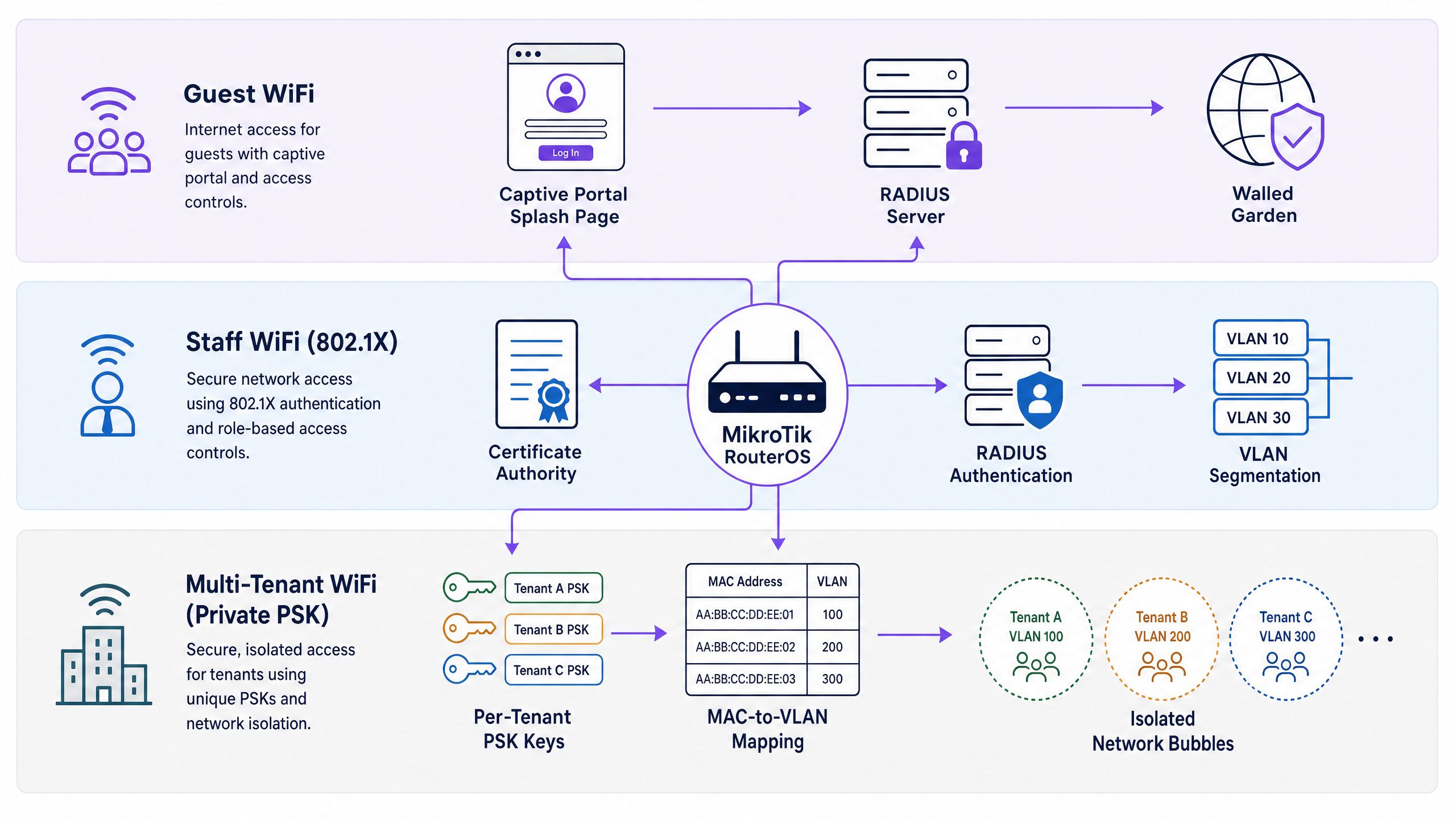
Guest WiFi:Captive Portal 與 Walled Garden
MikroTik Hotspot Gateway 會攔截未經驗證的 HTTP 流量,並將其重新導向至 Purple 託管的 Captive Portal。Purple 充當 RADIUS 伺服器,處理驗證和工作階段管理。
為確保 Captive Portal 正確載入,您必須設定 walled garden。這允許在驗證前存取 Purple 的歡迎頁面(splash page)網域、內容傳遞網路 (CDN) 和 OAuth 供應商(例如 Google Workspace 和 Microsoft Entra ID)。若沒有這些項目,重新導向迴圈將會中斷。
驗證成功後,Purple 的 RADIUS 伺服器會傳回標準屬性,包括用於強制執行連線限制的 Session-Timeout,以及可選擇用於直接從 Purple 儀表板強制執行頻寬限制的 Mikrotik-Rate-Limit。
Staff WiFi:802.1X 驗證
對於 Staff WiFi,您可透過部署 IEEE 802.1X 來消除共用密碼。MikroTik 存取點充當驗證器,將 EAP 憑證傳遞給 Purple 的 RADIUS 伺服器。Purple 與 Microsoft Entra ID、Okta 和 Google Workspace 原生整合,透過 PEAP-MSCHAPv2 或 EAP-TLS 驗證憑證。
當員工連線時,Purple 的 RADIUS 伺服器可以傳回 Mikrotik-Wireless-VLANID 屬性。這會指示 MikroTik 路由器將已驗證的裝置分配到特定的 VLAN,從而透過單一 SSID 實現基於角色的網路分割。如需更廣泛的安全標準概述,請參閱 企業 WiFi 安全:2026 年完整指南 。
Multi-Tenant WiFi:Private PSK (PPSK)
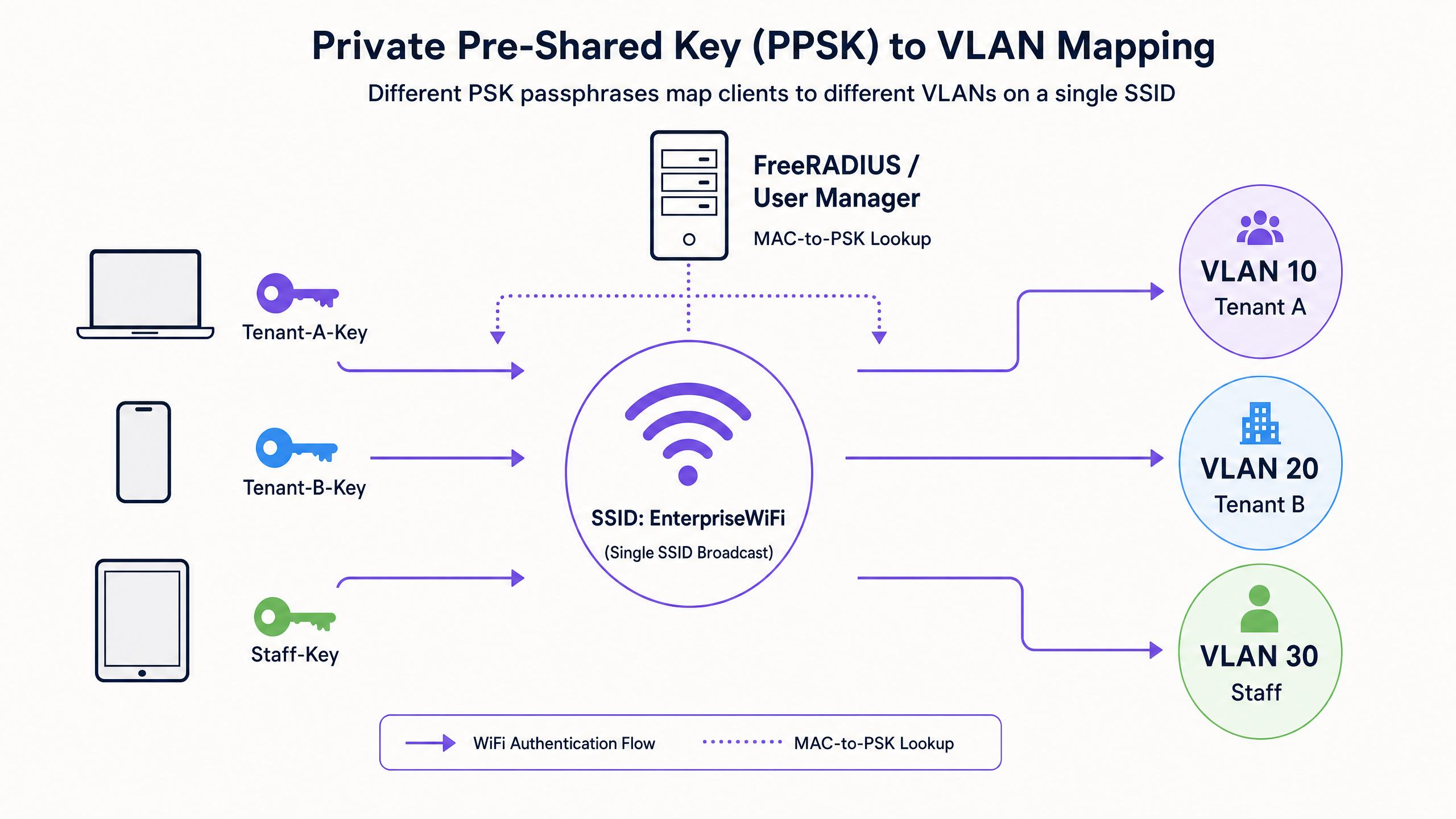
多租戶環境需要安全隔離,而無需 802.1X 的複雜性,因為許多消費級裝置(例如智慧電視和遊戲主機)並不支援它。MikroTik 透過基於 MAC 的 RADIUS 驗證支援 Private PSK (PPSK)。
當裝置連線到 SSID 時,MikroTik 路由器會將裝置的 MAC 位址傳送給 Purple。Purple 會傳回 Mikrotik-Wireless-Psk 屬性(該租戶的唯一密碼金鑰)和 Mikrotik-Wireless-VLANID 屬性。此架構允許數百個租戶共用單一 SSID,同時保持在完全隔離的網路泡泡中。
實作指南
1. 設定 RADIUS 用戶端
首先,在 RouterOS 中將 Purple 定義為 RADIUS 伺服器。這適用於所有三種使用案例。
/radius
add address=YOUR-PURPLE-RADIUS-IP secret=YOUR-SHARED-SECRET service=hotspot,wireless authentication-port=1812 accounting-port=1813 timeout=3000ms
2. Guest WiFi Hotspot 設定
在您的訪客 VLAN 介面上執行 Hotspot 設定精靈,然後在產生的設定檔中啟用 RADIUS 驗證。
/ip hotspot profile
set [ find default=yes ] use-radius=yes radius-accounting=yes
設定 walled garden 以允許存取 Purple 的基礎設施。
/ip hotspot walled-garden
add action=allow dst-host=*purple.ai
add action=allow dst-host=*purpleportal.net
3. Staff WiFi 802.1X 設定
將無線安全性設定檔設定為使用 WPA2-Enterprise,並將其指向 RADIUS 伺服器。
/interface wireless security-profiles
add authentication-types=wpa2-eap eap-methods=passthrough mode=dynamic-keys name=staff-8021x radius-mac-authentication=no
確保已啟用橋接 VLAN 篩選,以支援動態 VLAN 分配。
/interface bridge
set bridge1 vlan-filtering=yes
4. Multi-Tenant PPSK 設定
對於 PPSK,請在無線安全性設定檔上啟用 MAC 驗證,並設定 MAC 位址格式。
/interface wireless security-profiles
add authentication-types=wpa2-psk mode=dynamic-keys name=multi-tenant-ppsk radius-mac-authentication=yes radius-mac-format=XX:XX:XX:XX:XX:XX
最佳實踐
- 標準化使用 RouterOS 7:與 RouterOS 6 相比,透過無線 RADIUS 進行的動態 VLAN 分配在 RouterOS 7 中要穩定得多。
- 增加 RADIUS 逾時時間:預設的 MikroTik RADIUS 逾時時間為 1100ms。將此值增加到 3000ms,以防止因網路延遲引起的間歇性驗證失敗。
- 使用主機名稱 Walled Garden 項目:對於 walled garden 項目,請一律使用
dst-host代替dst-address,因為雲端基礎設施的 IP 位址會變經常變更。 - 啟用橋接 VLAN 過濾:透過 RADIUS (
Mikrotik-Wireless-VLANID) 進行的動態 VLAN 分配需要在橋接介面上設定vlan-filtering=yes。
疑難排解與風險緩釋
如果 Captive Portal 無法載入,幾乎可以肯定圍牆花園(walled garden)設定不完整。請使用 MikroTik Torch 工具監控訪客 VLAN 上未經身分驗證之用戶端被丟棄的 DNS 查詢。將缺失的網域新增至圍牆花園中。
如果 802.1X 用戶端無法通過驗證,請驗證共用金鑰,並確保 RADIUS 用戶端已配置 service=wireless。檢查 Purple 控制面板記錄,以確認 Access-Reject 是源自 Purple 還是您的身分識別提供者。
如果用戶端已通過驗證但取得錯誤的 IP 位址,請確認已啟用橋接 VLAN 過濾,且 DHCP 伺服器已正確繫結至動態分配的 VLAN 介面。
投資報酬率 (ROI) 與業務影響
在您的 MikroTik 基礎架構中部署 Purple,能將成本中心轉化為營收來源。透過收集第一方數據,場所可以建立詳細的數位輪廓並自動執行行銷活動。例如,Avanti West Coast 透過掌握回頭客與追加銷售機會,創造了 463% 的投資報酬率。
此外,身分導向的網路運作可降低 IT 開銷。透過 Entra ID 自動化 Staff WiFi 的入職與離職流程,可免除手動密碼管理的麻煩;而適用於 Multi-Tenant WiFi 的 PPSK 則能讓物業經理在無需為每個單元部署專用硬體的情況下,配置隔離的網路。
關鍵定義
Hotspot Gateway
A RouterOS feature that intercepts unauthenticated HTTP traffic and redirects it to a captive portal splash page.
Used to capture guest data and enforce terms of service before granting internet access.
Walled Garden
A list of allowed destinations that unauthenticated users can access.
Critical for allowing guests to reach the Purple splash page, CDNs, and OAuth providers (like Google) to complete the login process.
802.1X
An IEEE standard for port-based network access control that provides an authentication mechanism to devices wishing to attach to a LAN or WLAN.
Used for secure Staff WiFi, allowing authentication via Entra ID or Okta instead of a shared password.
Private PSK (PPSK)
A security architecture where multiple unique Pre-Shared Keys are used on a single SSID, often tied to specific MAC addresses and VLANs.
Ideal for Multi-Tenant WiFi, providing isolated network bubbles for residents and their consumer devices.
RADIUS
Remote Authentication Dial-In User Service. A networking protocol that provides centralised Authentication, Authorization, and Accounting (AAA) management.
The core protocol linking MikroTik hardware to Purple's cloud platform for identity validation.
VLAN Filtering
A RouterOS bridge setting that enforces VLAN tagging and untagging rules on bridge ports.
Must be enabled for dynamic VLAN assignment via RADIUS to function correctly.
CAPsMAN
Controlled Access Point system Manager. MikroTik's centralised wireless management system.
Used to deploy consistent wireless security profiles and RADIUS settings across multiple access points.
EAP-TLS
Extensible Authentication Protocol - Transport Layer Security. A highly secure authentication method requiring client-side certificates.
Supported by Purple for zero-trust Staff WiFi deployments where passwordless authentication is required.
範例
A 200-room hotel needs to deploy secure Staff WiFi across their MikroTik access points. They want finance staff on VLAN 10 and operations staff on VLAN 20, using their existing Microsoft Entra ID credentials.
- Integrate Purple with Microsoft Entra ID in the Purple dashboard.
- Configure the MikroTik RADIUS client to point to Purple with
service=wireless. - Create a MikroTik wireless security profile with
authentication-types=wpa2-eap. - Enable
vlan-filtering=yeson the MikroTik bridge. - In Purple, map the Entra ID 'Finance' group to return
Mikrotik-Wireless-VLANID=10and the 'Operations' group to returnMikrotik-Wireless-VLANID=20.
A build-to-rent property manager needs to provide isolated WiFi networks for 50 apartments using a single SSID broadcast from MikroTik CAPsMAN.
- Configure the MikroTik wireless security profile for the SSID with
authentication-types=wpa2-pskandradius-mac-authentication=yes. - Ensure the RADIUS client is configured with
service=wirelesspointing to Purple. - In the Purple dashboard, register the MAC addresses of the residents' devices.
- Assign a unique PSK and VLAN ID to each apartment in Purple.
- When a device connects, Purple returns the
Mikrotik-Wireless-PskandMikrotik-Wireless-VLANIDattributes, placing the device in its isolated network bubble.
練習題
Q1. You have configured the MikroTik Hotspot Gateway and pointed it to Purple's RADIUS server. Guests connect to the SSID, but their browsers display a timeout error instead of the Purple splash page. What is the most likely configuration error?
提示:Consider what must happen before the guest authenticates.
查看標準答案
The walled garden is misconfigured or missing entries. Without allowing access to Purple's splash page domains and associated CDNs in the /ip hotspot walled-garden, the unauthenticated guest cannot load the login page, resulting in a timeout.
Q2. A retail chain wants to deploy Staff WiFi using 802.1X and Entra ID. They configure `authentication-types=wpa2-eap` and set up the RADIUS client. However, authentication fails. You check the RADIUS client configuration and see `service=hotspot`. How do you resolve this?
提示:Different wireless authentication methods require different RADIUS service types in RouterOS.
查看標準答案
Change the RADIUS client configuration to include service=wireless. The hotspot service type is only used for captive portal authentication. 802.1X and MAC authentication require the wireless service type.
Q3. You are deploying Multi-Tenant WiFi using Private PSKs. Purple successfully returns the `Mikrotik-Wireless-Psk` and `Mikrotik-Wireless-VLANID` attributes, and the device connects. However, the device receives an IP address from the default management subnet, not the isolated tenant subnet. What RouterOS setting is missing?
提示:Dynamic VLAN assignment requires the bridge to process VLAN tags.
查看標準答案
Bridge VLAN filtering is disabled. You must set vlan-filtering=yes on the bridge interface. Without this, the bridge ignores the dynamic VLAN tag assigned by RADIUS, and the traffic falls back to the default untagged PVID.
繼續閱讀本系列
Alta Labs 與 Purple WiFi 整合:設定與 Captive Portal 配置
本技術參考指南涵蓋了 Alta Labs AP6 和 AP6 Pro 基地台與 Purple 雲端託管 Captive Portal 的端到端整合。本指南詳細介紹了外部重新導向配置、RADIUS 驗證、Walled Garden 需求,以及使用 AltaPass 私有預先共用金鑰(PPSK)的多租戶區隔。場地營運商和 IT 團隊將獲得一份適用於餐旅、零售和智慧辦公環境的可重複部署指南。
Arista Cognitive Wi-Fi 與 Purple WiFi 整合
本技術指南詳細介紹了 Arista Cognitive Wi-Fi (CV-CUE) 與適用於企業場域的 Purple 訪客 WiFi 平台的逐步整合過程。內容涵蓋 Arista Captive Portal 設定、Walled Garden ACL 設計、RADIUS 伺服器設定、安全的員工 802.1X 驗證,以及使用 Arista PPSK 搭配動態 VLAN 導向的多租戶 (Multi-Tenant) 隔離——為 IT 團隊和網路架構師提供決定性的部署藍圖。
WatchGuard Firebox 與 Purple WiFi 整合:設定與組態指南
本指南是為部署 WatchGuard Firebox 和 Access Points 與 Purple 整合的 IT 經理和網路架構師提供的逐步整合手冊。內容涵蓋 Guest WiFi 的外部 Captive Portal 重新導向、Staff WiFi 的安全 802.1X 驗證,以及使用 WatchGuard 私有預先共用金鑰 (PPSK) 搭配動態 VLAN 導向的多租戶區隔,為您在所有存取層級提供單一、整合的架構。