
Allied Telesis Access Points Integration with Purple WiFi
本指南提供將 Allied Telesis TQ 系列無線基地台與 Purple WiFi 整合的完整設定指南。內容涵蓋外部 Captive Portal 重新導向、802.1X RADIUS 驗證,以及使用私有預共用金鑰 (PPSK) 進行動態 VLAN 導向,以實現安全的多租戶部署。
收聽此指南
查看播客逐字稿
執行摘要
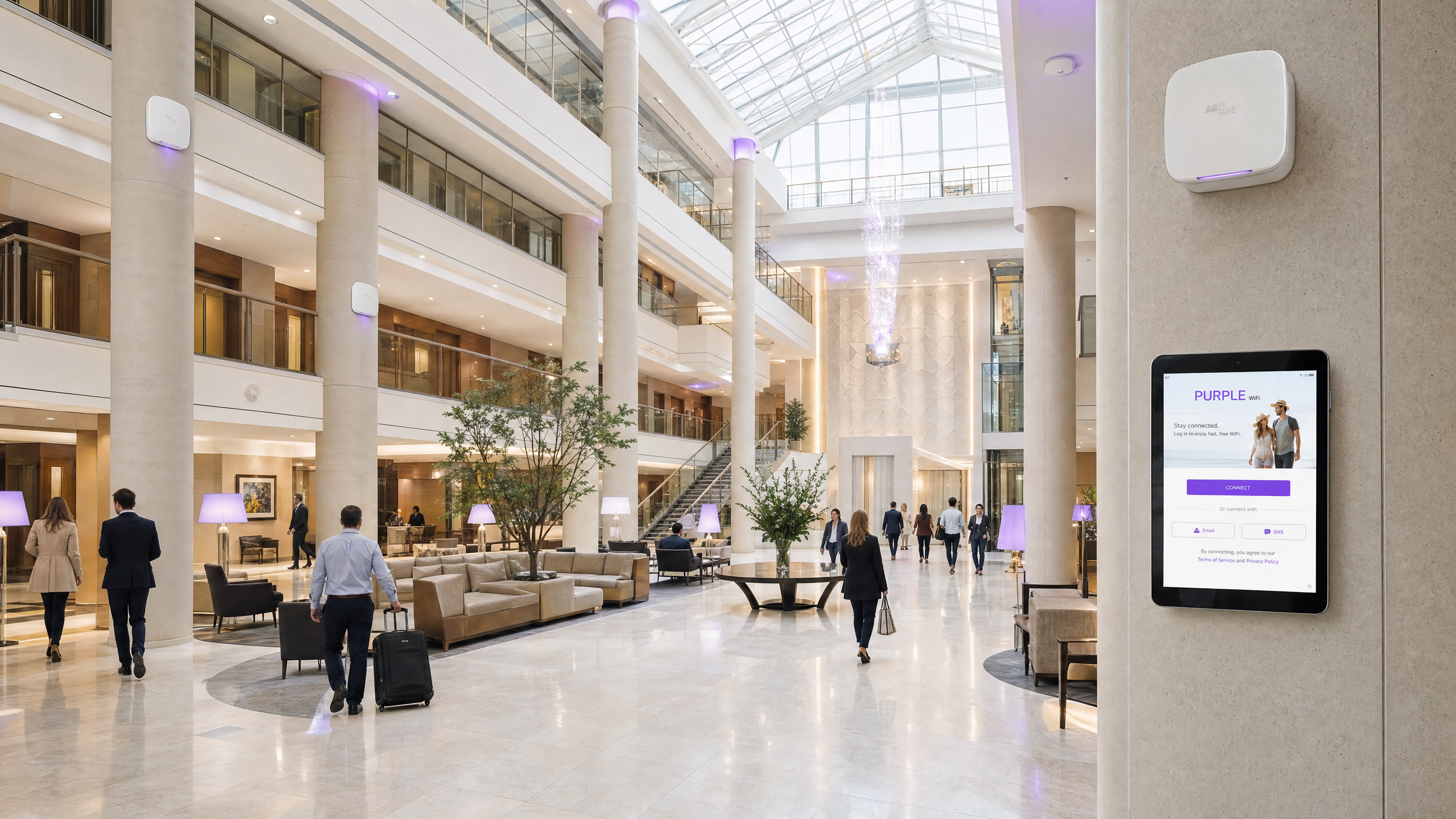
將 Allied Telesis TQ 系列無線基地台與 Purple 搭配部署,可提供具擴充性、安全且高度可設定的網路架構。本整合指南詳細說明了針對 Guest WiFi 的外部 Captive Portal 重新導向、針對 Staff WiFi 的 802.1X 驗證,以及針對多租戶網路隔離的私有預共用金鑰 (PPSK) 對應設定。透過將 Allied Telesis 硬體與 Purple RADIUS 即服務 (RADIUS as a Service) 結合,您可以集中管理身分識別,並免除對地端 RADIUS 伺服器的需求。本指南涵蓋了動態 VLAN 導向所需的特定 RADIUS 屬性、用於無縫提供歡迎頁面 (splash page) 的 Walled Garden 設定,以及在旅宿業、零售業和公共部門環境中擴充身分識別導向網路 (Identity-Based Networks) 的最佳實踐。
技術深度解析
Allied Telesis 無線基地台(例如 TQ6702 GEN2 和 TQ5403)運行 AlliedWare Plus 韌體。它們支援強大的企業級功能,包括 WPA3、Passpoint (Hotspot 2.0) 以及完整的 RADIUS 整合。與 Purple 整合時,無線基地台會作為網路存取伺服器 (NAS) 和 802.1X 驗證器,而 Purple 則作為雲端託管的 RADIUS 伺服器和 Captive Portal 提供者。
Guest Captive Portal 重新導向
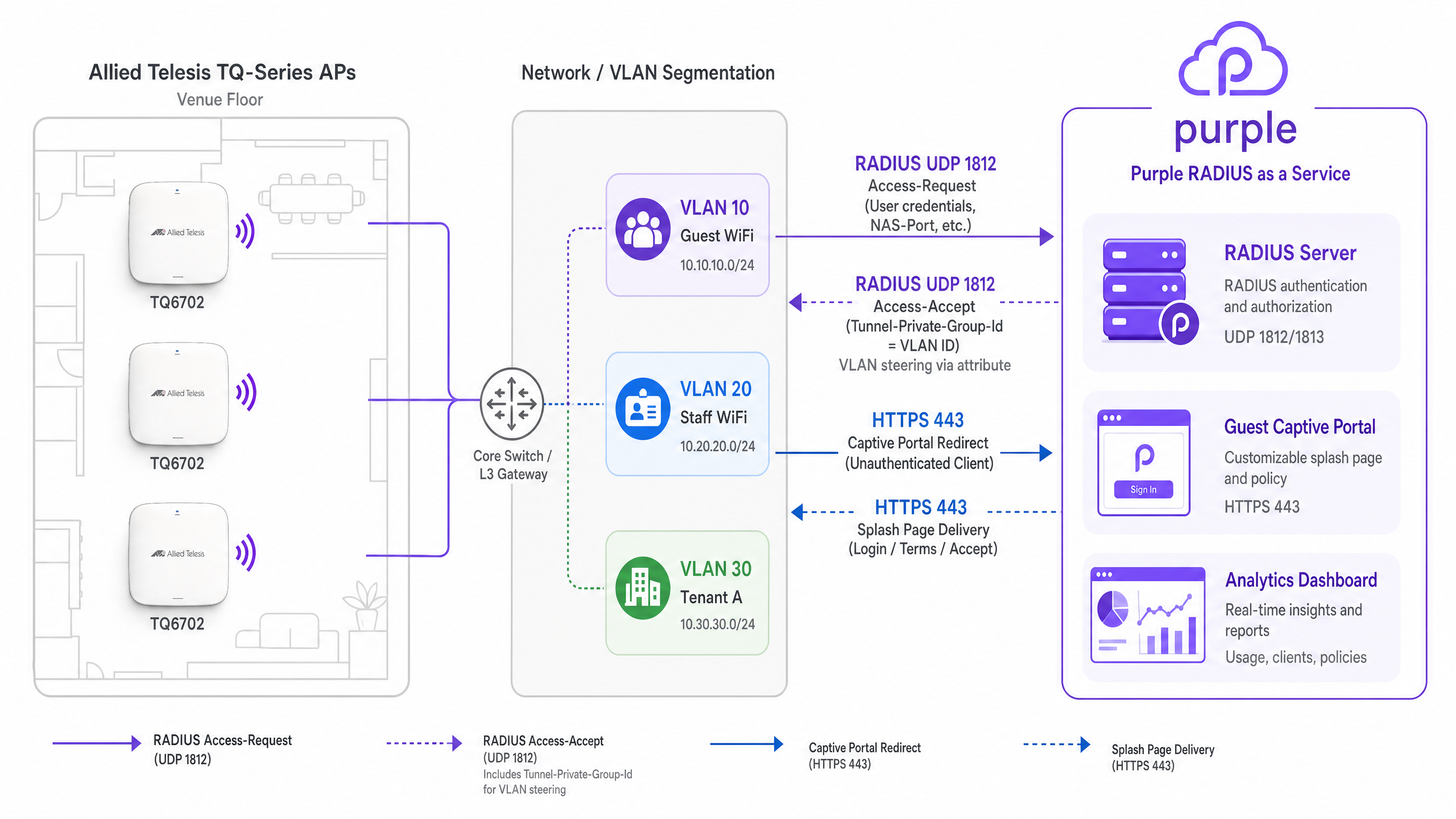
針對 Guest WiFi,無線基地台會攔截未經驗證的用戶端流量,並將 HTTP/HTTPS 請求重新導向至 Purple 歡迎頁面。這需要將 Captive Portal 模式設定為 External Page Redirect。
當訪客連線時,AP 會參考其 Walled Garden 設定。Walled Garden 必須將 Purple 的網域、CDN 端點以及任何已設定的社群登入提供者(例如 Google Workspace 或 Microsoft Entra ID)加入白名單。一旦訪客在歡迎頁面上完成驗證流程,Purple 的 RADIUS 伺服器就會向無線基地台傳送 RADIUS Access-Accept 訊息(UDP 連接埠 1812),隨後無線基地台便會授予完整的網路存取權限。
透過 RADIUS 進行動態 VLAN 導向
動態 VLAN 分配對於網路分割至關重要。使用 WPA Enterprise 設定 Staff WiFi 時,無線基地台會將 EAP 憑證轉發至 Purple 的 SecurePass RADIUS 服務。
驗證成功後,Purple RADIUS 伺服器會傳回一個 Access-Accept 封包,其中包含 RFC 3580 中定義的三個標準 IETF RADIUS 屬性:
Tunnel-Type(屬性 64):設定為VLAN(13)。Tunnel-Medium-Type(屬性 65):設定為IEEE-802(6)。Tunnel-Private-Group-Id(屬性 81):設定為分配的 VLAN ID(例如20)。
Allied Telesis AP 會讀取這些屬性,並將用戶端裝置動態分配到指定的 VLAN。注意: 必須在 Allied Telesis GUI 的 VAP 進階安全性 (Advanced Security) 設定中明確啟用動態 VLAN。
使用 PPSK 進行多租戶隔離
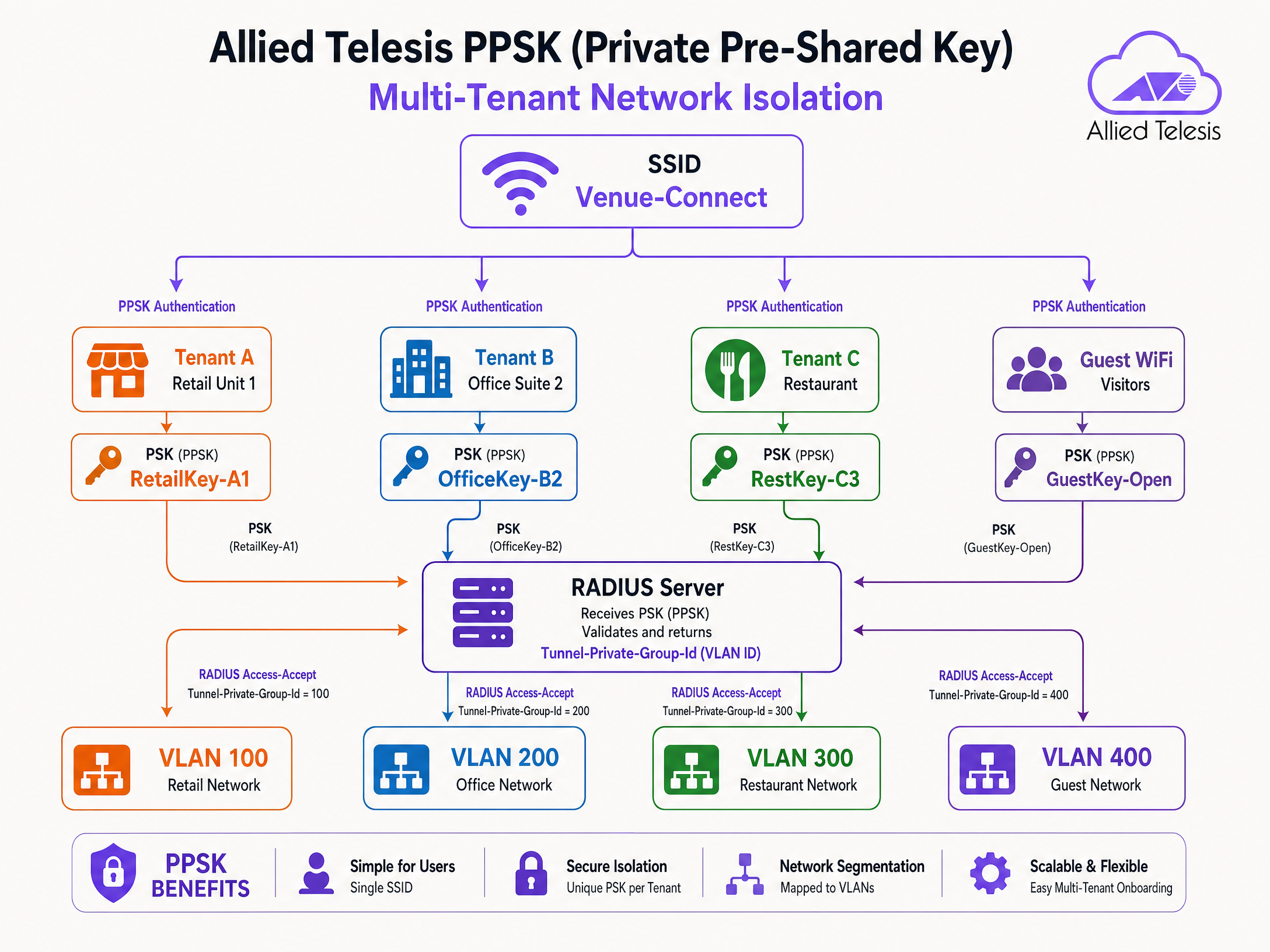
私有預共用金鑰 (PPSK) 允許您使用單一 SSID,同時為不同的使用者或租戶分配不同的密碼。這在多住戶單元 (MDU)、共同工作空間和零售園區中非常有效。
當裝置使用特定的 PPSK 進行關聯時,無線基地台會將密碼傳送至 Purple RADIUS 伺服器。Purple 會將該密碼對應到特定的租戶設定檔,並傳回 Tunnel-Private-Group-Id 屬性。這會將租戶的裝置導向至其專屬的 VLAN,在不廣播多個 SSID 的情況下確保 Layer 2 隔離。
實作指南
請按照以下步驟設定 Allied Telesis 無線基地台以進行 Purple 整合。
步驟 1:設定 RADIUS 伺服器設定檔
- 登入 Allied Telesis AP 裝置的 GUI。
- 導覽至 Network Services > RADIUS。
- 使用 Purple 儀表板中提供的 IP 地址新增一個外部 RADIUS 伺服器。
- 將驗證連接埠設定為
1812,計費連接埠設定為1813。 - 輸入 Purple 提供的確切共用金鑰 (Shared Secret)。
- 設定 NAS 識別碼 (NAS Identifier) 以符合 AP 的管理 IP 或主機名稱。
步驟 2:設定 Guest WiFi (Captive Portal)
- 導覽至 Wireless > Radio1(或 Radio2)。
- 針對目標 VAP(例如 VAP0)按一下 Edit。
- 設定 SSID 名稱(例如 "Guest WiFi")。
- 前往 Advanced Settings > Security 頁籤。
- 將 Captive Portal 設定為 External Page Redirect。
- 在 External Page URL 欄位中輸入 Purple 歡迎頁面的 URL。
- 在 Walled Garden 下,新增所需的 Purple 網域和社群登入 IP。
步驟 3:設定 Staff WiFi (802.1X 和動態 VLAN)
- 編輯另一個用於 Staff WiFi 的 VAP。
- 將安全性 (Security) 設定為 WPA Enterprise。
- 從 RADIUS Authentication Group 下拉式選單中選擇 Purple RADIUS 伺服器設定檔。
- 前往 Advanced Settings > Security。
- 啟用 Dynamic VLAN。
- 確保後端網路交換器已設定為將動態分配的 VLAN 幹線 (trunk) 連接至 AP 連接埠。
步驟 4:設定多租戶 PPSK
- 編輯預計用於多租戶的 VAP。
- 啟用 PPSK(通常根據韌體版本與 MAC 驗證或特定 WPA 設定結合使用)。
- 確保已選擇 RADIUS 伺服器設定檔。
- 在 Purple 儀表板中建立 PPSK 使用者記錄,將每個密碼對應到正確的 VLAN ID。
最佳實踐
- Walled Garden 維護:定期 審查並更新 Walled Garden 條目。社群登入提供商經常變更其 IP 範圍和 CDN 網域。
- 備援:請務必在 AP 的 RADIUS 群組中設定主要和次要的 Purple RADIUS 伺服器 IP 位址,以確保高可用性。
- 韌體更新:保持 AlliedWare Plus 韌體為最新版本。WPA3 CCMP 支援和進階 PPSK 功能需要 5.5.4-2.3 或更高版本。
- VLAN Trunking:驗證連接到無線基地台 (AP) 的交換器連接埠是否已設定為 802.1Q trunk,並允許所有可能由 RADIUS 伺服器動態分配的 VLAN。
疑難排解與風險降低
- 靜默驗證失敗:如果裝置無法連線至 802.1X 或 PPSK 網路,請驗證 RADIUS 共用金鑰 (shared secret)。不一致會導致 AP 靜默捨棄 Access-Reject 封包。
- Splash Page 無法載入:如果 Captive Portal 重新導向發生無限循環或無法載入資源,很可能是 Walled Garden 遺漏了必要的網域。請檢查瀏覽器的開發者主控台以識別被封鎖的要求。
- 用戶端被分配到錯誤的 VLAN:如果動態 VLAN 導向 (Dynamic VLAN steering) 失敗,請檢查 VAP 上是否已明確啟用動態 VLAN。使用封包擷取來驗證 Purple 是否有傳回
Tunnel-Private-Group-Id屬性。
投資報酬率 (ROI) 與業務影響
將 Allied Telesis 與 Purple 整合,能將基本的無線連線轉化為智慧型、數據驅動的平台。
對於 IT 團隊而言,透過 Purple RADIUS 即服務 (RADIUS as a Service) 進行集中式驗證,可免除在邊緣端管理地端 (on-premises) RADIUS 伺服器和 Active Directory 整合的日常開銷。使用 PPSK 可減少 SSID 開銷,進而提升射頻 (RF) 效能並簡化租戶上線流程。
對於場所營運而言,Captive Portal 可擷取經驗證的第一方數據,從而推動 CRM 成長並實現精準行銷。透過 Purple 平台收集的超過 290 億個數據點,場所營運商能獲得關於訪客行為、停留時間和空間利用率的具體洞察,直接支持其商業目標。
關鍵定義
PPSK (Private Pre-Shared Key)
A security mechanism where multiple unique passphrases can be used on a single SSID, with each passphrase mapped to specific network policies or VLANs.
Used in multi-tenant environments to provide secure, isolated network access without broadcasting multiple SSIDs.
Tunnel-Private-Group-Id
RADIUS Attribute 81, defined in RFC 2868, used to specify the VLAN ID that a user or device should be assigned to upon successful authentication.
Essential for dynamic VLAN steering in both 802.1X and PPSK deployments.
Walled Garden
A restricted network environment that allows unauthenticated users access to a specific whitelist of IP addresses or domains.
Required for captive portals to allow devices to load the splash page and authenticate via social login providers before gaining full internet access.
RADIUS as a Service
A cloud-hosted RADIUS infrastructure managed by a third party (like Purple), eliminating the need for on-premises authentication servers.
Simplifies 802.1X deployments for distributed venues by centralising identity management in the cloud.
Captive Portal
A web page that users are forced to view and interact with before access is granted to a public WiFi network.
Used to capture first-party data, enforce terms of service, and display venue branding.
VAP (Virtual Access Point)
A logical entity within a physical access point that broadcasts its own SSID and maintains its own security and policy configurations.
Allows a single Allied Telesis AP to simultaneously provide Guest WiFi, Staff WiFi, and IoT connectivity.
EAP-PEAP
Protected Extensible Authentication Protocol, a secure method for transmitting authentication credentials inside an encrypted TLS tunnel.
The most common authentication protocol used for Staff WiFi (802.1X) when verifying usernames and passwords against a directory.
Access-Accept
A standard RADIUS packet sent by the server to the authenticator (AP) indicating that authentication was successful.
Often includes additional attributes, such as VLAN assignments or bandwidth limits, to enforce network policy.
範例
A 250-room hotel needs to deploy a secure staff network and a branded guest network. The IT team wants to manage staff access via Microsoft Entra ID without deploying a local RADIUS server, while guests must accept terms and conditions via a captive portal.
Deploy Allied Telesis TQ6702 GEN2 APs. Configure VAP0 as an open network with Captive Portal set to 'External Page Redirect', pointing to the Purple splash page URL. Configure VAP1 with WPA Enterprise, pointing the RADIUS Authentication Group to Purple's SecurePass RADIUS servers. Integrate Purple SecurePass with Microsoft Entra ID in the cloud. Enable Dynamic VLAN on VAP1 so staff are automatically steered to the internal VLAN upon successful EAP authentication.
A retail park landlord wants to provide WiFi to 12 independent retail units using a single hardware deployment. Each unit requires its own secure, isolated network segment.
Configure a single SSID (e.g., 'Retail-Park-Secure') on the Allied Telesis APs. Enable PPSK (Private Pre-Shared Key) and point authentication to the Purple RADIUS server. In the Purple dashboard, generate a unique passphrase for each retail unit and map it to a specific VLAN ID (e.g., Unit 1 = VLAN 101, Unit 2 = VLAN 102). When a device connects, the AP sends the passphrase to Purple, which returns the Tunnel-Private-Group-Id attribute, steering the device to the correct tenant VLAN.
練習題
Q1. A venue reports that Android devices can connect to the Guest WiFi and see the splash page, but Apple iOS devices show a blank white screen. What is the most likely configuration issue?
提示:Consider how different operating systems detect captive portals and what domains they need to reach.
查看標準答案
The Walled Garden is likely missing the specific domains Apple uses for captive portal detection (e.g., captive.apple.com). If the AP blocks these domains before authentication, the iOS Captive Network Assistant cannot trigger the mini-browser correctly.
Q2. You have configured WPA Enterprise on the AP and pointed it to Purple's RADIUS server. The RADIUS logs show successful authentication (Access-Accept), but the client device does not receive an IP address on the expected VLAN. What are the two most likely causes?
提示:Check both the AP configuration and the physical switch port configuration.
查看標準答案
- 'Dynamic VLAN' is not enabled in the VAP Advanced Security settings on the Allied Telesis AP. 2. The switch port connecting the AP is not configured as an 802.1Q trunk, or the target VLAN is not allowed on the trunk, preventing DHCP traffic from reaching the client.
Q3. A retail park wants to deploy PPSK for 50 tenants. They ask if they should create 50 separate VAPs or use a single VAP. What is your recommendation and why?
提示:Consider the impact of management frames on wireless airtime.
查看標準答案
Recommend using a single VAP with PPSK. Broadcasting 50 separate SSIDs generates excessive beacon frames and management overhead, severely degrading RF performance and available airtime. A single SSID with PPSK provides the same Layer 2 isolation via dynamic VLAN assignment without the RF penalty.
繼續閱讀本系列
CommScope Ruckus 與 Purple WiFi 整合:安裝與設定指南
本技術參考指南為 CommScope Ruckus 架構與 Purple WiFi 的整合提供了權威的設定指南。其中詳細介紹了使用 Guest WiFi Captive Portal、透過 802.1X 的安全員工 WiFi,以及使用 Ruckus Dynamic PSK 的多租戶網路隔離的逐步部署步驟。
Grandstream GWN Access Points Integration with Purple WiFi
本權威技術參考指南詳細說明如何將 Grandstream GWN 基地台與 Purple 的 Guest WiFi 及分析平台進行整合。內容涵蓋 Grandstream Captive Portal 設定、RADIUS AAA 設定、Walled Garden(圍牆花園)設定、支援動態 VLAN 導向的安全員工 802.1X 驗證,以及多租戶 PPSK 分割,為大規模部署訪客與員工 WiFi 的 MSP 和 IT 團隊提供具體可行的逐步指引。
OpenWrt 客製化韌體與 Purple WiFi 整合
本指南提供部署 OpenWrt 客製化韌體與 Purple WiFi 整合的完整指南。內容涵蓋 CoovaChilli Captive Portal 設定、iptables 圍牆花園(walled garden)管理、使用 hostapd 的 802.1X 安全員工 WiFi,以及具備動態 VLAN 分配的多租戶 PPSK 區隔,為 IT 團隊提供在任何支援 OpenWrt 的硬體上建構身分辨識網路(Identity-Based Network)所需的確切設定步驟。