
NETGEAR Insight 與企業級無線基地台整合 Purple WiFi
本指南為 IT 經理提供將 NETGEAR Insight 和 WAX 企業級無線基地台與 Purple WiFi 整合的權威技術指南。內容涵蓋關鍵配置,包括訪客 Captive Portal、802.1X 員工網路,以及使用 PPSK 和動態 VLAN 分配的多租戶隔離。
收聽此指南
查看播客逐字稿
Executive Summary
Relying on pre-shared keys for enterprise WiFi access is a significant security liability. A single compromised credential exposes the entire network, and revoking access requires changing the password for every device. This guide provides IT managers and network architects with a definitive roadmap for integrating NETGEAR Insight and WAX series enterprise access points with Purple.
We detail four core deployment architectures: Guest WiFi with a captive portal, Secure Staff WiFi using 802.1X, Multi-Tenant segmentation via NETGEAR Private Pre-Shared Keys (PPSK), and Identity-Based Networks using dynamic VLAN assignment. Whether you operate Hospitality venues, Retail spaces, or public-sector environments, these configurations eliminate shared passwords, enforce strict network segmentation, and capture actionable WiFi Analytics .
Listen to our technical briefing podcast below for a comprehensive overview of the architecture and common deployment pitfalls.
Technical Deep-Dive
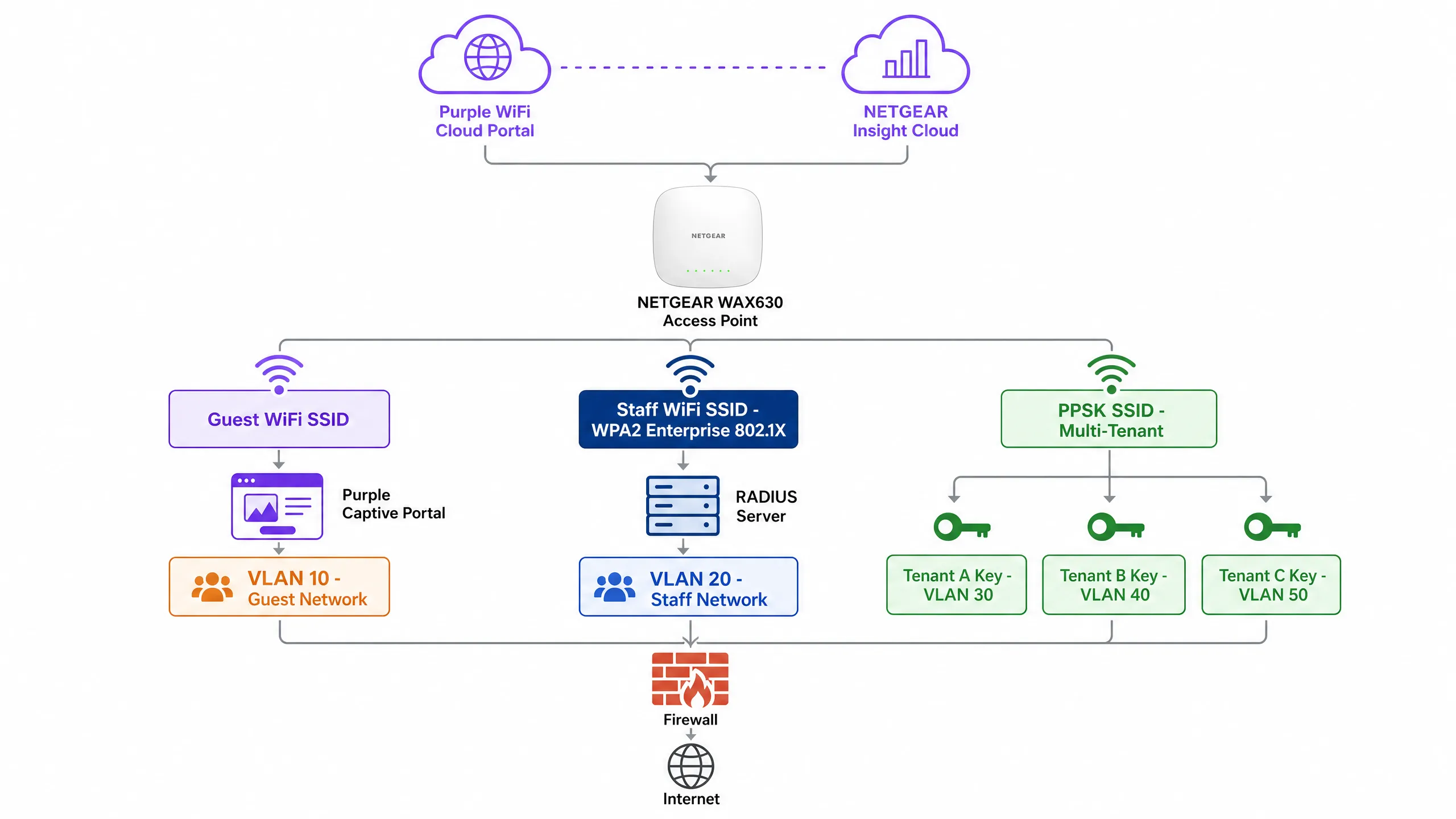
NETGEAR WAX series access points (WAX610, WAX620, WAX630) are cloud-managed WiFi 6 devices designed for high-density environments. Managed via the NETGEAR Insight portal, they support up to eight separate SSIDs per radio, WPA3 encryption, and multi-gigabit throughput. Purple acts as a hardware-agnostic cloud overlay, integrating with NETGEAR Insight to deliver enterprise-grade access control and data capture.
1. Guest WiFi with Captive Portal
For public-facing environments, you must deploy an External Captive Portal. This configuration intercepts guest HTTP requests and redirects them to a Purple-hosted splash page.
Architecture:
- Access Point: NETGEAR WAX access point broadcasts an open or WPA2 Personal Guest SSID.
- Walled Garden: NETGEAR Insight permits pre-authentication traffic to Purple's servers and social login providers.
- Authentication: Purple handles the user session via RADIUS or HTTP web authentication.
When a guest connects, they are presented with a branded portal. Upon accepting the terms and providing details, Purple's RADIUS server returns an Access-Accept message, granting internet access. This approach guarantees compliance with data privacy regulations like GDPR while capturing valuable first-party data.
2. Secure Staff WiFi (802.1X)
Pre-shared keys are unacceptable for staff networks. You must implement IEEE 802.1X authentication. In this model, every user has an individual credential. When an employee departs, you disable their directory account, and their access is revoked instantly.
In NETGEAR Insight, you configure a Staff SSID with WPA2 Enterprise or WPA3 Enterprise security. The access point acts as the authenticator, relaying Extensible Authentication Protocol (EAP) messages to the RADIUS server. The RADIUS server validates the credentials against your directory (e.g., Microsoft Entra ID or Okta) and returns the authorisation decision.
3. Multi-Tenant Segmentation (PPSK)
Mixed-use developments and retail parks face a specific challenge: multiple tenants sharing physical WiFi infrastructure. Deploying separate SSIDs for each tenant creates radio frequency congestion. Providing a single shared password compromises security.
NETGEAR Private Pre-Shared Key (PPSK) solves this. You broadcast a single SSID. In NETGEAR Insight, you generate unique passwords for each tenant. Crucially, each password maps to a specific VLAN.
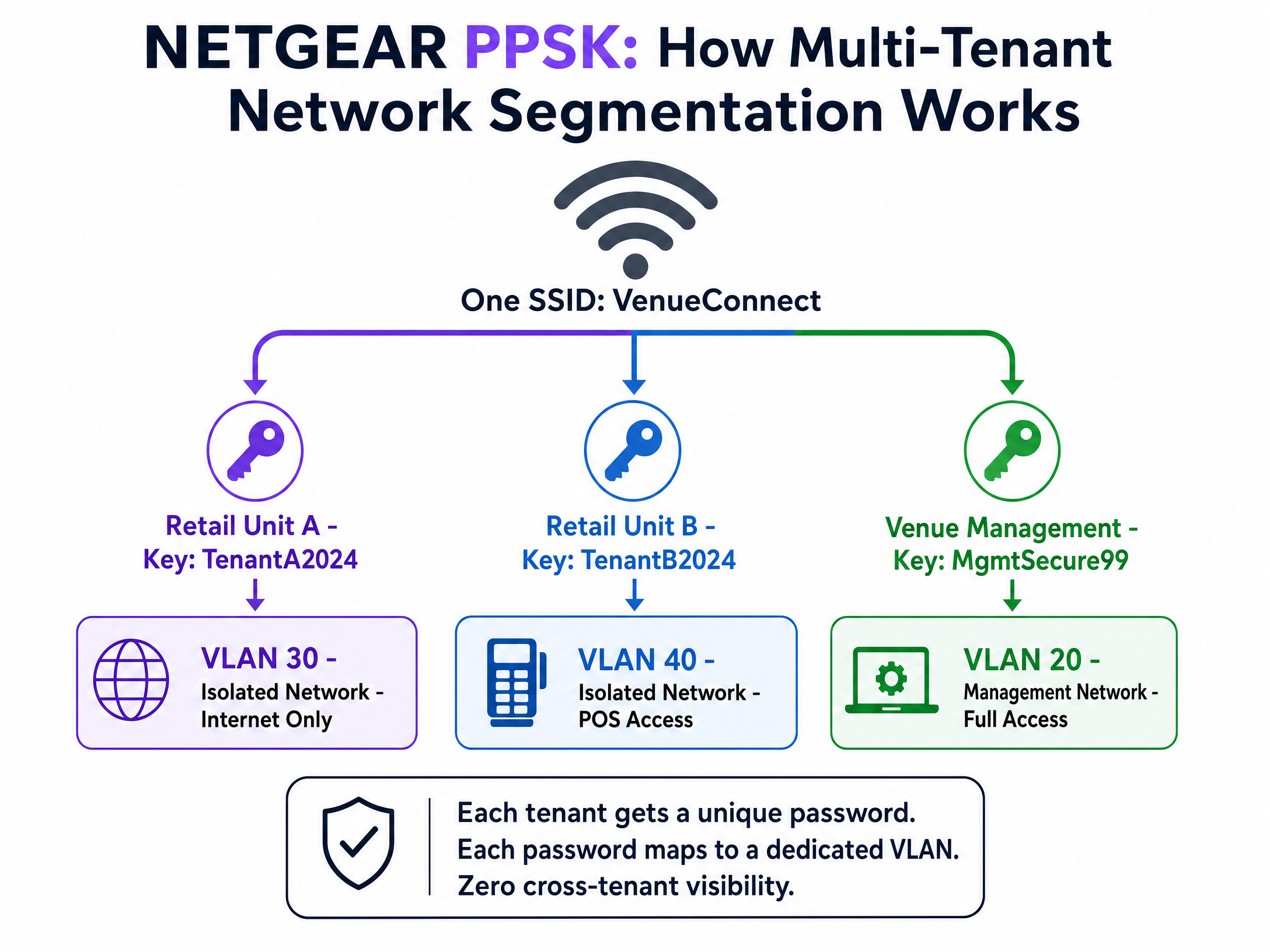
When a device connects using the retail unit's password, the access point places it on the isolated retail VLAN. When venue management connects using their password, they land on the management VLAN. You achieve complete traffic isolation with zero additional hardware. Note that PPSK requires WPA2 Personal and cannot be combined with a captive portal on the same SSID.
4. Dynamic VLAN Assignment via RADIUS
For sophisticated Identity-Based Networks, you must use dynamic VLAN assignment. Instead of statically assigning a VLAN to an SSID or a password, the RADIUS server dictates the VLAN based on the user's directory profile.
The RADIUS server returns three standard attributes in the Access-Accept message:
[64] Tunnel-Type = 13 (VLAN)[65] Tunnel-Medium-Type = 6 (802)[81] Tunnel-Private-Group-ID = [VLAN ID]
A single WPA2 Enterprise SSID can serve the entire organisation. A hotel manager authenticates and lands on VLAN 20. A front desk agent lands on VLAN 21. A contractor lands on VLAN 50. The network adapts to the identity of the user. For a broader look at securing your environment, review our Enterprise WiFi Security: A Complete Guide for 2026 .
Implementation Guide
Follow these steps to deploy NETGEAR Insight with Purple Guest WiFi .
Step 1: Configure the Guest SSID
- Log in to the NETGEAR Insight Cloud Portal.
- Select your network location and navigate to Wireless > Settings.
- Create a new SSID (e.g., "Venue Guest WiFi").
- Select Captive Portal and choose External Captive Portal.
Step 2: Configure the Captive Portal
- In the Splash Page URL field, enter the URL provided by Purple.
- Select the Radius radio button.
- Enter the Primary Authentication Server IP, port (1812), and shared secret provided by Purple.
- Enter the Primary Accounting Server IP, port (1813), and shared secret.
- Set a descriptive NAS-Identifier (e.g., "London-Retail-01").
Step 3: Configure the Walled Garden
This is the most critical step. If the walled garden is incorrect, guests will see a blank screen.
- Scroll to the Walled Garden section in the Captive Portal settings.
- Add every domain provided in Purple's integration documentation. This includes Purple's CDN domains, authentication servers, and any enabled social login providers (e.g., Facebook, Google).
- Click Save.
Step 4: Verify RADIUS Reachability
Ensure your firewall permits UDP ports 1812 and 1813 outbound from the access point management IP addresses to the Purple RADIUS servers.
Best Practices
- Enforce Certificate Validation: For 802.1X deployments, you must enforce strict certificate validation on all client devices via Group Policy Objects (GPO) or Mobile Device Management (MDM). If clients do not validate the RADIUS server certificate, they are vulnerable to rogue access point attacks.
- Isolate Management Traffic: Always place access point management IP addresses on a dedicated management VLAN, isolated from guest and staff traffic.
- Enable Failsafe: In the NETGEAR Insight Captive Portal settings, enable the FailSafe option. If the RADIUS servers become unreachable, guests are granted temporary internet access, preventing a total WiFi outage.
- Separate SSIDs for PPSK: Because NETGEAR Insight does not support PPSK and Captive Portal on the same SSID, you must create dedicated SSIDs (e.g., "Venue-Guest" and "Venue-Tenant").
Troubleshooting & Risk Mitigation
Symptom: Guests connect to the SSID but the splash page does not load.
- Cause: Incomplete Walled Garden configuration.
- Resolution: Verify that all Purple domains and social login domains are entered correctly in the NETGEAR Insight Walled Garden settings. Test with a device that has no cached credentials.
Symptom: Staff devices fail to authenticate via 802.1X.
- Cause: RADIUS timeout or incorrect shared secret.
- Resolution: Verify that UDP ports 1812 and 1813 are open outbound. Confirm the shared secret matches exactly between the NETGEAR Insight portal and the RADIUS server. Check the RADIUS server logs for
Access-Rejectmessages.
Symptom: PPSK clients are placed on the wrong VLAN.
- Cause: Incorrect VLAN mapping or missing VLAN configuration on the switch.
- Resolution: Ensure the VLAN is created in NETGEAR Insight under Wired settings. Verify the Multi PSK Settings map the correct password to the correct VLAN ID. Ensure the switch port connecting the access point is configured as a trunk port allowing the target VLAN.
ROI & Business Impact
Deploying NETGEAR Insight with Purple transforms your wireless infrastructure from a cost centre into a revenue-generating asset. By implementing Identity-Based Networks and captive portals, you achieve:
- Reduced IT Overhead: PPSK and 802.1X eliminate the need to manually manage shared passwords or dispatch engineers for routine access changes.
- Actionable Analytics: Capture demographic data, dwell times, and return rates to optimise venue operations and tenant mix.
- Marketing ROI: Build a high-intent, GDPR-compliant CRM database. Venues typically see a significant reduction in customer acquisition costs when leveraging first-party data collected via WiFi.
- Enhanced Security: Dynamic VLAN assignment isolates IoT devices, point-of-sale systems, and guest traffic, significantly reducing the attack surface and ensuring PCI DSS compliance.
關鍵定義
802.1X
一項基於連接埠之網路存取控制的 IEEE 標準,為希望連線至 LAN 或 WLAN 的裝置提供驗證機制。
企業安全不可或缺;以個人使用者認證取代共享密碼。
Captive Portal
公共存取網路的使用者在獲得存取權限之前,必須瀏覽並進行互動的網頁。
由 Purple 用於收集第一方數據並確保使用者接受服務條款。
PPSK (Private Pre-Shared Key)
一種允許在單一 SSID 上使用多個不重複密碼的功能,其中每個密碼都會將使用者分配到特定的 VLAN。
非常適合多租戶大樓或隔離 IoT 裝置,而無需建立多個 SSID。
RADIUS
遠端使用者撥入驗證服務;一種提供集中式驗證、授權和計費 (AAA) 管理的網路協定。
驗證認證並告知 NETGEAR AP 是否允許存取的核心伺服器。
Walled Garden
在完成完全驗證之前,控制使用者存取網頁內容與服務的受限環境。
必須在 NETGEAR Insight 中配置,以允許裝置連線至 Purple 登入頁面和社群登入提供者。
Dynamic VLAN Assignment
RADIUS 伺服器根據已驗證使用者的身分,指示無線基地台將其分配到特定 VLAN 的過程。
啟用身分導向網路,允許單一 SSID 安全地為多個部門提供服務。
NAS-Identifier
網路存取伺服器識別碼;用於識別 RADIUS 存取請求來源的字串。
在 NETGEAR Insight 中配置,以便 Purple 知道使用者是從哪個場域或無線基地台進行連線。
EAP-TLS
可延伸驗證協定 - 傳輸層安全;一種在用戶端和伺服器端都需要數位憑證的驗證方法。
最安全的 802.1X 方法,完全免除密碼,但需要 MDM 來部署憑證。
範例
一個擁有 40 個店面的零售園區需要為每個租戶的 POS 系統提供安全且隔離的 WiFi,並為購物者提供品牌專屬的公開 WiFi 網路。他們已部署 NETGEAR WAX630 無線基地台。該如何配置網路?
在 NETGEAR Insight 中建立兩個 SSID。SSID 1:「RetailPark-Guest」。將其配置為指向 Purple 登入頁面(splash page)的外部 Captive Portal,並搭配 RADIUS 驗證和完整的 Walled Garden。將其對應到 VLAN 10(僅限網際網路)。SSID 2:「RetailPark-Tenants」。將其配置為 WPA2 Personal 並啟用 Multi PSK (PPSK)。建立 40 個不重複的密碼。將租戶 A 的密碼對應到 VLAN 101,租戶 B 對應到 VLAN 102,依此類推。確保核心交換器將所有 VLAN 透過 Trunk 傳輸至無線基地台。
某公司總部希望淘汰共享的 WPA2 密碼。他們需要員工使用其 Microsoft Entra ID 認證進行驗證,並希望將財務團隊分配到 VLAN 50,行銷團隊分配到 VLAN 60。
部署單一配置為 WPA2 Enterprise 的「Corporate-Secure」SSID。將 NETGEAR Insight RADIUS 設定指向與 Entra ID 整合的 RADIUS 伺服器。配置 RADIUS 伺服器,使其根據使用者的目錄群組成員資格,傳回標準通道屬性(Tunnel-Type=13、Tunnel-Medium-Type=6、Tunnel-Private-Group-ID=50 或 60)。透過 MDM 在所有公司筆記型電腦上強制執行憑證驗證。
練習題
Q1. 您已在 NETGEAR WAX620 上部署了 Purple Captive Portal。訪客可以連線至 WiFi,但他們的瀏覽器顯示「無法連線至目的地」錯誤,而不是登入頁面。最可能的配置錯誤是什麼?
提示:思考在訪客完全通過驗證以連線至外部伺服器之前,必須先發生什麼事。
查看標準答案
Walled Garden 配置錯誤或不完整。NETGEAR 無線基地台封鎖了前往 Purple 伺服器的初始流量。您必須確保所有必要的 Purple CDN 網域、驗證 URL 和社群登入網域都已新增至 Insight 入口網站中的 Walled Garden 清單。
Q2. 某個場域需要訪客 Captive Portal,同時也需要為 10 個不同的零售租戶提供安全且隔離的 WiFi。他們希望將射頻 (RF) 干擾降至最低。您該如何配置 NETGEAR 無線基地台?
提示:NETGEAR Insight 對於混用 Captive Portal 和 PPSK 有特定的限制。
查看標準答案
您必須剛好建立兩個 SSID。NETGEAR 不支援在同一個 SSID 上同時使用 PPSK 和 Captive Portal。建立「Venue-Guest」並配置指向 Purple 的外部 Captive Portal。建立「Venue-Retail」並配置 WPA2 Personal,然後設定 10 個不重複的密碼(PPSK),每個密碼對應到不同的 VLAN。
Q3. 使用 802.1X 為員工配置動態 VLAN 分配時,伺服器必須在 Access-Accept 訊息中傳回哪三個 RADIUS 屬性?
提示:思考用於通道配置的 RFC 2868 標準屬性。
查看標準答案
RADIUS 伺服器必須傳回:[64] Tunnel-Type = 13 (VLAN)、[65] Tunnel-Medium-Type = 6 (802) 以及 [81] Tunnel-Private-Group-ID = [特定的 VLAN ID 字串]。
繼續閱讀本系列
Cisco WLC and Catalyst Integration with Purple WiFi: Step-by-Step Guest Access Guide
本權威指南詳細介紹 Cisco Catalyst 9800 WLC 與 Purple WiFi 的逐步整合。內容涵蓋用於訪客 Captive Portal 的外部網頁驗證、用於員工安全存取的 802.1X EAP-TLS,以及用於多租戶動態 VLAN 隔離的 Cisco iPSK。
CommScope Ruckus 與 Purple WiFi 整合:安裝與設定指南
本技術參考指南為 CommScope Ruckus 架構與 Purple WiFi 的整合提供了權威的設定指南。其中詳細介紹了使用 Guest WiFi Captive Portal、透過 802.1X 的安全員工 WiFi,以及使用 Ruckus Dynamic PSK 的多租戶網路隔離的逐步部署步驟。
Allied Telesis 基地台與 Purple WiFi 整合
本指南提供將 Allied Telesis TQ 系列基地台與 Purple WiFi 整合的完整設定指南。內容涵蓋外部 Captive Portal 重新導向、802.1X RADIUS 驗證,以及使用私有預共用金鑰 (PPSK) 進行動態 VLAN 導向,以實現安全的多租戶部署。