
Zyxel Nebula Cloud and USG Integration with Purple WiFi
本技術參考指南涵蓋了 Zyxel Nebula Cloud 和 USG Flex 防火牆與 Purple WiFi 平台的端到端整合。它提供了逐步的設定說明,包括訪客 Captive Portal 重新導向、RADIUS 驗證、Walled Garden 設定、使用 802.1X 的安全員工 WiFi,以及使用 Zyxel 私人預先共用金鑰 (PPSK) 搭配動態 VLAN 分配的多租戶網路分段。對於在旅宿、零售和多租戶場所部署 WiFi 的 IT 經理、MSP 和網路架構師,本指南提供了基於 PCI DSS、IEEE 802.1X 和 GDPR 等產業標準的可行指引。
收聽此指南
查看播客逐字稿
執行摘要
Zyxel Nebula Cloud 和 USG Flex 防火牆已部署於數千個企業場所,從連鎖飯店到零售物業。當您將此硬體與 Purple 整合時,即可新增一個符合法規且可擷取資料的訪客驗證層,將標準無線網路轉化為第一方數據資產。本指南涵蓋四種部署情境:透過外部 Splash 頁面進行訪客 Captive Portal 重新導向、基於 RADIUS 的驗證與計費、使用 IEEE 802.1X 的安全員工 WiFi,以及使用 Zyxel 動態個人預先共用金鑰 (DPPSK) 的多租戶網路分段。Purple 在全球 80,000 多個實際場所運作,並在 2024 年處理了 4.4 億次登入(Purple 內部數據)。它擁有 ISO 27001、GDPR、CCPA 和 Cyber Essentials 認證。此處描述的整合架構在平台層級上與硬體無關,但本指南中的特定設定路徑和參數適用於執行目前韌體的 Zyxel Nebula 控制中心 (NCC) 和 USG Flex 防火牆。
如需更廣泛的企業 WiFi 安全架構視角,請參閱我們的 企業 WiFi 安全性:2026 年完整指南 。
技術深度解析
整合架構
Zyxel 與 Purple 的整合依賴於依序運作的三個標準協定:HTTP 重新導向 (Captive Portal 偵測)、RADIUS 驗證 (UDP 1812) 和 RADIUS 計費 (UDP 1813)。當訪客裝置連線到訪客 WiFi SSID 時,Zyxel 基地台會攔截第一個 HTTP 請求,並向 Purple 外部 Captive Portal URL 發出 HTTP 302 重新導向。訪客在 Purple Splash 頁面上進行驗證(透過電子郵件、社群登入或簡訊),然後 Purple 會將 RADIUS Access-Accept 訊息傳送回 Zyxel 控制器。控制器隨即授予網際網路存取權限,並開始傳送 RADIUS Accounting Start 封包以記錄工作階段資料。
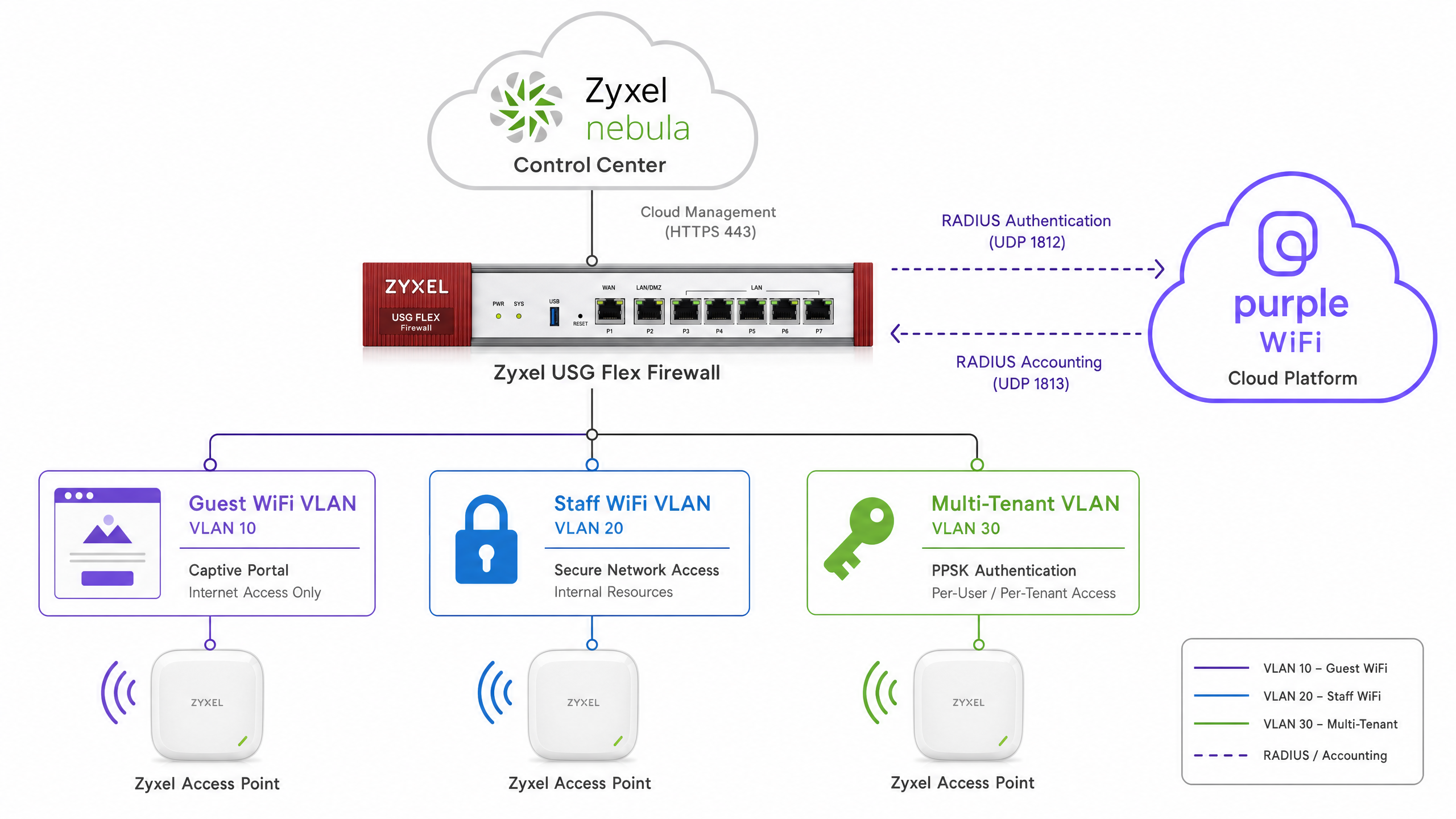
Zyxel USG Flex 防火牆介於無線區段和 WAN 之間。它執行基於區域的安全策略,將訪客、員工和多租戶 VLAN 彼此隔離,並與企業區域網路 (LAN) 隔離。Nebula 控制中心透過連接埠 443 上的 HTTPS 集中管理基地台和 SSID 設定,並連線至 Nebula 雲端。
RADIUS 參數
下表摘要說明您需要從 Purple 管理主控台取得的 RADIUS 設定參數。
| 參數 | 值 |
|---|---|
| 主要 RADIUS IP | 於 Purple 管理主控台提供 |
| 次要 RADIUS IP | 於 Purple 管理主控台提供 |
| 驗證連接埠 | UDP 1812 |
| 計費連接埠 | UDP 1813 |
| 共用金鑰 | 於 Purple 管理主控台提供 |
| NAS 識別碼 | 設定為 AP MAC 位址或站點名稱 |
| Called Station ID | AP MAC 位址 |
請務必同時設定主要和次要 RADIUS 伺服器。單一 RADIUS 端點是單一故障點,如果伺服器無法連線,訪客將被鎖定在外。
Walled Garden 設定
Walled Garden(也稱為白名單)定義了裝置在完成驗證之前可以存取的網域和 IP 範圍。在 Zyxel Nebula 中,您可以在 Site-wide > Configure > Access points > Captive portal customisation > Captive portal advance setting 下進行設定。
您必須包含以下類別的項目:
- Purple Portal 網域及其所有子網域(使用萬用字元格式:
*.purple.ai) - 提供 Portal 的 CSS、JavaScript 和圖片資產的 CDN 網域
- 如果您啟用了 Facebook、Google 或 Microsoft 登入,則需包含社群登入提供商的網域
- Apple Captive Portal 偵測:
captive.apple.com - Google 連線檢查:
connectivitycheck.gstatic.com - Microsoft NCSI:
www.msftconnecttest.com
遺漏其中任何一項都將導致 Splash 頁面在特定裝置類型上無法轉譯。特別是 iOS 裝置,如果未正確處理 Apple CNA 端點,將會顯示空白的迷你瀏覽器。
使用 IEEE 802.1X 的安全員工 WiFi
對於員工網路,您不應使用共用的 PSK。IEEE 802.1X(定義於 IEEE 802.1X-2020 標準中)使用每個使用者的個別憑證提供基於連接埠的網路存取控制。在 Nebula 中,您可以透過將 SSID 安全性設定為 WPA2-Enterprise,並將驗證指向 Nebula 雲端驗證伺服器 (NCAS) 或透過 RADIUS 代理指向外部 RADIUS 伺服器(例如 Microsoft Entra ID 或 Okta)來進行此設定。
對於 WPA3-Enterprise 部署,設定路徑完全相同,但您要在安全性選項中選擇 WPA3。WPA3 強制要求受保護的管理框架 (PMF),並使用對等同時驗證 (SAE) 以提高對離線字典攻擊的防禦能力。
適用於多租戶場所的 PPSK 與動態 VLAN 分配
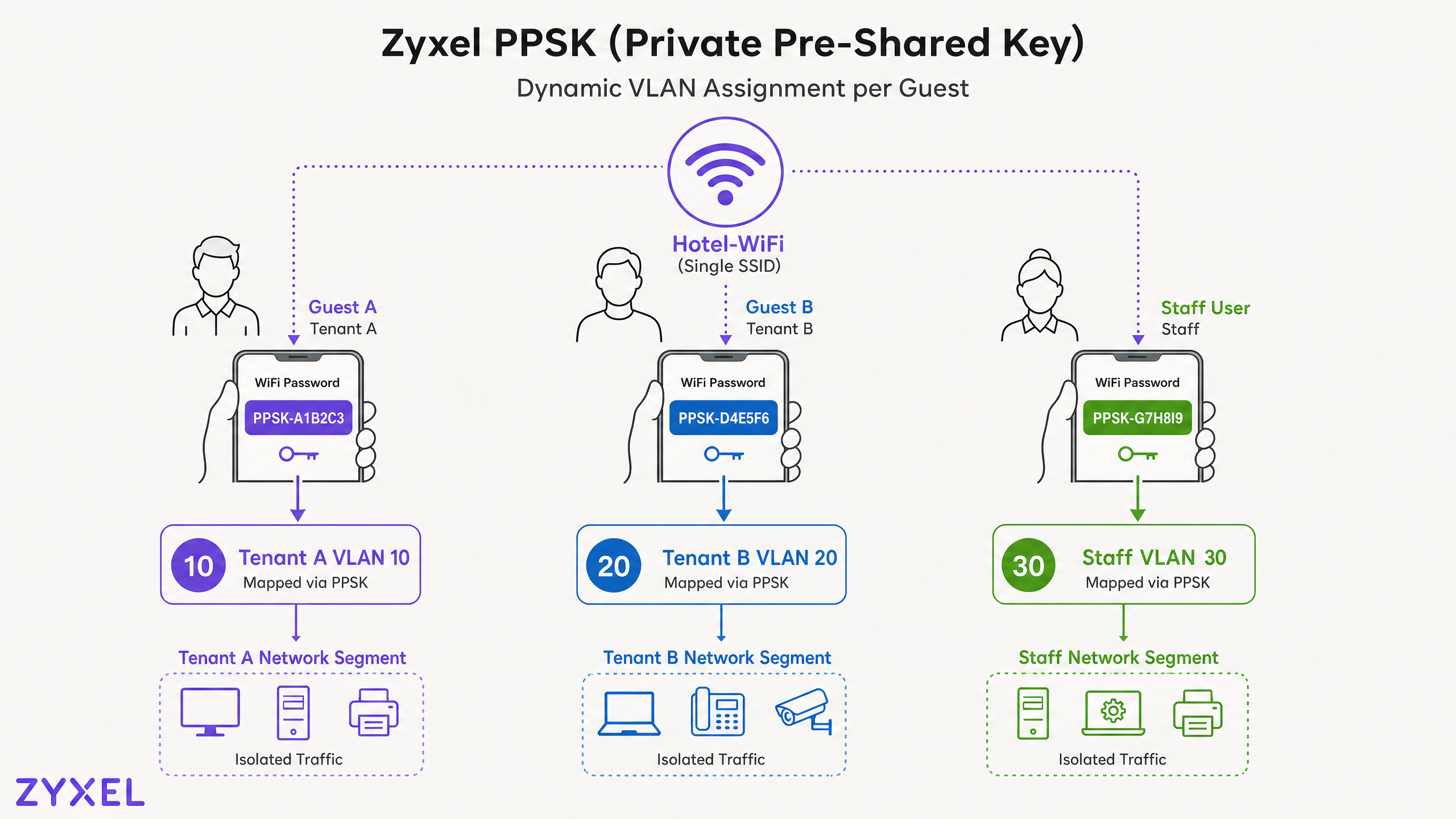
Zyxel DPPSK (動態個人預先共用金鑰) 允許單一 SSID 為多個隔離的網路區段提供服務。每個使用者或裝置都會收到一個唯一的密碼。當他們進行驗證時,Nebula 控制器會將該密碼對應到 DPPSK 資料庫中定義的 VLAN ID。對於需要租戶隔離而又不想廣播數十個 SSID 的共同工作空間、學生宿舍、建屋出租 (BTR) 開發項目和多戶住宅 (MDU) 而言,這是正確的方法。
DPPSK 需要 Nebula Pro Pack 授權以及 6.00 或更新版本的基地台韌體。您可以在 Nebula 控制中心的 Configure > Cloud authentication > DPPSK 下設定 DPPSK 資料庫。每個項目都包含密碼、選填的到期日、電子郵件地遞送地址以及目標 VLAN ID。
同時授權的 DPPSK 項目上限為 2,048 個。對於同時在線使用者超過 2,048 人的部署,您需要仔細管理到期日,以確保啟用中的憑證保持在此限制之內。
實作指南
步驟 1:準備網路基礎架構
在開始設定 Nebula Control Center 之前,請先在 USG Flex 防火牆和下游交換器上設定您的 VLAN。
- 建立一個 Guest VLAN(例如:VLAN 10)並配置專用子網路(例如:192.168.10.0/24)。在此介面上設定 DHCP 伺服器。
- 建立一個 Staff VLAN(例如:VLAN 20)並配置專用子網路(例如:192.168.20.0/24)。
- 對於多租戶部署,請為每個租戶建立額外的 VLAN(例如:VLAN 30、40、50)。
- 在 USG Flex 上,建立一個對應到 VLAN 10 的 Guest Zone。建立一條安全策略,允許流量從 Guest Zone 流向 WAN 區域。建立一條「全部拒絕」的策略,阻擋從 Guest Zone 流向 LAN 區域的流量。
- 確保連接 Zyxel AP 的交換器連接埠已設定為 802.1Q trunk,以傳輸所有必要的 VLAN 標籤。
步驟 2:在 Nebula Control Center 中設定訪客 SSID
- 登入 Nebula Control Center,網址為
ncc.nebula.zyxel.com。 - 前往 Site-wide > Configure > Access points > SSID settings。
- 啟用訪客 SSID 並切換至 Advanced mode。
- 啟用 Guest network 以啟用 Layer 2 用戶端隔離。這可以防止訪客裝置在同一個 SSID 上直接互相通訊。
- 儲存。
步驟 3:設定外部 Captive Portal
- 前往 Site-wide > Configure > Access points > SSID advanced settings。
- 從下拉式選單中選擇您的訪客 SSID。
- 在 Sign-in method 下,為初始重新導向選擇 Click-to-continue,或者如果您使用的是 Purple 的 RADIUS 基礎 MAC 驗證,請選擇 My RADIUS server。
- 前往 Site-wide > Configure > Access points > Captive portal customisation。
- 在 External captive portal URL 下,輸入來自 Purple 管理主控台的 Purple 重新導向網址。格式為
https://[your-purple-domain]/[venue-id]。 - 在 Captive portal advance setting 下,輸入所有必要的 Walled Garden 網域。
- 將 Strict policy 設定為 Block all access until sign-on,以防止訪客繞過 portal。
- 設定 Reauth time 以符合您場所的工作階段策略(旅宿業通常為 24 小時,零售業會員計劃通常為 30 天)。
- 儲存。
步驟 4:在 Nebula 中設定 RADIUS
- 在 SSID advanced settings 的 Network access 下,選擇 My RADIUS server。
- 輸入來自 Purple 管理主控台的 Primary RADIUS server IP。
- 將 Authentication port 設定為
1812。 - 輸入 Shared secret。
- 對次要 RADIUS 伺服器重複上述步驟。
- 啟用 RADIUS accounting 並將計費連接埠設定為
1813。 - 儲存。
步驟 5:設定 DPPSK 以進行多租戶分割
- 前往 Configure > Access points > SSID advanced settings。
- 選擇多租戶 SSID,並將 Network access 設定為 Dynamic personal PSK。
- 前往 Configure > Cloud authentication > DPPSK。
- 按一下 Add 並選擇 Batch create DPPSK。
- 為每個租戶群組設定憑證數量、到期日和目標 VLAN ID。
- 輸入接收批次憑證的電子郵件地址。
- 儲存並將憑證分發給租戶。
步驟 6:驗證部署
- 將測試裝置連線至 Guest WiFi SSID。
- 確認裝置已重新導向至 Purple 歡迎頁面(splash page)。
- 完成驗證並確認已取得網際網路存取權限。
- 在 Purple 管理主控台中,驗證該工作階段是否顯示在分析儀表板中。
- 在 Nebula 中,前往 Access point > Monitor > Clients,以確認用戶端已建立關聯並分配到正確的 VLAN。
- 使用租戶憑證進行連線以測試 DPPSK,並確認 VLAN 分配是否正確。
最佳實踐
分割每種流量類型。 Guest、Staff 和 IoT 流量必須各自佔用專用的 VLAN。如果您的場所在相同的實體基礎架構上處理刷卡付費,這將是強制性的要求——PCI DSS v4.0 要求持卡人資料環境與訪客網路之間必須進行網路分割。
使用 RADIUS 備援。 在 Nebula 中同時設定主要和次要的 Purple RADIUS IP。單一 RADIUS 伺服器故障將會阻止所有訪客進行驗證,直到問題解決為止。
定期稽核 Walled Garden。 Portal 廠商會更新其 CDN 設定。在部署時可正常運作的網域,可能會在六個月後因為廠商將資源遷移到新的 CDN 而失效。請安排每季審查您的 Walled Garden 項目。
啟用 RADIUS accounting。 若未啟用計費功能,Purple 將無法追蹤工作階段持續時間、數據使用量,或執行基於時間的存取限制。計費數據也會傳送至 WiFi Analytics 分析儀表板。
在硬體支援的情況下套用 WPA3。 2021 年起推出的 Zyxel 無線基地台(AP)均支援 WPA3。對於 Staff WiFi,採用 192 位元安全性模式的 WPA3-Enterprise 符合 NIST SP 800-187 對企業無線安全性的建議。
在正式上線前測試 CNA 行為。 在 iOS 上,與完整瀏覽器相比,Captive Network Assistant (CNA) 迷你瀏覽器的功能有限。在向訪客部署之前,請先在 CNA 環境中測試您的 Purple 歡迎頁面(特別是社群登入流程和自訂 JavaScript)。
對於 旅宿業 部署,另請參閱我們關於分割訪客網路與後勤網路的指南。對於 零售業 環境,相同的 PPSK 方法也適用於將銷售點(POS)系統與顧客 WiFi 進行隔離。
疑難排解與風險緩釋
歡迎頁面載入失敗
症狀:訪客連線至 SSID,但在 CNA 中看到空白頁面或瀏覽器錯誤。
原因:歡迎頁面所需的一或多個網域未包含在 WWalled Garden。
解決方案:將測試裝置連線至 Guest SSID。開啟瀏覽器(而非 CNA)並導覽至任何 HTTP URL。重新導向至 Portal 時,開啟瀏覽器的開發者工具並檢查「網路 (Network)」頁籤。找出任何傳回 403 或連線被拒 (connection-refused) 錯誤的請求。將這些網域新增至 Nebula Walled Garden。
訪客已通過驗證但無法存取網際網路
症狀:訪客填寫完 Portal 表單並看到成功頁面,但無法瀏覽網際網路。
原因:Zyxel 控制器未收到來自 Purple 的 RADIUS Access-Accept,或者 USG Flex 防火牆封鎖了 RADIUS 回應。
解決方案:驗證是否允許從 Zyxel AP 管理 IP 到 Purple RADIUS 伺服器 IP 的輸出 UDP 連接埠 1812 和 1813。檢查 USG Flex 安全性原則記錄以確認是否有被封鎖的流量。
Purple 儀表板遺失 RADIUS 計費資料
症狀:工作階段顯示在 Nebula 中,但 Purple 分析儀表板未顯示任何工作階段持續時間資料。
原因:Nebula SSID 設定中未啟用 RADIUS 計費 (Accounting),或者 UDP 連接埠 1813 被封鎖。
解決方案:確認 SSID 進階設定中已啟用 RADIUS 計費。驗證計費連接埠是否設定為 1813,且共用金鑰 (shared secret) 與 Purple 設定相符。
DPPSK 使用者被分配到錯誤的 VLAN
症狀:租戶使用其 PPSK 連線,但被分配到錯誤的網路區段。
原因:DPPSK 資料庫項目中的 VLAN ID 與交換器 Trunk 或 USG Flex 介面上設定的 VLAN 不符。
解決方案:交叉比對 Nebula DPPSK 資料庫中的 VLAN ID 與上游交換器和 USG Flex 上的 VLAN 設定。確保 AP 交換器連接埠為承載所有租戶 VLAN 的 Trunk 連接埠。
投資報酬率 (ROI) 與商業影響
將 Zyxel 基礎架構與 Purple 整合,可將原本屬於成本中心的無線網路轉化為能創造營收的數據資產。對於擁有 200 間客房的飯店,在 WiFi 登入時收集訪客的電子郵件地址和行銷同意書,可建立起推動直接訂房行銷活動的 CRM 資料庫,從而減少對 OTA 佣金的依賴。對於連鎖零售商,Purple 的 Guest WiFi 平台提供客流量分析、停留時間數據和重複造訪率,為排班和商品陳列決策提供依據。
對於多租戶營運商(如 BTR 住宅開發案、學生宿舍、共享工作空間),部署 Zyxel DPPSK 搭配 Purple 可消除為每個租戶管理獨立 SSID 和憑證的營運開銷。單一 SSID 搭配動態 VLAN 分配可減少射頻 (RF) 干擾、簡化上網引導流程,並在無需額外基礎架構的情況下擴充至數百名住戶。
Purple 的 99.999% 可用性服務層級協定 (SLA) 確保驗證層不會成為訪客存取的瓶頸。憑藉在整個平台收集的 290 億個數據點(Purple 內部數據),透過 Purple 管理主控台提供的分析為場地營運商提供實用情資,在部署的第一個季度內即可證明整合投資的價值。
對於 醫療保健 和 交通運輸 環境,其中訪客 WiFi 是受管制的服務,Purple 的 captive portal 中內建符合 GDPR 規範的數據收集和同意管理,消除了與未受管理開放網路相關的合規風險。
另請參閱: Arista Cognitive Wi-Fi Integration with Purple WiFi 以了解在不同硬體平台上類似的整合模式。
關鍵定義
Captive portal
A web page that intercepts unauthenticated HTTP traffic from a connected device and requires the user to interact or authenticate before internet access is granted.
The primary mechanism Purple uses to capture guest data and enforce terms of service on Zyxel Guest WiFi networks.
Walled Garden
A list of IP addresses and domain names that a device can access before completing captive portal authentication.
Configured in Nebula under Captive portal advance setting. Must include all Purple portal domains, CDN endpoints, and OS connectivity check URLs.
RADIUS
Remote Authentication Dial-In User Service. A networking protocol providing centralised Authentication, Authorisation, and Accounting (AAA) management for network access.
Purple acts as the RADIUS server. Zyxel APs send authentication requests on UDP 1812 and accounting data on UDP 1813.
DPPSK
Dynamic Personal Pre-Shared Key. A Zyxel Nebula feature that issues unique WiFi passphrases on a single SSID, mapping each passphrase to a specific VLAN.
Used in multi-tenant venues to isolate resident or tenant traffic without broadcasting multiple SSIDs. Requires Nebula Pro Pack.
VLAN
Virtual Local Area Network. A logical network segment that isolates traffic at Layer 2, regardless of the physical switch or AP infrastructure.
Mandatory for separating Guest, Staff, and Multi-Tenant traffic. Required for PCI DSS compliance in venues that process card payments.
IEEE 802.1X
An IEEE standard for port-based network access control that uses the Extensible Authentication Protocol (EAP) to authenticate individual users or devices before granting network access.
Used for Staff WiFi in Nebula by selecting WPA2-Enterprise or WPA3-Enterprise with either the Nebula Cloud Authentication Server or an external RADIUS server.
CNA
Captive Network Assistant. The pseudo-browser that iOS and macOS devices automatically open when they detect a captive portal on a WiFi network.
Has limited JavaScript and cookie support compared to a full browser. Purple splash pages must be tested in the CNA environment before deployment.
Identity-Based Networks
A network architecture where access policies, VLAN assignments, and bandwidth limits are dynamically applied based on the authenticated identity of the user or device.
The outcome of combining Zyxel DPPSK with Purple's RADIUS platform. Each user gets the right network segment automatically at connection time.
NCC
Nebula Control Center. Zyxel's cloud-based network management platform for centrally configuring and monitoring Zyxel access points, switches, and firewalls.
All SSID, captive portal, RADIUS, and DPPSK configurations described in this guide are performed within NCC.
範例
A 200-room hotel is deploying Zyxel Nebula access points and a USG Flex 500 firewall. They need guest WiFi with a branded splash page, a separate staff network with individual credentials, and an IoT network for smart TVs and thermostats - all without broadcasting more than three SSIDs.
The IT team configures three SSIDs. The first is 'Hotel-Guest', an open SSID with the Purple external captive portal URL configured in Nebula. Guests are redirected to a branded Purple splash page where they submit their email and accept marketing consent. RADIUS authentication and accounting point to the Purple cloud platform on ports 1812 and 1813. The second SSID is 'Hotel-Staff', configured with WPA2-Enterprise and the Nebula Cloud Authentication Server. Each staff member has a unique username and password in the NCAS database, mapped to VLAN 20. The third SSID is 'Hotel-IoT', configured with DPPSK. Each smart TV and thermostat receives a unique passphrase mapped to VLAN 30. The USG Flex enforces zone policies: Guest (VLAN 10) can only reach the WAN. Staff (VLAN 20) can reach the WAN and internal management systems. IoT (VLAN 30) is restricted to specific local services only.
A coworking space operator manages 12 tenants across three floors. Each tenant needs isolated internet access and must not be able to reach other tenants' devices. The operator wants to issue WiFi credentials at move-in and revoke them at move-out, without changing the SSID or reconfiguring the APs.
The operator deploys a single 'CoWork-Connect' SSID with DPPSK enabled in Nebula. At move-in, they log in to the Nebula Control Center, navigate to Configure > Cloud authentication > DPPSK, and create a new credential for the tenant with the target VLAN ID matching that tenant's network segment. They set an expiry date matching the lease end date and email the credential to the tenant. At move-out, they delete the DPPSK entry. The credential immediately becomes invalid and the tenant's devices can no longer associate. Layer 2 isolation is enabled on the SSID to prevent cross-tenant communication even within the same VLAN.
練習題
Q1. You have configured the Purple captive portal URL in Zyxel Nebula and enabled the external portal. Guests connect to the SSID but report that the splash page takes over 30 seconds to load and appears visually broken - missing images and layout. What is the most likely cause and how do you resolve it?
提示:Consider what controls access to external resources before a guest has authenticated.
查看標準答案
The Walled Garden configuration is incomplete. The Purple splash page loads CSS, JavaScript, and image assets from CDN domains. If these domains are not whitelisted in the Nebula Captive portal advance setting, the AP blocks those requests before authentication is complete. Resolution: connect a test device to the Guest SSID, open a browser (not the CNA mini-browser), navigate to any HTTP URL to trigger the redirect, then open developer tools and inspect the Network tab. Identify any requests returning 403 or connection errors. Add those domains to the Nebula Walled Garden and retest.
Q2. A venue operator wants to provide isolated networks for 15 different retail tenants in a shopping centre. Their initial plan is to broadcast 15 separate SSIDs from their Zyxel APs. Why is this approach problematic, and what should they deploy instead?
提示:Think about RF airtime and the Zyxel feature designed specifically for this use case.
查看標準答案
Broadcasting 15 SSIDs generates 15 sets of beacon frames per access point per second. In a dense retail environment with multiple APs, this beacon overhead consumes significant airtime and degrades throughput for all connected devices. The correct approach is to broadcast a single SSID and enable Zyxel DPPSK. Each tenant receives a unique passphrase mapped to their dedicated VLAN ID. When a tenant device connects, the Nebula controller dynamically assigns it to the correct VLAN. This achieves full traffic isolation with a single SSID and minimal RF overhead.
Q3. After deploying the Zyxel and Purple integration, guests can authenticate successfully and browse the internet. However, the Purple analytics dashboard shows zero session duration data and the time-based access limit feature is not working. What is missing from the configuration?
提示:Authentication and session tracking use different ports and protocols.
查看標準答案
RADIUS Accounting is either not enabled in the Nebula SSID configuration or UDP port 1813 is blocked by the upstream firewall. Authentication (UDP 1812) is succeeding, which is why guests can connect. But without Accounting packets (Start, Interim-Update, Stop), Purple cannot track session duration, enforce time limits, or populate the analytics dashboard. Resolution: confirm RADIUS accounting is enabled in SSID advanced settings with the accounting port set to 1813 and the correct shared secret. Then verify the upstream firewall permits outbound UDP 1813 from the Zyxel AP management IP to the Purple RADIUS server IP.
繼續閱讀本系列
CommScope Ruckus 與 Purple WiFi 整合:安裝與設定指南
本技術參考指南為 CommScope Ruckus 架構與 Purple WiFi 的整合提供了權威的設定指南。其中詳細介紹了使用 Guest WiFi Captive Portal、透過 802.1X 的安全員工 WiFi,以及使用 Ruckus Dynamic PSK 的多租戶網路隔離的逐步部署步驟。
Allied Telesis Access Points Integration with Purple WiFi
本指南提供將 Allied Telesis TQ 系列無線基地台與 Purple WiFi 整合的完整設定指南。內容涵蓋外部 Captive Portal 重新導向、802.1X RADIUS 驗證,以及使用私有預共用金鑰 (PPSK) 進行動態 VLAN 導向,以實現安全的多租戶部署。
Grandstream GWN Access Points Integration with Purple WiFi
本權威技術參考指南詳細說明如何將 Grandstream GWN 基地台與 Purple 的 Guest WiFi 及分析平台進行整合。內容涵蓋 Grandstream Captive Portal 設定、RADIUS AAA 設定、Walled Garden(圍牆花園)設定、支援動態 VLAN 導向的安全員工 802.1X 驗證,以及多租戶 PPSK 分割,為大規模部署訪客與員工 WiFi 的 MSP 和 IT 團隊提供具體可行的逐步指引。