
WatchGuard Firebox 與 Purple WiFi 整合:設定與組態指南
本指南是為部署 WatchGuard Firebox 和 Access Points 與 Purple 整合的 IT 經理和網路架構師提供的逐步整合手冊。內容涵蓋 Guest WiFi 的外部 Captive Portal 重新導向、Staff WiFi 的安全 802.1X 驗證,以及使用 WatchGuard 私有預先共用金鑰 (PPSK) 搭配動態 VLAN 導向的多租戶區隔,為您在所有存取層級提供單一、整合的架構。
收聽此指南
查看播客逐字稿
執行摘要
在複雜的場域中部署安全且具擴充性的無線基礎設施,需要安全閘道器與身分識別提供者之間的精確整合。本指南詳細介紹了 WatchGuard Firebox 和 WatchGuard Access Points 與 Purple 的整合,涵蓋三個不同的存取層級: Guest WiFi Captive Portal 重新導向、使用 IEEE 802.1X 的安全 Staff WiFi,以及透過 WatchGuard 私有預先共用金鑰 (PPSK) 進行的多租戶 WiFi 區隔。
透過將 WatchGuard 的統一安全平台與 Purple 的雲端重疊網路相結合,您可以自動化執行依據身分的存取控制、實施細粒度的安全原則,並大規模收集第一方數據。Purple 在全球超過 80,000 個實際場域中運作,並在 2024 年處理了 4.4 億次登入(Purple 內部數據)。此整合在設計上與硬體無關 — 在 Purple 支援的硬體清單中,WatchGuard 與 Cisco Meraki、HPE Aruba、Ruckus、Juniper Mist、Ubiquiti UniFi、Cambium、Extreme 和 Fortinet 並列。如需更廣泛地瞭解企業 WiFi 安全標準,請參閱我們的 企業 WiFi 安全:2026 年完整指南 。
技術架構
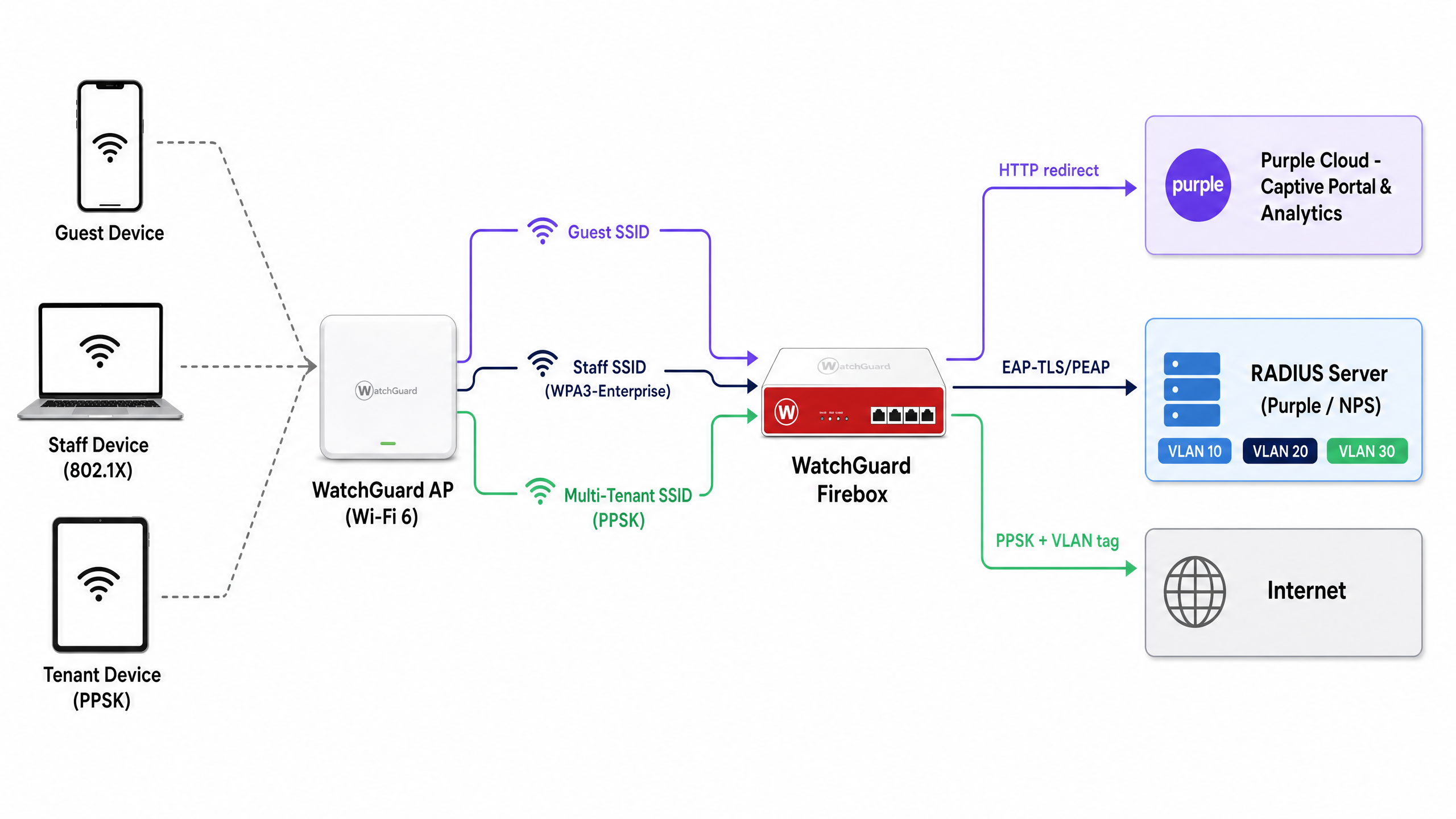
此整合使用兩種標準機制將 WatchGuard 硬體連接到 Purple 的雲端服務:用於驗證和計費的 RADIUS (遠端驗證撥入使用者服務),以及用於傳遞 Captive Portal 的 HTTP 重新導向。該架構在單一實體基礎設施上支援三個存取層級。
| 存取層級 | SSID 類型 | 驗證方法 | Purple 角色 |
|---|---|---|---|
| Guest WiFi | 開放式 | 外部 Captive Portal + RADIUS 計費 | 歡迎頁面、數據收集、分析 |
| Staff WiFi | WPA3-Enterprise | 802.1X (EAP-TLS 或 PEAP) | RADIUS 伺服器、身分識別提供者代理 |
| 多租戶 WiFi | WPA2/WPA3 Personal + PPSK | 透過 RADIUS 驗證的 PPSK | 金鑰管理、動態 VLAN 分配 |
所有三個層級都可以在同一個 WatchGuard Access Point 設備群中同時執行。WatchGuard Wi-Fi 6 機型(AP130、AP230W、AP330、AP332CR、AP430CR 和 AP432)自韌體 v2.6 起支援 PPSK。
設定 Guest WiFi Captive Portal 重新導向
WatchGuard Captive Portal 整合會將未經驗證的 HTTP 要求重新導向至 Purple 託管的歡迎頁面。這是收集第一方數據和執行服務條款的主要機制。
步驟 1:RADIUS 伺服器組態
在 WatchGuard Cloud 或 Firebox Policy Manager 中,將 Purple 定義為 RADIUS 驗證和計費伺服器。
- 主要 RADIUS 伺服器:設定為您所在區域的 Purple RADIUS IP 位址(可在 Purple 入口網站的「Settings > Hardware Integration」下取得)。
- 驗證連接埠:1812
- 計費連接埠:1813
- 共用秘密:輸入 Purple 入口網站中提供的唯一秘密。
- NAS ID:使用
%m格式指定元,將此項設定為 Firebox 或 AP 的 MAC 位址。這會向 Purple 識別場域,並將分析數據導向至正確的帳戶。 - 計費間隔:設定為 10 分鐘,以確保工作階段數據定期傳送至 Purple 的分析儀表板。
步驟 2:SSID 與 Captive Portal 設定
在 WatchGuard Cloud 中,導覽至 Configure > Devices > [您的 AP] > Device Configuration > SSIDs。建立或編輯 Guest SSID。
- 安全性:開放式(無預先驗證密碼)。
- Captive Portal 類型:選擇 Third-Party Hosted Captive Portal with RADIUS Authentication。
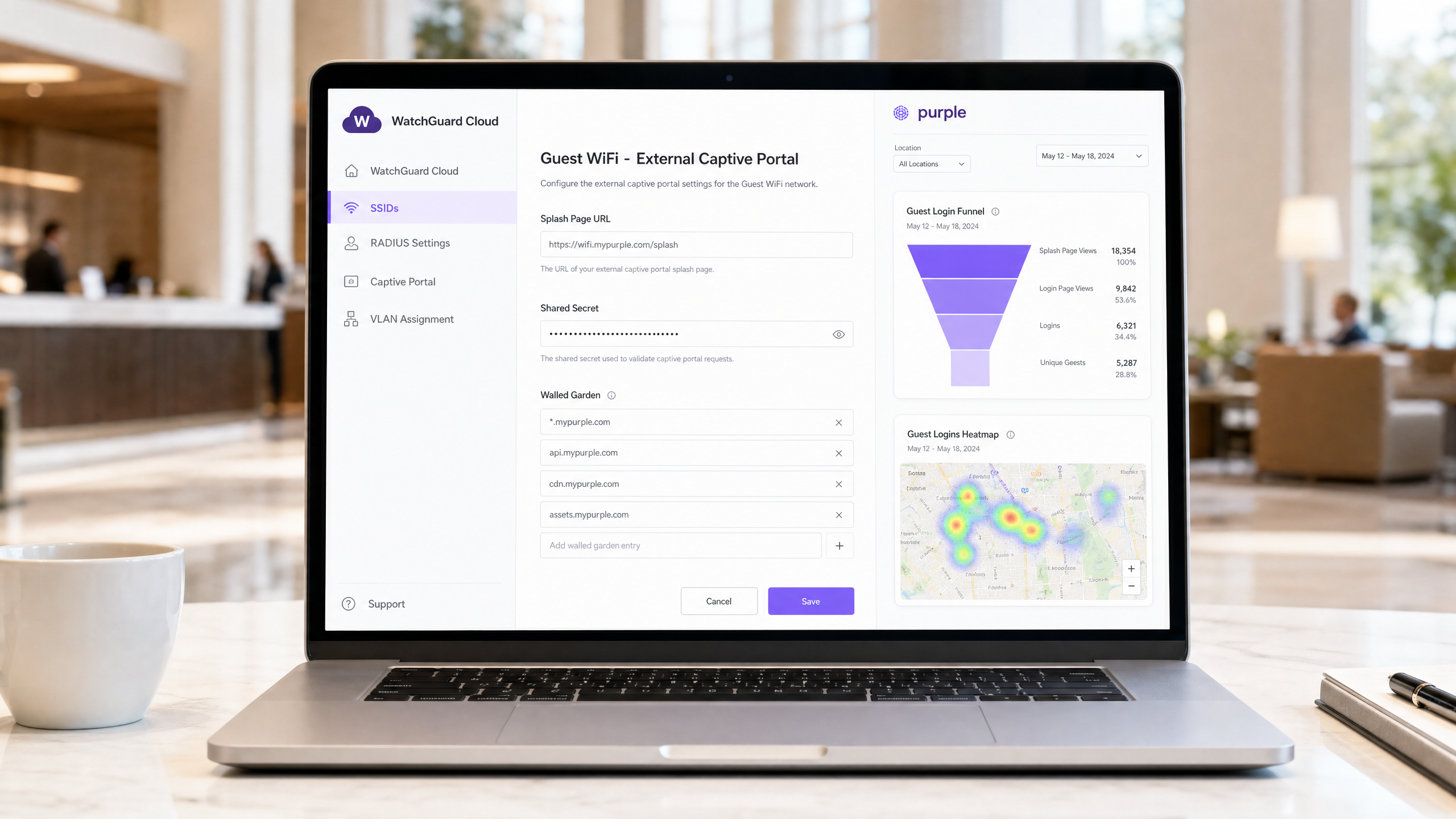
- 歡迎頁面 URL:輸入 Purple 歡迎頁面 URL(例如
https://wifi.mypurple.com/splash)。可從 Purple > Analyze > Portals 取得此資訊。 - 共用秘密:輸入來自同一個 Purple Analyze Portals 頁面的入口網站共用秘密。此秘密會產生 HMAC-SHA1 摘要,WatchGuard 會使用該摘要來驗證來自 Purple 的驗證成功回應。
步驟 3:Walled Garden 組態
Walled Garden 定義了裝置在完成驗證前可以存取的網域。若未設定此項,裝置將無法載入 Purple 歡迎頁面。請將以下項目新增至使用者在登入前可以存取的網站:
*.mypurple.comapi.mypurple.comcdn.mypurple.comassets.mypurple.com
如果您透過 Microsoft Entra ID、Okta 或 Google Workspace 啟用社群或聯合登入,請新增相關的身分識別提供者網域(例如 login.microsoftonline.com、accounts.google.com)。如需共用 WiFi 基礎設施的法律與合規背景資訊,請參閱我們的指南: 共用 WiFi 基礎設施的法律與合規要求 。
HMAC 驗證流程的運作方式
瞭解此流程有助於您快速診斷故障。
- 訪客裝置連線至開放式 SSID 並發送 HTTP 要求。
- WatchGuard AP 攔截該要求,並將瀏覽器重新導向至 Purple 歡迎頁面 URL,同時附加
challenge參數(隨機十六進位字串)和裝置 MAC 位址。 - Purple 顯示歡迎頁面。訪客填寫登入表單。
- Purple 使用入口網站共用秘密和挑戰值 (challenge) 產生 HMAC-SHA1 摘要。
- Purple 將瀏覽器重新導向回 WatchGuard AP 的登入 URL,並附加挑戰值和摘要。
- WatchGuard AP 使用相同的共用秘密驗證摘要。如果相符,AP 將授予網際網路存取權限,並向 Purple 傳送 RADIUS Accounting Start 封包。
使用 802.1X 的安全 Staff WiFi
對於 Staff WiFi,您需要將 Captive Portal 替換為 IEEE 802.1X — 這是埠型網路存取控制的企業標準。每位員工都使用唯一的認證或憑證進行驗證,從而消除,從而消除共享密碼的風險。
在 WatchGuard Cloud 中,將員工 SSID 配置為 WPA3 Enterprise 安全性,並將 Authentication Domain 指向 Purple 的 RADIUS 伺服器。Purple 作為 RADIUS 伺服器,並可透過 SAML 或 LDAP 將驗證請求代理傳送至 Microsoft Entra ID、Okta 或 Google Workspace。
對於基於憑證的驗證 (EAP-TLS),請透過您的 MDM 將用戶端憑證部署到受管理裝置。對於基於認證資訊的驗證 (PEAP-MSCHAPv2),使用者使用其目錄認證資訊進行驗證。Purple 會針對已配置的識別提供者驗證該請求,並向 WatchGuard AP 回傳 RADIUS Access-Accept 或 Access-Reject。
如需跨裝置類型之 802.1X 配置的詳細逐步說明,請參閱我們的指南: 802.1X 驗證:在現代裝置上保障網路存取安全 。
關於 MAC 隨機產生的重要注意事項:現代 iOS 和 Android 裝置預設會隨機產生其 MAC 位址。對於 802.1X 員工 WiFi,請指示員工停用員工 SSID 的 MAC 隨機產生功能。隨機產生的 MAC 會導致驗證記錄不一致,並破壞基於 MAC 的原則強制執行。
使用 WatchGuard PPSK 的多租戶 WiFi
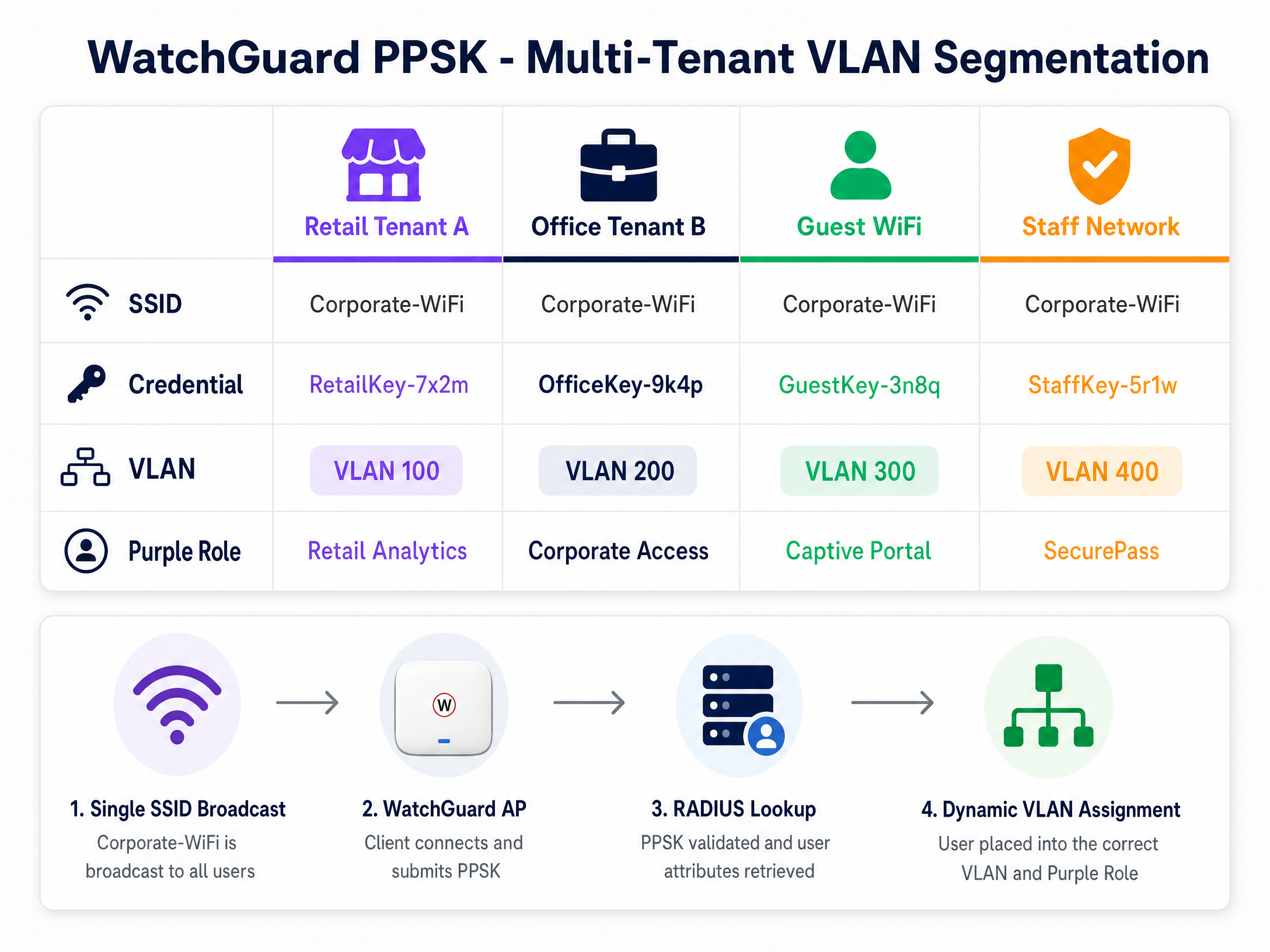
在零售中心、共同工作空間或租賃專用住宅 (BTR) 開案中,為每個租戶廣播獨立的 SSID 會導致同頻道干擾並使射頻 (RF) 環境變得混亂。WatchGuard PPSK (Private Pre-Shared Key)(於 AP 韌體 v2.6 中推出)透過在單一 SSID 上為每個使用者或租戶分配唯一的密碼來解決此問題。
步驟 1:在 SSID 上啟用 PPSK
在 WatchGuard Cloud 中,編輯目標 SSID(例如 Venue-WiFi)。
- 安全性:WPA2 Personal 或 WPA3 Personal。
- 驗證:啟用 Private Pre-Shared Key (PPSK)。
- RADIUS 伺服器:指向 Purple 的 RADIUS 伺服器。Purple 會管理 PPSK 認證資訊儲存庫,並在驗證時回傳 VLAN 屬性。
步驟 2:配置動態 VLAN 分配
為了隔離租戶流量,WatchGuard AP 會根據所使用的 PPSK 分配特定的 VLAN。
- VLAN 設定:選擇 Dynamic VLAN assigned by RADIUS。
- 未分配用戶端後備:選擇隔離的隔離區 VLAN(例如 VLAN 999),以確保未通過 RADIUS 驗證的裝置無法存取企業網路。
在 WatchGuard 存取點上使用動態 VLAN 的需求:
- AP 韌體 v2.2 或更高版本。
- 必須在 SSID 上停用 NAT。
- 動態 VLAN 和 Captive Portal 無法同時在同一個 SSID 上執行。
- 連接到 AP 的交換器連接埠必須配置為傳輸所有相關 VLAN 的 Trunk 連接埠。
步驟 3:用於 VLAN 導向的 RADIUS 屬性
當使用者使用 PPSK 連線時,WatchGuard AP 會向 Purple 傳送 RADIUS Access-Request。Purple 會驗證金鑰並回傳包含三個 IETF RADIUS 屬性的 Access-Accept 封包:
| RADIUS 屬性 | 屬性編號 | 值 |
|---|---|---|
| Tunnel-Type | 64 | 13 (VLAN) |
| Tunnel-Medium-Type | 65 | 6 (802) |
| Tunnel-Private-Group-ID | 81 | VLAN ID(例如 "100") |
WatchGuard AP 會讀取屬性 81並將用戶端置於對應的 VLAN 中。在 Purple 中,您可以將每個 PPSK 認證資訊對應到特定的 VLAN ID 和角色。這就是身分識別導向網路 (Identity-Based Networks) 背後的機制——由認證資訊決定網路區段,而非 SSID。
實作最佳實踐
這些建議適用於 餐旅 、 零售 、 醫療保健 和 交通運輸 部署。
工作階段逾時:在 Purple 和 WatchGuard 中配置工作階段逾時,以強制定期重新驗證。這可以保持分析數據的準確性,並防止過期的工作階段消耗頻寬。將 RADIUS Interim-Update (Acct-Interim-Interval) 設定為 600 秒(10 分鐘)。
韌體管理:確保 WatchGuard 存取點執行韌體 v2.6 或更高版本以支援 PPSK。使用 WatchGuard Cloud 安排在離峰時段進行韌體升級,以避免覆蓋範圍中斷。
PCI DSS 合規性:對於處理刷卡付款的零售環境,請使用 PPSK 將 POS 裝置隔離在專用 VLAN(例如 VLAN 200)上。確保 Guest WiFi VLAN 無法路由至 POS VLAN。這符合 PCI DSS 網路分段的要求。
GDPR 與資料收集:Purple 的 Captive Portal 使用自願選擇加入機制,確保資料收集符合 GDPR 要求。Purple 已通過 ISO 27001、GDPR、CCPA 和 Cyber Essentials 認證。在開始收集資料之前,請確保您的歡迎頁面包含清晰的隱私權聲明和服務條款連結。
疑難排解與風險降低
Captive Portal 無法載入:首先應檢查 Walled Garden。如果裝置在驗證前無法解析 DNS 或連線至 Purple 的伺服器,瀏覽器將顯示逾時錯誤,而非歡迎頁面。驗證所有 Purple 網域是否都在 Walled Garden 清單中,且 WatchGuard DNS 設定允許驗證前解析。
HMAC 摘要驗證錯誤:如果 WatchGuard 記錄顯示因 HMAC 錯誤而導致驗證失敗,則表示 WatchGuard 與 Purple 之間的 Captive Portal 共用金鑰(Shared Secret)不相符。兩者在兩個系統中必須完全相同。在 Purple 中重新產生金鑰,然後在 WatchGuard Cloud 中重新輸入。
VLAN 導向失敗:如果 PPSK 使用者從錯誤的 VLAN 取得 IP,請檢查 Purple 入口網站中的 RADIUS 記錄。驗證 Purple 是否回傳了所有三個 IETF RADIUS 屬性。確保 Tunnel-Private-Group-ID 的值格式化為字串,且與交換器 Trunk 連接埠上配置的 VLAN ID 相符。
PPSK 與 Captive Portal 衝突:WatchGuard 不支援在同一個 SSID 上同時使用動態 VLAN 和 Captive Portal。如果您兩者都需要,請使用兩個 SSID:一個用於訪客 Captive Portal,另一個用於用於 PPSK 多租戶存取。
802.1X 驗證失敗:使用 WatchGuard AP 韌體 v2.5 及更高版本中提供的封包擷取工具,來擷取 AP 與 RADIUS 伺服器之間的流量。尋找 RADIUS Access-Reject 封包以及回覆訊息屬性中的原因代碼。
ROI 與商業影響
WatchGuard 與 Purple 的整合將安全性與分析功能整合至單一架構中。一間擁有 200 間客房的飯店使用此整合方案後,無需再部署獨立的顧客與員工閘道器,與多閘道器部署相比,可減少約 30% 的硬體支出(Purple 內部數據)。Guest WiFi Captive Portal 可收集第一方數據(電子郵件地址、人口統計資訊和造訪頻率),進而透過 Purple 的 Engage 方案推動直接行銷營收。
對於多租戶場域,PPSK 消除管理多個 SSID 的營運開銷。在單一 SSID 上管理 15 個店面的零售中心,可降低 AP 無線電使用率並簡化網路稽核。Purple 的 WiFi Analytics 為場域營運商提供停留時間、客流量和重複造訪數據,這些指標可向財務團隊證明基礎設施投資的合理性。
Purple 維持 99.999% 的正常執行時間(Purple 內部數據),確保 Guest WiFi Captive Portal 即使在體育場和會議中心等高密度場域的尖峰時段也能保持可用。
關鍵定義
PPSK (Private Pre-Shared Key)
A security feature that assigns a unique password to each user or device on a WPA2/WPA3 Personal SSID. Introduced in WatchGuard AP firmware v2.6.
Used in multi-tenant environments - retail centres, coworking spaces, BTR developments - to segment users without requiring 802.1X supplicant configuration on client devices.
Dynamic VLAN steering
The process of assigning a network device to a specific Virtual LAN based on RADIUS attributes (Tunnel-Type, Tunnel-Medium-Type, Tunnel-Private-Group-ID) returned during authentication.
The mechanism that isolates tenant, staff, and guest traffic on the same physical access point. Requires AP firmware v2.2 or higher on WatchGuard hardware.
Walled Garden
A list of IP addresses or domains that an unauthenticated user is permitted to access before completing captive portal authentication.
Required to allow guest devices to load the Purple splash page and complete federated logins (Microsoft Entra ID, Google Workspace) before full internet access is granted.
HMAC digest
A cryptographic hash (HMAC-SHA1) used to verify the integrity and authenticity of the authentication success message from the captive portal.
WatchGuard validates the HMAC digest using the Captive Portal Shared Secret. A mismatch between the secret in WatchGuard and Purple causes authentication failures.
RADIUS accounting
The component of the RADIUS protocol that tracks network usage, including session start, session duration, and data transfer volume.
Purple relies on RADIUS Accounting packets from the WatchGuard Firebox to populate the analytics dashboard and enforce session time limits. Operates on port 1813.
Captive portal
A web page that a device is redirected to before being granted access to a public network. WatchGuard intercepts HTTP requests and redirects to the configured external portal URL.
The primary mechanism for capturing first-party data and enforcing terms of service on Guest WiFi networks. Purple hosts the splash page and manages the data.
802.1X
An IEEE standard for port-based network access control. Requires each device to authenticate with unique credentials or a certificate before network access is granted.
The enterprise standard for securing Staff WiFi. Eliminates the shared-password risk of WPA2 Personal. Requires a RADIUS server (Purple) and a supplicant on the client device.
EAP-TLS (Extensible Authentication Protocol - Transport Layer Security)
A highly secure 802.1X authentication method requiring both a client certificate and a server certificate for mutual authentication.
Used in high-security environments where devices are managed by an MDM. Ensures only corporate-owned devices with valid certificates can connect to the Staff WiFi SSID.
NAS ID (Network Access Server Identifier)
A string sent in RADIUS packets that identifies the network device (AP or Firebox) making the authentication request.
Purple uses the NAS ID to identify which venue a RADIUS request originates from. Typically set to the AP MAC address using the %m format specifier in WatchGuard.
Identity-Based Networking
A network architecture where access policies, VLAN assignments, and security controls are determined by the user's identity rather than their physical port or SSID.
The combination of WatchGuard PPSK, Purple RADIUS, and dynamic VLAN steering delivers Identity-Based Networking - the credential determines the network segment automatically.
範例
A 200-room Premier Inn property needs to provide Guest WiFi for guests, secure Staff WiFi for front-of-house and back-office teams, and a separate network for IoT devices (smart TVs, door locks). They have WatchGuard AP330 access points managed via WatchGuard Cloud and a Firebox T85 gateway. How should they architect the three networks?
Deploy three SSIDs on the WatchGuard AP330 fleet. SSID 1: 'Premier-Guest' - open SSID with external captive portal redirection to Purple. Configure the Firebox T85 as the RADIUS client pointing to Purple's servers (port 1812/1813). Add Purple's Walled Garden domains. Guests authenticate via the Purple splash page using email, social login, or a room code. SSID 2: 'Premier-Staff' - WPA3-Enterprise SSID with 802.1X authentication. Point the authentication domain to Purple's RADIUS server, which proxies credentials to the property's Microsoft Entra ID tenant. Staff authenticate with their corporate credentials. SSID 3: 'Premier-IoT' - WPA2 Personal SSID with a static PSK, placed on a dedicated VLAN (e.g., VLAN 50) with firewall rules blocking access to the staff and guest VLANs. The Firebox T85 enforces inter-VLAN routing policies. All three SSIDs broadcast on the same AP hardware, reducing infrastructure cost.
A retail centre managing 12 shop units wants to provide each tenant with isolated WiFi access using a single SSID. The centre also needs to ensure that a compromised tenant credential does not expose other tenants' traffic. They are running WatchGuard AP230W access points on firmware v2.6.
Configure one SSID: 'Centre-Retail' with WPA2 Personal and PPSK enabled. In Purple, create 12 unique PPSK credentials, one per tenant. Map each credential to a dedicated VLAN (e.g., VLAN 101 for Tenant 1, VLAN 102 for Tenant 2, and so on). In WatchGuard Cloud, set the SSID VLAN to 'Dynamic VLAN assigned by RADIUS' with a fallback to a quarantine VLAN (VLAN 999). Configure the switch ports connected to the AP230W as trunk ports carrying VLANs 101-112 and 999. When a tenant device connects using their PPSK, the AP queries Purple RADIUS, receives the Tunnel-Private-Group-ID attribute, and places the device on the correct VLAN. A compromised credential for Tenant 3 only exposes VLAN 103 - all other tenants remain isolated.
練習題
Q1. A hotel IT manager reports that guests connect to the WiFi but the Purple splash page never appears. The browser shows a connection timeout error. The WatchGuard Cloud configuration shows the correct Purple splash page URL and shared secret. What is the most likely cause and how do you resolve it?
提示:Consider what must happen before the device is authenticated. What domains does the device need to reach to load the splash page?
查看標準答案
The Walled Garden is missing or incomplete. The WatchGuard Firebox is blocking the device's initial HTTP request to Purple's servers before authentication completes. Add the required Purple domains to the 'Websites that users can access before login' list: *.mypurple.com, api.mypurple.com, and cdn.mypurple.com. If guests are using social logins, also add the relevant identity provider domains (e.g., login.microsoftonline.com for Entra ID).
Q2. You are configuring PPSK-based VLAN steering for a coworking space with 8 members. RADIUS authentication succeeds (the WatchGuard logs show Access-Accept), but every member device receives an IP address from VLAN 1 (the default management VLAN) instead of their assigned tenant VLAN. How do you diagnose and resolve this?
提示:Authentication succeeded, so the credential is valid. The issue is in the VLAN assignment step. What does WatchGuard need from the RADIUS server to assign a VLAN?
查看標準答案
The RADIUS Access-Accept packet from Purple is missing or incorrectly formatting the VLAN attributes. Capture the RADIUS traffic on the AP using the WatchGuard packet capture tool and inspect the Access-Accept packet. Verify that Purple is returning all three IETF attributes: Tunnel-Type (attribute 64, value 13), Tunnel-Medium-Type (attribute 65, value 6), and Tunnel-Private-Group-ID (attribute 81, set to the VLAN ID as a string, e.g. '101'). Also confirm that the switch port connected to the AP is configured as a trunk port carrying the relevant VLANs, and that the SSID VLAN setting in WatchGuard Cloud is set to 'Dynamic VLAN assigned by RADIUS' rather than a static VLAN ID.
Q3. A venue operator wants to run a Guest WiFi captive portal (Purple splash page) and a multi-tenant PPSK network for 6 retail units on the same WatchGuard AP330 access point. They plan to configure both features on a single SSID to simplify the RF environment. Is this possible? If not, what is the correct architecture?
提示:Review the WatchGuard Dynamic VLAN requirements. Are there any feature conflicts?
查看標準答案
This is not possible on a single SSID. WatchGuard does not support Dynamic VLANs (required for PPSK) and Captive Portal on the same SSID simultaneously. The correct architecture uses two SSIDs: SSID 1 ('Venue-Guest') configured as an open SSID with external captive portal redirection to Purple for public guests. SSID 2 ('Venue-Retail') configured with WPA2 Personal, PPSK enabled, and Dynamic VLAN assignment for the 6 retail tenants. Both SSIDs broadcast from the same AP330 hardware, so the RF impact is limited to one additional SSID beacon. The switch port connected to the AP must be a trunk port carrying all relevant VLANs for both SSIDs.
繼續閱讀本系列
MikroTik RouterOS Captive Portal 與 Purple WiFi 整合指南
本技術指南提供將 MikroTik RouterOS 與 Purple 的 WiFi 平台整合的逐步說明。內容涵蓋訪客 WiFi Captive Portal 設定、員工 WiFi 802.1X 驗證,以及使用 Private PSK 進行動態 VLAN 切割的多租戶 WiFi。
Alta Labs 與 Purple WiFi 整合:設定與 Captive Portal 配置
本技術參考指南涵蓋了 Alta Labs AP6 和 AP6 Pro 基地台與 Purple 雲端託管 Captive Portal 的端到端整合。本指南詳細介紹了外部重新導向配置、RADIUS 驗證、Walled Garden 需求,以及使用 AltaPass 私有預先共用金鑰(PPSK)的多租戶區隔。場地營運商和 IT 團隊將獲得一份適用於餐旅、零售和智慧辦公環境的可重複部署指南。
Arista Cognitive Wi-Fi 與 Purple WiFi 整合
本技術指南詳細介紹了 Arista Cognitive Wi-Fi (CV-CUE) 與適用於企業場域的 Purple 訪客 WiFi 平台的逐步整合過程。內容涵蓋 Arista Captive Portal 設定、Walled Garden ACL 設計、RADIUS 伺服器設定、安全的員工 802.1X 驗證,以及使用 Arista PPSK 搭配動態 VLAN 導向的多租戶 (Multi-Tenant) 隔離——為 IT 團隊和網路架構師提供決定性的部署藍圖。