
在移动设备上实施 802.1X 身份验证
本综合指南为 IT 负责人提供了在 iOS 和 Android 设备上实施 802.1X 身份验证的技术蓝图。内容涵盖架构、EAP 方法选择、MDM 预配以及故障排除,以确保安全、可扩展的移动网络访问。
收听本指南
查看播客转录
核心系列的一部分:Enterprise WiFi Security Guide →
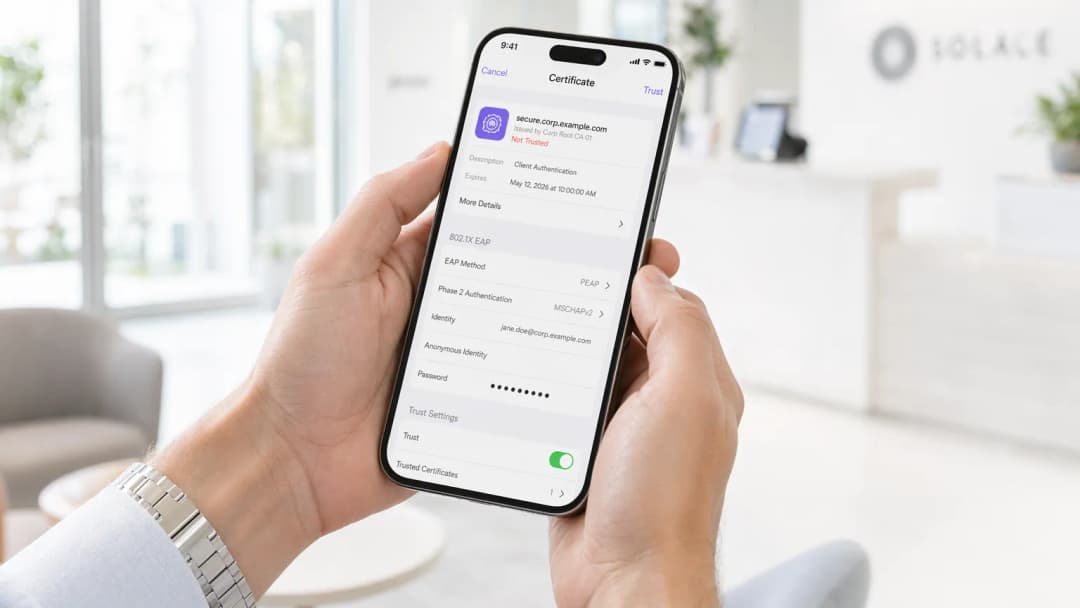
执行摘要
在移动设备上实施 802.1X 认证对于企业环境而言已不再是可选项。无论是管理企业办公室、拥有 500 间客房的酒店还是体育场,依赖预共享密钥(PSK)都会带来不可接受的安全风险。本指南为在 iOS 和 Android 设备群中部署 802.1X 提供了全面的技术蓝图。我们将涵盖架构要求、可扩展身份验证协议(EAP)方法选择、移动设备管理(MDM)配置以及常见故障模式。
通过过渡到 802.1X,企业可以实现细粒度的网络访问控制、增强的 Guest WiFi 安全性,并符合 PCI-DSS 和 GDPR 等框架的要求。这种过渡需要无线基础设施、RADIUS 服务器和移动终端之间的精心协调。
技术深度剖析:架构与 EAP 方法
IEEE 802.1X 标准定义了基于端口的网络访问控制,主要由三个部分组成:请求方(移动设备)、认证方(无线接入点或控制器)和认证服务器(RADIUS)。
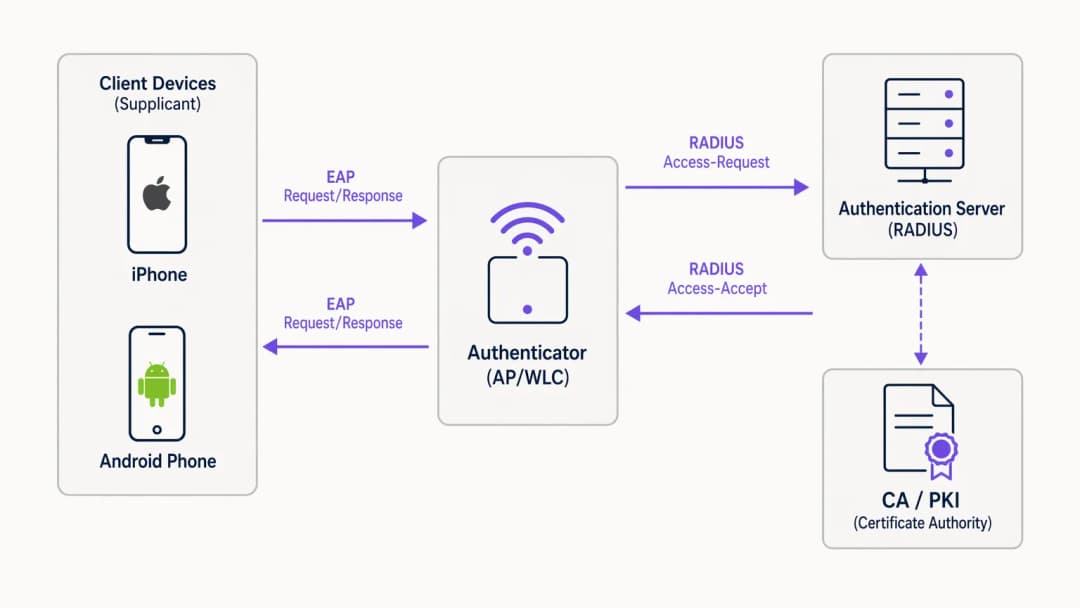
当移动设备尝试连接时,认证方会阻止除局域网 EAP(EAPoL)数据包之外的所有流量,直到 RADIUS 服务器成功验证凭证。EAP 方法的选择决定了安全态势和部署复杂度。
适用于移动设备的 EAP 方法选择
移动操作系统对 EAP 方法的原生支持程度各有不同。企业部署的两大主流标准是 EAP-TLS 和 PEAP-MSCHAPv2。

EAP-TLS 是最安全的方法,依赖于基于证书的双向认证。它消除了凭证被盗的风险,但需要强大的公钥基础设施(PKI)和 MDM 进行证书分发。iOS 和 Android 都原生支持 EAP-TLS。
PEAP-MSCHAPv2 将认证交互封装在 TLS 隧道内,允许使用 Active Directory 凭证。虽然在没有 PKI 的情况下更容易部署,但如果客户端设备没有严格配置为验证服务器证书,则很容易受到凭证窃取攻击。
实施指南
部署 802.1X 需要在网络基础设施和移动设备群中进行协调配置。
1. RADIUS 服务器配置
必须配置 RADIUS 服务器(例如 Microsoft NPS、Cisco ISE 或 JumpCloud 等云替代方案)以支持所选的 EAP 方法。对于 PEAP,请安装由受信任证书颁发机构 (CA) 颁发的服务器证书。对于 EAP-TLS,请将服务器配置为信任颁发客户端证书的 CA。确保 RADIUS 服务器与您的目录服务(AD、LDAP)或身份提供商集成。
2. 无线基础设施配置
配置您的接入点 (AP) 或无线局域网控制器 (WLC) 以广播具有 WPA2-Enterprise 或 WPA3-Enterprise 安全性的 SSID。指定 RADIUS 服务器的 IP 地址和共享密钥。启用 RADIUS 计费以跟踪用户会话,这对于 WiFi Analytics 和故障排除至关重要。
对于高级部署,请考虑阅读我们的指南:实施 WPA3-Enterprise 以增强无线安全性。
3. 移动设备配置 (MDM)
由于用户错误和安全风险(例如,用户接受流氓服务器证书),强烈不建议在移动设备上手动配置 802.1X。使用 MDM 解决方案(Jamf、Intune、Workspace ONE)推送 WiFi 配置描述文件。
- iOS: 使用 Apple Configurator 或 MDM 推送包含 SSID、EAP 方法和受信任服务器证书链的描述文件。对于 EAP-TLS,描述文件还必须部署客户端证书。
- Android: Android 11+ 严格要求服务器证书验证。MDM 必须将 CA 证书连同 WiFi 描述文件一起推送至设备信任库。
最佳实践
- 强制执行服务器证书验证: 绝不允许设备在不验证 RADIUS 服务器证书的情况下进行连接。这可以防止中间人攻击。
- 使用 MDM 进行配置: 依赖用户手动配置 802.1X 设置会导致支持开销和安全漏洞。
- 细分流量: 将 802.1X 认证用户与访客流量或物联网设备隔离在不同的 VLAN 上。
- 实施云 RADIUS: 对于 Retail 连锁或 Hospitality 场所等分布式环境,云 RADIUS 可以减少对本地基础设施的依赖。
故障排除与风险缓解
移动 802.1X 部署中最常见的故障模式通常围绕证书和超时展开。
- 证书信任错误: 如果 iOS 设备提示用户信任证书,或者 Android 设备拒绝连接,则 MDM 描述文件中可能缺失了完整的证书链(根 CA 和中间 CA)。
- RADIUS 延迟: 如果 RADIUS 服务器响应时间超过 2 - 3 秒,移动设备将断开连接。请确保您的 RADIUS 基础设施已正确扩展,特别是在高密度环境中。- EAP Mismatch: 确保 WLC 上配置的 EAP 方法与 RADIUS 服务器和客户端配置文件相匹配。
ROI 与业务影响
实施 802.1X 可显著降低未经授权的网络访问和横向移动风险。对于一家拥有 10,000 名员工的企业,与管理 PSK 轮换相比,通过 MDM 和 802.1X 自动进行 WiFi 引导可每年节省数百个 IT 支持工时。此外,RADIUS 记账提供的细粒度可见性支持合规性要求,并有助于容量规划。
听一听我们的完整播客简报,获取更多见解:
关键定义
802.1X
一种用于基于端口的网络访问控制的 IEEE 标准,为希望连接到 LAN 或 WLAN 的设备提供身份验证机制。
在企业环境中取代不安全共享密码 (PSK) 的基础标准。
Supplicant (客户端)
移动设备上的客户端软件,用于请求网络访问并处理 EAP 交换。
iOS 或 Android 上的原生 WiFi 设置充当客户端 (supplicant)。
Authenticator (认证器)
促进客户端与 RADIUS 服务器之间身份验证过程的网络设备(AP 或 WLC)。
AP 在身份验证成功之前阻止流量。
RADIUS 服务器
远程用户拨号认证服务;一种提供集中化身份验证、授权和计费 (AAA) 管理的网络协议。
根据目录(例如 Active Directory)验证凭据的决策引擎。
EAP (可扩展身份验证协议)
一种常用于无线网络和点对点连接的身份验证框架。
在移动设备和 RADIUS 服务器之间承载身份验证数据的协议。
EAP-TLS
一种 EAP 方法,使用公钥基础设施 (PKI) 要求客户端和服务器双方都出示证书以进行双向身份验证。
最安全的方法,非常适合完全受管理的公司设备。
PEAP-MSCHAPv2
受保护的 EAP;创建一个加密的 TLS 隧道,客户端在其中使用用户名和密码进行身份验证。
最常用的方法,在没有 PKI 的环境中兼顾了安全性和部署便利性。
MDM (移动设备管理)
IT 部门用于监控、管理和保护员工移动设备的软件。
对于在无需用户干预的情况下静默配置 802.1X 设置和分发证书至关重要。
应用实例
一家拥有 500 间客房的酒店需要为员工移动设备(包括公司拥有的 iOS 和个人自携 BYOD Android 的混合设备)部署安全的 WiFi。他们目前使用的是共享的 WPA2-PSK。
部署使用 PEAP-MSCHAPv2 的 802.1X SSID。将云 RADIUS 服务器与酒店的 Azure AD 集成。对于公司拥有的 iOS 设备,使用 MDM 推送 WiFi 配置文件和受信任的 CA 证书。对于 BYOD Android,提供一个引导配置门户(例如 SecureW2)来自动配置设备客户端并安装 CA 证书,从而避免手动配置错误。
练习题
Q1. 您的组织正在为一批 BYOD Android 设备部署 802.1X。您没有 MDM 解决方案。用户抱怨他们无法连接到新的 SSID,并看到 "必须指定域名" 或 "需要 CA 证书" 的错误。
提示:思考现代 Android 版本与旧版本相比在处理服务器证书验证时的差异。
查看标准答案
现代 Android 版本(11+)已不再允许用户绕过服务器证书验证(选择“不验证”)。在没有 MDM 推动 CA 证书的情况下,用户必须手动下载 CA 证书并将其安装到设备的信任库中,然后手动配置 WiFi 配置文件以使用该特定证书。更好的长期解决方案是实施引导门户以自动化此过程。
Q2. 您已使用内部 Microsoft ADCS PKI 部署了 EAP-TLS。Windows 笔记本电脑连接无误,但通过 Jamf MDM 部署的 iOS 设备却无声无息地身份验证失败。
提示:思考完整的证书链以及 iOS 设备需要信任服务器什么。
查看标准答案
iOS 设备可能缺少内部 PKI 的根 CA 证书(以及任何中间 CA)。Windows 笔记本电脑通过组策略自动信任 ADCS 根 CA。必须更新 Jamf MDM WiFi 配置文件,以明确包含根 CA 证书负载,以便 iOS 设备可以在 TLS 握手期间验证 RADIUS 服务器的证书。
Q3. 在体育场的高流量活动期间,许多移动设备无法连接到 802.1X 网络,而其他设备则连接正常。数据包捕获显示 AP 正在发送 RADIUS Access-Requests,但 RADIUS 服务器在数秒后响应 Access-Rejects,或者根本没有响应。
提示:考虑针对移动设备和 RADIUS 性能的“3秒规则”。
查看标准答案
RADIUS 服务器可能由于同时发生的身份验证请求数量过大而不堪重负,从而导致高延迟。移动设备的超时阈值很短(通常为 3 秒),会中止连接或重试,这进一步加剧了负载。解决方案是扩展 RADIUS 基础设施(例如,添加更多节点或部署区域代理)并优化 WLC 超时/重试设置。
继续阅读本系列
用于 WiFi 的 Microsoft Cloud PKI:结合 Intune 和 Entra ID 的 EAP-TLS 证书部署
您将能够评估并决定 Microsoft Cloud PKI、Cloud PKI 根或自带 CA (BYOCA) 是否适合您的环境。随后,您可以向 Intune 管理的设备部署 EAP-TLS WiFi 证书,无需使用 NDES。本指南还涵盖了让 RADIUS 信任证书链、通过 CRL 吊销证书以及解决 8 种最常见故障的方法。
在 Juniper Mist 上配置结合云 RADIUS 的 802.1X
您将学会在 Juniper Mist 上配置采用云 RADIUS 进行身份验证的 WPA2 或 WPA3-Enterprise WLAN,在 UDP RADIUS、RadSec 和 Mist Edge 代理之间做出合适选择,并将 RADIUS 属性映射到动态 VLAN。您还将了解 Mist 的客户端分析时间线和 Marvis 如何准确定位身份验证失败的环节。
iOS 和 macOS 802.1X 故障排查:Intune、Jamf 和 Microsoft Entra ID 部署清单
使用此清单诊断 iPhone、iPad 和 Mac 在 Intune 或 Jamf Pro 上无法通过 802.1X 验证的原因。每次失败都可归结为以下四个原因之一:服务器信任、身份证书、macOS 模式或 Microsoft Entra ID 组范围。您将通过 eapolclient 和 RADIUS 日志确认原因,应用修复程序并安排未来的证书轮换。
对您的具体配置有疑问吗?
我们的团队与 80,000 多个场所的运营方、IT 经理和网络工程师保持合作。预约 20 分钟的通话,我们将为您展示同行是如何解决类似问题的。