
如何实施 SCEP 以实现自动化 WiFi 证书注册
本指南阐述了如何在企业场所中实施 SCEP(简单证书注册协议)以实现自动化 WiFi 证书注册。它涵盖了完整的架构蓝图 - 从 PKI 设计、MDM 集成到强制性的三步部署顺序 - 并向 IT 经理和网络架构师展示了如何消除共享凭据、自动化证书生命周期管理,以及在大规模场景下满足 PCI-DSS 和 GDPR 的合规要求。
Video overview
收听本指南
查看播客转录
核心系列的一部分:企业级 WiFi 安全指南 →
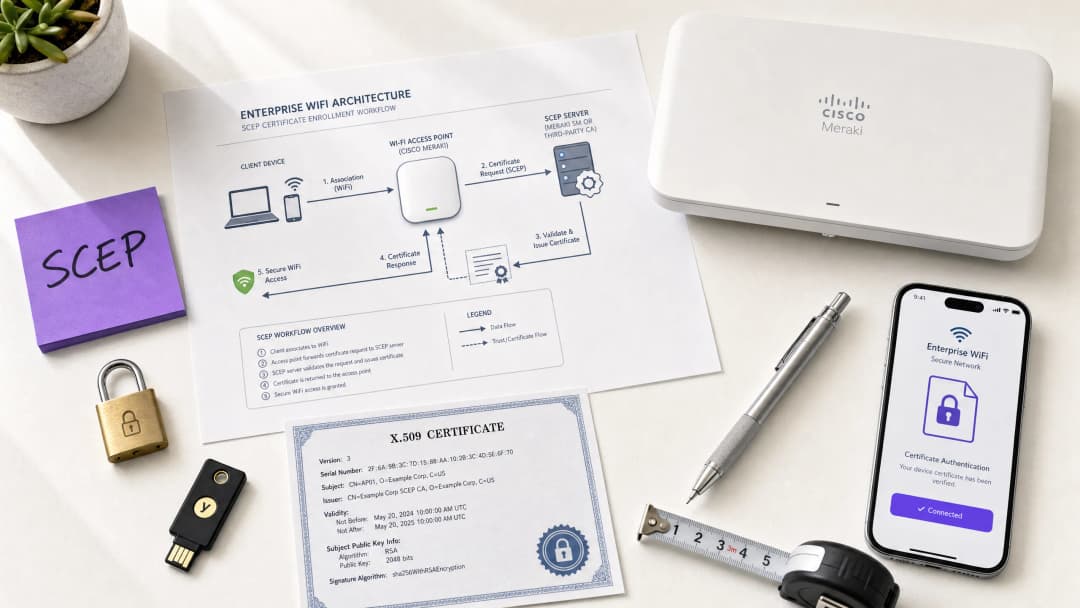 \n\n## 执行摘要\n\n对于在酒店、零售物业、体育场馆和会议中心运营 Guest WiFi 的场馆运营商而言,依靠预共享密钥或基本的 Captive Portal 来进行员工网络访问存在安全隐患。现代网络架构要求使用 EAP-TLS(可扩展身份验证协议 - 传输层安全)进行 802.1X 身份验证,以确保每个设备在接入网络之前都经过加密验证。挑战在于分发:如何在不给服务台带来沉重负担的情况下,向数千台 Windows、iOS 和 Android 设备部署唯一的客户端证书?\n\n答案是 SCEP - 简单证书注册协议。SCEP 于 2020 年被 IETF 正式确立为 RFC 8894,它实现了托管设备群中证书注册的自动化。当与 Microsoft Intune 或 Jamf 等 MDM 平台集成时,SCEP 可提供免干预的证书配置:设备无需任何 IT 干预即可请求、接收和更新其自身的证书。私钥在设备本地生成,绝不在网络上传输 - 与基于 PKCS 的交付相比,这是一个根本性的安全优势。\n\n本指南详细介绍了完整的 SCEP 实施工作流程:PKI 架构、NDES 网关配置、强制性的三步 MDM 部署顺序,以及决定推广成功与否的运营控制(特别是 CRL 检查和分组定位)。两个真实世界的案例说明了该方法在酒店和零售环境中的应用。Purple 在 80,000 多个活跃场馆中运营,拥有 3.5 亿独立用户;这里描述的模式反映了在这种规模下行之有效的方案。\n\n<audio controls src="https://tfstmpunsngbqczbybwb.supabase.co/storage/v1/object/public/guide-assets/guides/how-to-implement-scep-for-automated-wifi-certificate-enrollment/how_to_implement_scep_for_automated_wifi_certificate_enrollment_podcast.mp3\" preload="none">
技术深度剖析
SCEP 的实际工作原理
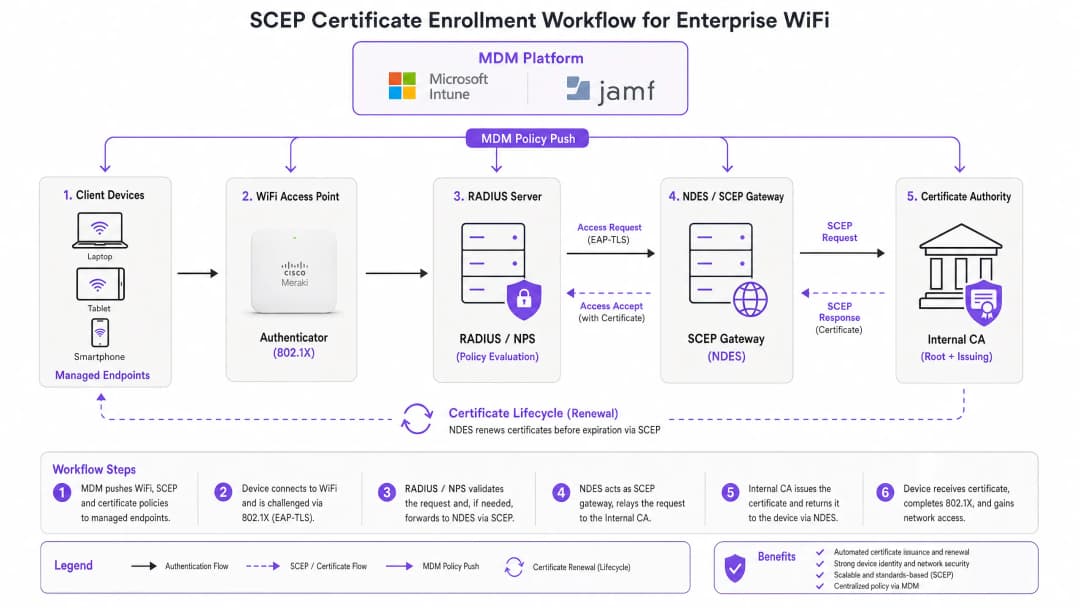
SCEP 介于您的 MDM 平台和证书颁发机构(CA)之间。它提供了一种标准化的基于 HTTP 的机制,使设备能够请求、接收和更新 X.509 证书,而无需加入域的凭据或管理员的手动干预。该协议最初开发于 21 世纪初,在 IETF 正式将其发布为 RFC 8894 之前,已在企业级 MDM 环境中获得了广泛采用。
六步注册流程如下:第一步,托管设备连接到其 MDM 配置文件中预先配置的 SCEP 网关 URL。第二步,设备在本地生成私钥/公钥对并创建证书签名请求(CSR)。第三步,SCEP 网关使用 MDM 策略中嵌入的质询密码或 OTP 验证设备的授权。第四步,网关将验证后的 CSR 转发给 CA。第五步,CA 对证书进行签名并将其返回给网关。第六步,网关将签名后的证书交付给设备。未来的更新也遵循相同的自动化路径 - 设备在过期前重新注册,无需任何用户或管理员的操作。
SCEP 对比 PKCS:关键的设计抉择
Microsoft Entra ID 相关的 Microsoft Intune 和大多数 MDM 平台都支持两种证书交付机制:SCEP 和 PKCS。两者的区别在于架构,而非表象。
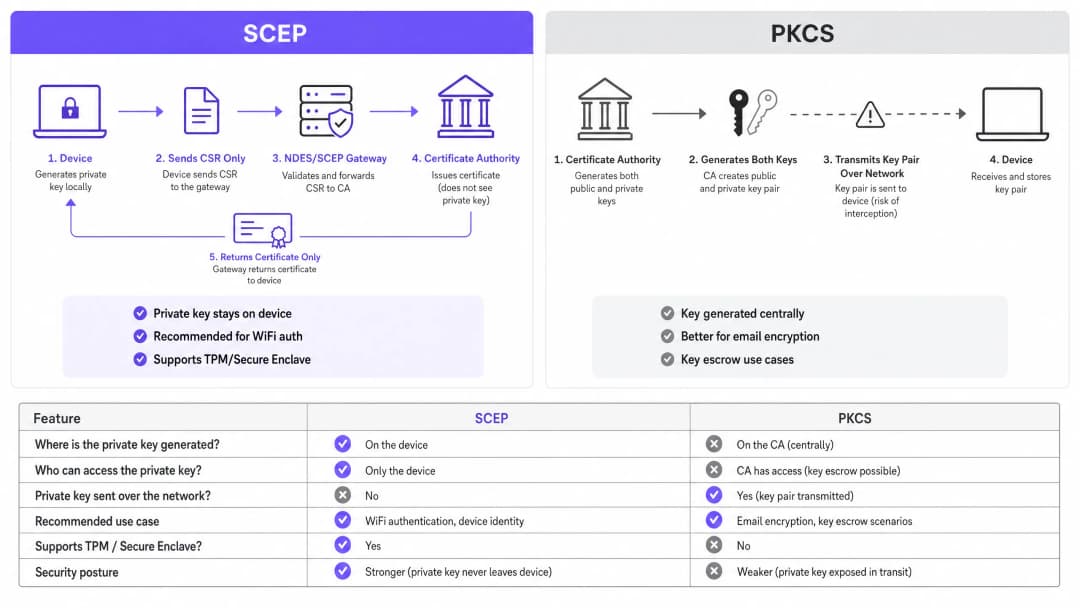
使用 SCEP 时,私钥在设备上生成并保留在设备上。CA 永远看不到它。设备的 TPM(在 Windows 上)或 Secure Enclave(在 iOS/macOS 上)在硬件层面保护该密钥。而使用 PKCS 时,CA 集中生成密钥对,并通过网络将其传输到设备。CA 会保留一份副本,从而实现密钥托管 - 这对 S/MIME 电子邮件加密很有用,但对于网络认证来说引入了不必要的风险。
对于 802.1X WiFi 认证,请使用 SCEP。私钥绝不离开设备。这是一条铁律。
| 评估维度 | SCEP | PKCS |
|---|---|---|
| 私钥生成位置 | 设备 | CA(集中生成) |
| 私钥通过网络传输 | 否 | 是 |
| 支持 TPM / Secure Enclave | 是 | 否 |
| 推荐用于 WiFi 认证 | 是 | 否 |
| 推荐用于电子邮件加密 (S/MIME) | 否 | 是 |
| 是否支持密钥托管 | 否 | 是 |
| 802.1X 与 EAP-TLS:身份验证框架 | IEEE 802.1X 是奠定企业 WiFi 安全基础的基于端口的网络访问控制标准。它定义了三个角色:申请者(客户端设备)、认证者(接入点 - 比如 Cisco Meraki、HPE Aruba、Ruckus、Juniper Mist、Ubiquiti UniFi、Cambium、Extreme 或 Fortinet)以及认证服务器(RADIUS 服务器,例如 Microsoft NPS、FreeRADIUS 或 Cisco ISE)。 |
EAP-TLS 是适用于 802.1X 的最安全的 EAP 方法。双方都需要出示证书:RADIUS 服务器向客户端出示其证书,而客户端向 RADIUS 服务器出示其通过 SCEP 调配的证书。在没有来自受信任 CA 层级的有效且未撤销的证书的情况下,任何一方都无法冒充另一方。这种双向认证模型通过单一的架构设计消除了凭据窃取、双面恶魔(Evil Twin)攻击以及流氓接入点风险。
EAP-TLS 满足 PCI-DSS 4.0 中关于网络层多因素身份验证的要求 8.6。它是部署 WPA3 企业级 192 位(Suite B)所必需的。对于涉及持卡人数据处理的任何无线网络 - 零售收银台、酒店前台、体育场售票处 - EAP-TLS 都是正确的选择。
欲深入了解 secure WiFi 架构以及基于证书的身份验证如何融入更广泛的安全态势,请参阅我们的基本指南。
-
对您的具体配置有疑问吗?
我们的团队与 80,000 多个场所的运营方、IT 经理和网络工程师保持合作。预约 20 分钟的通话,我们将为您展示同行是如何解决类似问题的。
实施指南
部署顺序是不可更改的。Intune 和 Jamf 按照以下顺序解析配置文件依赖关系:WiFi 配置文件依赖于 SCEP 配置文件,而 SCEP 配置文件又依赖于受信任根(Trusted Root)配置文件。如果未按顺序部署,WiFi 配置文件将无法应用。
第 1 步:设计您的 PKI
在接触 MDM 控制台之前,请先设计您的证书层级。标准结构是双层 PKI:一个离线根 CA 和一个在线发行 CA。根 CA 的私钥是您整个证书基础设施的主信任锚 - 请保持物理隔离。发行 CA 负责日常证书发行,并发布证书撤销列表(CRL)和 OCSP 响应程序。
对于大多数企业场馆部署,在 Windows Server 上运行的 Microsoft Active Directory 证书服务(AD CS)可充当发行 CA。来自 SCEPman 或 SecureW2 等供应商的云托管 PKI 服务则完全免去了本地基础设施的要求,非常值得在跨酒店集团、零售连锁店或多场地公共部门机构的分布式物业部署中进行评估。
第 2 步:部署 NDES 服务器(或云 SCEP 网关)
NDES(网络设备注册服务)是 Microsoft Windows Server 的一个角色,用作 MDM 和 CA 之间的 SCEP 网关。关键配置要求:
- 通过 Azure AD 应用程序代理(或等效的反向代理)向外部发布 NDES URL。这允许远程设备在到达现场之前进行注册,而无需打开入站防火墙端口。
- NDES 服务账户需要对 CA 证书模板具有“读取”和“注册”权限。
- 配置证书模板,将“密钥用法”设置为“数字签名”和“密钥加密”,并将“增强型密钥用法”设置为“客户端身份验证”(OID: 1.3.6.1.5.5.7.3.2)。
- 设置适当的证书有效期。客户端证书的标准有效期为一年;对于稳定设备群中的设备证书,两年是可接受的。 如果您希望避免使用本地 NDES 基础设施,云 SCEP 网关可以通过 API 与 Intune 以及您的 CA 直接集成,从而完全免除对 IIS 的依赖。
步骤 3:部署可信根证书配置文件
在您的 MDM 平台中,创建一个“可信证书”配置文件,并将您的根 CA 证书(以及任何中间 CA 证书)作为 .cer 文件上传。在部署任何其他证书或 WiFi 配置文件之前,先将此配置文件部署到您的目标设备组。如果没有这一步,设备在 EAP-TLS 握手期间将无法验证 RADIUS 服务器的证书,并且在申请自己的 SCEP 证书时也无法信任颁发方 CA。
经验法则: 务必在所有三个相关配置文件中针对同一个 Azure AD 组(用户或设备)。此处的配置不匹配是导致 WiFi 配置文件部署失败最常见的原因。
步骤 4:配置 SCEP 证书配置文件
在您的 MDM 中创建一个 SCEP 证书配置文件:
- 使用者名称格式: 对于用户驱动的身份验证,使用
CN={{UserPrincipalName}}。对于设备身份验证(推荐用于共享设备和物联网),使用CN={{AAD_Device_ID}}。 - 密钥用法: 数字签名、密钥加密。
- 增强型密钥用法: 客户端身份验证(OID: 1.3.6.1.5.5.7.3.2)。
- SCEP 服务器 URL: 外部发布的 NDES URL。
- 根证书: 链接到步骤 3 中的“可信根”配置文件。
- 证书有效期: 与 CA 上配置的模板保持一致。
步骤 5:部署 802.1X WiFi 配置文件
创建一个 WiFi 配置文件:
- SSID: 输入与您的接入点广播完全一致的网络名称。
- 安全类型: WPA2-Enterprise 或 WPA3-Enterprise。
- EAP 类型: EAP-TLS。
- 客户端身份验证证书: 选择步骤 4 中的 SCEP 证书配置文件。
- 服务器验证: 指定步骤 3 中的可信根证书,并输入预期的 RADIUS 服务器名称。这可以防止设备连接到呈现欺诈性证书的恶意接入点。
最佳实践
在您的 RADIUS 服务器上强制执行严格的 CRL 检查
证书吊销是弥合禁用帐户与阻止网络访问之间差距的操作控制措施。当设备丢失、被盗或员工离职时,请在 AD 中禁用该帐户并在 CA 处吊销证书。必须配置您的 RADIUS 服务器在每次身份验证尝试时检查 CRL。如果因为无法访问 CDP(CRL 分发点)而导致 CRL 不可用 - 大多数 RADIUS 服务器默认会变为“故障打开”,这存在安全风险。请确保您的 CDP 具有高可用性,并且将您的 RADIUS 服务器配置为在无法获取 CRL 时“故障关闭”。
对于实时吊销,除 CRL 外,还应配置 OCSP(联机证书状态协议)。OCSP 提供针对单个证书的状态响应,无需 RADIUS 服务器下载并解析整个 CRL。
针对共享设备和物联网设备使用设备证书
对于共享设备 - 酒店客房部平板电脑、零售 POS 终端、体育场准入控制阅读器 - 请使用设备证书而不是用户证书。设备证书与机器身份绑定,而不与用户帐户绑定。这意味着无论哪个用户登录,设备都会进行身份验证,并且吊销操作与设备记录相关联,而不是与员工离职相关联。
对于 零售 部署,POS 硬件上的设备证书还能满足 PCI-DSS 对网络层设备身份的要求,同时不会在销售点引入用户凭据的复杂性。
自动化证书更新
SCEP 支持自动更新:MDM 会指示设备在证书过期前重新注册。配置您的 SCEP 配置文件,在证书剩余有效期达到 20% 时触发更新。对于有效期为一年的证书,更新将在过期前大约 73 天开始。此窗口期提供了足够的时间来解决证书过期和设备失去网络访问权限之前的任何更新失败问题。
证书过期导致大规模身份验证失败是 802.1X 部署中最常见的方法性运行事故。通过 SCEP 进行自动更新完全消除了这种风险。
按证书属性划分网络细分
RADIUS 服务器可以读取证书属性 - 主题、SAN 或自定义 OID - 并使用它们将设备动态分配到 VLAN。使用从 HousekeepingDevices 模板颁发的证书的客房部平板电脑会落入客房部 VLAN。使用从 RetailPOS 模板颁发的证书的 POS 终端会落入 PCI 范围内的 VLAN。这是加密强化的网络细分 - 比基于 SSID 或基于 MAC 的方法可靠得多。
对于在同一物理基础设施上同时运行 Guest WiFi 和员工 WiFi 的 酒店/文旅 运营商,通过证书属性进行 VLAN 分配可确保宾客和员工始终处于不同的网络细分中,无论设备连接到哪个 SSID。
故障排除与风险缓解
WiFi配置文件在Intune中显示“错误”或“不适用”
根本原因: 组目标不匹配。SCEP配置文件与WiFi配置文件分配给了不同的组。Intune无法解析证书依赖关系。
解决方法: 审核所有三个配置文件(受信任的根证书、SCEP、WiFi)。确保它们都分配给完全相同的Azure AD组。如果您是部署到“用户”,则所有三个配置文件都必须针对“用户”组。如果是部署到“设备”,则所有三个都必须针对“设备”组。
NDES返回HTTP 403错误
根本原因: Intune Certificate Connector服务帐户缺少对CA证书模板的“读取”或“注册”权限,或者防火墙URL过滤阻止了SCEP查询字符串。
解决方法: 验证连接器帐户在CA控制台的模板上是否具有“读取”和“注册”权限。检查防火墙日志中是否包含被阻止的、含有 ?operation=GetCACaps 或 ?operation=PKIOperation 的请求。这些查询字符串必须在不进行修改的情况下通过。
设备在过期前无法更新证书
根本原因: SCEP更新窗口过短,或者在更新时无法访问NDES服务器。
解决方法: 将更新阈值设置为证书有效期的20%。确保通过高可用的反向代理发布NDES URL。监控NDES IIS日志中的更新请求失败情况,并主动发出警报。
RADIUS拒绝有效的证书
根本原因: RADIUS服务器的受信任CA存储中不包含颁发CA证书,或者CRL已过期。
解决方法: 将完整的CA链(根CA + 颁发CA)导入到RADIUS服务器的受信任存储中。验证是否成功获取了CRL,并且从RADIUS服务器可以访问CDP URL。检查CRL的下次更新时间戳 - 如果已过期,CA需要发布新的CRL。
有关安全之外的更广泛网络性能考量,请参阅我们的 带宽管理指南。
投资回报率与业务影响
基于SCEP的证书注册的业务案例非常简单。基于密码的WiFi会产生可预测的帮助台工单量:密码过期、锁定、员工与访客共享凭据以及新员工入职摩擦。基于证书的身份验证对最终用户是无感的。设备会自动连接。没有密码会过期、被共享或被遗忘。
从基于密码的WiFi迁移到使用SCEP的EAP-TLS的企业通常报告,与WiFi相关的帮助台工单减少了70% - 80%(Purple内部数据,2024年,基于在酒店和零售物业的部署情况)。仅帮助台节省的成本通常就能在第一年内抵消实施成本。合规性影响同样具体。EAP-TLS 满足了 PCI DSS 4.0 要求 8.6 关于网络层多因素身份验证的规定。对于 医疗 环境,它符合 HIPAA 对无线网络访问的技术保障要求。对于公共部门组织,它支持网络访问控制的 NCSC Cyber Essentials Plus 认证要求。
对于 交通 运营商(铁路特许经营、机场运营商、公交网络),在员工设备上使用基于证书的身份验证可确保承载安全关键数据的业务网络与旅客 WiFi 隔离,并免受基于凭据的攻击。
Purple 的 WiFi Analytics 平台与受 802.1X 保护的网络集成,可在不损害底层基础设施安全状况的情况下提供第一方数据洞察。在 Purple 网络中收集的 290 亿个数据点表明,安全与分析是互补而非竞争的目标。
如需在部署安全网络的同时进行反馈和体验管理,请参阅我们的 场所反馈指南。
关键定义
SCEP (Simple Certificate Enrollment Protocol)
一种 IETF 标准化协议(RFC 8894),用于为托管设备自动进行 X.509 证书注册。设备在本地生成自己的私钥,且仅通过网关向 CA 发送证书签名请求。私钥永远不会离开设备。
IT 团队在配置 MDM 平台(Intune、Jamf)以大规模部署 WiFi 身份验证证书时会遇到 SCEP。它是 802.1X EAP-TLS 部署的推荐机制,因为私钥在终端上受到硬件级保护。
EAP-TLS (Extensible Authentication Protocol - Transport Layer Security)
最安全的 802.1X 身份验证方法。客户端设备和 RADIUS 服务器都需要出示 X.509 证书。如果缺少来自受信任 CA 层级的有效且未被吊销的证书,任何一方都无法通过身份验证。
EAP-TLS 是 SCEP 证书部署所启用的目标身份验证协议。它满足 PCI-DSS 4.0 要求 8.6,并且是 WPA3 企业级 192 位(Suite B)部署的必需项。
PKCS (Public Key Cryptography Standards)
一种证书交付机制,其中 CA 集中生成公钥和私钥对,并将它们传输到终端。CA 保留私钥的副本,从而实现密钥托管。
IT 团队在 Intune 中配置证书配置文件时,需要在 SCEP 和 PKCS 之间进行选择。PKCS 适用于需要密钥托管的 S/MIME 电子邮件加密。不推荐将其用于 WiFi 身份验证,因为私钥会在网络上传输。
NDES (Network Device Enrollment Service)
一个 Microsoft Windows Server 角色,充当 MDM 平台与证书颁发机构之间的 SCEP 网关。它用于验证设备注册请求并将 CSR 转发给 CA。
对于使用 Microsoft Intune 的本地 SCEP 部署,NDES 是必需的基础架构组件。它必须通过应用代理进行外部发布,以允许远程设备注册。云端 SCEP 网关是一种替代方案,可以消除对本地 NDES 的依赖。
CRL (Certificate Revocation List)
由 CA 发布的一份列表,其中包含在到期日前已被吊销的证书序列号。RADIUS 服务器通过检查 CRL 来确保拥有已吊销证书的的设备无法通过身份验证。
CRL 检查是执行证书吊销的运行控制手段。IT 团队必须配置其 RADIUS 服务器,以便在每次身份验证尝试时检查 CRL,并确保 CRL 分发点(CDP)高度可用。
802.1X
一种用于基于端口的网络访问控制的 IEEE 标准。它定义了企业 WiFi 和有线网络中使用的三方身份验证框架(申请者、认证者、认证服务器)。
802.1X 是 EAP-TLS 和 SCEP 运行的框架。IT 团队在配置 WPA2 企业级或 WPA3 企业级 SSID 以及设置 RADIUS 服务器策略时会遇到它。
RADIUS (Remote Authentication Dial-In User Service)
一种网络协议,为网络访问提供集中的身份验证、授权和计费(AAA)。在 802.1X 部署中,RADIUS 服务器负责验证客户端证书并执行 VLAN 分配策略。
RADIUS 服务器是每个 802.1X 部署中的身份验证决策点。常见的实现包括 Microsoft NPS、FreeRADIUS 和 Cisco ISE。它必须配置受信任的 CA 链以及严格的 CRL 或 OCSP 检查。
CSR (Certificate Signing Request)
由设备生成的编码文本块,其中包含设备的公钥和身份信息。设备(通过 SCEP 网关)向 CA 发送 CSR 以请求签名证书。相应的私钥在设备上生成并保留。
CSR 是 SCEP 注册流程中的核心要素。IT 团队在其 MDM 平台的 SCEP 证书配置文件中配置 CSR 格式(主题名称、密钥用法、EKU)。
PKI (Public Key Infrastructure)
创建、管理、分发和撤销数字证书所需的硬件、软件、策略和程序的组合。标准的组织级 PKI 由离线根 CA 和在线颁发 CA 组成。
PKI 是任何 EAP-TLS 部署的前提条件。IT 团队在配置 SCEP 之前必须设计和部署双层 CA 层次结构。云托管的 PKI 服务可减轻分布式资产部署的基础设施负担。
VLAN (Virtual Local Area Network)
在第 2 层隔离流量的逻辑网络分段。在 802.1X 部署中,RADIUS 服务器根据证书属性、用户身份或策略将设备动态分配到 VLAN。
通过 RADIUS 进行 VLAN 分配是企业 WiFi 中实施网络隔离的机制。IT 团队利用它将 POS 设备隔离到 PCI 范围的 VLAN,将访客设备隔离到仅限互联网的 VLAN,并将员工设备隔离到企业 VLAN - 所有这些都基于单一的物理基础设施。
应用实例
一家拥有 200 间客房的 Premier Inn 酒店需要为 150 台 iOS 客房服务设备部署安全的 WiFi。目前,员工与访客共享 WPA2 个人版(WPA2-Personal)密码,这带来了合规与运营风险。IT 总监需要在不影响日常运营的前提下消除该共享密码。
IT 总监分三个阶段实施了由 Jamf 驱动的 SCEP 部署。第一阶段:通过 Jamf 受信证书配置文件将根 CA 证书推送到所有 150 台 iOS 设备,目标指向“客房服务设备”智能群组。第二阶段:部署 SCEP 证书配置文件,将设备引导至通过 Azure AD 应用代理发布的 NDES 服务器。主题名称使用 CN={{SERIALNUMBER}},以将证书与设备硬件绑定。第三阶段:推送 WPA2 企业版(WPA2-Enterprise)WiFi 配置文件,指定 EAP-TLS 并链接到 SCEP 证书。设备进行无感认证。共享密码 SSID 被停用。RADIUS 服务器配置了严格的 CRL 检查和 VLAN 分配:客房服务设备划分到 VLAN 20(运营),访客设备划分到 VLAN 10(仅限互联网)。
一家拥有 500 个门店的零售连锁店需要为运行支付处理软件的 Windows POS 平板电脑保障企业 WiFi 的安全。PCI-DSS 4.0 合规要求在网络层实施多因素身份验证。现有的 WPA2 个人版(WPA2-Personal)设置未能通过 PCI-DSS 规范 8.6 的评估。
网络架构师通过 Microsoft Intune 和 SCEP 在所有 500 个门店部署了 EAP-TLS。该部署使用设备证书,并将 CN={{AAD_Device_ID}} 作为主题名称,将每个证书与 Intune 设备记录进行绑定。三配置文件序列(受信根、SCEP、WiFi)被部署到“POS 设备”Azure AD 群组 - 这三个配置文件均指向同一个群组。RADIUS 服务器根据证书的签发模板,将 POS 设备分配到专用的 PCI 范围 VLAN(VLAN 100)。CRL 被发布到一个高可用的 CDN 托管端点,有效期窗口为四小时。同时启用了 OCSP 以进行实时吊销检查。该部署已通过 QSA 针对 PCI-DSS 4.0 规范 8.6 的验证。
练习题
Q1. 您已向 Intune 中的“所有员工”用户组部署了受信任的根和 SCEP 证书配置文件。然后,您向“企业设备”设备组部署了 WiFi 配置文件。设备接收到了证书,但 WiFi 配置文件在 Intune 控制台中显示“错误”。最可能的原因是什么,您该如何解决?
提示:考虑 Intune 如何解析配置文件之间的依赖关系,以及当配置文件针对不同的组类型时会发生什么。
查看标准答案
根本原因是组定位不匹配。WiFi 配置文件依赖于 SCEP 配置文件,而 SCEP 配置文件又依赖于受信任根配置文件。当这些配置文件针对不同的组类型(用户与设备)时,Intune 无法解析这些依赖关系。解决方法:将所有三个配置文件重新部署到同一个组。如果 WiFi 配置文件针对“企业设备”(设备组),则 SCEP 和受信任根配置文件也必须针对“企业设备”。或者,如果需要基于用户的身份验证,将这三个配置文件都移动到用户组中。
Q2. 据报告,一名酒店客房部员工的 iPad 被盗。您立即禁用了该员工的 Active Directory 帐户。第二天早上,被盗的 iPad 仍能连接到酒店的 WPA2 企业网络。这是为什么?您应采取哪两个行动来防止这种情况?
提示:思考 RADIUS 服务器在 EAP-TLS 身份验证期间实际验证的内容,以及哪些控制措施管理着证书的有效性。
查看标准答案
禁用 AD 帐户并不会撤销存储在 iPad 上的客户端证书。在 EAP-TLS 身份验证期间,RADIUS 服务器验证的是证书,而不是 AD 帐户状态。需要采取的两个行动是:(1) 在 CA 处撤销该设备证书 - 这会将证书序列号添加到 CRL 中;(2) 确保 RADIUS 服务器配置了严格的 CRL 检查,以便在下一次身份验证尝试时获取更新后的 CRL 并拒绝已被撤销的证书。为了更快地执行撤销,可在 RADIUS 服务器上配置 OCSP 以进行实时证书状态检查。
Q3. 一家零售连锁店正在向 500 个 POS 网点部署 802.1X WiFi。安全架构师建议使用 PKCS 证书传输代替 SCEP,以避免部署 NDES 服务器。审查 PCI DSS 4.0 评估的 QSA 提出了质疑。该质疑是什么?正确的建议又是什么?
提示:考虑 PCI DSS 对私钥处理的规定,以及 PKCS 在传输过程中对私钥的处理方式。
查看标准答案
QSA 的质疑在于 PKCS 会将私钥通过网络从 CA 传输到设备。PCI DSS 4.0 要求 3.5 规定,用于身份验证的私钥必须防止泄露。通过网络传输私钥 - 即使经过加密 - 也会引入 SCEP 可以完全消除的安全风险。正确的建议是使用 SCEP,其中私钥在 POS 设备上生成,且绝不离开设备。为避免本地 NDES 基础设施,架构师应评估通过 API 与 Intune 和 CA 直接集成的云 SCEP 网关服务。
Q4. 您正在为一家每年举办 50 多场活动的大型会议中心设计 WiFi 网络。员工设备需要接入安全的 802.1X 网络。您希望确保如果承包商的设备遭到入侵,能在 15 分钟内将其从网络中隔离。您会配置哪种证书吊销机制?为什么?
提示:在吊销延迟以及决定 RADIUS 服务器响应吊销速度的因素方面,对 CRL 和 OCSP 进行对比。
查看标准答案
在 RADIUS 服务器上配置 OCSP(联机证书状态协议)。基于 CRL 的吊销存在延迟,延迟时间由 CRL 的有效期决定(通常为 1 到 24 小时),这意味着在 RADIUS 服务器获取下一个 CRL 之前,已吊销的证书可能仍能通过认证。而 OCSP 针对每个证书提供实时的状态查询响应:当证书在 CA 处被吊销时,OCSP 响应程序会在下一次查询时立即返回 “已吊销” 状态。在 RADIUS 服务器上配置 OCSP 后,已吊销的承包商证书将在下一次认证尝试时(通常在几秒钟内)被阻止。确保 OCSP 响应程序具有高可用性 - 如果其不可达且 RADIUS 服务器配置为 “无法连接则拒绝”(fail closed),所有认证都将失败。
继续阅读本系列
CIPA合规:场所运营商合规清单
您将能够确定您的WiFi是否受CIPA约束,然后进行网络细分、通过Purple Shield路由DNS并关闭绕过路径。您还将了解为Form 486或Form 479认证需要保留哪些证据。该清单为每个要求分配了责任人,因此您的下一个资助年度认证将毫无遗漏。
WPA3 过渡模式连接失败:Cisco Meraki、HPE Aruba 和 Ruckus 的部署检查清单
使用此检查清单来诊断设备在 WPA3 SAE 过渡模式 SSID 上连接失败的原因,并在 Cisco Meraki、HPE Aruba 或 Ruckus 上进行修复。您将把 802.11 状态码与原因进行匹配,隔离 PMF、802.11r 和 6GHz 问题,并决定何时切换到仅限 WPA3 的 SSID。
最佳 DNS 过滤:企业综合指南
本技术参考指南阐述了企业级 DNS 过滤如何通过在解析层(即建立连接之前)阻止恶意域名,来保障公共网络的安全。它为 IT 总监、网络架构师和场所运营团队提供了部署架构、防火墙配置以及合规性背景,帮助他们在酒店、零售和公共部门环境中保护宾客 WiFi。Purple Shield 在 DNS 级别为 80,000 多个活跃场所阻止恶意软件、僵尸网络和不当内容。
对您的具体配置有疑问吗?
我们的团队与 80,000 多个场所的运营方、IT 经理和网络工程师保持合作。预约 20 分钟的通话,我们将为您展示同行是如何解决类似问题的。