
Hotel WiFi:酒店经营者完整指南
了解如何设计、部署企业级酒店 WiFi 网络并实现变现。内容涵盖 PMS 集成(Opera、Mews)、分层带宽 ROI、PCI-DSS 合规性以及住客数据采集。
Video overview
收听本指南
查看播客转录
核心系列的一部分:住客 WiFi 终极指南 →
执行摘要
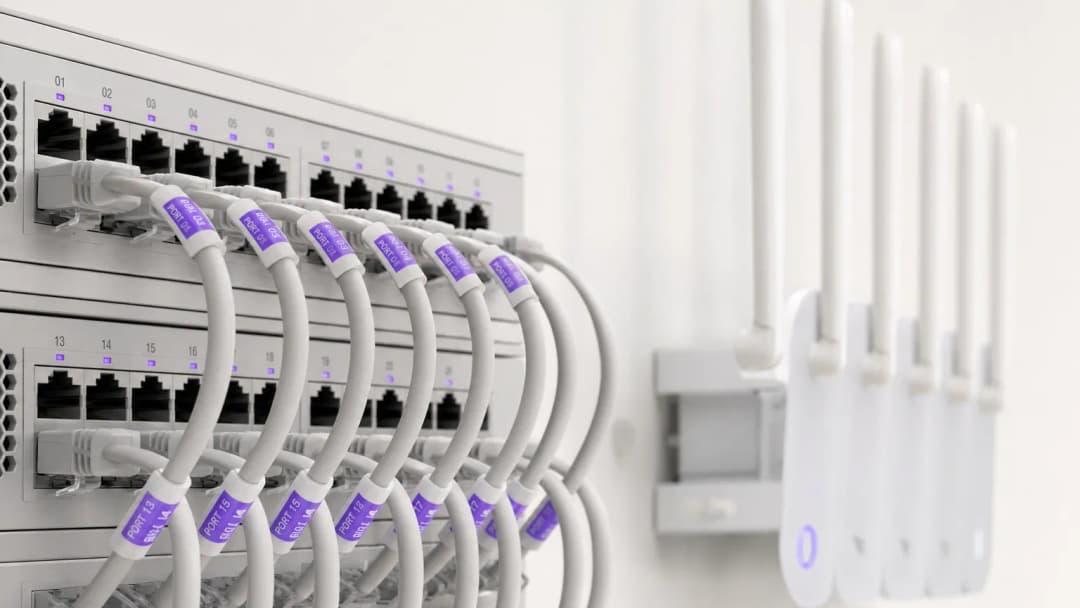
对于现代酒店业者而言,宾客 WiFi 远不止是一项基本便利设施 - 它是宾客满意度评分、重复直接预订和运营效率的主要驱动力。酒店宾客期望在客房、大堂、会议空间和户外设施中获得无缝、高速的连接。与此同时,IT 高级主管必须在平衡高并发带宽需求与 PCI DSS 安全合规及数据隐私法规之间取得平衡。
本指南为酒店 IT 经理、场馆运营总监和总经理提供了一个用于设计、部署和变现企业级酒店 WiFi 网络的实用框架。我们将深入探讨客房内接入点架构、物业管理系统(PMS)集成、分层带宽收入模型,以及如何将宾客 WiFi 登录转化为经验证的第一方营销数据。
听听我们关于核心酒店 WiFi 概念的配套简报:
技术架构与网络分段
逻辑 VLAN 分段
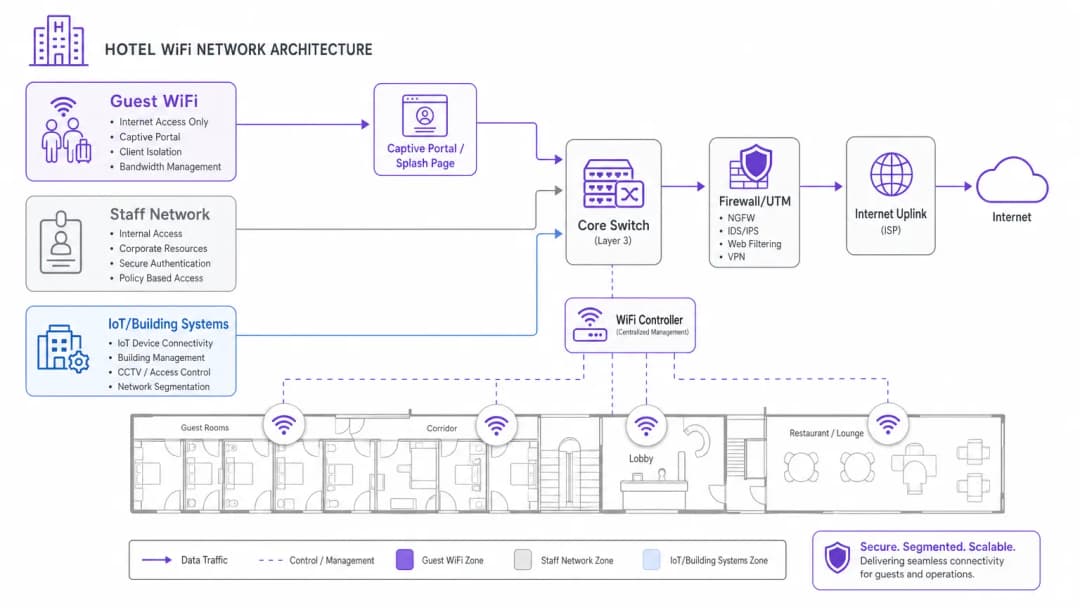
企业级酒店 WiFi 的基石是严格的逻辑网络分段。单一的物理基础设施必须处理不同的用户群(酒店宾客、员工运营、销售点 (POS) 终端和楼宇自动化 (IoT/HVAC)),同时又不牺牲安全性或性能。
宾客流量必须隔离在专用的虚拟局域网 (VLAN) 上。将支付处理 (POS) 和物业管理系统 (PMS) 隔离到加密的员工 VLAN 上,是满足 PCI-DSS 合规性要求的强制性规定。此外,宾客 VLAN 必须强制执行客户端隔离,以防止宾客设备在本地无线网络上相互通信。
无线密度与接入点部署
传统的酒店 WiFi 设计依赖于部署在走廊的接入点 (AP),每隔 5 到 7 间客房布置一个。在采用钢筋混凝土、电梯井、瓷砖浴室和箔面保温材料的现代酒店建筑中,走廊信号在到达宾客床头和书桌之前会迅速衰减。
目前的行业标准是客房内墙面插座 AP 部署(每间客房 1 个 AP,或每 2 间客房 1 个 AP)。房内 Wi-Fi 6 AP 可提供清晰的 5GHz 和 6GHz 覆盖、低延迟的视频通话,并为智能电视、IP 电话和 VoIP 落地线路提供内置的有线以太网端口。
PMS 集成与宾客认证门户
将您的宾客 WiFi Captive Portal 与您的物业管理系统 (PMS) - 例如 Oracle Opera、Mews、Stayntouch 或 Cloudbeds - 进行集成,可将简单的网络接入转化为个性化的宾客体验。
PMS 认证工作原理
- 宾客关联: 宾客连接到酒店 WiFi SSID 并被重定向到品牌化的 Captive Portal。
- 客房验证: 宾客输入其房号和姓氏(或预订编号)。
- API 查询: 门户通过安全 API 查询 PMS 数据库,以验证其处于在住状态。
- 权限映射: 网络根据宾客忠诚度级别应用定制的带宽策略(例如,VIP 宾客可享受 50 Mbps 的高速接入,普通宾客则为 10 Mbps)。
酒店 WiFi 接入模式对比
| 接入模式 | 认证方式 | 宾客体验 | 营收 / 数据价值 | 安全与合规性 |
|---|---|---|---|---|
| PMS 认证 | 房号 + 姓氏 | 无缝、个性化的欢迎体验 | 高(同步个人资料和入住历史记录) | 高(已验证的酒店宾客) |
| 社交 / 表单选择加入 | 电子邮件、LinkedIn、Google | 快速、单键登录 | 高(捕获已验证的电子邮件选择加入) | 中(客户端隔离) |
| 分级付费卡 | 信用卡 / 记入房账 | 可选择免费或尊享网速 | 高(直接增加营收) | 高(加密支付网关) |
| 一键登录 | 接受条款和条件按钮 | 即时接入 | 低(不收集联系数据) | 基础级(客户端隔离) |
酒店 WiFi 变现与分层带宽 ROI
高带宽视频流媒体(4K Netflix、YouTube、Twitch)和远程工作视频会议占据了晚间宾客网络消耗的大部分。无限制的开放带宽会导致上行链路饱和并引发宾客的差评。
实施分层带宽
酒店业者可以实施双层带宽模型:
- 免费基础层: 每台设备 5 - 10 Mbps 对等速度 - 非常适合网页浏览、电子邮件和社交聊天。
- 尊享高速层: 30 - 50 Mbps 高优先级带宽,价格为每 24 小时 7.99 美元至 12.99 美元(或对会员免费)。
该策略在保证所有宾客获得流畅基础性能的同时,还能从商务旅客和重度用户中产生持续性收入。
如需深入了解宾客网络策略和企业安全,请浏览我们的 Guest WiFi Guide、WiFi Marketing Guide 和 Enterprise WiFi Security Guide。
关键定义
PMS 集成
将住客 WiFi Captive Portal 与物业管理系统(例如 Oracle Opera、Mews、Stayntouch)进行连接,以通过房号或姓名验证住客身份,并同步画像偏好。
对于无缝办理住客入住、VIP 带宽规则以及离店后自动触发电子邮件至关重要。
客户端隔离
一种安全功能,可防止连接到同一无线网络的住客设备发现彼此或相互通信。
酒店住客网络上的强制要求,以防止房间之间的横向网络攻击和数据窃听。
分层带宽
根据住客级别分配不同的带宽限制和优先级(例如,免费 5Mbps 用于标准浏览,付费 50Mbps 用于 4K 流媒体和游戏)。
允许酒店经营者通过高带宽需求实现变现,同时为所有住客保护上行链路容量。
入室 Access Point (AP)
在客房内布设低调的面板式 WiFi 6 接入点,而不是在走廊里进行稀疏的吸顶安装。
消除浴室瓷砖、铝箔绝缘层和重型防火门带来的走廊信号衰减。
应用实例
一家拥有 250 间客房的商务酒店在晚上高峰时段(晚上 7 点至 10 点)频繁收到住客关于 WiFi 网速的投诉。该物业目前依赖 500 Mbps 的宽带连接,且接入点部署在中央走廊。应该实施何种网络架构升级?
- 将互联网上行链路升级为具有保证 SLA 的 1 Gbps 专用专线,以应对高峰期并发流媒体流量。 2. 将无线架构重新设计为入室 AP 模式(每间房或每 2 间房部署 1 个 AP),以消除墙体衰减。 3. 在住客 VLAN 上实施带宽整形(例如每个客户端基准为 10 Mbps),同时提供可选的付费 50 Mbps 高速分层。
一家精品酒店集团希望采集经核实的住客联系信息用于直接预订营销活动,同时确保严格遵守 GDPR 和隐私法规。应该如何配置 Captive Portal?
部署与物业管理系统(PMS)集成的 Captive Portal。配置登录页面,要求勾选明确、非绑定的同意复选框以接收营销信息,该复选框需与网络服务条款分开。Portal 将自动记录同意的时间戳、IP 地址和 MAC 地址,同时将核实的住客画像同步到中央营销平台中。
练习题
Q1. 您的酒店运营总监希望将室外泳池露台上的新移动销售点(POS)平板电脑连接到现有的住客 WiFi 网络。您应该如何回应?
提示:考虑 PCI-DSS 合规性和网络分段。
查看标准答案
拒绝该请求。将支付终端连接到开放的住客 WiFi 网络违反了 PCI-DSS 规则,并会使信用卡数据面临风险。POS 平板电脑必须连接到使用 WPA3-Enterprise 保护的专用、加密员工/POS VLAN,与住客流量完全隔离。
Q2. 一位室内设计师坚持将吸顶式接入点隐藏在装饰性黄铜外壳内,以保持酒店大堂的美观。这会带来什么技术影响?
提示:考虑金属外壳如何与无线电信号相互作用。
查看标准答案
金属外壳相当于法拉第笼,会严重阻挡射频信号并产生盲区。接入点必须安装在外部,或安装在透射频的外壳(如塑料或石膏板)后面。使用供应商批准的乙烯基贴纸可以融入装潢,且不会降低 WiFi 性能。
Q3. 酒店营销经理要求自动将每位连接到访客 WiFi 的客人订阅到酒店每日时事通讯。这应该如何处理?
提示:考虑 GDPR 和隐私法规定的明示同意要求。
查看标准答案
Portal 页面不能自动为客人订阅。同意必须是明示的、知情的且非捆绑的。登录页面必须提供一个未勾选的营销勾选框,这必须与接受网络服务条款区分开来。
常见问题
Why is in-room AP deployment preferred over corridor access points in hotels?
Modern hotel construction materials (reinforced concrete, foil insulation, fire doors, and bathroom tile) cause RF attenuation of 10 to 18 dB per wall. Corridor-mounted APs struggle to penetrate guest rooms, forcing client devices to transmit at maximum power and degrading battery life. In-room wall-plate APs provide line-of-sight 5 GHz and 6 GHz coverage, sub-millisecond roaming latency, and built-in Gigabit Ethernet switch ports for smart TVs, VoIP phones, and IoT thermostats.
How does hotel WiFi integrate with Property Management Systems (PMS)?
Guest WiFi captive portals integrate with hotel PMS platforms (such as Oracle Opera, Mews, Stayntouch, and Cloudbeds) via secure REST APIs or Micros FIAS protocols. When guests connect, they authenticate using their room number and surname or reservation code. The portal validates active stay status against the PMS in real time, applies VIP bandwidth profiles automatically, and posts optional tiered service charges directly to the guest folio.
How do tiered WiFi bandwidth passes generate revenue for hoteliers?
Tiered bandwidth models provide a complimentary baseline speed (such as 10 Mbps for email and social browsing) while offering paid high-speed passes (such as 50 to 100 Mbps for 4K video streaming, gaming, or remote work videoconferencing). Guests purchase 24-hour or multi-day passes via credit card, Apple Pay, or direct room charge. This protects core uplink capacity during peak evening hours while generating predictable ancillary revenue.
What network segmentation is required for hotel WiFi and PCI DSS compliance?
Hotels must maintain strict Layer-2 and Layer-3 network segmentation using dedicated Virtual Local Area Networks (VLANs). Guest WiFi traffic must be isolated on an independent guest VLAN with client isolation enabled, preventing guest devices from discovering or attacking one another. Point-of-Sale (POS) card terminals, Property Management Systems (PMS), and administrative staff devices must reside on separate, encrypted VLANs protected by next-generation firewall access control lists (ACLs) to satisfy PCI DSS Requirement 1.3.
How do hotels handle MAC address randomisation across returning guests?
iOS, Android, and Windows rotate randomized MAC addresses periodically, which can cause guests to see repeated login splash screens when returning to the hotel or moving between common areas. Enterprise platforms like Purple resolve this by issuing Passpoint (Hotspot 2.0) encrypted profiles or binding authenticated guest sessions to secure HTTP session tokens and verified user identity profiles rather than transient physical MAC addresses.
How does Purple improve guest WiFi ROI for hotels and resorts?
Purple turns hotel guest WiFi into a high-conversion marketing and operations asset. By streamlining captive portal logins with social and PMS authentication, Purple captures verified, GDPR-compliant guest profiles and syncs them with hospitality CRMs (such as HubSpot, Salesforce, and Revinate). Hoteliers leverage real-time footfall analytics, dwell times, and automated post-stay review triggers (TripAdvisor, Google Reviews) to drive repeat direct bookings and reduce OTA commission fees.
继续阅读本系列
Staff WiFi 对比 Guest WiFi:企业网络分段最佳实践
针对 IT 领导者的全面技术指南,介绍如何对 staff 和 guest WiFi 网络进行分段。内容涵盖 VLAN 架构、802.1X 认证、防火墙策略以及安全网络设计对业务的影响。
酒店客用 WiFi 管理:整合 PMS、门户与品牌标准
本技术指南详细介绍了如何构建企业级酒店 WiFi 网络,重点关注 VLAN 划分、用于自动会话管理的 PMS 集成,以及用于符合 GDPR 的数据采集的 Captive Portal 优化。
如何设置 Guest WiFi:企业级安全配置指南
本权威指南为 IT 负责人和网络架构师提供了部署安全企业 Guest WiFi 的确定性蓝图。内容涵盖了基本架构、WPA3 迁移、VLAN 隔离以及 Captive Portal 集成,在保护内部系统的同时,实现合规的一方数据采集。
对您的具体配置有疑问吗?
我们的团队与 80,000 多个场所的运营方、IT 经理和网络工程师保持合作。预约 20 分钟的通话,我们将为您展示同行是如何解决类似问题的。