
如何在 Ruijie Networks 設備上設定訪客 WiFi 與 Captive Portals
本技術指南詳細介紹了在 Ruijie Networks 硬體上設定訪客 WiFi 和 Captive Portals 的步驟,涵蓋原生雲端入口網站與外部 RADIUS 整合。本指南為 IT 經理和網路架構師提供了 VLAN 隔離、Walled Garden 設定以及第三方平台整合的具體實作步驟,以推動數據分析並創造收益。
收聽此指南
查看播客逐字稿

執行摘要
在 Ruijie Networks 硬體上設定訪客 WiFi 和 Captive Portals,需要對該平台的架構有清晰的理解,特別是原生雲端入口網站與外部 RADIUS 整合之間的選擇。本技術參考指南為 IT 經理、網路架構師和場域營運總監提供了使用 Ruijie RG-WS 控制器和 Reyee EG 閘道器部署安全、隔離且具擴充性之訪客網路的確切步驟。我們將介紹從基本 NAT 轉發到強大 VLAN 隔離的過渡、透過 WISPr 設定外部 Captive Portals,以及整合如 Purple 等第三方平台以獲取第一方數據並推動收益。無論您是管理單一飯店還是多據點的零售物業,本指南都能提供建立合規且高效能無線網路所需的實用、不限特定廠商的設定步驟。
技術深度解析
Ruijie Networks 提供強大的企業級無線架構,支援多種訪客存取部署模式。對於任何網路架構師而言,核心決策在於選擇合適的驗證流程與隔離策略。
Captive Portal 部署模式
Ruijie 支援三種不同的 Captive Portal 部署模式,各自適用於不同的營運需求:
- 原生雲端入口網站 (Ruijie JaCS):內建的 Ruijie Cloud 平台(特別是針對旅宿業的 JaCS 介面)提供了拖放式入口網站建置工具。此模式在「Device Config」(裝置設定)下進行設定,其中 SSID 驗證設定為 Captive Portal。它支援基本的登入選項,包括一鍵存取和憑證代碼(Voucher)。這適用於不需要深度分析或外部 CRM 整合的單一場域。
- 外部 Captive Portal (WISPr/RADIUS):對於企業級部署、多據點零售和大型公共場所,外部入口網站模式是必不可少的。此方法使用 WISPr 協定將訪客流量重導向至如 Purple 等第三方平台。驗證是透過使用 PAP 加密的外部 RADIUS 伺服器群組進行處理。此模式可實現進階數據收集、GDPR 合規性管理,以及與現有行銷工具鏈的無縫整合。
- 獨立 AP 入口網站:執行 ReyeeOS 1.219 或更新版本的 Ruijie Reyee 無線基地台支援本地化的 Captive Portal,無需 EG 閘道器。這是臨時部署的備用方案,但缺乏基於控制器架構的強大 QoS 和隔離功能。
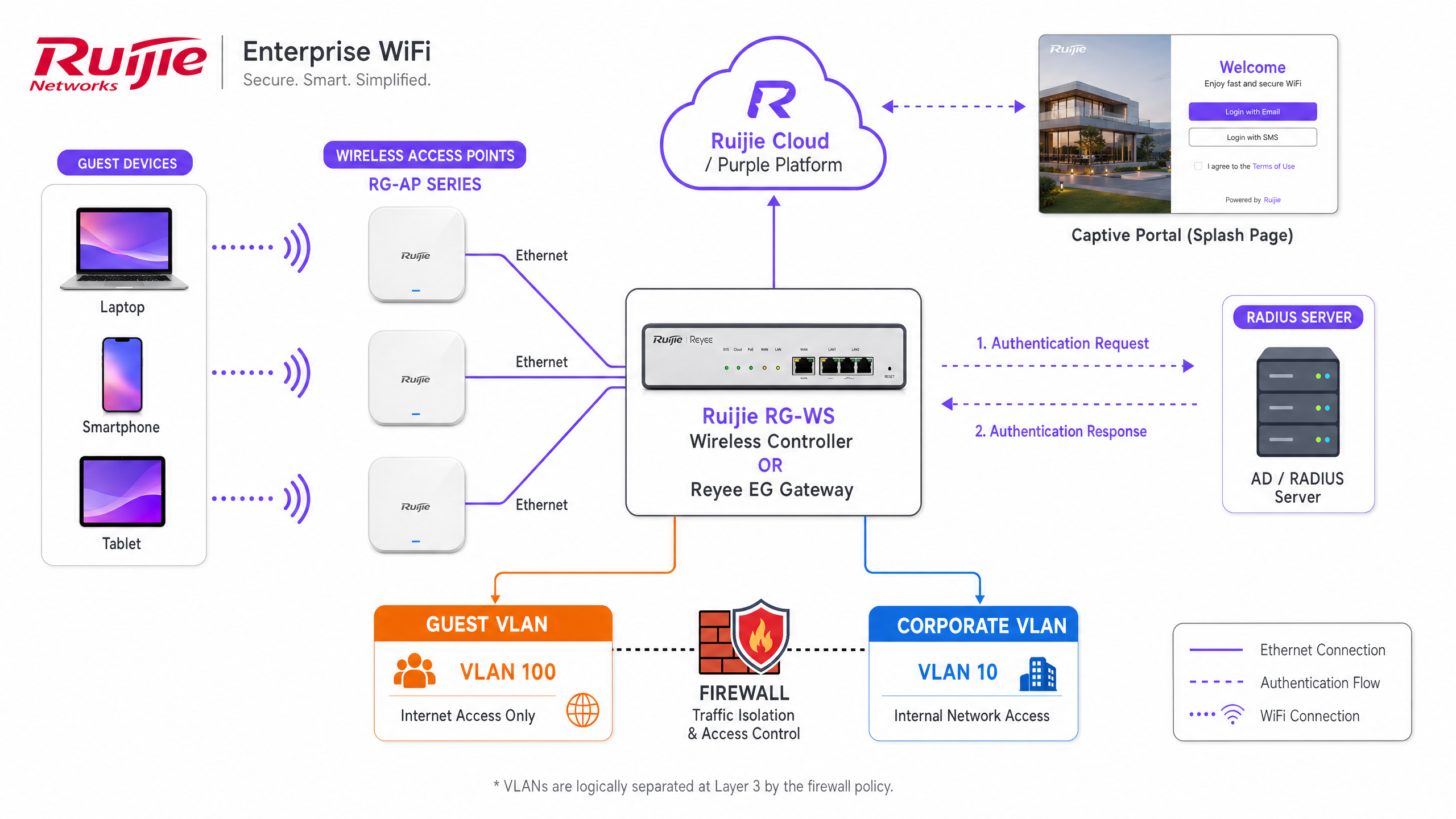
網路隔離:NAT 與 VLAN
最關鍵的架構決策是如何將訪客流量與企業網路隔離。Ruijie 為訪客 SSID 提供兩種轉發模式:
- NAT 模式:閘道器從專用位址池(預設為 192.168.23.0/24)分配 IP 位址,並在將流量路由到網際網路之前進行網路位址轉換(NAT)。雖然部署簡單,但此方法在 Layer 3 對訪客流量的能見度與控制力有限。
- VLAN 模式:推薦的企業標準。訪客 SSID 被對應到專用 VLAN(例如 VLAN 100)。Reyee EG 閘道器或 RG-WS 控制器使用存取控制清單(ACL)來執行嚴格的隔離。必須設定擴充 ACL 以拒絕從訪客子網路到企業子網路的 IP 流量,同時允許向外的網際網路存取。此方法符合 Enterprise WiFi Security: A Complete Guide for 2026 的原則。
Walled Garden 設定
在訪客完成 Captive Portal 驗證之前,其裝置會處於受限狀態。必須設定 Walled Garden(或白名單)以允許存取基本服務。如果您使用外部平台,則必須新增該平台的網域、IP 位址以及任何社群登入提供者(例如 Facebook 或 Google)的驗證端點。至關重要的是,您必須包含 captive.apple.com,以確保 iOS 裝置能正確觸發 Captive Portal 迷你瀏覽器。
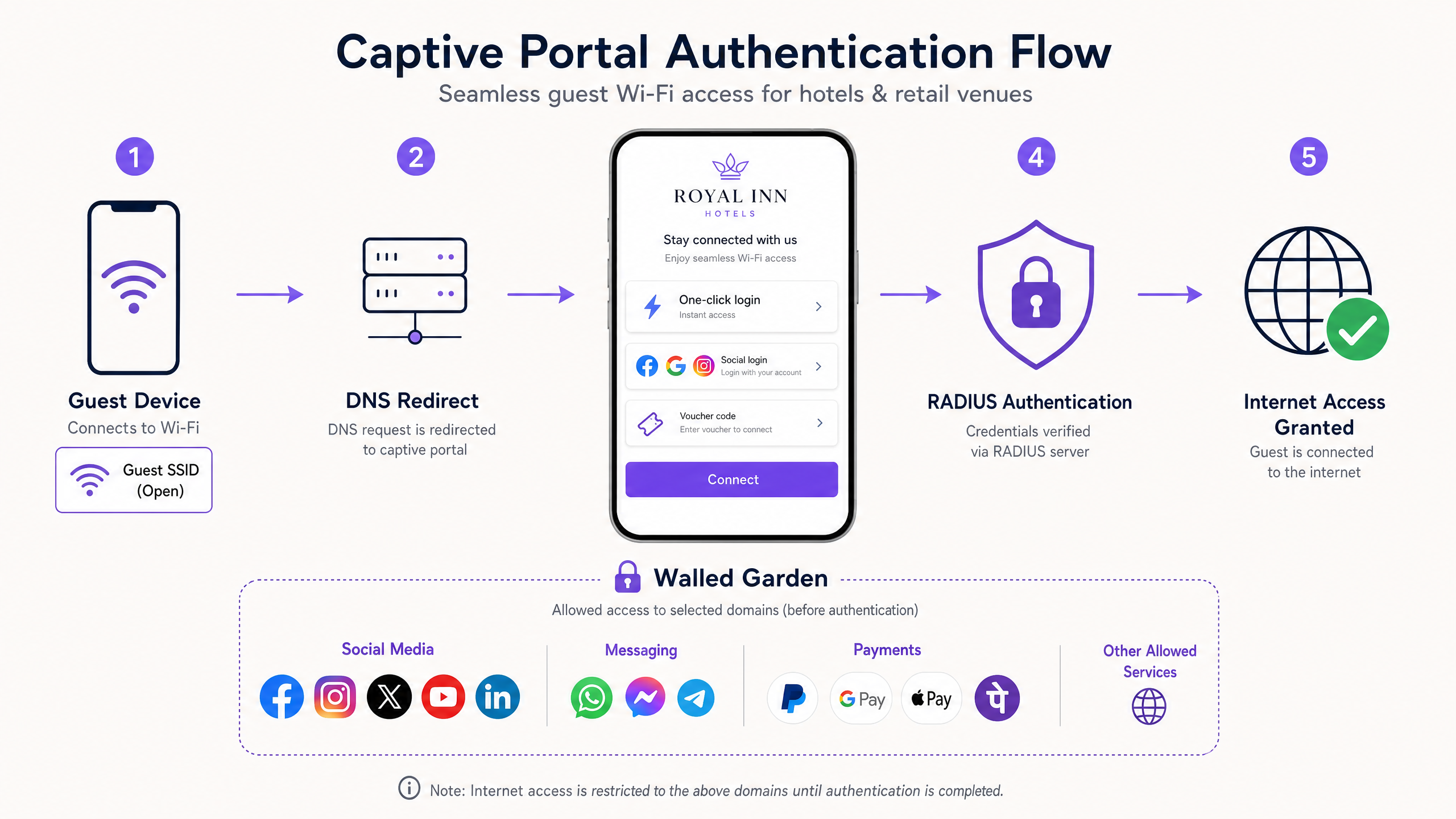
實作指南
在 Ruijie 硬體上部署外部 Captive Portal 需要對 SSID、驗證原則和網路隔離層進行精確設定。請按照以下步驟將 Ruijie 與如 Purple 等外部平台進行整合。
步驟 1:設定訪客 SSID 與 VLAN
- 登入 Ruijie Cloud 或控制器的本機 eWeb 介面。
- 導覽至「Wireless Settings」(無線設定),並為您的場域建立一個命名合適的 SSID。
- 將「Security Mode」(安全性模式)設定為「Open」(開放)。Captive Portal 將作為驗證機制。
- 將 SSID 指派給您指定的訪客 VLAN。確保您的 EG 閘道器上已設定對應的 VLAN 介面與 DHCP 範圍。
步驟 2:設定外部 Captive Portal 原則
- 導覽至「Auth & Account」(驗證與帳戶)區段。
- 在「Authentication」(驗證)選單下選擇「Captive Portal」。
- 建立新原則,並將「Policy Mode」(原則模式)設定為「External」(外部)。
- 選擇您在步驟 1 中建立的訪客 SSID。
- 輸入由您的外外部平台(例如 Purple 的 portal 端點)。
- 使用您平台提供的 IP 位址、連接埠(通常驗證為 1812,計費為 1813)以及共用金鑰來設定 RADIUS 伺服器群組。
步驟 3:實作 Walled Garden
- 在「驗證與帳戶」(Auth & Account)區段中,找到「允許清單」(Allowlist)設定。
- 新增外部平台所需的網域和 IP 位址。
- 新增您計劃使用的任何社群身分驗證提供商的網域。
- 確保允許標準的 Captive Portal 偵測網域。
步驟 4:強制執行 ACL 隔離
連線至您的 Ruijie 閘道器或控制器的命令列介面(CLI)以設定隔離 ACL。此步驟可確保訪客無法存取內部資源。
Ruijie(config)# access-list extended 107
Ruijie(config-ext-nacl)# deny ip 192.168.100.0 0.0.0.255 192.168.10.0 0.0.0.255
Ruijie(config-ext-nacl)# permit ip any any
Ruijie(config-ext-nacl)# exit
Ruijie(config)# interface BVI 100
Ruijie(config-if-BVI 100)# access-group 107 in
最佳做法
為確保可靠且安全的訪客 WiFi 體驗,請遵循以下產業標準的最佳做法:
- 使用外部驗證以進行擴充:如果您管理多個場域或需要詳細的 訪客 WiFi 分析,請繞過原生 portal 並使用外部 RADIUS 整合。像 Purple 這樣的平台提供與硬體無關的管理,讓您能夠在 Ruijie、Cisco Meraki、HPE Aruba 和 Ruckus 硬體上標準化訪客體驗。
- 實施分級頻寬:使用 Ruijie EG 閘道器上的 QoS 功能來強制執行單一使用者頻寬限制。提供免費的基本層級(例如 5 Mbps),並透過您的外部 portal 與金流閘道整合,以提供付費的高速層級。這能為您的基礎設施創造直接的營收來源。
- 同步設定:使用 Ruijie JaCS 平台時,修改 Captive Portal 策略後,您必須明確點擊「同步」(Synchronise)按鈕。若未執行此操作,EG 閘道器將無法接收更新後的設定,從而導致 portal 行為不一致。
- 遵守資料隱私法規:確保您的 Captive Portal 包含針對行銷傳播的明確、自主選擇同意(opt-ins)。使用 Purple 時,平台會自動處理 GDPR 和 CCPA 合規性,提供安全的資料隱私層。請參閱 網路管理員的 GDPR 與訪客資料隱私合規指南 以瞭解詳細需求。
疑難排解與風險緩解
即使經過仔細設定,Captive Portal 部署仍可能會遇到問題。以下是常見的故障模式及其解決方法:
- iOS 裝置無法顯示 Portal:這幾乎總是 Walled Garden 的問題。Apple 裝置會檢查
captive.apple.com以判斷它們是否位於 portal 後方。如果此網域被封鎖,裝置會判定其擁有完整的網際網路存取權限,且無法啟動 Captive Network Assistant。請驗證您的允許清單設定。 - 訪客無法透過 RADIUS 進行驗證:檢查 Ruijie 閘道器上的 RADIUS 共用金鑰和連接埠設定。確保閘道器的公用 IP 位址已正確註冊至您的外部平台。使用 Ruijie 診斷工具來驗證 RADIUS 的連通性。
- 頻寬限制被忽略:如果您使用外部平台來強制執行頻寬分級,則必須停用 Ruijie 閘道器上的 Client Escape 功能。如果啟用了 Client Escape,閘道器可能會繞過外部平台的 QoS 指令。
- 訪客流量到達企業網路:審查您的 ACL 設定。確保擴充存取清單已套用至正確 VLAN 或 BVI 介面的輸入(inbound)方向。透過將裝置連線至訪客 SSID 並嘗試 ping 已知的內部 IP 位址來測試隔離情況。
投資報酬率(ROI)與商業影響
在 Ruijie 硬體上部署強大的 Captive Portal,可將訪客 WiFi 從沉沒成本轉化為可衡量的商業資產。透過整合像 Purple 這樣的外部 WiFi 分析 平台,場域可以獲得顯著的回收。
- 第一方數據獲取:Captive Portal 是主要的數據收集點。透過提供免費 WiFi 以換取電子郵件地址或社群登入,場域能建立豐富的客戶輪廓資料庫。這些數據可助力精準行銷活動,從而提高客戶終身價值。
- 營運效率:透過 Ruijie Cloud 和 Purple 進行集中式雲端管理,可減少 IT 團隊排查本地網路問題所花費的時間。重疊網路(overlay)與硬體無關的特性,意味著您可以升級或更換無線基地台(AP),而無需重建整個分析架構。
- 直接產生營收:實施分級頻寬模式可讓場域直接將網路變現。例如,AGS Airports 實施了分級 WiFi 策略,並獲得了 842% 的投資報酬率。
- 提升訪客體驗:無縫且具品牌特色的登入體驗可提高客戶滿意度。在 旅宿業 和 零售業 等產業中,可靠的連線是基本期望;安全地提供連線能建立品牌信任度。
關鍵定義
Captive Portal
A web page that a user of a public access network is obliged to view and interact with before access is granted.
The primary mechanism for authenticating guests and capturing first-party data on a Ruijie wireless network.
RADIUS
Remote Authentication Dial-In User Service. A networking protocol that provides centralized Authentication, Authorization, and Accounting management.
Used to securely connect Ruijie gateways to external platforms like Purple for guest authentication.
Walled Garden
An allowlist of domains and IP addresses that a guest device can access before completing the captive portal authentication.
Essential for allowing social login providers and captive portal detection mechanisms (like Apple's CNA) to function.
VLAN Isolation
The practice of assigning guest traffic to a separate Virtual Local Area Network and using Access Control Lists to prevent communication with internal corporate networks.
The standard security posture for enterprise guest WiFi deployments on Ruijie hardware.
WISPr
Wireless Internet Service Provider roaming. A protocol that allows users to roam between different wireless providers, often used to handle the redirect to external captive portals.
The underlying mechanism Ruijie uses when the captive portal policy is set to External mode.
Ruijie JaCS
Ruijie's cloud management platform specifically tailored for hospitality and hotel scenarios, offering native captive portal building tools.
Used for managing single-site deployments that do not require external data capture platforms.
Reyee EG Gateway
Ruijie's line of enterprise security routers that handle routing, firewall policies, and captive portal redirection for the wireless network.
The central hardware component where ACLs and RADIUS configurations are applied in a Ruijie deployment.
Client Escape
A feature on Ruijie gateways that, if enabled, can allow clients to bypass certain QoS or portal restrictions.
Must be disabled when using an external platform to enforce tiered bandwidth limits.
範例
A 200-room hotel deploying Ruijie RG-AP access points and an EG gateway needs to provide free guest WiFi while capturing email addresses for their marketing database. They also require strict isolation from their property management system (PMS) network.
The IT team configures a new Open SSID assigned to VLAN 100. On the EG gateway, they configure an extended ACL to deny traffic from VLAN 100 to the PMS VLAN, applying it inbound on the guest interface. They set the captive portal policy to External mode, pointing the Portal Server URL to Purple's platform. They configure the RADIUS server group with Purple's credentials and add Purple's domains to the allowlist. The Purple platform handles the branded splash page and email capture workflow.
A retail chain with 50 locations is rolling out Ruijie hardware. Customers report that when they connect to the guest WiFi on their iPhones, the login screen does not appear automatically, forcing them to open a browser manually.
The network administrator logs into Ruijie Cloud, navigates to Auth & Account, and opens the Allowlist configuration. They add 'captive.apple.com' to the walled garden list and synchronise the configuration to all EG gateways across the estate.
練習題
Q1. You are deploying Ruijie WiFi across a stadium. You need to capture fan data for marketing and enforce a 5 Mbps bandwidth limit per user. Should you use the native Ruijie portal or an external platform, and how do you enforce the bandwidth?
提示:Consider the scale of the deployment and the data capture requirements.
查看標準答案
You must use an external platform like Purple for the data capture and marketing integration. To enforce the bandwidth, configure the QoS settings on the Ruijie EG gateway for the guest SSID, and ensure the Client Escape feature is disabled so the external platform's policies are respected.
Q2. A client complains that their guest network is insecure because the SSID is set to 'Open'. They ask you to implement a pre-shared key (WPA2-Personal) alongside the captive portal. How do you advise them?
提示:Consider the user experience and the purpose of the captive portal.
查看標準答案
Advise the client that for public guest networks, adding a pre-shared key introduces unnecessary friction without significantly improving security, as the key must be shared publicly anyway. The captive portal itself serves as the authentication and authorization layer. For true security, WPA3-Enterprise with 802.1X should be used, but this is rarely suitable for public guest access.
Q3. After configuring a new external captive portal policy on Ruijie Cloud and pointing it to Purple, guests are still seeing the default Ruijie login page. What is the most likely cause?
提示:Think about the configuration deployment process in the Ruijie interface.
查看標準答案
The administrator likely saved the configuration in Ruijie Cloud but failed to click the Synchronise button. The configuration has not been pushed down to the local EG gateway, so it is still serving the default local portal.
繼續閱讀本系列
Grandstream GWN 基地台與 Purple WiFi 整合
本權威技術參考指南詳細說明如何將 Grandstream GWN 基地台與 Purple 的 Guest WiFi 及分析平台進行整合。內容涵蓋 Grandstream Captive Portal 設定、RADIUS AAA 設定、Walled Garden(圍牆花園)設定、支援動態 VLAN 導向的安全員工 802.1X 驗證,以及多租戶 PPSK 分割,為大規模部署訪客與員工 WiFi 的 MSP 和 IT 團隊提供具體可行的逐步指引。
員工 WiFi Captive Portal:員工入網與驗證
針對 IT 主管設計與部署員工 WiFi Captive Portal 的全面技術參考指南。本指南涵蓋 EAP-TLS 驗證、BYOD 入網、VLAN 區隔及頻寬管理,旨在提升營運效率並降低安全風險。
整合 WeChat WiFi 登入:透過社群 Captive Portals 捕捉互動參與
本指南詳細介紹如何將 WeChat WiFi 驗證整合至企業級 Captive Portals 中,內容涵蓋 OAuth 2.0 架構、RADIUS 整合,以及在 Cisco Meraki、HPE Aruba 和 Juniper Mist 硬體上的逐步部署步驟。它為 IT 經理和網路架構師提供了一個實用框架,在吸引 WeChat 13 億用戶的同時捕捉第一方數據,並透過關注公眾號和登入後重新導向來推動互動參與。