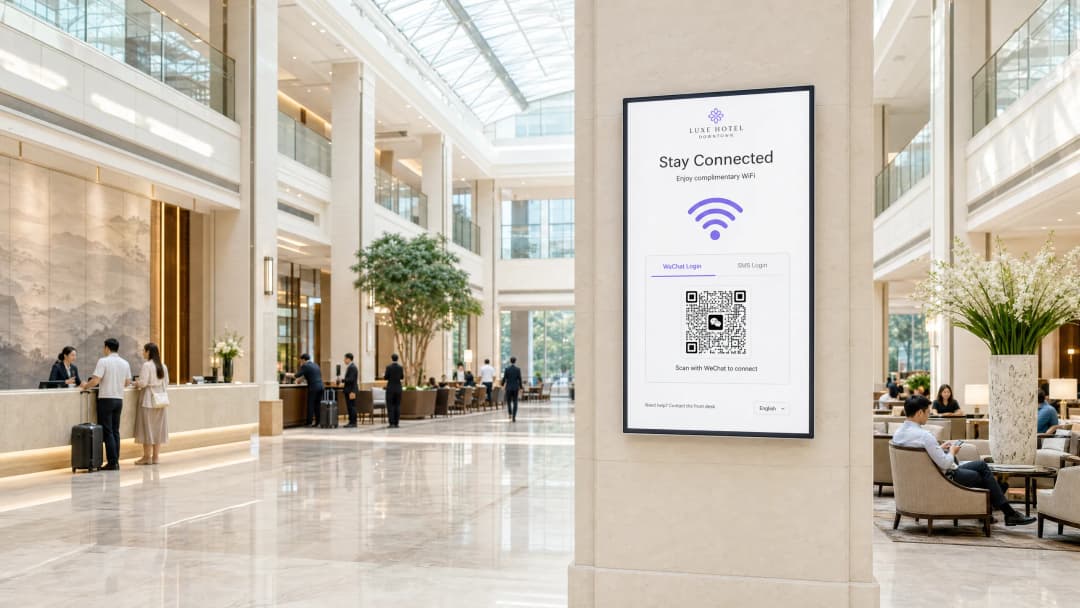
How to Configure WeChat OAuth Authentication for Captive Portals

This technical guide explains how to configure WeChat OAuth authentication for captive portals. It details the required platform registrations, OAuth 2.0 flow, scope selection, and network enforcement mechanisms necessary to capture first-party data from Chinese visitors securely.

📖 4 min read📝 815 words🔧 2 worked examples3 practice questions📚 8 key definitions

Listen to this guide

View podcast transcript
HOW TO CONFIGURE WECHAT OAUTH AUTHENTICATION FOR CAPTIVE PORTALS A Purple Technical Briefing - Approximately 10 Minutes --- INTRODUCTION AND CONTEXT (approximately 1 minute) Welcome. If you are responsible for guest WiFi at a hotel, retail chain, stadium, or conference centre that serves Chinese visitors, this briefing is for you. WeChat has 1.38 billion monthly active users, according to Tencent's 2024 data. The overwhelming majority are in China, but the platform has a meaningful international footprint too - four million users in the United States, 12 million in Malaysia, and growing numbers across Southeast Asia, Europe, and the Middle East. When a Chinese guest connects to your WiFi and sees a login page with only email, Facebook, or a voucher code, they face immediate friction. They may not have a local email address set up on that device. They almost certainly have WeChat. So the question is not whether you should offer WeChat login - it is how you configure it correctly, securely, and in a way that generates first-party data you can actually use. That is what we are going to cover today. We will walk through the OAuth 2.0 flow, the two platform registrations you need, the scope decision that determines what data you collect, the network-side enforcement mechanism, and the compliance considerations that matter in 2026. --- TECHNICAL DEEP-DIVE (approximately 5 minutes) Let us start with the architecture. A captive portal intercepts HTTP traffic from an unauthenticated device and redirects it to a login page. That login page is hosted on a portal server - either on-premises or in the cloud. When you add WeChat OAuth, you are inserting a third-party identity provider into that flow. Here is the sequence. The guest connects to your SSID. The access point or wireless controller detects that the device has no authenticated session and redirects all HTTP traffic to your captive portal URL. The portal page loads and presents login options - including WeChat. The guest taps WeChat login. Your portal server redirects the browser to WeChat's authorisation endpoint at open.weixin.qq.com, passing your AppID, the redirect URI, the response type of code, and the scope. WeChat handles the authentication entirely on its own servers. If the guest is already logged into WeChat in their browser, they see a consent screen. If they are using the WeChat in-app browser, the experience can be silent with snsapi_base scope - no consent prompt at all. WeChat then redirects back to your portal's redirect URI with a temporary authorisation code. Your portal server exchanges that code for an access token by calling api.weixin.qq.com/sns/oauth2/access_token, passing your AppID, AppSecret, the code, and grant type of authorization_code. WeChat returns an access token, a refresh token, the user's OpenID, and the scope granted. If you requested snsapi_userinfo scope, you can then make a second API call to retrieve the user's nickname, avatar, gender, and city. Now, the two platform registrations. This is where most implementations go wrong. WeChat has two separate developer platforms. The WeChat Open Platform at open.weixin.qq.com handles website applications and mobile apps. The WeChat Official Accounts Platform at mp.weixin.qq.com handles public accounts - what most venues actually need. For a captive portal serving guests inside the WeChat in-app browser, you need a Service Account on the Official Accounts Platform. A Subscription Account will not work - it does not have OAuth web page authorisation permissions. A Service Account does, and it supports both snsapi_base and snsapi_userinfo scopes. For a captive portal accessed from a standard mobile browser outside WeChat - Chrome on Android, Safari on iOS - you need a Website Application registered on the Open Platform. This uses snsapi_login scope and presents a QR code that the user scans with their WeChat app. In practice, most venue deployments use both. A guest on a hotel's WiFi might open the portal in Chrome, see a QR code, scan it with WeChat, and authenticate. Or they might follow a link in WeChat itself, land in the in-app browser, and authenticate silently with snsapi_base. Let us talk about scope selection, because this is a genuine decision point. snsapi_base returns only the OpenID - a unique identifier for that user within your Official Account. It requires no user consent prompt. The authentication is invisible to the user. This is ideal for returning guests you have already profiled, or for venues where you want zero friction at the cost of zero new data. snsapi_userinfo returns the OpenID plus the user's WeChat nickname, profile picture, gender, language setting, and city. It requires an explicit consent screen. The user sees a prompt asking whether they allow your Official Account to access their information. Most users accept, but there is friction. The right choice depends on your use case. For a first-time guest registration where you want to build a profile, use snsapi_userinfo and pair it with a GDPR-compliant consent layer on your portal page. For a returning guest who has already consented and whose profile you already hold, use snsapi_base for silent re-authentication. Now, the network enforcement side. Getting an OAuth token proves identity, but it does not automatically open the network. You need a mechanism to translate a successful authentication into network access. The two standard approaches are RADIUS Change of Authorisation, defined in RFC 3576, and MAC address bypass. With RADIUS CoA, your portal server sends a CoA request to the network controller after successful OAuth, and the controller moves the device from the unauthenticated VLAN to the guest VLAN. This works with Cisco Meraki, HPE Aruba, Ruckus, Juniper Mist, and most enterprise-grade controllers. With MAC bypass, the portal server registers the device's MAC address as an authorised client, and the controller allows it. MAC bypass is simpler to implement but less secure, because MAC addresses can be spoofed. Purple's Guest WiFi platform handles both mechanisms. After WeChat OAuth completes, Purple's cloud overlay sends the appropriate signal to the underlying hardware - whether that is Cisco Meraki, HPE Aruba, Ruckus, Juniper Mist, Ubiquiti UniFi, Cambium, Extreme, or Fortinet. The venue operator does not need to manage that translation manually. --- IMPLEMENTATION RECOMMENDATIONS AND PITFALLS (approximately 2 minutes) Let me give you the five things that cause WeChat OAuth captive portal implementations to fail. First: the redirect URI mismatch. WeChat validates the redirect URI against the authorised domain you registered on the platform. If your portal server uses a different subdomain, a different path, or HTTP instead of HTTPS, the OAuth flow fails with error 40029 - invalid code. Register every domain variant you use, including staging environments. Second: the AppSecret on the client side. Your AppSecret must never appear in client-side JavaScript or in a mobile app binary. It belongs on your server. If it is exposed, anyone can impersonate your application and call WeChat's APIs on your behalf. Third: missing CSRF protection. The state parameter in the OAuth request exists specifically to prevent cross-site request forgery. Generate a cryptographically random state value, store it in the user's session, and validate it when WeChat redirects back. Skip this and you have a real vulnerability. Fourth: the in-app browser detection gap. WeChat's in-app browser sets a specific user agent string containing "MicroMessenger". If your portal does not detect this and serve the correct OAuth flow - Official Account flow for in-app browser, Open Platform QR flow for standard browsers - users get a broken experience or an error. Fifth: GDPR and PIPL alignment. If you serve European visitors, GDPR applies to the data you collect via WeChat OAuth. If you serve Chinese visitors, China's Personal Information Protection Law - PIPL - applies to how you process their data. Both require a lawful basis for processing, clear purpose limitation, and data minimisation. snsapi_base is easier to justify under data minimisation principles than snsapi_userinfo. Whatever you collect, document your legal basis and your retention period. --- RAPID-FIRE Q AND A (approximately 1 minute) Question: Can I use WeChat login on a portal that also offers email and SMS login? Yes. Most enterprise portal platforms, including Purple, support multiple authentication methods on the same portal page. WeChat appears as one option alongside others. Question: Does WeChat OAuth work on iOS? Yes, but with a nuance. Apple's App Tracking Transparency framework does not affect server-side OAuth flows. WeChat login in Safari on iOS works via the QR code flow or redirect flow. The WeChat app itself handles the authentication. Question: What happens if WeChat's API is unavailable? Your portal should implement a fallback. If the WeChat API call times out or returns an error, redirect the user to an alternative login method. Do not leave them with a blank screen. Question: Can I use the OpenID as a persistent customer identifier? Within your Official Account, yes. The OpenID is stable for a given user and a given Official Account. If you have multiple Official Accounts, the same user will have different OpenIDs across them. For cross-account identity resolution, WeChat provides a UnionID, which requires your accounts to be linked on the Open Platform. --- SUMMARY AND NEXT STEPS (approximately 1 minute) To summarise. WeChat OAuth authentication for captive portals is a two-platform registration exercise, a scope decision, a network enforcement integration, and a compliance review. Get those four things right and you have a login method that serves over a billion potential visitors with zero password friction. The practical next steps are these. First, determine whether your visitors encounter the portal inside the WeChat in-app browser or in a standard mobile browser - that determines which platform registration you need. Second, decide on scope - snsapi_base for returning guests, snsapi_userinfo for first-time registration with consent. Third, confirm your network hardware supports RADIUS CoA or configure MAC bypass as an alternative. Fourth, review your privacy notice and consent flow against GDPR and PIPL requirements. Fifth, test the redirect URI, the state parameter validation, and the in-app browser detection before you go live. If you want to see how Purple handles WeChat OAuth as part of a broader Guest WiFi and analytics platform - across 80,000 venues and 440 million logins in 2024 - visit purple.ai or speak to your account team. Thanks for listening. --- END OF SCRIPT

header_image.png

Executive Summary

When Chinese visitors connect to your WiFi, presenting a login page with only email or Facebook creates immediate friction. WeChat has 1.38 billion monthly active users, and configuring it as an identity provider eliminates this barrier. This guide explains how to implement WeChat OAuth 2.0 authentication for captive portals, detailing the necessary platform registrations, the OAuth flow, and the network enforcement mechanisms required to translate a successful login into network access. We cover the technical implementation across enterprise hardware and the compliance requirements under GDPR and PIPL.

Technical Architecture

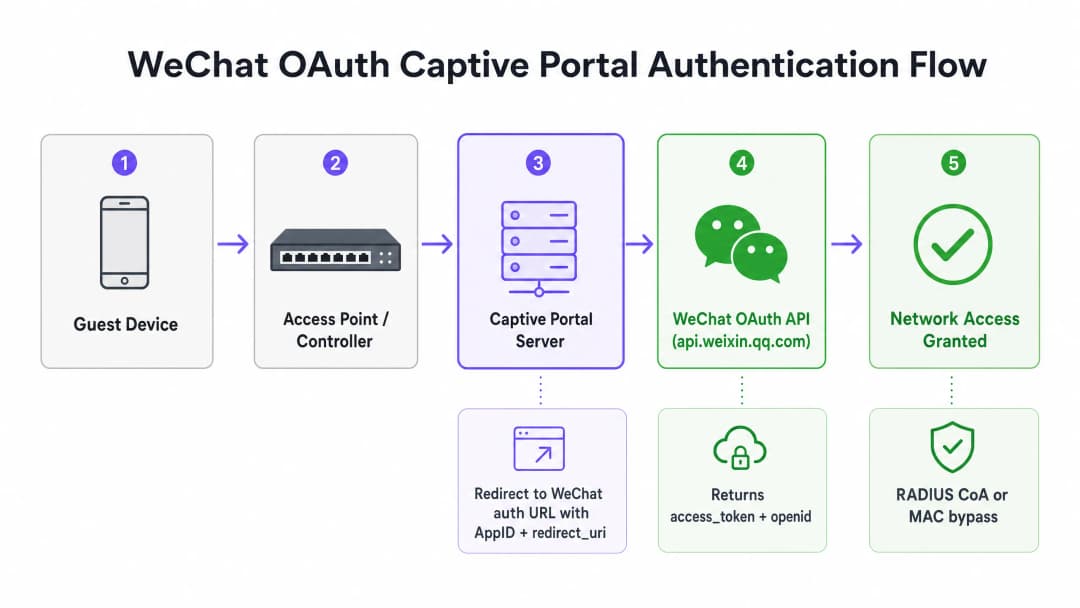
A captive portal intercepts HTTP traffic from an unauthenticated device and redirects it to a login page hosted on a portal server. When you integrate WeChat OAuth, you insert a third-party identity provider into this flow.

architecture_overview.png

The sequence operates as follows:

  1. The visitor connects to the SSID.
  2. The access point or wireless controller detects the lack of an authenticated session and redirects HTTP traffic to the captive portal URL.
  3. The visitor selects WeChat login.
  4. The portal server redirects the browser to WeChat's authorisation endpoint (open.weixin.qq.com), passing the AppID, redirect_uri, response_type=code, and scope.
  5. WeChat handles authentication. If the visitor uses the WeChat in-app browser with snsapi_base scope, this occurs silently.
  6. WeChat redirects back to the portal's redirect_uri with a temporary authorisation code.
  7. The portal server exchanges this code for an access token by calling api.weixin.qq.com/sns/oauth2/access_token.
  8. WeChat returns an access_token, refresh_token, and the user's openid.

Platform Registration Requirements

Implementing WeChat login requires registration on the correct developer platform. WeChat operates two distinct platforms, and selecting the wrong one causes the integration to fail.

WeChat Official Accounts Platform

For a captive portal serving visitors inside the WeChat in-app browser, you require a Service Account on the Official Accounts Platform (mp.weixin.qq.com). A Subscription Account lacks the necessary OAuth web page authorisation permissions. A Service Account supports both snsapi_base and snsapi_userinfo scopes.

WeChat Open Platform

For a captive portal accessed from a standard mobile browser outside WeChat (such as Chrome on Android or Safari on iOS), you require a Website Application registered on the Open Platform (open.weixin.qq.com). This uses the snsapi_login scope and presents a QR code that the user scans with their WeChat app.

Most enterprise deployments require both registrations to cover all access methods.

Scope Selection and Data Collection

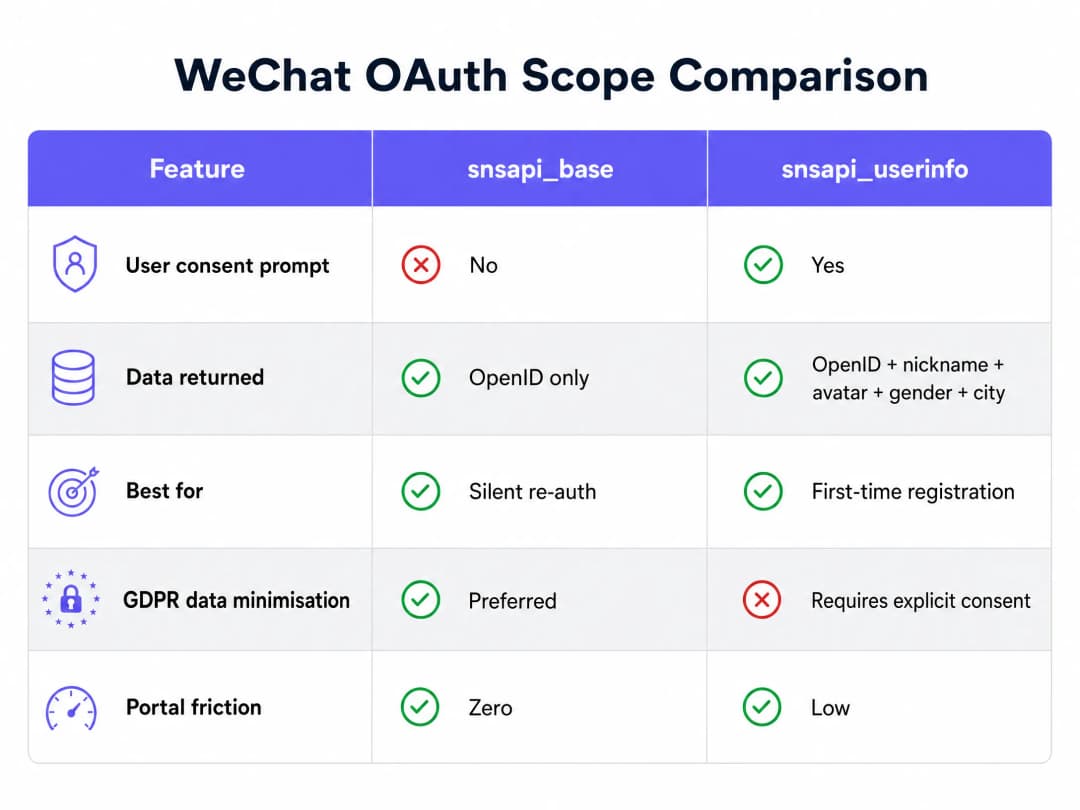
The scope parameter determines what data WeChat returns to your portal server. This decision impacts both user friction and data privacy compliance.

scope_comparison_chart.png

snsapi_base

This scope returns only the OpenID, a unique identifier for the user within your Official Account. It requires no user consent prompt, making the authentication invisible to the user. This is optimal for returning visitors where you already hold a profile, or for venues prioritising zero friction over new data collection.

snsapi_userinfo

This scope returns the OpenID plus the user's WeChat nickname, profile picture, gender, language setting, and city. It requires an explicit consent screen, introducing friction. Use this for first-time visitor registration where building a profile is necessary, paired with a GDPR-compliant consent layer.

Network Enforcement Integration

Acquiring an OAuth token proves identity, but it does not open the network. You must translate a successful authentication into network access using standard protocols.

RADIUS Change of Authorisation (CoA)

Defined in IEEE 802.1X and RFC 3576, RADIUS CoA allows the portal server to send a request to the network controller after successful OAuth. The controller then moves the device from the unauthenticated VLAN to the guest VLAN. This is the standard for enterprise hardware including Cisco Meraki, HPE Aruba, Ruckus, and Juniper Mist.

MAC Address Bypass

Alternatively, the portal server registers the device's MAC address as an authorised client, and the controller allows it. While simpler to implement, it is less secure as MAC addresses can be spoofed.

Purple's cloud overlay automates this translation, sending the appropriate signal to the underlying hardware (including Ubiquiti UniFi, Cambium, Extreme, and Fortinet) once WeChat OAuth completes.

Compliance and Security Considerations

GDPR and PIPL Alignment

If you serve European visitors, GDPR applies to the data collected via WeChat OAuth. If you serve Chinese visitors, China's Personal Information Protection Law (PIPL) applies. Both frameworks require a lawful basis for processing, clear purpose limitation, and data minimisation. The snsapi_base scope aligns more easily with data minimisation principles than snsapi_userinfo.

CSRF Protection

The state parameter in the OAuth request prevents cross-site request forgery. You must generate a cryptographically random state value, store it in the user's session, and validate it when WeChat redirects back.

Redirect URI Validation

WeChat validates the redirect_uri against the authorised domain registered on the platform. If your portal server uses a different subdomain, path, or HTTP instead of HTTPS, the OAuth flow fails with error 40029.

For more information on securing your network, see our Enterprise WiFi Security: A Complete Guide for 2026 .

Key Definitions

snsapi_base

A WeChat OAuth scope that returns only the user's OpenID without displaying a consent prompt.

Used when IT teams need to authenticate returning visitors silently without causing login friction.

snsapi_userinfo

A WeChat OAuth scope that returns the OpenID along with demographic data (nickname, gender, city) and requires explicit user consent.

Used during first-time registration when marketing teams need to build a visitor profile.

OpenID

A unique identifier for a specific user within a specific WeChat Official Account.

Used as the primary key in the portal database to track visitor behaviour and return visits.

RADIUS CoA

Change of Authorisation. A mechanism defined in RFC 3576 that allows a server to modify the authorisation state of an active session.

Used by the portal server to tell the wireless controller to grant network access after successful WeChat authentication.

PIPL

Personal Information Protection Law. China's comprehensive data privacy regulation.

Must be considered alongside GDPR when designing the consent flow for Chinese visitors using WeChat login.

AppID and AppSecret

The credentials provided by WeChat to identify and authenticate your application.

The AppSecret must remain securely on the portal server and never be exposed in client-side code.

State Parameter

A cryptographically random string passed in the OAuth request and validated upon return.

Essential for preventing Cross-Site Request Forgery (CSRF) attacks on the captive portal.

MAC Address Bypass

A method of granting network access by authorising the device's hardware address rather than requiring 802.1X authentication.

An alternative to RADIUS CoA for simpler network setups, though less secure.

Worked Examples

A luxury retail brand in London wants to offer WeChat login for Chinese shoppers. They want to collect demographic data to understand their customer base, but they are concerned about GDPR compliance and high drop-off rates at the portal.

The retailer should register a Service Account on the WeChat Official Accounts Platform. They must configure the portal to use the snsapi_userinfo scope for first-time connections to gather demographic data (nickname, gender, city). To ensure GDPR compliance, the portal page must display a clear, conscious-choice opt-in before the WeChat redirect, explaining exactly what data is collected and why. For returning shoppers, the portal should detect the MAC address and use snsapi_base for silent re-authentication, minimising friction.

Examiner's Commentary: This approach balances data collection with user experience. By limiting the high-friction `snsapi_userinfo` flow to the first visit and using `snsapi_base` subsequently, the retailer maximises conversion while remaining compliant with data minimisation principles.

A stadium deploys a new WiFi network using HPE Aruba controllers. They have configured WeChat OAuth, and the portal successfully receives the access token, but the visitor's device remains on the captive portal page and cannot access the internet.

The integration lacks a network enforcement mechanism. The portal server has verified the user's identity with WeChat, but it has not instructed the HPE Aruba controller to grant access. The portal server must be configured to send a RADIUS Change of Authorisation (CoA) message to the controller, instructing it to transition the user's MAC address from the pre-authentication role to the authenticated guest role.

Examiner's Commentary: This highlights the distinction between identity verification and network access control. Enterprise networks require a protocol like RADIUS CoA to bridge the gap between the web application (portal) and the network infrastructure.

Practice Questions

Q1. You are deploying a captive portal across a retail chain. Testing shows that users opening the portal in Safari on iOS receive an error when selecting WeChat login, but users opening the portal from within a WeChat message link authenticate successfully. What is the likely cause?

Hint: Consider the difference between the WeChat in-app browser and standard mobile browsers.

View model answer

The implementation is likely relying solely on a Service Account registered on the Official Accounts Platform, which only supports OAuth within the WeChat in-app browser. To support Safari on iOS, you must also register a Website Application on the WeChat Open Platform and implement user agent detection to route Safari users to the QR code flow.

Q2. Your portal server logs show frequent 40029 'invalid code' errors returning from the WeChat API during the access token exchange. What configuration should you check first?

Hint: Think about how WeChat validates the source of the authentication request.

View model answer

You should verify the redirect_uri configuration. WeChat strictly validates the redirect URI against the authorised domain registered in the developer console. If the portal is using a different subdomain, or if it drops HTTPS, WeChat will reject the code exchange.

Q3. A venue operator wants to collect visitor data but insists on zero friction during the login process. They request that you configure WeChat login to collect the visitor's nickname and city without showing a consent prompt. How do you respond?

Hint: Review the capabilities of the different OAuth scopes.

View model answer

You must inform the operator that this is technically impossible. Collecting demographic data like nickname and city requires the snsapi_userinfo scope, which mandatorily triggers a WeChat consent prompt. To achieve zero friction, you must use snsapi_base, which operates silently but only returns the OpenID.

Continue reading in this series

Measuring the Business ROI of Guest WiFi and Location Analytics

This guide provides a technical and operational framework for measuring the business ROI of guest WiFi and location analytics. It details how to calculate value from hardware investments through dwell time uplift, operational efficiency, and first-party data capture across retail, hospitality, and public venues. IT managers, network architects, CTOs, and venue operations directors will find concrete measurement frameworks, real-world case studies, and compliance guidance to justify and maximise their WiFi investment.

Read the guide →

Integrating WeChat WiFi Login: Capturing Engagement via Social Captive Portals

This guide details how to integrate WeChat WiFi authentication into enterprise captive portals, covering the OAuth 2.0 architecture, RADIUS integration, and step-by-step deployment across Cisco Meraki, HPE Aruba, and Juniper Mist hardware. It gives IT managers and network architects a practical framework for capturing first-party data from WeChat's 1.3 billion users while driving engagement via Official Account follows and post-login redirects.

Read the guide →

WiFi GDPR Compliance: How to Securely Collect Guest Data via Captive Portals

This technical guide gives IT managers, network architects, and venue operations directors a practical framework for achieving GDPR compliance across guest WiFi deployments. It covers how captive portals collect personal data, how to secure explicit consent, and how to implement automated data retention policies that protect your organisation from regulatory fines of up to 4% of global turnover. Purple's guest WiFi platform maps directly to each compliance requirement, from consent logging to one-click data erasure.

Read the guide →