
平均證明清白時間:如何證明不是 WiFi 的問題
平均證明清白時間 (MTTI) 是一項關鍵指標,定義了 IT 團隊花費多少時間來證明網路問題並非其責任。本指南詳細介紹了一套包含五個步驟的可觀測性方法論,旨在消除多租戶環境中的推諉現象,以共享證據取代互相指責,從而降低平均修復時間 (MTTR)。
收聽此指南
查看播客逐字稿
📚 核心系列的一部分:多租戶 WiFi:完整指南 →
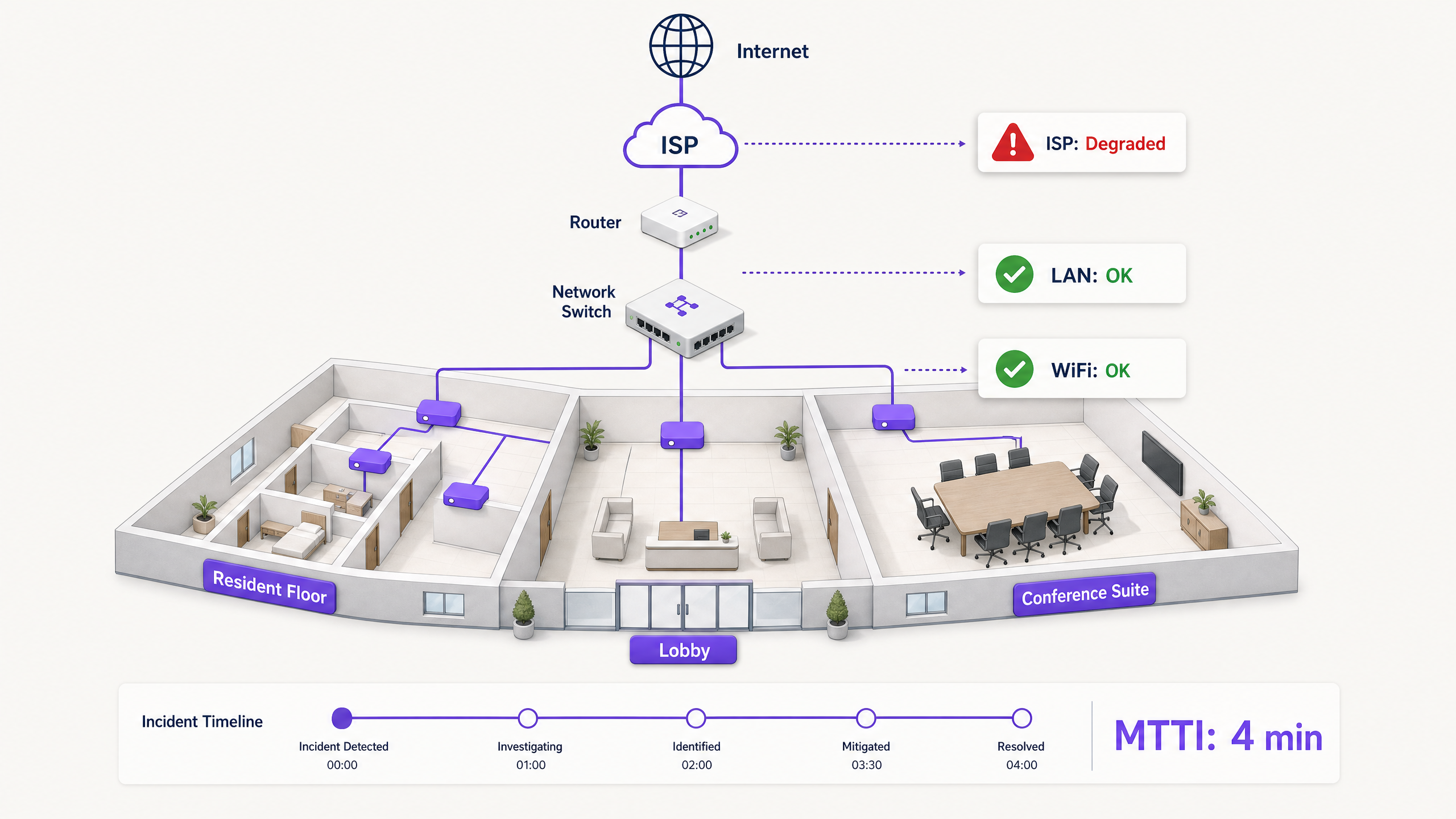
執行摘要
當多租戶環境中的連線中斷時,WiFi 總是首當其衝被歸咎。它是網路中顯而易見的邊緣、裝置前的最後一跳,也是受挫使用者最容易怪罪的目標。對於 IT 經理、網路架構師和場域營運總監而言,這造成了持續的營運負擔:花費時間來證明清白。
平均證明清白時間 (MTTI) 衡量的是從通報事件到團隊能夠證明其管轄範圍並非根本原因之間的平均流逝時間。在租賃專用住宅 (BTR) 大樓、飯店或會議中心等複雜環境中,網路權責分散在物業經理、託管 WiFi 供應商和網際網路服務供應商 (ISP) 之間。在缺乏明確遙測數據的情況下,由於各團隊爭論責任歸屬而非解決故障,MTTI 會拉長平均修復時間 (MTTR)。
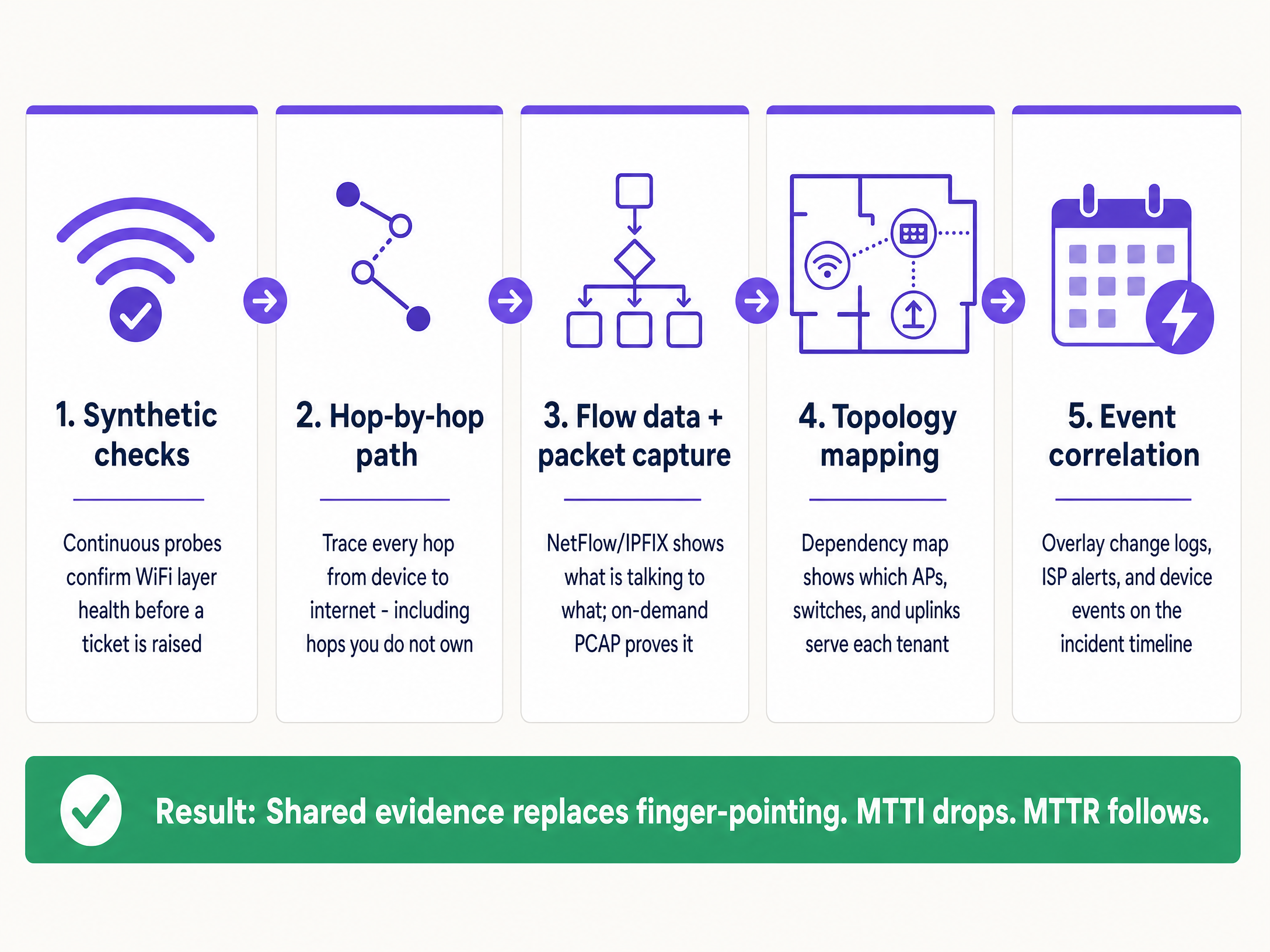
本指南詳細介紹了一套包含五個步驟的可觀測性方法論,以系統化地縮短 MTTI。透過部署持續的模擬檢測、逐跳路徑可視性、流量數據分析、拓撲繪製和事件關聯,您可以用共享證據取代敵對式的互相指責。其目標不是更快地在推諉遊戲中勝出,而是徹底終結這種現象。
技術深度探討:MTTI 的運作機制
MTTI 與平均識別時間的區別
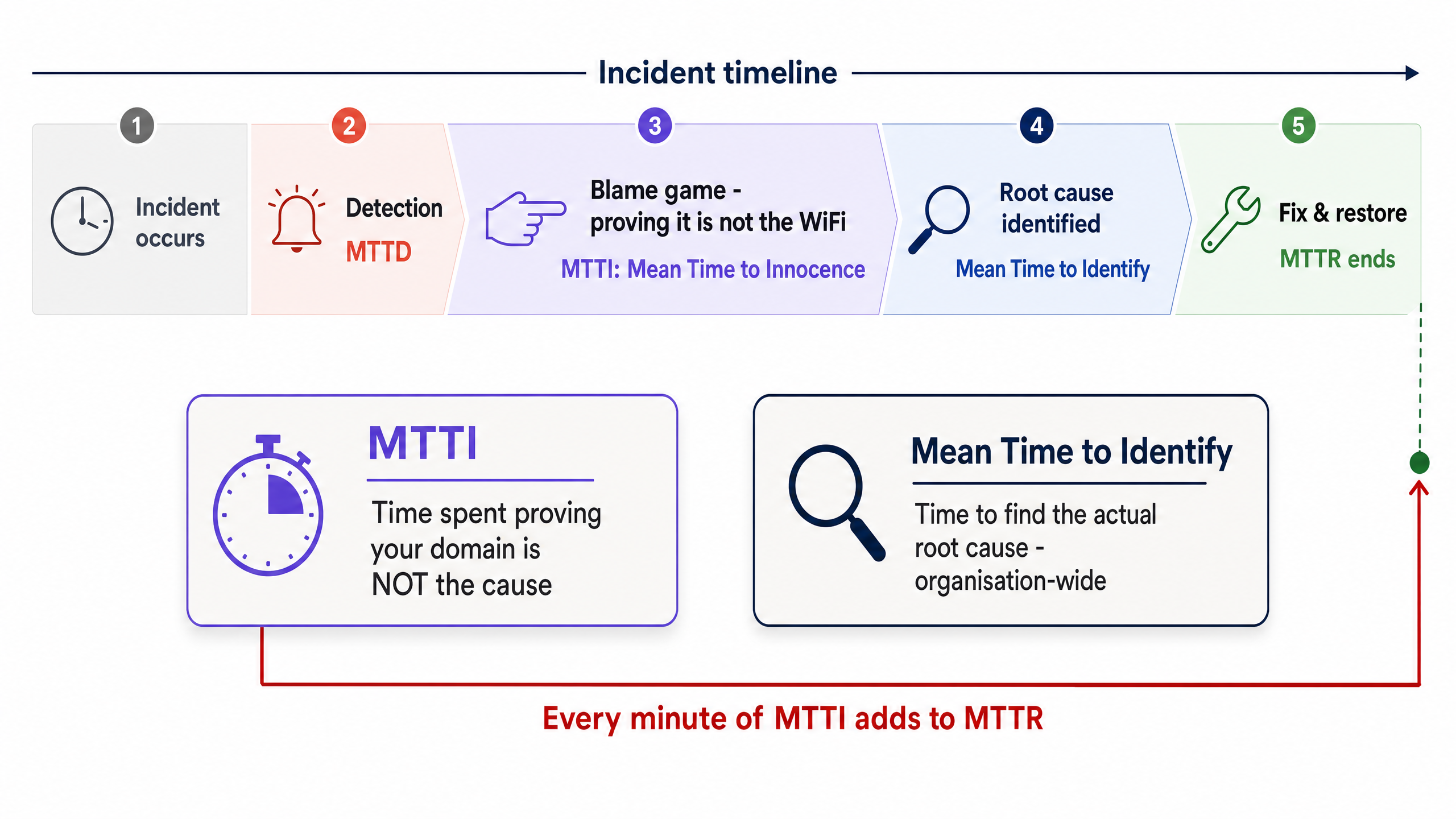
區分 MTTI 與平均識別時間至關重要。平均識別時間是一項組織層級的指標,用於追蹤找出中斷實際根本原因所需的時間。而 MTTI 則是一項孤立的、特定領域的指標,用於追蹤單一團隊證明自己並非罪魁禍首所需的時間。
MTTI 的每一分鐘都會直接增加 MTTR。如果託管 WiFi 供應商在得出問題出在 ISP 的結論之前,花費了 40 分鐘手動檢查無線基地台 (AP) 和交換器記錄,那麼在實際開始修復之前,MTTR 就已經被強加了 40 分鐘的延遲罰時。
為什麼 WiFi 總是背黑鍋
在為 80,000 多個實體場域、3.5 億不重複使用者提供服務的環境中,Purple 反覆看到相同的模式。由於以下三個結構性現實,WiFi 層預設會被歸咎:
- 可見性偏差:WiFi 訊號指示器是普通場域使用者唯一可用的網路診斷工具。
- 邊緣鄰近性:作為連接用戶端裝置的最後一跳,WiFi 承接了所有上游故障的症狀。從使用者的角度來看,ISP 端的 DNS 逾時與 AP 故障看起來完全一樣。
- 遙測差距:在過去,證明無線網路健康狀況需要人工介入。如果您無法在兩分鐘內出示無線層運作正常的證明,您就會失去話語權。
多租戶環境的複雜性
在單一租戶企業中,網路團隊擁有從 AP 到防火牆的整個技術堆疊。但在多租戶 WiFi 環境中,所有權是破碎的。
BTR 居民向物業經理付費。物業經理與託管 WiFi 供應商簽約。託管 WiFi 供應商依賴第三方 ISP 線路,且通常還依賴房東的大樓內部分配網路。當居民無法串流影片時,供應商必須迅速排除 WiFi 硬體(Cisco Meraki、HPE Aruba、Ruckus 或 Juniper Mist)的嫌疑,並將故障隔離至用戶端裝置、大樓交換器或 ISP。若無法做到這一點,將會損害供應商與物業經理之間的商業關係。
實作指南:五步驟方法論
若要系統化地縮短 MTTI,請實作此五層可觀測性架構。
1. 持續的模擬檢測
不要等待使用者抱怨。部署自動化模擬探針,從網路邊緣持續模擬使用者行為。
- 實作:設定 AP 或專用感測器,針對 DHCP 回應、DNS 解析、HTTP 可達性以及驗證流程(例如 802.1X 或 Captive Portal 登入)執行排程測試。
- 成效:當建立工單時,您首先檢查模擬儀表板。如果探針在投訴發生的確切時間顯示 HTTP 可達性正常,您便能立即排除 WiFi 層和 WAN 線路的嫌疑,將焦點轉移到特定的用戶端裝置或目標應用程式。
2. 逐跳路徑可視性
如果無法證明通往網際網路的路徑暢通,僅證明您的硬體健康是遠遠不夠的。
- 實作:使用路徑視覺化工具追蹤流量,從存取層跨越 LAN、通過分界點並進入 ISP 網路。
- 成效:當延遲飆升時,路徑追蹤會精確顯示是哪個節點引入了延遲。如果第一到第四跳(您的管轄範圍)顯示 2 毫秒的延遲,而第五跳(ISP 邊緣路由器)顯示 150 毫秒的延遲和 12% 的封包遺失率,您就有了確鑿的證據可以提供給 ISP。
3. 流量數據與隨選封包擷取
當使用者回報特定應用程式的故障時,您需要對話層級的可視性。
- 實作:從核心交換器或防火牆匯出 NetFlow 或 IPFIX 數據。確保您的存取層硬體支援遠端、隨選封包擷取 (PCAP),而無需工程師親臨現場。
- 成效:流量數據可證明前往特定服務的流量是否正常離開您的網路。如果是,則代表網路是清白的。如果若需要更深入的鑑識證明,在特定 VLAN 上進行針對性的 PCAP 可提供無可爭辯的證據,證明存在 TCP 重傳或伺服器端重設。
4. 拓撲與相依性對應
在多租戶環境中,隔離波及範圍(blast radius)是分類故障最快的方法。
- 實作:維護一份即時、動態更新的相依性地圖,將每個 AP 連結到其交換器、上行鏈路和 WAN 線路,並對應到租戶 VLAN。
- 成果:如果故障影響了多個樓層的 AP,但僅限於單一交換器,則問題出在交換器。如果影響了所有 AP,但僅限於單一租戶的 VLAN,則屬於邏輯設定問題。快速界定範圍可避免浪費精力去調查健康的基礎設施。
5. 事件關聯
缺乏脈絡的數據會延長調查時間。
- 實作:將變更記錄、ISP 維護警示、硬體韌體更新和使用者工單整合到單一時間軸檢視中。
- 成果:將驗證失敗的急遽增加與 10 分鐘前發生的 Microsoft Entra ID 憑證過期事件重疊比對,即可立即找出根本原因,完全繞過網路硬體。
最佳實踐
- 標準化硬體堆疊:將部署限制在主流企業級廠商(Cisco Meraki、HPE Aruba、Ruckus、Juniper Mist、Ubiquiti UniFi、Cambium、Extreme、Fortinet),這些廠商提供 API 以進行模擬測試和遠端 PCAP。
- 自動化證據收集:設定您的監控平台,在建立 ITSM 工單的瞬間,自動將模擬測試結果和路徑追蹤附加到工單中。
- 共享儀表板:為物業經理提供高階健康狀況儀表板的唯讀存取權限。透明度可預防互相推諉。
- 正式追蹤 MTTI:衡量從工單建立到您的團隊提供「無罪證明」之間的時間。將其與 MTTR 一併視為主要 KPI。
疑難排解與風險緩釋
- 風險:「未發現故障」的無限循環:使用者回報問題,但模擬檢查顯示正常(綠燈)。
- 緩釋措施:問題可能與特定裝置有關,或與射頻干擾(同頻道干擾或物理障礙物)有關。使用用戶端分析來檢查特定裝置的 RSSI 和漫遊歷史記錄。
- 風險:ISP 否認:儘管您有證據,ISP 仍拒絕承認故障。
- 緩釋措施:提供逐跳(hop-by-hop)路徑追蹤,顯示開始丟包的確切 IP 位址。分享 PCAP 以證明從您的分界點(demarcation point)流出的流量是乾淨的。確鑿的數據能迫使問題升級至一線客服以上。
- 風險:Captive Portal 故障:當入口網站無法載入時,使用者會歸咎於 WiFi。
- 緩釋措施:隔離身分識別提供者(IdP)。檢查整合狀態(Microsoft Entra ID、Okta、Google Workspace)。如果網路允許驗證前的流量,但 IdP 逾時,則網路是無辜的。
投資報酬率(ROI)與業務影響
降低 MTTI 除了能節省工程時間外,還能帶來可衡量的業務價值。
關鍵定義
Mean Time to Innocence (MTTI)
The average time required for a specific IT team to prove, using objective data, that their domain or infrastructure is not the root cause of a reported incident.
Critical for managed WiFi providers who must defend their service against property managers and ISPs.
Mean Time to Identify
The organisation-wide metric tracking the total time elapsed from incident detection to the discovery of the actual root cause.
MTTI is a subset of this metric. Reducing MTTI directly reduces the overall time to identify.
Synthetic Checks
Automated, continuous tests that emulate user traffic (e.g., DNS lookups, HTTP requests) to proactively monitor network health.
Used to prove the WiFi layer was functioning correctly at the exact moment a user complained.
Hop-by-Hop Path Visibility
Telemetry that traces network traffic node-by-node from the client to the destination, measuring latency and loss at each specific router or switch.
Essential for proving a fault lies in an ISP network or a landlord's distribution switch, rather than the managed WiFi hardware.
Flow Data (NetFlow/IPFIX)
Network protocol data that provides a summary of traffic conversations, showing source, destination, protocol, and volume.
Used to prove that specific application traffic is successfully leaving the local network.
On-Demand Packet Capture (PCAP)
The ability to remotely record raw network traffic from an access point or switch for forensic analysis.
The ultimate proof used to demonstrate server-side errors or client device misbehaviour.
Blast Radius
The scope of impact of a specific incident (e.g., one user, one AP, one switch, one tenant, or the entire building).
Determining the blast radius via topology mapping is the fastest way to exclude healthy infrastructure from an investigation.
Event Correlation
The practice of overlaying different data streams (logs, alerts, updates) on a single timeline to identify cause and effect.
Used to prove that a network outage was caused by a third-party change, such as an unannounced ISP maintenance window.
範例
A 350-room hotel reports that in-room WiFi is slow across the entire property. The front desk blames the managed WiFi provider. How do you exonerate the network and find the root cause?
- Check the synthetic probes: DNS and HTTP reachability tests show the APs have a clean connection to the internet. 2. Review the topology map: The issue affects all APs across all switches, ruling out edge hardware. 3. Execute a path trace: The trace shows 2ms latency within the hotel LAN, but 180ms latency at the third hop (the ISP's aggregation router). 4. Export the evidence: Send the path trace screenshot to the hotel manager and the ISP.
A national retailer reports point-of-sale (POS) terminals in one region are dropping connections to the payment processor. The network team is blamed for a firewall or routing misconfiguration.
- Isolate the blast radius: Confirm only POS terminals (specific VLAN) are affected; guest WiFi and back-office systems are healthy. 2. Analyse flow data: NetFlow confirms traffic destined for the payment processor's IP range is successfully leaving the store routers. 3. Capture packets: An on-demand PCAP on the POS VLAN reveals the payment processor's server is sending TCP resets (RST). 4. Share the PCAP with the payment processor's support team.
練習題
Q1. A tenant in a coworking space complains they cannot access their corporate VPN. Other tenants are browsing the internet without issue. What is the most efficient way to prove the WiFi network is not at fault?
提示:Consider the blast radius and the specific type of traffic failing.
查看標準答案
First, use the topology map to confirm the blast radius is limited to one user or one specific service, ruling out a general AP or switch failure. Second, analyse flow data (NetFlow/IPFIX) for that client's IP address. If the flow data shows the VPN traffic (e.g., UDP 500 or TCP 443) is leaving the network cleanly, the WiFi and LAN are innocent. The issue is either the client's VPN configuration or the corporate firewall blocking the connection.
Q2. Your monitoring dashboard shows an AP has gone offline, but the property manager insists the WiFi is broken because the ISP is down. How do you prove the issue is internal power, not the ISP?
提示:Look for correlation between infrastructure state and external events.
查看標準答案
Use event correlation and topology mapping. If the topology map shows only one AP is offline while others on the same switch are functioning, the ISP circuit is clearly active. Event correlation might show a PoE (Power over Ethernet) failure log from the switch port connected to that specific AP. This proves the issue is local hardware or cabling, not the WAN circuit.
Q3. A stadium operations director claims the WiFi failed during halftime because ticket scanners stopped working. You need to exonerate the network in under two minutes. What telemetry do you use?
提示:You need historical proof of health at the exact moment of the reported failure.
查看標準答案
Pull the historical data from the continuous synthetic checks. Show the operations director the dashboard confirming that during the exact 15-minute halftime window, the APs were successfully resolving DNS and reaching the ticketing server's IP address with low latency. This immediately proves the wireless network was healthy and shifts the investigation to the ticketing application servers, which likely buckled under the sudden load.
繼續閱讀本系列
企業 SCEP 指南:部署簡單憑證登錄協定以實現自動化校園 WiFi 安全
本技術參考指南為使用 SCEP 的企業 WiFi 憑證部署提供了權威的架構藍圖與逐步實作策略。內容涵蓋 SCEP 與 PKCS 之間的核心差異、成功部署所需的確切步驟順序,以及 IT 主管的實務風險緩釋策略。
為什麼我的顧客 WiFi 無法連線?Captive Portal 問題排查指南
本權威技術參考指南說明了 Captive Portal 偵測的底層機制,並詳細介紹了導致顧客 WiFi 無法連線的六種主要故障模式。它為 IT 經理和網路架構師提供了一個實用的疑難排解框架,用以解決 HTTP 重新導向問題、DNS 衝突以及 MAC 隨機化挑戰。
如何實作 SCEP 以進行自動化 WiFi 憑證登錄
本指南說明如何實作 SCEP (簡單憑證登錄協定),以在企業場域中進行自動化 WiFi 憑證登錄。內容涵蓋完整的架構藍圖——從 PKI 設計與 MDM 整合,到強制性的三步驟部署流程——並向 IT 經理和網路架構師展示如何消除共享憑證、自動化憑證生命週期管理,以及大規模滿足 PCI DSS 與 GDPR 的合規要求。