
酒店 WiFi 速度:宾客的期望及如何实现
本权威技术参考指南为 IT 经理、网络架构师和 CTO 提供了关于酒店 WiFi 带宽规划、QoS 实施以及分层定价模型的实用策略。它详细介绍了如何合理调整网络容量以满足现代宾客的期望 - 从中档物业的每间客房 15 Mbps 到豪华和会议场所的 50+ Mbps - 同时确保安全、合规且可扩展的企业部署。通过集成 Purple 的 Guest WiFi 和分析平台,场所运营商可以将网络从成本中心转变为创收的数据驱动型资产。
Video overview
收听本指南
查看播客转录
核心系列的一部分:Guest WiFi 指南 →
Hotel WiFi Speed & Bandwidth Planning Calculator
Model concurrent guest streaming loads, calculate required WAN uplink bandwidth with statistical multiplexing, size DHCP scopes, and project tiered guest WiFi monetisation.
Why Hospitality Networks Require Statistical Multiplexing
Without bandwidth management, unconstrained streaming across 341 concurrent devices would require 4.09 Gbps of dedicated leased line throughput. This is commercially unsustainable for most properties.
执行摘要
对于管理酒店投资组合的 IT 总监和 CTO 而言,客用 WiFi 已从一项基本便利设施演变为关键任务型公用基础设施。糟糕的连接会直接影响宾客满意度得分、品牌声誉和收入。本指南详细介绍了在中档商务酒店到豪华品牌等各种物业中合理配置带宽、实施服务质量 (QoS) 以及部署分层 WiFi 架构的技术要求。通过摆脱传统的固定带宽模式,场所可以优化网络性能,应对高峰需求,并实现高端服务的货币化。集成像 Purple 这样强大的 客用 WiFi 平台,可实现安全认证、流量整形和捕获宝贵的第一方数据 - 将传统的成本中心转变为战略资产。本指南同样适用于 酒店、零售、医疗保健 和 交通 行业的运营商,在这些行业中,高密度、高可靠性的无线网络是一项基本要求。
技术深度剖析
带宽规划与容量
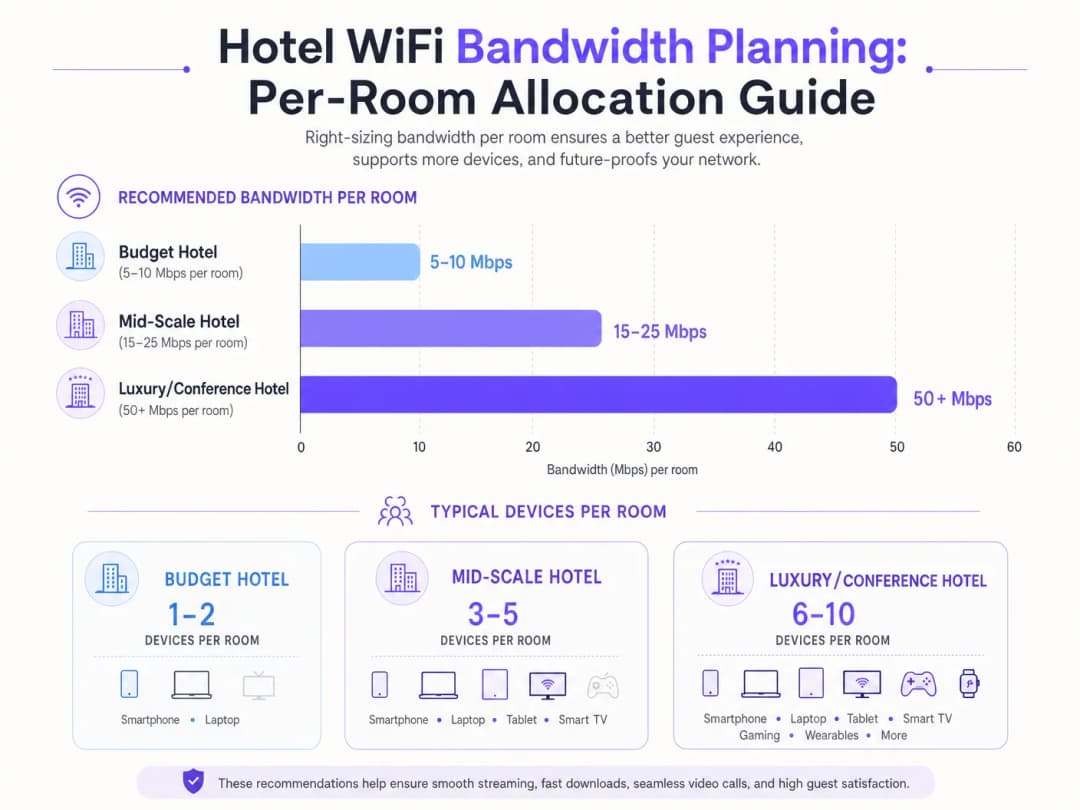
酒店网络设计中的根本挑战是容量规划。为每个房间分配固定 5 - 10 Mbps 的传统方法已无法满足现代宾客的需求。如今,单个客房通常拥有 3 - 5 台连接设备 - 智能手机、笔记本电脑、平板电脑、可穿戴设备以及流式传输 4K 内容的智能电视。根据 Wi-Fi Alliance 的数据,到 2025 年,全球人均连接设备数量已超过 9 台,其中酒店环境的每房设备密度在所有行业中最高。
对于中档酒店,IT 架构师必须为每间客房预留 15 - 25 Mbps 的带宽。在豪华或以会议为重点的场所,这一要求会扩大到每间客房 50+ Mbps。这就需要部署高密度接入点 (AP) - 通常是每个房间一个 AP 或每两个房间一个,具体取决于建筑材料 - 以确保足够的信号强度和容量。会议空间需要专用的高密度 AP,能够处理数百个并发连接,并通过专用带宽池和 VLAN 与客房流量隔离。
有线回传同样至关重要。每个接入点都需要一个千兆以太网(Gigabit Ethernet)上行链路,最理想的是通过 PoE+ 交换机连接。核心交换层必须能够同时处理所有 AP 的聚合吞吐量。一个拥有 200 间客房且每间客房均部署 AP 的酒店,在高峰时段可能会产生 10 Gbps 或更多的聚合流量。互联网上行链路(通常是专用 专线)必须相应地规划带宽,中等规模的物业最低建议为 1 Gbps,大型会议场馆则建议为 10 Gbps。
无线标准与技术
现代部署应至少运行 WiFi 6 (802.11ax)。WiFi 6 引入了 OFDMA(正交频分多址),允许单个 AP 同时为多个客户端提供服务,从而显著提高了高密度环境中的效率。对于较新的部署,WiFi 6E 将这一能力扩展到了 6 GHz 频段,减少了同信道干扰 (CCI),并为高带宽应用提供了额外的频谱。企业设备必须通过 WPA3 Enterprise 配合 802.1X 认证来强制执行安全策略,而访客网络则使用 WPA3 Personal。
服务质量 (QoS) 与流量管理
仅仅增加原始带宽很少是最具成本效益的解决方案。使用 802.11e QoS 标准进行智能流量管理至关重要。通过将对延迟敏感的应用(如视频会议、VoIP)优先级置于大容量数据传输之上,网络管理员可以确保商务旅客即使在 peak 利用率时段(通常是晚上 7 点到 10 点)也能获得无缝体验。深度包检测 (DPI) 使网络能够按应用类型对流量进行分类,并动态应用适当的 QoS 策略。
对您的具体配置有疑问吗?
我们的团队与 80,000 多个场所的运营方、IT 经理和网络工程师保持合作。预约 20 分钟的通话,我们将为您展示同行是如何解决类似问题的。
实施指南
分层服务架构
分层 WiFi 模型是在平衡访客满意度与基础设施成本方面的行业标准。该架构通常涉及三个不同的服务级别:
| 层级 | 速度 | 使用场景 | 定价模式 |
|---|---|---|---|
| 免费基础版 | 5 Mbps | 即时消息、轻度网页浏览 | 免费 |
| 标准访客版 | 15 Mbps | 社交媒体、标准画质流媒体 | 4.99 英镑/天或对常旅客计划会员免费 |
| 尊享商务版 | 保证 50+ Mbps | VPN、4K 流媒体、视频会议 | 9.99 英镑/天 |

实施此架构需要一个强大的 Captive Portal、一个用于认证的 RADIUS 服务器以及一个策略执行引擎。像 Purple 这样的平台在 Connect 许可下可以作为 OpenRoaming 等服务的免费身份提供商,在简化入网流程的同时执行带宽限制,并通过其 WiFi Analytics 仪表板收集用户分析数据。Captive Portal 本身是捕获第一方数据(电子邮件地址、社交媒体资料和人口统计信息)的主要触点,这些数据可以直接馈入 CRM 和营销自动化工作流。
部署清单
在正式上线前,请验证以下内容:
- 现场勘测: 进行预测性射频(RF)勘测,以识别覆盖盲区、干扰源和最佳 AP 放置位置。需考虑会衰减信号的建筑材料(混凝土、钢材、玻璃)。
- AP 密度: 每间房或每隔一间房部署一个 AP。对于会议空间,部署带有定向天线的高密度 AP 以创建微小区。
- VLAN 隔离: 将访客、企业、物联网(IoT)和支付网络隔离在不同的 VLAN 上,并在防火墙处执行严格的 ACL。
- QoS 策略: 配置 802.11e WMM (WiFi Multimedia) 配置文件以优先处理语音和视频流量。按 SSID 或按用户应用速率限制。
- Captive Portal: 部署符合 GDPR 合规要求的门户,并提供明确的营销传播加入许可(opt-in)。与 Purple 集成以进行分析和身份管理。
- 监控: 配置 SNMP 或基于云的网络管理平台,以便在 AP 故障、高利用率和延迟激增时发送告警。
最佳实践
安全与隔离是不可逾越的红线。访客流量必须使用 VLAN 与企业和支付处理网络严格隔离,以保持 PCI-DSS 合规性。对于企业级部署,强制要求实施 WPA3 加密和强大的 802.1X 认证。应在访客 SSID 上启用客户端隔离,以防止访客设备之间发生横向移动。
数据隐私与合规性要求 Captive Portal 和数据收集行为必须符合 GDPR 以及其他地区性隐私法规。在英国和欧盟,明确的服务条款和默认不勾选的营销传播加入许可(opt-in)机制是法律强制要求的。Purple 平台提供了内置的 GDPR 合规工具,包括同意管理和数据保留控制。
持续监控至关重要。仅依赖在线率指标是远远不够的。IT 团队必须在高峰时段监控延迟、丢包率和 AP 利用率,以主动识别并解决拥堵问题。如果延迟超过 150ms 或丢包率超过 1%,从技术上讲连接虽然可能仍处于“在线”状态,但对于视频通话来说已完全无法使用。 有关全面酒店网络策略的进一步阅读,请参阅 Hotel WiFi:酒店业者完整指南 以及西班牙语版本 WiFi para Hoteles: La Guía Completa para Hoteleros。
故障排除与风险缓解
**同频干扰 (CCI):**在密集部署中,重叠信道会严重降低性能。实施自动射频资源管理 (RRM) 以动态调整信道分配和发射功率。避免在彼此覆盖范围内的主机上,将多个 AP 部署在相同的信道上。
**Captive Portal 摩擦:**复杂或设计不佳的登录过程会让宾客感到沮丧,并降低数据收集率。利用无缝身份验证方法 - 社交登录、OpenRoaming 或基于二维码的访问 - 在保持合规性的同时减少摩擦。
**回传带宽不足:**无线网络的实际速度取决于其有线回传的速度。确保核心交换机和互联网连接能够支持所有 AP 的总吞吐量。单个饱和的上行链路端口可能会降低整个楼层的网络性能。
**流氓接入点:**在大型物业中,宾客有时会连接个人旅行路由器或热点,从而造成干扰和安全风险。实施无线入侵防御系统 (WIPS) 功能,以检测流氓设备并发送警报。
投资回报率与业务影响
投资企业级 WiFi 基础设施可在多个维度带来可衡量的回报。分层定价模型可从高级层服务中产生直接收入 - 一个拥有 200 间客房的酒店,如果高级层采用率为 30% 且价格为 £9.99/天,那么仅 WiFi 收入每年就能产生超过 £200,000,这通常足以在 12 - 18 个月内为网络升级提供资金。
除了直接收入之外,集成像 Purple 这样的平台还能让场所捕获宝贵的第一方数据,从而实现精准营销活动、增加忠诚度计划注册量并推动重复预订。Purple 的 WiFi Analytics 平台提供停留时间分析、客流量热力图和回头客跟踪等洞察,为人员配置决策、餐饮摆设和零售布局优化提供参考。这种方法同样适用于 Retail 和 Transport 行业。
不进行投资的风险同样是可量化的。2024 年 J.D. Power 酒店客房满意度研究发现,WiFi 性能是商务酒店负面在线评价中被提及最多的单一因素。TripAdvisor 评分下降一星,相当于每间可售房收入 (RevPAR) 减少 5 - 9%。
请收听上方完整的技术简报播客 - 约 10 分钟,涵盖带宽规划、QoS 架构、实施陷阱以及快速问答。
关键定义
Quality of Service (QoS)
用于将某些类型的流量 - 例如语音和视频 - 优先于不太关键的数据进行处理的网络机制,以确保在拥堵期间保持稳定的性能。
对于确保商务旅客获得流畅的视频会议体验至关重要,即使网络在其他宾客的重度使用下处于高负载状态。
VLAN (Virtual Local Area Network)
一种网络设备的逻辑分组,允许管理员将物理网络分割成多个不同的广播域,每个域都拥有自己的安全和流量策略。
对于将宾客流量与安全的内部企业网络及支付处理环境进行隔离,以维持 PCI DSS 合规性至关重要。
Captive Portal
用户在访问公共 WiFi 网络之前必须与其进行交互 class 的网页,通常用于身份验证、接受服务条款或支付处理。
访客接入和第一方数据采集的主要触点;其设计直接影响用户体验摩擦力、转化率以及 GDPR 合规性。
802.11e / WMM
一个 IEEE 标准,通过对 MAC 层的修改来定义无线局域网的服务质量增强。WiFi 多媒体 (WMM) 是基于该标准的用户端认证。
实现 WiFi 语音和视频流量优先级的底层协议。必须在 AP 和客户端设备上同时启用才能生效。
OpenRoaming
一个 WiFi 网络联盟,允许用户使用 Passpoint/Hotspot 2.0 框架自动安全地连接,而无需重复输入凭据或与 captive portals 交互。
减少访客的接入摩擦;在 Connect 许可下,Purple 充当该服务的免费身份提供商。
吞吐量
在通信信道上成功传送数据的实际速率,以每秒比特数 (bps) 衡量。与理论最大带宽不同。
访客体验到的实际速度,由于协议开销、干扰和并发用户,通常仅为理论最大值的 40% - 70%。
同频干扰 (CCI)
当运行在相同信道上的多个接入点可以检测到彼此,导致它们延迟传输并降低整体吞吐量时,所发生的性能下降。
高密度部署中的一个主要问题。需要精细的信道规划、自动射频资源管理 (RRM),并且最好迁移到干扰较小的 5 GHz 或 6 GHz 频段。
PCI DSS
PCI DSS (支付卡行业数据安全标准) - 针对处理、存储或传输支付卡数据的组织的一套强制性安全标准。
如果酒店在与访客 WiFi 相同的物理网络基础设施上处理支付,则法律强制要求进行严格的网络隔离和合规控制。
OFDMA (正交频分多址)
OFDM 的多用户版本,允许单个接入点通过将信道划分为更小的、称为资源单元 (RU) 的子信道,来同时为多个客户端提供服务。
在 WiFi 6 (802.11ax) 中引入,OFDMA 是 WiFi 6 在酒店大堂和会议空间等高密度环境中性能超越 WiFi 5 的主要原因。
应用实例
一家拥有 400 间客房的豪华酒店在晚上 7 点至 10 点之间遇到严重网络拥堵,导致其 1 Gbps 专线饱和。IT 总监需要解决此问题,但又不想立即升级到 10 Gbps 线路。推荐的方法是什么?
IT 总监应分三个阶段实施分层 QoS 策略。第一阶段:在无线控制器上使用单用户速率限制,对免费宾客层实施 5 Mbps 的硬性上限。这可以防止少数用户通过批量下载或 BT 种子下载垄断带宽。第二阶段:使用 802.11e WMM QoS 标记优先处理尊享层(保证 50 Mbps)的流量,确保视频会议和 VPN 流量获得比尽力而为流量更高的队列优先级。第三阶段:部署 Purple 的 WiFi 分析以分析流量模式,识别高峰时段的应用类型,并使用深度包检测实施应用感知 QoS 策略。监控 30 天内的高峰利用率,以确定是否仍需要升级线路。
一家举办 500 人技术活动的大型会议酒店发现,在主题演讲期间,宴会厅的 WiFi 完全无法使用。该场所有一条 10 Gbps 专线,并在宴会厅内设有三个接入点。这属于什么架构故障,如何解决?
该故障是覆盖范围与容量设计上的错误。三个 AP 为该空间提供了足够的覆盖范围(信号强度),但无法处理 500 多名参会者及其 1500 多台设备的并发关联请求和数据吞吐量。解决方案是部署 12 个带有定向天线的高密度 AP,创建更小的非重叠微型信道。每个 AP 应配置在非重叠信道上(2.4 GHz 上为 1、6、11 信道;5 GHz 上使用多个信道并采用 20 MHz 信道宽度,以最大化可用信道数量)。应在独立的 VLAN 上配置专用的会议 SSID,并配备专用的带宽池,与客房网络隔离。应启用频段引导,将支持该频段的设备推向 5 GHz 或 6 GHz 频段。
练习题
Q1. 一家酒店正在举办一场大型技术会议。IT 团队已为客房大楼的每个房间预留了 50 Mbps 的带宽,但主宴会厅内的 500 名参会者报告网速缓慢且频繁掉线。该场地拥有一条 10 Gbps 的专线,并在宴会厅内部署了三个接入点。最可能的架构缺陷是什么?整改方案又是什么?
提示:考虑基于覆盖范围的设计与基于容量的设计之间的区别。信号强度并不等同于容量。
查看标准答案
宴会厅的网络是针对覆盖范围而非容量进行设计的。三个 AP 虽能提供充足的信号强度,但无法处理 500 多名参会者及其持有的 1500 多台设备的并发关联请求和吞吐量。整改方案是部署 12 个配备定向天线的高密度 AP,以创建更小的互不重叠的微蜂窝。配置互不重叠的信道,启用频段导航以将支持该功能的设备推向 5 GHz 或 6 GHz 频段,并在独立的 VLAN 上配置专用的会议 SSID,分配与客房网络隔离的专用带宽池。
Q2. 营销总监希望收集所有使用 WiFi 的客人的电子邮件地址,但 IT 总监担心 GDPR 合规性和接入摩擦。推荐的架构是什么?
提示:如何在数据收集、用户体验和法律要求之间取得平衡?考虑在 GDPR 下什么才构成有效同意。
查看标准答案
实施一个与 Purple 集成的 captive portal。提供社交登录(Google、Facebook、Apple)以获得无摩擦的体验。该门户必须包含用于营销传播的明确且未勾选的同意复选框 - 根据 GDPR,预先勾选的框不是有效的同意。包含一个指向隐私政策的清晰链接。将带有时间戳的同意记录存储在 Purple 平台中以便进行审计。这种方法在保持完全合规的同时最大化了数据采集。
Q3. 一家中等规模的酒店希望推出每天 9.99 英镑的优质 WiFi 级别,但担心客人会通过旅行路由器共享单个连接来绕过费用。这在技术上如何缓解?
提示:哪些网络层控制可以识别或限制特定的设备类型?请同时考虑设备指纹识别和会话管理。
查看标准答案
网络可以利用 MAC 地址过滤并结合设备指纹识别(通过 DHCP 指纹识别或 HTTP User-Agent 分析)来检测旅行路由器和 NAT 设备。此外,captive portal 可以对每个优质访问凭证强制执行严格的设备限制 - 通常为 3 台设备 - 从而使共享变得不切实际。实施 IP TTL 分析也可以检测 NAT 遍历,因为通过旅行路由器路由的数据包到达时的 TTL 通常会减少。对于持续违规者,RADIUS 服务器可以标记该 MAC 地址并要求重新验证。
Q4. 一家拥有 300 间客房的商务酒店正在计划进行全面的网络更新。IT 总监必须在每间客房部署一台 AP 与每条走廊(每 3 - 4 间客房)部署一台 AP 之间做出选择。哪些因素应该推动这一决策,推荐的方法是什么?
提示:考虑建筑材料、客用设备密度,以及每间客房部署与走廊部署的成本效益。
查看标准答案
该决策取决于建筑材料和预期的设备密度。在现代混凝土和钢结构建筑中,防火门和厚墙会显著衰减 5 GHz 信号,因此对于客人经常使用 VPN 和视频会议的商务酒店,推荐采用每房部署 AP 的方法。在较轻的建筑中(例如石膏板隔墙),走廊 AP 对于经济型酒店可能已经足够。对于一家拥有 300 间客房的商务酒店,每房部署 AP 的增量成本(每台 AP 约 150 - 250 英镑)可以通过提升客人满意度以及能够可靠地支持每房 6 - 10 台设备而变得合理。
常见问题
What internet speed do hotel guests expect?
Modern hotel guests expect a minimum of 10 to 15 Mbps download per device for buffer-free HD streaming, video calls, and responsive browsing. For business and luxury hotels, providing 25 to 50 Mbps enables 4K media streaming, large file transfers, and low-latency virtual meetings without evening bandwidth contention.
How do network engineers calculate hotel WAN bandwidth requirements?
Calculate required dedicated WAN bandwidth with the formula: (Total Rooms × Occupancy Rate × Average Guests per Room × Devices per Guest × Peak Concurrency Factor × Average Stream Bitrate) ÷ Oversubscription Ratio. For example, a 160-room hotel at 80% occupancy averaging 2.5 devices per guest and 12 Mbps streaming with a 6:1 oversubscription ratio requires a 500 Mbps dedicated circuit.
What oversubscription ratio should be used for hotel WiFi?
Hospitality networks typically apply statistical multiplexing oversubscription ratios between 5:1 and 8:1. Because internet streaming transfers data in quick bursts rather than continuous saturation, statistical multiplexing prevents costly circuit over-provisioning while maintaining sub-20ms packet latency during peak evening hours.
How does tiered QoS bandwidth shaping prevent evening network saturation?
Tiered QoS caps complimentary guest bandwidth (such as 10 Mbps down / 2 Mbps up) to protect core uplink capacity between 7 PM and 10:30 PM. Hotels monetize uncapped or higher tiers (such as 50 Mbps down / 10 Mbps up) for business travelers, conference attendees, and gaming via captive portal payment or PMS folio integration.
How should hotel conference and ballroom WiFi be provisioned?
Conference spaces require high-density access points designed for 50 to 60 concurrent clients per radio, 20 MHz or 40 MHz channel widths to avoid co-channel interference, and airtime fairness enabled. Subnets should use shorter DHCP lease times (1 to 2 hours) to avoid address pool exhaustion from rapid attendee device churn.
继续阅读本系列
Staff WiFi 对比 Guest WiFi:企业网络分段最佳实践
针对 IT 领导者的全面技术指南,介绍如何对 staff 和 guest WiFi 网络进行分段。内容涵盖 VLAN 架构、802.1X 认证、防火墙策略以及安全网络设计对业务的影响。
酒店客用 WiFi 管理:整合 PMS、门户与品牌标准
本技术指南详细介绍了如何构建企业级酒店 WiFi 网络,重点关注 VLAN 划分、用于自动会话管理的 PMS 集成,以及用于符合 GDPR 的数据采集的 Captive Portal 优化。
如何设置 Guest WiFi:企业级安全配置指南
本权威指南为 IT 负责人和网络架构师提供了部署安全企业 Guest WiFi 的确定性蓝图。内容涵盖了基本架构、WPA3 迁移、VLAN 隔离以及 Captive Portal 集成,在保护内部系统的同时,实现合规的一方数据采集。
对您的具体配置有疑问吗?
我们的团队与 80,000 多个场所的运营方、IT 经理和网络工程师保持合作。预约 20 分钟的通话,我们将为您展示同行是如何解决类似问题的。