
飯店 WiFi 速度:房客的期望與如何提供服務
本權威技術參考指南為 IT 經理、網路架構師和 CTO 提供有關飯店 WiFi 頻寬規劃、QoS 實施和分級定價模型的實用策略。其詳細介紹了如何調整網路容量大小以滿足現代房客的期望 - 從中型物業的每間客房 15 Mbps 到奢華和會議場所的 50+ Mbps - 同時確保安全、合規且具擴充性的企業部署。透過整合 Purple 的 Guest WiFi 與分析平台,場所營運商可以將其網路從成本中心轉變為能創造收益且數據驅動的資產。
Video overview
收聽此指南
查看播客逐字稿
核心系列的一部分:Guest WiFi 指南 →
Hotel WiFi Speed & Bandwidth Planning Calculator
Model concurrent guest streaming loads, calculate required WAN uplink bandwidth with statistical multiplexing, size DHCP scopes, and project tiered guest WiFi monetisation.
Why Hospitality Networks Require Statistical Multiplexing
Without bandwidth management, unconstrained streaming across 341 concurrent devices would require 4.09 Gbps of dedicated leased line throughput. This is commercially unsustainable for most properties.
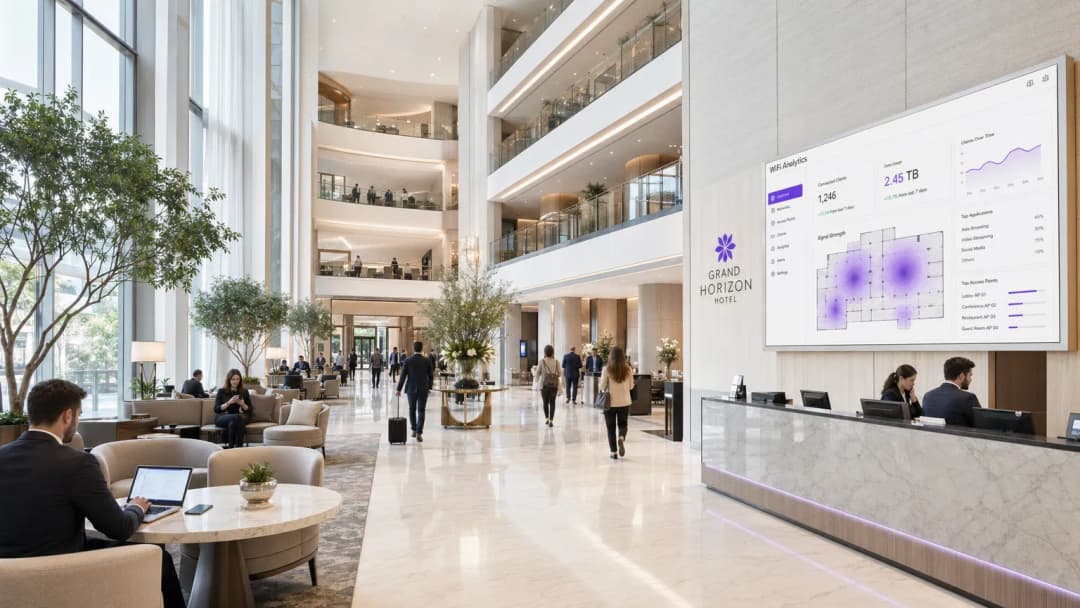
執行摘要
對於管理飯店資產組合的 IT 總監和 CTO 來說,客用 WiFi 已從一項基本便利設施演變為關鍵任務的公用事業基礎架構。糟糕的連線會直接影響顧客滿意度評分、品牌聲譽和收入。本指南詳細介紹了在從中型商務飯店到奢華品牌等各類物業中,進行適當頻寬規劃、實施服務品質 (QoS) 以及部署分層 WiFi 架構的技術要求。透過擺脫傳統的單一費率頻寬模式,場所可以最佳化網路效能、處理尖峰需求並將加值服務轉化為收益。整合如 Purple 這樣強大的 客用 WiFi 平台,可以實現安全驗證、流量塑形並擷取有價值的首方數據,將傳統的成本中心轉化為策略資產。本指南同樣適用於 Hospitality、Retail、Healthcare 和 Transport 產業的營運商,在這些產業中,高密度、高可靠性的無線網路是基本要求。
技術深度剖析
頻寬規劃與容量
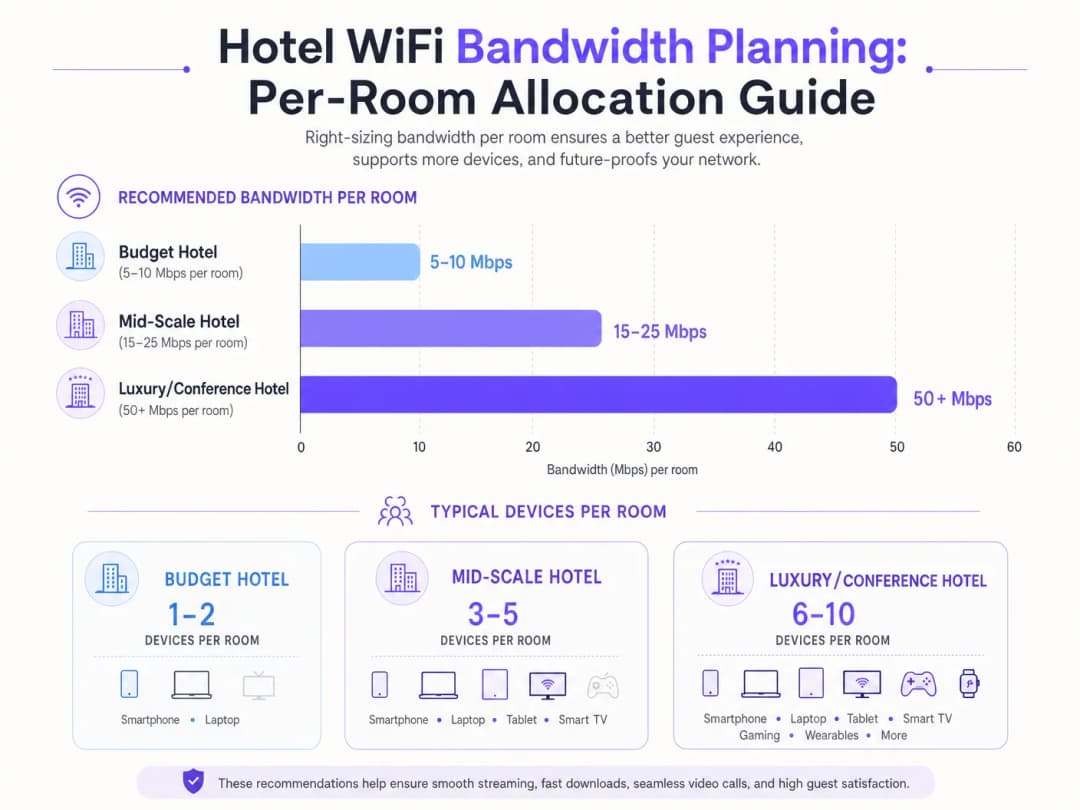
飯店網路設計中的根本挑戰是容量規劃。傳統每間客房分配固定 5 - 10 Mbps 的方法已無法滿足現代顧客的需求。如今,一間客房內通常有 3 - 5 台聯網裝置 - 智慧型手機、筆記型電腦、平板電腦、穿戴式裝置以及串流 4K 內容的智慧電視。根據 Wi-Fi Alliance 的數據,到 2025 年,全球每人平均聯網裝置數量已超過 9 台,其中飯店環境的每房裝置密度是所有產業中最高的。
對於中型飯店,IT 架構師必須為每間客房配置 15 - 25 Mbps 的頻寬。在奢華或以會議為重點的場所,此要求會擴展至每間客房 50+ Mbps。這需要部署高密度無線基地台 (AP) - 通常每間房或每隔一間房部署一個 AP,具體取決於建築材料 - 以確保足夠的訊號強度和容量。會議空間則需要專門的高密度 AP,能夠處理數百個同時連線,並透過專用頻寬池和 VLAN 與客房流量進行隔離。
有線回傳網路同樣至關重要。每個無線基地台都需要一個 Gigabit Ethernet 上行鏈路,最理想是透過 PoE+ 交換器連接。核心交換層必須能夠同時處理所有無線基地台的總吞吐量。一間擁有 200 間客房且每房配有無線基地台的飯店,在尖峰時段可能會產生 10 Gbps 或更多的總流量。網際網路聯外線路 - 通常是專用的 專線 - 必須依據此規模進行規劃,中型旅宿的最低建議頻寬為 1 Gbps,而大型會議場地則建議為 10 Gbps。
無線標準與技術
現代化部署至少應運行 WiFi 6 (802.11ax)。WiFi 6 引入了 OFDMA(正交頻分多址),允許單一無線基地台同時為多個用戶端提供服務,進而大幅提升高密度環境中的效率。對於更新穎的部署,WiFi 6E 將此能力擴展至 6 GHz 頻段,減少同通道干擾 (CCI),並為高頻寬應用提供額外的頻譜。安全性方面,企業端設備必須透過具備 802.1X 驗證的 WPA3 Enterprise 強制執行,而訪客網路則採用 WPA3 Personal。
服務品質 (QoS) 與流量管理
單純增加原始頻寬鮮少是最具成本效益的解決方案。使用 802.11e QoS 標準的智慧流量管理至關重要。透過將視訊會議、VoIP 等對延遲敏感的應用程式優先級置於大宗數據傳輸之上,網路管理員即使在尖峰使用時段(通常為晚上 7 點至 10 點)也能確保商務旅客獲得無縫體驗。深度封包檢測 (DPI) 使網路能夠按應用程式類型對流量進行分類,並動態套用適當的 QoS 策略。
對於您的特定設置有任何疑問嗎?
我們的團隊與超過 80,000 個場域的場域營運商、IT 經理和網路工程師合作。立即預約 20 分鐘的通話,我們將向您展示其他與您相似的用戶是如何解決此問題的。
實作指南
分級服務架構
分級 WiFi 模式是平衡訪客滿意度與基礎設施成本的產業標準。此架構通常包含三個不同的服務級別:
| 分級 | 速度 | 使用場景 | 定價模式 |
|---|---|---|---|
| 免費基礎型 | 5 Mbps | 即時通訊、輕度網頁瀏覽 | 免費 |
| 標準訪客型 | 15 Mbps | 社群媒體、標準畫質影音串流 | £4.99/天或會員專享免費 |
| 進階商務型 | 保證 50+ Mbps | VPN、4K 影音串流、視訊會議 | £9.99/天 |

實施此架構需要強大的 Captive Portal、用於驗證的 RADIUS 伺服器以及原則執行引擎。像 Purple 這樣的平台在 Connect 授權下可作為 OpenRoaming 等服務的免費身分識別提供者,在執行頻寬限制並透過其 WiFi Analytics 儀表板擷取使用者分析數據的同時,簡化上網引導流程。Captive Portal 本身是擷取第一方數據(電子郵件地址、社群檔案和人口統計資訊)的主要接觸點,這些數據會直接匯入 CRM 和行銷自動化工作流程。
部署檢查清單
在正式上線前,請驗證以下項目:
- 場勘: 進行預測性射頻 (RF) 調查,以識別訊號覆蓋盲區、干擾源和最佳 AP 配置。需將會衰減訊號的建築材料(混凝土、鋼材、玻璃)納入考量。
- AP 密度: 每間客房或每隔一間客房部署一台 AP。針對會議空間,請部署配備定向天線的高密度 AP 以建立微型蜂巢 (micro-cells)。
- VLAN 區隔: 使用防火牆上執行的嚴格 ACL,將訪客、企業、IoT 和付款網路隔離在不同的 VLAN 上。
- QoS 原則: 設定 802.11e WMM (WiFi 多媒體) 設定檔以優先處理語音和視訊流量。針對每個 SSID 或每個使用者套用速率限制。
- Captive Portal: 部署符合 GDPR 規範的入口網站,並針對行銷傳播提供明確的勾選同意。與 Purple 整合以進行分析和身分識別管理。
- 監控: 設定 SNMP 或雲端網路管理平台,以便在 AP 故障、高使用率和延遲尖峰時發出警報。
最佳實踐
安全性與區隔是不可妥協的。訪客流量必須使用 VLAN 與企業和付款處理網路嚴格隔離,以維持 PCI-DSS 合規性。對於企業部署,強制要求實施 WPA3 加密和強大的 802.1X 驗證。應在訪客 SSID 上啟用用戶端隔離,以防止訪客裝置之間的橫向移動。
數據隱私與合規性要求 Captive Portal 和數據收集做法必須符合 GDPR 及其他區域性隱私法規。在英國和歐盟,明確的服務條款和未預先勾選的行銷傳播同意機制是法律強制要求的。Purple 的平台提供了內建的 GDPR 合規工具,包括同意管理和數據保留控制。
持續監控至關重要。僅依賴運作時間指標是不夠的。IT 團隊必須在尖峰時段監控延遲、封包遺失和 AP 使用率,以主動識別並解決壅塞問題。如果延遲超過 150 毫秒或封包遺失率超過 1%,則連線在技術上可能顯示「正常」,但對於視訊通話而言卻完全無法使用。如欲深入閱讀完整的飯店網路策略,請參閱 Hotel WiFi: The Complete Guide for Hoteliers 以及西班牙文版本 WiFi para Hoteles: La Guía Completa para Hoteleros。
故障排除與風險緩釋
同頻干擾 (CCI): 在高密度佈署中,重疊的頻道會嚴重降低效能。請實作自動化無線電資源管理 (RRM) 以動態調整頻道分配和發射功率。避免在彼此訊號範圍內將多個 AP 佈署在相同的頻道上。
Captive Portal 摩擦: 複雜或設計不佳的登入流程會讓顧客感到沮喪,並降低資料收集率。請利用無縫驗證方法 - 社群登入、OpenRoaming 或基於 QR code 的存取 - 在符合合規性的同時減少阻礙。
回程網路頻寬不足: 無線網路的運作速度受限於其有線回程網路。請確保核心交換器和網際網路連線能夠支援所有 AP 的總吞吐量。單一飽和的上行連接埠可能會降低整層樓的效能。
惡意存取點 (Rogue AP): 在大型物業中,顧客有時會連接個人旅行路由器或熱點,從而產生干擾和安全風險。請實作無線入侵防禦系統 (WIPS) 功能,以偵測惡意裝置並發出警報。
投資報酬率與商業影響
投資企業級 WiFi 基礎設施可在多個維度上帶來可衡量的報酬。分級定價模式可從高級分級中產生直接收入 - 一家擁有 200 間客房的飯店,若有 30% 的高級分級採用率並定價為每日 £9.99,每年光是 WiFi 收入就能產生超過 £200,000,通常足以在 12 至 18 個月內為網路升級提供資金。
除了直接收入外,整合像 Purple 這樣的平台還能讓場域收集寶貴的第一方數據,進而實現精準的行銷活動、增加忠誠度計畫的註冊率並促進再次預訂。Purple 的 WiFi Analytics 平台提供停留時間分析、人流熱圖和重返訪客追蹤 - 這些洞察分析可用於指導員工排班決定、餐飲擺設和零售版面配置最佳化。這種方法同樣適用於 Retail 和 Transport 行業。
不進行投資的風險同樣是可以量化的。一項 2024 年 J.D. Power 飯店顧客滿意度研究發現,WiFi 效能是商務飯店負面線上評論中最常被提及的單一因素。TripAdvisor 評分下降一星與每間可用客房收益 (RevPAR) 減少 5 - 9% 相關。
歡迎收聽上方完整的技術簡報 Podcast - 全長約 10 分鐘,內容涵蓋頻寬規劃、QoS 架構、實施陷阱以及快速問答。
關鍵定義
服務品質 (Quality of Service - QoS)
用於將某些特定類型的流量(例如語音和視訊)排在較不重要的數據之前優先處理的網路機制,以確保在擁塞期間維持穩定的效能。
對於確保商務旅客即使在網路因其他房客而承受重載時,仍能獲得順暢的視訊會議體驗至關重要。
VLAN (Virtual Local Area Network)
一種網路設備的邏輯分組,允許管理員將實體網路分割為多個不同的廣播網域,每個網域都擁有各自的安全與流量策略。
這對於將訪客流量與安全的企業網路及付款處理環境進行隔離,以維持 PCI DSS 合規性至關重要。
Captive Portal
使用者在存取公共 WiFi 網路之前必須進行互動的網頁,通常用於身分驗證、接受服務條款或處理付款流程。
訪客上網引導與第一方數據收集的主要接觸點;其設計直接影響使用者阻力、轉換率以及符合 GDPR 規範的合規性。
802.11e / WMM
一項 IEEE 標準,透過修改 MAC 層來定義無線區域網路的服務品質 (QoS) 強化功能。WiFi 多媒體 (WMM) 是基於此標準的消費級認證。
可在 WiFi 上實現語音與視訊流量優先級排序的底層協定。必須在 AP 和用戶端設備上同時啟用才能發揮作用。
OpenRoaming
一個 WiFi 網路聯盟,使用 Passpoint/Hotspot 2.0 架構,允許使用者自動且安全地連線,無需重複輸入憑證或與 captive portals 進行互動。
減少訪客上網引導的阻力;Purple 在 Connect 授權下可作為此服務的免費身分識別提供者。
Throughput
透過通訊頻道成功傳輸數據的實際速率,以每秒位元數 (bps) 計算。與理論上的最大頻寬不同。
訪客體驗到的實際速度,由於協定開銷、干擾和同時在線使用者等因素,通常僅為理論最大值的 40% 到 70%。
Co-Channel Interference (CCI)
當運作在相同通道上的多個存取點可以互相偵測到時,所導致的效能衰退,這會使它們推遲傳輸並降低整體 throughput。
高密度佈署中的主要問題。需要仔細規劃通道、自動射頻資源管理 (RRM),且理想情況下應移至擁擠程度較低的 5 GHz 或 6 GHz 頻段。
PCI DSS
Payment Card Industry Data Security Standard - 針對處理、儲存或傳輸付款卡資料之組織的一套強制性安全標準。
如果飯店在與訪客 WiFi 相同的實體網路基礎架構上處理付款,法律上要求必須實施嚴格的隔離與合規控制。
OFDMA (Orthogonal Frequency Division Multiple Access)
OFDM 的多使用者版本,透過將通道分割為稱為資源單元 (RU) 的較小副通道,允許單一存取點同時為多個用戶端提供服務。
在 WiFi 6 (802.11ax) 中引入,OFDMA 是 WiFi 6 在飯店大廳和會議空間等密集環境中效能優於 WiFi 5 的主要原因。
範例
一家擁有 400 間客房的奢華飯店在晚上 7 點至 10 點之間遇到嚴重的網路擁塞,導致其 1 Gbps 的專線頻寬飽和。IT 總監需要在不立即升級到 10 Gbps 線路的情況下解決此問題。建議的方法是什麼?
IT 總監應分三個階段實施分級 QoS 策略。第一階段:在無線控制器上使用單一使用者速率限制,對免費客房層級強制實施 5 Mbps 的硬性上限。這可以防止少數使用者因大量下載或使用 BT 下載而壟斷頻寬。第二階段:使用 802.11e WMM QoS 標籤優先處理尊榮層級(保證 50 Mbps)的流量,確保視訊會議和 VPN 流量比最佳努力(best-effort)流量獲得更高的佇列優先權。第三階段:部署 Purple 的 WiFi 分析功能以分析流量模式,識別尖峰時段的應用程式類型,並使用深層封包檢測(Deep Packet Inspection)實施應用程式感知的 QoS 策略。監控 30 天期間的尖峰使用率,以確定是否仍需要升級線路。
一家舉辦 500 人科技活動的大型會議飯店發現,在主題演講期間,宴會廳的 WiFi 完全無法使用。該場所有一條 10 Gbps 的專線,且在宴會廳中設有三個無線基地台(AP)。其架構上的失敗原因是什麼,該如何解決?
此失敗屬於「覆蓋範圍對比容量」的設計錯誤。三個 AP 為該空間提供了足夠的覆蓋範圍(訊號強度),但無法處理 500 多名與會者及其 1,500 多部裝置的同時關聯請求和數據吞吐量。解決方案是部署 12 個配備定向天線的高密度 AP,以建立較小的無重疊微型蜂巢(micro-cells)。每個 AP 應設定在不重疊的頻道上(2.4 GHz 上的 1、6、11 頻道;5 GHz 上的多個頻道,並使用 20 MHz 頻道寬度以最大化可用頻道數量)。應在獨立的 VLAN 上配置專用的會議 SSID,並配有專用的頻寬池,與客房網路進行隔離。同時應啟用頻段導引(band steering)功能,以將支援該頻段的裝置引導至 5 GHz 或 6 GHz 頻段。
練習題
Q1. 一家飯店正在舉辦一場大型科技會議。IT 團隊在客房大樓為每間客房配置了 50 Mbps 頻寬,但主宴會廳的 500 名與會者反映網速緩慢且頻繁斷線。該場地擁有一條 10 Gbps 專線,且在宴會廳內設有三個存取點。最可能的架構缺陷是什麼?改善計劃又是什麼?
提示:思考覆蓋導向設計與容量導向設計之間的差異。訊號強度並不等於容量。
查看標準答案
宴會廳的網路是針對覆蓋範圍而非容量進行設計的。三個 AP 雖然提供了足夠的訊號,但無法處理 500 多名與會者及其 1,500 多台設備的同時關聯請求與 throughput。改善計劃是部署 12 個配備定向天線的高密度 AP,以建立較小且互不重疊的微型蜂巢 (micro-cells)。配置互不重疊的通道,啟用頻段導向 (band steering) 以將支援的設備推向 5 GHz 或 6 GHz,並在獨立的 VLAN 上配置專用的會議 SSID,並提供與客房網路隔離的專用頻寬池。
Q2. 行銷總監希望向所有使用 WiFi 的訪客收集電子郵件地址,但 IT 總監擔心 GDPR 合規性與登入摩擦。推薦的架構是什麼?
提示:您如何在數據收集、使用者體驗與法律要求之間取得平衡?思考在 GDPR 下什麼才構成有效的同意。
查看標準答案
實作與 Purple 整合的 captive portal。提供社群登入(Google、Facebook、Apple)以實現無摩擦體驗。該 portal 必須包含用於行銷通訊的明確且未勾選的同意核取方塊 - 預先勾選的方塊在 GDPR 下並非有效同意。加入隱私權政策的清晰連結。將帶有時間戳記的同意記錄儲存在 Purple 平台中以便進行稽核。此方法可在保持完全合規的同時最大化數據收集。
Q3. 一家中等規模的飯店希望推出每天 9.99 英鎊的付費進階 WiFi 方案,但擔心房客會透過旅行路由器分享單一連線來規避費用。這在技術上要如何緩解?
提示:哪些網路層級的控制措施可以識別或限制特定的裝置類型?請同時考慮裝置指紋識別與工作階段管理。
查看標準答案
網路可以利用 MAC 地址過濾並結合裝置指紋識別(透過 DHCP 指紋識別或 HTTP User-Agent 分析)來偵測旅行路由器與 NAT 裝置。此外,captive portal 可以針對每個進階存取憑證實施嚴格的裝置數量限制(通常為 3 台裝置),使分享變得不切實際。實作 IP TTL 分析也可以偵測 NAT 轉換,因為透過旅行路由器路由的封包通常會在到達時減少 TTL。對於持續違規者,RADIUS 伺服器可以標記該 MAC 地址並要求重新驗證。
Q4. 一家擁有 300 間客房的商務飯店正在規劃全面的網路更新。IT 總監必須在「每間房部署一台 AP」與「每條走廊部署一台 AP(每 3 - 4 間房)」之間做出選擇。哪些因素應該主導此決策?推薦的做法是什麼?
提示:請考慮建築構造材料、房客裝置密度,以及每間客房部署與走廊部署的成本效益。
查看標準答案
此決策取決於建築材料與預期的裝置密度。在現代的鋼筋混凝土建築中,防火門與厚牆會顯著衰減 5 GHz 訊號,因此對於房客經常使用 VPN 和視訊會議的商務飯店,推薦採用每房部署 AP 的做法。在較輕質的建築(例如石膏板隔間)中,走廊 AP 對於經濟型旅館可能就足夠了。對於擁有 300 間客房的商務飯店而言,每房部署 AP 的新增成本(每台 AP 約 150 - 250 英鎊)因客房滿意度的提升,以及能穩定支援每房 6 - 10 台裝置的能力而顯得完全合理。
常見問題
What internet speed do hotel guests expect?
Modern hotel guests expect a minimum of 10 to 15 Mbps download per device for buffer-free HD streaming, video calls, and responsive browsing. For business and luxury hotels, providing 25 to 50 Mbps enables 4K media streaming, large file transfers, and low-latency virtual meetings without evening bandwidth contention.
How do network engineers calculate hotel WAN bandwidth requirements?
Calculate required dedicated WAN bandwidth with the formula: (Total Rooms × Occupancy Rate × Average Guests per Room × Devices per Guest × Peak Concurrency Factor × Average Stream Bitrate) ÷ Oversubscription Ratio. For example, a 160-room hotel at 80% occupancy averaging 2.5 devices per guest and 12 Mbps streaming with a 6:1 oversubscription ratio requires a 500 Mbps dedicated circuit.
What oversubscription ratio should be used for hotel WiFi?
Hospitality networks typically apply statistical multiplexing oversubscription ratios between 5:1 and 8:1. Because internet streaming transfers data in quick bursts rather than continuous saturation, statistical multiplexing prevents costly circuit over-provisioning while maintaining sub-20ms packet latency during peak evening hours.
How does tiered QoS bandwidth shaping prevent evening network saturation?
Tiered QoS caps complimentary guest bandwidth (such as 10 Mbps down / 2 Mbps up) to protect core uplink capacity between 7 PM and 10:30 PM. Hotels monetize uncapped or higher tiers (such as 50 Mbps down / 10 Mbps up) for business travelers, conference attendees, and gaming via captive portal payment or PMS folio integration.
How should hotel conference and ballroom WiFi be provisioned?
Conference spaces require high-density access points designed for 50 to 60 concurrent clients per radio, 20 MHz or 40 MHz channel widths to avoid co-channel interference, and airtime fairness enabled. Subnets should use shorter DHCP lease times (1 to 2 hours) to avoid address pool exhaustion from rapid attendee device churn.
繼續閱讀本系列
員工 WiFi 對比訪客 WiFi:企業網路分段的最佳實踐
為 IT 領導者提供的全面技術指南,探討如何對員工和訪客 WiFi 網路進行分段。內容涵蓋 VLAN 架構、802.1X 驗證、防火牆策略,以及安全網路設計對業務的影響。
飯店顧客 WiFi 管理:整合 PMS、傳送門與品牌標準
本技術指南詳細介紹如何構建企業級飯店 WiFi 網路,重點在於 VLAN 隔離、用於自動化工作階段管理的 PMS 整合,以及用於符合 GDPR 的資料收集 Captive Portal 最佳化。
如何設定訪客 WiFi:企業安全設定指南
本權威指南為 IT 領導者與網路架構師提供佈署安全企業訪客 WiFi 的決定性藍圖。內容涵蓋核心架構、WPA3 遷移、VLAN 區隔及 captive portal 整合,在保護內部系統的同時,收集符合法規的第一方數據。
對於您的特定設置有任何疑問嗎?
我們的團隊與超過 80,000 個場域的場域營運商、IT 經理和網路工程師合作。立即預約 20 分鐘的通話,我們將向您展示其他與您相似的用戶是如何解決此問題的。