
飯店 WiFi:飯店業主的完整指南
探索如何設計、部署和變現企業級的飯店 WiFi 網路。涵蓋 PMS 整合(Opera、Mews)、分級頻寬 ROI、PCI DSS 合規性以及房客數據獲取。
Video overview
收聽此指南
查看播客逐字稿
核心系列的一部分:房客 WiFi 全方位指南 →
執行摘要
對於現代飯店業者而言,顧客 WiFi 遠不只是基本備品 - 它是提升顧客滿意度評分、提高重複直接訂房率以及營運效率的主要驅動力。飯店顧客期望在客房、大廳、會議空間和戶外設施中都能享有流暢、高速的連線。與此同時,高階 IT 主管必須在高度並行的頻寬需求與 PCI-DSS 安全合規性及數據隱私法規之間取得平衡。
本完整指南為飯店 IT 經理、場地營運總監和總經理提供了一個實用的框架,用於設計、部署和變現企業級飯店 WiFi 網路。我們將探討客房內存取點架構、物業管理系統 (PMS) 整合、分級頻寬營收模型,以及如何將顧客 WiFi 登入轉換為經過驗證的第一方行銷數據。
收聽我們關於核心飯店 WiFi 概念的隨附簡報:
Technical Architecture & Network Segmentation
Logical VLAN Segmentation
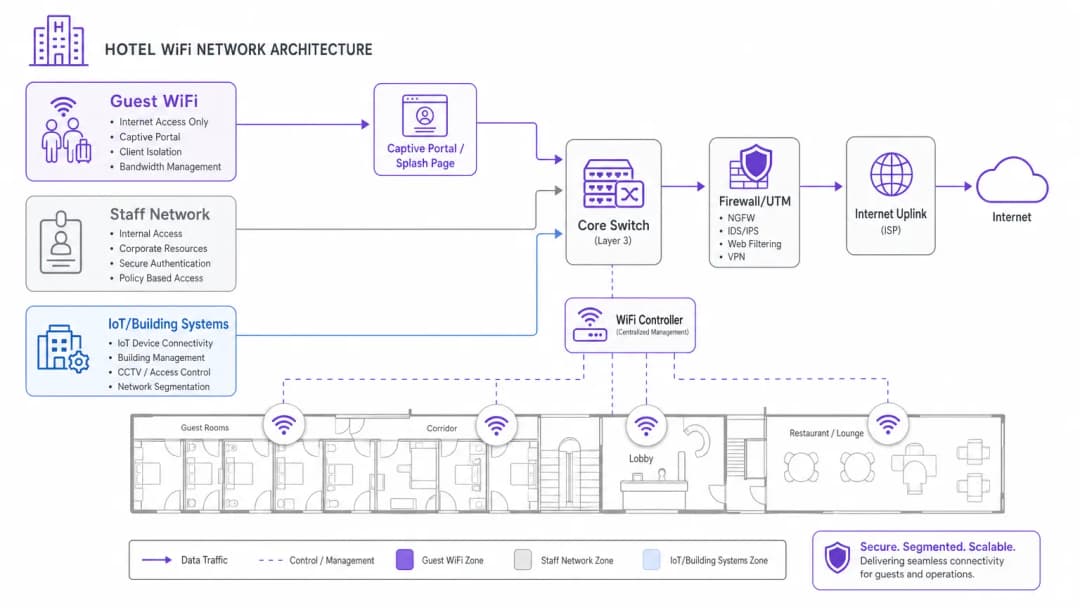
企業級飯店 WiFi 的基礎是嚴格的邏輯網路分段。單一實體基礎設施必須處理不同的使用者群組 - 飯店房客、員工營運、銷售點 (POS) 終端機以及建築自動化 (IoT/HVAC) - 且不損及安全性或效能。
房客流量必須隔離在專用的 Virtual Local Area Networks (VLANs) 上。將付款處理 (POS) 和物業管理系統 (PMS) 分割到加密的員工 VLAN 是符合 PCI-DSS 規範的強制性要求。此外,房客 VLAN 必須強制執行用戶端隔離,防止房客裝置在本地無線網路上互相通訊。
Wireless Density & Access Point Placement
過去的飯店 WiFi 設計依賴安裝在走廊上的無線基地台 (APs),每隔 5 到 7 間客房設置一個。在採用鋼筋混凝土、設有電梯井、鋪設磁磚浴室以及裝有鋁箔背襯隔熱材料的現代飯店建築中,走廊訊號在到達客房床鋪和書桌之前會迅速衰減。
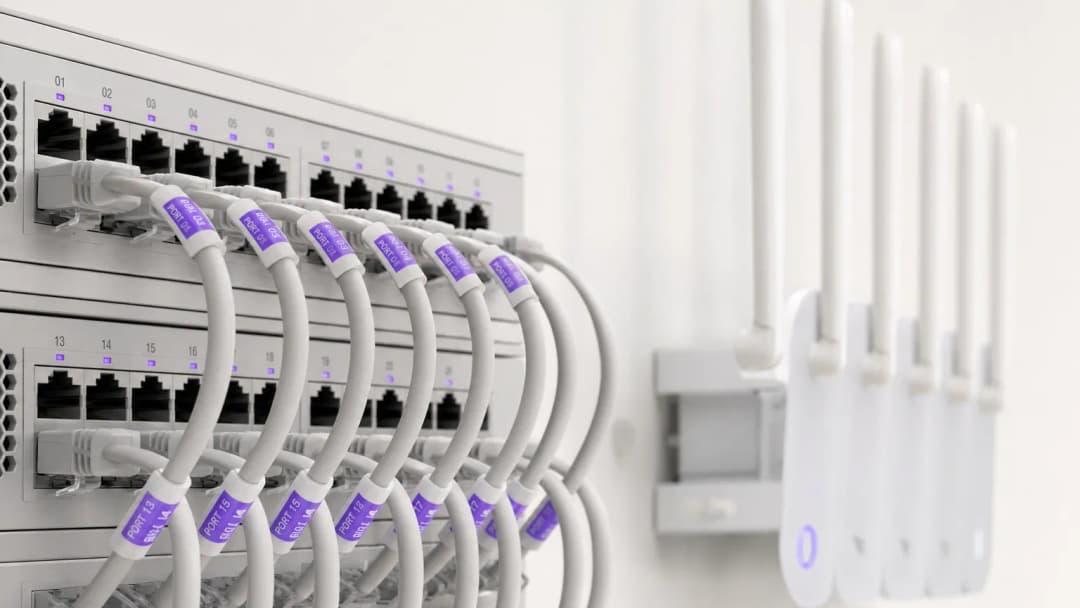
目前的產業標準是房內壁掛式 AP 佈署(每間客房 1 個 AP 或每 2 間客房 1 個 AP)。房內 Wi-Fi 6 AP 可提供乾淨的 5GHz 和 6GHz 覆蓋範圍、適合視訊通話的低延遲,並為智慧電視、IP 電話和 VoIP 電話線提供內建的有線乙太網路連接埠。
PMS Integration & Guest Authenticated Portals
將您的房客 WiFi Captive Portal 與您的物業管理系統 (PMS) - 例如 Oracle Opera、Mews、Stayntouch 或 Cloudbeds - 進行整合,可將單純的網路存取轉變為個人化的房客體驗。
How PMS Authentication Works
- 房客關聯: 房客連線到飯店 WiFi SSID,並被重新導向到品牌專屬的 Captive Portal。
- 客房驗證: 房客輸入他們的房號和姓氏(或訂房代號)。
- API 查詢: Portal 透過安全 API 查詢 PMS 資料庫,以驗證旅客是否為實際入住狀態。
- 權限對應: 網路會根據房客的會員等級套用量身定制的頻寬原則(例如:VIP 可獲得 50 Mbps 高速存取,而一般房客為 10 Mbps)。
Comparing Hotel WiFi Access Models
| 存取模式 | 驗證方式 | 房客體驗 | 營收 / 資料價值 | 安全性與合規性 |
|---|---|---|---|---|
| PMS Authenticated | 房號 + 姓氏 | 無縫、個人化的歡迎介面 | 高(同步個人檔案與入住歷史記錄) | 高(已驗證的飯店房客) |
| 社群 / 表單同意訂閱 | 電子郵件、LinkedIn、Google | 快速、一鍵登入 | 高(獲取已驗證的電子郵件訂閱同意) | 中(用戶端隔離) |
| 分級付費方案 | 信用卡 / 房帳 | 可選擇免費或付費高速頻寬 | 高(直接的增量營收) | 高(加密的付款閘道) |
| 開放式點擊通過 | 接受條款與細則按鈕 | 立即存取 | 低 (未收集聯絡數據) | 基本 (用戶端隔離) |
飯店 WiFi 變現與分級頻寬投資報酬率 (ROI)
高頻寬視訊串流 (4K Netflix、YouTube、Twitch) 和遠距工作視訊會議佔據了傍晚顧客網路消耗的大部分。不受限制的開放頻寬會導致上行鏈路飽和,進而帶來顧客的差評。
實施分級頻寬
飯店業者可以實施雙層頻寬模型:
- 免費基本方案: 每個裝置 5 - 10 Mbps 對稱速度 - 非常適合網頁瀏覽、電子郵件和社群通訊。
- 付費高速方案: 30 - 50 Mbps 高優先權頻寬,每 24 小時收費 $7.99 至 $12.99 美元 (或對會員免費提供)。
此策略可保證所有顧客的基本效能流暢,同時從商務旅客和重度使用者那裡獲得持續性的營收。
若要深入瞭解顧客網路策略和企業安全,請參閱我們的 Guest WiFi Guide、WiFi Marketing Guide 以及 Enterprise WiFi Security Guide。
關鍵定義
PMS 整合
將房客 WiFi Captive Portal 與物業管理系統(例如 Oracle Opera、Mews、Stayntouch)連接,以透過房號或姓名驗證房客身分,並同步個人喜好設定。
對於無縫的房客辦理入住、VIP 頻寬規則以及自動化入住後電子郵件觸發至關重要。
用戶端隔離 (Client Isolation)
一種安全功能,可防止連接到同一無線網路的房客裝置互相偵測或通訊。
飯店房客網路上必須啟用的功能,以防止客房之間的橫向網路攻擊和數據竊聽。
分級頻寬
根據房客級別分配不同的頻寬限制和優先權(例如,免費 5Mbps 用於標準網頁瀏覽,付費 50Mbps 用於 4K 串流和遊戲)。
允許飯店業者將高頻寬需求變現,同時保護所有房客的上行鏈路容量。
房內存取點 (AP)
在客房內部署低調的牆面面板式 WiFi 6 存取點,而非在走廊天花板上進行稀疏的安裝。
消除浴室瓷磚、箔紙隔熱層和厚重防火門造成的走廊訊號衰減。
範例
一家擁有 250 間客房的商務飯店,在傍晚尖峰時段(下午 7 點 - 晚上 10 點)經常收到房客對 WiFi 速度的嚴重投訴。該物業目前依賴 500 Mbps 的寬頻連線,並將存取點(AP)安裝在中央走廊。應該實施何種網路架構升級?
- 將網際網路上行鏈路升級至具有保證 SLA 的 1 Gbps 專線,以因應尖峰時段的同時串流流量。 2. 將無線架構重新設計為房內 AP 模式(每間客房或每 2 間客房 1 個 AP),以消除牆壁造成的訊號衰減。 3. 在房客 VLAN 上實施頻寬管制(例如,每位用戶基本 10 Mbps),並提供可選的付費 50 Mbps 高速分級。
一家精品飯店集團希望獲取經驗證的房客聯絡資料,以便進行直接預訂行銷活動,同時確保嚴格遵守 GDPR 和隱私法規。應如何設定 Captive Portal?
部署與物業管理系統(PMS)整合的 Captive Portal。將登入畫面設定為行銷資訊訂閱需有明確、非綁定的獨立核取方塊,與網路服務條款分開。該入口網站會自動記錄同意的時間戳記、IP 位址和 MAC 位址,同時將驗證過的房客個人資料同步到中央行銷平台中。
練習題
Q1. 您的飯店營運總監希望將戶外泳池露台上的新行動銷售點 (POS) 平板電腦連接到現有的房客 WiFi 網路。您應該如何回應?
提示:考慮 PCI DSS 合規性和網路分段。
查看標準答案
拒絕該要求。將付款終端連接到開放的房客 WiFi 網路違反了 PCI DSS 規則,並會使信用卡數據面臨風險。POS 平板電腦必須連接到使用 WPA3-Enterprise 保護的專用、加密員工/POS VLAN,與房客流量完全隔離。
Q2. 一位室內設計師堅持將天花板安裝的存取點隱藏在裝飾性黃銅外殼內,以維護飯店大廳的美觀。這會帶來什麼技術影響?
提示:考慮金屬外殼如何與無線訊號產生相互作用。
查看標準答案
金屬外殼會充當法拉第籠,嚴重阻擋射頻訊號並造成訊號死角。無線基地台必須安裝在外部,或安裝在射頻透明的外殼(例如塑膠或乾壁)後面。使用經製造商核准的乙烯基貼膜可以在不降低 WiFi 效能的情況下融入室內裝潢。
Q3. 飯店行銷經理要求自動將每個連線到訪客 WiFi 的旅客訂閱每日飯店電子報。應該如何處理這個需求?
提示:考慮 GDPR 和隱私法規中有關明確同意的要求。
查看標準答案
Captive Portal 登入頁面無法自動為旅客進行訂閱。同意必須是明確、知情且非綑綁式的。Splash page 必須提供一個未勾選的行銷訂閱選取方塊,且必須與接受網路服務條款分開。
常見問題
Why is in-room AP deployment preferred over corridor access points in hotels?
Modern hotel construction materials (reinforced concrete, foil insulation, fire doors, and bathroom tile) cause RF attenuation of 10 to 18 dB per wall. Corridor-mounted APs struggle to penetrate guest rooms, forcing client devices to transmit at maximum power and degrading battery life. In-room wall-plate APs provide line-of-sight 5 GHz and 6 GHz coverage, sub-millisecond roaming latency, and built-in Gigabit Ethernet switch ports for smart TVs, VoIP phones, and IoT thermostats.
How does hotel WiFi integrate with Property Management Systems (PMS)?
Guest WiFi captive portals integrate with hotel PMS platforms (such as Oracle Opera, Mews, Stayntouch, and Cloudbeds) via secure REST APIs or Micros FIAS protocols. When guests connect, they authenticate using their room number and surname or reservation code. The portal validates active stay status against the PMS in real time, applies VIP bandwidth profiles automatically, and posts optional tiered service charges directly to the guest folio.
How do tiered WiFi bandwidth passes generate revenue for hoteliers?
Tiered bandwidth models provide a complimentary baseline speed (such as 10 Mbps for email and social browsing) while offering paid high-speed passes (such as 50 to 100 Mbps for 4K video streaming, gaming, or remote work videoconferencing). Guests purchase 24-hour or multi-day passes via credit card, Apple Pay, or direct room charge. This protects core uplink capacity during peak evening hours while generating predictable ancillary revenue.
What network segmentation is required for hotel WiFi and PCI DSS compliance?
Hotels must maintain strict Layer-2 and Layer-3 network segmentation using dedicated Virtual Local Area Networks (VLANs). Guest WiFi traffic must be isolated on an independent guest VLAN with client isolation enabled, preventing guest devices from discovering or attacking one another. Point-of-Sale (POS) card terminals, Property Management Systems (PMS), and administrative staff devices must reside on separate, encrypted VLANs protected by next-generation firewall access control lists (ACLs) to satisfy PCI DSS Requirement 1.3.
How do hotels handle MAC address randomisation across returning guests?
iOS, Android, and Windows rotate randomized MAC addresses periodically, which can cause guests to see repeated login splash screens when returning to the hotel or moving between common areas. Enterprise platforms like Purple resolve this by issuing Passpoint (Hotspot 2.0) encrypted profiles or binding authenticated guest sessions to secure HTTP session tokens and verified user identity profiles rather than transient physical MAC addresses.
How does Purple improve guest WiFi ROI for hotels and resorts?
Purple turns hotel guest WiFi into a high-conversion marketing and operations asset. By streamlining captive portal logins with social and PMS authentication, Purple captures verified, GDPR-compliant guest profiles and syncs them with hospitality CRMs (such as HubSpot, Salesforce, and Revinate). Hoteliers leverage real-time footfall analytics, dwell times, and automated post-stay review triggers (TripAdvisor, Google Reviews) to drive repeat direct bookings and reduce OTA commission fees.
繼續閱讀本系列
如何設定訪客 WiFi:企業安全設定指南
本權威指南為 IT 領導者與網路架構師提供佈署安全企業訪客 WiFi 的決定性藍圖。內容涵蓋核心架構、WPA3 遷移、VLAN 區隔及 captive portal 整合,在保護內部系統的同時,收集符合法規的第一方數據。
如何在不升級網路方案的情況下解決 Wi-Fi 慢的問題
一份針對 IT 經理和網路架構師的綜合技術參考指南,介紹如何在不增加 ISP 頻寬的情況下優化企業 Wi-Fi 效能。內容涵蓋 RF 調諧、用戶端密度管理、QoS 實施,以及如何利用 Wi-Fi 分析來診斷和解決瓶頸。
如何建置校園 WiFi 網路:大學 IT 指南
本技術指南為設計和部署高密度校園 WiFi 網路提供了全面的藍圖,涵蓋了從主動現場勘測和基地台部署,到控制器架構、無縫漫遊以及安全訪客登入的一切內容。本指南專為大學和大型場館的 IT 經理、網路架構師和 CTO 撰寫,為他們在不遠的將來規劃和執行無線部署提供實用的指導。本指南還將 Purple 的 Guest WiFi 和分析平台對接到部署生命週期中的實際整合點。
對於您的特定設置有任何疑問嗎?
我們的團隊與超過 80,000 個場域的場域營運商、IT 經理和網路工程師合作。立即預約 20 分鐘的通話,我們將向您展示其他與您相似的用戶是如何解決此問題的。