跳至主要內容

Dynamic VLAN Assignment with RADIUS: Segmenting Users by Role

本指南提供使用 RADIUS 屬性實作動態 VLAN 分配的完整技術概述。其中詳細說明企業場域如何為員工、訪客和 IoT 裝置自動進行網路區隔,以增強安全性並減少手動設定的開銷。

📖 5 分鐘閱讀📝 1,035 字數🔧 2 範例3 練習題📚 8 關鍵定義

收聽此指南

查看播客逐字稿
Welcome to the Purple Technical Briefing. I'm your host, and today we are diving into a critical architecture topic for multi-venue operators: Dynamic VLAN Assignment with RADIUS. If you're managing networks across hotels, retail chains, or large public venues, you know the pain of manual network segmentation. You've got staff devices, guest devices, and an ever-growing army of IoT sensors. Putting them all on a flat network is a security nightmare, but manually assigning static VLANs per port or SSID doesn't scale. That's where RADIUS comes in. By leveraging 802.1X authentication and RADIUS attributes, specifically Tunnel-Private-Group-ID, you can automatically assign users and devices to the correct VLAN at the exact moment they authenticate. Let's break down the technical mechanics. When a device associates with an access point, it initiates an EAP exchange. The authenticator—usually your AP or switch—forwards this to your RADIUS server. If the credentials are valid, the RADIUS server sends back an Access-Accept message. But here is the magic: inside that Access-Accept packet, you configure the RADIUS server to include three specific IETF standard attributes. First, Tunnel-Type set to VLAN, which is value 13. Second, Tunnel-Medium-Type set to IEEE-802, value 6. And third, Tunnel-Private-Group-ID, which contains the actual VLAN ID string, like "10" for Staff or "20" for Guests. When the access point receives this, it dynamically tags the user's traffic with that VLAN ID. The result? A single SSID can securely serve multiple distinct user groups, dropping them into isolated network segments with their own firewall rules and bandwidth limits. Let's talk implementation. Whether you're using Cisco Catalyst, Aruba ClearPass, or Ubiquiti UniFi, the core principles remain the same, though the exact syntax varies. In a hospitality scenario, for example, a front desk agent logs in and gets dropped into the secure Staff VLAN with access to the property management system. A guest connects via the captive portal and gets placed on an isolated Guest VLAN with client isolation enabled. Meanwhile, smart thermostats authenticate via MAC Authentication Bypass, or MAB, and are assigned to a locked-down IoT VLAN that can only reach specific control servers. This architecture isn't just about convenience; it's about risk mitigation and compliance. If you process payments, PCI DSS requires strict segmentation of your point-of-sale terminals. Dynamic VLANs ensure that even if a POS device is moved to a different port, it remains securely segmented. But what are the pitfalls? The most common failure mode is RADIUS unavailability. If your access points can't reach the RADIUS server, devices can't authenticate. You must configure fallback mechanisms. Most enterprise APs support a "critical VLAN" or "fallback VLAN" setting. If RADIUS times out, the AP drops the device into a restricted VLAN that perhaps only allows internet access, keeping the business running without compromising internal security. Another pitfall is inconsistent VLAN naming across sites. If VLAN 10 is "Staff" at site A but "Guest" at site B, dynamic assignment will cause chaos. Standardise your VLAN IDs globally before implementing this. To summarise: Dynamic VLAN assignment via RADIUS transforms network access from a manual chore into an automated, scalable security policy. It reduces SSID bloat, enforces role-based access control, and simplifies compliance. Thanks for joining this technical briefing. For more deep dives into enterprise WiFi architecture, check out the guides section on the Purple website.

執行摘要

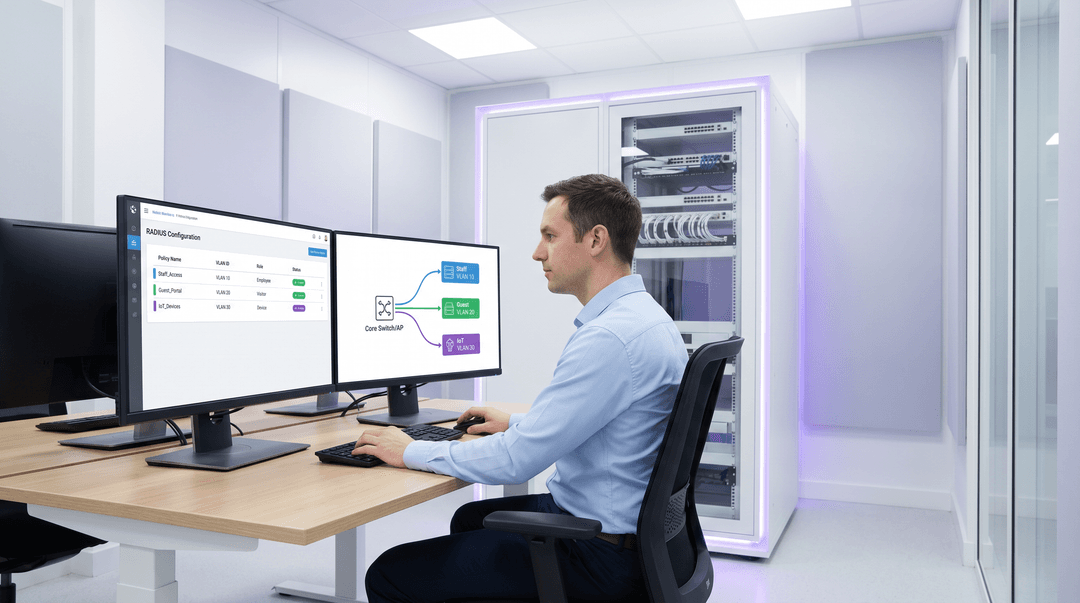
header_image.png

對於多場域營運商而言,手動管理網路區隔是一個重大的營運瓶頸。隨著餐旅、零售和公共部門環境中連線裝置數量的增加,依賴每個連接埠的靜態 VLAN 設定或廣播數十個 SSID 已變得難以維持。本指南探討如何利用 RADIUS 的動態 VLAN 分配,在驗證時依角色自動區隔使用者和裝置。透過傳遞特定的 RADIUS 屬性(例如 Tunnel-Pvt-Group-ID),網路架構師可以動態地將使用者分配到正確的 VLAN,從而執行嚴格的安全政策、確保符合 PCI DSS 等標準,並大幅減少手動 IT 開銷。

技術深度探討

動態 VLAN 分配依賴 IEEE 802.1X 標準進行基於連接埠的網路存取控制,並結合 RADIUS(遠端使用者撥入驗證服務)伺服器進行集中式驗證、授權和計費 (AAA)。當用戶端裝置嘗試連線到網路時,驗證器(通常是無線存取點或網路交換器)會充當媒介,透過可延伸驗證協定 (EAP) 將用戶端的憑證轉發給 RADIUS 伺服器。

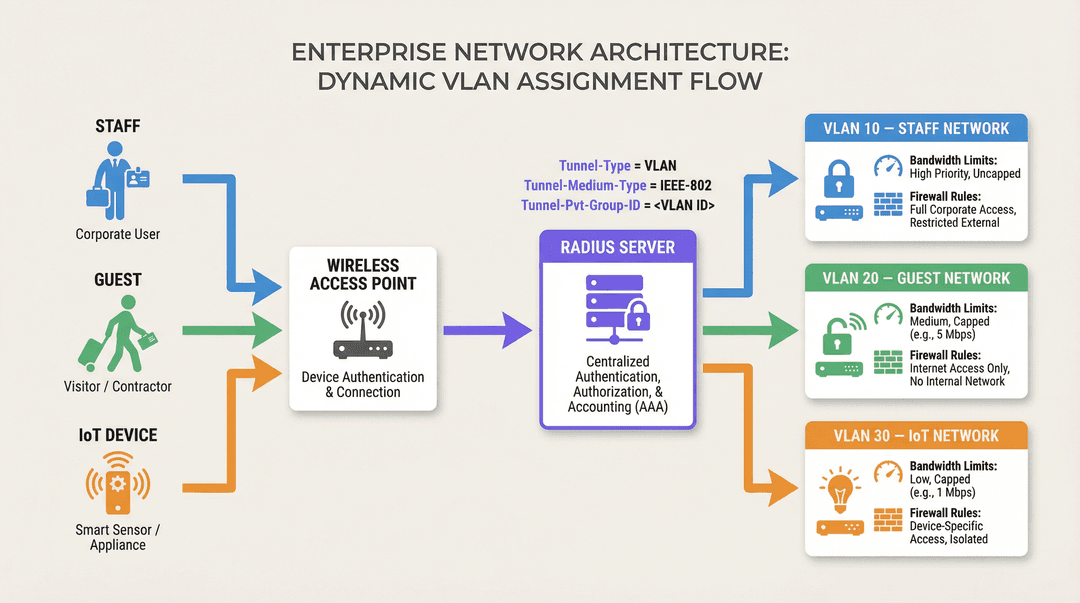
如果憑證有效,RADIUS 伺服器會回應 Access-Accept 訊息。動態 VLAN 分配的關鍵機制是在此 Access-Accept 封包中包含特定的 IETF 標準 RADIUS 屬性。這三個基本屬性為:

  1. Tunnel-Type (Attribute 64): 必須設定為 VLAN(值為 13)。
  2. Tunnel-Medium-Type (Attribute 65): 必須設定為 IEEE-802(值為 6)。
  3. Tunnel-Private-Group-ID (Attribute 81): 這包含實際的 VLAN ID 字串(例如 "10"、"20"、"Guest_VLAN")。

當驗證器收到這些屬性時,它會使用指定的 VLAN ID 動態標記使用者的流量,無論他們連線到哪個實體連接埠或 SSID,都會將其放入適當的網路區段中。

radius_vlan_architecture.png

此架構可實現基於角色的網路存取控制。單一 SSID 即可安全地為多個不同的使用者群組提供服務,並將他們放入具有各自防火牆規則、頻寬限制和路由政策的隔離網路區段中。例如,Purple 的 Guest WiFi 解決方案通常與 RADIUS 整合,以確保將訪客置於隔離的 VLAN 中,從而保護內部資源。

實作指南

部署動態 VLAN 分配需要在 RADIUS 伺服器和網路基礎架構(存取點或交換器)上進行設定。雖然不同廠商(例如 Cisco ISE、Aruba ClearPass、FreeRADIUS)之間的確切語法有所不同,但核心原則保持一致。

步驟 1:RADIUS 伺服器設定

設定您的 RADIUS 伺服器,使其根據使用者群組或裝置設定檔傳回所需的屬性。例如,您可以建立如下政策:

  • 如果使用者群組 = "Staff",則傳回 Tunnel-Private-Group-ID = "10"。
  • 如果使用者群組 = "Contractors",則傳回 Tunnel-Private-Group-ID = "20"。
  • 如果裝置類型 = "IoT Sensor"(透過 MAC 驗證旁路),則傳回 Tunnel-Private-Group-ID = "30"。

步驟 2:驗證器設定(存取點/交換器)

設定您的網路裝置以查詢 RADIUS 伺服器並處理傳回的屬性。這通常包括:

  1. 定義 RADIUS 伺服器 IP 位址和共用金鑰。
  2. 在相關的 SSID 或交換器連接埠上啟用 802.1X 驗證。
  3. 啟用動態 VLAN 分配(有時稱為 "AAA 覆寫" 或 "RADIUS VLAN 分配")。

特定廠商注意事項

  • Cisco: 在 WLC 上,確保在 WLAN 設定中啟用了 "AAA Override"。對於交換器,請設定 authentication port-control autodot1x pae authenticator
  • Aruba: 在 ArubaOS 中,確保 AAA 設定檔中已設定 "RADIUS Server",且伺服器群組已設定為處理用於 VLAN 導出的伺服器規則。
  • Ubiquiti UniFi: 在 UniFi Network 應用程式中,啟用 "RADIUS MAC Authentication" 或 "WPA2/WPA3 Enterprise",並確保在網路設定中勾選了 "Enable RADIUS assigned VLAN"。
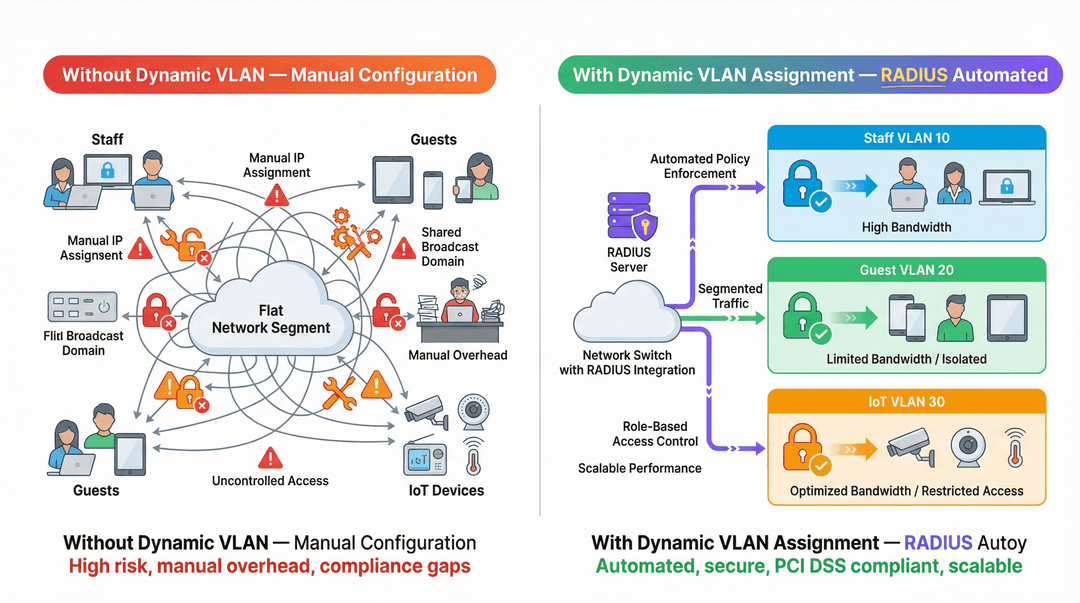
vlan_segmentation_comparison.png

最佳實踐

為確保部署穩健且具擴充性,請遵循以下產業標準建議:

  1. 全球統一 VLAN ID 標準: 跨站點的 VLAN 命名不一致是一個重大闖。如果 VLAN 10 在站點 A 是 "Staff",但在站點 B 是 "Guest",則動態分配將會導致混亂。在實作動態分配之前,請建立全球統一的 VLAN 編號配置方案。
  2. 實作後備機制: RADIUS 無法使用是一種關鍵的故障模式。在您的存取點上設定 "關鍵 VLAN" 或 "後備 VLAN"。如果無法連線至 RADIUS 伺服器,AP 應將裝置放入受限的 VLAN 中(例如僅允許網際網路存取),在不損害內部安全性的情況下維持連線。
  3. 對無介面裝置使用 MAC 驗證旁路 (MAB):Sensors (感測器)或智慧溫控器之類的 IoT 裝置通常無法進行 802.1X 驗證。請使用 MAB 根據其 MAC 位址對這些裝置進行驗證,並將其分配到受限的 IoT VLAN。
  4. 利用分析功能: 使用 Purple 的 WiFi Analytics 等平台來監控驗證趨勢、識別異常,並根據基於角色的使用模式最佳化網路效能。

疑難排解與風險降低

在實作動態 VLAN 分配時,請準備好排解常見問題:

  • 用戶端被分配至預設 VLAN: 這通常發生在 RADIUS 伺服器無法傳送正確的屬性,或是驗證器未設定處理這些屬性(例如「AAA Override」被停用)時。請使用封包擷取來驗證 Access-Accept 訊息的內容。
  • 驗證逾時: 如果裝置無法通過驗證,請檢查驗證器與 RADIUS 伺服器之間的網路連線。驗證共用金鑰,並確保 RADIUS 伺服器已將該驗證器設定為有效的用戶端。
  • DHCP 問題: 裝置被動態分配到 VLAN 後,必須取得該子網路的 IP 位址。請確保 DHCP 伺服器已針對所有動態 VLAN 進行正確設定,且在必要時已配置 IP helper 位址。

ROI 與業務影響

實作動態 VLAN 分配可減少手動設定的開銷並降低安全性風險,從而帶來顯著的投資報酬率。

  • 營運效率: 無需再為每個連接埠手動設定靜態 VLAN,或針對不同的使用者群組廣播多個 SSID,從而為 IT 團隊節省數小時的管理工作。
  • 強化安全性: 實施嚴格的角色型存取控制,確保受感染的裝置或未授權的使用者與關鍵業務系統隔離。這對於符合 零售 環境中的 PCI DSS 等標準至關重要。
  • 提升使用者體驗: 為員工和訪客提供無縫的驗證體驗,因為他們只需連線至單一 SSID,即可自動獲得相應的網路存取權限。

收聽我們的技術簡報 Podcast 以獲取更多深入見解:

如需了解更多關於保護網路安全的資訊,請參閱我們的指南: 802.1X 驗證:保護現代裝置上的網路存取

關鍵定義

Dynamic VLAN Assignment

The process of automatically assigning a device to a specific Virtual Local Area Network (VLAN) based on its identity or role during authentication, rather than its physical connection point.

Essential for scalable network segmentation in enterprise environments, eliminating the need for manual port configuration.

RADIUS (Remote Authentication Dial-In User Service)

A networking protocol that provides centralized Authentication, Authorization, and Accounting (AAA) management for users who connect and use a network service.

The core engine that evaluates credentials and dictates network policy, including VLAN assignment.

802.1X

An IEEE Standard for port-based Network Access Control (PNAC), providing an authentication mechanism to devices wishing to attach to a LAN or WLAN.

The framework that allows devices to securely transmit credentials to the network infrastructure before gaining access.

Tunnel-Private-Group-ID

RADIUS Attribute 81, used to specify the VLAN ID or VLAN name that the authenticator should assign to the user's session.

The specific data field in the RADIUS response that dictates the network segment.

MAC Authentication Bypass (MAB)

A technique used to authenticate devices that do not support 802.1X (like printers or IoT sensors) by using their MAC address as their identity.

Crucial for integrating headless devices into a dynamically segmented network architecture.

Authenticator

The network device (such as a wireless access point or switch) that facilitates the authentication process between the client and the RADIUS server.

The device responsible for enforcing the VLAN assignment policy returned by the RADIUS server.

Access-Accept

The RADIUS message sent to the authenticator indicating that the user's credentials are valid and access should be granted.

This packet carries the crucial VLAN assignment attributes.

AAA Override

A configuration setting on many authenticators (like Cisco WLCs) that allows the RADIUS server to override the default VLAN or policy configured on the device.

Must be enabled for dynamic VLAN assignment to function correctly.

範例

A 500-room luxury hotel needs to segment its network for guests, staff, and IoT devices (smart thermostats and door locks). They currently broadcast 5 different SSIDs, causing significant co-channel interference and confusing guests. How can dynamic VLAN assignment solve this?

The hotel should consolidate to two SSIDs: 'Hotel_Guest' (Open/Captive Portal) and 'Hotel_Secure' (802.1X). For 'Hotel_Secure', staff authenticate using their corporate credentials. The RADIUS server verifies the credentials against Active Directory and returns Tunnel-Private-Group-ID = '10' (Staff VLAN). For IoT devices, which cannot use 802.1X, the network uses MAC Authentication Bypass (MAB). The RADIUS server recognizes the MAC addresses of the thermostats and locks, returning Tunnel-Private-Group-ID = '30' (IoT VLAN). Guests connect to 'Hotel_Guest' and are placed in VLAN 20 via standard captive portal workflows, potentially integrated with Purple's Hospitality solutions.

考官評語: This approach drastically reduces SSID overhead, improving RF performance. Using MAB for IoT devices is the standard workaround for headless clients. The critical success factor is ensuring the RADIUS server has an up-to-date database of IoT MAC addresses.

A large retail chain is deploying point-of-sale (POS) terminals across 50 locations. To comply with PCI DSS, these terminals must be strictly isolated from the corporate and guest networks. How can dynamic VLAN assignment ensure compliance even if a terminal is moved to a different port?

The IT team configures the network switches to require 802.1X authentication on all edge ports. The POS terminals are configured with certificates for EAP-TLS authentication. When a terminal connects to any port, it authenticates with the RADIUS server. The RADIUS server verifies the certificate and returns Tunnel-Private-Group-ID = '40' (PCI VLAN). The switch dynamically assigns the port to VLAN 40, applying strict ACLs that only allow communication with the payment processing gateways.

考官評語: This is a textbook example of using dynamic VLANs for compliance. By tying the VLAN assignment to the device identity (via certificate) rather than the physical port, the retail chain maintains PCI DSS compliance regardless of physical moves, adds, or changes.

練習題

Q1. You are deploying dynamic VLAN assignment across a university campus. The RADIUS server is successfully sending the Access-Accept message with Tunnel-Private-Group-ID set to '50' for faculty members. However, faculty devices are still being placed in the default VLAN (VLAN 1) configured on the SSID. What is the most likely cause?

提示:Check the configuration on the wireless access point or controller.

查看標準答案

The most likely cause is that the authenticator (the Wireless LAN Controller or Access Point) does not have 'AAA Override' (or the equivalent setting, such as 'Enable RADIUS assigned VLAN') enabled for that specific SSID. Even if the RADIUS server sends the correct attributes, the authenticator will ignore them and use the default configuration unless explicitly instructed to process dynamic assignments.

Q2. A hospital needs to connect hundreds of new smart infusion pumps to the network. These devices do not support 802.1X supplicants. How can the IT team ensure these devices are automatically placed into a secure, isolated clinical IoT VLAN?

提示:Consider how devices without 802.1X capabilities can be identified by the network.

查看標準答案

The IT team should implement MAC Authentication Bypass (MAB). The MAC addresses of all infusion pumps must be added to the RADIUS server's database. When a pump connects to the network, the switch or AP will use its MAC address as the identity for authentication. The RADIUS server will recognize the MAC address and return an Access-Accept message containing the Tunnel-Private-Group-ID for the clinical IoT VLAN.

Q3. Your enterprise network relies heavily on dynamic VLAN assignment. During a scheduled maintenance window, the primary and secondary RADIUS servers become temporarily unreachable. What configuration must be in place to ensure business-critical devices maintain some level of connectivity?

提示:Look for features related to authentication failure or fallback scenarios on the switch or AP.

查看標準答案

The network infrastructure must be configured with a 'Critical VLAN' or 'Fallback VLAN'. When the authenticator detects that the RADIUS servers are dead (unreachable), it automatically places connecting devices into this pre-defined Critical VLAN. This VLAN should have strict ACLs applied, perhaps only allowing internet access or access to essential remediation services, ensuring basic connectivity without exposing the internal network.

繼續閱讀本系列

How to Reduce the Number of WiFi SSIDs Using Per-Device PSK (iPSK, DPSK, MPSK)

本權威技術參考指南說明 IT 團隊如何透過使用每裝置 PSK (xPSK) 將多個專用網路整合至單一 SSID 中,從而消除因 SSID 訊標開銷 (beacon overhead) 導致的 WiFi 效能下降。內容涵蓋 Cisco iPSK、HPE Aruba MPSK、Ruckus DPSK、Juniper Mist PPSK 和 Ubiquiti UniFi PPSK 等各大廠商的技術版圖,並針對動態 VLAN 分配、IoT 裝置上網引導 (onboarding) 以及 PCI DSS 合規性提供實用的實作指南。餐旅業、零售業、體育場館和公共部門組織等場域營運商,將能在本指南中獲得具可行性的架構指導與實際應用案例。

閱讀指南 →

How to Fix Slow WiFi Without Upgrading Your Internet Plan

針對 IT 經理與網路架構師的完整技術參考指南,旨在不增加 ISP 頻寬的情況下優化企業 WiFi 效能。內容涵蓋 RF 調諧、用戶端密度管理、QoS 實作,以及如何利用 WiFi 分析來診斷與解決瓶頸。

閱讀指南 →

How to Implement Post-Admission NAC for Continuous Trust Monitoring

本指南為在旅宿、零售、醫療和公共部門等企業場所中實施結合持續信任監控的准入後網路存取控制 (NAC) 提供了權威的技術藍圖。它詳細介紹了如何從靜態的准入前檢查,轉變為使用 RADIUS CoA、行為基準建立和遙測整合的動態、感知工作階段的執行架構。IT 架構師和網路營運團隊將在其中獲得實用的部署指南、真實案例研究、合規性對齊說明以及可衡量的 ROI 框架。

閱讀指南 →