跳至主要內容

The Ultimate Guide to Secure Guest WiFi Architecture

本指南為飯店、連鎖零售、體育場館和公共部門機構的 IT 經理、網路架構師和 CTO 提供部署安全企業級訪客 WiFi 的完整技術藍圖。內容涵蓋三大核心架構支柱:網路分段、WPA3-OWE 加密和身分識別感知存取控制,並結合 PCI DSS 與 GDPR 合規要求、實際案例研究以及逐步部署指南。

📖 11 分鐘閱讀📝 2,638 字數🔧 3 範例3 練習題📚 9 關鍵定義

收聽此指南

查看播客逐字稿
Welcome to the Purple Technical Briefing Series. I'm your host, and today we're covering something that every IT manager and network architect at a hotel, retail chain, stadium, or public-sector venue needs to have nailed down: secure guest WiFi architecture. This isn't a theoretical exercise. Guest WiFi is one of the most common attack surfaces in enterprise environments, and yet it's also one of the most frequently under-engineered. So let's get into it. --- SECTION ONE: INTRODUCTION AND CONTEXT Let's start with the problem statement. Your organisation needs to provide internet access to visitors, guests, customers, or contractors. These are unmanaged devices — you have no control over what's running on them. They could be infected with malware. They could be running a packet sniffer. And yet they need to connect to your network infrastructure. The challenge is that most organisations treat guest WiFi as an afterthought — a simple open SSID bolted onto the corporate network with a firewall rule that says "block internal traffic." That's not good enough anymore. The threats are real. Man-in-the-middle attacks on open networks. Lateral movement from a compromised guest device into your corporate LAN. Rogue access points impersonating your SSID to harvest credentials. And of course, the regulatory dimension — if you're in retail, hospitality, or healthcare, you have PCI DSS, GDPR, and potentially sector-specific data regulations to comply with. So the question isn't whether you need a properly architected guest network. The question is: how do you build one that's genuinely secure, scalable, and compliant — without creating a terrible user experience? --- SECTION TWO: TECHNICAL DEEP-DIVE Let me walk you through the core architectural pillars. The first and most fundamental pillar is network segmentation. Every guest device must be placed into a completely isolated network segment — specifically, a dedicated VLAN. Let's call it VLAN 10. This VLAN must be logically separated from your corporate LAN, your staff network, your POS systems, your IP cameras, and any other internal infrastructure. At the Layer 3 boundary — your firewall or core switch — you configure what I call the "internet-only" rule. This is an Access Control List that explicitly blocks all outbound traffic from VLAN 10 destined for private IP ranges. That means blocking the RFC 1918 ranges: 10.0.0.0 slash 8, 172.16.0.0 slash 12, and 192.168.0.0 slash 16. Guest traffic is only permitted to reach public DNS servers and the public internet. Nothing else. Within the wireless network itself, you enable client isolation — sometimes called peer-to-peer blocking. This prevents any two guest devices from communicating directly with each other over the wireless medium. So even if a guest device is infected with a worm, it cannot scan or attack other devices on the same SSID. Now, at the Layer 2 level, you should also enable DHCP Snooping and Dynamic ARP Inspection on the switches that carry the guest VLAN. DHCP Snooping prevents rogue DHCP servers — a classic attack vector for redirecting user traffic. Dynamic ARP Inspection prevents ARP spoofing, which is the foundation of most man-in-the-middle attacks on local networks. The second pillar is over-the-air encryption. For years, guest networks were left completely unencrypted — open SSIDs with no WPA key. The rationale was user experience: you don't want guests to have to type a password. But an unencrypted wireless network means that anyone with a laptop and Wireshark can passively capture every HTTP request, every DNS query, every unencrypted session from every device in range. The solution is WPA3 Opportunistic Wireless Encryption, or OWE. It's defined in RFC 8110 and it's part of the Wi-Fi Alliance's Enhanced Open certification. What OWE does is perform a Diffie-Hellman key exchange during the association process. Each client gets a unique, individualized encryption key — a Pairwise Transient Key — without any password being entered. From the user's perspective, they just tap the network name and connect. But the wireless session is fully encrypted. For legacy devices that don't support WPA3 — older Android phones, older Windows laptops — you can run OWE in Transition Mode. The controller broadcasts both a legacy open SSID and an OWE SSID under the same network name. WPA3-capable devices automatically connect to the encrypted version. Legacy devices fall back to the open version. It's not perfect, but it's a pragmatic migration path. The third pillar is identity-aware access control. Encryption protects the wireless medium, but it doesn't tell you who is connecting. For compliance and accountability, you need to bind each session to a verified identity. This is where the captive portal comes in. An enterprise captive portal is much more than a splash page. It's a policy enforcement point. When a guest connects to the SSID, their session is initially blocked at the gateway. All HTTP traffic is redirected to the captive portal URL — which must be served over HTTPS with a publicly trusted TLS certificate, by the way. The portal then prompts the user to verify their identity — via email, SMS one-time password, social login, or corporate SSO. Once verified, the portal sends an authorisation signal to the RADIUS server, which updates the session policy to allow internet access. This gives you several critical capabilities. You have an audit trail — every session is tied to a verified identity, with timestamps and MAC address bindings. You have legal accountability — users have agreed to an Acceptable Use Policy. And you have the foundation for GDPR compliance — you've collected consent at the point of authentication. Speaking of GDPR — if you're capturing any personal data through the captive portal, you need to ensure that your consent mechanism uses un-ticked checkboxes for marketing opt-ins, that you're only collecting data that's necessary for the service, and that you have a clear, automated mechanism for users to request deletion of their data. These aren't optional niceties; they're legal obligations. For PCI DSS compliance, the key requirement is complete isolation of the Cardholder Data Environment. Your guest VLAN must not be able to route to any system that stores, processes, or transmits payment card data. This needs to be verified through penetration testing, not just assumed based on firewall rules. --- SECTION THREE: IMPLEMENTATION RECOMMENDATIONS AND PITFALLS Let me give you the practical deployment guidance. When you're sizing your DHCP scope for the guest VLAN, be aware of MAC address randomisation. iOS 14 and later, and Android 10 and later, randomise MAC addresses by default. This means a single guest's phone might appear as a new device every time they reconnect, consuming multiple IP addresses. To mitigate this, use a short DHCP lease time — two to four hours — and size your subnet generously. For a 200-room hotel, I'd recommend at least a /22 subnet, giving you over 1,000 IP addresses. For high-density venues — stadiums, conference centres, exhibition halls — consider Dynamic VLAN Pooling. Instead of putting all 10,000 concurrent users into a single /20 subnet, you distribute them across a pool of four or eight VLANs using a hash of their MAC address. This reduces broadcast domain sizes, improves wireless performance, and prevents IP exhaustion. The most common troubleshooting issue I see is the captive portal redirect failure. A guest connects to the SSID but the portal page never loads. This is almost always caused by one of three things: DNS blocking before authentication, HTTPS redirect interception, or a captive portal certificate that isn't trusted by the client device. The fix is to ensure that DNS queries to public resolvers are permitted before authentication, that your portal uses a globally trusted certificate authority, and that your gateway is correctly intercepting HTTP traffic for redirect. On the topic of rogue access points — if you're operating in a public venue, you should have Wireless Intrusion Detection and Prevention enabled on your wireless controllers. WIDS/WIPS monitors the RF spectrum for evil twin attacks, where an attacker sets up an AP with the same SSID as your network to harvest credentials. Cloud-managed platforms can automatically detect and alert on these threats. --- SECTION FOUR: RAPID-FIRE Q&A Let me address a few questions I frequently get from IT teams. "Should I use a single SSID or multiple SSIDs for different guest types?" — Use multiple SSIDs only if you have genuinely different access policies. For example, a hotel might have one SSID for registered guests authenticated via the PMS, and a separate SSID for restaurant walk-ins authenticated via email. Each SSID maps to a separate VLAN with its own QoS profile. But avoid SSID sprawl — each additional SSID consumes airtime with beacon frames. "Can I use 802.1X for guest WiFi?" — You can, but it's generally not appropriate for unmanaged guest devices. 802.1X requires either a certificate or credentials on the client device, which isn't practical for visitors. It's the right choice for staff and corporate devices. For guests, OWE plus a captive portal is the correct architecture. "What bandwidth limits should I set for guest users?" — A common starting point is 2 megabits per second download and 512 kilobits per second upload per client. This is sufficient for web browsing and video calls, but prevents a single user from saturating your internet connection. Adjust based on your total available bandwidth and expected concurrent user count. --- SECTION FIVE: SUMMARY AND NEXT STEPS Let me wrap up with the key takeaways. First: segment your guest network into a dedicated VLAN and enforce internet-only ACLs at the gateway. This is non-negotiable. Second: deploy WPA3 Opportunistic Wireless Encryption. Stop running unencrypted open SSIDs. Your guests deserve encryption, and your organisation deserves the liability protection. Third: implement an enterprise captive portal that binds sessions to verified identities. This is your compliance foundation for both GDPR and PCI DSS. Fourth: enable client isolation and Layer 2 hardening — DHCP Snooping, Dynamic ARP Inspection — on every switch port carrying the guest VLAN. Fifth: size your DHCP scopes for MAC randomisation, and use Dynamic VLAN Pooling in high-density environments. For your next steps: if you're running legacy open SSIDs today, the quickest win is to enable OWE Transition Mode on your existing wireless controllers. Most enterprise platforms — Cisco, Aruba, Juniper Mist — support this without a hardware upgrade. From there, review your firewall ACLs to ensure the RFC 1918 block rule is in place, and evaluate whether your current captive portal solution is providing the identity binding and compliance reporting you need. If you want to go deeper, Purple's technical documentation covers cloud RADIUS integration, multi-site captive portal deployment, and WiFi analytics — all of which build on the secure architecture we've discussed today. Thanks for listening. This has been the Purple Technical Briefing Series.

header_image.png

執行摘要

在現代企業中,訪客 WiFi 不再只是單純的便利服務,而是關鍵的業務接觸點與重要的網路邊緣安全防禦面。對於飯店、連鎖零售、體育場館和公共部門場域的 IT 經理、網路架構師和 CTO 而言,訪客網路代表著一個獨特的架構悖論:它們必須對未受管理且可能已受危害的裝置保持高度可存取性,同時又必須與安全的企業資源完全隔離。

設計不良的訪客網路可能會成為橫向移動、惡意軟體傳播和中間人 (MITM) 攻擊的直接媒介,進而可能使支付系統或企業資料庫面臨風險。全球化營運還需要嚴格遵守法規框架,包括支付卡產業資料安全標準 (PCI DSS) 和歐盟一般資料保護規則 (GDPR)。

本技術參考指南概述了實作安全、高效能且合規的 訪客 WiFi 基礎架構所需的架構藍圖、協定標準和部署最佳實踐。透過從傳統的開放式 SSID 轉移到利用機會性無線加密 (OWE)、強大的網路存取控制 (NAC) 和集中式 Captive Portals 的現代策略驅動架構,企業可以降低安全風險,同時透過 WiFi 分析 等平台解鎖強大的第一方數據分析。


技術深度剖析:核心架構支柱

安全的訪客 WiFi 架構建立在三個不可妥協的技術支柱之上:嚴格的網路分段現代空中介面加密以及身分識別感知存取控制

1. 網路分段與 Layer 2/3 隔離

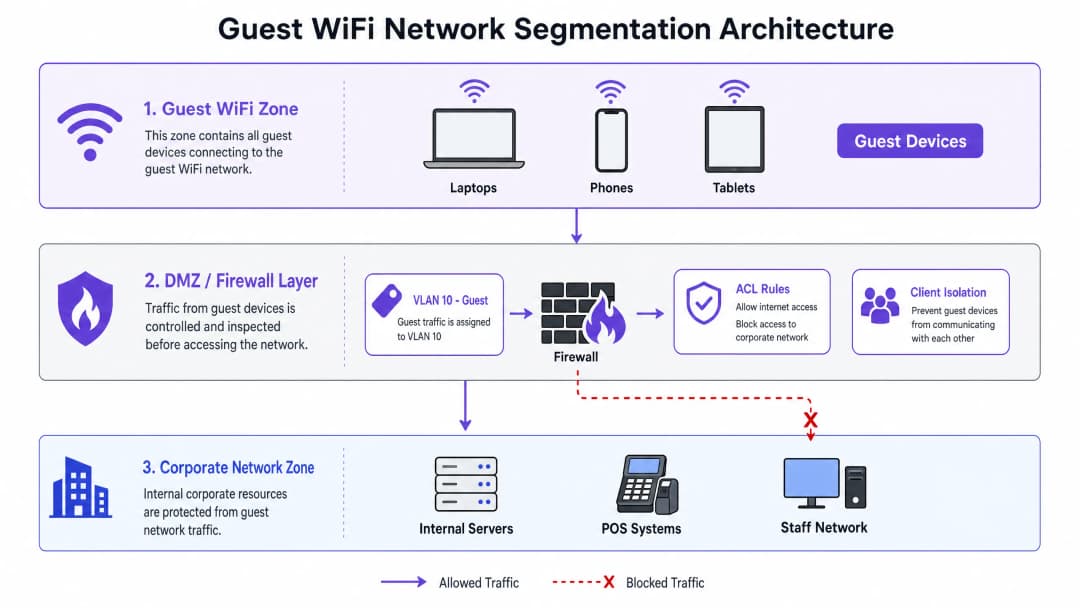
訪客網路的基本安全規則是,訪客流量在任何時候都必須被視為不可信且隔離的。這是透過在 OSI 模型的 Layer 2(資料連結層)和 Layer 3(網路層)運作的多層分段策略來實現的。

虛擬區域網路 (VLAN) 是主要的分段機制。訪客流量必須在無線基地台 (AP) 層級對應到專用的、不可路由的 VLAN(例如 VLAN 10)。此 VLAN 必須與企業、員工和 IoT VLAN 完全隔離。VLAN 邊界可確保即使訪客裝置受到危害,威脅也會被限制在訪客分段內。

Layer 3 閘道器(通常是狀態檢測防火牆或 Layer 3 核心交換器)上,必須執行嚴格的入站和出站存取控制清單 (ACL)。關鍵規則是「僅限網際網路」ACL:所有從訪客 VLAN 發出、目的地為 RFC 1918 私有 IP 範圍(10.0.0.0/8、172.16.0.0/12、192.168.0.0/16)的出站流量都必須明確封鎖。訪客流量僅允許到達公共 DNS 伺服器和公共網際網路。

用戶端隔離(也稱為點對點阻斷)必須在無線控制器或 AP 層級啟用。這可以防止相同 SSID 上的無線用戶端互相通訊,從而降低訪客裝置之間橫向惡意軟體傳播和本地封包竊聽的風險。

承載訪客 VLAN 的交換器上的 Layer 2 強化應包括:

安全功能 功能 緩解的威脅
DHCP Snooping 過濾不可信的 DHCP 訊息 惡意 DHCP 伺服器攻擊
Dynamic ARP Inspection (DAI) 根據 DHCP 綁定驗證 ARP 封包 ARP 欺騙 / MITM 攻擊
IP Source Guard 將用戶端 MAC 綁定到分配的 IP IP 位址欺騙
Port Security 限制每個交換器連接埠的 MAC 位址數量 MAC 洪水攻擊

network_segmentation_diagram.png

2. 空中介面加密:向 WPA3-OWE 的轉變

歷史上,訪客網路通常保持開放(無加密)以消除使用者阻力。然而,未加密的 SSID 會使所有使用者流量暴露於被動監聽中——任何在射頻 (RF) 範圍內擁有封包分析儀的人都可以擷取每個 HTTP 請求、DNS 查詢和未加密的工作階段。

WPA3 機會性無線加密 (OWE)(在 RFC 8110 下標準化,並經 Wi-Fi 聯盟認證為「Enhanced Open」)解決了這一挑戰。OWE 在 802.11 關聯過程中執行 Diffie-Hellman 金鑰交換,為每個用戶端工作階段建立唯一的成對暫時金鑰 (PTK)。這提供了:

  • 個人化數據加密: 針對被動空中監聽提供完整保護。
  • 無阻力存取: 使用者連線不需要預先共用金鑰 (PSK) 或密碼。
  • 正向安全: 每個工作階段使用唯一的金鑰;破解一個工作階段不會暴露其他工作階段。

對於不支援 WPA3 的舊型裝置,OWE 轉換模式可以在同一個邏輯網路上同時運行傳統的開放式 SSID 和 OWE SSID。支援 WPA3 的裝置會自動與加密的 OWE SSID 關聯,而舊型裝置則會降級使用開放式 SSID。建議將過渡到純 OWE 作為長期目標狀態。

如需深入探討 WPA3 標準和部署考量,請參閱 如何使用 Cloud RADIUS 實作 802.1X 驗證 指南。

3. 身分識別感知存取控制與 Captive Portals

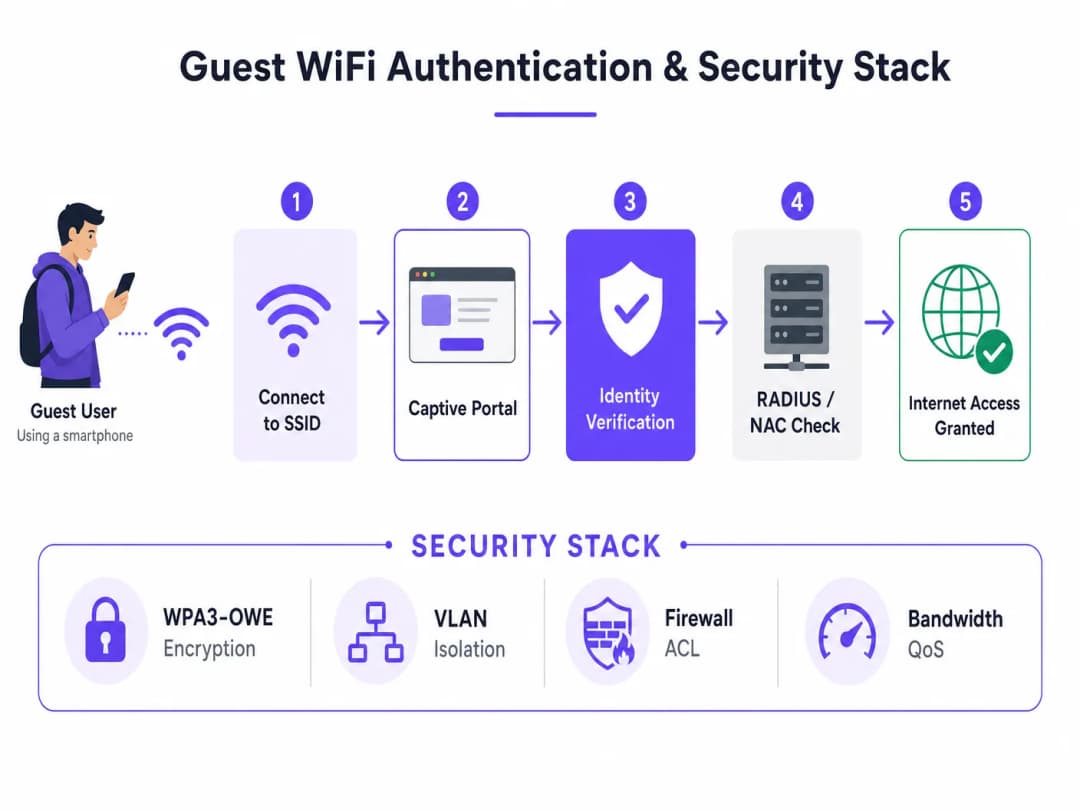
雖然 OWE 加密了無線媒介,但它並未驗證使用者身分。一個安全的訪客架構需要一個身份繫結層,透過與 網路存取控制 (NAC) 解決方案或雲端型顧客 WiFi 平台整合的企業級 Captive Portal 來提供。

Captive Portal 作為 策略執行點 (PEP),執行以下功能:

  • 身份關聯: 透過簡訊 OTP、電子郵件驗證、社群登入或企業單一登入 (SSO),將裝置的 MAC 位址與已驗證的身份進行繫結。
  • 可接受使用政策 (AUP) 執行: 要求使用者在獲得網際網路存取權限之前同意法律條款。
  • GDPR 同意書收集: 針對資料處理和行銷傳播,獲取明確且知情的同意。
  • 工作階段管理: 執行工作階段逾時、頻寬限制 (QoS) 和重新驗證時間間隔。

authentication_flow_diagram.png

Captive Portal 必須透過 HTTPS 搭配受公開信任的 TLS 憑證來提供。在現代裝置上,自行簽署或內部核發的憑證會觸發瀏覽器安全性警告,從而降低使用者體驗並損害信任。


實作指南:逐步部署藍圖

部署安全的顧客 WiFi 網路需要協調存取點 (AP)、無線區域網路控制器 (WLC)、核心交換器、防火牆和雲端 RADIUS 伺服器之間的設定。

步驟 1:設定顧客 VLAN 與 DHCP 範圍

在您的核心交換器或防火牆上,為顧客流量配置專用的 VLAN 和子網路。寬裕地規劃子網路大小,以因應現代行動裝置 (iOS 14+、Android 10+) 上的 MAC 位址隨機化。對於擁有 200 間客房的飯店,/22 子網路(1,022 個可用位址)是合理的最小值。設定較短的 DHCP 租期(2 到 4 小時),以防止 IP 位址耗盡。

步驟 2:實作防火牆 ACL

在您的邊界安全性閘道器設定狀態防火牆規則,以限制顧客 VLAN。下表定義了核心規則集:

來源 目的地 協定 / 連接埠 動作 說明
Guest_Subnet 10.0.0.0/8, 172.16.0.0/12, 192.168.0.0/16 任何 拒絕 封鎖所有私有 IP 範圍 (RFC 1918)
Guest_Subnet Corporate_Subnets 任何 拒絕 明確封鎖內部資源
Guest_Subnet Captive_Portal_IP TCP 443 允許 允許重新導向至驗證入口網站
Guest_Subnet 任何 (DNS) UDP/TCP 53 允許 允許在驗證前進行 DNS 解析
Guest_Subnet 任何 (WAN) TCP 80, 443 允許 允許驗證後進行網頁瀏覽
Guest_Subnet 任何 任何 拒絕 預設拒絕所有其他流量

步驟 3:在無線控制器上設定 SSID

在您的企業級無線平台(Cisco Catalyst、Aruba、Juniper Mist 或類似平台)上,使用以下參數設定顧客 SSID:

  • 安全性類型: WPA3-OWE(或適用於舊版用戶端相容性的 OWE 轉換模式)
  • VLAN 對應: 將 SSID 直接對應到顧客 VLAN
  • L2 功能: 啟用用戶端隔離 / 點對點阻斷
  • Captive Portal 整合: 設定指向您的雲端 NAC 或顧客 WiFi 平台的 RADIUS CoA (授權變更)

步驟 4:部署與設定 Captive Portal

將您的雲端 Captive Portal 與 RADIUS 伺服器整合。確保該入口網站:

  • 使用受公開信任的 TLS 憑證(Let's Encrypt 或商業 CA)
  • 透過電子郵件、簡訊 OTP 或社群登入收集身份資訊
  • 顯示符合 GDPR 規範的同意核取方塊(行銷用途預設為未勾選)
  • 將 MAC 位址、IP 位址、已驗證的身份和工作階段時間戳記記錄到集中式 syslog 伺服器

對於 零售飯店旅宿 環境中的多站點部署,雲端託管的 Captive Portal 可確保在所有位置一致地執行策略,而無需進行逐站設定。

步驟 5:啟用第二層強化與 WIDS/WIPS

在所有承載顧客 VLAN 的交換器上,啟用 DHCP 窺探 (DHCP Snooping)、動態 ARP 檢測 (DAI) 和 IP 來源防護 (IP Source Guard)。在無線控制器上,啟用無線入侵偵測/防禦 (WIDS/WIPS),以偵測惡意存取點和邪惡雙生攻擊並發出警報。


實際案例研究

案例研究 1:大廣場酒店及度假村 (飯店旅宿業)

面臨挑戰: 一家擁有 15 家物業的奢華度假村集團需要更換其老舊且未加密的顧客 WiFi。現有系統允許顧客看到彼此的裝置,違反了隱私預期,且缺乏與其物業管理系統 (PMS) 的整合,導致錯失了從顧客資料收集獲取收益的機會。

解決方案: 大廣場酒店部署了安全的顧客 WiFi 架構,將顧客流量對應到 Cisco 無線 AP 上的隔離 VLAN。實作了 WPA3-OWE 以進行空中加密,並將 Purple 的 顧客 WiFi 平台與其 Oracle Opera PMS 整合。顧客使用房號和姓氏進行驗證,並與 PMS 進行即時比對。餐廳散客則在獨立的 VLAN 上使用獨立的 SSID,並透過電子郵件進行驗證。

實施成效:

  • 100% 加密所有顧客無線工作階段,消除被動竊聽風險
  • 透過 Captive Portal 收集顧客電子郵件的比例提升了 35%
  • 完全符合 GDPR 規範,具備自動化同意記錄和資料刪除工作流程
  • 透過 POS 網路的完整 VLAN 隔離,實現無縫的 PCI DSS 合規性

案例研究 2:地鐵體育館 — 高密度體育場部署

面臨挑戰: 一個可容納 20,000 人的體育與娛樂場館在活動期間面臨嚴重的網路擁塞。安全團隊發現在活動期間有多個惡意存取點在運作,且缺乏網路隔離對該場館造成了風險的票務與 POS 系統。

解決方案: IT 團隊部署了具備動態 VLAN 池(Dynamic VLAN Pooling)的高密度 Wi-Fi 6 網路,利用 MAC 位址雜湊演算法將 15,000 名同時在線的訪客用戶分配到 8 個 VLAN(VLAN 101 至 108)中。所有訪客 SSID 皆啟用了用戶端隔離(Client isolation)。同時配置了 WIDS/WIPS 以自動偵測惡意 AP 並發出警報。雲端管理的 Captive Portal 強制執行了《可接受使用政策》(Acceptable Use Policy),並對每位用戶端限制 1.5 Mbps 的頻寬上限。連線記錄則同步傳輸至集中式 SIEM 進行安全性監控。

成果:

  • 部署後 12 個月內,回報之安全性事件為零
  • 成功管理 15,000 名同時在線用戶的尖峰吞吐量
  • 活動期間,惡意 AP 偵測警報在數分鐘內觸發並完成處置
  • 透過 WiFi Analytics 產生的訪客洞察,實現了精準的特許商品行銷,使場館內消費額增長了 12%

標準、合規性與最佳實踐

合規性必須設計在邏輯拓撲中,而非事後才補救。以下標準直接適用於企業級訪客 WiFi 部署。

PCI DSS v4.0 — 要求 1.2

如果您的場館需要處理信用卡付款(例如零售 POS、飯店接待處、特許商品攤位),您的網路必須符合 PCI DSS 要求 1.2,該要求規定網路安全控制必須將入站和出站流量限制在必要的範圍內。訪客 WiFi 網路必須與持卡人資料環境(CDE)完全隔離。此隔離必須透過年度滲透測試進行驗證,而不能僅憑防火牆規則配置來推定。

GDPR — 第 5、6 和 17 條

在 GDPR 規範下,處理訪客 WiFi 資料的合法依據通常是同意(第 6(1)(a) 條)。這要求同意必須是自由給予、具體、知情且明確的。在實務上,這意味著:

  • Captive Portal 上的行銷訂閱勾選框預設必須為未勾選狀態
  • 隱私權聲明必須清楚說明收集了哪些資料、如何使用以及保留多久
  • 訪客必須能夠透過明確且自動化的機制行使其刪除權(第 17 條)

IEEE 802.11 與 Wi-Fi 聯盟標準

標準 相關性
IEEE 802.11ax (Wi-Fi 6) 高密度效能;利用 BSS 著色技術(BSS Colouring)減少干擾
WPA3 / OWE (RFC 8110) 現代訪客網路加密的強制標準
IEEE 802.1X 員工網路的企業級驗證;通常不用於訪客存取
IEEE 802.11w (PMF) 受保護的管理框架(Protected Management Frames);防止取消驗證攻擊

對於員工與訪客網路並存的環境, 如何使用 Cloud RADIUS 實作 802.1X 驗證 指南針對架構中的員工網路端提供了詳細的配置指引。


疑難排解與風險緩釋

問題 1:Captive Portal 重新導向失敗

症狀: 訪客已連線至 SSID,但 Captive Portal 頁面無法載入。

根本原因與緩釋措施:

  • 驗證前的 DNS 阻擋: 閘道器必須在使用者驗證前,允許向公共解析伺服器發送 DNS 查詢(UDP/TCP 53)。若無 DNS,裝置將無法解析 Portal 的主機名稱。
  • HTTPS 重新導向攔截: 現代瀏覽器對已知網域強制執行 HTTPS 嚴格傳輸安全(HSTS)。Captive Portal 重新導向必須攔截 HTTP(連接埠 80)流量,而非 HTTPS。請確保閘道器配置為攔截 HTTP 並重新導向至 Portal URL。
  • 不受信任的 TLS 憑證: Portal 必須使用由全球受信任 CA 簽署的憑證。執行 iOS 或 Android 的裝置會阻擋與使用自我簽署憑證之 Portal 的連線。

問題 2:因 MAC 隨機化導致 IP 位址耗盡

症狀: 儘管作用中用戶數量較少,但訪客 VLAN DHCP 池已耗盡。

根本原因: iOS 14+ 和 Android 10+ 預設會隨機化 MAC 位址。每次重新連線都可能呈現新的 MAC 位址,從而消耗新的 DHCP 租約。

緩釋措施: 將 DHCP 租約時間縮短至 2 到 4 小時。擴大訪客子網路(中等密度場館至少為 /22)。針對高密度環境實作動態 VLAN 池(Dynamic VLAN Pooling)。

問題 3:頻寬濫用與網路飽和

症狀: 訪客網路效能在尖峰時段下降,影響所有使用者。

緩釋措施: 實作針對每個用戶端的 QoS 頻寬限制(例如:下載 2 Mbps / 上傳 512 Kbps)。在閘道器上使用應用程式層過濾以阻擋 P2P 種子下載。配置每個 SSID 的總頻寬上限,以保護整體的網際網路 uplink。

問題 4:惡意存取點(Rogue AP)攻擊

症狀: 訪客回報被重新導向至異常的登入頁面,或安全性監控偵測到重複的 SSID。

緩釋措施: 在無線控制器上啟用 WIDS/WIPS。針對與您訪客網路名稱相符的 SSID 配置自動警報。在實體安全較難強制執行的 交通運輸醫療保健 環境中,應考慮採用 WIPS 遏制措施(自動取消惡意 AP 用戶端的驗證)。


投資報酬率(ROI)與商業影響

部署安全且企業級的訪客 WiFi 架構不僅僅是成本支出,它還能帶來可衡量的財務與營運回報。

風險緩釋價值

目前企業資料外洩的平均成本已超過 440 萬美元。透過實施嚴格的 VLAN 區隔並阻擋橫向移動,企業可確保即使訪客裝置遭到入侵,威脅也會被完全限制在訪客 VLAN 內。企業網路、POS 系統及敏感資料仍能保持安全。

第一方數據與營收創造

當與雲端分析平台整合時,安全的訪客網路將成為強大的營收產生器。或來自 零售餐旅交通運輸 產業的組織正利用顧客 WiFi 數據來:

  • 了解訪客的人口統計特徵、停留時間與回訪率
  • 根據即時位置和造訪歷史記錄,向顧客發送個人化優惠
  • 利用來自 WiFi 分析 的即時人流熱圖,優化人員配置與場地佈局

避免合規成本

GDPR 罰金最高可達全球年營業額的 4%。未遵守 PCI DSS 可能導致每月 5,000 至 100,000 美元的罰款。一個架構完善的顧客網路,結合自動化同意管理與完整的 CDE 隔離,能直接降低這些財務風險。

對於在教育環境中管理 WiFi 的組織而言,安全顧客架構的原則同樣適用 —— 請參閱 學校 WiFi:2026 年管理員與 IT 指南 以獲取特定產業的指南。


參考資料

  1. IETF. RFC 8110: Opportunistic Wireless Encryption. https://datatracker.ietf.org/doc/html/rfc8110
  2. PCI Security Standards Council. PCI DSS v4.0. https://www.pcisecuritystandards.org/
  3. 歐洲議會. GDPR — Regulation (EU) 2016/679. https://gdpr-info.eu/

關鍵定義

Opportunistic Wireless Encryption (OWE)

A Wi-Fi standard (RFC 8110, Wi-Fi Alliance 'Enhanced Open') that provides individualised data encryption between a client and an Access Point without requiring a password or pre-shared key, using a Diffie-Hellman key exchange during the association process.

Encountered when deploying WPA3 guest networks to replace legacy unencrypted open SSIDs. The primary modern standard for guest network over-the-air security.

Network Segmentation

The architectural practice of splitting a computer network into smaller, isolated subnetworks (VLANs) to improve security, performance, and manageability by limiting the blast radius of a security incident.

The primary defence mechanism used to keep guest WiFi traffic completely separate from corporate data, payment systems, and staff networks.

Client Isolation

A setting on wireless access points or controllers that prevents wireless clients connected to the same SSID from communicating directly with each other at Layer 2.

Crucial for guest networks to block lateral movement of malware and prevent malicious users from scanning or attacking other visitors' devices on the same wireless network.

DHCP Snooping

A Layer 2 security feature on network switches that acts as a firewall between untrusted hosts and trusted DHCP servers, filtering untrusted DHCP messages and building a binding table of valid MAC-to-IP-to-port mappings.

Enabled on enterprise switches to prevent rogue DHCP server attacks on the guest VLAN, which could redirect user traffic to an attacker-controlled gateway.

Captive Portal

A web page displayed to newly connected WiFi users before they are granted broader network access, used for authentication, identity binding, Acceptable Use Policy acceptance, and GDPR consent collection.

Serves as the primary identity gateway and legal policy enforcement point for guest networks. Must be served over HTTPS with a publicly trusted TLS certificate.

Network Access Control (NAC)

A security solution that enforces policies, checks device posture, and manages authentication and authorisation before granting network access, typically integrating with RADIUS servers and identity providers.

Used in enterprise guest networks to integrate captive portals with backend identity providers, enforce session policies, and provide dynamic VLAN assignment.

Cardholder Data Environment (CDE)

Under PCI DSS, the people, processes, and technologies that store, process, or transmit cardholder data or sensitive authentication data, including POS terminals, payment servers, and associated network segments.

The guest WiFi network must be completely isolated from the CDE to maintain PCI DSS compliance. This isolation must be verified through annual penetration testing.

Dynamic VLAN Assignment

A technique where a RADIUS server or NAC solution dynamically assigns a connecting client to a specific VLAN based on their credentials, device type, or a hash of their MAC address, rather than using a static port-to-VLAN mapping.

Used in high-density guest networks to distribute thousands of users across multiple smaller VLANs, preventing IP address exhaustion and reducing broadcast domain sizes.

WIDS/WIPS (Wireless Intrusion Detection/Prevention System)

A system that monitors the RF spectrum for unauthorised wireless activity, including rogue access points, evil twin attacks, deauthentication floods, and other wireless-layer threats.

Deployed on enterprise wireless controllers to detect and alert on (WIDS) or actively contain (WIPS) rogue access points and wireless attacks in public venues.

範例

A 200-room luxury hotel wants to deploy a secure guest WiFi network that integrates with their Property Management System (PMS) to authenticate guests using their room number and last name. They also have a restaurant and a spa open to non-hotel guests, who should authenticate via email. The hotel operates a PCI-compliant network for its reception desk and POS systems. How should the network be architected?

The network architect designs a dual-SSID architecture mapped to separate VLANs on a cloud-managed wireless controller. SSID 1 ('Hotel-Guest') is configured with WPA3-OWE transition mode and mapped to VLAN 10. It uses a captive portal integrated via API with the hotel's Oracle Opera PMS — when a guest connects, the portal validates their room number and surname against the PMS database in real time before granting access. SSID 2 ('Restaurant-Guest') is mapped to VLAN 11 and uses a captive portal requiring email verification. The core switch is configured with Layer 3 ACLs on VLAN 10 and 11 that block all traffic to VLAN 50 (Staff/Reception) and VLAN 60 (POS CDE). Client isolation is enabled on both SSIDs. DHCP Snooping and Dynamic ARP Inspection are enabled on all switches carrying VLANs 10 and 11. The gateway firewall restricts guest bandwidth to 3 Mbps download per user. Centralised logging captures MAC address, IP, verified identity, and session timestamps to a cloud syslog server for GDPR compliance.

考官評語: This design correctly addresses multiple security and operational requirements simultaneously. Separating hotel guests and walk-in visitors into distinct VLANs (10 and 11) allows different authentication methods and QoS profiles to be applied per segment. The Layer 3 ACLs on the core switch ensure strict isolation from the Cardholder Data Environment (VLAN 60), which is a hard requirement for PCI DSS Requirement 1.2. Integrating the guest portal with the PMS via secure APIs ensures only registered guests can access high-speed internet, preventing unauthorised bandwidth consumption. Enabling client isolation at the AP level protects guests from lateral attacks by other connected devices. The centralised logging architecture satisfies GDPR accountability requirements.

A multi-site retail chain with 50 stores wants to implement a secure guest WiFi network. They want to capture visitor emails for marketing campaigns, track store footfall, and ensure that store POS systems and security cameras are completely protected. Each store has a single broadband connection and a local firewall/router. How should this be deployed at scale?

At each retail location, a cloud-managed security gateway and enterprise access points are deployed. A dedicated Guest SSID ('Store-WiFi') is configured and mapped to VLAN 20. The local firewall is configured with an internet-only ACL for VLAN 20, explicitly blocking all traffic to VLAN 10 (POS/Backoffice) and VLAN 30 (IP Cameras). A cloud-based captive portal is configured for the Guest SSID, requiring email opt-in with GDPR-compliant consent checkboxes. The APs are configured with client isolation and rogue AP detection (WIPS). Centralised logging is configured, sending connection logs (MAC address, IP, timestamp, email) to a secure cloud syslog server. The cloud management platform pushes consistent VLAN and ACL configurations to all 50 locations, eliminating per-site manual configuration. Bandwidth is capped at 2 Mbps per client to protect the shared broadband connection.

考官評語: This multi-site architecture leverages cloud management to ensure consistent policy enforcement across all 50 locations — a critical operational requirement for retail chains where local IT expertise may be limited. The separation of POS (VLAN 10) and cameras (VLAN 30) from the guest network (VLAN 20) is essential for securing critical store operations and maintaining PCI DSS compliance. The use of a cloud-managed captive portal simplifies GDPR compliance, as user consent and data retention are handled by a specialised platform rather than stored locally on individual store routers. Centralised logging ensures the business can respond to legal or security inquiries regarding guest network usage across all sites.

A large public-sector conference centre hosting events with up to 10,000 concurrent users needs a highly secure, high-density guest WiFi network. They require that all guest traffic be encrypted over-the-air, that users agree to an Acceptable Use Policy, and that the network can dynamically scale to prevent IP address exhaustion during peak times. What architecture should be recommended?

The network architect deploys a high-density Wi-Fi 6 wireless network. The Guest SSID is configured with WPA3-OWE to provide individual over-the-air encryption without a shared key. To prevent IP address exhaustion, Dynamic VLAN Pooling is implemented: guest clients are distributed across eight VLANs (VLAN 101 to 108) using a hash of their MAC address, each with a /22 subnet providing 1,022 usable addresses per VLAN — a total capacity of over 8,000 concurrent IP leases. DHCP lease times are set to 1 hour. The captive portal is hosted on a cloud-based NAC platform, which enforces an Acceptable Use Policy and redirects users after 8 hours of continuous connection. Client isolation is enabled across all VLANs. Bandwidth is capped at 1.5 Mbps per client. WIDS/WIPS is enabled with automatic alerts for rogue AP detection.

考官評語: In a high-density public environment, over-the-air security and IP address management are the primary architectural challenges. Implementing WPA3-OWE is the gold standard for this use case, providing strong encryption for thousands of unmanaged devices without the administrative overhead of distributing a password. The combination of a short 1-hour DHCP lease time and Dynamic VLAN Pooling prevents IP address exhaustion, which is a common failure mode in large venues. Distributing clients across multiple VLANs also reduces broadcast domain sizes, improving overall wireless performance and reducing the impact of broadcast storms. The cloud-based captive portal provides scalable AUP enforcement without requiring local infrastructure at the venue.

練習題

Q1. A hotel's IT manager reports that several guests are complaining they cannot access the guest WiFi. Upon investigation, you discover that the guest VLAN's DHCP pool is completely exhausted, even though there are only 50 guests currently in the hotel. The DHCP scope is a /24 subnet with a 24-hour lease time. What is the most likely cause, and what architectural changes should be made?

提示:Consider the impact of modern mobile operating systems on MAC addresses and the relationship between DHCP lease times and IP address consumption.

查看標準答案

The most likely cause is MAC address randomisation. iOS 14+ and Android 10+ randomise MAC addresses by default, meaning each time a guest's device reconnects (or the OS rotates its MAC), it appears as an entirely new device to the DHCP server and consumes a new IP address. With a 24-hour lease time, exhausted addresses are not reclaimed quickly enough. The recommended fixes are: (1) Reduce the DHCP lease time to 2 to 4 hours to reclaim addresses from disconnected devices more rapidly. (2) Expand the subnet from a /24 (254 addresses) to at least a /22 (1,022 addresses) to provide adequate headroom. (3) For high-density environments, implement Dynamic VLAN Pooling to distribute clients across multiple VLANs, each with its own DHCP scope.

Q2. During a PCI DSS audit, an assessor flags the guest WiFi network because a device connected to the guest SSID can successfully ping the gateway IP address of the POS VLAN (e.g., 10.50.0.1), even though it cannot ping the POS terminals themselves. The IT team argues this is acceptable because the POS devices are protected. Is this a valid compliance finding, and what change is required?

提示:PCI DSS Requirement 1.2 requires that network security controls restrict inbound and outbound traffic to only that which is necessary. Consider whether the gateway IP of the CDE is within scope.

查看標準答案

Yes, this is a valid and significant compliance finding. The ability to ping the CDE gateway IP indicates that the guest VLAN has Layer 3 routing access to the POS VLAN interface, which is a violation of PCI DSS Requirement 1.2. Even if POS terminals are individually protected, the gateway IP exposure creates a risk surface for denial-of-service attacks against the POS network gateway and potentially for exploiting vulnerabilities in the gateway device itself. The required fix is to add an explicit ACL rule on the firewall or core switch that blocks all traffic from the Guest VLAN destined for any internal VLAN interface IP, including gateway addresses. The guest VLAN should only be permitted to route to its own gateway IP and public WAN destinations.

Q3. A stadium network architect is planning a guest WiFi deployment for 15,000 concurrent users during events. They want all user sessions to be encrypted over-the-air without requiring users to enter a password. Which encryption standard should be deployed, and what is the key client-side compatibility consideration that must be addressed in the deployment plan?

提示:Look at the WPA3 standard family for a technology that encrypts open networks without a shared password, and consider the installed base of legacy devices at a public venue.

查看標準答案

The architect should deploy WPA3 Opportunistic Wireless Encryption (OWE), also known as Wi-Fi Certified Enhanced Open. OWE provides individualised over-the-air encryption without requiring a password, using a Diffie-Hellman key exchange during the association process. The key client-side compatibility consideration is that legacy devices — older smartphones and laptops running pre-2019 operating systems — do not support WPA3-OWE. In a public venue with a diverse and uncontrolled device population, this is a significant practical constraint. The mitigation is to configure the wireless controller in OWE Transition Mode, which broadcasts both a legacy open SSID and an OWE SSID under the same network name. WPA3-capable devices automatically connect to the encrypted OWE SSID, while legacy devices fall back to the open SSID. The long-term target state is pure OWE as legacy device penetration declines.