跳至主要內容

Managing BYOD (Bring Your Own Device) Security on Staff Networks

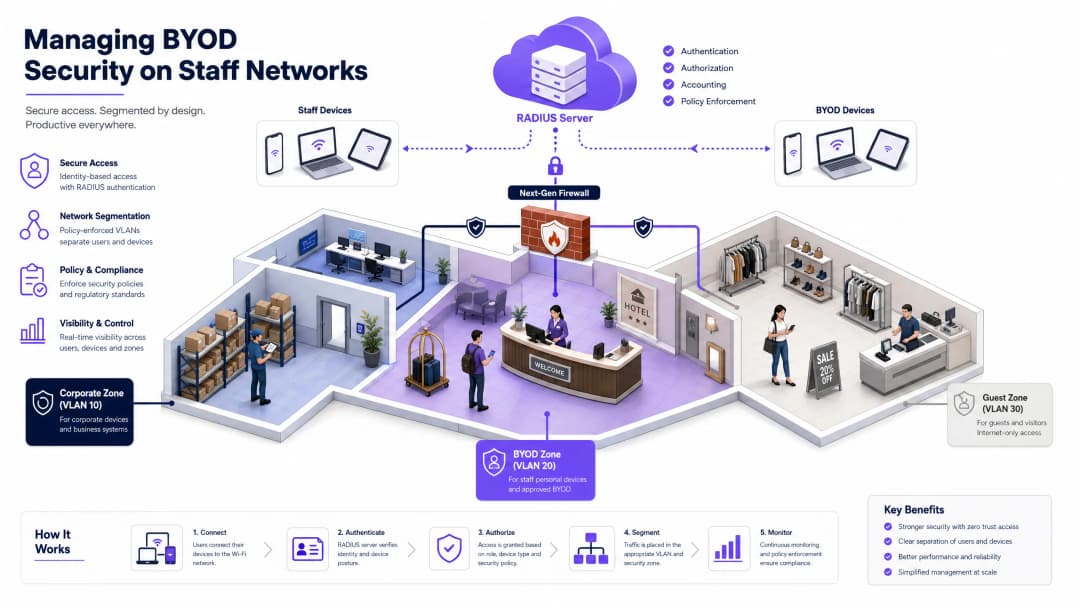
本指南為企業 IT 經理與網路架構師提供權威的技術參考,說明如何確保員工網路上 BYOD (攜帶自有裝置) 存取的安全性。本指南概述了在人流量高的場所中,減少資料外洩並維持法規遵循所需的確切網路架構、驗證協定與 MDM 整合工作流程。

📖 9 分鐘閱讀📝 2,016 字數🔧 2 範例3 練習題📚 8 關鍵定義

收聽此指南

查看播客逐字稿
Managing BYOD Security on Staff Networks — Podcast Script Approximate duration: 10 minutes | UK English voice | Senior consultant briefing tone [INTRO — 0:00 to 1:00] Welcome to the Purple Technical Briefing Series. I'm your host, and today we're tackling one of the most persistent and consequential challenges facing enterprise IT teams in 2026: managing BYOD security on staff networks. Whether you're the network architect for a 400-room hotel chain, the IT director of a multi-site retail operation, or the head of infrastructure for a stadium or conference centre, the same problem lands on your desk. Your staff want to use their personal iPhones and Android devices to access work systems. Your board wants to cut hardware costs. And your security team is watching the clock, knowing that every unmanaged personal device on your network is a potential entry point for a breach. The good news is that this is a solved problem — architecturally. The challenge is implementation discipline. So today, we're going to cut through the theory and get into the practical architecture, the deployment pitfalls, and the compliance implications that will shape your decisions this quarter. [TECHNICAL DEEP-DIVE — 1:00 to 6:00] Let's start with the fundamental shift in mindset. The single biggest mistake organisations make with BYOD is treating it as a policy problem rather than an architecture problem. You can write the most comprehensive Acceptable Use Policy in the world, but if your network is flat and your staff WiFi is still running on a shared WPA2 pre-shared key, you have a security exposure that no policy document will fix. The non-negotiable technical baseline is IEEE 802.1X — port-based Network Access Control. This standard ensures that no device can pass traffic on your network until it has been explicitly authenticated. The authenticator — your wireless access point or switch — acts as a gatekeeper, blocking all traffic except the authentication handshake until the RADIUS server gives the green light. If you're not familiar with how to implement this, Purple has a detailed guide on implementing 802.1X with Cloud RADIUS that's worth reading alongside this briefing. Now, 802.1X is the framework. The security actually lives in the EAP method you choose. Most legacy deployments use PEAP — Protected EAP — with a username and password. It works, but it has a critical weakness: if an attacker sets up a rogue access point with the same SSID, they can capture credentials. For a BYOD deployment in a high-footfall venue like a hotel or retail store, that's a real risk. The gold standard is EAP-TLS — Transport Layer Security. Instead of a password, the device presents a client-side certificate. The RADIUS server validates that certificate against your Certificate Authority. There are no credentials to steal. No man-in-the-middle attack is possible because the certificate is unique to that device and tied to your PKI. If the device is lost or the employee leaves, you revoke the certificate, and the WiFi access terminates immediately — automatically. The obvious question is: how do you get certificates onto personal devices you don't own? That's where Mobile Device Management comes in. MDM platforms like Microsoft Intune, Jamf, or VMware Workspace ONE act as your compliance enforcement layer. You define a policy: the device must run a minimum OS version, must have a screen lock enabled, must not be jailbroken or rooted. If the device passes those checks, the MDM pushes the WiFi configuration profile and the certificate via SCEP — the Simple Certificate Enrollment Protocol. The whole process is automated. The user installs the MDM profile once, and from that point forward, certificate renewal happens silently in the background. Now let's talk about the network itself, because authentication is only half the battle. A flat network — where every device, whether it's a managed corporate laptop, a personal iPhone, or a guest's tablet, sits on the same subnet — is an architectural disaster. If one device is compromised, an attacker has lateral movement access to everything on that subnet. In a hotel, that could mean moving from a staff member's personal phone to the property management system. In retail, it could mean pivoting from a personal device to the point-of-sale network. The architecture you need is a Three-Zone model. Zone one is your Corporate VLAN — VLAN 10 in most deployments. This is for managed, company-owned devices. They get full access to internal resources. Zone two is your BYOD VLAN — VLAN 20. This is for employee-owned personal devices that have been enrolled in MDM and have a valid certificate. They get internet access and tightly controlled, explicitly permitted access to specific internal applications — your email platform, your scheduling system, your HR portal — via a reverse proxy or application-layer gateway. They cannot browse the corporate file server. They cannot reach the POS network. Zone three is your Guest VLAN — VLAN 30. Internet access only. Client isolation enabled, so devices cannot communicate with each other. This is where your guest WiFi lives. Your firewall must deny all inter-VLAN routing by default. Any permitted traffic between zones must be explicitly defined in your firewall policy. This is the principle of least privilege applied at the network layer. One more critical point on the network side: WPA3-Enterprise. If you're still running WPA2, you need a migration plan. WPA3-Enterprise mandates Protected Management Frames, which defeats deauthentication attacks — a technique attackers use to knock devices off the network and force them to reconnect to a rogue AP. WPA3 also uses stronger cryptographic suites. For any new access point deployment or refresh cycle, WPA3-Enterprise should be your baseline. [IMPLEMENTATION RECOMMENDATIONS AND PITFALLS — 6:00 to 8:00] Let's talk about the deployment pitfalls, because this is where projects stall or fail. The first and most common pitfall is the onboarding experience. If enrolling a personal device in MDM and connecting to the secure BYOD SSID requires more than five minutes and a helpdesk call, your adoption rate will be terrible. You'll end up with staff either not connecting at all, or finding workarounds — shadow IT, personal hotspots, or worse, connecting to the guest network with access to sensitive apps. The solution is a provisioning SSID. Broadcast a separate, open or lightly secured SSID specifically for onboarding. When a new staff member connects, they're redirected to a captive portal — this is where a platform like Purple's Guest WiFi solution can serve as that initial touchpoint — guiding them through the MDM profile installation. Once the profile is installed and the certificate is issued, the device automatically disconnects from the provisioning SSID and connects to the secure 802.1X BYOD SSID. The user sees it as a seamless, one-time setup. The second major pitfall is MAC address randomisation. Modern iOS devices from iOS 14 onwards, and Android devices from Android 10 onwards, randomise their MAC addresses by default. If your network access control, captive portal bypass, or device identification logic relies on MAC addresses, it will break. Devices will appear as new, unknown devices on every connection. The fix is straightforward: rely on the 802.1X certificate identity, not the MAC address. Your RADIUS policy should be driven by the certificate's Common Name or Subject Alternative Name, not the MAC. The third pitfall is certificate lifecycle management. Certificates expire. If you haven't automated renewal via SCEP, you will face a wave of staff locked out of the network when certificates expire en masse. Configure your MDM to trigger certificate renewal at least 30 days before expiry. This is a zero-helpdesk-ticket scenario if configured correctly, and a major incident if it isn't. From a compliance perspective, two frameworks dominate in the venues we work with. PCI DSS 4.0 requires strict network segmentation between cardholder data environments and all other networks. If your BYOD devices are on the same VLAN as your payment systems, you are out of scope for PCI DSS and you have a significant audit finding. The Three-Zone Architecture directly addresses this. GDPR requires that personal data processed on staff devices is subject to appropriate technical controls. MDM enrollment, with its ability to remotely wipe corporate data containers, is a key technical control for GDPR compliance. [RAPID-FIRE Q&A — 8:00 to 9:00] Let's hit some quick questions we hear regularly from CTOs and IT directors. Question: Do we need a dedicated NAC solution, or can we do this with just RADIUS and MDM? Answer: For most venues, a cloud RADIUS service integrated with your MDM and your existing wireless LAN controller is sufficient. Dedicated NAC appliances like Cisco ISE or Aruba ClearPass add significant capability — particularly around device posture assessment and automated remediation — but they also add cost and complexity. Start with cloud RADIUS and MDM. Add a full NAC platform when your environment scales beyond a few hundred concurrent BYOD devices or when your compliance requirements demand it. Question: What about contractors and temporary staff? Answer: Contractors are a specific challenge. You don't want to enroll their personal devices in your MDM — that's an overreach. The right approach is a time-limited certificate issued via a lightweight onboarding portal, scoped to a restricted BYOD VLAN with minimal application access. Set the certificate validity to match the contract duration and configure automatic expiry. Question: How do we handle the public sector, where personal device use policies are more restricted? Answer: In public-sector environments, particularly healthcare and local government, the risk appetite for BYOD is lower. The architecture is the same, but the MDM compliance policies are stricter — mandatory encryption, mandatory remote wipe capability, and often a requirement for a containerised work profile that fully separates personal and corporate data. The network segmentation model is identical. [SUMMARY AND NEXT STEPS — 9:00 to 10:00] To wrap up, here are the five things you should take away from this briefing. First: kill the shared pre-shared key on your staff WiFi. It is not a security control. It is a liability. Second: implement 802.1X with EAP-TLS as your authentication baseline. Certificates, not passwords. Third: enforce device compliance via MDM before issuing any certificate. The MDM is your gatekeeper. Fourth: segment your network ruthlessly. Corporate, BYOD, and Guest VLANs, with a firewall denying all inter-VLAN traffic by default. Fifth: automate the onboarding experience and the certificate lifecycle. If it requires a helpdesk call, it will fail at scale. For the full technical breakdown — including step-by-step configuration guidance, architecture diagrams, and real-world case studies from hospitality and retail deployments — read the complete guide on the Purple website. And if you're evaluating how your current WiFi infrastructure supports both staff BYOD security and guest WiFi analytics, the Purple platform is worth a conversation. Thanks for listening. Stay secure. [END]

header_image.png

執行摘要

隨著企業網路邊界的界線逐漸模糊,管理員工網路上的 BYOD (攜帶自有裝置) 安全性已從營運上的便利轉變為關鍵的安全要務 [1]。對於在飯店、多據點零售連鎖店、醫療機構和交通樞紐等高人流量場所營運的網路架構師、IT 經理和技術長 (CTO) 而言,核心挑戰在於如何平衡使用者便利性與強大的企業資料保護 [2]。

本參考指南提供了一個高度實用且不綁定特定廠商的藍圖,用於確保員工網路上的 BYOD 存取安全。我們避開理論上的抽象概念,詳細介紹 IEEE 802.1X 驗證、透過 行動裝置管理 (MDM) 進行用戶端憑證發放,以及嚴格的 網路分段 的精確部署方式。藉由捨棄不安全的預共用金鑰 (PSK) 並實作零信任架構,企業可以降低橫向威脅移動的風險、防止代價高昂的資料外洩,並滿足如 PCI DSS 4.0GDPR 等嚴格的合規性框架 [3]。


收聽技術簡報 Podcast

在深入探討詳細架構之前,您可以收聽我們長達 10 分鐘的完整技術音訊簡報。此 Podcast 的風格為資深系統顧問向客戶簡報確切的實作步驟、常見的部署陷阱以及合規性框架。


技術深究:架構與標準

確保 BYOD 環境的安全需要完全捨棄基於邊界的安全性模型,轉而採用以身分為中心的 零信任網路存取 (ZTNA) [4]。網路必須假設每個嘗試連線的個人裝置都可能已受到危害。

802.1X 驗證框架

IEEE 802.1X 標準是確保企業邊緣安全不可或缺的基準。它提供基於連接埠的網路存取控制 (NAC),確保端點 (要求者) 在其身分通過驗證伺服器 (RADIUS 伺服器) 驗證之前,無法透過驗證器 (無線存取點或交換器) 傳送任何網路層流量 [5]。

階段 框架類型 / 動作 說明
初始化 EAPOL-Start 用戶端裝置 (要求者) 發出準備連線至網路的訊號。
身分請求 EAP-Request/Identity 存取點 (驗證器) 請求連線裝置的身分。
身分回應 EAP-Response/Identity 用戶端回應其身分,該身分會被轉發至 RADIUS 伺服器。
TLS 握手 EAP-TLS 協商 用戶端與 RADIUS 伺服器建立安全的 TLS 通道並相互驗證憑證。
授權 RADIUS Access-Accept RADIUS 伺服器核准存取,並推送動態 VLAN 和 dACL 屬性。

選擇可延伸驗證協定 (EAP) 方法決定了您部署的強度:

  • PEAP (受保護的 EAP): 將基於密碼的驗證 (如 MS-CHAPv2) 封裝在 TLS 通道中。雖然常見,但如果用戶端要求者設定錯誤,PEAP 仍容易受到透過惡意存取點進行的認證收割攻擊 [6]。
  • EAP-TLS (傳輸層安全性): 企業 BYOD 的黃金標準。它採用基於憑證的雙向驗證,完全消除了對密碼的依賴和認證遭竊的管道。RADIUS 伺服器會驗證唯一的用戶端憑證,而用戶端則會驗證 RADIUS 伺服器的憑證 [5]。

網路分段與 VLAN 架構

單一扁平網路是容易受到危害的網路。如果感染了惡意軟體的個人裝置連線到扁平的員工網路,攻擊者可以輕鬆進行橫向移動,從而危害高價值目標,例如飯店的物業管理系統 (PMS)、零售業的銷售點 (POS) 系統,或醫療機構的電子健康紀錄 (EHR) 資料庫 [7]。

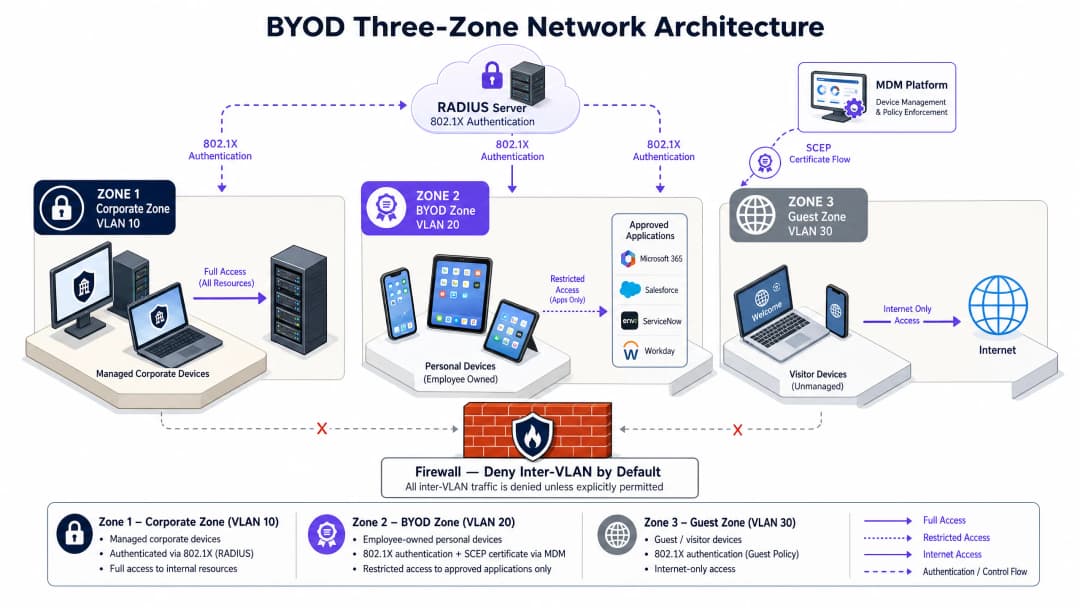
我們強制要求在防火牆層級執行嚴格的 三區網路架構

byod_architecture_overview.png

  1. 企業區域 (VLAN 10): 專供完全受控的公務裝置使用。此區域具有路由存取內部企業資料庫、Active Directory 和本地業務系統的權限。
  2. BYOD 區域 (VLAN 20): 專用於員工自有的個人裝置。此區域中的裝置被授予對外網際網路存取權限,並透過應用程式層閘道或反向代理,受到嚴格限制且明確允許存取特定的內部應用程式 (例如電子郵件、排班入口網站、人資系統)。
  3. 訪客區域 (VLAN 30): 專為訪客和客戶設計。此區域僅具有對外網際網路存取權限。必須在無線控制器層級啟用 用戶端隔離 (Client Isolation),以防止連線裝置之間進行任何點對點通訊。

若要深入了解如何最佳化您的訪客網路基礎架構,請參閱我們的核心產品: Guest WiFiWiFi Analytics

行動裝置管理 (MDM) 與 PKI 整合

在您不擁有的裝置上強制執行安全性原則,需要與 MDM 或統一端點管理 (UEM) 平台 (例如 Microsoft Intune、Jamf) 進行整合 [8]。MDM 扮演守門人的角色,在發放網路憑證之前驗證裝置的安全狀態。

自動化憑證生命週期依賴於 簡單憑證註冊協定 (SCEP)

  • 合規性評估: MDM 會驗證個人裝置是否符合基準安全性需求(例如:最低作業系統版本、啟用螢幕鎖定、磁碟加密、未越獄/Root)。
  • 憑證核發: 一旦合規,MDM 會透過 SCEP 向您的私有憑證授權單位 (CA) 要求用戶端憑證,並將其與安全的 802.1X WiFi 設定檔直接推送到裝置。
  • 持續合規性: 如果使用者停用其密碼或對裝置進行 Root,MDM 會將該裝置標記為不合規、撤銷憑證,且 RADIUS 伺服器會立即終止網路存取。

如需深入瞭解這些整合,請參閱我們的指南: 如何使用 Cloud RADIUS 實作 802.1X 驗證


實作指南:逐步部署

從傳統的預先共用金鑰 (PSK) 網路轉移到 802.1X EAP-TLS 架構,需要無線區域網路控制器 (WLC)、身分識別提供者 (IdP) 和 MDM 平台之間的密切協調。

byod_onboarding_flow.png

步驟 1:無線與交換器基礎架構設定

在您的核心交換器和邊緣存取點上設定三個不同的 VLAN。確保您的核心防火牆預設拒絕 VLAN 間路由。

在您的無線控制器上,使用以下設定來設定安全的 BYOD SSID:

  • 安全性類型: WPA3-Enterprise(或適用於舊版裝置相容性的 WPA2/WPA3-Enterprise 轉換模式)。
  • 802.11w 保護管理畫面 (PMF): 設定為 必要(WPA3 下的強制要求)以阻擋取消驗證攻擊 [9]。
  • RADIUS 伺服器: 指向您的主要和次要 RADIUS 伺服器。

步驟 2:PKI 與 SCEP 伺服器設定

建立私有憑證授權單位 (CA) 或與雲端 PKI 服務整合。設定 SCEP 閘道以處理來自 MDM 的自動憑證簽署要求。用戶端裝置必須信任該 CA 憑證,這會在 MDM 設定檔安裝期間自動處理。

步驟 3:MDM WiFi 與憑證設定檔發送

在您的 MDM 主控台中,建立兩個設定檔:

  1. 信任的憑證設定檔: 將根 CA 和中繼 CA 憑證推送到裝置。
  2. SCEP 憑證設定檔: 定義 SCEP 閘道 URL、金鑰大小(至少 RSA 2048 位元)以及主體名稱格式(例如:CN={{UserPrincipalName}})。
  3. WiFi 設定檔: 設定裝置使用 WPA3-Enterprise、EAP-TLS 連線至 BYOD SSID,並參照 SCEP 憑證設定檔進行驗證。

步驟 4:引導流程協調

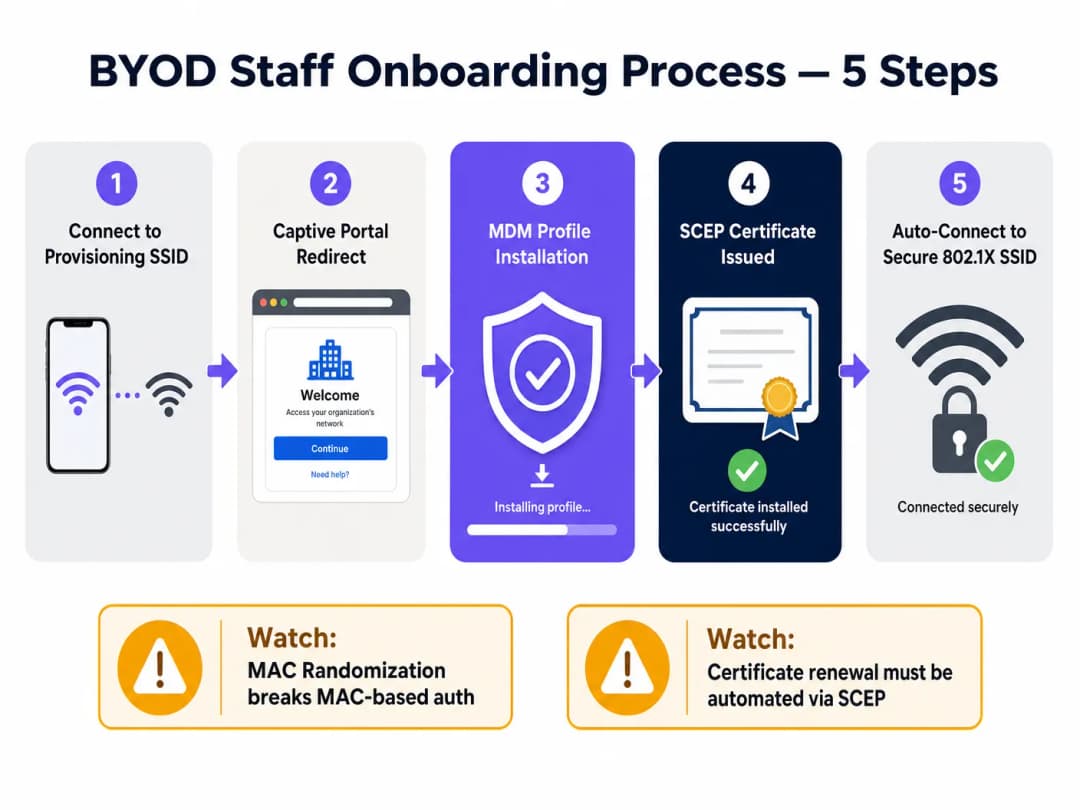
為避免客服中心瓶頸,請使用雙 SSID 流程將引導體驗自動化:

  • 引導 SSID: 廣播一個開放且限制速率並帶有 Captive Portal 的 SSID。
  • Portal 重新導向: 當員工連線時,將其重新導向至引導 Portal。這正是像 Purple 的 Guest WiFi 這樣的平台可以作為初始接觸點的地方,對照您的身分識別提供者(例如:Entra ID)驗證員工身分,並引導他們下載 MDM 設定檔。
  • 自動轉換: 安裝 MDM 設定檔後,裝置會自動拉取 SCEP 憑證、中斷與引導 SSID 的連線,並安全地連線至 802.1X BYOD SSID。

對於多據點部署,特別是在多廠商環境中,利用 OpenRoaming 等標準化框架可以大幅簡化此流程。在 Connect 授權下,Purple 可作為 OpenRoaming 的免費身分識別提供者,讓員工在不同地點之間無縫且安全地漫遊 [10]。


疑難排解與風險緩釋

部署企業級 BYOD 時,IT 團隊必須預測並緩釋幾種常見的技術與營運失敗模式。

1. MAC 位址隨機化

現代行動作業系統 (iOS 14+, Android 10+) 預設會在每次連線 SSID 時將其硬體 MAC 位址隨機化,以保護使用者隱私 [11]。

  • 問題所在: 如果您的網路存取控制、頻寬限制或工作階段逾時依賴 MAC 位址,裝置將會不斷顯示為新的端點,從而破壞您的原則。
  • 緩釋措施: 消除所有基於 MAC 的存取控制。完全依賴 RADIUS 伺服器傳回的 802.1X 憑證一般名稱 (CN) 或使用者身分屬性來進行工作階段追蹤和原則執行。

2. 憑證過期與更新失敗

如果用戶端憑證過期,員工將突然被鎖在網路之外,導致客服中心工單急增。

  • 問題所在: 手動更新憑證在大規模環境下是無法持續的。
  • 緩釋措施: 設定您的 MDM SCEP 設定檔,在憑證剩餘壽命達 20% 時(例如:1 年期憑證到期前 30 天)啟動自動憑證更新。確保您的 RADIUS 伺服器已設定為傳送工作階段逾時屬性,以便在佈署新憑證後強制重新驗證。

3. 客服中心瓶頸

複雜的引導流程會導致採用率低且支援成本高。

  • 問題所在: 使用者在憑證安裝步驟中遇到困難。
  • 緩釋措施: 維護一個自助服務引導 Portal,提供清晰、直觀且針對特定平台的指南。確保引導 SSID 受到嚴格的速率限制,且限制存取 MDM 和 CA URL,以激勵使用者完成註冊程序。

投資報酬率與商業影響

實作安全、自動化的 BYOD 架構可為企業場域營運商帶來可衡量的財務與營運回報。

成本效益分析

類別 傳統託管裝置模式 自動化 BYOD 模式 商業影響
**硬體資本 "
資本 支出 (CapEx)** 高(每台員工裝置 £300 - £500) 零(員工使用個人裝置) 直接節省資本。對於擁有 200 名員工的場所,這可節省高達 £100,000 的採購成本 [12]。
營運支出 (OpEx) 高(手動裝置配置、實體維修) 低(自動化 MDM 註冊與自助服務) 降低 IT 開銷和裝置生命週期管理成本高達 60% [12]。
技術支援工單量 中(密碼重設、連線問題) 極低(自我修復憑證更新) 透過 SCEP 自動化憑證生命週期可減少 45% 與 WiFi 相關的技術支援工單。
安全性風險評估 中(易受透過 PSK/PEAP 竊取憑證的影響) 極低(零信任、基於憑證) 降低橫向移動資料外洩的風險,避免潛在的法規罰款和商譽受損。

合規性與風險降低

在高度受監管的行業中,營運安全的 BYOD 環境對於維持合規性至關重要:

  • PCI DSS 4.0 合規性: 多據點零售連鎖店和飯店必須將其持卡人資料環境 (CDE) 與員工個人裝置隔離。實施三區 VLAN 架構可確保 BYOD 裝置完全不屬於 PCI 稽核範圍,從而降低稽核複雜性和合規成本 [13]。如需更多關於零售部署的資訊,請參閱 零售 WiFi 解決方案
  • GDPR 與資料隱私: 在 GDPR 規範下,組織必須保護個人資料免受未經授權的存取。透過強制執行 MDM 註冊,IT 團隊保留了從遺失或遭竊的個人裝置中遠端擦除企業資料容器的能力,而無需存取員工的個人檔案,從而兼顧安全性和使用者隱私 [14]。如需醫療保健部署的更多資訊,請參閱 醫療保健 WiFi 解決方案

參考文獻

  1. Fortinet, Bring Your Own Device (BYOD): Meaning and Benefits, 網路術語表。 https://www.fortinet.com/resources/cyberglossary/byod
  2. IBM, What is Bring Your Own Device (BYOD)?, IBM Think。 https://www.ibm.com/think/topics/byod
  3. Venn, BYOD Security: Trends, Risks, and Top 10 Best Practices, Venn Learn。 https://www.venn.com/learn/byod/byod-security-best-practices/
  4. Microsoft, Implementing a Zero Trust security model at Microsoft, Inside Track。 https://www.microsoft.com/insidetrack/blog/implementing-a-zero-trust-security-model-at-microsoft/
  5. Cloudi-Fi, What is 802.1X protocol: A complete guide to secure network access control, Cloudi-Fi 部落格。 https://www.cloudi-fi.com/blog/802-1x
  6. Portnox, 802.1X Authentication for Secure Network Access, Portnox 解決方案。 https://www.portnox.com/solutions/8021x-authentication/
  7. UK Netcom, How to Secure & Segment Enterprise Wi-Fi, UK Netcom 部落格。 https://uknetcom.co.uk/how-to-secure-segment-enterprise-wi-fi-in-2025/
  8. Portnox, SCEP Certificate Enrollment for Zero Trust Access, Portnox 解決方案。 https://www.portnox.com/solutions/scep/
  9. Cloudi-Fi, WPA2/3-Enterprise: Secure Wi-Fi with 802.1X authentication, Cloudi-Fi 部落格。 https://www.cloudi-fi.com/blog/wpa2-enterprise-802-1x
  10. Purple, BYOD WiFi Security: How to Safely Let Personal Devices on Your Network, Purple 指南。 https://www.purple.ai/en-us/guides/byod-wifi-security-how-to-safely-allow-personal-devices-onto-your-network
  11. Extreme Networks, Wireless Security in a 6 GHz Wi-Fi World, Extreme Networks 部落格。 https://www.extremenetworks.com/resources/blogs/wireless-security-in-a-6-ghz-wi-fi-6e-world
  12. Venn, BYOD ROI Calculator & Cost Savings, Venn 資源。 https://www.venn.com/roi-calculator/
  13. PCI Security Standards Council, Guidance for PCI DSS Scoping and Network Segmentation, PCI SSC 文件。 https://www.pcisecuritystandards.org/documents/Guidance-PCI-DSS-Scoping-and-Segmentation_v1.pdf
  14. UK Information Commissioner's Office, A guide to data security under UK GDPR, ICO 指南。 https://ico.org.uk/for-organisations/uk-gdpr-guidance-and-resources/security/a-guide-to-data-security/

關鍵定義

IEEE 802.1X

An IEEE standard for port-based Network Access Control (PNAC) that provides an authentication framework for devices connecting to a wired or wireless network.

It acts as the first line of defense, blocking all network traffic from an endpoint until its identity has been verified by a RADIUS server.

EAP-TLS

Extensible Authentication Protocol-Transport Layer Security. An authentication method that uses digital certificates for mutual authentication between the client and the network.

It is the gold standard for enterprise WiFi, eliminating password-based credential theft and man-in-the-middle attacks.

RADIUS

Remote Authentication Dial-In User Service. A networking protocol that provides centralized Authentication, Authorization, and Accounting (AAA) management for users who connect and use a network service.

The RADIUS server validates the credentials (or certificates) presented by the supplicant and pushes policy attributes (like VLAN tags) to the authenticator.

SCEP

Simple Certificate Enrollment Protocol. An IP-based protocol that automates the certificate enrollment and distribution process for large numbers of devices.

In a BYOD environment, SCEP allows the MDM to automatically request and install client certificates on staff devices without manual IT intervention.

Client Isolation

A security feature configured on wireless access points that prevents wireless clients from communicating directly with each other.

Essential on Guest and BYOD networks to block lateral movement of malware and peer-to-peer scanning attacks.

WPA3-Enterprise

The latest Wi-Fi Alliance security standard for enterprise networks, introducing stronger cryptographic suites and mandatory Protected Management Frames (PMF).

It replaces WPA2-Enterprise, protecting against deauthentication and decryption attacks in high-density corporate environments.

MAC Randomization

A privacy feature in modern operating systems (iOS 14+, Android 10+) where the device rotates its hardware MAC address when scanning or connecting to different networks.

This breaks traditional MAC-based authentication and device tracking, forcing IT teams to rely on certificate-based identities instead.

Protected Management Frames (PMF)

A security feature (defined in IEEE 802.11w) that encrypts wireless management frames, preventing attackers from forging frames to disconnect clients.

Mandatory under WPA3, PMF stops deauthentication and spoofing attacks dead in their tracks.

範例

A 350-room luxury hotel chain needs to enable housekeeping and maintenance staff to use their personal smartphones for the hotel's digital service application (HMS) while maintaining strict PCI DSS 4.0 compliance for its PMS and payment networks.

We deployed a Three-Zone Network Architecture. The hotel's PMS and credit card terminals were isolated on a firewalled VLAN 10 (Corporate/CDE). Staff personal devices were enrolled in the corporate MDM (Microsoft Intune) via a captive onboarding portal. Upon compliance verification, the MDM issued a client certificate via SCEP and pushed the WPA3-Enterprise 802.1X configuration. Staff connected to VLAN 20 (BYOD), which was restricted via firewall policies to only allow outbound HTTPS traffic to the HMS application's cloud endpoint. All lateral traffic to VLAN 10 was blocked. Guest WiFi was completely segregated on VLAN 30 with client isolation active.

考官評語: This design successfully isolates the Cardholder Data Environment (CDE), removing the staff BYOD devices from the scope of PCI DSS audits. By utilizing EAP-TLS with SCEP, the hotel eliminated the operational nightmare of managing passwords for transient staff, while the MDM integration ensured that lost or compromised devices could be instantly revoked.

A multi-site retail brand with 120 stores wants to implement a BYOD policy for store associates to access inventory and scheduling systems on their personal tablets, but is concerned about MAC randomization breaking device-tracking policies and rogue AP attacks.

To address rogue AP risks, we transitioned all stores to WPA3-Enterprise, which mandates Protected Management Frames (PMF), preventing deauthentication attacks. To mitigate MAC randomization issues, we configured the RADIUS server (Cloud RADIUS) to ignore hardware MAC addresses for access control. Instead, the authentication policy was tied directly to the Common Name (CN) of the SCEP-issued client certificates. Store associates enrolled their tablets via an onboarding SSID, which automatically pushed the certificate and secure SSID profile. The BYOD VLAN was restricted to inventory and scheduling endpoints only.

考官評語: Relying on certificates rather than MAC addresses is the only sustainable way to handle modern mobile devices. WPA3-Enterprise provides the cryptographic assurance needed in high-footfall retail environments where rogue APs are a constant threat. The automated enrollment minimized store-level IT support, which is critical for multi-site retail operations with no on-site IT staff.

練習題

Q1. A stadium venue operations director wants to deploy a BYOD network for 150 event-day staff. The director suggests using a WPA2-Personal SSID with a strong pre-shared key (PSK) changed every month to save on licensing costs. How should you advise them?

提示:Consider the operational overhead of monthly password changes, the risk of credential leakage among 150 temporary staff, and modern security standards.

查看標準答案

You should strongly advise against using WPA2-Personal with a shared PSK. First, a shared key is highly vulnerable to leakage; with 150 temporary staff, the key will inevitably be shared or exposed, compromising the entire network. Second, changing the key monthly creates massive operational overhead and connection issues on event days. Third, WPA2-Personal lacks Protected Management Frames, leaving the network open to deauthentication attacks. Instead, recommend WPA3-Enterprise with certificate-based 802.1X authentication. By utilizing a cloud RADIUS service and a lightweight onboarding portal, they can automate certificate distribution and instantly revoke access for off-boarded staff, eliminating licensing overhead and securing the stadium's operational perimeter.

Q2. During a network audit of a retail chain, you discover that staff personal devices on the BYOD WiFi are assigned to the same subnet as the store's Point-of-Sale (POS) controllers. The IT manager argues that because staff devices require AD credentials to log in, the network is secure. Is this compliant, and what are the risks?

提示:Analyze this against PCI DSS 4.0 scoping requirements and the risk of lateral movement of malware.

查看標準答案

This setup is highly insecure and violates PCI DSS 4.0 compliance. Under PCI DSS, any network segment that shares a subnet with the Cardholder Data Environment (CDE) is considered in-scope for audit. By placing BYOD devices on the same subnet as POS controllers, the entire BYOD environment becomes subject to full PCI audit controls, dramatically increasing compliance costs. Furthermore, Active Directory credentials only protect authentication, not network-layer traffic. If an employee's personal device is infected with malware, the malware can scan, sniff, and attempt to exploit vulnerabilities on the POS controllers directly via the flat subnet. The solution is to implement the Three-Zone Architecture, placing BYOD devices on a dedicated VLAN 20 and using firewall rules to completely block all traffic to the POS VLAN 10.

Q3. A healthcare provider is deploying BYOD for nurses to access Electronic Health Records (EHR) on their personal tablets. The network architect plans to use MAC-address filtering on the WLC as the primary security check for connecting to the BYOD SSID. What technical issue will this cause, and how should it be resolved?

提示:Think about how modern mobile operating systems handle MAC addresses on wireless networks.

查看標準答案

This deployment will fail due to MAC Address Randomization, which is enabled by default on iOS 14+ and Android 10+ devices. These operating systems rotate the device's MAC address periodically or per-SSID to protect user privacy. Consequently, a registered tablet's MAC address will change, causing the WLC to reject the connection and locking the nurse out of the EHR system. Furthermore, MAC addresses are easily spoofed, making them a weak security control. The resolution is to abandon MAC-address filtering entirely. Implement 802.1X authentication using EAP-TLS. The security check should be driven by a client-side certificate issued via SCEP after the MDM verifies the tablet's compliance. The network policy will then be bound to the certificate's Common Name (CN), which remains stable regardless of MAC address rotation.