
企業 SCEP 指南:部署簡單憑證登錄協定以實現自動化校園 WiFi 安全
本技術參考指南為使用 SCEP 的企業 WiFi 憑證部署提供了權威的架構藍圖與逐步實作策略。內容涵蓋 SCEP 與 PKCS 之間的核心差異、成功部署所需的確切步驟順序,以及 IT 主管的實務風險緩釋策略。
收聽此指南
查看播客逐字稿

執行摘要
對於企業場域而言,無論是繁忙的旅宿環境、多據點的零售營運,還是現代化的企業園區,依賴預共用金鑰或基礎 Captive Portal 來提供員工 WiFi,都是安全上的漏洞與營運上的瓶頸。現代網路架構要求使用 EAP-TLS 的 802.1X 驗證,以確保每個裝置在存取網路前都經過密碼學驗證。
挑戰在於分發:如何將唯一的用戶端憑證部署到數千台 Windows、iOS 和 Android 裝置,而不會讓您的技術支援團隊被支援工單淹沒?Microsoft Intune 和其他 MDM 平台透過自動化憑證生命週期管理解決了這個問題。藉由部署簡單憑證登錄協定 (SCEP) 設定檔,IT 團隊可以將信任的根憑證和用戶端憑證靜默推送到受管端點。
本指南為企業 WiFi 憑證部署提供了權威的架構藍圖與逐步實作策略。我們將探討 SCEP 與 PKCS 之間的核心差異,詳細說明成功部署所需的確切步驟順序,並概述實務風險緩釋策略,以確保您的 Guest WiFi 和企業網路保持安全且高效能。
收聽簡報
技術深度解析:SCEP 架構
在設計企業 WiFi 憑證部署策略時,第一個架構決策是選擇憑證傳遞機制。行動裝置管理平台同時支援 SCEP 和 PKCS,但它們的運作方式根本上不同。
簡單憑證登錄協定 (SCEP)
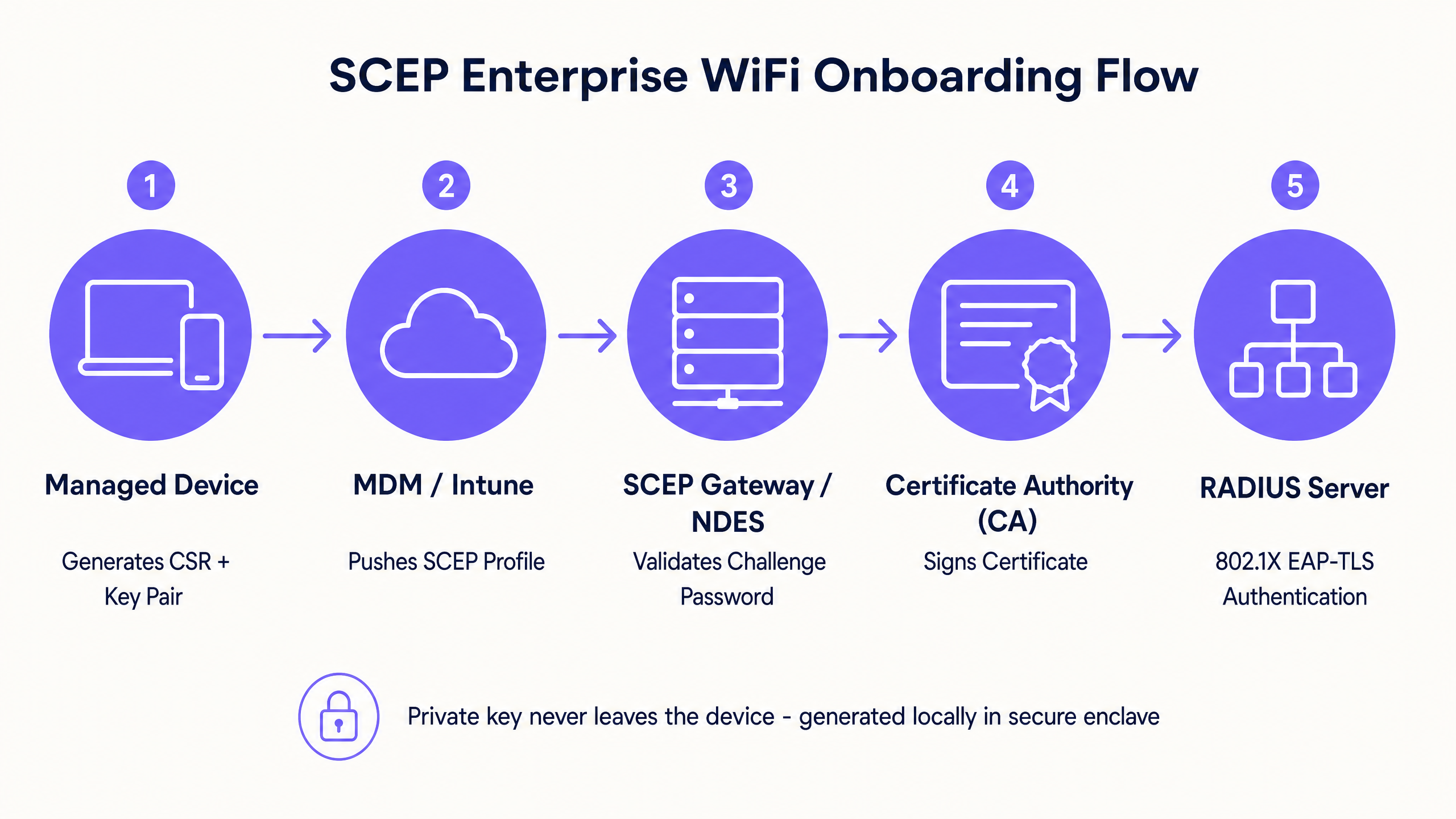
SCEP 是企業裝置登錄的業界標準。在 SCEP 工作流程中,管理服務會指示端點產生自己的私鑰與公鑰組。裝置會建立憑證簽署要求 (CSR),並透過網路裝置登錄服務 (NDES) 伺服器將其傳送至您的憑證授權單位 (CA)。CA 會簽署該要求並將公用憑證傳回給裝置。
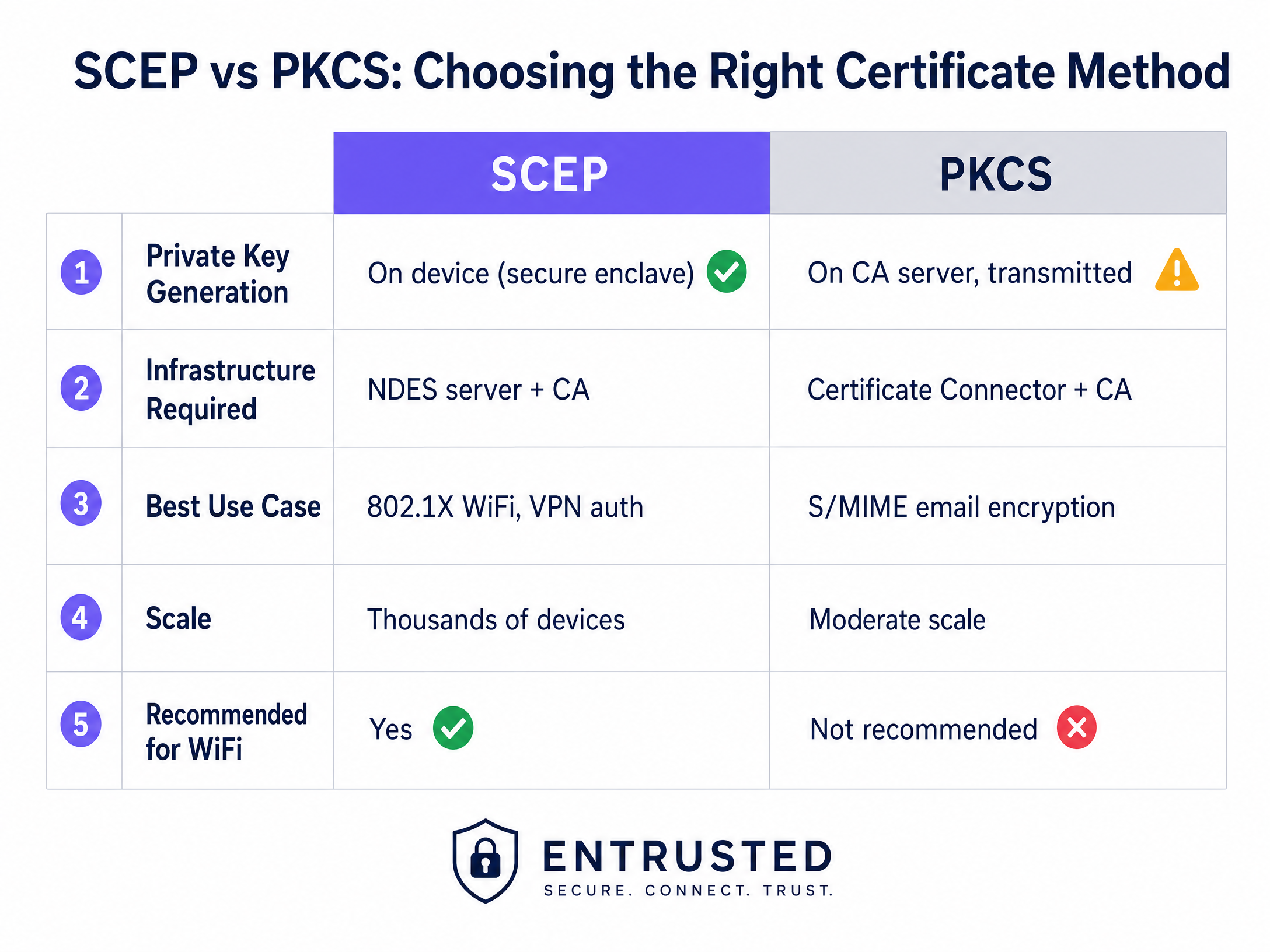
SCEP 的關鍵安全優勢在於私鑰永遠不會離開裝置。它是在本地端產生,儲存在裝置的安全記憶體中(例如 Windows 上的 TPM 或 iOS 上的 Secure Enclave),且絕不會透過網路傳輸。這使得 SCEP 成為 802.1X 驗證強烈建議採用的方法。
公鑰加密標準 (PKCS)
相反地,使用 PKCS 時,憑證授權單位會集中產生公鑰和私鑰。憑證連接器會安全地匯出此金鑰組,並將其推送到目標裝置。
雖然 PKCS 無需部署和維護 NDES 伺服器,簡化了基礎架構規模,但由於私鑰是透過網路傳輸,因此會引入理論上的安全風險。PKCS 通常更適合需要金鑰代管的用途(例如 S/MIME 電子郵件加密),而非網路驗證。
實作指南:部署順序
成功為 802.1X 設定受管 WiFi 設定檔需要嚴格遵循特定的部署順序。設定檔相依性決定了在設定驗證之前必須先建立信任關係。
步驟 1:部署信任的根憑證設定檔
在任何裝置可以要求用戶端憑證或信任您的 RADIUS 伺服器之前,它必須先信任發行的憑證授權單位。
- 將您的根 CA 憑證和任何中介 CA 憑證匯出為 .cer 檔案。
- 在您的 MDM 主控台中,建立一個新的組態設定檔。
- 選取目標平台並選擇信任的憑證設定檔類型。
- 上傳 .cer 檔案並將此設定檔部署到您的目標裝置群組。
步驟 2:設定 SCEP 憑證設定檔
建立信任關係後,設定 SCEP 設定檔以指示裝置如何取得其用戶端憑證。
- 建立一個新的組態設定檔並選取 SCEP 憑證。
- 設定主體名稱格式。對於使用者驅動的驗證,
CN={{UserPrincipalName}}是標準格式。對於裝置驗證,請使用CN={{AAD_Device_ID}}。 - 將金鑰用途設定為數位簽章與金鑰加密。
- 在延伸金鑰用途下,指定用戶端驗證 (OID: 1.3.6.1.5.5.7.3.2)。
- 將此設定檔連結到步驟 1 中建立的信任根憑證設定檔。
- 提供您的 SCEP 閘道或 NDES 伺服器的外部 URL。
步驟 3:部署 802.1X WiFi 設定檔
最後一個步驟是推送將憑證與網路 SSID 綁定的 WiFi 組態。
- 建立一個 WiFi 組態設定檔。
- 輸入與您的無線存取點所廣播完全相同的網路名稱。
- 選取 WPA2-Enterprise 或 WPA3-Enterprise 作為安全性類型。
- 將 EAP 類型設定為 EAP-TLS。
- 在驗證設定中gs,選擇在步驟 2 中建立的 SCEP 憑證設定檔作為用戶端驗證憑證。
- 指定用於伺服器驗證的受信任根憑證,以確保裝置僅連線至您合法的 RADIUS 伺服器。
最佳實踐與業界標準
在實施 SCEP 憑證部署時,請遵循以下與廠商無關的最佳實踐,以確保合規性與可靠性。
SCEP 閘道部署與安全性
SCEP 閘道必須可從網際網路存取,以便遠端裝置在抵達現場前佈署憑證。將內部伺服器直接暴露於網際網路是重大的安全風險。請使用應用程式代理或反向代理發佈 SCEP URL。這能提供安全的遠端存取,而無需開啟輸入防火牆連接埠,並允許您將條件式存取原則套用至註冊流程。
RADIUS 與 CRL 檢查
憑證部署僅是安全方程式的一半;撤銷同樣至關重要。如果員工離職,若其用戶端憑證仍然有效,且 RADIUS 伺服器未嚴格檢查憑證撤銷清單 (CRL),則停用其目錄帳戶可能無法立即撤銷其 WiFi 存取權限。
設定您的 RADIUS 伺服器以執行嚴格的 CRL 檢查。確保您的 CRL 發佈點具有高可用性;如果 RADIUS 伺服器無法存取 CRL,驗證將會失敗,從而導致大規模中斷。
如需現代連線能力的更廣泛考量,請參閱我們的指南: 頻寬管理:2026 年實用指南 。
疑難排解與風險緩釋
即使經過精心規劃,憑證部署仍可能會遇到問題。以下是常見的失敗模式與緩釋策略。
WiFi 設定檔套用失敗
裝置接收了受信任的根憑證和 SCEP 憑證,但 WiFi 設定檔在 MDM 主控台中顯示為錯誤或不適用。這幾乎總是由於群組目標不相符所致。如果 SCEP 設定檔指派給使用者群組,但 WiFi 設定檔指派給裝置群組,則 MDM 無法解析此相依性。請稽核您的指派。確保受信任的根憑證、SCEP 和 WiFi 設定檔都部署到完全相同的群組。
閘道 403 Forbidden 錯誤
裝置無法擷取 SCEP 憑證,且閘道記錄顯示 HTTP 403 錯誤。連接器服務帳戶缺少憑證範本上的必要權限,或者您防火牆上的 URL 篩選封鎖了 SCEP 使用的特定查詢字串參數。請驗證連接器帳戶在 CA 範本上是否具有讀取和註冊權限。檢查防火牆記錄以確保未封鎖包含 ?operation=GetCACaps 的 URL。
投資報酬率與業務影響
過渡到由 SCEP 驅動的 802.1X 憑證部署,可在安全性與營運方面帶來可衡量的回報。
- 減少技術支援工單: 基於密碼的 WiFi 會產生大量關於密碼過期、鎖定和輸入錯誤的支援工單。基於憑證的驗證對使用者而言是無感的,通常可減少 70% 與 WiFi 相關的技術支援工作量。
- 增強安全態勢: EAP-TLS 消除憑證收集和中間人攻擊的風險。這對於符合 PCI DSS 和 GDPR 等框架至關重要,特別是在 零售 和 醫療保健 環境中。
- 無縫上線: 將憑證部署與現有的 MDM 工作流程整合,可確保從第一天起就提供統一、零接觸的配置體驗。
雖然 SCEP 可以保護您受管理的企業裝置,但訪客和訪客網路需要不同的方法。對於未受管理的裝置,具有社群登入或簡訊驗證的 Captive Portal 會饋送到第一方數據層,為您提供具體可行的洞察。探索我們的 WiFi Analytics 平台,了解這些數據如何推動營收。
關鍵定義
SCEP (Simple Certificate Enrollment Protocol)
A protocol that allows devices to request digital certificates from a Certificate Authority, where the private key is generated and stored securely on the device itself.
The recommended method for deploying WiFi authentication certificates due to its high security and scalability across enterprise fleets.
PKCS (Public Key Cryptography Standards)
A set of standards where both the public and private keys are generated by the Certificate Authority and then securely delivered to the endpoint.
Often used for S/MIME email encryption, but less ideal for WiFi authentication due to the network transmission of the private key.
NDES (Network Device Enrollment Service)
A Microsoft Windows Server role that acts as a bridge, allowing devices without domain credentials to obtain certificates via SCEP.
A required infrastructure component when implementing SCEP certificate deployment with on-premises Microsoft PKI.
EAP-TLS (Extensible Authentication Protocol - Transport Layer Security)
The most secure 802.1X authentication method, requiring both the server and the client to present valid digital certificates.
The target authentication protocol that MDM WiFi and certificate profiles are designed to enable, eliminating password-based access.
CRL (Certificate Revocation List)
A list published by the Certificate Authority containing the serial numbers of certificates that have been revoked before their scheduled expiration date.
RADIUS servers must check the CRL during authentication to ensure terminated employees cannot access the network using a previously valid certificate.
CSR (Certificate Signing Request)
A block of encoded text given to a Certificate Authority when applying for an SSL/TLS certificate, containing the public key and identity information.
Generated locally by the managed device during the SCEP flow to request its unique identity credential.
802.1X
An IEEE standard for port-based network access control that provides an authentication mechanism to devices wishing to attach to a LAN or WLAN.
The foundational framework that enforces the requirement for EAP-TLS certificate validation before granting network access.
RADIUS (Remote Authentication Dial-In User Service)
A networking protocol that provides centralized authentication, authorization, and accounting management for users who connect and use a network service.
The server that evaluates the client certificate against the CA and CRL to make the final allow or deny decision for WiFi access.
範例
A 150-property hotel group needs to secure their staff network across a mix of Windows laptops for front-of-house, iOS devices for housekeeping, and Android tablets for restaurant point-of-sale. They currently use WPA2-Personal with a shared password rotated quarterly, generating massive helpdesk volume.
The hotel group deploys three Intune profiles in sequence to a unified device group. First, a Trusted Root Certificate profile establishes trust with the corporate CA. Second, a SCEP Certificate profile instructs devices to request a unique client certificate. Third, a WiFi profile configures the corporate SSID with WPA3-Enterprise and EAP-TLS, pointing to the SCEP certificate for authentication. The RADIUS server enforces strict CRL checking to revoke access instantly upon employee termination.
A fashion retailer with 200 stores requires PCI DSS compliance for their Windows-based point-of-sale systems managed through Intune. They must ensure strong authentication and strict network segmentation for any device handling cardholder data.
The retailer implements SCEP-based EAP-TLS for device-level authentication on the staff SSID. The RADIUS policy drives VLAN assignment, placing authenticated POS terminals onto a strictly isolated, PCI-scoped VLAN automatically. Guest WiFi is handled on a completely separate SSID with its own captive portal authentication flow, ensuring the two networks never intersect.
練習題
Q1. Your Intune deployment shows the Trusted Root and SCEP profiles successfully applied to a user's laptop, but the WiFi profile shows an 'Error' state. The user cannot connect to the corporate SSID. What is the most likely architectural cause?
提示:Consider how MDM platforms resolve dependencies between related configuration profiles.
查看標準答案
A group targeting mismatch. The SCEP profile is likely assigned to a User group, while the WiFi profile is assigned to a Device group (or vice versa). Intune cannot resolve the dependency across different group types, causing the WiFi profile deployment to fail. Audit the assignments and ensure all three profiles target the exact same Azure AD group.
Q2. A newly acquired subsidiary requires 802.1X authentication for their staff devices. Their security team mandates that private keys must never traverse the network and must be generated within the hardware TPM of the endpoint. Which certificate deployment method must you use?
提示:Compare where the private key is generated in the SCEP workflow versus the PKCS workflow.
查看標準答案
You must use SCEP (Simple Certificate Enrollment Protocol). In a SCEP workflow, the device generates its own private and public key pair locally within its secure enclave (TPM) and only sends a Certificate Signing Request (CSR) across the network. PKCS generates the private key centrally on the CA and transmits it over the network, which violates the security team's mandate.
Q3. An employee is terminated and their Active Directory account is disabled. However, their laptop remains connected to the corporate WiFi network for several hours before losing access. How do you resolve this security gap?
提示:Disabling an account does not invalidate an existing certificate. What mechanism does the RADIUS server use to check certificate validity?
查看標準答案
You must configure the RADIUS server to enforce strict Certificate Revocation List (CRL) checking. When an employee is terminated, their certificate must be explicitly revoked in the Certificate Authority. The RADIUS server will then check the CRL during the next authentication cycle and immediately deny access, regardless of the Active Directory account status.
繼續閱讀本系列
深入瞭解 Cisco SUDI:網路存取控制中的硬體型裝置身分識別
本指南詳細介紹 Cisco SUDI 的技術架構,說明硬體錨定身分識別如何確保網路存取控制的安全。它為 IT 主管提供了具體可行的實作步驟,以便在企業場域中部署 802.1X EAP-TLS 驗證並實現零接觸部署 (Zero Touch Provisioning) 自動化。
合規指南:GDPR 與顧客 WiFi 數據隱私
本完整指南為 IT 經理和場域營運商提供了一個技術框架,用於建構符合 GDPR 規範的顧客 WiFi 網路。本指南詳細介紹了同意機制、網路分段、自動化數據保留,以及如何將合規性從監管負擔轉化為可防禦的第一方數據資產。
在企業級網路控制器上設定 Captive Portal 重新導向
本權威指南詳細介紹了在企業級網路控制器上實作 Captive Portal 重新導向所需的技術架構與特定廠商設定步驟。它為 IT 團隊提供了關於設定圍牆花園(walled gardens)、整合 RADIUS 驗證以及確保符合 GDPR 和 PCI DSS 規範的實用指導。