How to Set Up Guest WiFi: The Enterprise Guide 2026

31 May 2026
How to Set Up Guest WiFi: The Enterprise Guide 2026

The most common advice on how to set up guest WiFi is still wrong. It usually boils down to this: create a second SSID, add a password, maybe turn on a splash page, and call it secure.

That's a home fix, not an enterprise design.

In a real venue, hotel, clinic, retail site, student property, or mixed-use building, guest WiFi sits right at the intersection of security, compliance, and customer experience. If you treat it as a side feature, you end up with a brittle network, a poor sign-in flow, and very little control over who connected, when they connected, and what should happen when access needs to be revoked.

A proper deployment looks different. You need hard separation from internal systems, a joining experience that matches your environment, and an authentication model that still works when you have visitors, contractors, residents, staff, and awkward legacy devices all on the same estate. That's where basic guides usually stop, and where real operational work starts.

Why Your Basic Guest WiFi Is a Liability

A shared guest password feels safe because it creates the appearance of control. In practice, it often creates the opposite. Once that password is printed at reception, sent in a confirmation email, posted behind a bar, or reused across sites, you've lost meaningful control over who can join and when.

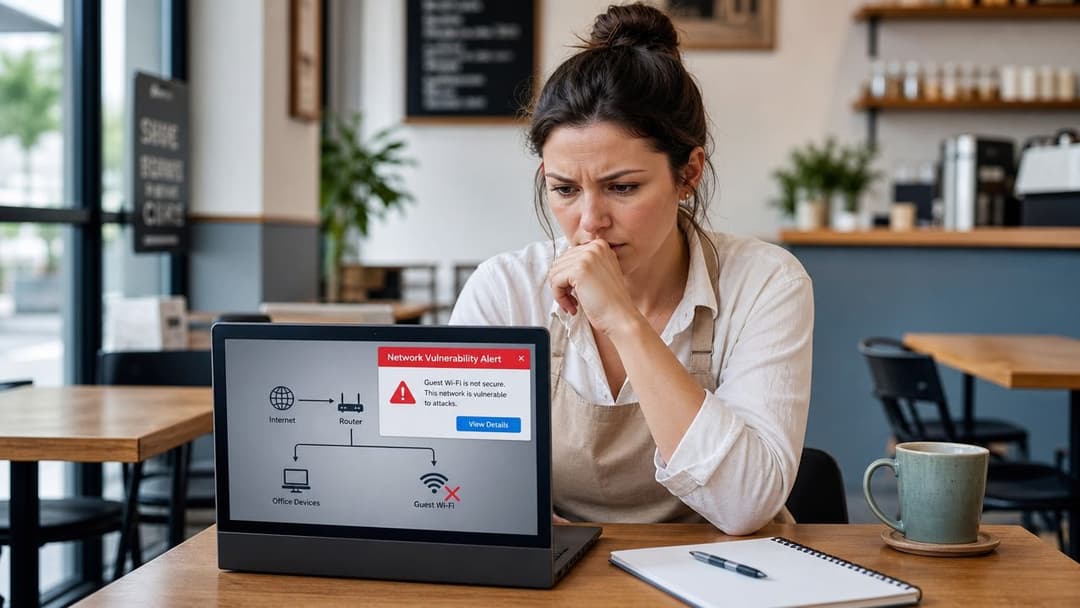
A concerned woman sitting at a table looking at a security alert on her laptop screen.

That matters more than many teams realise because guest WiFi is no longer a nice extra. UK users arrive expecting immediate connectivity, and Ofcom figures cited here show UK adults spent an average of 4 hours 20 minutes online per day in 2024, with smartphone ownership at 91% . If your network is awkward to join, flaky, or insecure, guests notice it fast.

What basic setups get wrong

Most poor deployments fail in one of three ways:

  • They confuse a separate password with separation: A new password on the same underlying network is not a security boundary.
  • They rely on open access plus a splash page: That may help with branding or terms acceptance, but it doesn't replace actual network security.
  • They ignore identity and lifecycle: Nobody asks what happens when a tenant moves out, a contractor leaves, or a returning guest should reconnect without friction.

A guest network should be designed like a controlled external zone, not like a spare corner of the office LAN.

The other problem is missed value. A basic SSID with a shared code gives you very little insight and almost no flexibility. You can't easily distinguish a resident from a conference attendee, a one-time cafe visitor from a repeat hotel guest, or a staff-owned phone from a guest tablet that's only there for a day.

If you're serious about how to set up guest WiFi, start by rejecting the idea that “guest” means “less important”. In most organisations, it's one of the most exposed network services you run.

Building Your Network Foundation for Security

The cleanest way to think about guest WiFi is as a digital guest house. You don't hand visitors keys to the main building and hope they stay in the right room. You give them a separate entrance, clear boundaries, and access only to what they need.

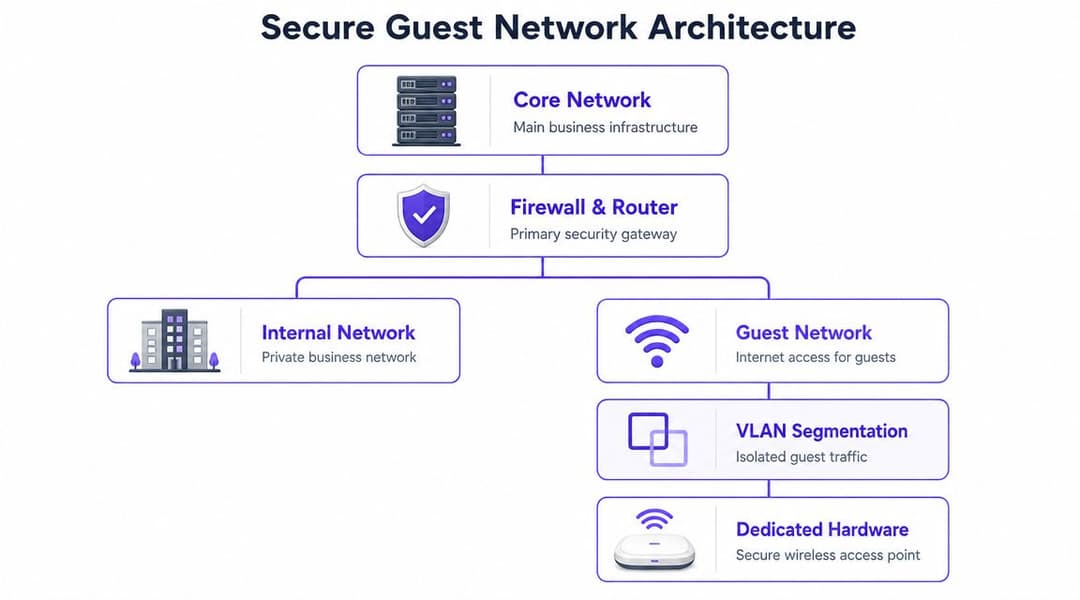
That principle matches UK baseline security guidance. Cyber Essentials requires separation between guest and staff networks, with visitors placed on a distinct SSID or VLAN and firewalls configured to block access to internal systems by default .

A diagram illustrating a secure guest network architecture separating internal business traffic from public guest access.

Separate the network properly

A secure guest deployment starts with architecture, not branding. At minimum, build these controls in before anyone connects:

  • Dedicated SSID: Create a guest SSID that is separate from staff and operational wireless networks.
  • VLAN segmentation: Map that SSID to its own VLAN so guest traffic stays outside your production network.
  • Firewall policy: Deny access from the guest segment to internal subnets by default, then only allow what's required.
  • Separate addressing and services: Use a dedicated DHCP scope and avoid leaking access to internal DNS, printers, file shares, or management interfaces.

If your controller supports role-based policies, use them. If it supports dynamic VLAN assignment, plan for it now even if you won't use it on day one. Good guest WiFi usually expands over time. Bad guest WiFi gets rebuilt under pressure.

Controls that should be non-negotiable

The technical baseline is straightforward when you strip out the marketing language:

  1. Create the guest SSID.
  2. Apply WPA2 or WPA3.
  3. Enable client isolation or guest isolation.
  4. Block access to the primary LAN.
  5. Test from a real client device.

That sequence sounds simple because it is. The discipline comes from not skipping steps when someone asks for a faster launch.

Practical rule: If a guest device can discover your printers, cast to meeting room screens, or hit an admin page, the network isn't finished.

A lot of teams also benefit from using a pre-deployment checklist before they touch production settings. This guest WiFi feature checklist is a useful way to sanity-check whether your design includes the controls and onboarding options an enterprise environment usually needs.

Where administrators get caught out

The failures I see most often are boring, not exotic. A guest SSID gets created on the same broadcast domain as staff devices. Isolation is left off because someone is troubleshooting AirPlay. A splash portal is enabled, but the WLAN is still open underneath. Or a firewall rule added for testing is never removed.

Use this short validation pass after setup:

  • Join as a guest: Confirm internet access works.
  • Probe local resources: Make sure printers, file shares, and internal web apps are unreachable.
  • Check east-west visibility: Verify one guest device can't see another.
  • Review fail-open behaviour: If the portal or authentication service is unavailable, decide whether guests should be blocked or allowed through with restricted policy.

That's the foundation. Everything else, portals, analytics, identity, Passpoint , only works if this layer is solid.

Choosing Your Guest Onboarding Experience

Once the network is properly isolated, the next decision is how people get on it. In making this decision, many projects drift back into consumer thinking. Teams choose the easiest sign-in method for IT, not the right one for the venue.

That trade-off shows up quickly. Guidance summarised here notes that shared passwords and basic portals are increasingly outdated, and also cites the UK Government's Cyber Security Breaches Survey 2025 finding that 43% of businesses experienced a cyber breach or attack in the previous 12 months . In other words, access design matters.

The real strengths and weaknesses of each method

A captive portal is still useful, but only if you're clear about what it is. It's an onboarding and policy tool. It is not your primary security control.

Purple's explanation of captive portals is a good reference point if you need to align marketing, operations, and networking teams on what a portal can and can't do.

Here's the practical comparison:

Method Security Level User Experience Data Capture Best For
Shared password Low to moderate, depending on rotation and segmentation Familiar, but clumsy when the password changes or is widely shared Minimal Small sites with limited requirements
Open network with captive portal Low if used alone Simple first join, inconsistent across devices Good if form-based Short-stay public venues
Voucher or time-limited code Moderate Manageable, but adds desk or staff dependency Moderate Hotels, events, managed access windows
Email or SMS registration Moderate Acceptable if the form is short Strong first-party data potential Retail, hospitality, venues
Sponsored access Stronger control Slower, but useful for controlled environments Moderate to strong Corporate visitors, healthcare, restricted sites
Per-user authentication High Better long-term experience once configured Strong Multi-user, compliance-sensitive environments
Passpoint or OpenRoaming style onboarding High with seamless encrypted access Best for repeat visits and roaming Depends on implementation Hospitality, transport, large venues, multi-site estates

What works in practice

For a cafe or one-off event, a simple captive portal may be enough if the underlying WLAN is still encrypted and isolated. For a hotel group, clinic, shopping centre, or transport environment, a static password usually becomes a support burden and a security drag.

Email registration can be a good middle ground when you need a branded experience and lawful first-party data collection. SMS can work, but it tends to create more friction and support issues around delivery. Social login used to be common. It's less compelling now unless it serves a very specific campaign goal.

Some environments don't want any login friction at all. In those cases, teams often look for ways to offer media access or engagement without forcing a full authentication event. For example, if you're running a venue activation and want simple content participation, this guide to event photo sharing without login is a useful contrast because it shows where removing login friction helps, and where it doesn't replace the need for proper network access control .

The best onboarding flow is the one that matches the user journey and still lets IT revoke, segment, and audit access without rewriting policy every week.

When to move beyond portals and passwords

If guests return regularly, move staff between sites, or operate a property with residents and transient users, start looking at identity-based onboarding and Passpoint/OpenRoaming rather than just better splash pages.

That shift solves several chronic problems at once:

  • Password sharing stops being the model: Access can be tied to the individual or device.
  • Repeat visits improve: Returning users reconnect without re-entering details every time.
  • Revocation gets easier: Remove the identity or policy, not a site-wide code.
  • Encryption starts from the first packet: That's a better outcome than open SSID plus web form.

If you're asking how to set up guest WiFi for a serious estate, this is usually the turning point. You stop thinking about “how do people see our splash page?” and start asking “how do we authenticate them cleanly, securely, and repeatedly at scale?”

Integrating Authentication and Managing Devices

The biggest gap in most guest WiFi advice isn't SSIDs or splash pages. It's identity. Basic guides rarely deal with what happens when the same property has short-stay visitors, permanent residents, contractors, staff, and unmanaged devices all needing different access rules.

That matters in the UK because mainstream guidance often overlooks multi-tenant and property-scale access control, despite the size of rented and shared-premises environments, including roughly 4.7 million households in the private rented sector and around 0.6 million in the social rented sector in the English Housing Survey context referenced here .

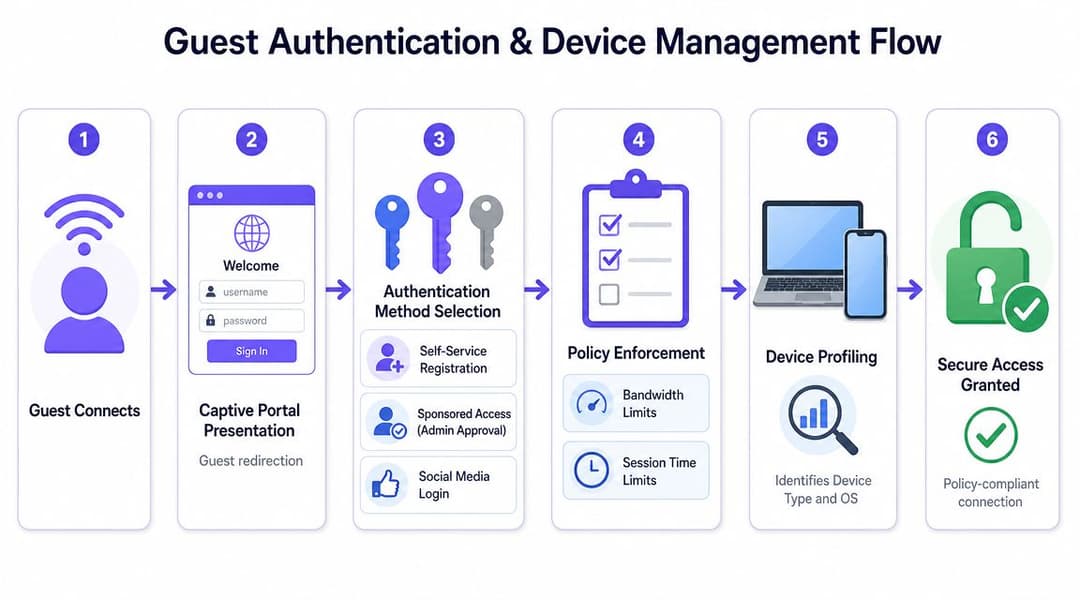
A six-step infographic illustrating the professional guest authentication and device management workflow for network access.

Use identity as the control plane

A modern deployment should answer two questions immediately:

  1. Who or what is connecting?
  2. What should that identity be allowed to reach?

That's where RADIUS and directory integration come in. If you haven't worked with it before, this overview of what a RADIUS server does is a useful primer. In practical terms, it becomes the decision point between your wireless network and your identity source.

For staff access, tie WiFi authentication to your directory platform such as Entra ID, Google Workspace, or Okta. That gives you joiner, mover, leaver control without maintaining a separate wireless password lifecycle. If a user leaves the organisation, their network access follows the identity change.

Patterns that work in real estates

Different environments need different models.

Hospitality and venues

Use short-session guest access for public users, but avoid a static site-wide password if you can. For conference spaces or VIP networks, issue policy-based access with clear expiry. If your platform supports Passpoint, it's worth testing for repeat visitors who value quick reconnects.

Residential and student housing

Residents need something closer to a home experience, but operators need enterprise isolation. Shared-property networks break down fast if everyone is handed the same key. Use individual or unit-based credentials where possible, and make sure offboarding can happen immediately when occupancy changes.

Staff and contractors

Don't put these users on the same workflow as anonymous guests. Staff should authenticate with directory-backed credentials. Contractors often need sponsored or time-bounded access tied to a named identity, not the reception password.

Multi-tenant WiFi fails when operators try to solve a policy problem with a password problem.

Legacy and IoT devices need a separate answer

Many elegant designs encounter issues. Smart TVs, printers, game consoles, scanners, and various embedded devices often can't handle modern browser-based onboarding or enterprise authentication.

For those devices, use iPSK or another per-device credentialing model if your platform supports it. That gives each device its own key and policy, which is a huge improvement over placing every awkward device on one shared “IoT” password that never changes.

A practical model looks like this:

  • Staff laptops and phones: directory-based authentication
  • Guests: portal, passwordless onboarding, or Passpoint depending on the venue
  • Legacy devices: per-device credentials with restricted policy
  • Operational devices: separate SSID and policy entirely

In environments with mixed needs, platforms such as Cisco identity stacks, Aruba ClearPass, cloud-managed RADIUS services, and vendor-integrated onboarding tools can all play a role. Purple also fits into this category for organisations that want passwordless guest access, directory integration, and multi-tenant controls without relying on shared passwords or local RADIUS infrastructure.

That's the difference between “guest WiFi” as a WLAN label and guest WiFi as an access strategy.

Practical Deployment Tips for Popular Vendors

Most design mistakes don't happen in the whiteboard phase. They happen in the dashboard, usually when someone clicks through a wizard too quickly.

Cisco Meraki

On Meraki, the temptation is to use the built-in guest options and stop there. That's fine for a small site, but for larger estates pay close attention to Layer 3 firewall rules, group policies, and traffic shaping. Guest internet access might work on day one, but if you don't define policy properly, you'll struggle later when you need different access levels for visitors, VIPs, or event traffic.

A common Meraki pitfall is portal success with incomplete isolation. The splash page loads, users browse the web, everyone assumes the job is done. Then someone discovers guest clients can still reach local services because the blocking rules weren't fully validated.

Aruba

With Aruba, especially in controller-based estates, the strength is policy depth. If you're using ClearPass, take the time to map roles before deployment. Decide which attributes should put a user into a guest role, a staff role, a contractor role, or a restricted device role.

The mistake here is overbuilding on the first pass. Teams sometimes create too many nested policies and exceptions, then nobody wants to touch the system later. Keep your first release clean. A few well-defined enforcement profiles beat a maze of edge-case logic.

Ruckus

On Ruckus, guest access can be very solid, particularly in hospitality-heavy environments. Focus on WLAN settings, user role assignment, and the exact captive portal handoff if you're integrating external authentication.

The field issue to watch is inconsistent behaviour across device types when portal redirection is involved. Test with current iPhone, Android, Windows, and macOS devices before rollout. Guest WiFi problems often look like “the internet is down” to end users when the actual issue is just failed portal detection.

Juniper Mist

With Mist, the advantage is visibility. The cloud dashboard makes it easier to see client behaviour, onboarding failures, and roaming events. Use that visibility. Don't just deploy the SSID and trust the default analytics view.

Mist environments also reward disciplined SSID design. If you create too many broadcast networks because every user type gets its own SSID, you'll complicate operations fast. Use policy and identity where possible, not an SSID for every scenario.

UniFi

On UniFi, guest WiFi is approachable, which is both its appeal and its trap. It's easy to create a guest network quickly, but you still need to verify guest control, network isolation, and any external portal integration carefully.

The common failure here is cosmetic success. The portal looks polished, vouchers print, clients connect, but the underlying segmentation is thinner than the admin realises. UniFi can do the job well, but it rewards administrators who test access paths rather than trusting labels in the interface.

One habit that saves time on every platform

Build and test with three devices before launch:

  • A normal smartphone for first-join experience
  • A laptop for portal and browser behaviour
  • A difficult device such as a smart TV or legacy client if your site supports them

That simple test catches most production surprises before your guests do.

Monitoring, Compliance, and Troubleshooting

Guest WiFi isn't finished when the SSID goes live. It becomes an operational service. The teams that run it well review usage, check policy drift, watch authentication failures, and revisit the guest journey after launch.

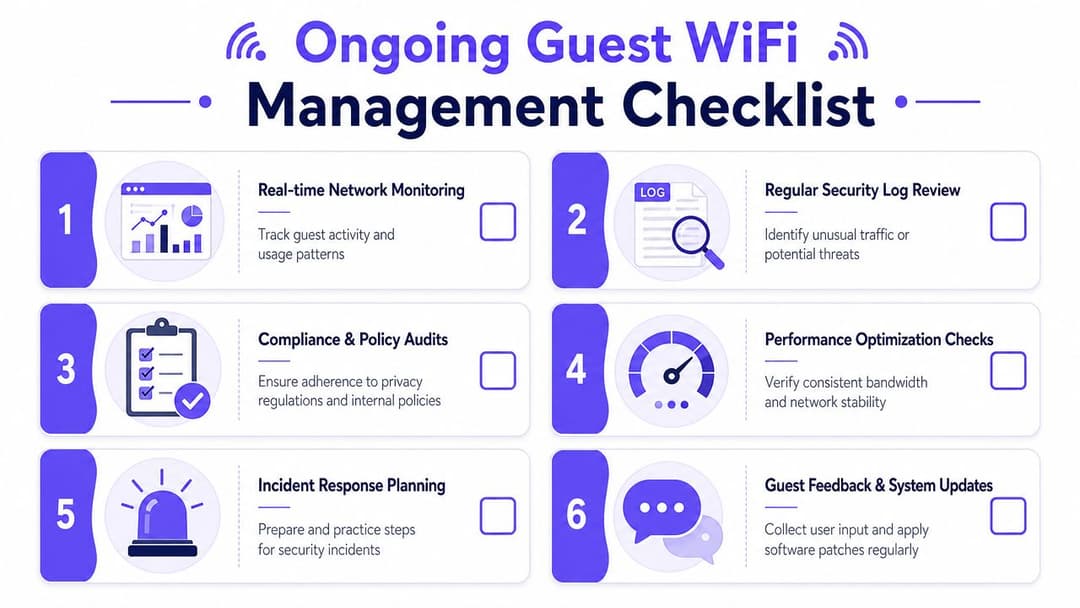
A six-step checklist infographic for managing ongoing guest WiFi networks, including monitoring, security reviews, and updates.

What to monitor every week

Start with the signals that help operations:

  • Authentication success and failure trends: If users can see the SSID but can't complete onboarding, the problem is usually portal flow, policy, or upstream dependency.
  • Concurrent user behaviour: Look for times and locations where experience degrades.
  • Device mix: This tells you whether onboarding is tuned for the clients people really bring.
  • Session drop patterns: Short repeated reconnects often indicate portal loops, DHCP friction, or roaming issues.
  • Policy exceptions: Temporary access rules have a habit of becoming permanent.

A guest network with no monitoring usually turns into a support queue. A monitored one becomes easier to optimise because patterns show up before complaints escalate.

Compliance and privacy need operational discipline

For UK organisations, guest WiFi often touches personal data through registration forms, analytics, CRM connections, or marketing workflows. That means privacy decisions can't be bolted on afterwards.

Keep the basics tight:

  1. Collect only what you need.
  2. Tell users what you're collecting and why.
  3. Separate access control from marketing consent.
  4. Define retention periods before launch.
  5. Make sure operations staff know the process for access requests, deletion requests, and policy questions.

The networking team doesn't need to become a legal department. It does need to avoid building a join flow that gathers data no one can justify or govern.

If your guest portal asks for more information than the business can explain, you've designed a compliance problem into the network.

Troubleshooting the failures that appear most often

The standard baseline for secure guest WiFi remains simple: separate SSID, client isolation, WPA2 or WPA3, and blocked access to the primary LAN. The cited guidance also warns that skipping isolation turns guest WiFi into only a separate password rather than a real security boundary . When troubleshooting, start there before chasing obscure edge cases.

Guests connect but have no internet

Check DHCP allocation first, then upstream firewall policy, then DNS reachability. In many estates, this issue is caused by a policy object or NAT setting that was correct in staging and missed in production.

The captive portal doesn't appear

Test with multiple operating systems. Some clients handle portal detection badly, especially if SSL interception, content filtering, or unusual redirection settings are involved. Confirm the WLAN is handing users to the right portal host and that certificate trust isn't breaking the flow.

Guests can see internal devices

Treat this as a design fault, not a user complaint. Review VLAN assignment, ACLs, and client isolation immediately. This is one of the clearest signs that someone created a “guest” network in name only.

Legacy devices won't connect

Don't keep weakening the whole WLAN to accommodate a single awkward device class. Put those devices on a separate onboarding path with their own credential model and restricted policy.

A simple operating checklist

Use a repeatable review cycle:

  • Review logs: Look for failed auth patterns and unusual traffic.
  • Retest isolation: Confirm guests still can't reach local resources.
  • Patch infrastructure: Keep APs, controllers, and portal components current.
  • Audit guest journeys: Make sure the live experience still matches policy and privacy commitments.
  • Retire workarounds: Temporary exceptions should expire unless someone actively justifies them.

How to set up guest WiFi is really two jobs. First, build the boundary correctly. Then run it like a production service.


If you're moving beyond shared passwords and basic splash pages, Purple is worth evaluating as part of your shortlist. It supports guest, staff, and multi-tenant access with passwordless onboarding, Passpoint and OpenRoaming capability, directory integration, analytics, and vendor interoperability across platforms such as Meraki, Aruba, Ruckus, Mist, and UniFi.

Ready to get started?

Book a demo with one of our experts to see how Purple can help you achieve your business goals.

Speak to an expert
IcBaselineArrowOutward