
如何實作 SCEP 以進行自動化 WiFi 憑證登錄
本指南說明如何實作 SCEP (簡單憑證登錄協定),以在企業場域中進行自動化 WiFi 憑證登錄。內容涵蓋完整的架構藍圖——從 PKI 設計與 MDM 整合,到強制性的三步驟部署流程——並向 IT 經理和網路架構師展示如何消除共享憑證、自動化憑證生命週期管理,以及大規模滿足 PCI DSS 與 GDPR 的合規要求。
收聽此指南
查看播客逐字稿
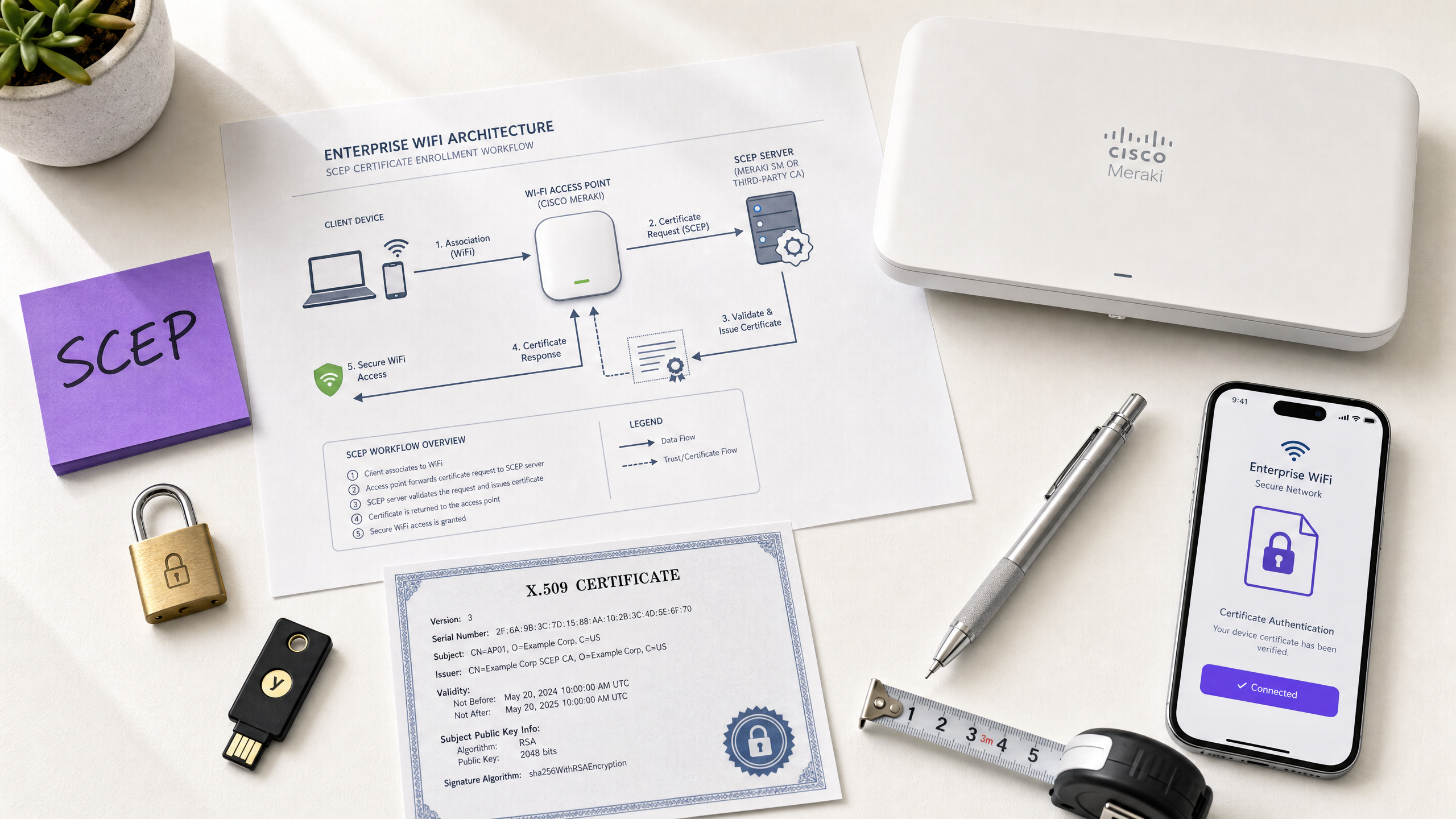
執行摘要
對於在飯店、零售物業、體育場館和會議中心營運 Guest WiFi 的場域營運商而言,依賴預共用金鑰或基礎 Captive Portal 來進行員工網路存取是一種安全隱患。現代網路架構要求使用 EAP-TLS (可延伸驗證協定 - 傳輸層安全性) 進行 802.1X 驗證,以確保每個裝置在存取網路之前都經過密碼學驗證。挑戰在於分發:如何將唯一的用戶端憑證部署到數千台 Windows、iOS 和 Android 裝置,而不會讓您的技術支援團隊工作過載?
答案就是 SCEP——簡單憑證登錄協定。SCEP 於 2020 年被 IETF 正式確立為 RFC 8894,可自動化管理裝置群的憑證登錄。當與 Microsoft Intune 或 Jamf 等 MDM 平台整合時,SCEP 可提供零接觸憑證佈署:裝置無需任何 IT 干預即可自行請求、接收和更新其憑證。私鑰在裝置本機產生,絕不會透過網路傳輸——與基於 PKCS 的分發相比,這是一個根本性的安全優勢。
本指南將逐步介紹完整的 SCEP 實作工作流程:PKI 架構、NDES 閘道設定、強制性的三步驟 MDM 部署流程,以及決定部署成功或停滯的營運控制(特別是 CRL 檢查和群組定位)。兩個實際案例說明了該方法在餐旅和零售環境中的應用。Purple 在全球 80,000 多個實際場域營運,擁有 3.5 億不重複使用者;此處描述的模式反映了在該規模下行之有效的方案。
技術深度解析
SCEP 的實際運作原理
SCEP 介於您的 MDM 平台和憑證授權單位 (CA) 之間。它提供了一種標準化、基於 HTTP 的機制,讓裝置能夠請求、接收和更新 X.509 憑證,而無需加入網域的認證或管理員的手動參與。該協定最初開發於 2000 年代初期,在 IETF 正式發佈為 RFC 8894 之前,已在企業 MDM 環境中獲得廣泛採用。
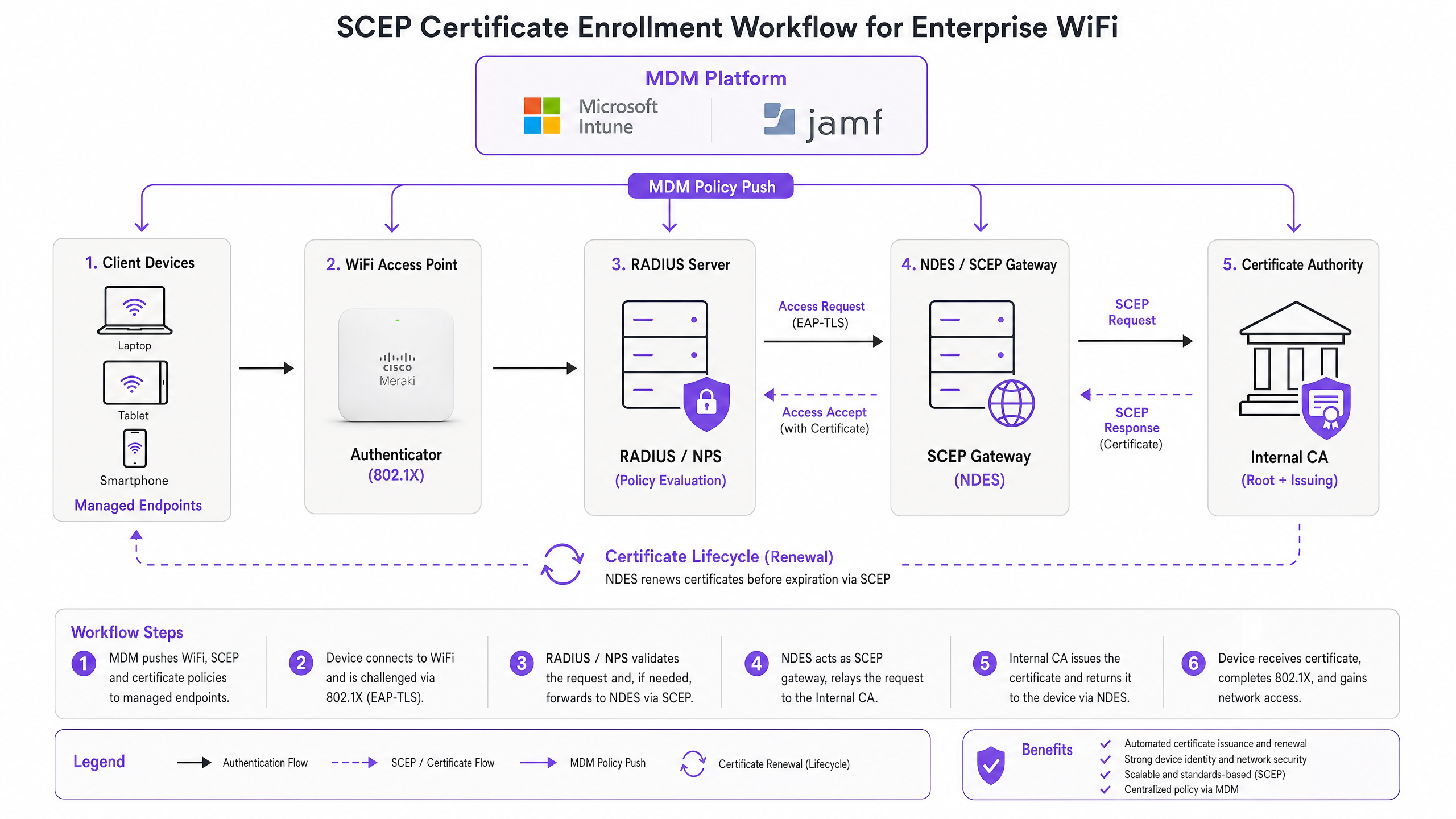
六步驟登錄流程如下。第一步,受控裝置連線至其 MDM 設定檔中預先設定的 SCEP 閘道 URL。第二步,裝置在本機產生私鑰/公鑰對,並建立憑證簽署請求 (CSR)。第三步,SCEP 閘道使用內嵌在 MDM 原則中的挑戰密碼或一次性密碼 (OTP) 來驗證裝置的授權。第四步,閘道將驗證後的 CSR 轉發給 CA。第五步,CA 簽署憑證並將其傳回給閘道。第六步,閘道將簽署後的憑證傳遞給裝置。未來的更新也遵循相同的自動化路徑——裝置在過期前重新登錄,無需任何使用者或管理員的操作。
SCEP 與 PKCS:關鍵的抉擇
Microsoft Intune 和大多數 MDM 平台支援兩種憑證傳遞機制:SCEP 和 PKCS。兩者的區別在於架構,而非表面。
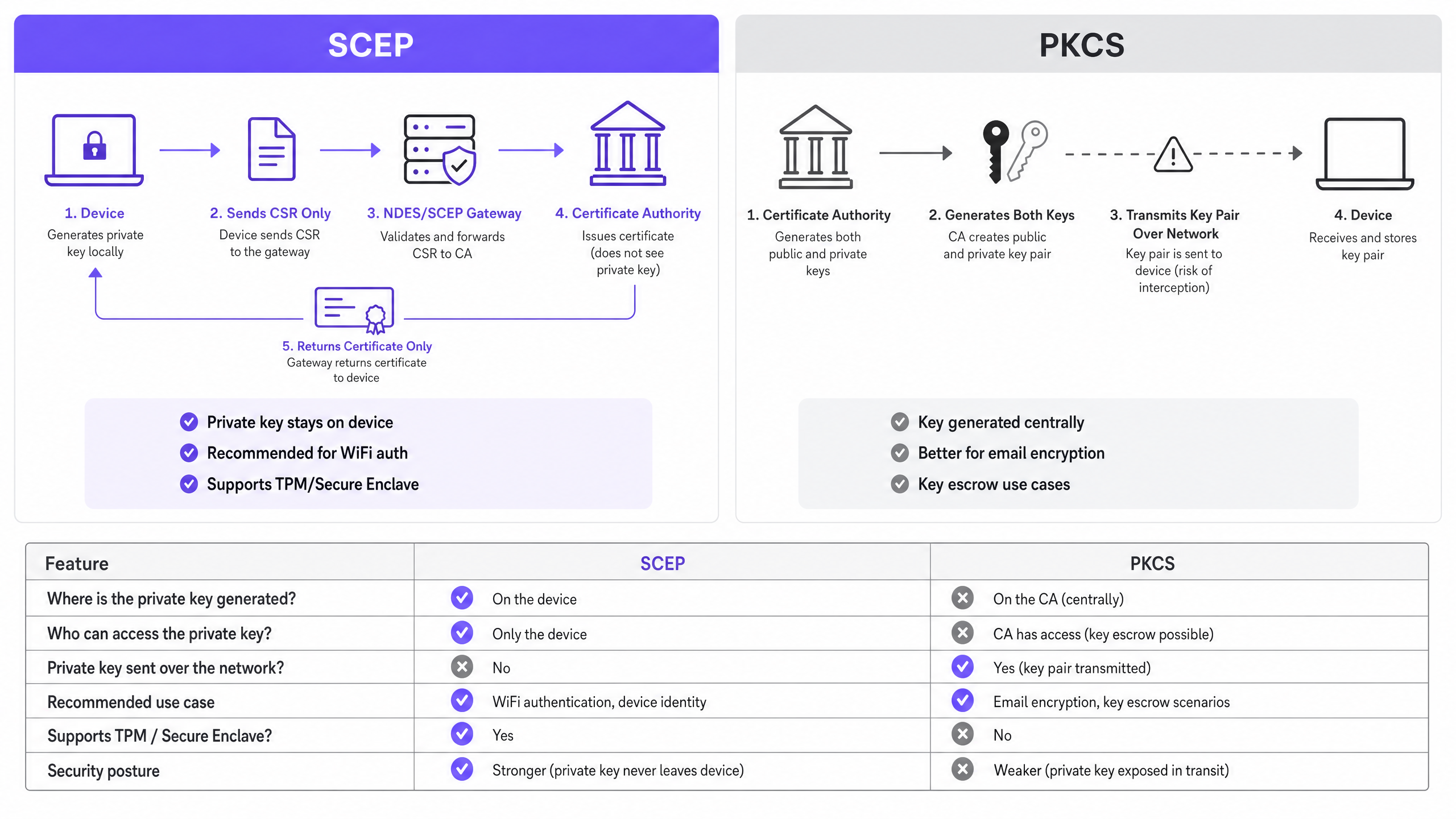
使用 SCEP 時,私鑰在裝置上產生並保留在該處。CA 絕不會看到它。裝置的 TPM (在 Windows 上) 或 Secure Enclave (在 iOS/macOS 上) 會在硬體層級保護該金鑰。使用 PKCS 時,CA 會集中產生金鑰對,並透過網路將其傳輸到裝置。CA 會保留一份複本以啟用金鑰託管——這對於 S/MIME 電子郵件加密很有用,但會為網路驗證引入不必要的風險。
對於 802.1X WiFi 驗證,請使用 SCEP。私鑰絕不離開裝置。這是基本原則。
| 評估標準 | SCEP | PKCS |
|---|---|---|
| 私鑰產生於 | 裝置 | CA (集中式) |
| 私鑰透過網路傳輸 | 絕不 | 是 |
| 支援 TPM / Secure Enclave | 是 | 否 |
| 建議用於 WiFi 驗證 | 是 | 否 |
| 建議用於電子郵件加密 (S/MIME) | 否 | 是 |
| 可進行金鑰託管 | 否 | 是 |
802.1X 與 EAP-TLS:驗證架構
IEEE 802.1X 是奠定企業 WiFi 安全基礎的埠型網路存取控制標準。它定義了三種角色:要求者 (用戶端裝置)、驗證者 (存取點 - Cisco Meraki、HPE Aruba、Ruckus、Juniper Mist、Ubiquiti UniFi、Cambium、Extreme 或 Fortinet) 以及驗證伺服器 (RADIUS 伺服器,例如 Microsoft NPS、FreeRADIUS 或 Cisco ISE)。
EAP-TLS 是 802.1X 最安全的 EAP 方法。雙方均需出示憑證:RADIUS 伺服器向用戶端出示其憑證,而用戶端向 RADIUS 伺服器出示其透過 SCEP 佈署的憑證。若沒有來自受信任 CA 階層的有效且未撤銷的憑證,任何一方都無法冒充另一方。這種雙向驗證模型透過單一架構決策,消除了憑證遭竊、邪惡雙生仔 (Evil Twin) 攻擊以及惡意存取點的風險。
EAP-TLS 滿足了 PCI DSS 4.0 規範 8.6 關於網路層多因素驗證的要求。它是 WPA3 Enterprise 192 位元 (Suite B) 部署的必要條件。對於任何涉及持卡人資料處理範圍內的無線網路——零售 銷售點(POS)、飯店前台、體育場票務——EAP-TLS 是正確的選擇。
如需深入瞭解 安全 WiFi 架構以及憑證驗證如何融入更廣泛的安全防護體系,請參閱我們的核心指南。
實作指南
部署順序不可變更。Intune 和 Jamf 會依序解析設定檔的相依性:WiFi 設定檔相依於 SCEP 設定檔,而 SCEP 設定檔又相依於信任的根憑證(Trusted Root)設定檔。若未按順序部署,WiFi 設定檔將無法套用。
步驟 1:設計您的 PKI
在操作 MDM 主控台之前,請先設計您的憑證階層。標準做法是採用雙層 PKI:離線根 CA(offline root CA)與線上發行 CA(online issuing CA)。根 CA 的私鑰是您整個憑證基礎架構的主信任錨點(master trust anchor)——請保持實體隔離(air-gapped)。發行 CA 則負責日常的憑證發行,並發佈憑證撤銷清單(CRL)與 OCSP 回應程式。
對於大多數企業場域部署,在 Windows Server 上執行的 Microsoft Active Directory 憑證服務(AD CS)可提供發行 CA。來自 SCEPman 或 SecureW2 等供應商的雲端託管 PKI 服務可完全免除地端基礎架構的需求,非常值得跨飯店集團、零售連鎖店或多據點公共部門組織的分散式資產部署進行評估。
步驟 2:部署 NDES 伺服器(或雲端 SCEP 閘道)
NDES(網路裝置註冊服務)是 Microsoft Windows Server 的角色,充當 MDM 與 CA 之間的 SCEP 閘道。關鍵設定需求如下:
- 透過 Azure AD 應用程式 Proxy(或同等的反向 Proxy)向外部發佈 NDES URL。這可讓遠端裝置在抵達現場之前進行註冊,而無需開啟輸入防火牆連接埠。
- NDES 服務帳戶需要對 CA 憑證範本具有「讀取」和「註冊」權限。
- 設定憑證範本,將「金鑰用法」設定為「數位簽章」和「金鑰加密」,並將「延伸金鑰用法」設定為「用戶端驗證」(OID: 1.3.6.1.5.5.7.3.2)。
- 設定適當的憑證有效期。用戶端憑證通常為一年;對於穩定運作的裝置群,裝置憑證兩年是可接受的。
如果您希望避免使用地端 NDES 基礎架構,雲端 SCEP 閘道可透過 API 直接與 Intune 和您的 CA 整合,完全免除對 IIS 的相依性。
步驟 3:部署信任的根憑證設定檔
在您的 MDM 平台中,建立「信任的憑證」設定檔,並將您的根 CA 憑證(以及任何中間 CA 憑證)上傳為 .cer 檔案。在部署任何其他憑證或 WiFi 設定檔之前,先將此設定檔部署到您的目標裝置群組。若缺少此步驟,裝置將無法在 EAP-TLS 交握期間驗證 RADIUS 伺服器的憑證,且在要求其自身的 SCEP 憑證時也無法信任發行 CA。
經驗法則: 在所有三個相關設定檔中,務必始終鎖定相同的 Azure AD 群組(使用者或裝置)。此處的不一致是導致 WiFi 設定檔部署失敗最常見的單一原因。
步驟 4:設定 SCEP 憑證設定檔
在您的 MDM 中建立 SCEP 憑證組態設定檔:
- 主體名稱格式: 對於使用者驅動的驗證,請使用
CN={{UserPrincipalName}}。對於裝置驗證(建議用於共用裝置和 IoT),請使用CN={{AAD_Device_ID}}。 - 金鑰用法: 數位簽章、金鑰加密。
- 延伸金鑰用法: 用戶端驗證(OID: 1.3.6.1.5.5.7.3.2)。
- SCEP 伺服器 URL: 外部發佈的 NDES URL。
- 根憑證: 連結到步驟 3 中「信任的根憑證」設定檔。
- 憑證有效期: 與 CA 上設定的範本相符。
步驟 5:部署 802.1X WiFi 設定檔
建立 WiFi 組態設定檔:
- SSID: 輸入與您的存取點廣播完全相同的網路名稱。
- 安全性類型: WPA2-Enterprise 或 WPA3-Enterprise。
- EAP 類型: EAP-TLS。
- 用戶端驗證憑證: 選擇步驟 4 中的 SCEP 憑證設定檔。
- 伺服器驗證: 指定步驟 3 中的「信任的根憑證」,並輸入預期的 RADIUS 伺服器名稱。這可防止裝置連線到呈現偽造憑證的惡意存取點。
最佳實踐
在您的 RADIUS 伺服器上強制執行嚴格的 CRL 檢查
憑證撤銷是彌補「停用帳戶」與「封鎖網路存取」之間時間差的營運控制措施。當裝置遺失、遭竊或員工離職時,請停用 AD 帳戶並在 CA 撤銷憑證。您的 RADIUS 伺服器必須設定為在每次驗證嘗試時檢查 CRL。如果 CRL 無法使用(因為無法連線到 CDP,即憑證撤銷清單分發點),大多數 RADIUS 伺服器預設會「預設開啟」(fail open),這會帶來安全風險。請確保您的 CDP 具有高可用性,且您的 RADIUS 伺服器設定為在無法獲取 CRL 時「預設關閉」(fail closed)。
對於即時撤銷,除了 CRL 之外,還請設定 OCSP(線上憑證狀態協定)。OCSP 可提供單一憑證的狀態回應,而無需 RADIUS 伺服器下載並解析整個 CRL。
針對共用與 IoT 裝置使用裝置憑證
對於共用裝置(例如飯店房務平板電腦、零售 POS 終端機、體育場門禁讀卡機),請使用裝置憑證而非使用者憑證。裝置憑證與機器身分綁定,而非使用者帳戶。這意味著無論登入哪位使用者,裝置都會進行驗證,且撤銷作業是與裝置記錄綁定,而非員工的離職。
對於 零售 部署,POS 硬體上的裝置憑證還能滿足 PCI DSS 對網路層裝置身分的要求,而不會在銷售點引入複雜的使用者認證資訊。
自動化憑證更新
SCEP 支援自動更新:MDM 會指示裝置在憑證過期前重新註冊憑證過期。請設定您的 SCEP 設定檔,在憑證剩餘有效期達 20% 時觸發更新。以一年期憑證為例,更新大約會在到期前 73 天開始。此時間視窗提供了足夠的時間,以便在憑證過期且裝置失去網路連線之前,解決任何更新失敗的問題。
憑證過期導致大規模驗證失敗,是 802.1X 部署中最常見的營運事件。透過 SCEP 進行自動更新可完全消除此風險。
依憑證屬性進行網路區隔
RADIUS 伺服器可以讀取憑證屬性(主體、SAN 或自訂 OID),並使用這些屬性將裝置動態分配到 VLAN。例如,使用從 HousekeepingDevices 範本核發之憑證的房務平板電腦會進入房務 VLAN。而使用來自 RetailPOS 範本之憑證的 POS 終端機則會進入 PCI 範圍的 VLAN。這是透過密碼學強制執行的網路區隔,比基於 SSID 或 MAC 的方法可靠得多。
對於在相同實體基礎架構上同時運行顧客 WiFi 與員工 WiFi 的 旅宿餐飲 業者而言,透過憑證屬性進行 VLAN 分配可確保訪客和員工始終處於不同的網路區段,無論裝置連接到哪個 SSID。
疑難排解與風險緩釋
WiFi 設定檔在 Intune 中顯示「錯誤」或「不適用」
根本原因: 群組目標不比對。SCEP 設定檔與 WiFi 設定檔分配給了不同的群組。Intune 無法解析憑證相依性。
解決方法: 稽核所有三個設定檔(信任的根憑證、SCEP、WiFi)。確保它們都分配給完全相同的 Azure AD 群組。如果您要部署到「使用者」,這三個設定檔都必須以「使用者」群組為目標。如果部署到「裝置」,這三個設定檔都必須以「裝置」群組為目標。
NDES 傳回 HTTP 403 錯誤
根本原因: Intune Certificate Connector 服務帳戶缺少對 CA 憑證範本的「讀取」或「註冊」權限,或者防火牆 URL 篩選封鎖了 SCEP 查詢字串。
解決方法: 驗證連接器帳戶在 CA 主控台中的範本上是否具有「讀取」和「註冊」權限。檢查防火牆記錄中是否包含被封鎖的 ?operation=GetCACaps 或 ?operation=PKIOperation 請求。這些查詢字串必須在不經修改的情況下通過。
裝置無法在到期前更新憑證
根本原因: SCEP 更新時間視窗太短,或者在更新時無法連線至 NDES 伺服器。
解決方法: 將更新閾值設定為憑證有效期的 20%。確保 NDES URL 透過高可用性的反向代理發佈。監控 NDES IIS 記錄中的更新請求失敗,並主動發出警報。
RADIUS 拒絕有效的憑證
根本原因: RADIUS 伺服器的信任 CA 存放區不包含核發 CA 憑證,或者 CRL 已過期。
解決方法: 將完整的 CA 鏈(根 CA + 核發 CA)匯入 RADIUS 伺服器的信任存放區。驗證是否成功擷取 CRL,以及從 RADIUS 伺服器是否可以連線至 CDP URL。檢查 CRL 的下一次更新時間戳記——如果已過期,CA 需要發佈新的 CRL。
如需了解安全性以外的更廣泛網路效能考量,請參閱我們的 頻寬管理指南 。
投資報酬率與商業影響
基於 SCEP 的憑證註冊商業案例非常簡單明瞭。基於密碼的 WiFi 會產生可預測數量的技術支援工單:密碼過期、鎖定、員工與訪客分享憑證,以及新進員工的入職摩擦。基於憑證的驗證對終端使用者而言是隱形的。裝置會自動連線。沒有會過期、分享或遺忘的密碼。
從基於密碼的 WiFi 遷移到採用 SCEP 的 EAP-TLS 的組織,通常報告 WiFi 相關的技術支援工單減少了 70-80%(Purple 內部數據,2024 年,基於在旅宿餐飲和零售物業的部署)。光是技術支援服務台的節省,通常就能在第一年內收回實施成本。
合規性影響同樣具體。EAP-TLS 滿足了 PCI DSS 4.0 要求 8.6 中關於網路層多因素驗證的要求。對於 醫療保健 環境,它符合 HIPAA 對無線網路存取的技術保護要求。對於公共部門組織,它支援 NCSC Cyber Essentials Plus 對網路存取控制的認證要求。
對於 交通運輸 營運商(鐵路特許經營商、機場營運商、巴士網路)而言,在員工裝置上使用基於憑證的驗證,可確保承載安全關鍵數據的營運網路與旅客 WiFi 隔離,並免受基於憑證的攻擊。
Purple 的 WiFi Analytics 平台與 802.1X 安全網路整合,可在不損害底層基礎架構安全態勢的情況下,提供第一方數據洞察。在 Purple 網路中收集的 290 億個數據點表明,安全與分析是互補而非競爭的目標。
如需在部署安全網路的同時進行回饋與體驗管理,請參閱我們的 場域回饋指南 。
關鍵定義
SCEP (Simple Certificate Enrollment Protocol)
An IETF-standardised protocol (RFC 8894) that automates X.509 certificate enrollment for managed devices. The device generates its own private key locally and sends only a Certificate Signing Request to the CA via a gateway. The private key never leaves the device.
IT teams encounter SCEP when configuring MDM platforms (Intune, Jamf) to deploy WiFi authentication certificates at scale. It is the recommended mechanism for 802.1X EAP-TLS deployments because the private key is hardware-protected on the endpoint.
EAP-TLS (Extensible Authentication Protocol - Transport Layer Security)
The most secure 802.1X authentication method. Both the client device and the RADIUS server present X.509 certificates. Neither side can authenticate without a valid, non-revoked certificate from the trusted CA hierarchy.
EAP-TLS is the target authentication protocol that SCEP certificate deployment enables. It satisfies PCI DSS 4.0 Requirement 8.6 and is required for WPA3 Enterprise 192-bit (Suite B) deployments.
PKCS (Public Key Cryptography Standards)
A certificate delivery mechanism where the CA generates both the public and private key pair centrally and transmits them to the endpoint. The CA retains a copy of the private key, enabling key escrow.
IT teams choose between SCEP and PKCS when configuring certificate profiles in Intune. PKCS is appropriate for S/MIME email encryption where key escrow is required. It is not recommended for WiFi authentication because the private key is transmitted over the network.
NDES (Network Device Enrollment Service)
A Microsoft Windows Server role that acts as the SCEP gateway between an MDM platform and a Certificate Authority. It validates device enrollment requests and forwards CSRs to the CA.
NDES is a required infrastructure component for on-premises SCEP deployments with Microsoft Intune. It must be published externally via an application proxy to allow remote devices to enroll. Cloud SCEP gateways are an alternative that eliminates the on-premises NDES dependency.
CRL (Certificate Revocation List)
A list published by the CA containing the serial numbers of certificates that have been revoked before their expiry date. RADIUS servers check the CRL to ensure devices with revoked certificates cannot authenticate.
CRL checking is the operational control that enforces certificate revocation. IT teams must configure their RADIUS server to check the CRL on every authentication attempt and ensure the CRL Distribution Point (CDP) is highly available.
802.1X
An IEEE standard for port-based network access control. It defines the three-party authentication framework (supplicant, authenticator, authentication server) used in enterprise WiFi and wired networks.
802.1X is the framework within which EAP-TLS and SCEP operate. IT teams encounter it when configuring WPA2-Enterprise or WPA3-Enterprise SSIDs and when setting up RADIUS server policies.
RADIUS (Remote Authentication Dial-In User Service)
A networking protocol that provides centralised authentication, authorisation, and accounting (AAA) for network access. In 802.1X deployments, the RADIUS server validates client certificates and enforces VLAN assignment policies.
The RADIUS server is the authentication decision point in every 802.1X deployment. Common implementations include Microsoft NPS, FreeRADIUS, and Cisco ISE. It must be configured with the trusted CA chain and strict CRL or OCSP checking.
CSR (Certificate Signing Request)
A block of encoded text generated by a device that contains the device's public key and identity information. The device sends the CSR to the CA (via the SCEP gateway) to request a signed certificate. The corresponding private key is generated and retained on the device.
The CSR is the core artifact in the SCEP enrollment flow. IT teams configure the CSR format (subject name, key usage, EKU) in the SCEP certificate profile within their MDM platform.
PKI (Public Key Infrastructure)
The combination of hardware, software, policies, and procedures required to create, manage, distribute, and revoke digital certificates. A standard enterprise PKI consists of an offline root CA and an online issuing CA.
PKI is the prerequisite for any EAP-TLS deployment. IT teams must design and deploy a two-tier CA hierarchy before configuring SCEP. Cloud-hosted PKI services reduce the infrastructure burden for distributed estate deployments.
VLAN (Virtual Local Area Network)
A logical network segment that isolates traffic at Layer 2. In 802.1X deployments, RADIUS servers assign devices to VLANs dynamically based on certificate attributes, user identity, or policy.
VLAN assignment via RADIUS is the mechanism that enforces network segmentation in enterprise WiFi. IT teams use it to separate POS devices onto PCI-scoped VLANs, guest devices onto internet-only VLANs, and staff devices onto corporate VLANs - all from a single physical infrastructure.
範例
A 200-room Premier Inn property needs to deploy secure WiFi for 150 iOS housekeeping devices. Staff are currently sharing a WPA2-Personal password with guests, creating a compliance and operational risk. The IT Director needs to eliminate the shared password without disrupting daily operations.
The IT Director implements a Jamf-driven SCEP deployment in three phases. Phase one: the Root CA certificate is pushed to all 150 iOS devices via a Jamf Trusted Certificate profile, targeting the 'Housekeeping Devices' smart group. Phase two: a SCEP certificate profile is deployed, directing devices to an Azure AD App Proxy-published NDES server. The subject name uses CN={{SERIALNUMBER}} to tie the certificate to the device hardware. Phase three: a WPA2-Enterprise WiFi profile is pushed, specifying EAP-TLS and linking to the SCEP certificate. Devices authenticate silently. The shared password SSID is decommissioned. The RADIUS server is configured with strict CRL checking and VLAN assignment: housekeeping devices land on VLAN 20 (operations), guest devices on VLAN 10 (internet-only).
A retail chain with 500 locations needs to secure corporate WiFi for Windows POS tablets running payment processing software. PCI DSS 4.0 compliance requires multi-factor authentication at the network layer. The current WPA2-Personal setup fails the PCI DSS Requirement 8.6 assessment.
The network architect deploys EAP-TLS via Microsoft Intune and SCEP across all 500 locations. The deployment uses device certificates with CN={{AAD_Device_ID}} as the subject name, tying each certificate to the Intune device record. The three-profile sequence (Trusted Root, SCEP, WiFi) is deployed to the 'POS Devices' Azure AD group - the same group across all three profiles. The RADIUS server assigns POS devices to a dedicated PCI-scoped VLAN (VLAN 100) based on the certificate's issuing template. The CRL is published to a highly available CDN-hosted endpoint with a four-hour validity window. OCSP is enabled for real-time revocation checking. The deployment is validated against PCI DSS 4.0 Requirement 8.6 by the QSA.
練習題
Q1. You have deployed Trusted Root and SCEP certificate profiles to the 'All Staff' user group in Intune. You then deploy the WiFi profile to the 'Corporate Devices' device group. Devices receive the certificates but the WiFi profile shows 'Error' in the Intune console. What is the most likely cause, and how do you fix it?
提示:Consider how Intune resolves dependencies between profiles and what happens when profiles target different group types.
查看標準答案
The root cause is a group targeting mismatch. The WiFi profile depends on the SCEP profile, which depends on the Trusted Root profile. Intune cannot resolve these dependencies when the profiles target different group types (Users vs Devices). Fix: redeploy all three profiles to the same group. If the WiFi profile targets 'Corporate Devices' (a device group), the SCEP and Trusted Root profiles must also target 'Corporate Devices'. Alternatively, move all three to a user group if user-based authentication is required.
Q2. A hotel housekeeper's iPad is reported stolen. You immediately disable the housekeeper's Active Directory account. The next morning, the stolen iPad is still connecting to the hotel's WPA2-Enterprise network. Why, and what two actions do you take to prevent this?
提示:Think about what the RADIUS server actually validates during EAP-TLS authentication, and what controls govern certificate validity.
查看標準答案
Disabling the AD account does not revoke the client certificate stored on the iPad. The RADIUS server validates the certificate, not the AD account status, during EAP-TLS authentication. The two required actions are: (1) revoke the device certificate at the CA - this adds the certificate serial number to the CRL; (2) ensure the RADIUS server is configured with strict CRL checking so it fetches the updated CRL and rejects the revoked certificate on the next authentication attempt. For faster revocation, configure OCSP on the RADIUS server for real-time certificate status checks.
Q3. A retail chain is deploying 802.1X WiFi to 500 POS locations. The security architect proposes using PKCS certificate delivery instead of SCEP to avoid deploying an NDES server. The QSA reviewing the PCI DSS 4.0 assessment raises a concern. What is the concern, and what is the correct recommendation?
提示:Consider what PCI DSS says about private key handling and what PKCS does with the private key during delivery.
查看標準答案
The QSA's concern is that PKCS transmits the private key over the network from the CA to the device. PCI DSS 4.0 Requirement 3.5 requires that private keys used for authentication are protected against disclosure. Transmitting the private key over the network - even encrypted - introduces a risk that SCEP eliminates entirely. The correct recommendation is to use SCEP, where the private key is generated on the POS device and never leaves it. To avoid on-premises NDES infrastructure, the architect should evaluate a cloud SCEP gateway service that integrates directly with Intune and the CA via API.
Q4. You are designing a WiFi network for a large conference centre that hosts 50+ events per year. Staff devices need to be on a secure 802.1X network. You want to ensure that if a contractor's device is compromised, it can be isolated from the network within 15 minutes. What certificate revocation mechanism do you configure, and why?
提示:Compare CRL and OCSP in terms of revocation latency and what determines how quickly a RADIUS server acts on a revocation.
查看標準答案
Configure OCSP (Online Certificate Status Protocol) on the RADIUS server. CRL-based revocation has a latency determined by the CRL's validity period - typically one to 24 hours - meaning a revoked certificate may still authenticate until the RADIUS server fetches the next CRL. OCSP provides real-time per-certificate status responses: when a certificate is revoked at the CA, the OCSP responder immediately returns a 'revoked' status on the next query. With OCSP configured on the RADIUS server, a revoked contractor certificate is blocked on the next authentication attempt, typically within seconds. Ensure the OCSP responder is highly available - if it is unreachable and the RADIUS server is configured to fail closed, all authentications will fail.
繼續閱讀本系列
企業 SCEP 指南:部署簡單憑證登錄協定以實現自動化校園 WiFi 安全
本技術參考指南為使用 SCEP 的企業 WiFi 憑證部署提供了權威的架構藍圖與逐步實作策略。內容涵蓋 SCEP 與 PKCS 之間的核心差異、成功部署所需的確切步驟順序,以及 IT 主管的實務風險緩釋策略。
為什麼我的顧客 WiFi 無法連線?Captive Portal 問題排查指南
本權威技術參考指南說明了 Captive Portal 偵測的底層機制,並詳細介紹了導致顧客 WiFi 無法連線的六種主要故障模式。它為 IT 經理和網路架構師提供了一個實用的疑難排解框架,用以解決 HTTP 重新導向問題、DNS 衝突以及 MAC 隨機化挑戰。
GDPR 與訪客 WiFi:場域行銷人員與 IT 的合規指南
本指南為 IT 經理和場域營運商提供了一個實用框架,以確保訪客 WiFi 服務完全符合 GDPR 規範。內容涵蓋技術架構、同意機制、資料保留,以及如何將合規性轉化為安全的第一方資料資產。