
無需 Active Directory 或地端伺服器的 Enterprise WiFi 驗證
本指南說明如何在沒有地端 Active Directory、Windows NPS 或 RADIUS 伺服器的情況下,部署安全的 WPA2/3-Enterprise WiFi 驗證。內容涵蓋雲端身分識別提供者與 802.1X 之間的協定不相容問題、採用 EAP-TLS 優於 PEAP-MSCHAPv2 的理由,以及如何針對 Microsoft Entra ID、Okta 或 Google Workspace,部署搭配 MDM 發行憑證的雲端 RADIUS。本指南專為準備淘汰地端基礎架構、以雲端優先且擁有大量 Mac/Chromebook 的企業 IT 主管所撰寫。
收聽此指南
查看播客逐字稿
核心系列的一部分:Enterprise WiFi Security Guide →
執行摘要
大多數組織已將其身分識別移至雲端。Microsoft Entra ID、Okta 和 Google Workspace 現在負責管理使用者、群組以及電子郵件、SaaS 應用程式和裝置管理的存取策略。然而,企業 WiFi 的發展卻未能同步跟上。無線基地台仍需要 RADIUS 伺服器,而該 RADIUS 伺服器在歷史上一直是連接到地端 Active Directory 網域控制站的 Windows 網路原則伺服器 (NPS)。
這種不匹配迫使 IT 團隊純粹為了維持 WiFi 運行而維護多餘的地端基礎架構。解決方案是雲端 RADIUS:一種完全託管的身分驗證服務,它對您的無線基地台使用 RADIUS 協定,並對您的雲端身分識別提供者使用 OAuth2、SCIM 和 SAML。將其與透過您的 MDM 進行的 EAP-TLS 憑證發送相結合,您即可擁有完整的 802.1X 部署,無需地端伺服器、無需作業系統修補,且可直接與您的雲端目錄連動,進行即時的存取權限撤銷。
Purple 在全球 80,000 多個場域營運雲端 RADIUS,可用性達 99.999% (Purple 內部數據,2024 年),並與 Microsoft Entra ID、Okta 及 Google Workspace 進行原生整合。您可以在不到一小時的時間內,在您現有的 Cisco Meraki、HPE Aruba、Ruckus、Juniper Mist、Ubiquiti UniFi、Cambium、Extreme 或 Fortinet 無線基地台上限時啟用。
技術深度剖析
問題核心的協定不匹配
最根本的挑戰在於雲端身分識別提供者與 WiFi 無線基地台使用完全不同的語言。Microsoft Entra ID (前稱 Azure AD) 透過 SAML、OIDC 和 OAuth2 (瀏覽器和 SaaS 應用程式使用的協定) 驗證使用者。WiFi 無線基地台則使用 RADIUS (遠端使用者撥入驗證服務,RFC 2865),這是一種在 1990 年代為撥接和 VPN 設計的 UDP 基礎協定。Microsoft 從未為 Entra ID 提供過原生的 RADIUS 端點。您無法將 Meraki 或 Aruba 無線基地台直接指向 Azure 並期望 802.1X 能夠正常運作。
這正是每個雲端優先的 IT 團隊在試圖使用 WPA2-Enterprise 或 WPA3-Enterprise 保護員工 WiFi 時所面臨的瓶頸。必須有某種機制來橋接無線基地台與雲端身分識別提供者之間的鴻溝。而這個機制就是雲端 RADIUS。
為什麼 PEAP-MSCHAPv2 在沒有 Active Directory 的情況下會失敗
在歷史上,802.1X 部署依賴於 PEAP-MSCHAPv2 (受保護的擴充驗證協定搭配 Microsoft 挑戰握手驗證協定版本 2)。使用者輸入其使用者名稱和密碼,無線基地台將請求轉發給 RADIUS 伺服器,然後 RADIUS 伺服器根據儲存在 Active Directory 中的 NTLM 雜湊值來驗證密碼。
Microsoft Entra ID 不會儲存 NTLM 雜湊值。這並非設定上的漏洞,而是刻意設計的架構。Entra ID 是現代化的雲端身分識別提供者,而非網域控制站。因此,指向 Entra ID 的 RADIUS 伺服器無法驗證 PEAP-MSCHAPv2 挑戰。要讓 PEAP 與 Entra ID 協同運作,唯一的做法是部署 Entra Domain Services(一種從 Entra ID 同步的付費託管 Active Directory),然後對其執行 NPS。這將會重新引入您原本試圖消除的大部分事物:Windows Server 虛擬機器、作業系統修補、NTLM 雜湊儲存空間以及手動憑證管理。
EAP-TLS:雲端優先組織的正確解答
EAP-TLS(可延伸驗證通訊協定 - 傳輸層安全性,RFC 5216)以 X.509 數位憑證取代密碼。裝置會向 RADIUS 伺服器出示憑證。RADIUS 伺服器會向信任的憑證授權單位(CA)驗證該憑證。由於交換過程中不包含密碼,因此 RADIUS 伺服器不需要 NTLM 雜湊儲存空間。它只需要信任 CA,並在身分識別提供者中檢查使用者的群組成員身分,即可套用正確的 VLAN 和存取原則。
EAP-TLS 在設計上即具備防網路釣魚功能。因為沒有任何憑證可供竊取。它符合 CISA 關於防網路釣魚多因素驗證的指引,並符合 PCI-DSS 對處理持卡人資料之網路進行強式驗證的要求。這是 IEEE 802.1X 為託管裝置群推薦的驗證方法。
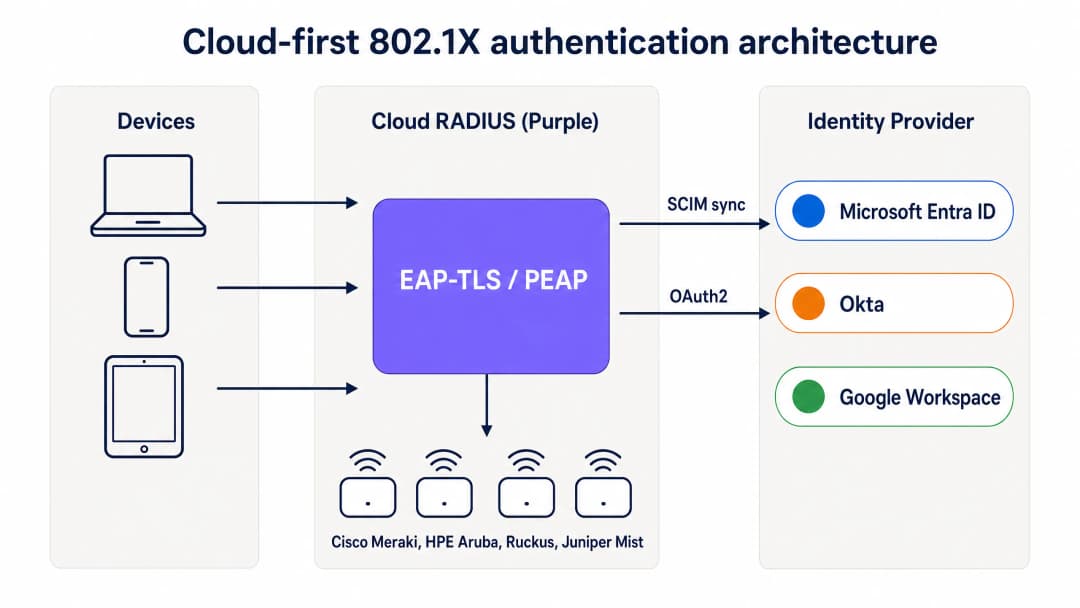
雲端優先的 802.1X 驗證架構:裝置透過 EAP-TLS 經由 Purple 的雲端 RADIUS 進行驗證,該服務會驗證憑證並套用來自 Entra ID、Okta 或 Google Workspace 的群組型原則。
MDM 如何取代內部部署的 CA
在傳統的 802.1X 部署中,憑證是由執行 Active Directory 憑證服務(AD CS)的內部部署憑證授權單位所核發。在雲端優先的部署中,MDM 會使用 SCEP(簡單憑證登冊通訊協定)接管此角色。Microsoft Intune、Jamf Pro 和其他 MDM 平台可以向雲端託管的 CA 要求憑證,並在背景自動推送至託管裝置。
其運作流程如下。IT 管理員在 MDM 中建立一個 SCEP 憑證設定檔,其範圍限定在需要 WiFi 存取權限的裝置群組。MDM 會自動將憑證推送至 Windows、macOS、iOS、iPadOS、Android 企業版和 ChromeOS 裝置。使用者不會看到任何畫面。該憑證會與 MDM 中的裝置身分識別綁定,並在過期前自動續約。當裝置連線至 WiFi 時,會向雲端 RADIUS 伺服器出示憑證,該伺服器會向 CA 驗證憑證並套用正確的網路原則。
對於使用 Microsoft Intune 的組織,Microsoft Cloud PKI 提供完全託管的 CA,直接與 Intune SCEP 設定檔整合,無需內部部署的 NDES (Network Device Enrollment Service) 伺服器。對於 Jamf 託管的 Mac 和 iOS 裝置群,Jamf 的內建 CA 或第三方雲端 CA 也能達到相同的目的。
SCIM 與立即撤銷存取權限
雲端 RADIUS 在營運上最重要的特點之一是 SCIM (System for Cross-domain Identity Management) 佈署。SCIM 是一種開放標準,可將身分變更從單一真實來源 - 您的雲端身分識別提供者 - 即時推送到相依系統。當員工在 Entra ID 或 Okta 中被停用時,SCIM 會立即將該變更推送到雲端 RADIUS 服務。下次該裝置嘗試進行驗證時,RADIUS 伺服器會傳回 Access-Reject。配合在存取點上設定的短暫工作階段逾時,裝置將在帳戶被停用後的幾分鐘內從網路中移除。
相較於共享 PSK 網路 (唯一撤銷存取權限的方法是變更所有裝置上的密碼) 以及依賴定期 LDAP 同步 (存在數小時或數天時間差) 的傳統 RADIUS 部署,這是一項重大的安全性提升。
RadSec:保護網際網路上的 RADIUS 流量
傳統 RADIUS 使用 UDP,僅提供基本訊息驗證。當您的 RADIUS 伺服器與存取點位於同一個資料中心時,這是可以接受的。但當您的 RADIUS 伺服器是雲端服務時,驗證流量就必須跨越公共網際網路。RadSec (RADIUS over TLS, RFC 6614) 使用 TLS 加密 RADIUS 交換,為驗證流量提供機密性與完整性。Purple 原生支援 RadSec,並針對尚不支援 RadSec 的存取點提供 IPsec 備援方案。
-
對於您的特定設置有任何疑問嗎?
我們的團隊與超過 80,000 個場域的場域營運商、IT 經理和網路工程師合作。立即預約 20 分鐘的通話,我們將向您展示其他與您相似的用戶是如何解決此問題的。
實作指南
部署帶有 EAP-TLS 的雲端 RADIUS 需要四個協調步驟。如果 Entra ID 和 MDM 已經就緒,試行 SSID 可以在一小時內上線。
步驟 1:將雲端 RADIUS 連接到您的身分識別提供者
透過 OAuth2 管理員同意 (適用於 Entra ID) 或 API 權杖 (適用於 Okta 和 Google Workspace) 將 Purple 連接到您的身分識別提供者。這會授權 Purple 從目錄中讀取使用者、群組和群組成員資格。設定 SCIM 佈署以即時將使用者狀態變更推送到 Purple。磁碟上不會儲存任何服務主體認證。群組變更會在下一次驗證事件時傳播,而不是依據同步排程。
步驟 2:設定您的 MDM 和 SCEP 設定檔
在 Microsoft Intune 中,為 CA 根憑證建立「信任的憑證設定檔」,然後建立指向 Purple 託管之 CA 的 SCEP 憑證設定檔。將這兩個設定檔的範圍限制在需要 WiFi 存取權限的裝置群組。對於 Jamf,請在組態設定檔中設定 SCEP 承載資料。MDM 會自動且無聲地推送憑證。在繼續下一步之前,請先在 MDM 合規性儀表板中驗證憑證傳遞狀況。
步驟 3:在雲端 RADIUS 儀表板中定義網路策略
建立將身分識別提供者群組對應到特定 VLAN 和存取控制的 RADIUS 策略。例如,將 Entra ID 群組「Staff-Finance」對應到具有完整網際網路存取權限的 VLAN 20,並將「Staff-Contractors」對應到具有自動過期之時間限制存取權限的 VLAN 30。Purple 的儀表板會在驗證時套用這些策略,無需更改防火牆。
步驟 4:更新無線基地台設定
更新無線基地台上的 SSID 設定,以使用具有 802.1X 的 WPA2-Enterprise 或 WPA3-Enterprise。輸入 Purple 雲端 RADIUS 的主、副端點主機名稱或 IP 位址,以及共用密鑰。將無線基地台設定為根據 Purple 傳回的 RADIUS 屬性使用動態 VLAN 分配。在整個場域部署之前,先在部分無線基地台子集上使用單一 SSID 進行測試。

雲端 RADIUS 與本地 RADIUS:部署時間、Active Directory 依賴性、高可用性、作業系統修補、身分識別整合和憑證生命週期管理方面的直接比較。
最佳實踐
這些建議反映了 IEEE 802.1X 標準、PCI-DSS v4.0 要求以及 Purple 在 80,000 多個場域的營運經驗。
強制對託管裝置使用 EAP-TLS。 密碼容易受到網路釣魚和憑證填充攻擊。憑證提供了身分識別和裝置合規性的加密證明。EAP-TLS 是唯一在設計上具備防釣魚能力的 802.1X 方法。
使用 SCIM 進行即時撤銷。 定期進行 LDAP 同步會留下一個空窗期,在此期間被終止合約的員工仍保留網路存取權限。SCIM 可確保在身分識別提供者中停用帳戶的瞬間,立即撤銷其存取權限。
部署多區域 RADIUS。 為您的無線基地台配置至少兩個位於不同地理區域的 RADIUS 端點。Purple 預設提供主動 - 主動多區域容錯轉移,並在數秒內完成容錯轉移。
使用動態 VLAN 進行流量區隔。 使用身分識別提供者群組成員資格將使用者動態分配到特定 VLAN。這可以隔離敏感流量,並在無需手動更改防火牆的情況下限制受損裝置的影響範圍。
啟用 RadSec。 如果您的無線基地台支援 RadSec,請啟用它以加密無線基地台與雲端 RADIUS 伺服器之間的驗證流量。這對於無線基地台位於未受信任網路區段的分支機構和場域尤為重要。
監控憑證生命週期。 將 MDM 自動更新設定為在憑證生命週期的 80% 時觸發。對於一年期憑證,更新會在第 10 個月時開始。對未能在憑證過期前更新的裝置發出警報。 欲了解企業 WiFi 安全標準和框架的更廣泛探討,請參閱我們的 企業 WiFi 安全:2026 年完整指南 。
疑難排解與風險緩釋
過渡到雲端 RADIUS 會引入新的相依性。在影響生產環境之前,請先為這些常見的失敗模式做好準備。
憑證過期。 如果裝置憑證在 MDM 更新之前過期,該裝置將會無聲無息地驗證失敗。使用者會看到連線錯誤,但沒有任何說明。緩釋措施是將 MDM 自動更新設定為憑證生命週期的 80%,並監控 MDM 合規儀表板以尋找憑證即將過期的裝置。
MDM 同步失敗。 未遵守 MDM 合規性或無法簽入的裝置可能無法接收更新的憑證。請實施合規性政策以標記異常裝置,並在憑證過期前警示管理員。
防火牆阻擋 RADIUS 流量。 存取點必須能夠透過 UDP 連接埠 1812(驗證)和 UDP 連接埠 1813(帳務),或 RadSec 的 TCP 連接埠 2083 連線到雲端 RADIUS 端點。分公司辦公室的輸出防火牆規則經常會阻擋這些連接埠。在部署前,請先測試來自存取點管理 VLAN 的連線能力。
SCIM 佈建失敗。 如果身分識別提供者與 Purple 之間的 SCIM 連線中斷,使用者狀態變更將無法傳播。請在身分識別提供者和 Purple 儀表板中監控 SCIM 同步狀態,並為同步失敗設定警示。
不支援憑證的舊型裝置。 IoT 裝置、印表機和較舊的硬體可能不支援 EAP-TLS。對於這些裝置,請使用 iPSK(個別預先共用金鑰)而非共用的 PSK。Purple 原生支援 iPSK,可為每個裝置分配唯一的金鑰,並將每個裝置放置在正確的 VLAN 上,而無需 802.1X 請求方支援。
投資報酬率與商業效益
從地端 RADIUS 移轉到雲端 RADIUS 可在基礎架構、營運和安全性方面帶來可衡量的價值。
| 維度 | 地端 NPS | 雲端 RADIUS (Purple) |
|---|---|---|
| 基礎架構成本 | Windows Server 授權、虛擬機運算、儲存空間 | 依 AP 訂閱,無需伺服器硬體 |
| 部署時間 | 數天至數週 | 一小時內 |
| 高可用性 | 手動 - 兩台伺服器加上複製 | 多區域主動 - 主動,預設 |
| 作業系統修補 | 每月,由您的團隊負責 | 廠商託管 |
| WiFi 技術支援工單 | 高 - 密碼重設、手動上線 | 降低 80% (Purple 客戶數據) |
| 存取權限撤銷 | 透過 LDAP 同步需數小時至數天 | 透過 SCIM 僅需數秒 |
| 使用 Purple 的 Staff WiFi 的 IT 團隊通常會看到 WiFi 支援工單減少 80%(Purple 內部數據,2024 年),這是因為免除了密碼重設與手動裝置上架。憑證式驗證還滿足了 PCI-DSS 規範 8.3 的強式驗證要求,以及 ISO 27001 控制措施 A.9.4 的系統與應用程式存取控制要求,進而減輕您資安團隊的稽核負擔。 |
對於 零售業 和 餐旅業 的企業而言,能從單一雲端控制面板(搭配整合的身分識別層)管理 Staff WiFi 和 Guest WiFi ,可降低跨多據點資產的營運複雜性。對於 交通運輸 營運商和 醫療保健 供應商,即時撤銷功能和完整稽核軌跡可滿足法規要求,而無需額外的工具。
Purple 的 WiFi Analytics 層在驗證基礎架構之上增加了空間佔用與混合工作數據,將 Staff WiFi 從成本中心轉變為營運情報的來源。
-
延伸閱讀: Enterprise WiFi Security: A Complete Guide for 2026 - OpenWrt Custom Firmware Integration with Purple WiFi
關鍵定義
802.1X
用於基於連接埠之網路存取控制的 IEEE 標準 (IEEE 802.1X-2020)。它要求裝置在存取點授予網路存取權限之前進行驗證,並使用由 RADIUS 伺服器中介的 EAP 交換。
IT 團隊使用 802.1X 來確保只有授權的使用者和裝置才能連線到企業網路。它提供每位使用者的加密、每個工作階段的金鑰,以及每個連線事件的完整稽核追蹤。
RADIUS
遠端使用者撥入驗證服務 (RFC 2865)。一種網路協定,為網路存取提供集中式的驗證、授權和計費 (AAA) 管理。
存取點會將每個連線請求轉發到 RADIUS 伺服器,由其決定是否允許裝置接入以及為其分配哪個 VLAN。雲端 RADIUS 取代了地端的 NPS 或 FreeRADIUS 伺服器。
EAP-TLS
可延伸驗證協定 - 傳輸層安全性 (RFC 5216)。一種 802.1X 驗證方法,使用相互 X.509 憑證交換代替密碼。
EAP-TLS 是託管裝置群組的金科玉律。它具備防網路釣魚功能,不需要密碼雜湊儲存,且是唯一符合 CISA 防釣魚多因素驗證 (MFA) 指引的 802.1X 方法。
PEAP-MSCHAPv2
搭配 Microsoft Challenge Handshake 驗證協定版本 2 的受保護可延伸驗證協定。一種舊型的 802.1X 方法,可根據儲存在 Active Directory 中的 NTLM 雜湊來驗證密碼。
PEAP-MSCHAPv2 在純雲端環境中會失敗,因為 Entra ID 不會儲存 NTLM 雜湊。從地端 AD 遷移的組織必須將 PEAP 取代為 EAP-TLS。
SCEP
簡易憑證登冊協定。MDM 平台使用的一種協定,用於在裝置上自動請求和安裝數位憑證,無需使用者互動。
IT 團隊將 SCEP 與 Intune 或 Jamf 搭配使用,以靜默方式將 WiFi 憑證配置給員工裝置。在雲端優先的部署中,SCEP 取代了地端的 NDES (網路裝置登冊服務) 伺服器。
SCIM
跨網域身分識別管理系統 (RFC 7644)。一種開放標準,可自動執行 IT 系統之間使用者身分識別資訊的即時交換。
SCIM 可確保當員工在 Entra ID 或 Okta 中被停用時,該變更會立即推送到雲端 RADIUS 服務,在數秒內(而非數小時)撤銷 WiFi 存取權限。
NPS
網路原則伺服器。Microsoft 的 RADIUS 實作,通常在 Windows Server 上執行,作為地端 Active Directory 環境的一部分。
雲端優先的組織正在淘汰 NPS,以消除 Windows Server VM、作業系統修補以及對地端 Active Directory 的依賴。雲端 RADIUS 是直接的替代方案。
RadSec
基於 TLS 的 RADIUS (RFC 6614)。一種使用 TLS 加密 RADIUS 驗證流量的協定,取代了傳統 RADIUS 所使用的基於 UDP 的明文傳輸。
使用雲端 RADIUS 時,RadSec 是必不可少的,因為驗證流量必須在存取點和雲端服務之間穿過公用網際網路。Purple 原生支持 RadSec。
iPSK
個人預共用金鑰。WPA2-Personal 的一種變體,為每個裝置分配唯一的預共用金鑰,而不是所有裝置共用單一金鑰。
iPSK 用於 IoT 裝置、印表機和其他無法支援 802.1X EAP-TLS 的硬體。它提供單一裝置的責任歸屬和 VLAN 分配,而不需要憑證支援。
Dynamic VLAN
一種網路分段技術,RADIUS 伺服器在 Access-Accept 回應中傳回 VLAN 識別碼,存取點(AP)則會自動將設備分配至該 VLAN。
動態 VLAN 允許 IT 團隊根據身份識別提供者(IdP)的群組成員身份,將員工、承包商、IoT 設備和訪客細分到不同的網路區段,而無需手動修改防火牆。
範例
一家擁有 400 家分店的零售連鎖企業需要確保所有地點的員工 WiFi 安全。他們運行 Cisco Meraki 基地台,並使用 Microsoft Entra ID 搭配 Intune 進行裝置管理。由於沒有地端 Active Directory 來運行 NPS,他們目前使用共享的 WPA2-Personal PSK。最近的一次內部稽核指出,共享 PSK 是 PCI DSS 合規性的一大漏洞。
該連鎖企業部署了 Purple 的雲端 RADIUS。首先,他們透過 OAuth 管理員同意將 Purple 連接到 Entra ID,並設定 SCIM 帳號同步。在 Intune 中,他們為 Purple CA 根憑證建立「受信任的憑證設定檔」,並為「Staff-Retail」裝置群組建立 SCEP 憑證設定檔。Intune 會自動將憑證推送到所有受管理的 POS 終端機和員工平板電腦。在 Meraki 管理介面中,他們將員工 SSID 更新為 WPA2-Enterprise,輸入 Purple 雲端 RADIUS 的主要與次要端點,並啟用動態 VLAN 分配。當裝置連線時,它會出示 Intune 發行的憑證,Purple 會向 CA 驗證該憑證並檢查 Entra ID 群組,然後根據群組成員資格將裝置置於 VLAN 10(員工網路)或 VLAN 20(管理網路)。共享的 PSK 隨即淘汰。400 個據點的部署僅花了一個週末,因為不需要部署任何現場硬體,只需修改 Meraki 中的 SSID 設定。
一所擁有 15,000 名學生的大學使用 Google Workspace 作為其主要身分識別提供者。IT 團隊希望在由 MacBook、Chromebook 和 Android 手機組成的 BYOD 設備環境中,為教職員和學生提供安全的 WiFi。他們沒有地端 Active Directory,也無意運行伺服器。
該大學將 Purple 的雲端 RADIUS 與 Google Workspace 進行整合。對於受管理的 Chromebook,他們使用 Google 管理主控台透過 SCEP 推送 WiFi 憑證設定檔,自動為每台裝置註冊憑證。對於 BYOD MacBook 和 Android 手機,他們部署了一個輕量級的引導應用程式,透過使用者的 Google 憑證進行驗證,並只需單擊一下即可在裝置上安裝憑證。後續的連線將自動使用 EAP-TLS。Purple 將 Google Workspace 的組織單位對應到 VLAN:教職員分配到 VLAN 10,學生分配到 VLAN 20,訪客則分配到 Captive Portal SSID。當學生畢業且其 Google 帳戶被停用時,SCIM 會將變更推送至 Purple,其 WiFi 存取權限將在幾分鐘內被撤銷。
練習題
Q1. 您的組織已完全從地端 Active Directory 遷移到 Microsoft Entra ID。您目前的 Staff WiFi 使用 PEAP-MSCHAPv2 對接已加入舊網域的 NPS 伺服器。在停用網域控制站後,員工回報無法再連線至 WiFi。根本原因為何?正確的長期解決方案是什麼?
提示:思考 PEAP-MSCHAPv2 需要從目錄中取得什麼,以及 Entra ID 是否提供該項目。
查看標準答案
根本原因是 PEAP-MSCHAPv2 需要 RADIUS 伺服器根據 Active Directory 中儲存的 NTLM 雜湊值來驗證使用者密碼。隨著網域控制站停用,NPS 沒有可供驗證的目錄。Entra ID 不儲存 NTLM 雜湊值,因此 NPS 無法重新導向至 Entra ID。正確的長期解決方案是用雲端 RADIUS 服務取代 NPS,從 PEAP-MSCHAPv2 遷移至 EAP-TLS,並使用 MDM (Intune) 透過 SCEP 發行設備憑證。這消除了對任何地端目錄的依賴。
Q2. 您正在為由 Jamf Pro 管理的 200 台企業 MacBook 設備部署雲端 RADIUS。您的身份識別提供者是 Okta。為這些設備設定 WiFi 憑證最安全且營運效率最高的方法是什麼?
提示:尋找一種不需要使用者互動、避免使用密碼,且能與您現有 MDM 整合的方法。
查看標準答案
設定 Jamf Pro 使用 SCEP 靜默推送設備憑證至 MacBook。在 Jamf 組態描述檔中建立 SCEP 負載,指向由您雲端 RADIUS 提供商管理的 CA。將該描述檔範圍限制在相關的設備群組。Jamf 將自動推送憑證至每台 MacBook,無需使用者互動。在同一個組態描述檔中設定 WiFi 描述檔,以搭配使用 SCEP 發行的憑證進行 EAP-TLS 驗證。透過 SCIM 將雲端 RADIUS 服務連線至 Okta,以確保當員工在 Okta 中被停用時,其 WiFi 存取權限會立即被撤銷。
Q3. 一名員工於週一上午 9:00 被解僱。人事部門於上午 9:05 停用了其 Entra ID 帳戶。但在上午 9:30,安全性警報顯示該員工的筆記型電腦仍從停車場連線至企業 WiFi。缺少了什麼設定?您該如何修正?
提示:RADIUS 伺服器如何得知使用者的狀態已在身份識別提供者中發生變更?
查看標準答案
該部署依賴定期 LDAP 同步,而非 SCIM 佈建。自帳戶停用以來,LDAP 同步尚未執行,因此雲端 RADIUS 服務仍視該使用者為啟用狀態。修正方法是在 Entra ID 和雲端 RADIUS 服務之間啟用 SCIM 佈建。SCIM 會即時推送使用者狀態變更,因此當上午 9:05 在 Entra ID 中停用帳戶時,RADIUS 服務會立即收到變更。下次設備嘗試重新驗證時(由存取點上的工作階段逾時控制),它將收到 Access-Reject。在存取點上設定較短的工作階段逾時(15 到 30 分鐘)可限制帳戶停用與網路驅逐之間的最大時間差。
Q4. 您的場域有 50 台 IoT 設備(數位看板播放器、環境感測器和印表機)不支援 802.1X EAP-TLS。您要如何確保這些設備與您的 EAP-TLS 員工網路在同一個 WiFi 基礎架構上安全運作?
提示:思考哪種驗證方法可以提供單一設備的權責歸屬,而不需要憑證支援。
繼續閱讀本系列
當員工離職時如何撤銷 WiFi 存取權限
本指南向 IT 和場域營運團隊展示如何在員工離職時移除其員工 WiFi 存取權限,同時不影響其他員工的正常工作。本指南比較了基於憑證的 802.1X、身分專屬的 iPSK 和 SCIM 驅動的停用流程,並提供當天執行的工作手冊、測試方法和稽核憑證模型。
安全 BYOD WiFi:Passpoint 憑證註冊對比 xPSK (iPSK)
針對 IT 團隊的全面技術指南,說明如何使用免設定的 Passpoint EAP-TLS 憑證與特定廠商的 xPSK (iPSK/easyPSK、DPSK、PPSK、MPSK) 來保護未託管的員工與學生裝置 (BYOD)。
WPA2 Personal 對比 Enterprise:有何不同以及您應該使用哪一個?
本技術參考指南提供 WPA2 Personal 與 WPA2 Enterprise 無線安全標準之間的權威性比較。其詳細說明了 IT 領導者保護企業網路所需的底層密碼編譯交握、架構需求和部署方法。讀者將學習如何從共享密碼過渡到個別化的憑證型驗證,以符合合規性架構並減輕內部威脅。
對於您的特定設置有任何疑問嗎?
我們的團隊與超過 80,000 個場域的場域營運商、IT 經理和網路工程師合作。立即預約 20 分鐘的通話,我們將向您展示其他與您相似的用戶是如何解決此問題的。