
自訂 Captive Portal:HTML 與 CSS 指南
本權威技術參考指南概述了設計和編寫自訂 captive portal 登入頁面所需的開發標準、CSS 架構以及網路層級限制。它為前端開發人員和網路架構師提供了實用的策略,以因應 Apple CNA 與 Android webview 環境,確保提供像素完美、合規且高效能的顧客 WiFi 體驗。
Video overview
收聽此指南
查看播客逐字稿
核心系列的一部分:Captive Portal 指南 →
Custom Captive Portal Architecture & CNA Inspector Tool
Model your custom HTML/CSS guest WiFi splash page. Inspect walled garden domain allowlists, evaluate Captive Network Assistant (CNA) mini-browser restrictions across iOS and Android, and export production-ready boilerplate code.
Vendor Controller Profile: Cisco Meraki (MR Series)
Architecture Category: Cloud-Managed WLAN
Redirection Flow: Custom splash URL with URL parameter append ($login_url)
RFC 3576 CoA Support: Supported (Dynamic Session Terminate / Role Push)
RFC 8908 Modern API: Native Controller Support
Onboarding & Conversion: Click-Through / Terms Acceptance
Guests review acceptable use policies (AUP) and click a single button to connect.
Average Onboarding Duration: ~8 seconds
Target Venue Policy: Fast friction-free onboarding, social marketing consent, and return visitor recognition.
Eliminate Captive Portal Support Calls & Walled Garden Errors
Building custom HTML/CSS captive portals by hand across changing iOS, Android, and Windows mini-browsers causes frequent disconnection tickets and broken walled gardens. Purple delivers enterprise cloud captive portals with 99.99% uptime SLA, native RFC 8908 support, and seamless CRM integrations across 40,000+ venues worldwide.
- ✓ Native Cisco Meraki, Aruba & Ruckus API Sync
- ✓ Automated Walled Garden Allowlist Orchestration
- ✓ Guaranteed iOS & Android CNA Compatibility
- ✓ GDPR, CCPA & ISO 27001 Certified Data Security
Request Custom Captive Portal Consultation
Speak with a Purple wireless architect to review your splash page requirements and controller integrations.
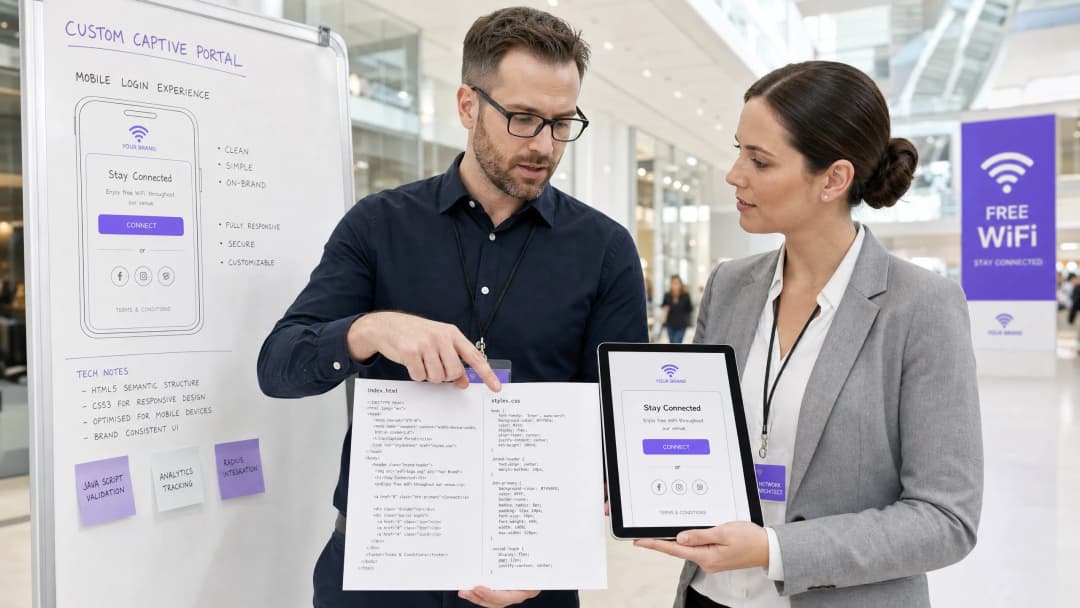
執行摘要
對於企業場所 - 範圍涵蓋奢華酒店 Hospitality、零售連鎖店 Retail、交通樞紐 Transport 以及現代醫療園區 Healthcare - 訪客 WiFi 登入頁面就是其數位門面。然而,超過 90% 的訪客 WiFi 登入發生在行動裝置上,其頁面轉譯並非由 Safari 或 Chrome 等標準瀏覽器控制,而是受到高度限制的 Captive Network Assistant (CNA) webview 所主導 [1]。這些「微型瀏覽器」執行嚴格的沙盒限制:它們會封鎖外部 CDN、停用持續性 Cookie、忽略外部網頁字型,並嚴格限制 JavaScript 執行,以降低安全風險並防止工作階段劫持 [2]。
當開發人員使用傳統網頁標準設計登入頁面時,這些限制會導致版面配置損壞、品牌資產遺失以及登入按鈕失效,直接影響客戶滿意度和數位互動。本指南提供了應對這些挑戰的解決方案,介紹了防禦性編碼實務 - 例如行內 CSS、Base64 資產編碼、系統字型堆疊以及明確的導航驅動驗證握手 - 以確保無縫的跨平台轉譯。此外,我們也探討了利用如 Purple 的入口網站建置器等託管解決方案,如何讓開發人員在保持完整 HTML/CSS 創意控制的同時,將 RADIUS 驗證、資料庫擴充、GDPR/PCI 合規性以及多廠商 AP 整合等工作委外處理 [3]。
技術深度剖析
要建置一個具彈性的自訂 Captive Portal,開發人員必須瞭解訪客與開放式 SSID 關聯時發生的網路層級攔截和瀏覽器虛擬化。
Captive Portal 生命週期
當用戶端裝置與 captive SSID 關聯時,會觸發以下程序:
- IP 關聯:裝置完成 3 向握手,並透過 DHCP 要求 IP 地址。
- 主動連線探測:作業系統的背景網路管理員會立即向專屬的廠商中立測試用 URL 發送 HTTP GET 要求 (例如 Apple 的
http://captive.apple.com/hotspot-detect.html或 Google 的http://connectivitycheck.gstatic.com/generate_204) [1]。 - DNS/HTTP 攔截:本機無線區域網路控制器 (WLC) 或 Access Point (AP) 會攔截此 port 80 HTTP 要求。閘道不會傳回預期的 HTTP 200 或 204 狀態,而是透過 HTTP 302 重新導向,將用戶端的流量重新導向至 captive portal 的登陸頁面 URL [2]。
- 產生 Webview:偵測到重新導向後,作業系統會產生其原生 Captive Network Assistant (CNA) 微型瀏覽器以顯示重新導向的登入頁面,使用者無需手動開啟完整瀏覽器。5. 驗證與狀態轉換:使用者填寫登入表單,將憑證提交回傳送入口伺服器,伺服器會指示閘道器(通常透過 RADIUS Access-Accept 或外部 API 呼叫)授權該 MAC 地址。
- CNA 結束握手:CNA 微型瀏覽器對其金絲雀 URL 執行另一次 HTTP GET。如果收到預期的 200/204 回應,它會將右上方按鈕從「取消」更改為「完成」,並將 WiFi 連線建立為主要網路介面。
平台專屬的微型瀏覽器限制
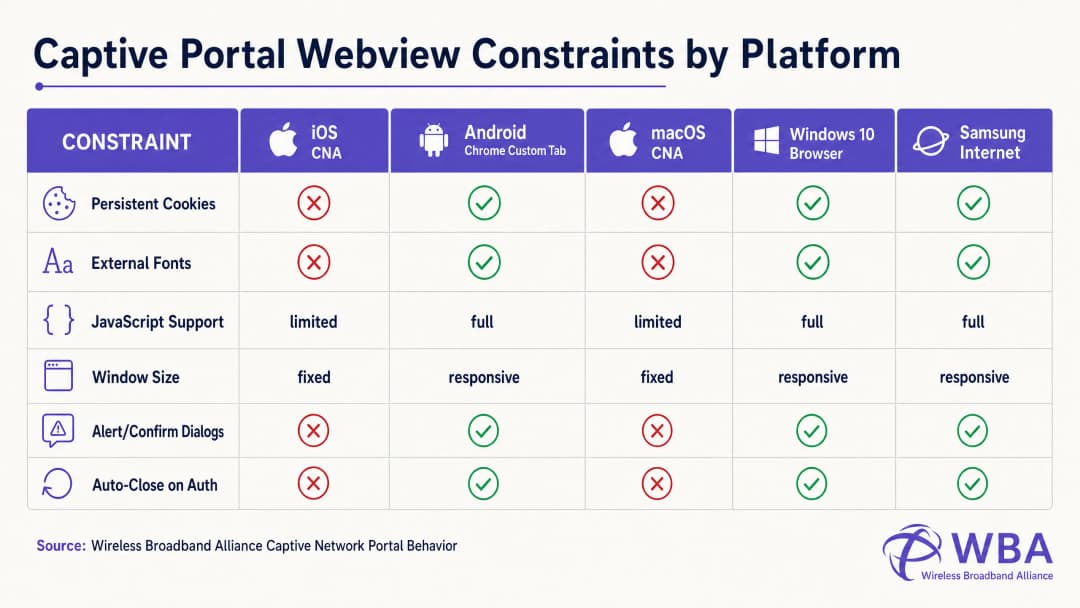
每個作業系統都在不同的 Webview 環境中處理此生命週期,從而導致高度分化的行為。下表詳細說明了這些關鍵限制:
| 平台 / Webview | 顯示方式 | 永久性 Cookie | 外部網頁字型 | JavaScript 執行 | 視窗尺寸 | 結束握手觸發器 |
|---|---|---|---|---|---|---|
| Apple iOS CNA (Websheet) | 微型瀏覽器彈出視窗 | 已阻擋(關閉時銷毀) | 已阻擋(離線) | 受限(無 localStorage/sessionStorage) | 回應式(裝置寬度) | 僅限全頁面 HTTP 重新導向 [1] |
| Apple macOS CNA (Captive Network Assistant) | 微型瀏覽器彈出視窗 | 已阻擋 | 已阻擋 | 受限(無 alert/confirm 對話方塊) | 固定 (900px x 572px) | 僅限全頁面 HTTP 重新導向 |
| Android (Google) (CaptivePortalLogin) | 推播通知 -> Chrome Custom Tab | 允許(與 Chrome 共用) | 允許(若在圍牆花園白名單中) | 完整 | 回應式 | 自動 (Captive Portal API / 204 檢查) [2] |
| Samsung Android (Samsung Internet) | 推播通知 -> 微型瀏覽器 | 允許 | 允許 | 完整 | 回應式 | 自動 |
| Windows 10/11 (預設瀏覽器) | 自動啟動預設瀏覽器 | 允許(完整瀏覽器環境) | 允許 | 完整 | 回應式 | 手動 / 自動 |
避開 Apple CNA 「完成」按鈕陷阱的編碼方法
自訂傳送入口開發中最常見的失敗模式之一是 iOS 裝置上的**「完成」按鈕陷阱**。當使用者進行驗證時,iOS Websheet Webview 必須偵測到網路已不再受限。它透過監控其背景金絲雀請求的成功與否來做到這一點。
至關重要的是,iOS CNA 只會在全頁面 HTTP 導向(位置重導向)時觸發此檢查。如果開發人員建置了一個現代的單頁應用程式(SPA),該程式透過非同步 AJAX 呼叫(例如 fetch() 或 Axios)提交表單資料,並在不變更 URL 的情況下動態更新 DOM,則 CNA 永遠不會重新執行其連線檢查。使用者將在閘道層級通過驗證,但右上角的 CNA 按鈕將保持為「取消」。如果感到挫折的使用者點擊了「取消」,iOS 裝置將立即與 SSID 取消關聯,終止 WiFi 工作階段 [1]。
為防止這種情況,驗證成功的處理常式必須執行全頁面重導向到實體落地網頁(例如 window.location.href = '/success'),或透過標準 HTTP POST 動作以原生方式提交登入表單。
實作指南
為了確保在所有平台上的一致轉譯,開發人員必須從現代、資產繁重的網頁設計轉換為高度自足、防禦性的編碼風格。
黃金法則:針對零網際網路連線進行設計
在 Captive Portal 狀態下,用戶端裝置無法存取更廣泛的網際網路。它只能解析和存取在無線控制器Walled Garden中明確列入白名單的 IP 位址和網域(例如 Captive Portal 伺服器本身的 IP)。因此,HTML 中參照的任何外部資產都將無法載入,從而導致版面配置損壞。
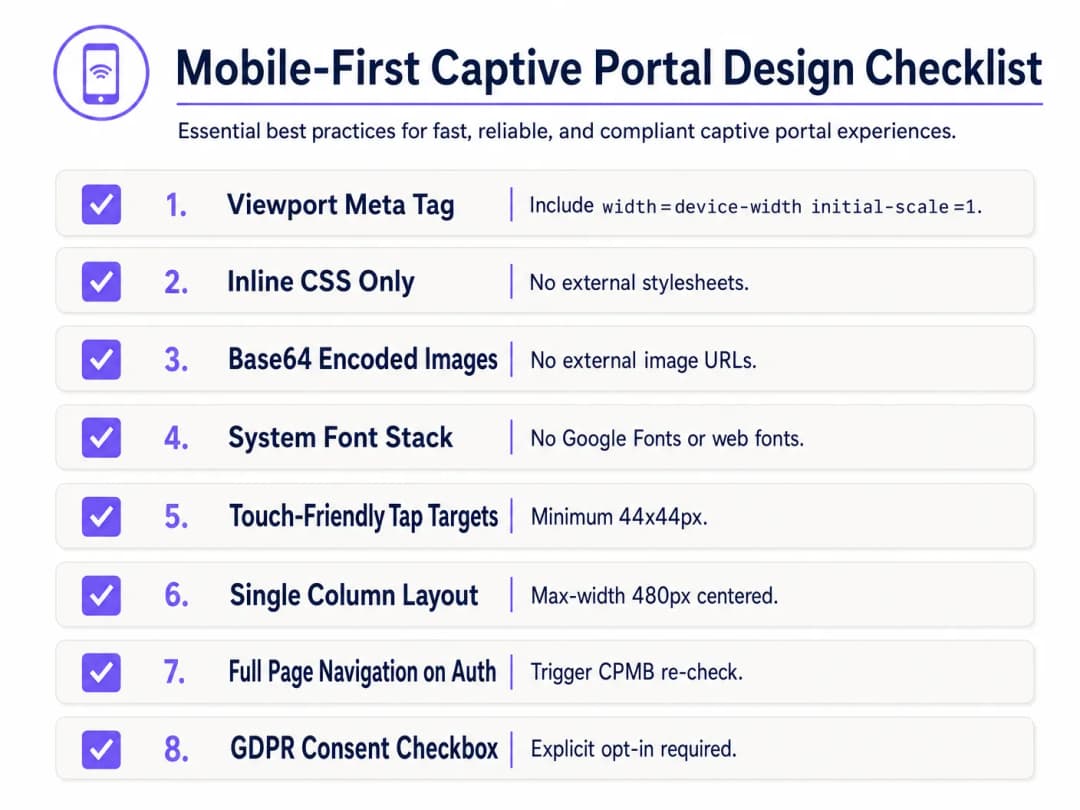
為了進行防禦性設計,請實作以下 行動優先 Captive Portal 設計檢查清單:
1. 檢視區配置
為了防止行動裝置將檢視區縮小到桌上型電腦寬度(通常為 980px),HTML <head> 必須包含回應式檢視區 Meta 標記。如果沒有此標記,文字和輸入欄位在行動裝置上會顯得微不足道:
<meta name="viewport" content="width=device-width, initial-scale=1.0, maximum-scale=1.0, user-scalable=no">
2. 內聯 CSS 並移除外部相依性
切勿連結到外部 CSS 檔案或 CDN(例如 Bootstrap、Tailwind 或 Google Fonts)。所有 CSS 必須嵌入到 HTML <head> 中的 <style> 區塊內。
對於字型,請利用參照預先安裝之本機作業系統字型的系統字型堆疊。這完全避免了 HTTP 請求,並確保頁面使用裝置的原生、高品質無襯線字型立即載入:
body {
    font-family: -apple-system, BlinkMacSystemFont, "Segoe UI", Roboto, Helvetica, Arial, sans-serif;
    background-color: #F5F1ED; /* 品牌珍珠白 */
    color: #011638; /* 品牌深藍色 */
    margin: 0;
    padding: 0;
    display: flex;
    flex-direction: column;
    align-items: center;
    justify-content: center;
    min-height: 100vh;
}
3. Base64 資產編碼
除非代管網域已列入閘道器隔離花園(Walled Garden)的白名單,否則不應透過外部 HTTP URL 引用圖片、標誌與圖示。最可靠的方法是將小型視覺資產(例如 PNG 或 SVG 標誌)直接以 Base64 資料 URI 的形式編碼至 HTML 或 CSS 中:
<!-- 行內 Base64 標誌範例 -->
<img src="data:image/svg+xml;base64,PHN2ZyB4bWxucz0iaHR0cDovL3d3dy53My5vcmcvMjAwMC9zdmciIHZpZXdCb3g9IjAgMCAxMDAgMTAwIj48Y2lyY2xlIGN4PSI1MCIgY3k9IjUwIiByPSI0MCIgZmlsbD0iIzc0NThGRCIvPjwvc3ZnPg==" alt="Purple Logo" class="brand-logo">
4. 輸入欄位與點擊目標最佳化
為符合行動裝置可用性標準(例如 Apple 的 Human Interface Guidelines),所有互動式元素都必須針對觸控輸入進行最佳化:
- 輸入欄位字型大小:輸入文字字型大小必須至少為 16px。如果字型大小低於此限制(例如 14px),iOS Safari 與 CNA 在聚焦於輸入欄位時會自動放大,進而導致網頁版面配置變形 [1]。
- 點擊目標:按鈕、核取方塊和連結的最小觸控目標區域必須為 44px x 44px,以防止誤觸或造成使用者困擾。
5. 法律同意與 GDPR 合規性
擷取訪客資料(例如電子郵件、電話號碼或社群個人檔案)時,HTML 結構必須支援明確的法律同意。在 GDPR 規範下,預先勾選的核取方塊或默示同意的聲明(例如「登入即表示您同意我們的條款」)均屬不合規 [3]。
- 針對服務條款與隱私權政策,提供預設未勾選的核取方塊。
- 將詳細的法律條文包裝在可捲動且高度受限的容器中(
max-height: 120px; overflow-y: auto;),以確保主要登入表單保持在首屏(above the fold)顯示。
<div class="consent-container">
    <input type="checkbox" id="terms_consent" name="terms_consent" required>
    <label for="terms_consent">
        我明確同意 <a href="#" onclick="showTerms()">服務條款</a>,並同意依據 <a href="#" onclick="showPrivacy()">隱私權政策</a> 處理我的資料。
    </label>
</div>
對於您的特定設置有任何疑問嗎?
我們的團隊與超過 80,000 個場域的場域營運商、IT 經理和網路工程師合作。立即預約 20 分鐘的通話,我們將向您展示其他與您相似的用戶是如何解決此問題的。
自訂 Captive Portal HTML/CSS 範本
以下是完整、可用於生產環境的單一檔案 HTML/CSS 範本,其中整合了所有行動優先、符合 CNA 規範的最佳實踐。它具備響應式版面配置、系統字型堆疊、支援 Base64 的資產預留位置、觸控友好的輸入欄位,以及符合 GDPR 規範的明確同意結構:
<!DOCTYPE html>
<html lang="en">
<head>
    <meta charset="UTF-8">
    <meta name="viewport" content="width=device-width, initial-scale=1.0, maximum-scale=1.0, user-scalable=no">
    <title>Guest WiFi Login</title>
    <style>
        /* CSS Reset & Variable Declarations */
        :root {
            --color-primary: #7458FD; /* Purple Brand Colour */
            --color-dark: #011638; /* Dark Blue */
            --color-light: #F5F1ED; /* Pearl White */
            --color-white: #FFFFFF;
            --color-border: #D1D5DB;
            --radius-container: 12px;
            --radius-element: 6px;
        }

        * {
            box-sizing: border-box;
            -webkit-tap-highlight-color: transparent;
        }

        body {
            font-family: -apple-system, BlinkMacSystemFont, "Segoe UI", Roboto, Helvetica, Arial, sans-serif;
            background-color: var(--color-light);
            color: var(--color-dark);
            margin: 0;
            padding: 20px;
            display: flex;
            flex-direction: column;
            align-items: center;
            justify-content: center;
            min-height: 100vh;
        }

        /* 響應式卡片版面配置 */
        .portal-card {
            background-color: var(--color-white);
            width: 100%;
            max-width: 420px;
            padding: 32px 24px;
            border-radius: var(--radius-container);
            box-shadow: 0 4px 20px rgba(1, 22, 56, 0.05);
            text-align: center;
        }

        .logo-container {
            margin-bottom: 24px;
        }

        /* 內嵌 Base64 Logo 預留位置 */
        .logo {
            width: 120px;
            height: auto;
        }

        h1 {
            font-size: 24px;
            font-weight: 700;
            margin: 0 0 8px 0;
            color: var(--color-dark);
        }

        p {
            font-size: 14px;
            color: #4B5563;
            margin: 0 0 24px 0;
            line-height: 1.5;
        }

        /* 表單樣式 */
        .form-group {
            text-align: left;
            margin-bottom: 16px;
        }

        label {
            display: block;
            font-size: 14px;
            font-weight: 600;
            margin-bottom: 6px;
            color: var(--color-dark);
        }

        /* 關鍵:字型大小必須至少為 16px 以防止 iOS 自動縮放 */
        input[type="email"],
        input[type="text"] {
            width: 100%;
            height: 48px;
            padding: 12px 16px;
            font-size: 16px;
            border: 1px solid var(--color-border);
            border-radius: var(--radius-element);
            background-color: var(--color-white);
            color: var(--color-dark);
            outline: none;
            transition: border-color 0.2s;
        }

        input[type="email"]:focus,
        input[type="text"]:focus {
            border-color: var(--color-primary);
            box-shadow: 0 0 0 3px rgba(116, 88, 253, 0.15);
        }

        /* 同意條款樣式 */
        .consent-group {
            display: flex;
            align-items: flex-start;
            text-align: left;
            margin: 20px 0;
        }

        /* 適合觸控的目標尺寸 */
        input[type="checkbox"] {
            width: 20px;
            height: 20px;
            margin: 2px 12px 0 0;
            flex-shrink: 0;
            cursor: pointer;
            accent-color: var(--color-primary);
        }

        .consent-label {
            font-size: 13px;
            line-height: 1.4;
            color: #4B5563;
            user-select: none;
        }

        .consent-label a {
            color: var(--color-primary);
            text-decoration: none;
            font-weight: 600;
        }

        .consent-label a:hover {
            text-decoration: underline;
        }

        /* Touch-Friendly CTA Button (Minimum 44px height) */
        .btn-submit {
            width: 100%;
            height: 48px;
            background-color: var(--color-primary);
            color: var(--color-white);
            border: none;
            border-radius: var(--radius-element);
            font-size: 16px;
            font-weight: 600;
            cursor: pointer;
            transition: background-color 0.2s;
            display: flex;
            align-items: center;
            justify-content: center;
        }

        .btn-submit:hover {
            background-color: #5B3EE3;
        }

        .btn-submit:active {
            background-color: #4A2FD4;
        }

        /* Legal Terms Scrollbox */
        .terms-scrollbox {
            display: none; /* Toggled via JS */
            text-align: left;
            font-size: 11px;
            color: #6B7280;
            background-color: var(--color-light);
            padding: 12px;
            border-radius: var(--radius-element);
            max-height: 100px;
            overflow-y: auto;
            margin-bottom: 16px;
            border: 1px solid var(--color-border);
        }

        .footer {
            margin-top: 24px;
            font-size: 11px;
            color: #9CA3AF;
        }
    </style>
</head>
<body>

    <div class="portal-card">
        <div class="logo-container">
            <!-- Replace src with your actual Base64-encoded SVG or PNG -->
            <svg class="logo" xmlns="http://www.w3.org/2000/svg" viewBox="0 0 100 30">
                <rect width="100" height="30" rx="6" fill="#7458FD"/>
                <text x="50" y="20" font-family="sans-serif" font-size="12" fill="#FFFFFF" font-weight="bold" text-anchor="middle">您的品牌</text>
            </svg>
        </div>

        <h1>歡迎使用訪客 WiFi</h1>
        <p>請在下方輸入您的詳細資訊,以取得安全且高速的網際網路連線。</p>

        <!-- Form must submit natively (full page navigation) to clear Apple CNA -->
        <form action="/login/submit" method="POST" onsubmit="return validateForm()">
            <div class="form-group">
                <label for="guest_name">姓名</label>
                <input type="text" id="guest_name" name="name" placeholder="王小明" required autocomplete="name">
            </div>

            <div class="form-group">
                <label for="guest_email">電子郵件地址</label>
                <input type="email" id="guest_email" name="email" placeholder="john@example.com" required autocomplete="email">
            </div>

            <div class="consent-group">
                <input type="checkbox" id="terms_consent" name="terms_accepted" required>
                <label for="terms_consent" class="consent-label">
                    我接受 <a href="#" onclick="toggleTerms(event)">服務條款</a> 並同意遵守 GDPR 法規進行數據處理。
                </label>
            </div>

            <div id="terms_box" class="terms-scrollbox">
                <strong>WiFi 服務條款:</strong><br>
                1. 本服務依「現況」提供,不提供任何保證。<br>
                2. 使用者不得從事非法的頻寬密集型活動。<br>
                3. 個人資料之收集僅用於身分驗證與行銷訂閱,並符合我們的隱私權政策。
            </div>

            <button type="submit" class="btn-submit">連接至 WiFi</button>
        </form>

        <div class="footer">
            Powered by Purple | 安全訪客 WiFi
        </div>
    </div>

    <script>
        function toggleTerms(e) {
            e.preventDefault();
            var box = document.getElementById('terms_box');
            box.style.display = (box.style.display === 'block') ? 'none' : 'block';
        }

        function validateForm() {
            var consent = document.getElementById('terms_consent');
            if (!consent.checked) {
                alert('您必須接受服務條款才能進行連線。');
                return false;
            }
            return true;
        }
    </script>
</body>
</html>
疑難排解與風險規避
部署自訂程式碼的 HTML/CSS Captive Portal 時,IT 營運團隊經常會遇到幾個嚴重的營運風險:
1. SSL/TLS 憑證警告迴圈
由於 Captive Portal 是透過攔截流量來運作,這與現代的 HTTPS 網路安全機制存在根本上的衝突。當使用者嘗試造訪 HTTPS 網站(例如 https://www.google.com),而閘道器嘗試將該流量重新導向至 HTTP Captive Portal 時,瀏覽器會偵測到 SSL 憑證不符合,並顯示嚴重的「您的連線不是安全連線」安全警告。
- 規避措施:切勿嘗試直接攔截 HTTPS 流量。應完全依賴作業系統內建的 CNA 輔助程式(該程式會發送未加密的 HTTP 請求以觸發重新導向)。確保您的 Captive Portal 網域擁有有效且受公開信任的 SSL 憑證(例如 Let's Encrypt 或 DigiCert),並且僅在初始 HTTP 重新導向成功將使用者引導至您的入口網站網域後,才透過 HTTPS 提供服務 [2]。
2. DNS 解析失敗(圍牆花園陷阱)
如果您自訂的 HTML 頁面引用了外部資源(例如:Facebook、Google 等社群登入 OAuth 端點或付款閘道),除非已在無線控制器的 Walled Garden 中明確將這些網域列入白名單,否則對這些網域的 DNS 請求將會失敗。若白名單中遺漏了某個網域,登入流程將會中斷,並呈現空白畫面。
- 緩解措施:維持嚴格且精簡的 Walled Garden 清單。如果使用社群登入,請將身分驗證提供商推薦的特定萬用字元網域(例如
*.google.com、*.gstatic.com)列入白名單。
3. 工作階段逾時與 MAC 位址詐騙安全漏洞
標準的 Captive Portal 是根據裝置的 MAC 位址進行驗證。然而,現代行動作業系統(iOS 14+ 和 Android 10+)預設會使用隨機 MAC 位址(私用 WiFi 位址),並定期進行輪替。這可能會導致訪客反覆收到重新驗證的提示,嚴重破壞使用者體驗 [1]。
- 緩解措施:在 RADIUS 伺服器上設定合理的工作階段逾時(例如 24 小時)以防止過期工作階段,並採用 Passpoint (Hotspot 2.0) 或 WPA3-Enterprise 等現代驗證標準,實現無縫、安全的註冊,從而完全繞過基於 MAC 的 Captive Portal。
Purple 產品關聯性:自建還是購買
雖然編寫單個 HTML 頁面非常簡單,但代管、保護和擴充自訂 Captive Portal 基礎架構卻面臨著巨大的技術和合規障礙。下表比較了自行代管自訂入口網站與使用 Purple 的託管企業平台在工程和營運方面的現實情況:
| 功能 / 營運需求 | 自行代管的自訂入口網站 | Purple 企業 WiFi 平台 |
|---|---|---|
| HTML/CSS 自訂 | 完全手動編碼,將檔案上傳到個別 AP 或本機網頁伺服器。 | 像素級精確的開發人員編輯器,允許自訂 HTML/CSS 嵌入,並結合拖放式視覺化建構工具。 |
| RADIUS 基礎架構 | 必須部署、設定和維護高可用性的 FreeRADIUS 或雲端 RADIUS 伺服器 [4]。 | 內建、全球分佈的雲端原生 RADIUS-as-a-Service,具有主動 - 主動備援和 99.99% 的運作時間 SLA。 |
| 多品牌 AP 支援 | 每個硬體品牌(Cisco、Aruba、Meraki、Ruckus)都需要自訂整合指令碼 [5]。 | 與 200 多種硬體型號進行原生、隨插即用的整合;在混合硬體資產中部署統一的入口網站。 |
| 資料隱私與合規性 | 場所需承擔 GDPR、CCPA 和 PCI-DSS 合規性的 100% 法律責任,包括安全的資料庫加密和資料刪除工作流程。 | 設計上完全合規。內建同意管理、自動化資料主體刪除請求,以及安全的 ISO 27001 驗證代管。 |
| Identity Provider Integrations | Manual OAuth2 integrations with Google, Facebook, Apple, and local SMS gateways. | One-click integrations with major social platforms, SMS gateways, and Azure AD / Okta for corporate guests. |
Purple's platform resolves the "Build vs. Buy" dilemma. It provides developers with the complete creative freedom of a custom HTML/CSS workspace while eliminating the complex, high-risk backend infrastructure engineering required to support secure RADIUS authentication at scale.
ROI & Business Impact
Investing in a professionally engineered, responsive custom captive portal delivers quantifiable returns across IT operations, marketing, and legal compliance.
1. Operational Cost Reduction (IT Helpdesk Tickets)
In large-scale deployments, such as a stadium or multi-site retail chain, a broken captive portal is a leading driver of IT helpdesk escalations. When guests encounter a "white screen" or a non-responsive login button, they overwhelm on-site staff or submit support tickets.
$$\text{Annual Support Savings} = (\text{Total Annual Guest Visits} \times \text{Portal Failure Rate} \times \text{Helpdesk Contact Rate}) \times \text{Cost Per Support Ticket}$$
- Scenario: A convention centre with 1,000,000 annual visitors. A poorly coded portal has a 5% failure rate on older iOS devices, leading to a 10% helpdesk contact rate. At an industry-standard $15 per support ticket, the operational cost is: $$(1,000,000 \times 0.05 \times 0.10) \times $15 = $75,000 \text{ annually in avoidable support overhead}$$
- Outcome: Transitioning to a CNA-optimised, mobile-first template reduces the portal failure rate to <0.1%, virtually eliminating this operational drain.
2. Marketing Data Capture and Opt-in Optimisation
For retail and hospitality venues, the guest WiFi portal is the primary mechanism for capturing clean, first-party customer data. A poorly designed user interface with microscopic text or a clunky form layout causes high bounce rates - users abandon the login process entirely, resulting in lost marketing opportunities.
- Case Study (Retail): A national retail chain implemented a mobile-first optimised captive portal utilising Purple's platform. By replacing a multi-step login form with a single-field email input (font-size: 16px) and an optimised 48px tap-target button, they saw a 42% increase in completed registrations and a 28% increase in marketing newsletter opt-ins within the first quarter [6].
3. Legal and Regulatory Risk Mitigation
在 GDPR 與 CCPA 的規範下,不合規的數據收集會帶來嚴重的財務處罰(在 GDPR 下最高可達全球年營業額的 4%)。依賴預先勾選的核取方塊,或未能於登入頁面上提供清晰且易於存取的隱私政策,會使企業面臨巨大的法律責任。
- 降低風險的投資報酬率 (ROI):實施明確且未預先勾選的同意核取方塊,並在優化的滾動文字方框內提供服務條款,可確保 100% 符合法規要求,從而降低數百萬美元監管罰款的風險並保護品牌聲譽。
關鍵要點總結
- CNA 沙箱具有限制性:Apple 的 iOS Websheet 與 macOS CNA 是高度沙箱化的環境,會封鎖外部資產、Cookie 和網頁字型。所有樣式與資產都必須是自我包含的(行內 CSS、Base64 圖片、系統字型)[1]。
- AJAX 會破壞 iOS 結束信號交換:為了成功將 iOS 裝置從「受限(Captive)」轉換為「已連線」(將右上角的按鈕從「取消」變更為「完成」),您必須觸發全頁面的 HTTP 重新導向。非同步的 DOM 更新會使裝置陷入受限迴圈。
- 行動優先是強制性的:超過 90% 的登入發生在行動裝置上。請設計單欄版面配置(最大寬度:480px)、使用適合觸控的點選目標(至少 44px x 44px),並對所有文字輸入欄位強制執行至少 16px 的字型大小,以防止 iOS 瀏覽器自動縮放。
- 圍牆花園(Walled Gardens)控制 DNS:登入期間引用的任何外部網域(例如社群登入 API)都必須在無線控制器的圍牆花園中明確加入白名單,否則頁面將無法載入。
- Purple 消除後端複雜性:利用 Purple 的入口網站建置工具,開發人員可透過自訂編輯器獲得完整的 HTML/CSS 控制權,同時將 RADIUS、多品牌 AP 整合以及符合 GDPR 的資料庫管理等龐大的安全性、擴充性與合規性負擔卸載 [3]。
參考資料
- [1] Wireless Broadband Alliance: Captive Network Portal Behaviour
- [2] Android Open Source Project: Captive Portal Login Webview Integration
- [3] European Data Protection Board: Guidelines on Consent under Regulation 2016/679
- [4] 如何使用 Cloud RADIUS 實施 802.1X 驗證
- [5] Cisco 無線 AP:2026 年產品與部署指南
- [6] Purple WiFi 行銷與分析平台
收聽技術簡報
收聽資深解決方案架構師討論自訂 Captive Portal 的技術限制與實施策略:
關鍵定義
Captive Portal
在向 WiFi 網路的新連線使用者授與更廣泛的網路資源存取權限之前,向其顯示的網頁,通常用於身分驗證、付款或顯示服務條款。
IT 團隊在閘道層級部署 Captive Portal,以控制訪客存取、收集使用者資料並強制執行法律合規性。
Captive Network Assistant (CNA)
一種受到高度限制、沙箱化的迷你瀏覽器,由作業系統(例如 Apple iOS 和 macOS)在偵測到 Captive Network 重新導向時自動產生,專門用於協助進行入口網站身分驗證。
CNA 網頁檢視執行嚴格的限制,包括封鎖外部 CDN、持久性 Cookie 和本機儲存,這經常會破壞標準的網頁設計。
Walled Garden
未經驗證的訪客使用者在完成 Captive Portal 登入流程之前,被允許透過閘道存取的 IP 位址、子網路或網域名稱的限制列表。
開發人員必須確保任何外部資源(例如社群登入 API 或付款閘道)都已列入 Walled Garden 的白名單中,以防止登入流程中斷。
Base64 編碼
一種將二進位資料(例如圖片)表示為 ASCII 字串的二進位轉文字編碼方案,允許將資產直接嵌入 HTML 或 CSS 文件中。
利用 Base64 編碼處理標誌和圖示可以消除外部 HTTP 請求,確保資產在離線 CNA 環境中完美呈現。
RADIUS (Remote Authentication Dial-In User Service)
一種網路協定,為連線和使用網路服務的使用者提供集中式的驗證、授權和記帳(AAA)管理。
一旦滿足身分驗證標準,Captive Portal 伺服器就會與 RADIUS 伺服器進行通訊,以在網路閘道處授權訪客的 MAC 位址。
系統字型集
一種 CSS font-family 宣告,其優先使用預先安裝的作業系統字型(例如 iOS 上的 San Francisco、Windows 上的 Segoe UI 以及 Android 上的 Roboto),而非外部網頁字型。
實作系統字型集可確保立即轉譯排版,而不會觸發對 Google Fonts 等服務被封鎖的外部 HTTP 請求。
Canary URL
由作業系統廠商維護的專用、未加密 HTTP URL(例如 captive.apple.com),用於測試裝置是否擁有不受限制的網際網路連線能力。
作業系統背景網路管理員會檢查此 URL,以偵測是否存在 Captive Portal 並觸發 CNA 網頁檢視彈出視窗。
Passpoint (Hotspot 2.0)
由 WiFi Alliance 開發的產業標準,使行動裝置能夠自動探索 WiFi 熱點並進行安全驗證,無需透過手動的 Captive Portal 登入。
企業將 Passpoint 與 Purple 等平台結合使用,將訪客從繁瑣的歡迎頁面引導至無縫、類似行動網路的安全漫遊體驗。
範例
一家擁有 250 間客房的奢華連鎖酒店 [餐旅業](/industries/hotels) 希望實作自訂顧客 WiFi 登入頁面,以完美符合其高階品牌形象指南。他們的創意代理商設計了一個啟動頁面,其中使用自訂品牌字型(代管於 Adobe Fonts)、多個高解析度背景圖片(代管於公開的 AWS S3 儲存桶),以及一個多步驟動畫 JavaScript 精靈。部署後,使用 iOS 的顧客連接到 SSID,但 portal 卻彈出空白畫面,且使用者無法進行驗證。
若要解決空白畫面和品牌破圖的問題,我們必須重構 portal 的前端架構,以符合 Apple CNA 沙盒限制:\n\n1. 字型修復:由於 Adobe Fonts 需要外部 HTTP 請求,而此請求會被 CNA 封鎖,因此我們將自訂字型調用替換為原生的高階系統字型系列 (font-family: -apple-system, BlinkMacSystemFont, 'Segoe UI', Roboto, Helvetica, Arial, sans-serif;)。這可確保在不進行外部網路調用的情況下立即進行渲染。\n2. 資產最佳化:AWS S3 上的背景圖片被封鎖,是因為 S3 不在閘道器的 walled garden 中。我們壓縮了主要品牌標誌,將其轉換為輕量級 SVG,並直接在 HTML 中將其編碼為 Base64 Data URI。至於背景,我們使用符合酒店品牌色彩的乾淨、響應式 CSS 漸層取代沉重的圖片,從而大幅減輕頁面重量。\n3. JavaScript 簡化:多步驟動畫精靈依賴外部 jQuery 和 GSAP 程式庫。我們去除了這些外部依賴關係,並將表單重構為單頁、單欄的 HTML 結構。表單驗證則使用輕量級的原生 JavaScript 重寫。\n4. 驗證信號交換:表單提交從基於 AJAX 的提交修改為原生 HTML <form action=\"/submit\" method=\"POST\">,以觸發全頁面重新導向,從而允許 iOS Websheet 執行其 canary 檢查並顯示「完成」按鈕。
一家擁有 450 家門市的全國零售連鎖店 [零售業](/industries/retail) 希望透過 WiFi 啟動頁面收集顧客電子郵件,以充實其 CRM。他們要求顧客選擇訂閱行銷電子報。初始設計中包含一個預先勾選的「我同意接收行銷電子郵件」核取方塊。此外,該 portal 代管在總部的單一本地伺服器上。在尖峰時段(週六下午),全國各地的顧客遇到嚴重的延遲,許多人無法載入登入頁面,導致資料收集率大幅下降。
我們必須同時解決合規性違規和基礎設施瓶頸問題:
- 合規性補救:在 GDPR 和 CCPA 的規定下,預先勾選的同意方塊是違法的。我們修改 HTML,將行銷同意核取方塊預設為未勾選(
<input type="checkbox" id="marketing_consent">)。我們還為服務條款新增了一個獨立的強制性核取方塊,將法律協議與行銷訂閱進行解耦。 - 基礎設施擴充:將全國性的 Captive Portal 託管在單一的集中式伺服器上會建立單點故障,並導致巨大的延遲瓶頸。我們將入口網站前端遷移到具有邊緣快取、高可用性的全球分散式內容傳遞網路(CDN)。
- RADIUS 整合:我們設定本地商店存取點指向具有主動 - 主動備援的雲端原生 RADIUS 叢集,確保即使在週六流量尖峰期間,身分驗證請求也能在邊緣進行本地處理,且延遲低於 50 毫秒。
- Purple 遷移:為了消除這整個工程開銷,零售商遷移至 Purple。Purple 內建的 GDPR 同意工具會自動管理合規的訂閱,其全球分散式的雲端基礎設施以 99.99% 的上線時間處理每日數百萬次的身分驗證,完全解決了擴充瓶頸。
練習題
Q1. 一家大型國際機場 [Transport](/industries/trains) 的 IT 團隊部署了自訂程式碼的 Captive Portal。他們注意到,雖然 Android 使用者可以無縫連線,但很大一部分 iOS 使用者會遇到驗證成功卻無法瀏覽網頁的問題。進一步觀察發現,iOS 裝置顯示已連線至 SSID,但 captive 彈出視窗右上角的按鈕仍顯示「取消」而非「完成」。此問題的根本原因為何?開發人員應如何修正?
提示:分析 Apple CNA 輔助程式如何偵測網路已從受限轉為已驗證,以及需要何種瀏覽器動作來觸發此檢查。
查看標準答案
根本原因在於該入口網站的成功頁面是透過 JavaScript(AJAX/SPA 路由)動態更新 UI,而不是執行全頁的 HTTP 導向。Apple iOS Captive Network Assistant (CNA) 微型瀏覽器只有在發生全頁 URL 重新導向或頁面切換時,才會重新執行其背景連線檢查(對 captive.apple.com 的 canary 請求)。如果開發人員透過 AJAX 送出登入表單,並僅在 DOM 中顯示「成功」訊息,CNA 將無法得知網路已被解鎖。因此,右上角的按鈕仍會維持「取消」。如果使用者點擊「取消」退出,作業系統會判定登入失敗並中斷 WiFi 網路連線。
解決方案:開發人員必須修改驗證成功處理常式,以強制進行全頁重新導向。這可以透過使用標準 HTML <form action="/submit" method="POST"> 原生送出登入表單來實現,或者在 API 傳回驗證成功回應時,在 JavaScript 中執行 window.location.href = '/success_landing_page'。這會觸發必要的全頁載入,進而強制 CNA 輔助程式重新評估網路狀態,確認已可連線至 canary URL,並將右上角的按鈕變更為「完成」。
Q2. 體育場營運團隊 [Events] 希望推出可收集行銷訂閱的訪客 WiFi 網路。合規人員堅持該入口網站必須 100% 符合 GDPR 規範。開發團隊展示了一個模型,其中登入表單有一個預先勾選的方格,內容為「我同意服務條款並同意接收行銷電子報」。為什麼此設計不合規?在維持高轉換率的同時,應如何重構 HTML/CSS 和表單結構以滿足 GDPR 規範?
提示:請考量 GDPR 對於明確同意的嚴格要求、行銷訂閱與服務條款的脫鉤,以及法律條文在行動裝置螢幕上的物理可見度。
查看標準答案
所提出的設計在兩個主要方面違反了 GDPR:首先,預先勾選的方塊並不構成有效的同意,同意必須是自由給予、具體、知情且明確的。其次,將行銷同意與同意服務條款捆綁在一起是不合規的;不能強制使用者接受行銷電子郵件,以此作為使用 WiFi 服務的條件。
重構策略:
- 解除同意捆綁:將核取方塊拆分為兩個獨立的方塊。核取方塊 A 為必填,涵蓋服務條款和隱私權政策。核取方塊 B 為選填,涵蓋訂閱行銷電子報。
- 預設為未勾選:確保 HTML 中的兩個核取方塊預設均為未勾選(省略
checked屬性)。 - CSS 可見性:由於超過 90% 的使用者使用行動裝置,請將核取方塊直接放置在「連線」按鈕上方,以便在無需捲動的情況下於「首屏」可見。使用系統字型系列,並將標籤字型大小設定為 14px,行高設定為 1.4,以提高可讀性。
- 條款捲動方塊:為了防止法律條文將表單元素擠出螢幕,請將詳細的服務條款放在具有固定高度的可捲動容器中(
max-height: 100px; overflow-y: auto; background-color: #F5F1ED; border: 1px solid #D1D5DB; border-radius: 6px;),該容器可以透過文字連結切換開啟或關閉。這樣可以在確保絕對法律合規的同時,保持乾淨且高轉換率的版面配置。
Q3. 某個零售連鎖品牌 [Retail](/industries/retail) 正在 100 家門市部署自訂程式碼的 Splash Page。設計師使用了 Google Fonts (Montserrat) 並在 HTML header 中連結至 CDN 託管的 Bootstrap 樣式表。在公司網路測試期間,頁面呈現非常美觀。然而,當部署在具有 Captive Portal 設定的測試門市 AP 上時,該頁面呈現出未套用樣式的 Times New Roman 文字、排版錯亂且缺少圖示。為什麼會發生這種情況?這些資產必須如何重構?
提示:分析使用者通過驗證前網路連線的狀態,並確定瀏覽器如何處理對 Walled Garden(圍牆花園)以外網域的外部 HTTP 請求。
查看標準答案
此失敗之所以發生,是因為載入 Splash Page 時,裝置處於未經驗證的受限狀態。在此狀態下,無線閘道器會阻止所有連外的網際網路流量,僅允許對閘道器 Walled Garden 中明確加入白名單的網域進行請求。因為 Bootstrap (cdn.jsdelivr.net) 和 Google Fonts (fonts.googleapis.com) 的 CDN 網域未加入白名單,瀏覽器獲取樣式表和字型檔案的請求會靜默失敗。因此,瀏覽器會退回到其預設的轉譯引擎,導致未套用樣式的 HTML(Times New Roman 文字)和排版錯亂。
重構策略:
- 內聯 CSS:移除外部 Bootstrap 樣式表連結。將必要的 CSS grid/flexbox 規則直接複製到 HTML
<head>中的<style>區塊。這可確保所有版面配置指令都包含在初始的單一頁面負載中。 - 實作系統字型系列:移除 Google Fonts
@import或<link>呼叫。在 CSS 中將其替換為原生系統字型系列(font-family: -apple-system, BlinkMacSystemFont, 'Segoe UI', Roboto, sans-serif;)。這會強制裝置使用作業系統中已預先安裝的高品質字型,從而完全消除對外部網路的依賴。 - Base64 編碼圖示/標誌:如果版面配置依賴外部圖片或圖示庫(如 FontAwesome),請將這些圖示轉換為 SVG 格式,並將其內嵌於 HTML 中,或在 CSS 中作為 Base64 Data URI 嵌入。這可確保頁面 100% 自給自足,即使在完全沒有網際網路連線的情況下也能完美呈現。
常見問題
什麼是 Captive Network Assistant (CNA)?為什麼自訂 Captive Portal HTML 與 CSS 在其中的運作方式會有所不同?
Captive Network Assistant (CNA) 是當 iOS、macOS、Android 和 Windows 等作業系統偵測到網路攔截時,自動產生的沙箱化、受限 Webview。CNA 缺乏完整的瀏覽器功能:它們經常封鎖快顯視窗、限制持續性 Cookie 儲存、限制 JavaScript 執行速度、停用檔案下載,並強制執行嚴格的檢視區邊界。自訂 Captive Portal HTML 與 CSS 必須輕量、獨立,並避免使用可能提前終止 CNA 工作階段的外部重新導向。
哪些網域和 IP 位址必須包含在 Captive Portal Walled Garden 中?
Walled Garden(驗證前允許清單)允許未驗證的無線用戶端在登入前存取關鍵資源。您必須將歡迎頁面中所使用之任何外部代管 CSS 樣式表、JavaScript 套件、網頁字型或 CDN 資產的主機名稱納入其中。如果支援社群登入或 SMS 簡訊驗證,您還必須允許 Apple、Google 或 SMS 閘道的驗證端點,以及控制器重新導向與 RFC 8908 API 端點。
RFC 8908 與 RFC 8910 如何使 Captive Portal 探索比傳統的 HTTP 重新導向更現代化?
傳統的 Captive Portal 會攔截純文字 HTTP 請求(連接埠 80)並傳回 HTTP 302 重新導向,這在用戶端嘗試 HTTPS 連線時會導致 SSL/TLS 憑證警告。RFC 8908 與 RFC 8910 建立了標準化的 Captive Portal API,其中無線網路會透過 DHCP Option 114 或 IPv6 路由器通告 Option 38 宣告 API URL。用戶端作業系統會直接查詢此 JSON 端點,接收明確的 Captive 狀態、場地條款和驗證 URL,而不會產生封包竄改或憑證錯誤。
哪些 CSS 設計模式最適合跨行動裝置的 Captive Portal 歡迎頁面?
Captive Portal CSS 的最佳實踐包括:使用流式 Flexbox 或 CSS Grid 版面配置、將互動式點擊目標設定為至少 48x48 像素以符合觸控工學、倚賴系統字型系列(例如 -apple-system、BlinkMacSystemFont、Segoe UI)以避免轉譯阻礙的網頁字型下載、將關鍵 SVG 圖示內聯以最小化 HTTP 請求,以及指定嚴格的行動裝置可視區域(viewport)Meta 標籤(width=device-width, initial-scale=1)以防止在微型瀏覽器中出現尷尬的水平滾動。
Purple 如何簡化自訂 Captive Portal 部署與 Walled Garden 管理?
Purple 以企業雲端 Captive Portal 平台取代了脆弱的自我主機型網頁伺服器。Purple 提供動態品牌建立工具、跨 Cisco Meraki、HPE Aruba、Ruckus、Ubiquiti UniFi 和 Fortinet 的自動化 Walled Garden 編排、完整的 RFC 8908 標準支援,以及跨 iOS 和 Android CNA 網頁檢視(webviews)的嚴格相容性測試,並以 99.99% 的雲端運作時間和 CRM 行銷整合為後盾。
繼續閱讀本系列
Ubiquiti UniFi 訪客入口網站未重定向:原因與解決方法
本指南循序追蹤訪客狀態、重新導向、預先授權路由及控制器授權,藉此釐清 UniFi guest portal 重新導向失敗的原因。它為場域 IT 團隊提供了一套經過實證的方法,用以解決訪客網路與 Hotspot 之間的混淆、外部 portal 轉接、目前的 UniFi OS 帳戶要求,以及 DNS 隔離測試。
Cisco Meraki splash page 無法正常工作:疑難排解流程圖
這份實用的後期維運指南,旨在隔離 Cisco Meraki splash 流程失敗的環節:用戶端授權、HTTP 重新導向啟動、walled-garden 可達性或 RADIUS 登入。它為場域 IT 團隊提供了一條受控的實證路徑,以便在不對營運中系統進行大範圍變更的情況下恢復 Guest WiFi。
企業級 Guest WiFi 設定指南:VLAN 分段、安全性與 Captive Portal
本技術指南向 IT 團隊展示如何將 Guest WiFi 設定為受控的網際網路存取服務,利用 VLAN 分段、防火牆策略及 Captive Portal 進行管理。同時也說明了 Purple 的註冊表單與上網流程控制如何支援適度的訪客體驗,且不削弱員工、支付和營運系統周邊的安全邊界。
對於您的特定設置有任何疑問嗎?
我們的團隊與超過 80,000 個場域的場域營運商、IT 經理和網路工程師合作。立即預約 20 分鐘的通話,我們將向您展示其他與您相似的用戶是如何解決此問題的。